

72% of Gorgias Uses AI for Decisions: How We Did It
Four months ago, our analysts were dealing with a barrage of questions. "What's our ARR by segment?" "Build me a dashboard for this quarter's pipeline." Quick asks piled up behind complex deep dives. Stakeholders waited for answers that should have taken seconds, and analysts spent their time fielding requests instead of doing the strategic work that creates the most value.
Today, anyone at Gorgias can ask a question in plain language and get an accurate, contextualized response in seconds. Not from a colleague or dashboard, nor from a generic answer from the internet. But a response built on our business context. We call it Cortex, our flagship internal AI agent.
In two months, Cortex went from an idea to fielding thousands of questions every week, recommending actions across the business, and deprecating the need for manual dashboard creation. While most companies right now are treating AI as an initiative — at Gorgias, AI is already part of how we work. 72% of Gorgias employees use Cortex each week, and that number is only growing.
We didn’t achieve this by simply plugging a large language model into our stack. LLMs are a critical part of the equation, but they aren't the driving force — it’s everything else under the hood: the infrastructure, context, platform architecture, and the team that brings it all together.
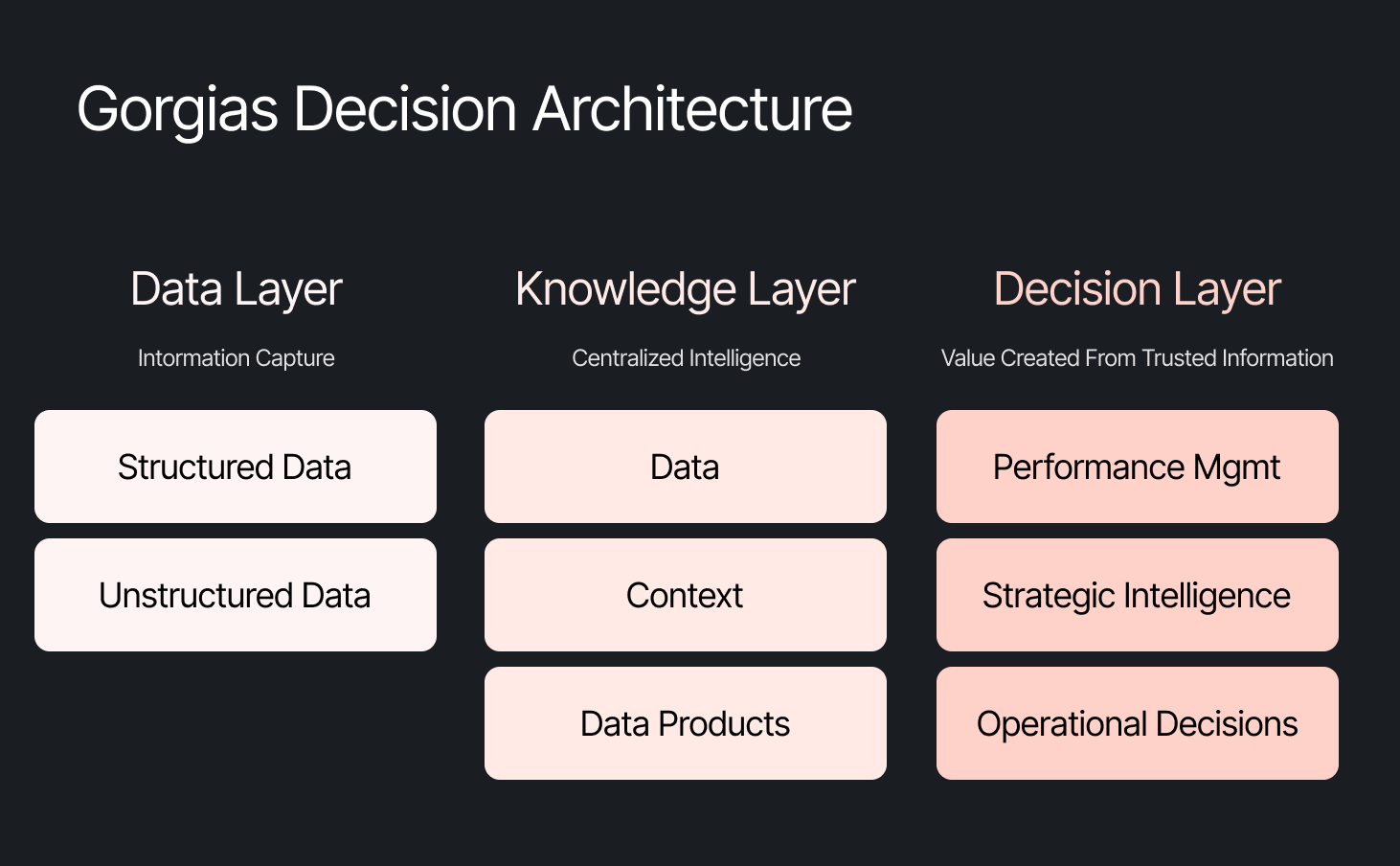
The framing problem most companies get wrong
The instinct across many companies today is to start with the model, pick a provider to solve a specific challenge, or invest heavily in getting the data right. All reasonable starting points, but most of them solve for one use case. Underneath that approach is a framing problem: seeing AI as an initiative — something you assign and measure. Seeing AI as another tool your company uses versus how your company operates.
We started somewhere different. Every company is built on four pillars: customers, people, product, and decisions. AI investments tend to place heavy emphasis on the first three. We started with the fourth. Our bet was that if we built everything around the need to make effective decisions first, asking what Gorgias needed to know to operate well, then our AI would become dramatically more powerful.
Cortex is that philosophy in practice
Cortex is our flagship internal AI agent, and the product where we established the tenets that now run through everything else we build: composable and modular infrastructure, governed context, and accessible from wherever decisions happen. Cortex lives in Slack, as well as across LLM vendors, in its own browser extension, and even on its own dedicated internal site.
Cortex doesn’t stop at answering questions. It can read and write to Notion, file Linear tasks, create HTML apps, automate signal delivery, and more. It operates across every layer of our stack, from dashboards to data pipelines, because we designed it as one integrated system. It is this connection that adds remarkable depth to what people can ask, and what they get in return.
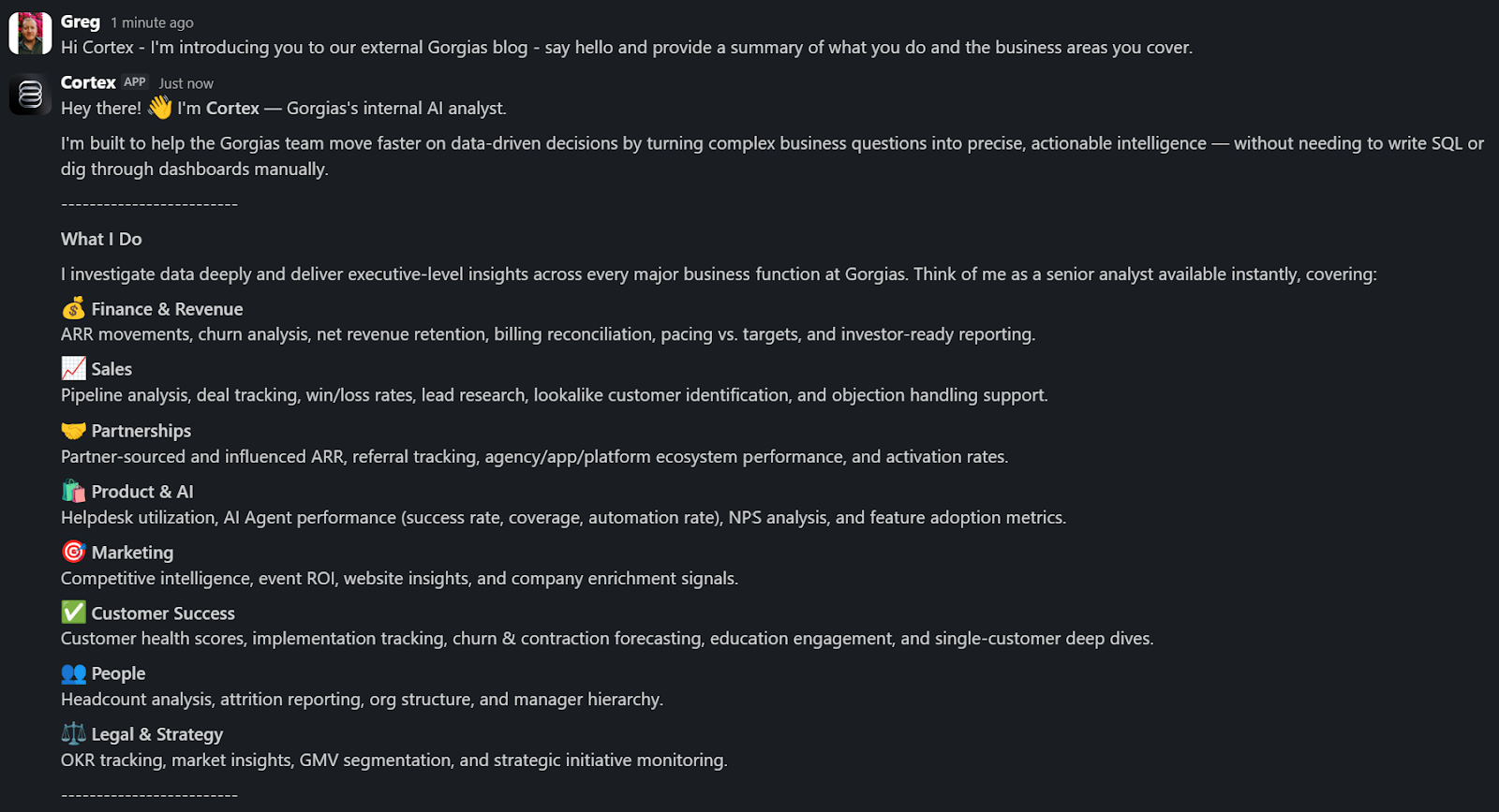
A Sales Lead is pitching and asks Cortex for the full picture of the merchant. In a customized PDF, Cortex lists coverage gaps, pre-sale intent signals, and product fit options. Everything the sales lead needs to walk in with confidence.
A Senior Product leader asks, "How are we performing against OKR #1, and what can my team do to help accelerate it?" Cortex returns a full ARR breakdown, projected end-of-month attainment, segment-level findings, and connects it all back to company-level strategies. A suite of recommendations customized to the leader, the performance, and the signals that bridge how they can support our goals. The kind of answer that used to take someone a week to put together.
These aren't simple lookup queries. They require deep business context spanning multiple areas. Cortex handles these because its Decision Engine gives it the information to reason against governed data, metric definitions, and business context, turning a generic answer into a credible one.
Overnight, teams have built Cortex into how they work. They’re spending less time searching and more time finding answers, not because they were told to, but because Cortex reduced the distance between question and decision.
Flexibility as the foundation
Cortex’s modular infrastructure allows us to experiment and add new capabilities freely. We’ve already built two more internal AI agents made for entirely different use cases, but using the same Decision Engine as Cortex.
GAIA, our internal experimentation AI Agent, helps our customers identify opportunities in their AI Agent Guidance design. It takes institutional knowledge across our teams and turns it into a scalable system that drives automation and value to our customers. Our CEO, Romain Lapeyre, has been its most vocal advocate since day one.
When we needed a platform for investor readiness and board preparation, we built Oracle. Our board decks and talk tracks are informed and built with the same AI, and our numbers are validated every step of the way.
We’re continuing to expand new AI agents internally, exploring how they can create value for customers and our own teams.
AI has transformed how data teams create value, and we’ve already shifted to account for it
When AI handles thousands of analytical questions each week, the highest-value work for a data team shifts permanently. Late 2025, we repositioned from a Data Analytics function into a Decision Intelligence function — a structural change in what we own and how we operate.
Today, our analysts focus on the most sensitive, complex, and forward-looking decisions and analyses. They partner more deeply with stakeholders by driving next steps from signals. They're even building entirely new capabilities that didn't exist in their role descriptions months ago. Things like AI skills for Cortex, context curation, and insight and recommendation delivery. The role of the analyst hasn't diminished. It's expanded to encompass the most meaningful work an analyst can do: driving outcomes and ensuring those decisions can achieve them.
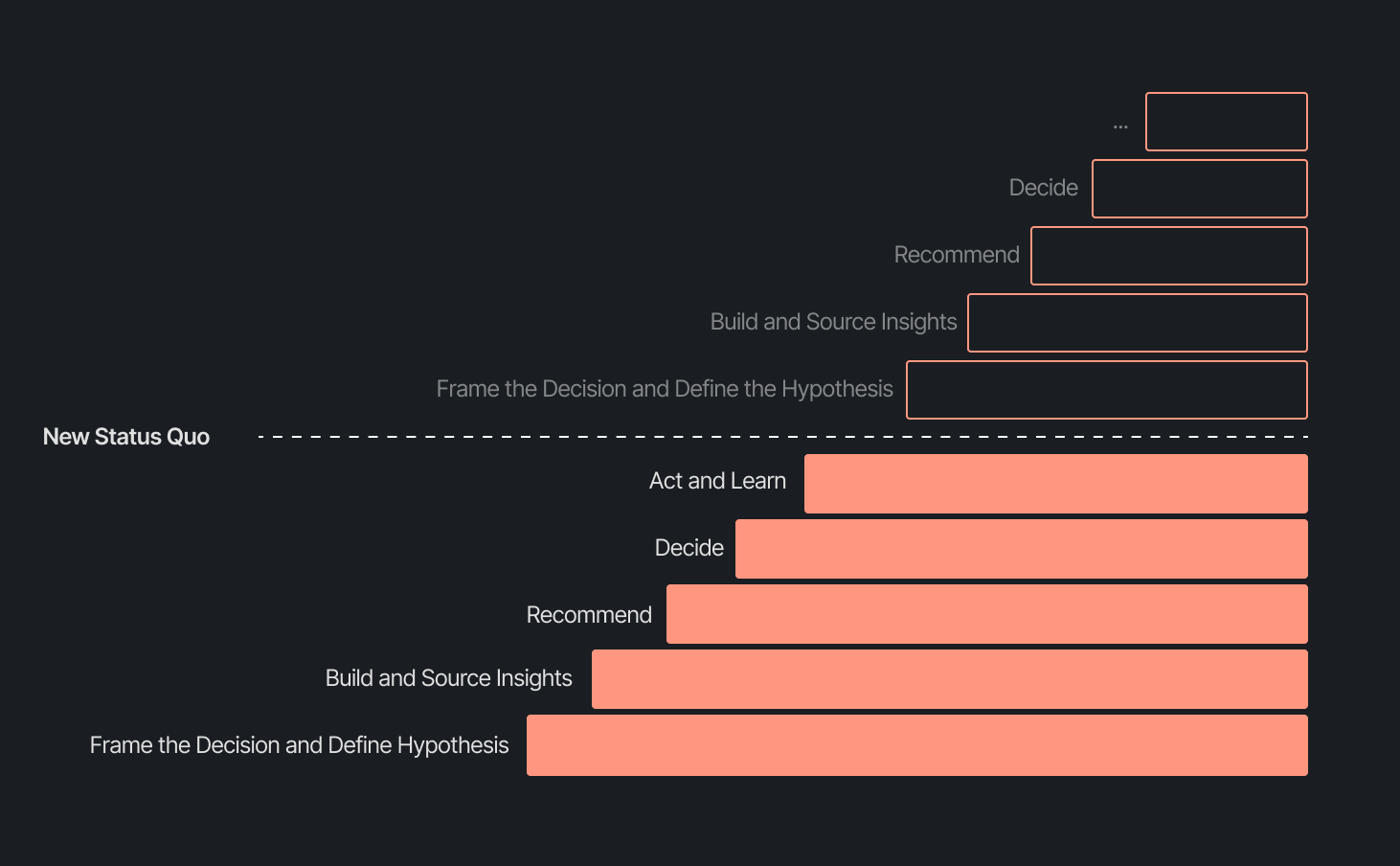
Our business support model has changed, too. Instead of embedding analysts and dedicated engineers within functional teams, we align capacity to the highest-impact company objectives and move fluidly across them. This model works even better because Decision Intelligence brings together both analytics and engineering teams under one roof.
Elliot Trabac leads our Data, Context and AI Engineering teams. The Decision Engine, Cortex, GAIA, and the platforms I've described exist because of the infrastructure his team innovated and built from the ground up. Noemie Happi Nono leads our Decision Strategy and Operations team, driving decision outcomes with stakeholders, advancing the development of Cortex skills and capabilities, and pushing into new areas of analysis every day.
Together, they're shaping what a modern data function looks like when AI becomes a standard building block for how a company operates.
What’s next for the Decision Intelligence team
The question of ROI is long gone. AI has opened the floodgates to more trusted and meaningful signals than ever. The natural next evolution is Proactive Intelligence, signals surfaced toward what you need to know, before you ask. And we're already building this because our architecture is designed to support it.
In the coming weeks, members of the Decision Intelligence team will go deeper into themes I've touched on here. Yochan Khoi, a Senior Analytics Engineer on our team, recently published a technical walkthrough of our context layer and will go further into building context strategies that scale. Others will cover infrastructure, analytical partnerships, evolving data assets into decision assets, and the cost and efficiency gains that make sustained AI investment viable.
AI hasn't changed the most important element of data and analytics functions — delivering outcomes — but it has raised the bar for what it looks like and how far we can take it. We’re just getting started.
TL;DR:
- AI is resolving tickets, not just replying. AI now handles 31% of customer interactions for ecommerce brands, and that number is expected to nearly double within two years.
- Every channel is becoming a storefront. Conversations are replacing the traditional browse-and-buy journey, with 79% of brands reporting sales from AI-driven interactions.
- AI is shortening the buying cycle. 93% of AI-influenced purchases happen within the first 48 hours of the conversation.
- CX teams are changing, not shrinking. Ecommerce brands are actively hiring for more technical roles to implement, coach, and maintain AI.
- The winning model is hybrid. AI handles volume and speed, while humans handle complexity and judgment.
The way shoppers buy online has shifted and customers are at the center.
They no longer want to scroll through product pages, dig through FAQs, or wait 24 hours for an email reply. They open a conversation, ask a specific question, and expect a useful answer in seconds. Brands that can’t deliver these experiences at scale are seeing customer hesitation turn into abandoned carts and lost revenue.
This shift has a name: conversational commerce. It's the practice of using real-time, two-way conversations as your primary sales channel, through chat, AI agents, messaging apps, and voice.
What started as an experiment for early adopters has become a key growth lever, with 84% of ecommerce brands treating conversational commerce as a strategic pillar this year vs. last year.
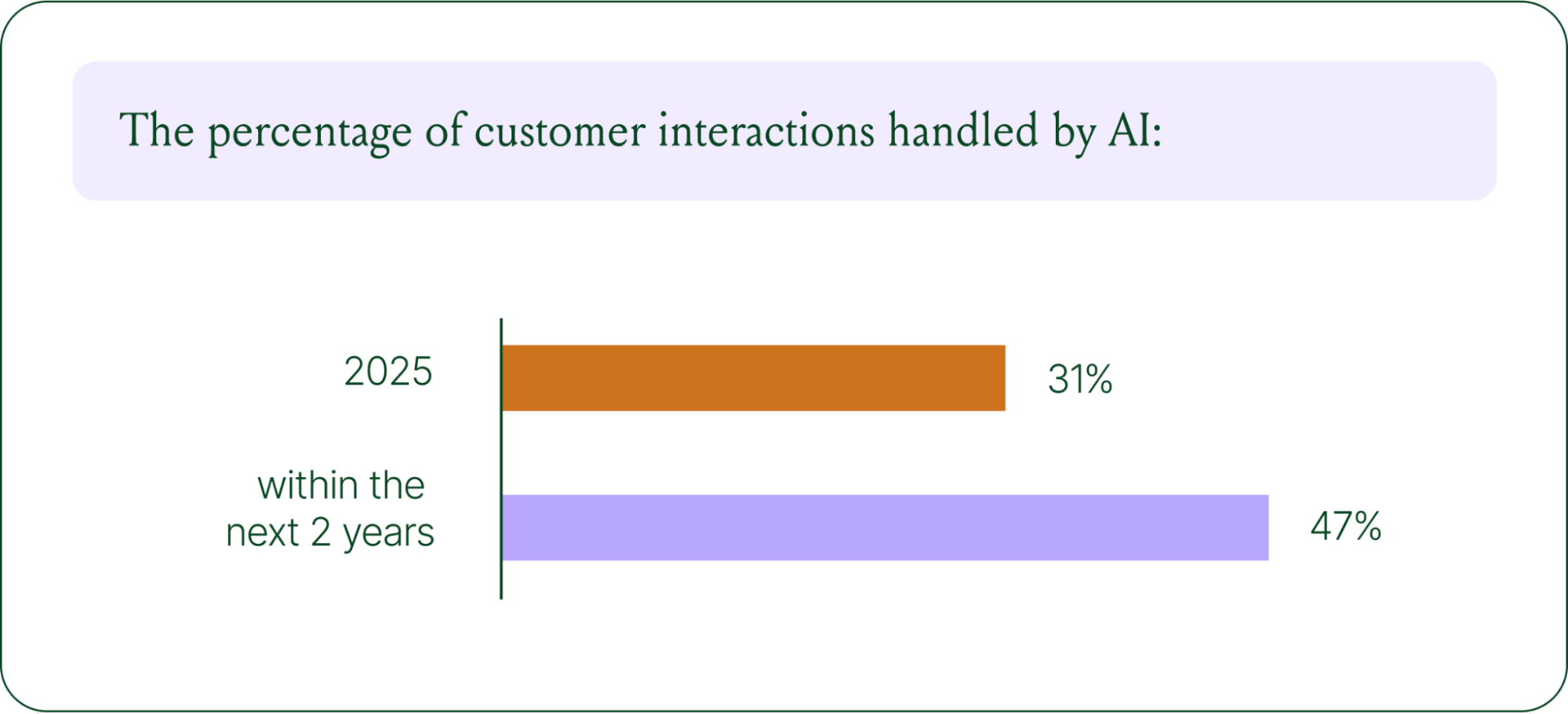
We surveyed 400 ecommerce decision-makers across North America, the U.K., and Europe to understand how conversational commerce and AI are reshaping the ecommerce landscape. These findings are complemented by aggregated and anonymized internal Gorgias platform data from 16,000+ ecommerce brands.
The State of Conversational Commerce in 2026 trends report breaks down all of the findings, including five key trends shaping the ecommerce landscape.
{{lead-magnet-1}}
Trend 1: AI is table stakes for ecommerce and it’s no longer just about efficiency
A few years ago, adding an AI chatbot to your site that could provide tracking links and Help Center article recommendations was a differentiator. Today, it's table stakes. McKinsey found that 71% of shoppers expect personalized experiences, and 76% get frustrated when they don't get them.
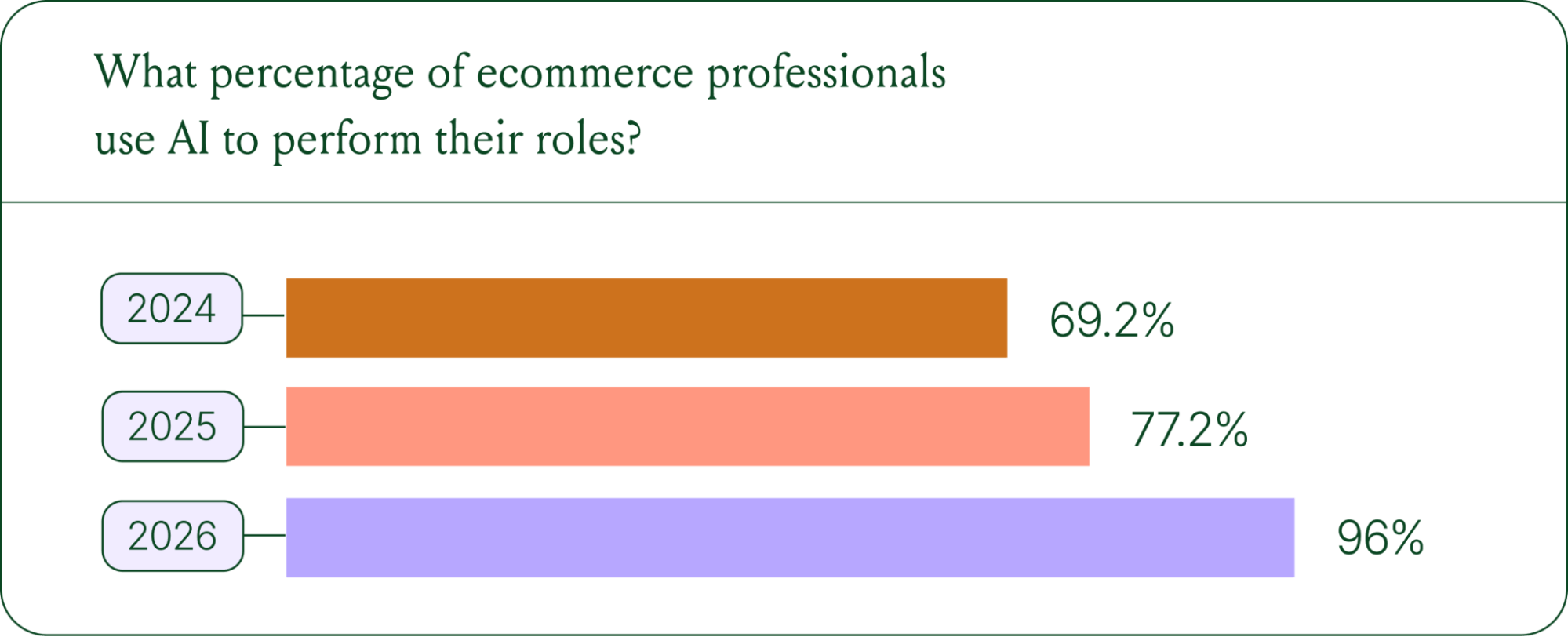
Right now, most ecommerce professionals use AI, with 93% having used it for at least 1 year. Enthusiasm is accelerating quickly, with only 30% of ecommerce professionals rating their excitement for AI at 10/10 in April 2025. Similarly, while AI adoption rose steadily year over year, it reached a clear peak in 2026.
The use cases driving this adoption are practical and high-volume:
- Order tracking and status updates
- Returns, exchanges, and refund requests
- Shipping FAQs and delivery estimates
These are the tickets that flood brands’ inboxes every day. AI agents resolve them instantly, without pulling teams away from conversations that actually require human judgment.
Explore AI adoption and use case data in more depth in the full report.
Trend 2: Conversations are the new path to checkout
The traditional ecommerce funnel, visit site, browse products, add to cart, check out, is losing ground. Shoppers now discover products on Instagram, ask questions via direct message, and complete purchases without ever visiting a website.
Conversational AI is actively increasing revenue, with 79% of brands reporting that AI-driven interactions have increased sales and conversion in their business.

The practical implication is that every channel is becoming a storefront. Creating personalized touchpoints with customers earlier in the journey, through proactive engagement, is impacting the bottom line.
Read the full report to explore how AI conversions have increased QoQ by industry.
Trend 3: AI is accelerating the purchase cycle
Pre-purchase hesitation is one of the biggest conversion killers in ecommerce. A shopper lands on your product page, has a question about sizing or compatibility, can't find the answer quickly, and leaves. That's a lost sale that had nothing to do with your product.
Conversational AI changes that dynamic. When a shopper can ask a question and get an accurate, personalized answer in real time, the friction disappears.
Brands using Gorgias saw this play out at scale in 2025. When AI Agent recommended a product, 80% of the resulting purchases happened the same day, and 13% happened the next day.
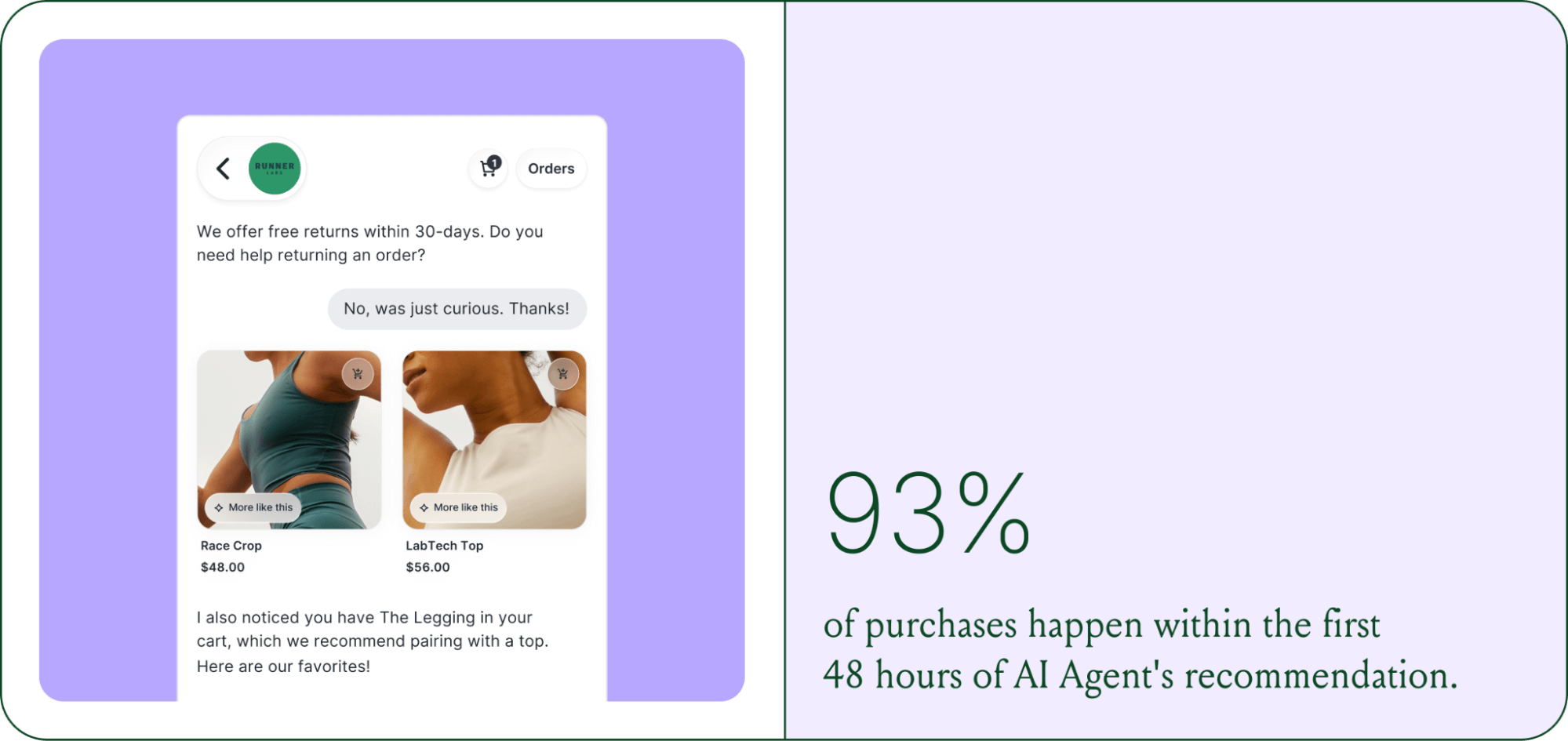
Brands are further accelerating the buying cycle through proactive engagement. On-site features such as suggested product questions, recommendations triggered by search results, and “Ask Anything” input bars drove 50% of conversation-driven purchases during BFCM 2025.
Explore how AI is collapsing the purchase cycle in Trend 3 of the report.
Trend 4: AI is making CX teams more technical
There's a persistent narrative that AI is making CX teams redundant. The data tells a different story. 62% of ecommerce brands are planning to grow their teams, not cut them. But the scope of those teams is changing.

New roles are emerging around AI configuration and quality assurance. Teams are investing in technical members to write AI Guidance instructions, develop tone-of-voice instructions, and continuously QA results.
CX teams are also bridging the gap between support goals and revenue goals, as the two functions increasingly overlap.
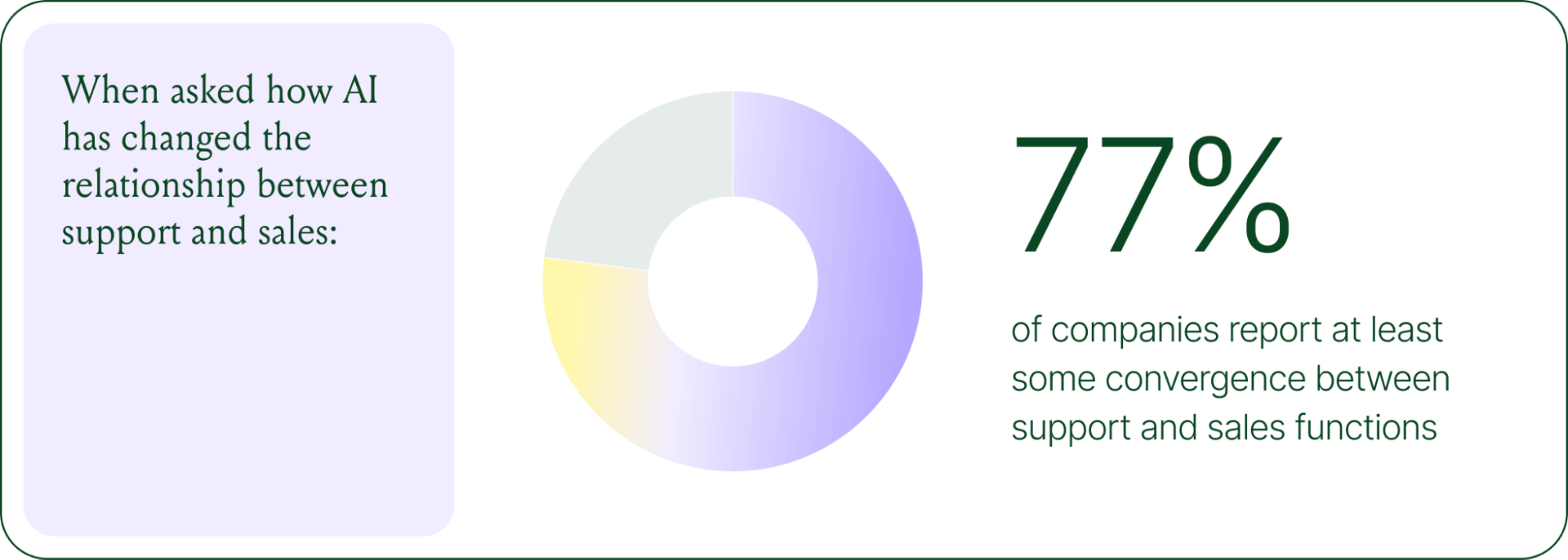
The result is CX teams that are more technical than they were before. Agents who once spent their days answering repetitive tickets are now spending that time on higher-value work: complex escalations, VIP customer relationships, and improving the AI systems and knowledge bases that handle the volume.
Learn more about the evolution of CX roles in Trend #4.
Trend 5: The future is hybrid: AI-first, humans when it counts
Despite increasing AI adoption, data shows that ecommerce brands shouldn’t strive for 100% automation. Winning brands are building systems in which AI handles repetitive tier-1 tickets, and humans handle complex, sensitive cases.

AI handles speed and scale. It resolves order-tracking requests at 2 a.m., processes return-eligibility checks in seconds, and answers the same shipping question for the thousandth time without compromising quality.
Human agents handle conversations that require context, empathy, or decisions that fall outside the standard playbook. There are several topics where shoppers still prefer human support.
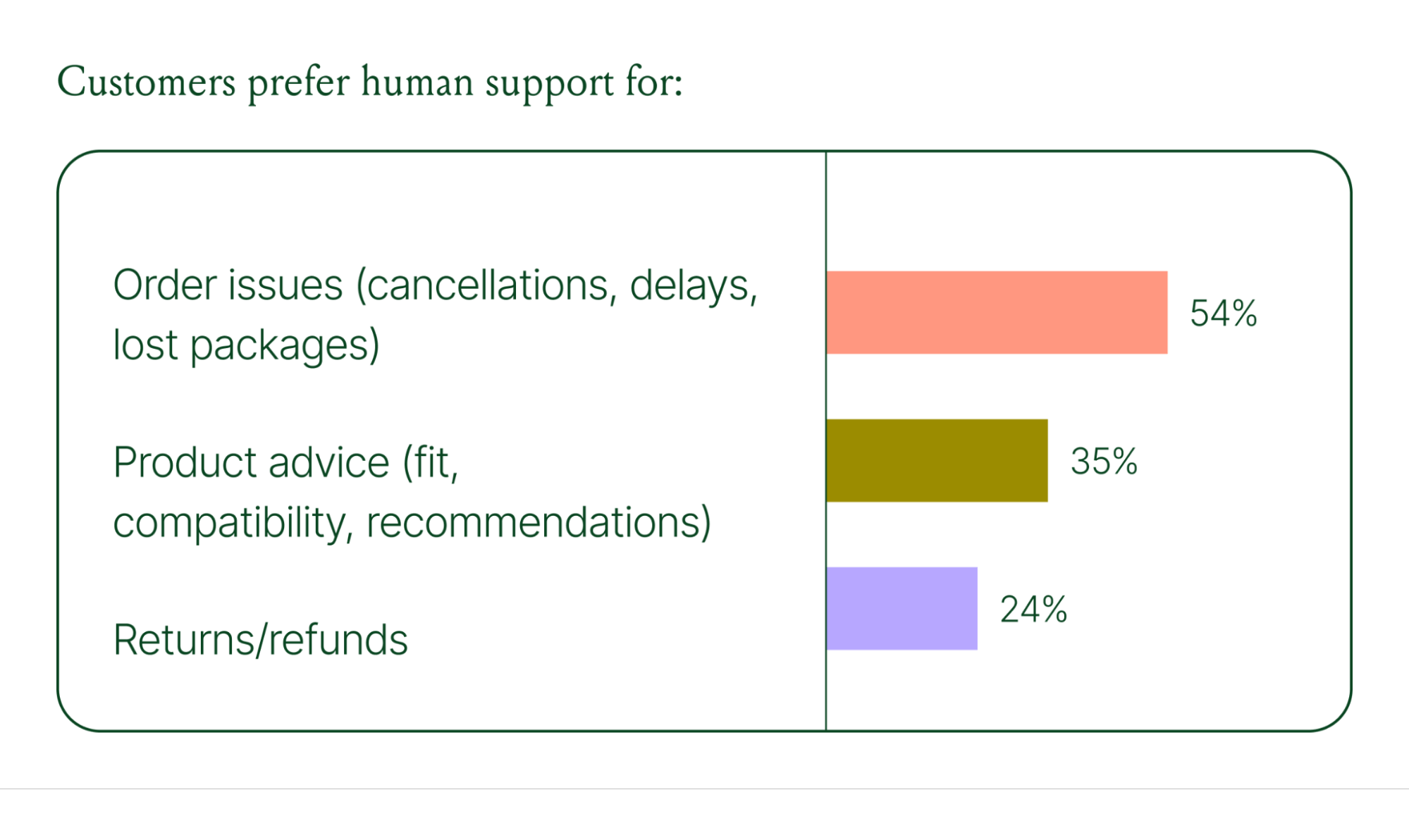
Successful hybrid systems require continuous iteration, meaning reviewing handover topics, Guidance, and reviewing AI tickets on a weekly basis.
Discover how leading brands are balancing human and AI systems in Trend #5.
Where conversational commerce is heading by 2030
The 2026 trends are about expansion and standardization. The 2030 predictions are about what comes next.
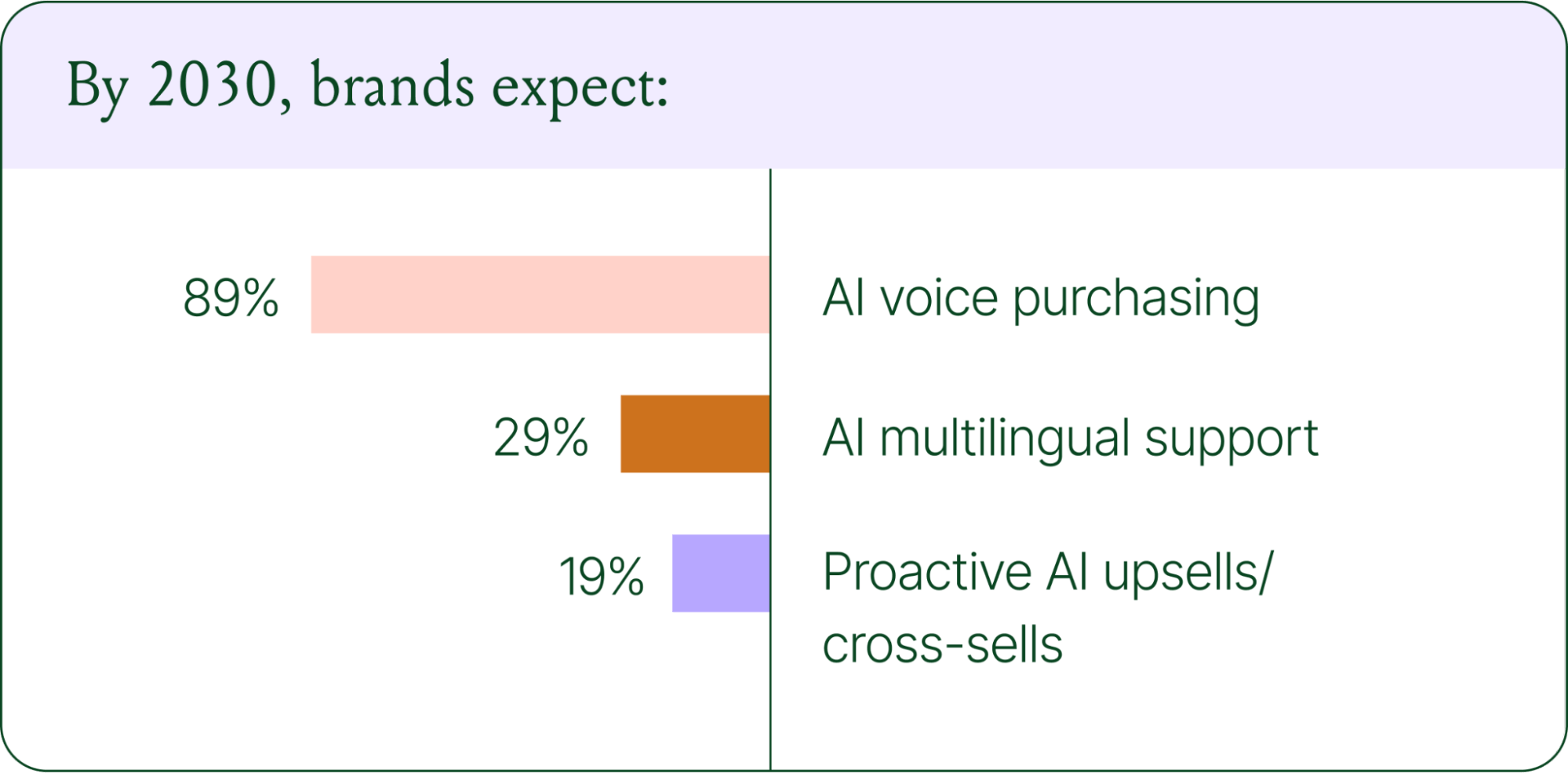
Voice-based purchasing is the biggest bet on the horizon. Only 7% of brands currently use voice assistants for commerce, but 89% expect it to be standard by 2030. The vision is a customer who can reorder a product, check their subscription status, or manage a return entirely over the phone.
Proactive AI is the other major shift. Rather than waiting for a customer to reach out, AI will anticipate needs based on browsing behavior, purchase history, and where someone is in their relationship with your brand. Think of it as the digital equivalent of a sales associate who remembers what you bought last time and knows what you're likely to need next.
Explore where ecommerce brands are allocating their AI budgets in the full report.
Start building your conversational commerce strategy today
The brands winning in 2026 are creating smart, scalable systems where AIhandles volume and humans handle nuance. They’re treating every conversational channel as an opportunity to serve and sell.
The data is clear: AI adoption is accelerating, customer expectations are rising, and the revenue impact of getting this right is measurable.
{{lead-magnet-1}}
Newsletter Signup
The best in CX and ecommerce, right to your inbox
Featured articles

Conversations Are Becoming a Revenue Channel: The Data Proves It
TL;DR:
- Customer journeys are collapsing to a single conversation. The traditional browse-and-buy journey is giving way to AI-guided shopping that moves from discovery to purchase in a single exchange.
- 79% of brands say AI-driven conversational commerce has increased their sales and purchase rates.
- AI-only influenced orders grew 63% in a single year, from 2.7 million in Q1 to 4.4 million in Q4.
- Brands treating conversation as a revenue channel. They’re not just a support function, generating higher AOV, shorter buying cycles, and stronger retention.
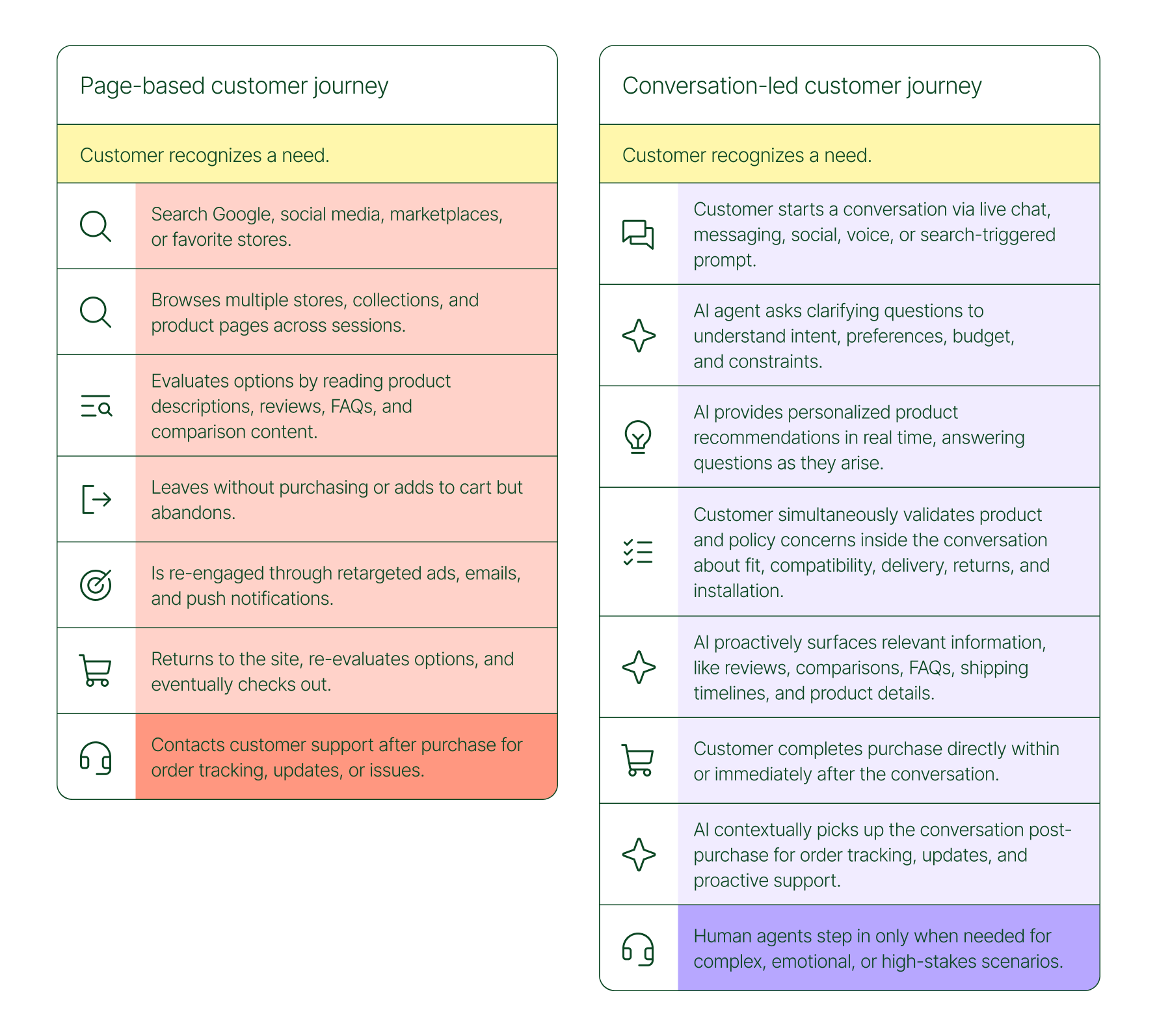
The page-based shopping experience dominated for decades. Customers would search, browse, compare, abandon, get retargeted, return, and eventually buy (sometimes).
That journey is no longer the only option.
Shoppers are turning to chat, messaging, and AI-powered tools to find what they need. Instead of clicking through product pages or reading static FAQs, they ask questions, have back-and-forth conversations, and get answers that move them closer to a purchase in real time. The path to checkout has changed, and the brands that recognize this are pulling ahead.
Read our 2026 State of Conversational Commerce Report to learn more about conversation commerce trends from 400 ecommerce decision-makers and 16,000+ ecommerce brands using Gorgias.
{{lead-magnet-1}}
The shopping journey has collapsed into a single thread
The traditional shopping journey was a solo experience. A shopper had a need, searched for options, browsed across sessions, and eventually made a decision — often days later, after being retargeted multiple times. Support only entered the picture after the purchase.
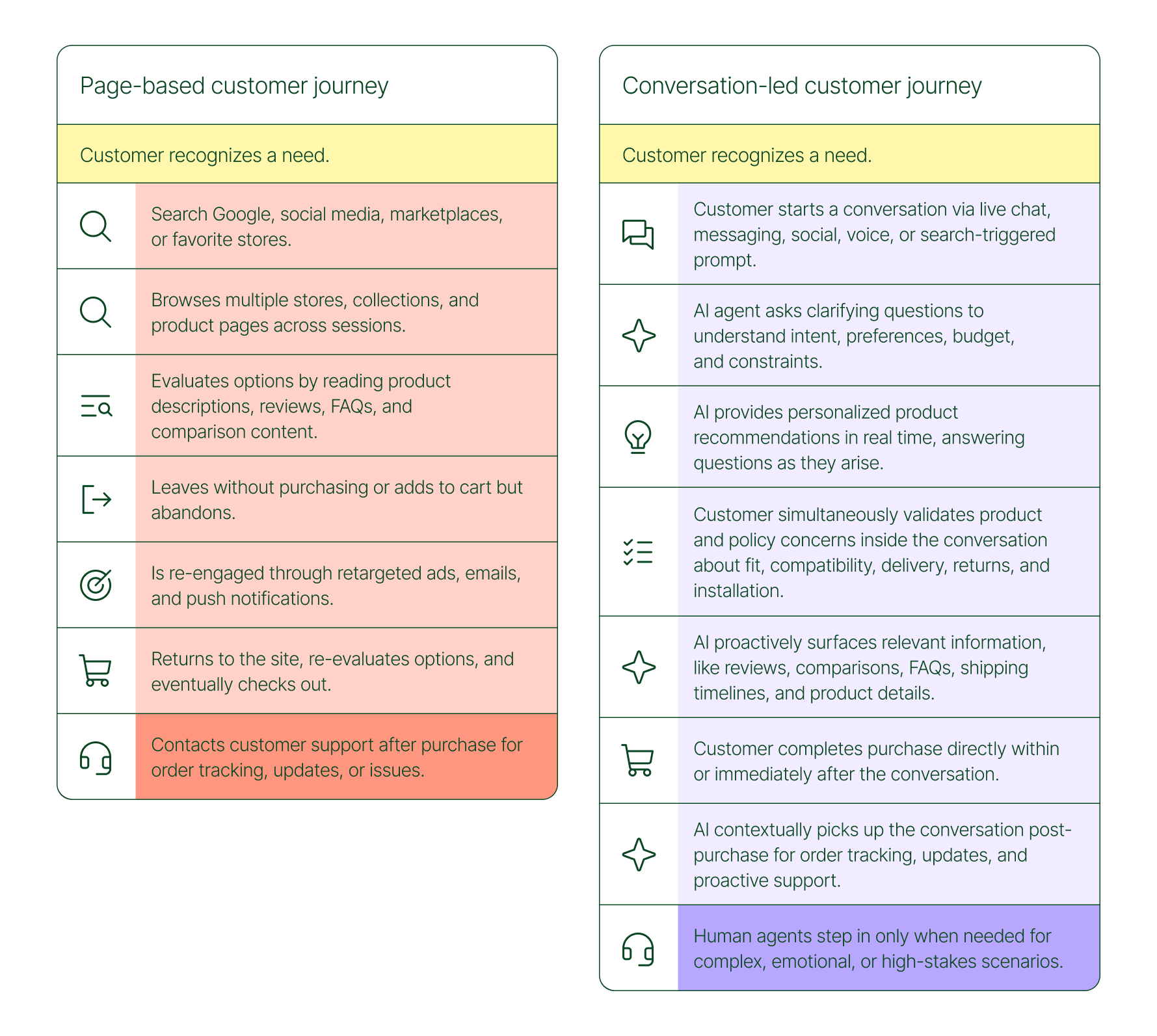
The conversation-led journey collapses that timeline:
- A shopper recognizes a need and starts a conversation via chat, messaging, or a search-triggered prompt
- An AI agent asks clarifying questions about preferences, budget, and constraints
- The AI provides personalized product recommendations in real time
- The shopper validates concerns about fit, compatibility, delivery, and returns, all inside the conversation
- The shopper completes the purchase directly within or immediately after that exchange
- The AI picks up the conversation post-purchase for order tracking and proactive support
- A human agent steps in only when the situation calls for it
What used to take days now takes minutes. Discovery, evaluation, and purchase happen in a single thread.
Conversation is a revenue strategy, not a support upgrade
79% of brands agree that AI-driven conversational commerce has increased sales and purchase rates in their business. When brands were asked to rank the highest-return areas:
- 38% cited improved customer support efficiency
- 23% pointed to higher customer retention and loyalty
- 20% saw improved purchase rates
Those numbers reflect something important: the value of conversation compounds. Faster support reduces friction. Better retention raises lifetime value. More confident shoppers buy more often and spend more per order.
The brands seeing the biggest returns aren't just using AI to deflect tickets. They're using it to create one-to-one shopping experiences at scale.
What the data shows about AI-influenced orders
Looking at AI-only influenced orders across key verticals like Apparel and Accessories, Food and Beverages, Health and Beauty, Home and Garden, and Sporting Goods, the growth across a single year was significant.
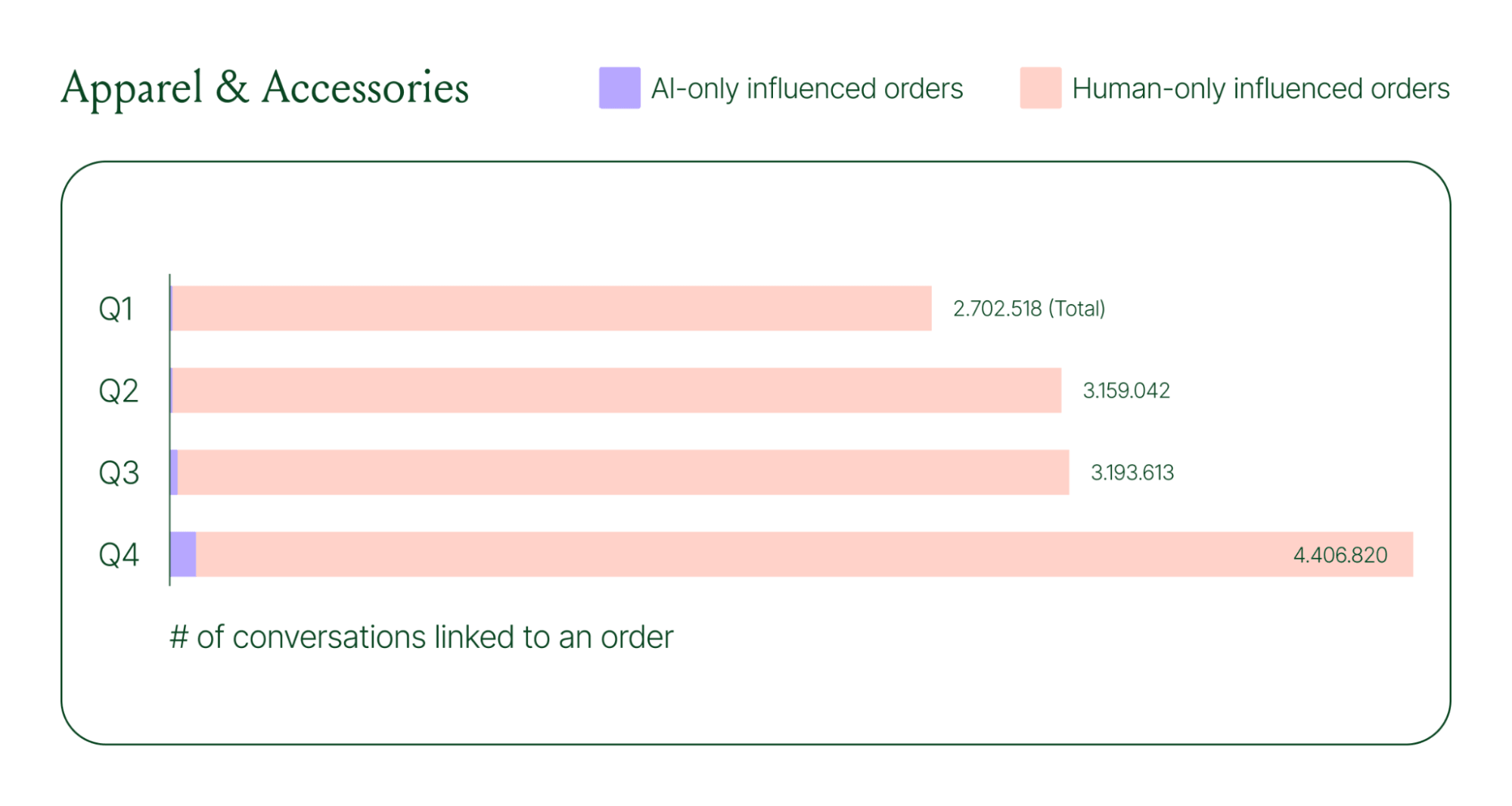
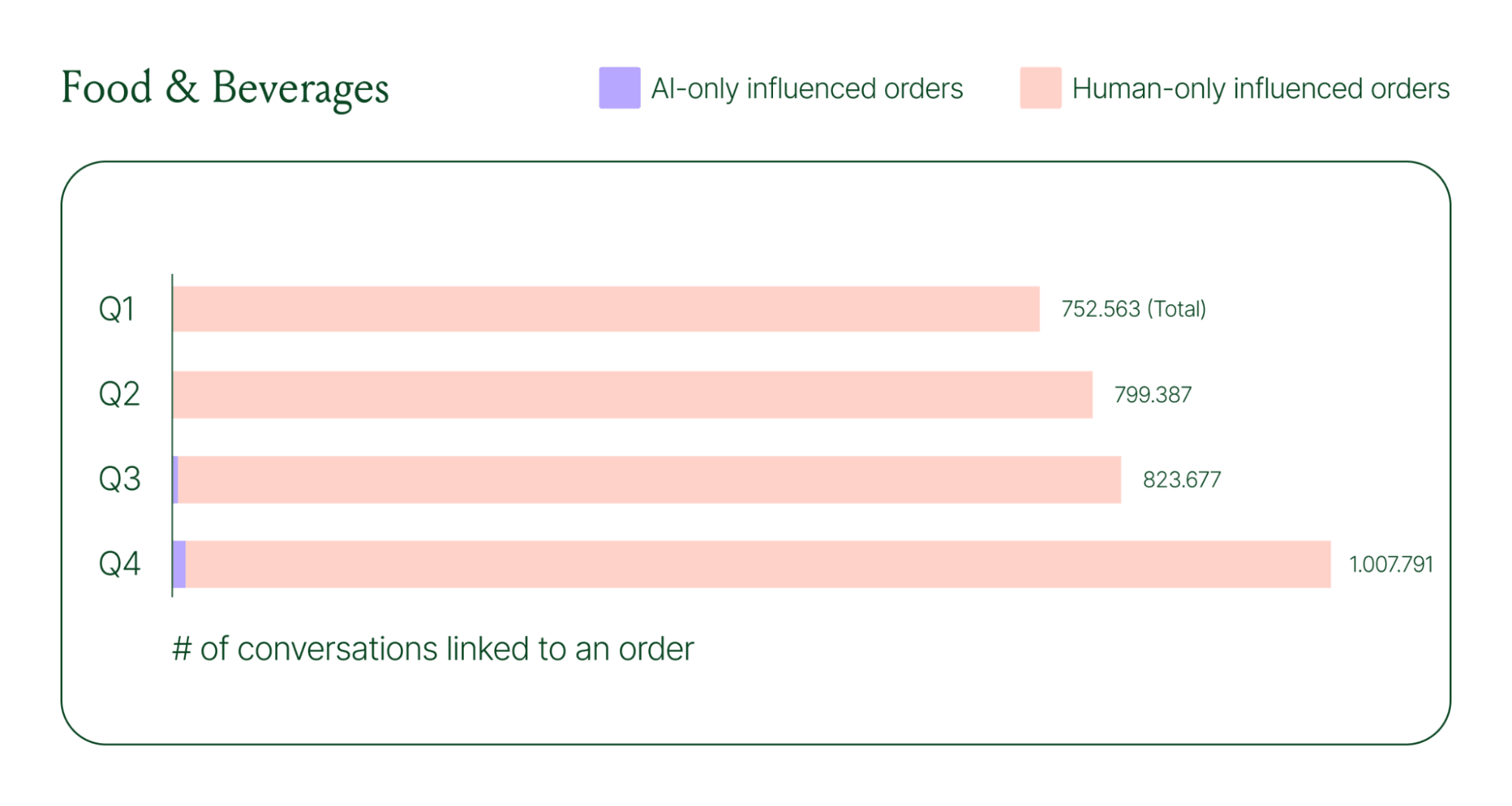
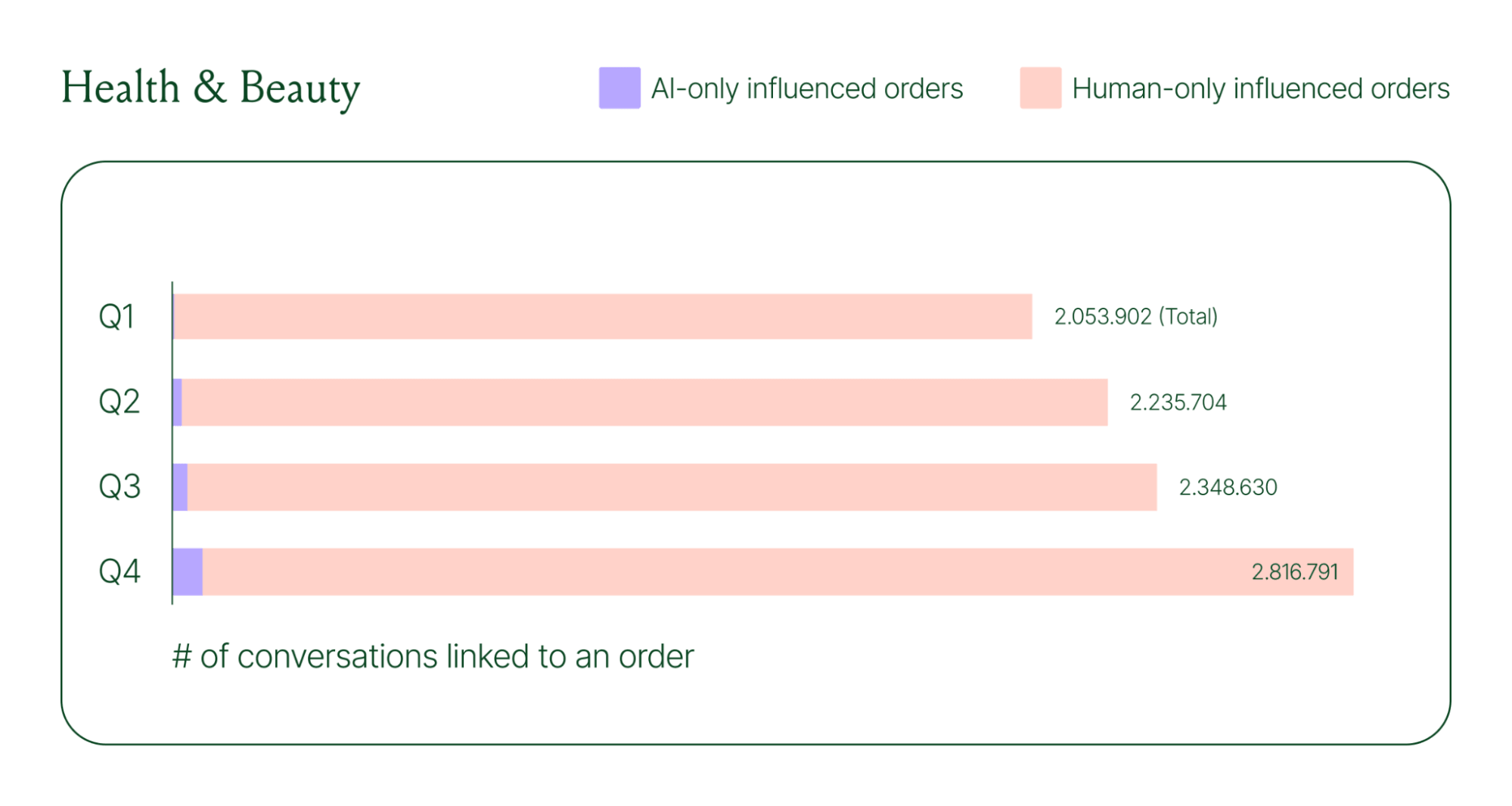
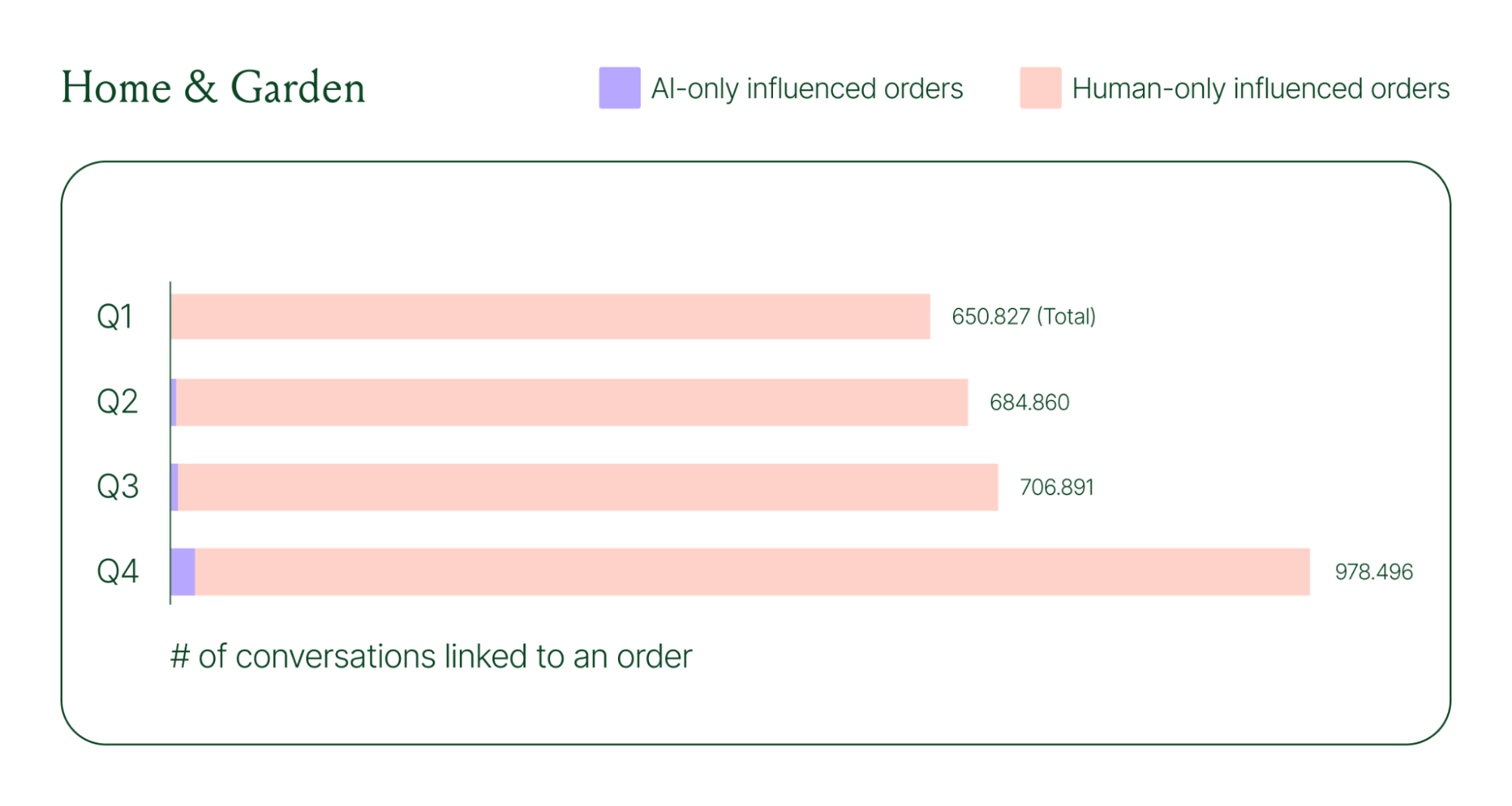
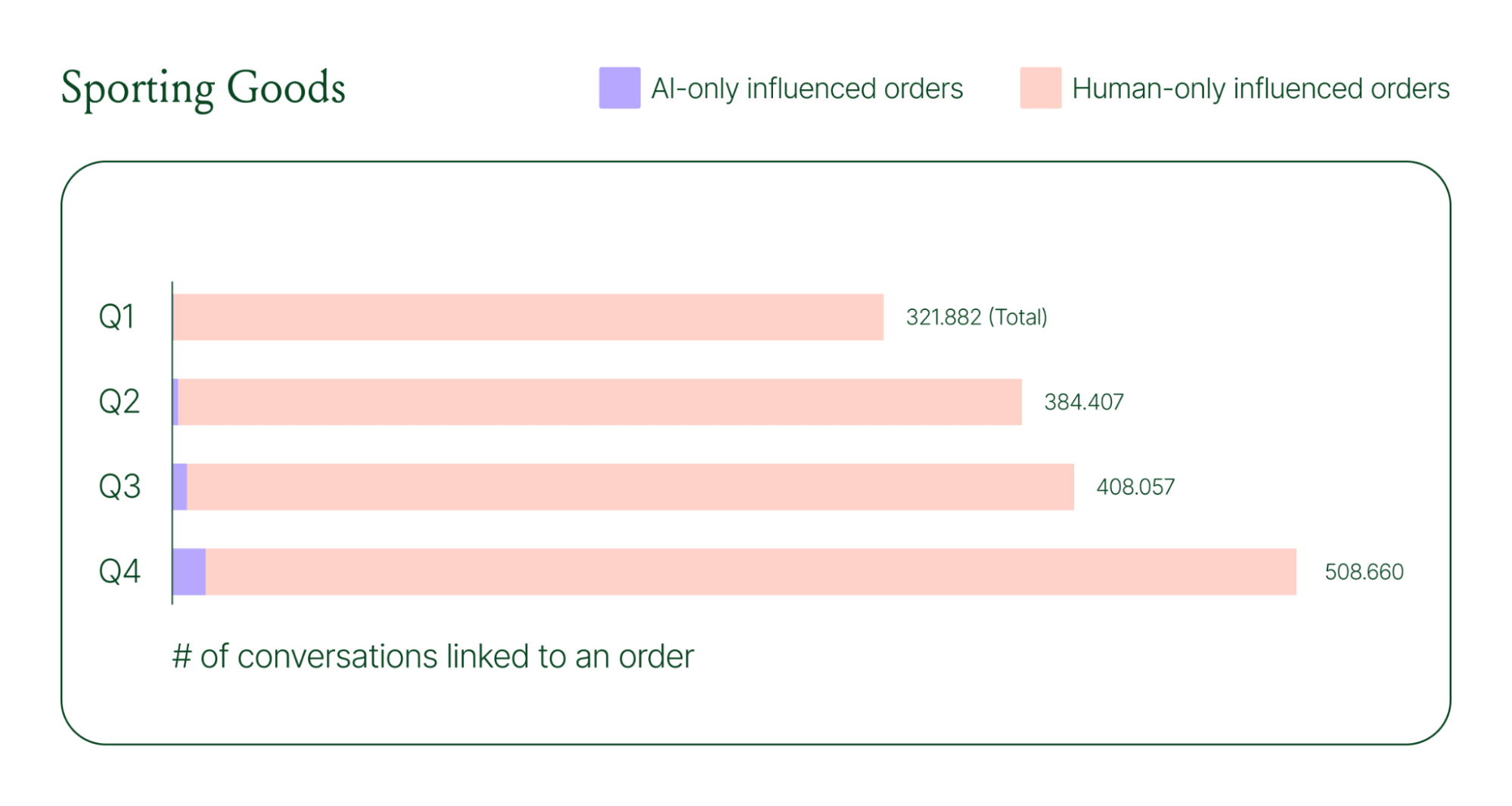
Across industries, ecommerce brands saw AI step into conversations, reduce shopper hesitation, and drive higher QoQ conversion rates.
Learn more about AI-powered revenue generation in the full 2026 Conversational Commerce Report.
Why brands are making this a strategic priority
84% of brands say the strategic importance of conversational commerce is higher than it was a year ago. 82% agree it will be mainstream in their sector within two years.
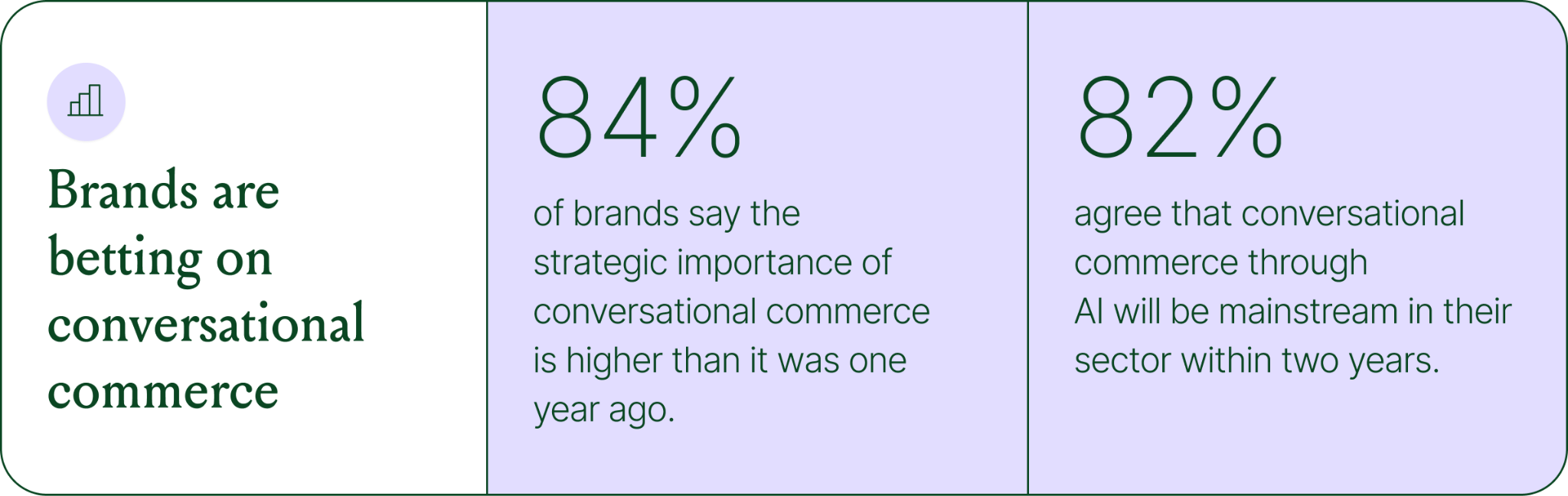
That shift is registering at the leadership level because of what conversational commerce does to the buying experience. Creating one-to-one touchpoints earlier in the journey drives higher AOV, shorter buying cycles, and stronger purchase rates. Shoppers who get real-time answers to their questions are more confident.
What this looks like in practice: TUSHY
TUSHY, known for eco-friendly bidets and bathroom essentials, is a useful example of what happens when you take conversational commerce seriously.
Bidets aren't an impulse purchase. Shoppers have real questions about fit, compatibility, and installation. Those questions used to go unanswered until the CX team could respond, often after the customer had abandoned the cart.
TUSHY used Gorgias's AI Agent and shopping assistant capabilities to automate pre-sales support. AI Agent engaged shoppers in real-time conversations, addressed their concerns directly, and built confidence at the moment of highest intent.
This resulted in a 190% increase in chat-based purchases, a 13x return on investment, and twice the purchase rate of human agents.
How to apply this to your strategy
You don't need to overhaul your entire operation to start seeing results. The most effective approach is to start where the impact is clearest and expand from there.
A few places to begin:
- Pre-sales chat. Identify your most common pre-purchase questions (sizing, compatibility, shipping timelines) and ensure your AI can answer them confidently and promptly.
- Product page engagement. Use proactive chat prompts triggered by page behavior to start conversations before shoppers leave.
- Post-purchase follow-up. Let AI pick up the conversation after checkout with order updates and proactive support, reducing inbound volume and building trust.
- Human escalation. Define clearly which situations require a human agent – complex issues, emotional exchanges, high-stakes decisions.
Want to see the full picture of where conversational commerce is headed in 2026? Read the full report to explore the data, trends, and strategies shaping the next era of ecommerce.
{{lead-magnet-1}}
AI Is Table Stakes for Ecommerce: What the Data Tells Us About 2026
TL;DR:
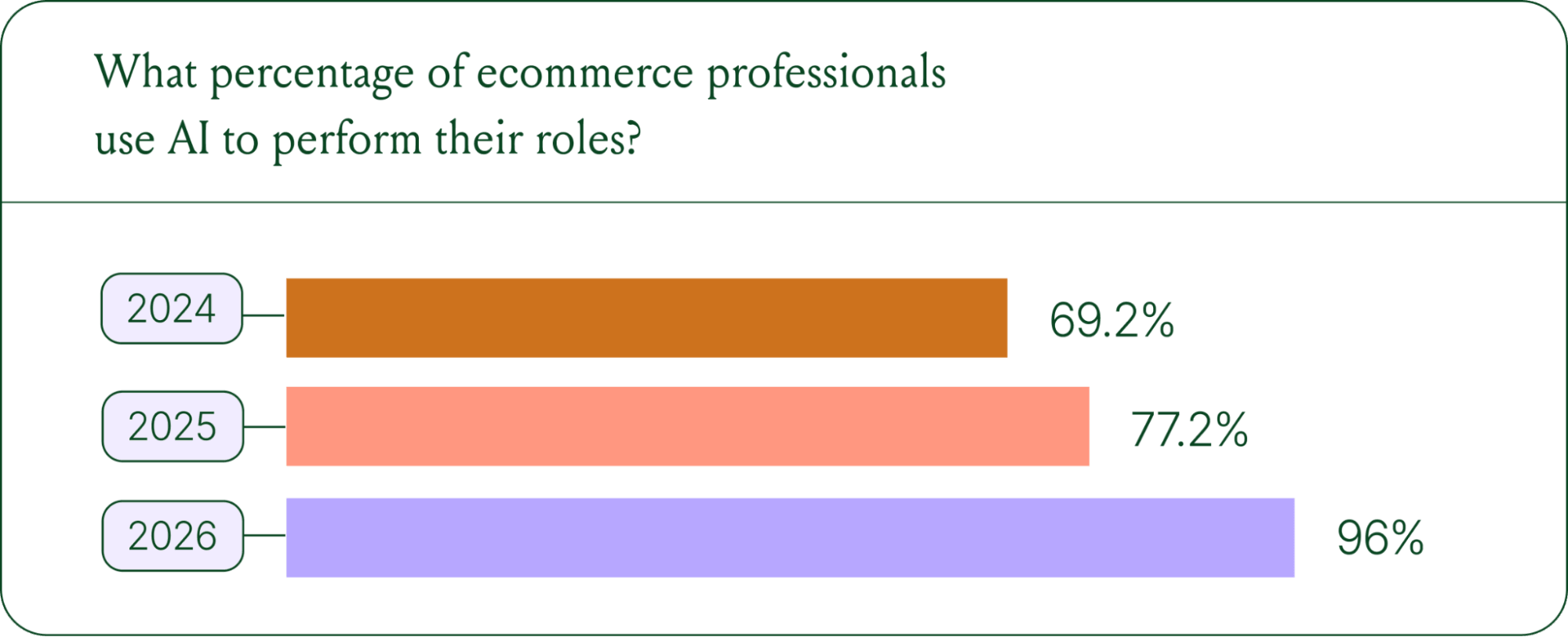
- AI adoption is rapidly accelerating. 96% of ecommerce professionals now use AI in their roles, up from 69% in 2024.
- AI has moved beyond support automation. Use cases have evolved into revenue generation, personalization, and logistics.
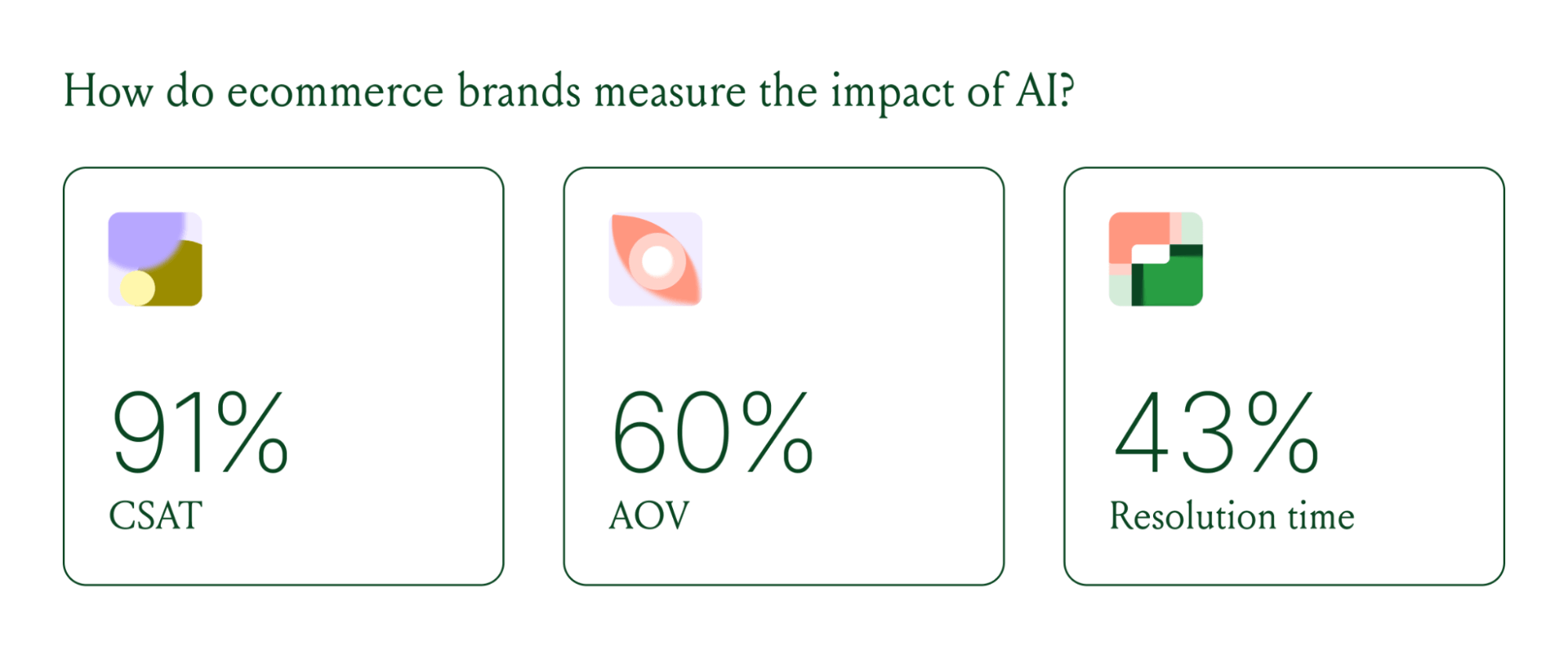
- Brands are tying AI success to profit-and-loss outcomes. 60% of brands consider AOV a top indicator of AI effectiveness.
A year ago, ecommerce brands were still debating whether AI was worth the investment. That debate is over. Today, nearly every ecommerce professional uses AI to do their job.
The shift isn't just about adoption. It's about what AI is used for and how brands measure its impact. Support automation was the entry point. Now, AI is embedded across the full operation, from product recommendations to inventory control to real-time shopping conversations.
In our 2026 State of Conversational Commerce Report, we break down trends on AI usage among 400 ecommerce decision-makers and 16,000+ ecommerce brands using Gorgias.
{{lead-magnet-1}}
AI adoption has reached a tipping point
If we rewind 12 months ago, the industry was still split on AI. Some ecommerce professionals were excited, but most were still hesitant. In 2024, 69% of ecommerce professionals used AI in their roles. By 2025, that number reached 77%. In 2026, it hit 96%.
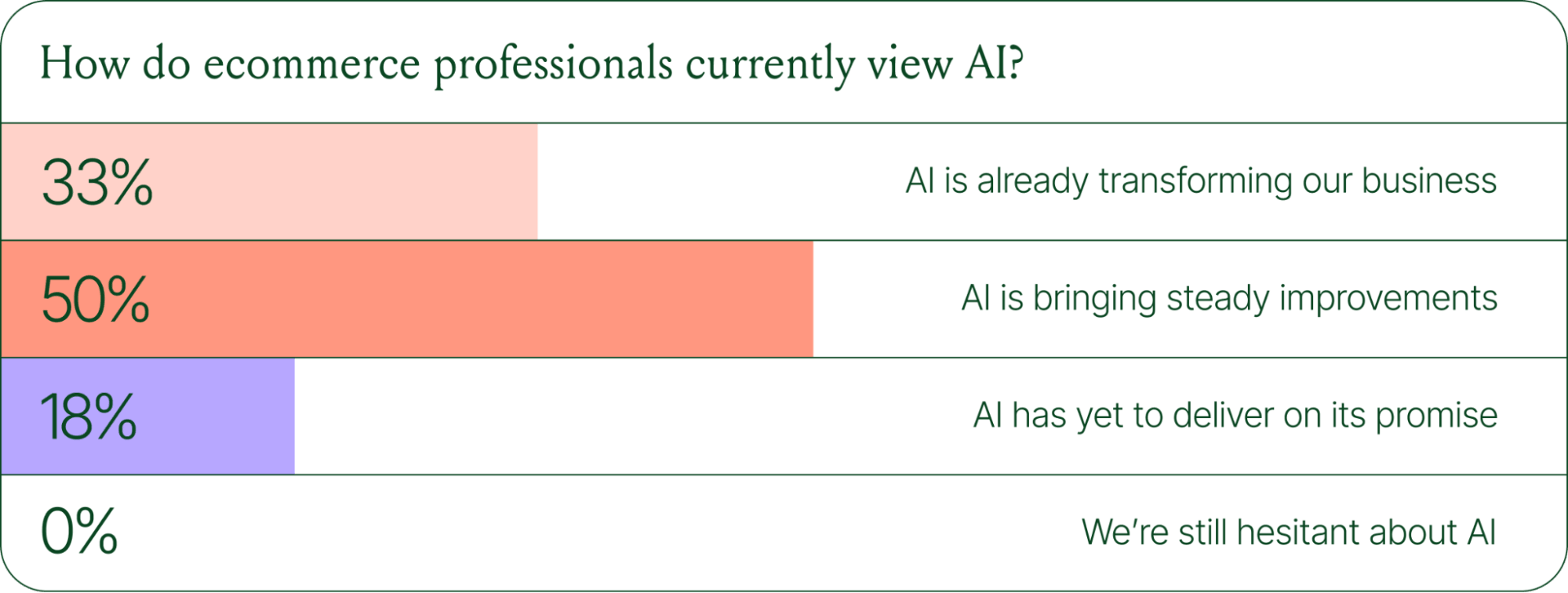
The confidence numbers back it up. 71% of brands say they are confident using AI for ecommerce, and 73% are satisfied with its business impact.
In early 2025, only 30% of ecommerce professionals rated their excitement for AI at 10/10. Today, zero percent of respondents describe themselves as hesitant about AI.
AI use cases now span the full ecommerce stack
Using AI in ecommerce is not new. In fact, it dates back to the 1980s with the invention of algorithms and expert systems. And if you’ve ever leveraged similar product recommendations or chatbots, you’ve already integrated AI into your ecommerce stack.
Modern AI is far more sophisticated.
With the rise of agentic commerce and conversational AI, brands began leveraging AI agents to automate the processing of repetitive support tickets. That’s still happening today, but the scope has expanded beyond the support queue.
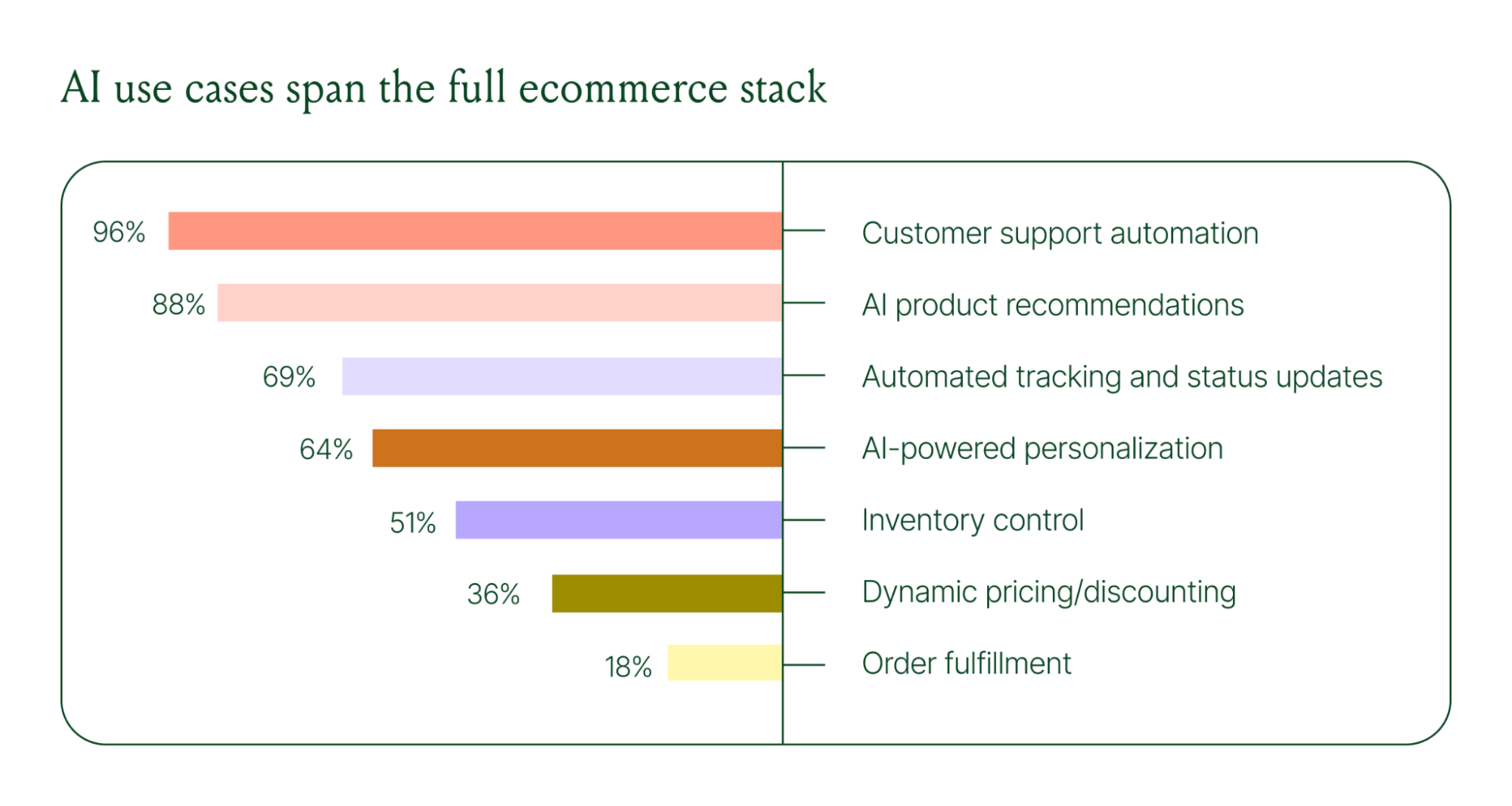
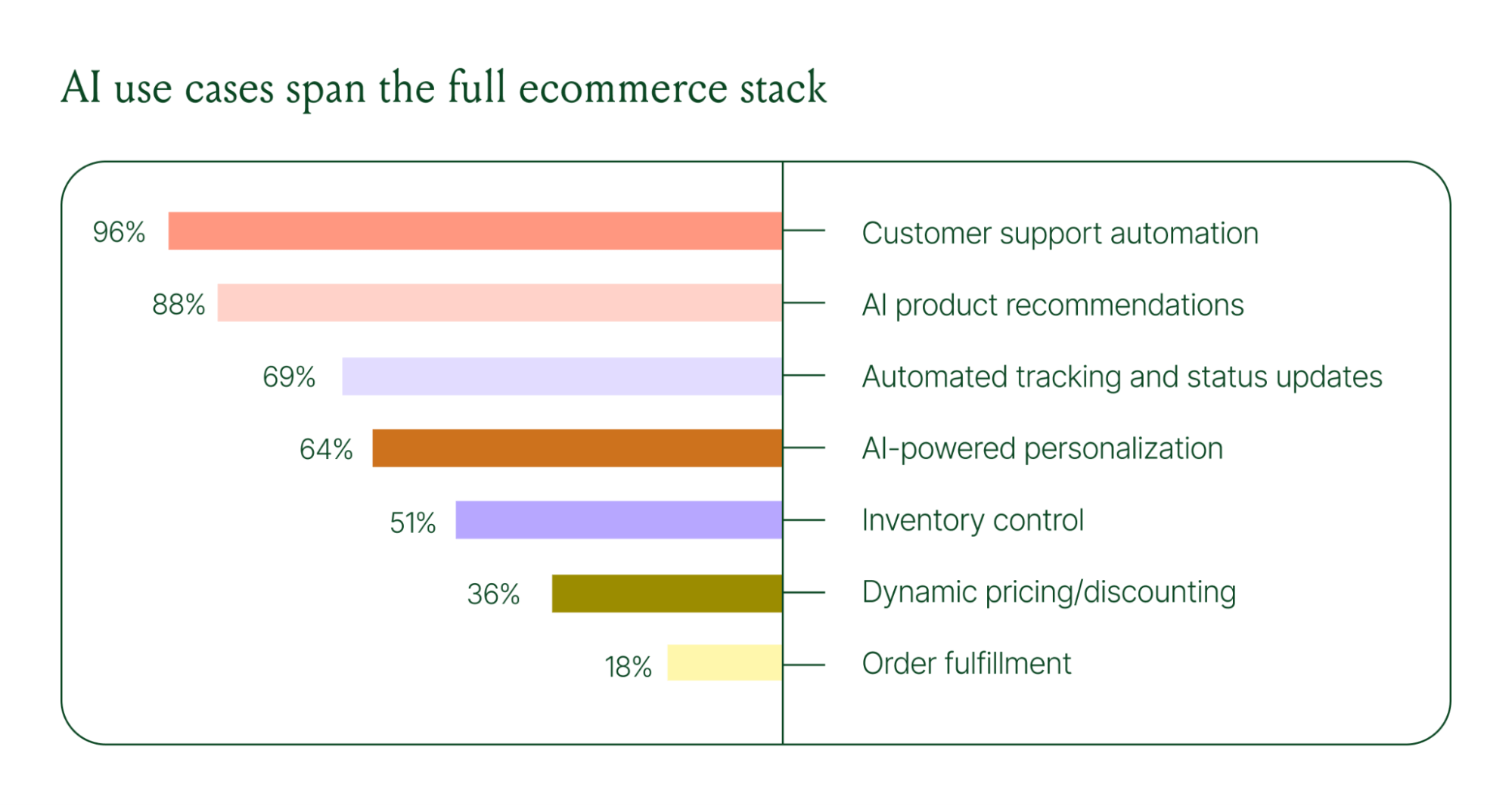
Ecommerce brands are deploying AI across every layer of their operation:
- Customer support automation: 96%
- Product recommendations: 88%
- Automated tracking and status updates: 69%
- Personalization: 64%
- Inventory control: 51%
- Dynamic pricing and discounting: 36%
- Order fulfillment: 18%
When brands were asked which channels contribute most to their AI success, conversational channels dominated. Social media messaging led at 78%, followed by SMS at 70%, and website live chat at 51%. Shoppers want fast, personal conversations, and AI is the best way to deliver that at scale.
Learn more about AI adoption, perception, and use case trends in the full 2026 Conversational Commerce Report.
How AI is changing CX success metrics
For decades, customer support success meant fast response times and high satisfaction scores. Those are still important indicators of success, but leading brands are adding revenue-focused metrics to their dashboards.
91% of brands still track CSAT as a measure of AI's impact. But 60% now include AOV as a top indicator, and higher-revenue brands earning $20M+ are focusing on metrics like total operating expenses, cost per resolution, incremental revenue, and one-touch ticket rate.
AI can now start a conversation, ease customer doubts, sell, upsell, and recover abandoned carts in a single conversation. When you’re only measuring CSAT, you’re ignoring the real ROI of conversational AI investment.
AI makes every conversational channel a storefront
Virtual shopping assistants now proactively engage shoppers, adapt to their needs in real time, and offer contextual product recommendations and upsells. When the moment calls for it, they can close the deal with a targeted discount.
Gorgias brands using AI Agent's shopping assistant capabilities nearly doubled their purchase rates and converted 20–50% better than those using AI Agent for support only.
Orthofeet, the largest provider of orthopedic footwear in the US, is a concrete example of this in practice. Using Gorgias, they achieved:
- 56% of support tickets automated in 2 months
- Email response times down from 24 hours to 35 seconds
- Double-digit revenue growth without adding headcount.
What this means for your AI strategy
The data tells a clear story: AI has evolved beyond a tool for handling tier 1 support tickets. It’s a core part of your revenue generation strategy.
57% of brands are already using AI for 26–50% of all customer interactions, and 37% expect that share to rise to 51–75% within the next two years. The brands building toward that range now are the ones who will have the operational advantage when it matters most.
The practical question isn't whether to invest in AI. It's where to focus first. Based on where brands are seeing the most impact, three priorities stand out:
- Start with high-volume, low-complexity tickets. WISMO (where is my order) inquiries, return policy questions, and order status updates are where AI delivers the fastest return. Automate these first.
- Expand into conversational channels. Social messaging and SMS are where AI is driving the most success right now.
- Connect AI performance to revenue metrics. If you're only measuring CSAT and response time, you're missing half the story. Add AOV, conversion rate, and incremental revenue to your reporting.
Want to go deeper on the full 2026 conversational commerce trends? Read the complete report for data across every major AI use case in ecommerce.
{{lead-magnet-1}}




Further reading

Shopify Fulfillment Network Review From an Ecommerce Merchant
Inventory management and order fulfillment are often two of the more time-consuming tasks of running a Shopify store. However, the ability to ship orders on time is also key for ecommerce businesses to deliver a great customer experience. 22% of online shoppers will abandon their order if they see that it will take too long to be delivered.
Relying on a third-party fulfillment solution is one way to mitigate the challenges of order fulfillment and provide the speedy fulfillment services that today's customers have come to expect. Of the various fulfillment providers online retailers have available, the Shopify Fulfillment Network is one option to consider for merchants who sell on Shopify.
In this Shopify Fulfillment Network review, we'll cover everything you need to know about outsourcing your order fulfillment responsibilities to Shopify. We'll dive into what the program is and how it works, the biggest benefits it offers to online retailers, comparable alternatives, and a conversation with Supply CEO and co-founder Patrick Coddou on his company's experience with Shopify Fulfillment Network.
Don't have time to read our full review of the Shopify Fulfillment Network? Here’s a summary of our thoughts on the program:
Joining the Shopify Fulfillment Network won't reduce your order fulfillment expenses. As a matter of fact, it will more than likely increase them due to the various fees that Shopify charges as part of the program. However, joining the network will allow you to:
- Save time by completely outsourcing your inventory management and order fulfillment responsibilities
- Offering faster and more reliable fulfillment to customers
- Boost conversion rates by advertising expedited shipping delivery on your website
If you can afford to join the network and don’t have the know-how or in-house capacity to handle fast fulfillment, the SFN. If you’re a small operation and longer shipping times haven’t hurt your purchase rates, then you might consider an alternative fulfillment solution.
What is the Shopify Fulfillment Network?
The Shopify Fulfillment Network (SFN) program is similar to Amazon's FBA (Fulfillment by Amazon). It lets you ship your products in bulk to a single Shopify warehouse, where they are then distributed to a network of fulfillment centers across the United States and Canada.
Along with inventory storage and warehousing services, SFN also offers ecommerce fulfillment services. When a customer orders one of your products, Shopify will pick and pack the product from the nearest fulfillment center and ship it to the customer on your behalf.
This program allows business owners to reduce the tedious tasks associated with ecommerce fulfillment. It also offers additional benefits as well, such as the ability to provide faster shipping and access to powerful analytics for demand forecasting and improved inventory management.
{{lead-magnet-2}}
The launch of Shopify Fulfillment Network: A brief history lesson

In June 2019, Shopify announced that it would be spending $1 billion to launch the Shopify Fulfillment Network. A few months later, in October 2019, this plan was accelerated when Shopify acquired 6 River Systems — a company that produces robotics for warehouse management.
By October 2020, the SFN had increased its shipping volume by 2.5x compared to the first quarter of 2020. One driving factor behind the network's faster-than-expected growth was the increase in online shopping driven by the COVID-19 pandemic. In comments made to the Wall Street Journal, the program director stated that the pandemic pushed the program's development forward by about 10 years.
In 2022, the SFN continues to go through some understandable growing pains. The program continues to add new merchants and fine-tune its services. Today, the network has nine different centers in North America that are all operated by third-party fulfillment partners.
The key benefits of the Shopify Fulfillment Network
Joining the Shopify Fulfillment Network offers merchants plenty of benefits, allowing them to create a fulfillment operation that essentially runs itself. The biggest benefit of outsourcing your order fulfillment is saved time.
As Sergio Tache, CEO of Dossier says, “I shipped everything myself and made a lot of trips to the post office. It was intense and pretty tough. You quickly reach that breaking point, where you cannot do it any longer, and it’s not worth the compromised quality of life.”
Along with saved time, the SFN offers several other noteworthy benefits, including:

Free customizable packaging
One key benefit of the SFN compared to similar networks such as FBA is that the SFN lets you customize your product packaging. This enables you to develop branded packaging for your products to help market your store instead of shipping your packages in Shopify-branded packaging. This gives you greater control over your branding and marketing overall.
Best of all, packaging comes free to SFN merchants. While there is still a fulfillment cost associated with using the FSN (and it might be higher than your current shipping costs — more on that later), paying for packaging is not one of those expenses.
Simplified inventory management
Even if you sell from multiple marketplaces and sales channels, partnering with the Shopify Fulfillment Network makes inventory management a breeze. All you have to do is ship your products in bulk to a single SFN fulfillment center, and Shopify and its partnering third-party logistics companies will take care of the rest. Shopify even provides recommendations for minimum inventory levels, allocation, and when it's time to reorder products.
All these tedious logistics being handled elsewhere can be a huge weight off your shoulders — and a great way to lighten the load on your employees as well.
By simplifying your inventory management responsibilities, joining the SFN can free you up to focus on other tasks and ensure that you don't encounter any inventory management mistakes that lead to out-of-stock products and unhappy customers.
Real-time analytics for demand forecasting
Another way that the Shopify Fulfillment Network helps simplify inventory management and ensure fulfillment success is through insightful real-time analytics that you can use for demand forecasting. Members of the SFN can look forward to having a wealth of customer data at their disposal — data to forecast demand so that your inventory is kept at optimum levels all year long.
Potential same-day fulfillment
One of the biggest benefits of the Shopify Fulfillment Network is the potential for expedited shipping. Thanks to the network's streamlined and automated order fulfillment process and its strategic inventory distribution, the SFN can ship products to most US customers within two days. In many cases, merchants who are members of the SFN can even offer customers same-day fulfillment. This is nearly impossible for most brands — especially smaller brands — that manage fulfillment in-house.
Given current customer expectations, this ability to offer faster shipping is something that could make your products far more appealing to online shoppers. Research by Deloitte indicates that 67% of online shoppers want their items delivered in two days or less.
Seamless inventory distribution through machine learning
One of the ways that the Shopify Fulfillment Network can expedite order fulfillment is through an optimized inventory distribution strategy. By distributing products across a network of fulfillment centers that spans the U.S. and Canada, the SFN can ship orders from the fulfillment center closest to the customer for faster delivery times. And faster delivery times lead to greater customer satisfaction.
Shopify doesn't just spread products across these warehouses blindly, though. Instead, the SFN uses machine learning to predict demand and strategically distribute inventory. This is a strategy that large corporations have been using to optimize their supply chains for several years now. Thanks to the SFN, it's a strategy that ecommerce stores of all sizes can now leverage to meet consumers' increasingly short delivery window expectations.
Shopify Fulfillment Network cost
There's no denying the fact that the Shopify Fulfillment Network offers great functionality and a number of considerable benefits. However, these benefits do come at a cost.
There are several different fees that you will incur as a member of the SFN, and these fees will vary depending on factors such as your inventory volume, the number of product returns that are processed, and more. Shopify doesn't provide pricing for most of these fees and instead requires merchants to apply for the program to receive a custom quote.
However, Shopify does include an interactive tool to estimate the domestic fulfillment rate per item, depending on the number and weight of items, on their website:

One of the more substantial fees that you will incur as a member of the SFN is storage fees. Shopify doesn't charge storage fees for products sold within six months of being shipped to an SFN fulfillment center. But if your products sit for longer than six months, you will begin incurring storage fees of $2.25 per cubic foot per month. This makes it essential to develop an inventory management strategy that limits the number of products sitting in storage for long periods.
If you have any additional requirements, such as the need to put together special bundles for the holiday season, you will have to pay a one-time "special projects" fee. This fee is variable depending on the project's scope but can often be substantial.
Is it worth it? A review of the Shopify Fulfillment Network
Now that we've looked at the benefits and costs of the Shopify Fulfillment Network, the question is whether its benefits outweigh its costs. As with the fees themselves, though, the answer to this question will vary from business to business. To help you decide if joining the SFN is the right choice, let's look at a few instances when it is and is not worth the cost.
There comes a point in a company's growth when many business owners have more money available than time. If you are trying to scale your ecommerce store but are too bogged down by day-to-day responsibilities such as order fulfillment, the SFN can be a great way to take a lot of burdens off your shoulders. However, it won't reduce your shipping costs and will likely increase the money you spend on inventory management and order fulfillment rather than reduce these expenses.
Of course, you need to factor the potential revenue-boosting benefits of the SFN into this calculation. Along with freeing you up to grow your company and make it more profitable, the expedited shipping that the SFN allows may also directly boost your sales by making your offerings more appealing to potential customers.
A few other qualifications can easily determine whether or not your business is a good fit for the Shopify Fulfillment Network. For one, you need not apply to the SFN if you are shipping less than 10 orders per day; the program does not accept merchants with lower volumes, and it wouldn't be worth your time even if they did.
The program is also only available to sellers in the U.S. or Canada, and only to companies with under 2,000 unique SKUs.
If you meet all of these qualifications and can justify the fees, joining the SFN can be an excellent way to scale your company without building your own supply chain from the ground up.
ShipBob: A worthy alternative to the Shopify Fulfillment Network

ShipBob is a third-party order fulfillment provider that offers services similar to those of the Shopify Fulfillment Network. Like the SFN, ShipBob enables you to ship your products in bulk to a single ShipBob warehouse, where they are then distributed to fulfillment centers all over the globe.
The "All over the globe" is actually one advantage that ShipBob has over Shopify’s fulfillment services — with ShipBob, you can ship products from 30+ fulfillment centers across six different countries. Ecommerce businesses that sell to a lot of European and Australian customers are therefore likely better off choosing ShipBob than the Shopify Fulfillment Network.
Like SFN, one of ShipBob’s biggest benefits is helping brands of all sizes offer fast shipping — ShipBob even guarantees two-day shipping everywhere in the US.
ShipBob is a 3PL, or a third-party logistics provider. Shopify itself is not a 3PL, it’s a middleman between Shopify stores and other 3PLs and warehouses. This isn’t a bad thing, per se, but it introduces an additional player and potential for disconnect, confusion, and lack of accountability that you wouldn’t have by partnering directly with a 3PL.
As with the SFN, pricing for ShipBob varies depending on your needs, and ShipBob requires you to contact them for a custom pricing quote. This makes it difficult to compare the cost of ShipBob vs. the cost of the SFN in a blog post. However, ShipBob packs quite a bit more value than SFN due to its focus on order fulfillment and maturity. Here are a few of the pros ShipBob has over Shopify’s fulfillment system:
- Integrations with ecommerce platforms other than Shopify, like Magento and BigCommerce
- More control and visibility into order fulfillment than SFN, which outsources to third-party warehouses
- Five more years of experience than SFN, having operated its own fulfillment centers since 2014
- Better customer support: Because Shopify outsources parts of the process to third parties, you risk finding yourself in a situation where the Shopify support team isn’t sure what went wrong
- Additional features to manage your inventory and supply chain management that Shopify has yet to develop
- The ability to work with brands that ship 80,000+ orders a month (whereas SFN maxes out at 6,200 orders/month)
- A deep integration with Gorgias to sync and display historical and real-time fulfillment data in your helpdesk
How to apply for the Shopify Fulfillment program
Applying for the Shopify Fulfillment Network is a quick and simple process. All you have to do is create a Shopify account, ensure that your business meets the qualifications to join, and apply online by contacting Shopify. You can start the process by clicking “Learn more” on this page.
Once Shopify receives your application, their team will review your business to see if it is a good fit for the SFN. If accepted, Shopify will provide you with a custom quote detailing all the one-time and ongoing fees you will have to pay. If you choose to proceed, you will gain access to the Shopify Fulfillment Network app within your Shopify store.

How Supply was chosen to be in the Shopify Fulfillment Network
To better understand the value of the Shopify Fulfillment Network, we sat down for a discussion with Patrick Coddou — co-founder and CEO of Supply, the personal-grooming ecommerce store. You can listen to our conversation in the last third of this podcast episode:
From what Patrick remembers, Shopify reached out to him about Supply being one of the early adopters of the Fulfillment Network. Since he has long supported Shopify and openly acknowledges that it allowed him to accomplish his dreams, Patrick was excited about the opportunity. He told us that he sees this as another way that Shopify will continue to change people’s lives for the better, and he wanted to be a part of it. He was also interested after hearing all the buzz about Shopify's new program.
So, he said yes (obviously).
He told us that right now it’s still a small program — almost the equivalent of a beta project — and they have strategically dispersed warehouses that are white-labeled for their merchants.
We’re here for it. And so far, Patrick is, too: After months of experiencing it firsthand, he’s still loving it.
Supply's Shopify Fulfillment Center is in Austin, Texas, and across the U.S. there are about three centers in total with approximately 10 or fewer merchants (Note: This is Patrick’s best guess on numbers). As Shopify continues to test and perfect the program, these numbers will undoubtedly increase.
One of the biggest value-adds from the Shopify Fulfillment Network is that the software actually lives in your online store. There’s a fulfillment app, which is how Patrick and the Supply team review their inventory levels, along with other settings that really come in handy.
Though it’s not a very robust software right now, and merchants such as Supply are still waiting on Shopify to work through some of the kinks, there’s a very clear and strong potential here that could help countless ecommerce businesses.
{{lead-magnet-1}}
Optimize your order fulfillment, shipping, and inventory management with Gorgias
Joining the Shopify Fulfillment Network can be an excellent way to streamline your order fulfillment process, speed up your delivery times, and reduce your daily workload. However, it isn't the only order fulfillment solution available today.
At Gorgias, we recognize how important it is to have effective inventory management and order fulfillment. That's why we've designed our comprehensive customer support platform to integrate with numerous inventory management and order fulfillment solutions, including ShipBob, ShipMonk, LateShipment.com, and more.
To learn more about these powerful integrations, check out our full list of shipping and fulfillment integrations.
How to Forecast Customer Service Hiring Needs Ahead of BFCM
TL;DR:
- Forecasting CX workload prevents burnout, long wait times, and wasted headcount.
- To project ticket volume, calculate your ticket-to-order ratio (tickets ÷ orders) and use a metric like average order volume or cost per acquisition.
- Most ecommerce stores receive 20–50 tickets per 100 orders, depending on the level of automation used.
- Once you have an estimate of BFCM ticket volume, estimate the number of agents you need based on average capacity. A healthy benchmark is ≈40–60 tickets/day per agent.
- Pull transaction counts from your ecommerce platform (e.g., Shopify, BigCommerce, Magento, WooCommerce) or Google Analytics, and ticket counts from your helpdesk (e.g., Gorgias).
Customer service forecasting is tough in any season. But during Black Friday and Cyber Monday, it’s even harder. Fast growth can throw your estimates off, and miscalculations have real costs. Too few agents can lead to burnout and long wait times, while too many means wasted budget on unused headcount.
The good news is forecasting doesn’t have to be guesswork. Instead of trying to predict the future, it’s better to forecast customer service volume as a percentage of revenue growth.
Following this best practice gives you a much clearer picture of staffing levels, when to bring in more help, and how to plan your support team for BFCM and beyond.
At HelpFlow, we run 24/7 live chat and customer service teams for over 100 stores. We’ve helped brands improve their customer experience through huge holiday seasons, new product launches, and even lean downturns with our accurate forecasting model.
{{lead-magnet-1}}
Why forecast customer service volume?
For CX leaders, forecasting helps make sure your team is ready for whatever comes next.
Accurate forecasts help you:
- Plan for BFCM surges. Black Friday and Cyber Monday can generate ticket spikes unlike any other time of year. Forecasting gives you a data-driven way to staff up ahead of the rush instead of scrambling mid-sale.
- Right-size your team. Whether you’re scaling up during a growth phase or rethinking headcount during a slowdown, forecasts give you the confidence to add or reduce agents strategically instead of reactively.
- Protect agent well-being. Burnout is real when workloads swing without warning. Clear forecasts let you balance ticket loads fairly and avoid overwhelming your team.
- Budget smarter. Forecasts tie support costs directly to revenue expectations, making it easier to justify hiring plans and prove the long-term value of CX to finance leaders.
- Support org-wide decisions. Restructuring, product launches, or new market entries all impact ticket volume. Forecasting helps you align CX with the rest of the business so nothing catches you off guard.
Bottom line: Forecasting volume lets CX managers run proactive, not reactive, support operations.
A 3-step framework for forecasting customer service volume
Don’t wait until your agents are overwhelmed to decide if you need more help. Forecasting support volume should be proactive and data-driven. The good news is you only need two inputs to get started: sales transaction volume and ticket volume over a set period of time.
With data from Shopify and Gorgias (plus Google Analytics if you’d like more context), you can calculate your ticket-to-order ratio, or how many tickets your team receives for every 100 transactions. This ratio stays surprisingly steady as you grow, making it one of the most reliable ways to forecast ticket volume and plan headcount.
1) Calculate your ticket-to-order ratio
To find your ticket-to-order ratio, divide tickets by orders within a set period of time.
To find your average number of orders on Shopify, go to Analytics -> Reports and select your date range. Find your total orders under the Orders column. On other ecommerce platforms, the process is similar—look for order or transaction reports in your analytics dashboards.
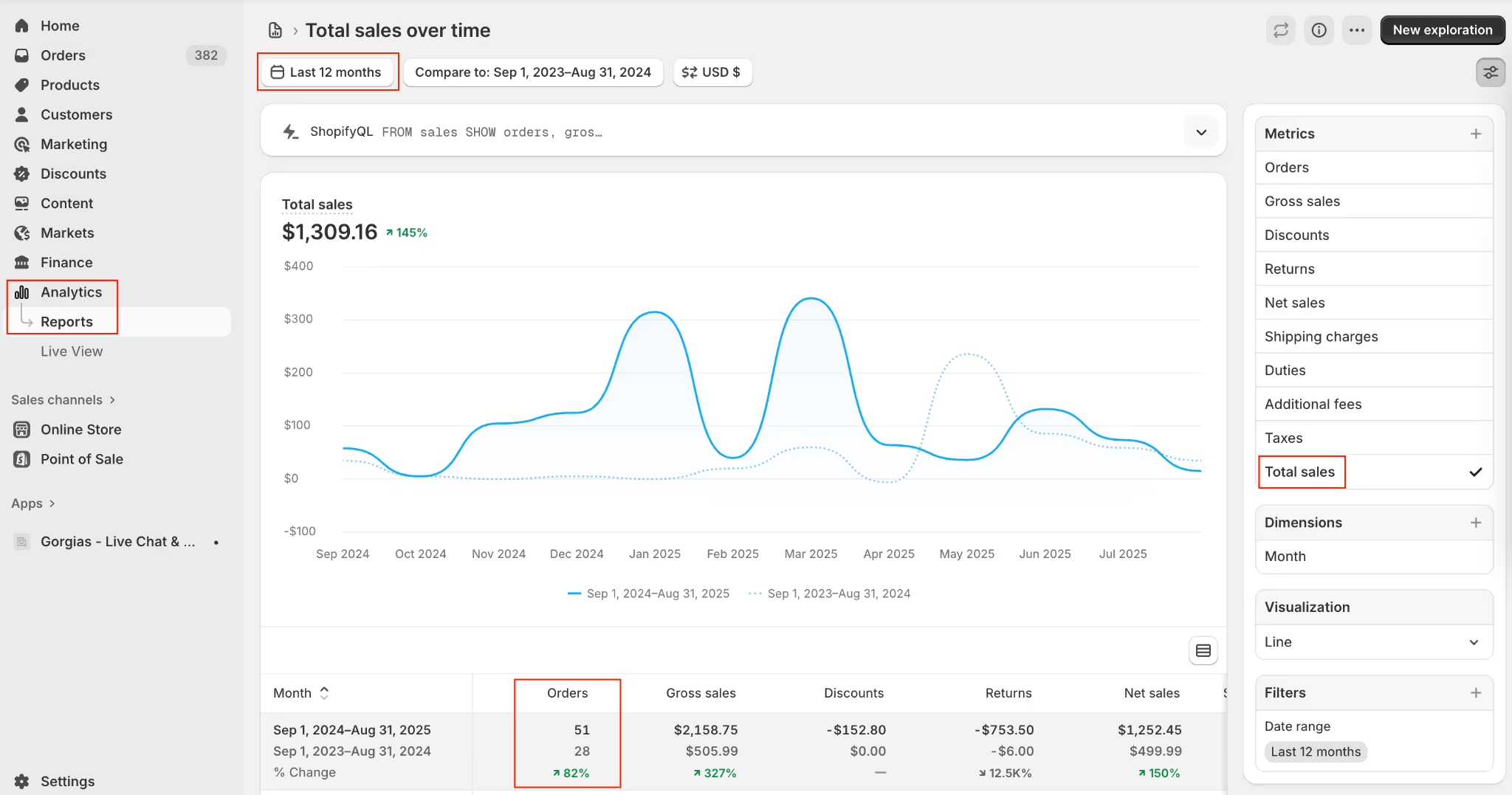
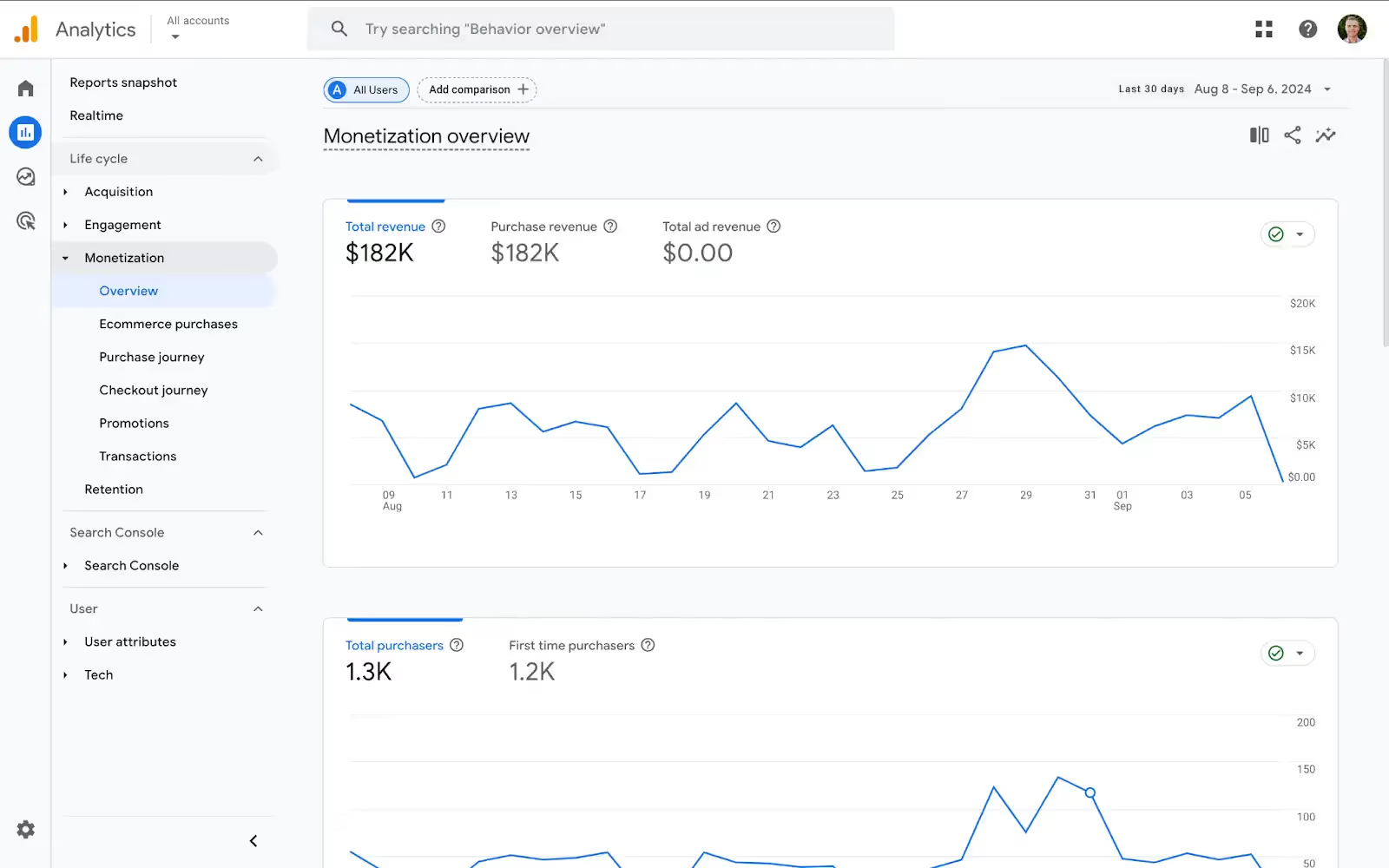
Note: You can also get this data from Google Analytics by going to Conversions -> Ecommerce -> Overview and selecting the target date range. The transaction count will be under the Transactions field.
This might not be accurate if a significant portion of your orders are subscriptions that are not tracked in Analytics. Still, it will be close enough for now as long as you continue to use this transaction count in future calculations.
Next, you need your average ticket volume. In a customer experience platform, like Gorgias, find this number by going to Statistics -> Support Performance -> Overview → Created Tickets and select the same time period.
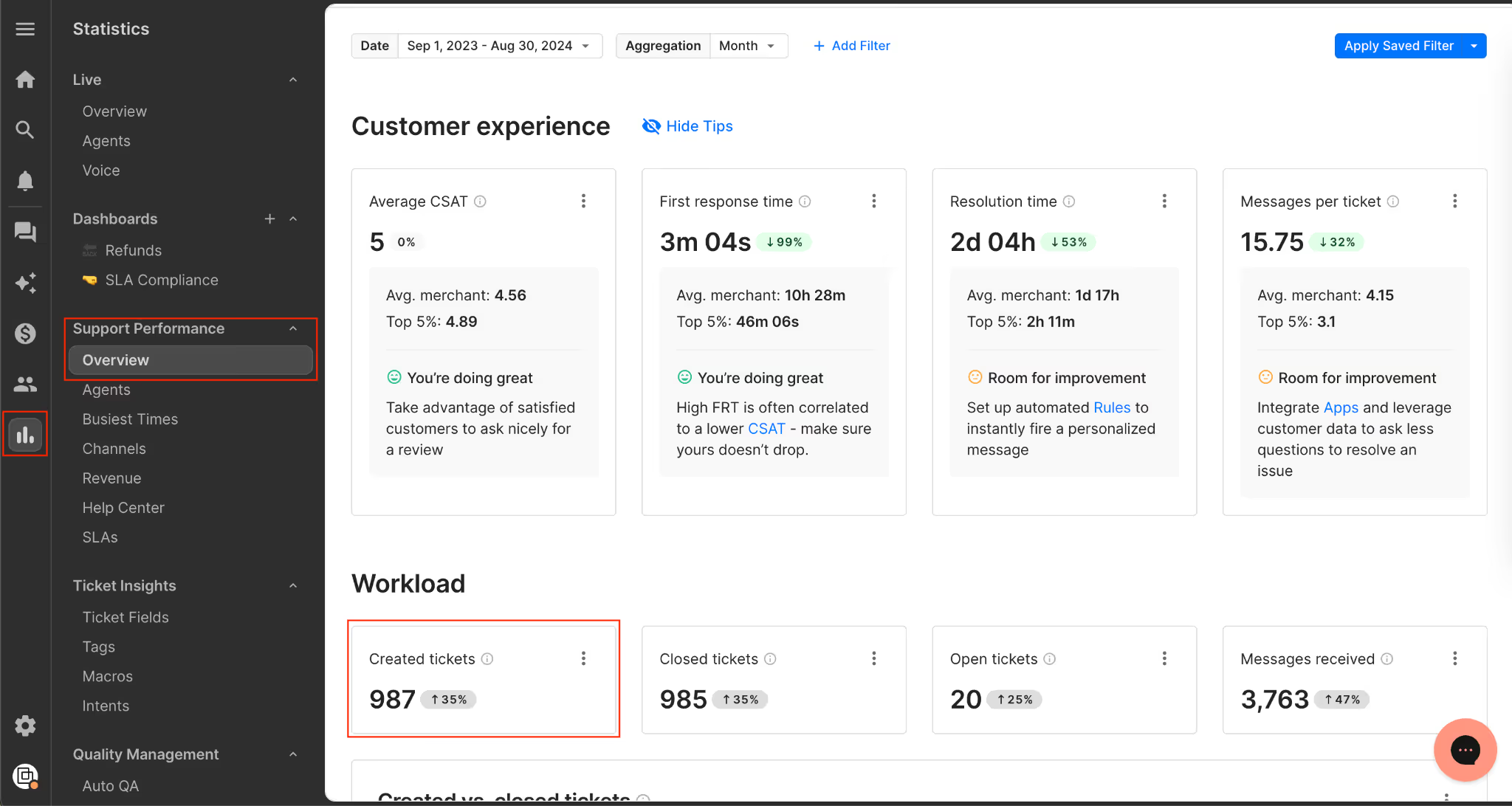
Put it all together: Plug in your order number and ticket volume into this formula: tickets ÷ orders. For example, if you had 1000 orders and 400 tickets, then your ticket ratio is 40. This means for every 100 transactions, 40 tickets are created.
Pro Tip: We typically see the ticket ratio anywhere from 30% to 50%. For stores that use customer support automation in their helpdesk workflow, the ticket ratio normalizes to about 20%.
Related: Orthofeet took a step in the right direction by automating 56% of tickets in 2 months with Gorgias
2) Use your ratio to project ticket volume
Once you have the ticket-to-order ratio, you need a baseline business metric to anchor your forecast. In other words, you need a way to estimate how many orders will be placed. That order volume is the bridge between sales activity and customer service demand.
Here’s how to project ticket volume using cost per acquisition, average order value, or ticket ratio.
1. Based on paid traffic (using CPA)
- Media spend: $200,000 in Nov–Dec
- Cost per acquisition (CPA): $20
- Projected orders: 10,000
2. Based on projected revenue (using AOV)
- Revenue forecast: $600,000 in Nov–Dec
- Average order value (AOV): $60
- Projected orders: 10,000
3. Converting orders into tickets (using ratio)
- Ticket ratio: 40%
- Projected tickets: 4,000 for Nov–Dec
- If reduced to 20%: 2,000 tickets (showing the impact of improving efficiency)
Once you’ve forecasted ticket volume, the next step is translating it into how many team members you’ll need.
Related: How Psycho Bunny avoided adding additional headcount while doubling revenue
3) Estimate the number of agents needed based on past capacity
At some point, you can’t just throw more people at the problem. People are a finite resource, and it takes time to hire and train competent agents. Don’t let yourself end up in that position as you drive growth.
To run an effective customer service operation, you should have benchmarks set for agents’ capacity to handle tickets. With this data, you can convert the forecasted ticket volume into a forecasted agent headcount needed to handle that volume.
How to calculate agent capacity: Find the average number of tickets resolved per agent over a specific time period. Be sure to focus your analysis on full-time agents, not part-timers who jump in from time to time.
In Gorgias, navigate to Statistics -> Support Performance -> Agents, and locate the data under the Closed Tickets column.
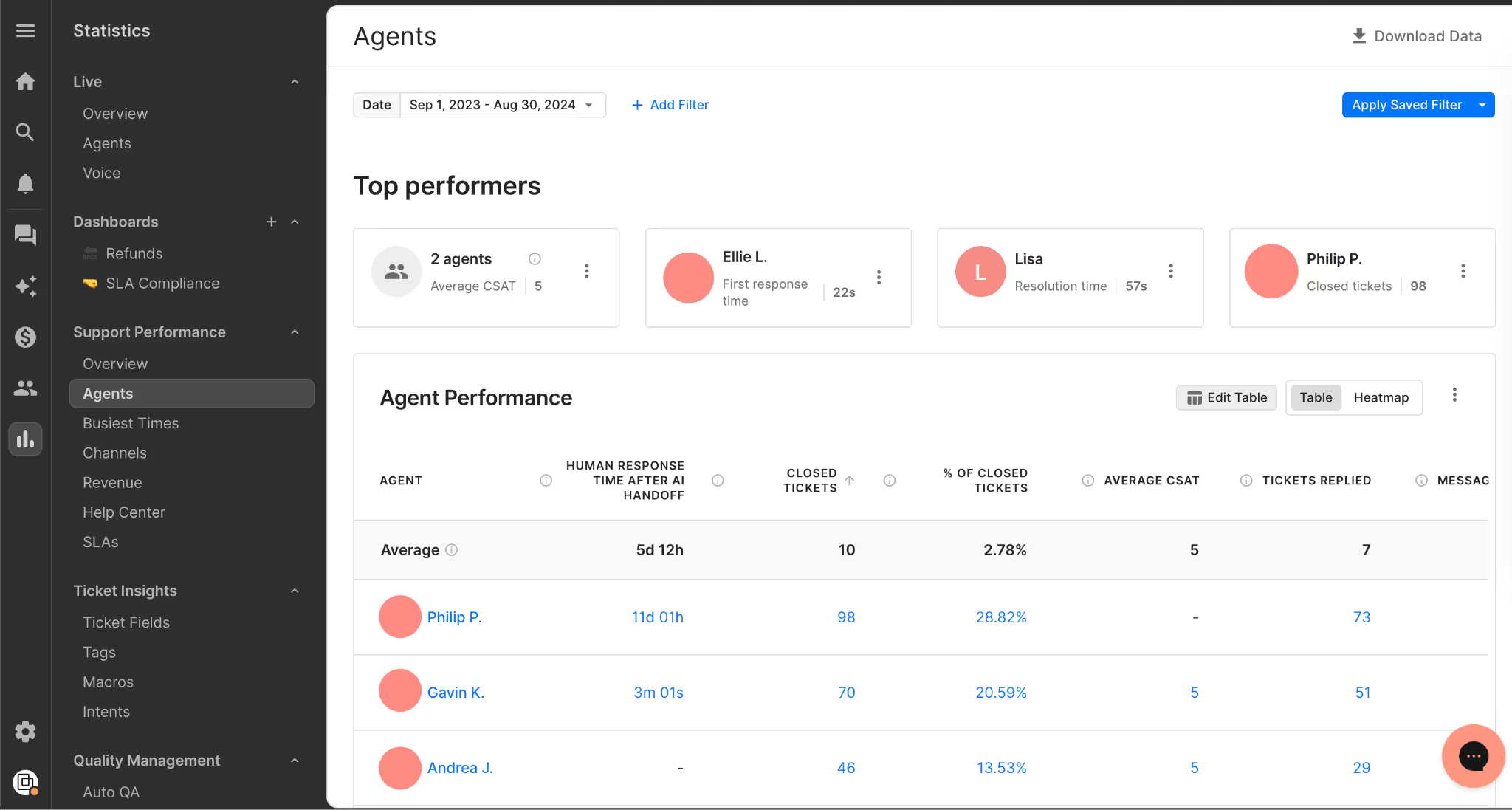
Pro Tip: We typically see anywhere from 40 to 60 tickets per day per agent as a healthy benchmark.
Once you’ve forecasted ticket volume, the next step is turning that into staffing needs (so start preparing your interview questions). Here’s how it works in practice:
Projected tickets: 4,000 (Nov–Dec)
Agent capacity: 40 tickets/day
Monthly agent capacity: 40 tickets/day × 5 days/week × 4.3 weeks/month = 860 tickets per agent per month
Required agents:
- 4,000 tickets ÷ 2 months ÷ 860 = 2.33 agents
- Round up to 3 agents to allow buffer for spikes (shipping delays, stockouts, promos, etc.)
This gives you a concrete, data-backed number you can use for BFCM staffing plans, instead of guessing or waiting until your team feels overwhelmed.
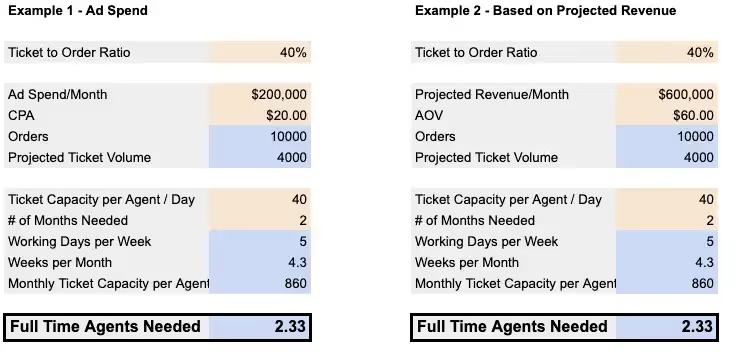
This is a little simplistic since it assumes the tickets come fairly uniformly during that time, but the basic forecasting process here is sound.
Check out HelpFlow.com's free Customer Service Forecast Calculator (no email address required).
Turn support into revenue with HelpFlow and Gorgias
The way you handle customer service has a massive impact on sales. Based on Gorgias support performance data across all customers:
- A sub-10 minute response time on tickets increases conversion rate by around 10%
- Answering live chat questions in less than 2 minutes increased conversion rate by as much as 50%
Slow responses cost revenue, and live chat conversion rates drop sharply when first replies take more than 10 seconds. If your team is overloaded, hitting <10 minutes on tickets or seconds on chat just isn’t realistic without the right tools.
Two options to consider:
- HelpFlow: Provides 24/7 live chat and customer service teams for 100+ ecommerce stores, handling thousands of tickets daily and driving over $100M in revenue.
- Gorgias: If you already have a team, Gorgias gives you visibility into agent performance and the data you need to forecast and scale. Book a demo today.
{{lead-magnet-2}}

The Career Evolution of Amy Elenius: Manager of Customer Education at Gorgias
In August 2020, Amy started her job at Gorgias as a Customer Success Manager. Fast forward to today: Amy has held four positions in the company, pioneered two brand-new Gorgias programs, and holds a new position as the Manager of Customer Education.
How is that possible in only two years? What special sauce has she found at Gorgias that keeps her going? And what kind of higher education was the precursor to her professional success?
Read the interview with Amy to learn more about her dynamic career evolution and the support Gorgias provided to make it possible.
What did you do before Gorgias?
My career path is a little unconventional. After finishing school I decided against going to university and launched into full-time work instead, picking up study later in life.

I was fortunate to find a field where adaptability, problem-solving, and experience in customer relationships held high value in junior roles. When I transitioned to tech in my mid-twenties I had six years of hands-on experience which was a huge advantage in the startup space. From there, all of my training has been “on the job.”
I’ve been lucky to work underneath brilliant managers, most of whom were female. They provided me with excellent opportunities to benefit from industry-leading mentorship.

How did you find out about Gorgias and what made you apply to work here?
It is a classic story — I stumbled across a position on LinkedIn.
After doing the case study the product had me hooked. I saw its potential to help merchants deliver an exceptional customer experience and drive revenue from happy shoppers. From that point, all my eggs were in the Gorgias basket.
!["I saw [Gorgias'] potential to help merchants deliver an exceptional customer experience and drive revenue from happy shoppers."](https://cdn.prod.website-files.com/5e78f62c08f1bb8c2d788576/63a9c40df3ba37100afc0a0c_6304d1ab8bf1e187b7cc7795_amy-quote-final-3.webp)
At that point, Gorgias had just raised a 25M series B funding and had around 75 employees and 5,000+ customers.
What are the roles you had at Gorgias and how did they change over time?
Back in August 2020 when I initially started in Gorgias, I was a Customer Success Manager. I started when the Success team had half a dozen people wearing many hats.
The CSM role was originally a hybrid position — encompassing both CSM and Onboarding Manager responsibilities. The focus was on managing full-cycle customer relationships: retention, churn, and expansion.
As Gorgias grew, Success roles were split into specialties, and a new department was created to service our non-managed merchants. I transitioned into Scaled Programs, a two-woman team led by Elena Balagush (who we recently welcomed back to the Gorgias family.)
Being a new function there was plenty of trial and error but always support from leadership which was essential to our success.

In this role, I managed merchant relationships using a one-to-many approach and maintained a local book of business. After a few months, I was promoted to senior CSM — a natural progression for anyone at Gorgias who performs well. While continuing the above duties, I took on additional education duties running webinars and creating educational content.
After realizing the value of education, I upskilled in eLearning, content creation, and instructional design. The culminating project was setting up the Gorgias Academy.
While I built the academy, I needed to prove its impact (one of Gorgias’ values is to maximize your impact, so everyone is accountable for delivering measurable results). I focused on before/after data comparisons to show the substantial impact the academy was having.
After proving the function was valuable, I moved into the Customer Education Specialist role as a one-woman show.

From there, the upskilling continued. With incredible guidance and investment from my brilliant manager Elise Kubicki, I was equipped with the tools necessary to make the Customer Education function (CEd) a success.
One of the most valuable strategies I had was connecting with industry leaders. I became an active member in a few CEd communities and leveraged group tips/feedback to guide decisions in lieu of a team. One particular community is called Customer Education Org run by Sumeru Chatterjee. The support from other CEd leaders has been instrumental to my career growth.
After managing a substantial workload and delivering high-quality results consistently, Elise generously promoted me into a management position which I’m thrilled to be in today.
What training and resources did you receive to help you in your new roles?
Elise, my manager, has been incredible. She led by example and gave me an excellent benchmark for what a manager should look like. She encouraged me to be brave with ideas and trust my intuition and experience. She listened to me pitch new strategies, provided feedback to strengthen my proposals, and gave me the confidence to execute my ideas.
Without a manager who fostered open communication and responded with encouragement and empathy, I would never have advanced this quickly.
Gorgias is also committed to getting the right tool for the job. We invest in technology. I could not have performed at the volume or velocity I did without a company that understands the benefit of a solid tech stack.
Elena Balagush was my manager when I was on the Scales Programs team, and she is also amazing. She celebrated my wins and gave me the freedom to go after new, out-of-the-box ideas.
How did you manage growing new functions while keeping up with your old role?
Honestly, balancing all my responsibilities took a whole lot of time. But Gorgias investing in the right technology is a big factor — if I had to work without the right equipment, I could not have delivered quality content on time. I’m extremely grateful for this. Not enough businesses respect the impact the right tools can make.
The $2,000 learning stipend is also amazing. I managed to do most of my training for free but having funds available gives me the confidence to take on projects that require new skills. I used a portion of it to complete certifications in different areas like SQL.
Gorgias is also full of amazing, collaborative people. Openness with colleagues and genuine interest in sharing skills is not common. It’s one of the things that makes Gorgias an incredible place to work.
How do you think your experience would have been different at another company?
I don’t think many companies would match the level of trust Gorgias had when I was piloting new projects. Beyond that, there are a few factors that other companies struggle with that I feel are important to mention:
When goals aren’t unified across an organization, teams don’t want to help one another
If departments operate in closed silos, they can find themselves striving toward opposing goals. At Gorgias, we are all aware of the major targets and work toward them together. We celebrate wins as a team and take responsibility for setbacks as a team.
This unity gives us a huge advantage because everyone wants everyone to do well.
Competition between colleagues discourages skill sharing
Healthy competition is good. But too often, leadership uses competition as the primary way to drive results. The notion that only one can win can be archaic and doesn’t motivate all personality types.
At Gorgias, we have the understanding that if everyone exceeds the target, everyone is eligible to advance their career, be it in a different role or a different team. That’s motivating.
We have a culture of empowerment, enablement, and rapid growth
At Gorgias, the idea is to hire the best of the best. The result is that everyone is hungry to become a better version of their professional selves, and Gorgias repays that hunger with great career progression, room (and budget) to learn new things, and a healthy collaborative atmosphere.
No one is happy “coasting”
The combination of the enormous amount of work to do and the brightest minds around means you are constantly encouraged to push yourself to deliver great work, fast. We all help each other to upskill and remove bottlenecks that occur when there isn’t enough work to go around.
A lack of honesty breeds anxiety
Not knowing why decisions have been made can plant the seed of doubt in the workforce, causing staff to be in a constant low-level state of panic. Gorgias operates with radical candor, meaning no matter what happens — good or bad, at the individual contributor level or in leadership — we understand why. This alleviates the stress associated with ‘the unknown’ and leaves employees' minds free to be creative and push harder in the right direction.
How can you connect your experience with Gorgias's core values?
To recap, Gorgias’ values are:
- Maximize your impact
- Customer-first
- 100% honest
- Strive for excellence
- Take extreme ownership

The honesty value is a huge benefit to me, personally. I am relaxed knowing leadership is open to hearing feedback from all levels of staff and that blindspots I have will be flagged. I have the confidence to speak my mind and know I will be heard.
Also, I respect how truly customer-first Gorgias is. Every company says they are customer first but I’ve never seen it lived the way it is at Gorgias. At all levels, we have an unprecedented number of conversations with merchants to learn about their challenges and develop new solutions.
Lastly, my experience hinged on taking extreme ownership. Taking extreme ownership means passing the buck is not an option. This encourages people to think things through and rationalize the why. Knowing I own a project from end to end makes me push harder to deliver work I’m truly proud of.
What other anecdotes have you heard from people at Gorgias with similar career evolutions?
Elise is amazing (I know I say it a lot but she really is). She started as an Onboarding Manager and is now leading the whole success department — and that’s a mammoth workload.
She moved from onboarding manager to interim head of success in less than a year. She is now our VP of Success and, gosh, she earned it. She lives and breathes Gorgias' values - it shows in the team she’s chosen, of which I’m honored to be a part.
We also recently welcomed back Elena Balagush, who was my manager before Elise. When staff return to an organization it speaks volumes about the environment.
What is your favorite thing about working at Gorgias?
Does it have to be just one? Here are a few of the standouts:
The support from upper management to try new things and experiment
A great deal of my success at Gorgias is due to supportive management. First, in Success from Chloe Kesler, then in Scaled Programs from Elena Balagush, and in the last 12 months from our outstanding VP of Success Elise Kubicki.
I have a particular soft spot for Elise, as she gave me the skills to develop strategies and concepts of my own but, more importantly, instilled in me the confidence to put them into practice.
The resources to become a better version of my work-self
The Gorgias team, internally, is jam-packed with team members who are experts in their field. This has given many of us a rare opportunity to learn on the job from the industry's best performers.
A culture that encourages the sharing of knowledge
Following on from my earlier point, the collaborative culture at Gorgias is second to none. I have experienced first-hand the way sometimes competitive nature can become engrained at companies with aggressive goals.
At Gorgias, you won’t find a skerrick of this. Instead, the value of 100% honesty and having a unified goal breeds an undercurrent of genuine camaraderie and a sense of drive to achieve as a collective.
Knowledge is freely shared across all departments and seniority levels. This flat structure encourages curiosity and discussions between everyone — regardless of role.
If there is one thing you would like to change about the company, what would it be?
That we can’t hire everyone. There isn’t a single tech person I know who wouldn’t benefit from the experience of working here.
Now that you are holding a management position, what are your plans for customer education at Gorgias?
In the future, I’m going to do everything I can to develop a winning Customer Education program and (fingers crossed) position us as industry leaders in this field.
I’d like to see us continue to roll out new initiatives to help our merchants thrive, especially given the difficult landscape at this time.
I’ll continue to learn and grow in the Customer Education space. I still have plenty of areas to work on — I’m just grateful I’m part of an organization that gives me every possible opportunity to do this.
What's next for you at Gorgias (and how is Gorgias helping you get there)?
I’d love to carry on in Customer Education and one day move up into a director position. I’ve got a long way to go but I’m confident Gorgias is the most suitable place for me.
I couldn’t wish for a better manager, better team, or better organization. Results are rewarded and I’m incredibly proud of not just the growth that we’ve seen but the way we got here — we move fast, we make mistakes, we learn and we adapt. Rinse and repeat. That’s the kind of company I want to be with for life.
Interested in joining Amy and the rest of Gorgias team? Check out our jobs page to learn more about our benefits, interview process, and open roles.

How To Calculate Net Promoter Score: NPS Formula, Tools, & Tips
Businesses run on happy customers. Happy customers generate repeat business, share positive reviews, and refer others to your brand. Plus, happy customers are cost-effective. Getting a new customer typically costs more than keeping your current ones around.
Net promoter score (NPS) measures how likely a customer is to recommend your brand to someone else. This metric was invented by Fred Reichheld of Bain & Company in 2003 and is a surprisingly good indicator of a company’s success. Companies with high NPS for their industry grow revenue 2.5 faster than their competition, according to research from Rob Markey, founder of Bain & Company’s Customer & Marketing practice.
Want to evaluate the success of your customer experience, product, and overall business? You should measure NPS. Here is a closer look at NPS, including how to calculate and benchmark your score.
{{lead-magnet-1}}
What is net promoter score (NPS) and what does it measure?
Net promoter score (NPS) is a metric to calculate the quality of your customer experience across every channel based on whether or not your existing customers are likely to recommend your business to someone else.
The net promoter score for your business is essential because it directly reflects how well your business satisfies your customers. It also shows the number of promoters you are creating through your company. It allows you to quantify the sentiment of your customers so you can better serve and satisfy them.

So what, exactly, is NPS measuring? Most directly, it indicates how much of your customer base would recommend your product to others. However, people treat NPS as a metric for brand loyalty, customer satisfaction, overall customer service, and happy customers.
NPS is one of the most common metrics to measure your brand’s customer experience and growth potential. Lumoa, a customer survey company, surveyed customer experience directors. Of the respondents, two-thirds said they prioritize and track NPS.
NPS terms explained
Calculating your NPS score isn’t difficult once you understand the three types of responses:
- Promoter: A promoter is a customer who responds to the NPS survey question with a nine or a 10. They are highly likely to recommend your business to others. These customers are likely to bring you new customers because of their recommendations. The majority of your referrals will come from these satisfied customers.
- Detractor: A detractor gives a 0 to 6 response on the survey. These are usually unhappy customers who are not likely to recommend you to others. They may even detract from your business by posting bad reviews and warning people to stay away from your brand.
- Passive: A passive responds with a score of 7 or 8. These are part of your customer base and may remain loyal, but they are not happy enough to recommend your business to many people. They do not impact your NPS.
Net promoter score formula + how to calculate
The formula for net promoter score is: Total % of promoters - the total % of detractors = NPS

NPS scores are significant for measuring the overall quality of your customer support and interactions. Fortunately, collecting NPS is relatively straightforward — it all boils down to one simple question:
"On a scale of 0 to 10, how likely are you to recommend our product to someone else?"
On this scale, 10 is the highest response: Customers who choose 10 are “extremely likely” to recommend your brand. And 0 is the lowest “not likely at all” response.
Let’s walk through how to calculate net promoter score step-by-step:
- Separate your survey results into promoters, passives, and detractors. When you ask for customer feedback with the NPS question, their ratings will group them into one of three categories: promoters, passives, and detractors. Go through your responses and categorize them accordingly.
- Determine what percentage of the total number of responses are promoters and what percentage are detractors. Leave passives aside.
- Subtract the percent of detractors from the percent of promoters. That number, which should range from 1 to 100, is your NPS.
Example of NPS score calculation
Here’s an example: You have a survey that comes back with 60% of the respondents being promoters, 10% of the respondents being detractors, and 30% of the respondents being passives. This is what your NPS calculation would look like:

60% promoters - 10% detractors = 50 NPS
In this scenario, the NPS score is 50. The NPS is always an integer, never a percent.
{{lead-magnet-2}}
Interpreting your NPS results
A perfect NPS would be 100, but you can score as low as -100. A score below zero is considered poor because it means you have more detractors than promoters. Negative scores indicate your business may have a high churn rate and will struggle to grow. A score of 0 to 30 is acceptable, but anything above 30 is best.
Also, your overall NPS is only one piece of the puzzle. Once you know how to collect survey responses and calculate your score, you can drill down to determine which factors impact your score most.
For example, NPS may vary across your products. If so, you can start investigating whether the low-scoring products are low-quality, have misleading marketing, or something else entirely. Likewise, NPS may vary depending on the customer service channel customers use. If so, you may want to bolster your omnichannel customer service offering.
What’s considered a good NPS score?
This is a tricky question to answer. NPS scores range from -100 to 100, so any NPS above zero technically means you have more promoters than detractors. The traditional score breakdown looks like this:
- Scores between 1 and 30 are acceptable.
- Average scores between 31 and 50 mean you’re doing pretty well.
- Between 50 and 70, you’re doing fantastic.
- Scores above 70 are considered beyond amazing — and sometimes unattainable since it would mean that all or nearly all of your respondents are promoters.
In practice, looking at others in your industry is usually better to determine what is good and what isn’t. Pay particular attention to whether or not your business is B2B or B2C, as B2C scores tend to vary much more widely based on the nature of the consumer products industry.
ClearlyRated’s 2022 NPS Benchmarks for B2B Service Industries illustrates this well, with most B2B service NPS ranging from 23 to 60. In the B2C market, on the other hand, the average NPS ranges from 5 to 62 for 2022.
What’s considered a bad NPS score?
With NPS, the goal is always to have more promoters than detractors. So, like any score above zero is technically positive, any NPS of zero or lower is a negative score regardless of your industry because it means you have more detractors than promoters.
Whether you want to improve a good score or bring a lousy score up to par, it’s usually about providing a better customer experience. If your score is lower than you’d like, it’s time to analyze the customer experience you’re providing to find weak areas that could improve.
NPS benchmarks across industries
Of course, your score doesn’t mean much without context. Retently’s 2023 NPS benchmark provides excellent data on the average NPS across industries:
- Insurance: 74
- Financial services: 71
- Retail: 61
- Ecommerce: 50
- Healthcare: 45
- Communications and media: 29
- Internet software and services: 9
Don’t lose hope if your NPS is lower than the numbers above. Every brand is different, and every brand starts somewhere. The most important project is to continuously improve your NPS, regardless of where you stack up against competitors.
Three ways to collect and calculate net promoter scores at scale
The formula is simple enough, but you might want to create a system to process your score continually. We have three recommendations:
1) Create an Excel or Google Sheets NPS spreadsheet
If you’re comfortable with Excel or Google Sheets, you can set up a spreadsheet to perform your net promoter score calculation. To do this, you will need to follow these steps with the COUNTIF function:
- Define promoters using =COUNTIF(R:R,”>=9″), detractors with =COUNTIF(R:R,”<=6″), and passives with =COUNTIF(R:R,”=7″) +COUNTIF(R:R,”=8″)
- Copy and paste the customer responses into the column, and Excel or Google Sheets will count them for you
- Add the NPS equation into the spreadsheet using this formula: =(Promoters - Detractors)/Responses * 100
Plugging these formulas into your spreadsheet allows you to keep tabs on your NPS in real time, updating it as you need to when new survey responses come in.
2) Use a free NPS calculator tool
If you're not great at using Excel, you can also use free NPS calculator tools online. To use one of these, you only need to count up the customer responses on their surveys and put them in the NPS calculator platform. Many survey tools allow you to export the scores easily.
Some good options for free NPS calculation include:
3) Use a survey automation tool with NPS capabilities
Before calculating your score, you’ll have to send a survey to customers to collect their responses. Some survey tools have NPS calculations built in.
If you use Gorgias as your customer service platform, you can easily integrate a survey automation tool to collect and calculate responses like:
We love and recommend all these tools, but as an example, let’s look at how Delighted and Gorgias work together. Delighted helps you spin up an automated NPS survey — one of many survey templates they offer. Then, you can automatically send out the survey to customer segments on multiple channels via Gorgias:

Source: Delighted
Best practices for NPS effectiveness and accuracy
An accurate NPS score helps you grow your business, overall customer retention, and referrals. An inaccurate NPS may point you in the wrong direction. Accuracy doesn’t just mean you used the formula correctly — it also means you’re measuring the full breadth of your customer base and customer journey.
Below are some best practices to implement to make your NPS as accurate and helpful as possible.
Decide whether you'll use a relationship or transactional survey (or both)
First, the type of survey you use is important. There are two main types to choose between: relationship surveys and transactional surveys.
Relationship surveys try to measure a customer's brand or company loyalty. They ask questions about the overall customer experience and how satisfied the customer is with your company. You will send these to your customer base at specific intervals to help you evaluate the quality of your customer experience and support.
Transactional surveys focus on a particular transaction — for ecommerce, this is usually a purchase. The survey questions focus on that transaction, not the overall customer experience. This type of survey might give you better information about the specific product purchased, though it can also skew up or down if the customer contacted customer support.
Most of the time, you’ll start with relationship surveys. Before you drill down to specific products and transactions, it’s helpful to benchmark your customers’ overall sentiment, loyalty, and promoter status.
If you don’t have a helpdesk, you can use standalone NPS software to collect contact information and send surveys. But suppose you have a helpdesk like Gorgias. In that case, you’ll have an easier time automating your NPS surveys with one of the NPS survey tools listed above because your helpdesk already has customer contact information and can automatically send surveys after purchases or customer service interactions.
Limit the number of questions you include as part of the NPS survey experience
When you decide to contact, you may be tempted to ask as many questions as possible to maximize the insights you receive. We get it; we love customer insight, too. However, response rates for NPS surveys are low, and customers are even less likely to respond to longer surveys.
You’ll have higher response rates if you focus your NPS surveys on two questions:
- On a scale of 0 to 10, how likely are you to recommend our product to someone else?
- Tell us why you selected that score
Let customers answer an open-ended question right after they provide their score
As we said above, you should follow up after a respondent gives you their score to understand why they answered that way. Leaving the question as optional won't impact the number of NPS questions you get back, but you may get some critical qualitative data from customers who choose to fill out the open-ended question.
Open-ended questions require more than a "yes" or "no" response. Here are some examples of open-ended questions that work well:
- What disappointed you about your experience?
- How could we improve your experience?
- What do you like the most about our product/service?
Make this question about the customer, using plenty of second-person pronouns, and let them have an open forum to add a response. Use the information you gather to help you improve your customer satisfaction in future interactions.
Just get started and aim for statistically significant sample sizes later on
It's easy to get caught up in details and never actually launch your NPS survey. While you want an effective survey, don’t let perfect get in the way of done. Even if you only have a small amount of data initially, you will have some. NPS surveys are not one-and-done; you can optimize your next survey to get more responses.
Start with the relationship survey and send it to your current customers. Then, after receiving responses, tweak your survey and send it to different customer base segments. Continue tweaking the frequency, wording, and targeting until you get a statistically significant number of survey responses.
Don't wait to start until you have a perfect system — you'll lose valuable data if you do.
Optimize when you send your surveys
Experiment with the timing of your survey to maximize the total number of respondents. We’re unaware of any universal best practice for the time and day of the week to send out NPS surveys. The timing will depend on your specific customer base, so experiment until you find the sweet spot.
Some survey automation tools, like those mentioned above, will send surveys in response to customer actions. For example, a customer could get a survey a few hours (or days) after purchasing or contacting customer support. This is a great way to ensure you target customers who are actively engaged with your brand.
Want to improve your survey response rates? Check out our list of best practices for improving your NPS response rate.
Test your survey before you send it out to customers
Finally, ensure you test your survey in-house before sending it to actual customers. There is nothing worse than a poorly worded, poorly functioning survey. Send a test survey to people within your organization first, and make sure it gets to their inbox and not the spam folder.
What might trigger a spam flag in the invitation email for your survey? Here are some things to avoid:
- All-caps in the subject line
- Too many exclamation points
- Words like "act now," "free," and "urgent matter"
- An image with little text in the email body
- Too many font sizes, colors, and types
Send the invitation email to people in-house and make sure everything works. The email should open, be easy to read, work on multiple browsers and email programs, and make sense to the reader. Take feedback from your team to tweak the email and ensure the survey has the best chance of getting read and responded to once it reaches your customer.
Create a process to handle low NPS scores
The primary purpose of NPS is to give you an overall impression of brand loyalty. Another benefit is to identify — and fix — low-NPS interactions as they happen.
We recommend identifying some of the top reasons for low scores and implementing a system to respond to incoming low scores quickly. In Gorgias, for example, you can set up an automated Rule to automatically create a ticket for incoming NPS scores and assign low NPS scores to a dedicated agent.
As your team grows, you can even dedicate agents to each common issue: damaged products, delayed shipping, etc. Gorgias’ intent detection automatically analyzes tickets to identify the root cause of the problem and, combined with Rules, can send each issue to a specialized agent:

Source: Gorgias
Treat those flagged low scores as priority tickets and establish a suitable solution for each reason. For example, you could send a gift card to customers who receive a late or damaged product.
These conversations may be sensitive and challenging, especially among VIP customers. So, we recommend activating phone support as a last line of defense for customers with a negative experience.
Raising your NPS is one of the revenue-generating tactics from our CX-Driven Growth Playbook, which is based on research of over 10,000+ top ecommerce brands. Check out the playbook for 17 more actionable tips to drive revenue by improving your CX.
Don’t stop at NPS: Also measure customer satisfaction (CSAT) score
Net promoter score is a rich metric, but it’s not the only — nor necessarily the best — way to gauge customer loyalty. One issue is the premise of the survey itself: Just because a customer might promote your brand doesn’t mean they’ll stay loyal. A customer might recommend your product to a friend but choose not to purchase it again because your product is too expensive for them.
We recommend complimenting your NPS efforts by measuring customer satisfaction (CSAT), mainly to gauge the performance of your customer support team. Whereas NPS helps you understand the potential for referral-based growth, CSAT asks about customer loyalty more directly: How satisfied are you with the help you received today?
If you use Gorgias, you can automatically send customer satisfaction surveys after closing a conversation with a customer:

Source: Gorgias
This information will be displayed in future discussions to give the next agent context about this customer’s past experiences with your brand. Plus, you can zoom out to get a sense of CSAT across your entire customer base with the platform’s customer satisfaction dashboard:

Source: Gorgias
Data from our CX-Driven Growth Playbook indicates your CSAT and revenue are linked. For example, raising your CSAT from 4/5 to 4.9/5 can raise your overall revenue by 4%.
Want to better understand your ecommerce business’s overall performance with metrics like conversion rate, acquisition costs, and lifetime value? Check out our guide to ecommerce KPIs.
Want to zoom in on your customer service department’s performance with metrics like NPS, CSAT, and support performance score? Check out our guide to evaluating customer service.
Learn how Gorgias helps ecommerce companies measure and improve key metrics
A good NPS score means your customers are happy and they are spreading the news about your product via word of mouth. Gorgias helps ecommerce brands improve customer experience to drive customer loyalty, referrals, and revenue.
One of our customers, Bagallery, saw their NPS go from 19 to 41 after partnering with Gorgias. Another client, Comme Avant, now maintains a nearly perfect NPS after switching to Gorgias.
And with Gorgias, NPS is only the tip of the iceberg for reporting and analytics. You have access to reporting dashboards like our Support Performance dashboard, which combines many key customer service metrics, and our Live Statistics dashboard, which shows up-to-date information about each agent's performance.
Sign up for a free trial to see Gorgias' powerful tools for reporting, analytics, and omnichannel customer support.


Why Talent Sourcing is Key for Gorgias Recruiting (And How We Build Our Talent Pool)
As a Talent Acquisition Specialist, I firmly believe talent sourcing is a crucial component of recruitment. It involves proactively reaching out to good-fit candidates to broaden your talent pool and make key connections well in advance, rather than just waiting for the perfect person to find and apply to job postings once they go live.
Talent sourcing helps us at Gorgias cut through application noise and get the highest quality candidates possible. Our outreach emails for Engineering positions, one of the most challenging roles to fill, see 26%-46% response rates. And in this deeply competitive labor market, getting in contact with those gem candidates is especially important.
In this article, we’ll discuss the merits of talent sourcing as a hiring strategy, as well as the tools and tactics we use for talent sourcing at Gorgias.
The state of the hiring market in Q1 2022 (post-pandemic)
The state of the hiring market in 2022 is worrisome, to say the least. It seems like every single company has at least 10 open roles, and they’re all competing over the same pool of top-notch candidates.
Let’s take a step back and look at the last couple of years. Compared to Q1 2020, iCIMS reports job openings in Q1 2021 are up by 86%, hires are up by 45%, and job applications are down by 11%.

Meanwhile, 78% of companies report being unable to find enough talented candidates in the market to fill their open roles. Why? As we mentioned above, the labor market has tightened. This means that naturally, there are more jobs open than people to fill them, which consequently makes hiring even harder.
2022 continues these trends. There are now a record 5 million more job openings than unemployed people in the US, according to this article published by CNBC (which contains many top takeaways from the Bureau of Labor Statistic’s Job Openings and Labor Turnover Survey.)
Also, like always, certain roles are particularly difficult to fill right now. Full-stack engineers are most in-demand right now, meaning they’re especially difficult to find and hire. Fortunately, a shift toward hiring remote talent in smaller regions is taking place. Software engineers who are open to remote work receive 20% more interview requests.
Part of appealing to this pool of in-demand talent is understanding software engineers’ top priorities. Here’s below the full list of the biggest motivators for software engineers, according to the 2022 State of Software Engineers Report:

These motivators are valuable insights because they can help you market your open roles (and, to get back to the topic, talent sourcing outreach) more sharply.
What exactly is talent sourcing?
There are differing opinions about the exact definition of talent sourcing. But the basic definition of talent sourcing is engaging candidates who are not active applicants. We call the targets of talent sourcing “passive talent,” which excludes candidates who apply traditionally, through a job posting.
For us, the goal of talent sourcing is to build a pipeline of talent that operates throughout the year as a proactive approach to the company’s hiring needs. Sourcing allows us to connect with potential fits long before a need develops. Considering that hiring a new employee can take anywhere from a week to several months, getting a head start on promising candidates is a great long-term strategy.
Why do we believe talent sourcing is an essential best practice?
In Q1 2022, it took our team an average of 53 days to extend an offer. In Q2, we were able to send out offers in 39 days thanks in part to talent sourcing. Therefore, we managed to speed up the process of extending an offer by 26% thanks to talent sourcing.
We looked at some statistics outside of Gorgias and here’s what we found: 70% of the world's workforce are passive candidates, and 86% of the most qualified candidates for your open positions are already employed, hence not actively looking for a job. That said, LinkedIn has found that 90% of the professionals active on their platform would like to hear about career opportunities.
Talent sourcing helps bridge the gap between the companies hiring and passive candidates (which, again, make up 70% of the workforce). We can build relationships with promising talent well before we’re urgently looking to make a hire.
Gem found that talent sourcing is the second most important recruiting trend (after diversity recruiting), according to their 2022 Recruiting Trends: Data-Driven Recruiting.

The impact of talent sourcing on key hiring metrics
Why exactly is talent sourcing such a prominent trend? Because it’s a strategic approach to improve many of the most important metrics a recruiting team pays attention to.
Time to hire
Talent sourcing can improve your time to hire because you can start refining a pool of candidates well before you have a live job ad. For us, one of the best tactics was to use outreach to identify a pool of talent that uses our tech stack. That way, when you post an engineering, product management, or non-tech role, you don’t have to source from scratch and filter out candidates because of basic misalignments.
Once a job posting goes live, our team has a huge headstart (and can therefore crush previous time-to-hire metrics). Instead of going to LinkedIn and starting a search from scratch, I would go to our refined pool of (currently, but forever growing) 111K candidates that match our company’s needs, tech stack, or overall preferences and start my search there.
Candidate quality
Talent sourcing helps us create a pool of pre-vetted candidates, so we’re never in a situation of having to accept a mediocre candidate because of a time crunch and lack of inbound interest.
Also, when a high-potential candidate doesn’t end up receiving (or accepting) an offer, they go back into our talent pool so we can potentially find another opportunity to work with that high-quality candidate.
Diverse hiring
We use Gem for robust top-of-funnel diversity reporting. The tool lets us deep dive into our natural sourcing tendencies and analyze passthrough rates across demographics like gender. This helps us point out some of the unconscious biases we each might have, so we can keep diversity and inclusivity in mind, implement action items, and source a diverse and strong team.
Our approach to building a Talent Pool
Explore our ATS for candidates we want to re-engage
As you likely know, a candidate’s potential (and journey with your company) doesn’t necessarily come to an end after a rejection. To make the most of high-quality candidates who have already gone through our screening once, we check out junior candidates we talked to 2+ years ago and marked as under-qualified. We do the same with candidates who have kept warm after rejection and candidates who withdrew from the process because they took another offer.
These candidates have already expressed an interest in our company and therefore get consideration to introduce into our ongoing talent pool.
Optimize our recruiting tech stack for searchability
One of our most helpful tools is HireSweet. The tool enables us to explore all of the 4,000 candidates who live in our ATS much easier than just searching the database. One of the best features is that HireSweet allows us to find candidates that may have switched careers completely but live in our ATS under an old position.
But the question still stands: how do we expand our talent pool to 111K people?
Source, scrape, and upload a massive number of leads
We don’t reach out to leads by hand: we contact them in bulk by sourcing and scraping. Before we explain our process, the important thing to keep in mind is that your search and bulk leads import should always resonate with the company’s hiring strategy. Simply put, we don’t do volume sourcing for the sake of doing high volume.
Bulk imports can help you in a few ways:
- While searching for candidates, you want to keep profiles that are not an exact fit so you can find them when a better-fit role comes along
- You want to reach out to a higher volume of leads
- You want to anticipate and pre-source for the future
Here’s an example of how we might pre-source our industry to collect a high volume of good-fit names:
- Find a list of start-ups (related to your industry if you want to be more precise)
- Break it down per country
- Find the companies’ LinkedIn pages (with automation, if possible)
- Scrape the “people” section of said pages
- Clean the data, and import it into your 3rd party tool to enrich it
- All employees that mentioned working for the companies you’re targeting are now in your talent pool
We use the following four tools to execute the process described above:

LinkedIn will limit the number of profiles you can scrape each day. If that’s the case, you can set up bot automation to run multiple times a day. With fewer profiles scrapped more frequently, you can stay under the radar.
Additional ways to improve your talent sourcing and recruitment marketing
Did you know that 66% of people who changed jobs were aware of the company they joined before they applied? That’s why we encourage you to do everything you can (with the resources and buy-in you have) to take a proactive approach to your talent strategy. Some more tactics include:
Create clear, engaging outbound messaging
A well-written message tailored to each candidate (or at least each role) is a terrific approach to draw top talent in, keep them interested, and persuade them to discover more about the company.
At Gorgias, we do our best to include the relevant information without plopping an entire job ad in the first message. We typically try and highlight a couple of unique features (including compensation, which we share with our SaaS calculator).
Encourage your non-recruiting team to source talent
Talent sourcing doesn’t just need to be a recruiter activity. We encourage employee ambassadorship, wherein the entire company is invited to source talent for live and upcoming roles. (They aren’t scraping LinkedIn, but can refer candidates our way and spread the word.)
When employees establish a direct relationship with candidates, they can provide a meaningful testimonial and sneak peek into the company’s culture.
Engaging passive candidates involves more effort than engaging active candidates because you have to persuade someone to be interested. But the effort is worthwhile: at the very least, you spread the word about the company.
Speaking of engaging your team, check out our article of five tips to engage a hybrid or distributed team.
Let us know your take on talent sourcing
At Gorgias, we managed to reach a 26%-46% response rate for our outreach emails for Engineering positions.
Even though recruiting and sourcing tactics constantly evolve, the mindset is still the same:
- Grab candidates’ attention
- Engage with them in a clear, helpful way
- Build relationships that make great placements easier in the longterm
Top talent is in high demand, and competition for their attention is severe. That’s why we need to establish a presence wherever potential candidates are — starting with their Inbox.
We’re hungry for lifelong learning and growth, so we want to hear from all the recruiters and sourcers out there. What’s your take on talent sourcing? How are you approaching it in your company? What can we learn from your practice?
Send me an email and let us know!

Playbook: How Berkey Filters Drove Customer Adoption of a New SMS Support Channel
When your company decides to launch a new support channel — usually for efficiency and customer convenience — setting it up is only half the battle. The other half is driving customers toward the new channel (and away from your old ones). Without a concerted effort for customer adoption, you risk paying for a support channel that nobody uses.
Berkey Filters, a world leader in water purification and seller of water filter systems, wanted to add SMS as a support channel for their shoppers. SMS is more convenient for on-the-go shoppers and allows agents to provide service to multiple shoppers more efficiently than other channels.
Berkey Filters launched SMS with Klaviyo, and wanted wanted to add the Klaviyo SMS integration to Gorgias to unify customer conversations in one platform.
The launch was one of the most successful we’ve seen to date, both in terms of ticket efficiency and customer adoption. Within a month of launching SMS, Berkey Filters:
- Achieved a 2-minute average first-response time for SMS
- Achieved a 20-minute average handle time for SMS
- Converted 2% of tickets to SMS from more time-consuming channels
- Decreased time-consuming phone tickets by 23%
- Decreased time-consuming email tickets by 21%
We sat down with Jessica, the Gorgias account owner and Customer Experience Analyst for Berkey Filters, to ask how Berkey Filters achieved such suburb support stats so quickly. Jessica was generously willing to share her strategies to drive customer adoption of the new support channel.
In this Playbook, learn about the six tactics Berkey Filters used to launch SMS, increase the number of customers using this channel, and decrease ticket volume on older channels.
Why add SMS to your helpdesk in the first place?
SMS is one of the fastest-growing support channels today. It’s one of five channels consumers expect from brands, alongside email, website, voice, and chat.
Consumers love SMS because it’s fast, convenient, and always with them (even on the go). They don’t need to block off time in their day to sit by their laptop or on the phone to deal with a support situation. They can carry about their day and effortlessly reply to texts whenever they have a moment – something most people already do.
Support managers love direct messaging channels because conversations are typically shorter and resolved faster. And as long as SMS tickets are managed in the same places as other channels, it’s easy for agents to manage.

Jessica was specifically interested in using the SMS channel in Gorgias for Berkey Filters to achieve the following goals:
- Decrease the number of phone calls they received (because agents can only talk to one person at a time)
- Decrease the number of times a customer reaches out across multiple channels for the same issue (because faster response times on SMS would make it less likely for duplicate tickets to come in)
- Let customers using mobile — which accounts for half of their website visits — contact customer service on the device they’re already using
- Easily send photos back and forth with customers (especially because they frequently get questions about how to fix or store their products)
- Offer a channel that doesn’t require a stable WiFi connection (because they have customers all over the country, including in rural areas that don’t always have reliable service)
Jessica’s team also views SMS as a modern support channel. More and more brands want to offer a customer service experience that’s seamlessly integrated into the shopper’s day, and Berkey wanted to be an early adopter.
While some of these benefits are pretty applicable to any store, make sure you’re clear on your “why” before adding a new support channels. This will help you know how to prioritize it compared to other channels and justify the work that goes into adding a new method of communication with your customers.
How to add Gorgias SMS to your helpdesk
For the purposes of this playbook, we’ll assume you’ve already created your Gorgias helpdesk. If you haven’t, get started with a free trial or schedule a call with our team for a personalized demo.
Gorgias SMS allows you to send and receive 1:1 SMS and MMS messages with your customers. To add it, go to Settings > Integrations > SMS.
You’ll need a Gorgias phone number to get started. If you have one already (likely because you use Gorgias voice support), you can add the SMS integration without changing numbers. If you do not have a number yet, it’ll prompt you to create one first.
If you already have a phone number but it isn’t owned by Gorgias, you’ll need to port it. Learn how in this help doc.
If you’ve just added SMS (or any new channel), there are a few administrative tasks we recommend before following the steps outlined this playbook:
- Create a dedicated view for SMS tickets
- Set up routing Rules for SMS tickets
- Create SMS-specific Macros (SMS messages should probably be shorter than some of your other channels, for example)
- Review existing Rules to add or exclude SMS as a channel trigger
Now, we’ll share exactly how Jessica promoted SMS for Berkey Filters customers.
{{lead-magnet-1}}
6 steps to drive customer adoption of your new SMS channel (inspired by Berkey Filters)
Jessica knew they would eventually add their SMS number directly on the Berkey Filters website, but she also knew she’d have to wait for her developer to do so. In the meantime, she started with the tools available to her in Gorgias.
Here are six tactics Jessica used to drive adoption of the newly launched support channel:
- Launch a Gorgias Chat Campaign on the Berkey Filters “Contact us” page
- Customize the auto-reply that was sent to new email tickets
- Add the SMS number directly on the “Contact us” page
- Promote SMS in the top banner of the website
- Leverage their 2 min. first response time (FRT) for SMS in messaging
- Maintain that FRT with an SLA view in Gorgias
Let’s break each of these down.
1) Launch a Gorgias Chat Campaign on the Berkey Filters “Contact us” page
Even though Jessica would need to wait for her developer to update the actual page content, she knew she could launch a Gorgias Chat Campaign on the “Contact us” page to announce they now offer support via SMS. (If you don’t know, a Chat Campaign is a live chat session that automatically and proactively triggers for targeted website visitors, often to announce special promotions.)
Here’s what their campaign looked like:

Jessica’s campaign automatically opens a live chat box announcing the launch of SMS for anyone who stays on the Berkey Filters contact page for longer than 30 seconds. That time frame is a good way to target anyone who’s clearly trying to identify the best contact method, and not someone who accidentally clicked onto the page (and would likely bounce before 30 seconds).
To create a Chat Campaign in Gorgias, go to Settings > Integrations > Chat and select the chat widget you want to use. Click the “Create Campaign” button in the top right.
From here, you can enter the URL(s) the campaign should appear on, set a required time spent on the page, and customize the message that displays.
Read this help doc to learn more about chat campaigns.
2) Customize the auto-reply on new email tickets
One of the best ways to tell customers about a new support channel is to promote it on one of your existing channels — especially to customers who are already accustomed to those existing channels and may never visit the contact page again.
For the segment of customers who already use email to contact support, Jessica leveraged the initial auto-reply that Berkey Filters sends when a customer emails them to announce the new, faster channel.
In addition to the standard, “Thanks for contacting us! An agent will reply back shortly,” Jessica added, “We are currently experiencing high contact volumes and will be responding as quickly as possible. Our chat and text response times are typically faster. We are now accepting text messages at 1-800-350-4170.”

By customizing the auto-reply to promote the new channel, Jessica met Berkey Filters’ customers where they were to make sure they knew about the latest and greatest way to get support.
3) Add the SMS number directly on the “Contact us” page
At this point, Jessica got developer support to add the support phone number to the website. The contact page is a natural location to add any new support channels, because you know new customers will go there looking for contact information.
Here’s what the Berkey Filters “Contact us” page looks like:

When building this page, Jessica made many intentional decisions to funnel visitors toward the new channel. Specifically, she:
- Featured SMS next to another efficient (and therefore preferred) channel
- Put the phone number in the headline so it’s easy to see
- Added “Text Us” and a chat bubble visuals to clarify the number is for texting, not calls
- Pointed out that texting is great for “Conversation On The Go,” reminding people to use the channel if they plan to step away from the computer
- Set expectations by listing each channel’s average response time (ART)
The lesson? When releasing a new support channel, don’t be afraid to give extra context around it to help your shoppers understand when they should use one over the other.
4. Promote SMS in the top banner across the website
The banner at the top of the website is a high-visibility location that’s especially great for getting in front of returning customers (since they may not need to visit your contact page anymore).
Brands usually use the top banner for promotions or sales, but Berkey Filters uses it for a mix of sales and support to cater to the entire customer experience. If you refresh their website a few times, you’ll see it rotate through three messages:
- Free shipping on orders over a certain amount
- Chat now for an immediate response
- Text us for support on the go

5. Promote first response time (FRT) for SMS in messaging
You might’ve picked up on this already, but Jessica was doing something really strategic with her messaging about SMS: She was promoting their first response time of 2 minutes.
That’s fast! And therefore, a pretty compelling reason for shoppers to use it over other, slower channels like email or voice.
Now, obviously this only works if your team is achieving a fast response time like that and willing to maintain it. (More on that in the next point.)
What’s important is that Gorgias gives you insights into your support team’s performance. While that’s useful for internal planning (staffing, budgeting, etc.), we also highly recommend leveraging these data points with your own customers to show the value of the support you provide.
Support stats that are great to leverage when promoting support via SMS:
- Global first response time
- SMS first response time
- Global resolution time
- SMS resolution time
- Global CSAT score
- Total or percentage of tickets your brand has answered via SMS (if you’re still trying to increase adoption post-launch)
We don’t currently include SMS CSAT score in Gorgias reporting. If you’d like to measure and promote your SMS CSAT score, share that product feedback here!
6. Maintain that FRT with an SLA view in Gorgias
To help her team keep those impressive first response and resolution times, Jessica knew she needed to improve (and not just measure) those times. She set up a service-level agreement (SLA) view in Gorgias that shows SMS tickets that are open and were created more than one minute ago.
Here’s what that looks like:

This view sits at the top of their sidebar along with a few other SLA-based channel views, so agents can quickly prioritize what tickets they should solve next.
In addition to the view, Jessica created an Auto-Reply Rule that sends the first message to an SMS ticket.
This message thanks the customer for texting support, and states the business hours for Berkey Filters. We love how this helps set expectations right from the start, especially for customers who might text in outside of these hours. (So they don’t text again waiting for a reply!)
Here’s what that Rule looks like:

Last but not least, it’s worth mentioning that Jessica was also incredibly intentional about rolling all of this out to the Berkey Filters agents. Specifically, she involved them in the decision to launch the new channel, trained them on the new system, and made sure they were prepared before launch.
None of this would be possible if agents were unsure how to handle incoming SMS tickets or use the SLA view.
{{lead-magnet-2}}
Berkey Filters’ results from adding support via SMS
We’ve already teased some of the impact that Berkey Filters has seen since adding SMS support, but how does it all add up?
In their first 30 days using Gorgias SMS, Berkey Filters:
- Closed over 250 SMS tickets
- Sent almost 1400 messages via SMS
- Achieved a 2-minute first response time
- Achieved 20-minute resolution time
- Converted 2% of all tickets to SMS
- Decreased phone calls by 23%
- Decreased emails by 21%
That’s remarkable! And while those stats certainly speak to the high quality of their support team, they first needed to make customers aware and excited about the new channel. If you decide to launch a new support channel, we recommend following Berkey’s lead and creating an intentional adoption campaign to accompany the launch.
Get your customers excited about texting your brand
Prioritizing SMS shifts customer service conversations to a “live” channel where agents can help multiple customers at once, giving everyone a better experience.
And even if you’re strained for resources (like waiting for your developer to be able to update your store’s site) you can follow Berkey Filters’ lead and use other features and channels in Gorgias to start promoting your new channel.
Gorgias also integrates with SMS marketing platforms like Klaviyo to make texting a seamless part of your customer journey (and easy for agents to manage).
Specifically, if customers reply to an SMS sent with Klaviyo, Gorgias will create a ticket so your agents can respond right away. Plus, Klaviyo and Gorgias share customer data in real time, so you have as much information about your customers as possible in both tools:
“Having the Gorgias + Klaviyo integration has helped provide a service to our customers that we did not have before. Our customer service department is now able to provide a near-instant response via text message without having to exit Gorgias. This feature has made the entire process of getting to these tickets so effortless and much more efficient.”
— Jessica Robles, Customer Experience Analyst at Berkey Filters
To get started with Gorgias SMS, log into your helpdesk or click here to sign up for free.

What’s New with Gorgias: June 2022 Product Updates
Every month, our product team holds a casual, conversational event with our customers to demo new features, receive real-time feedback, and host live Q&As.
Watch the video below or read on for a recap of our latest product updates.
1. Admins can require Two-Factor Authentication for all users (3:18)
While Gorgias does a lot to keep your data secure, one of the best ways to add an extra layer of security is to encourage agents to use secure passwords and two-factor authentication (2FA).
And with our latest update, you can do more than just encourage. Admins can now require agents to set up two-factor authentication.
 |
1. Admins can require Two-Factor Authentication for all users (3:18)
Once an admin toggles the option, all users in your account will have 14 days to set up 2FA. After 14 days, users will need to set it up to access your helpdesk.
2. Add a contact form in Gorgias Chat for a better CX outside business hours (11:38)
It can be hard to follow up with chat tickets that were left during off-business hours. Sometimes customers don’t include enough details in their message, making it harder to follow up on the next day.
Using a contact form in Gorgias Chat, you can capture a customer's email and message in a short conversational way. The contact form is designed to collect more information without disrupting the conversational experience, so you can easily follow up and help via email when you log back into Gorgias.
 |
The contact form prompts your web visitors to select a subject (to help you triage tickets faster), and then provide more details about their issue so your agents know what they’re trying to solve. Last, it collects the shopper’s email address so you know who to follow-up with and where to reach them. All of this information will be collected in a single ticket in your helpdesk.
Read this help center article to learn how to enable the contact form in your Gorgias chat.
3. Create sub-categories in Help Center (19:55)
Create multiple levels of categories to help your shoppers navigate to improve help center organization and find help content for related issues more easily.
 |
These new categories also give your team more options when creating a Help Center, so you can organize FAQs in whatever way makes sense for your brand.
4. New Managed Rules (For Automation Add-on Subscribers) (21:30)
Rules are a powerful feature that let Gorgias users automatically organize, tag, and reply to tickets. Thousands of Gorgias customers have adopted rules in their customer support workflow to save time and allow themselves to provide faster and higher quality service. Focusing on the common inquiries like WISMO, we’ve built Managed Rules to optimize time for Automate subscribers.
 |
Managed Rules are pre-built automations developed by the Gorgias team and include some of the most common and helpful automations. They need no code, no setup. Install them from the Rule Library and you’re good to go! If we improve the Rule, it will automatically update in your helpdesk, no action from you required.
Customer Q&A (24:44)
Tune into the above timestamp if you want the full 25 minutes of customer questions and answers from our product team. Here were a few of the highlights!
With only two weeks left in Q2, which of the planned releases on the public roadmap will actually launch? (25:44)
Some features listed in Q2 of our public roadmap will indeed be released in Q2, while others will spill into Q3 (or later). We’re proud to provide transparency with our public roadmap, but please understand that it’s subject to change throughout the quarter. We do our best to update our roadmap frequently but can’t always do so right away.
Although we can’t promise to release any of these features in Q2, a few features we plan to release sooner than later include:
- FAQ article recommendations in chat
- Create a Chat report in help desk statistics
- Display agents phone availability state
Our team is actively prioritizing the roadmap for Q3 right now. Check back soon to see the latest plan!
Will you be improving the returns and cancellations workflow for the Help center? We use Loop, but can’t integrate our self-service return portal with our new Help Center. (33:40)
This is a limitation we’re definitely aware of, and are exploring options. The long-term solution is to build better integrations with Loop and other top returns platforms. If this is a feature you’d like to see, please submit the request here.
When will the option to convert phone calls to SMS be available? (45:15)
We’re hoping to release more features around that at the start of 2023. Today if you receive a phone call, you can always reply to that ticket via SMS. In the future, we’ll focus on helping you deflect the phone call entirely and prioritize SMS instead.
Join us for the next monthly product event
Thanks for checking out the recap of our June customer product event. We hold these events once as a month as a way to share the latest releases and connect with our customers in real-time. It’s a favorite – from both customers, and the Gorgias team.
If you’d like to sign up for the next one to attend live, you can register here. We’d love to have you join us!
Building delightful customer interactions starts in your inbox
