TL;DR:
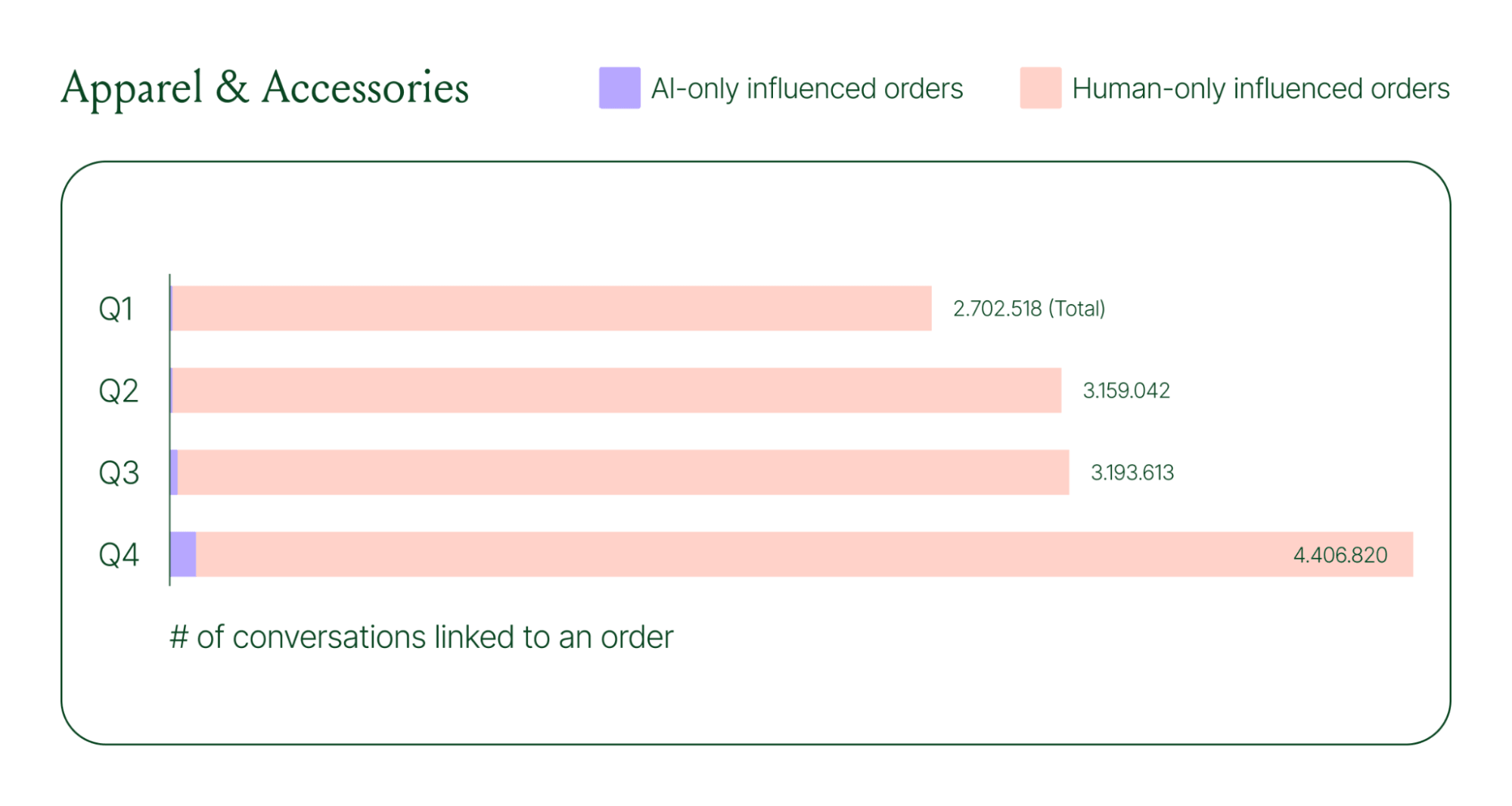
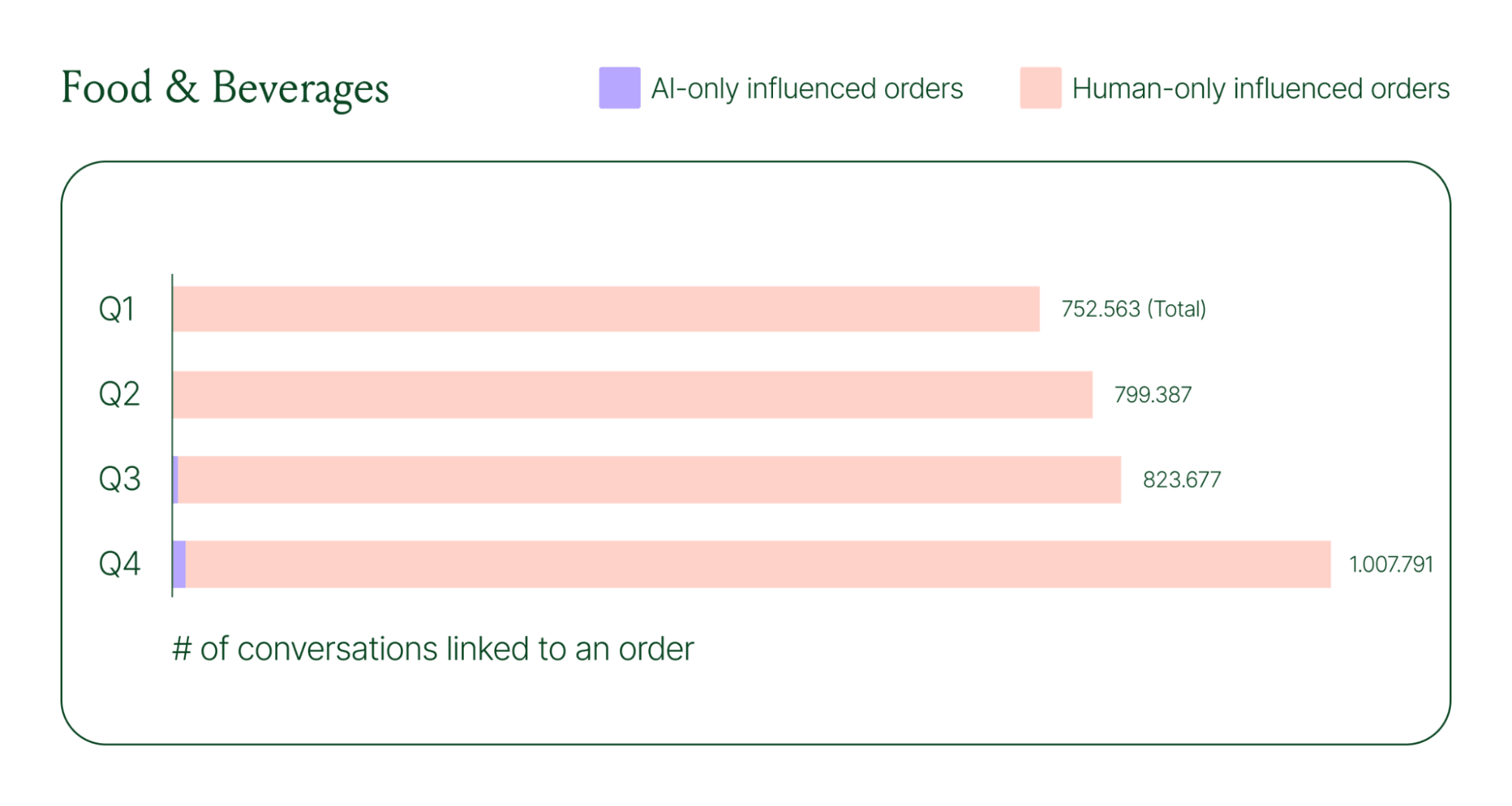
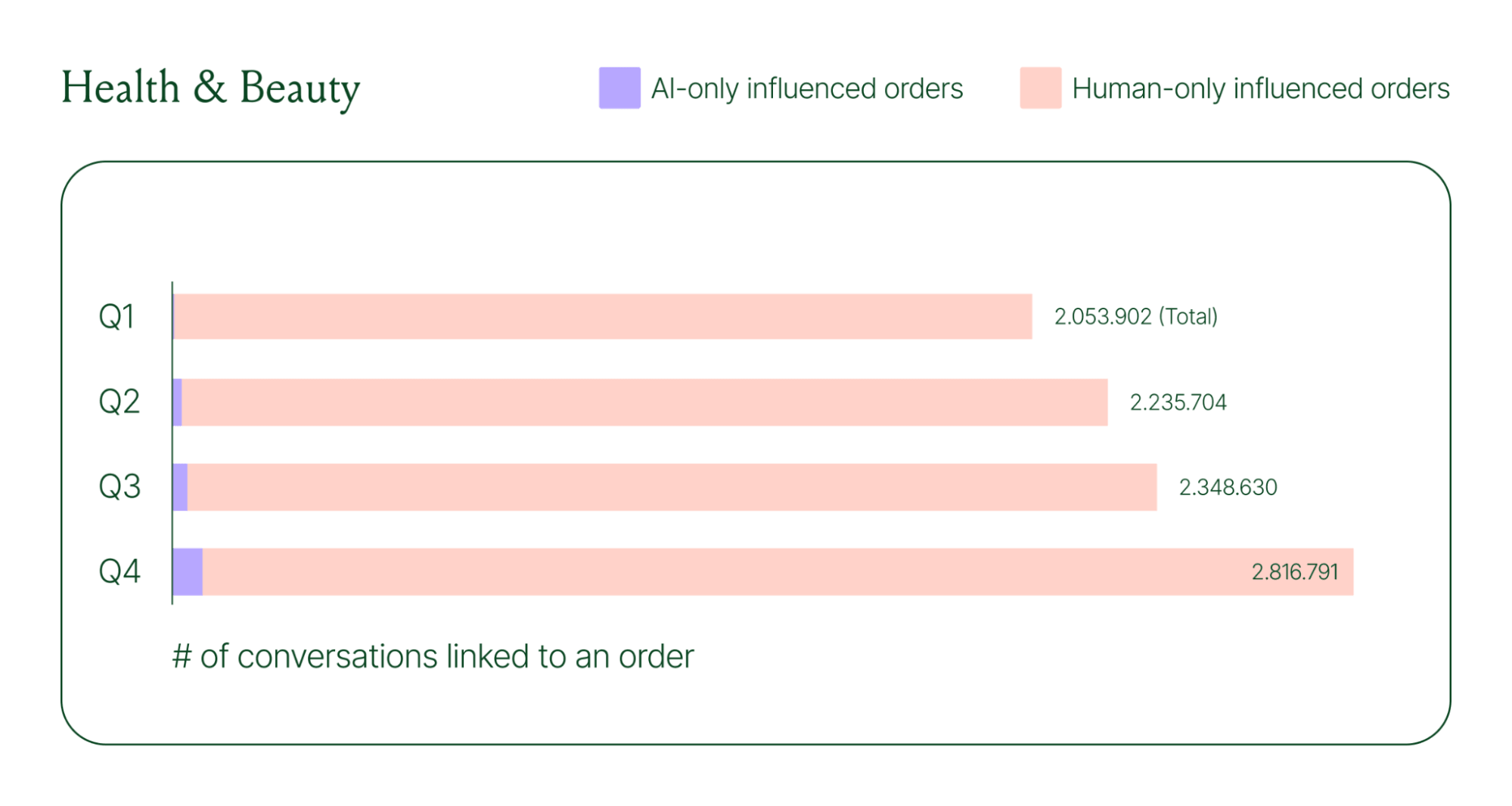
In 2025, chat’s growth outpaced email by 2.5x quarter over quarter. Chat has become our most powerful customer experience tool for how shoppers discover products, ask questions, and decide to buy.
We knew it needed an upgrade, so we reimagined the entire experience from the ground up.
The result is 36% more engagement with product recommendations, nearly 2.25x more shoppers add-to-cart, and 7.3% more customer engagement.
In this post, we'll walk you through our thinking, what’s new in Chat, and how brands are already seeing big gains.
Chat has outpaced email support. Today’s shoppers prefer the speed of quick chat conversations over email. And when shoppers make a new move, we watch, listen, and move with them.
This behavioral shift isn’t happening in isolation. It aligns with the rise of conversational commerce and proves a universal move toward real-time conversations in ecommerce.
In fact, the signals were already there. Two years of building AI Agent showed us just how much design shapes behavior. The interface is the experience, and we knew that pushing chat experiences to closely resemble human interactions would transform how shoppers engage.
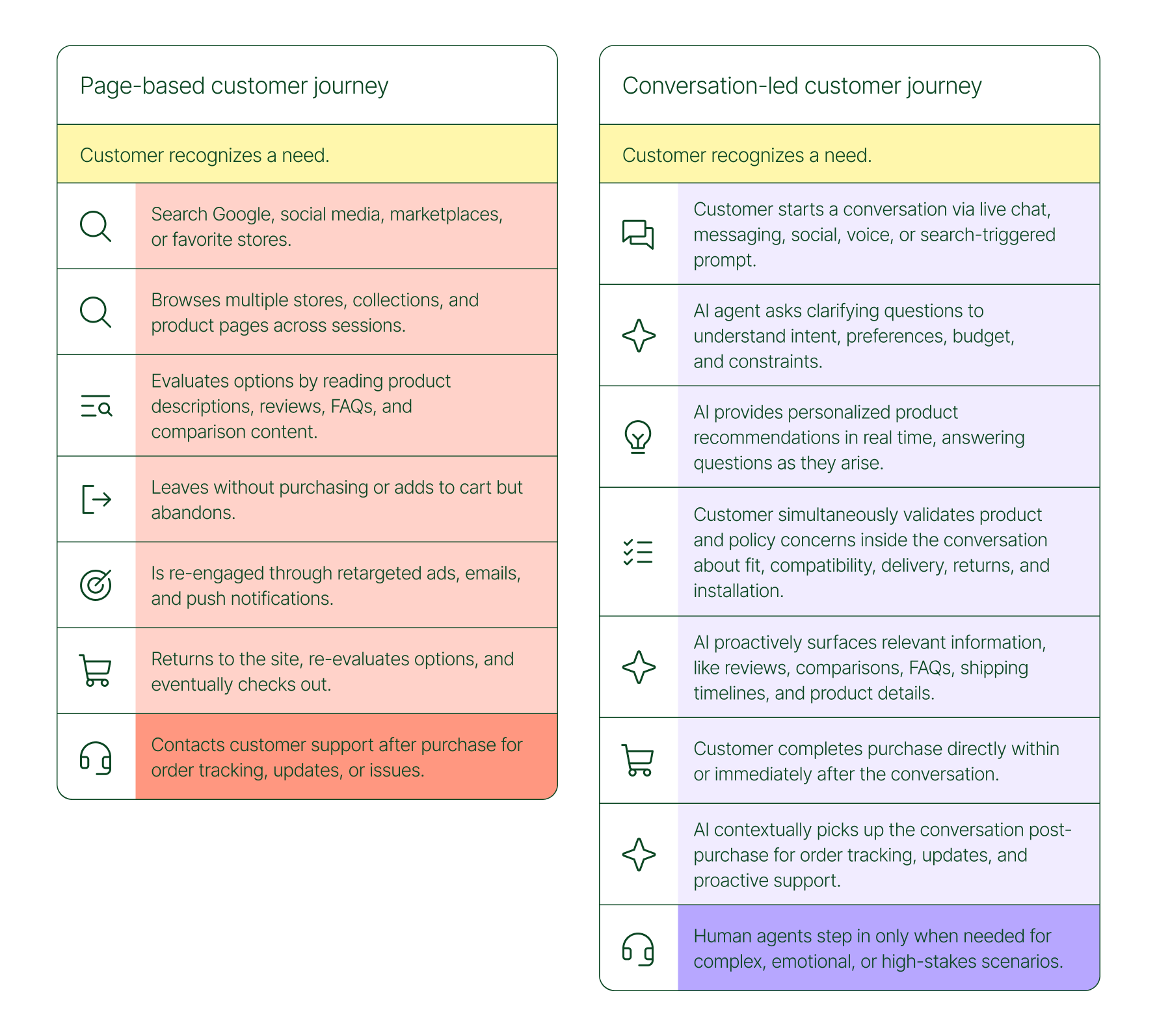
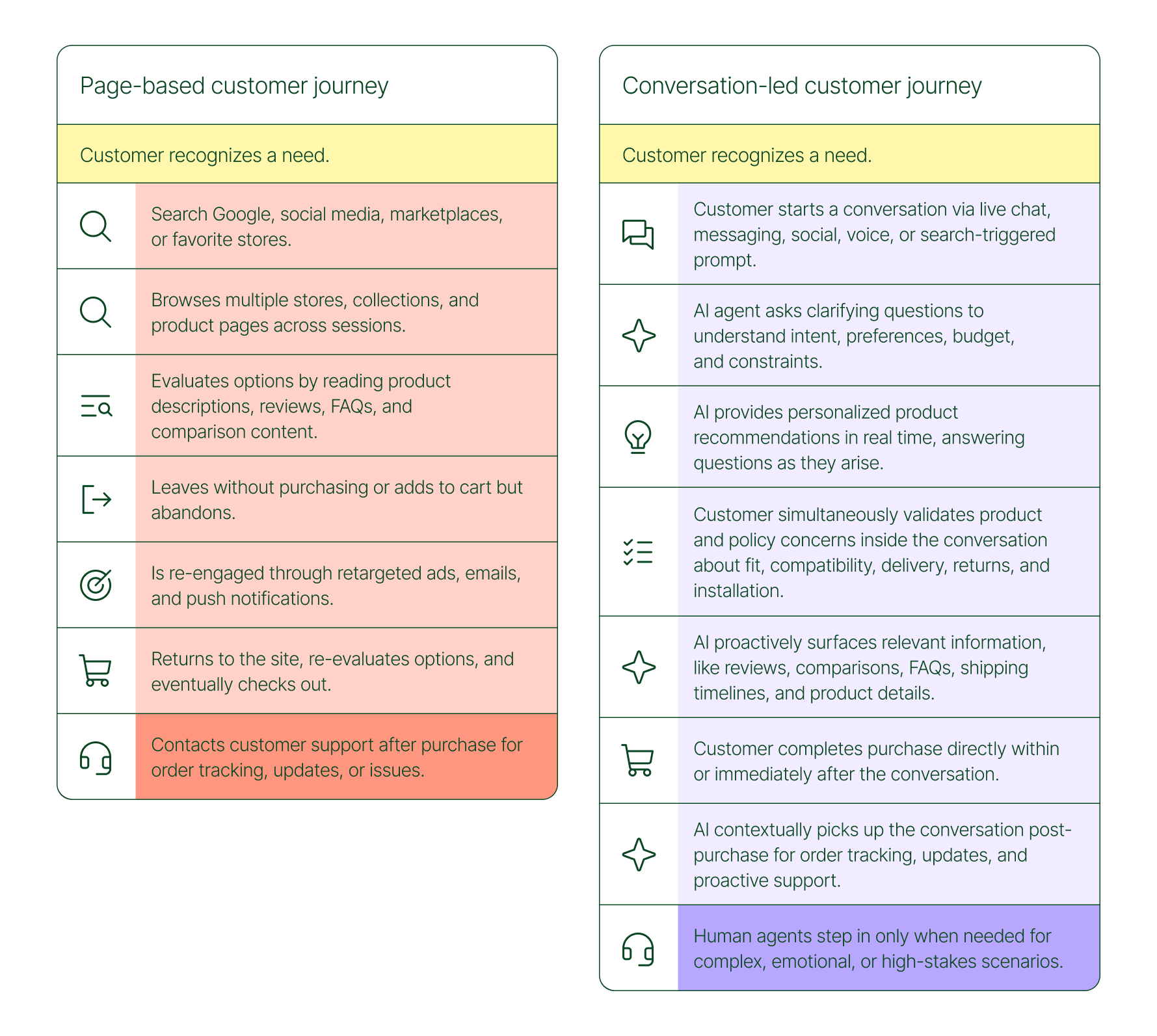
Our new and updated chat brings that vision to life. We believe that shopping is moving from static pages to conversations. This new update is built for how people actually want to shop.
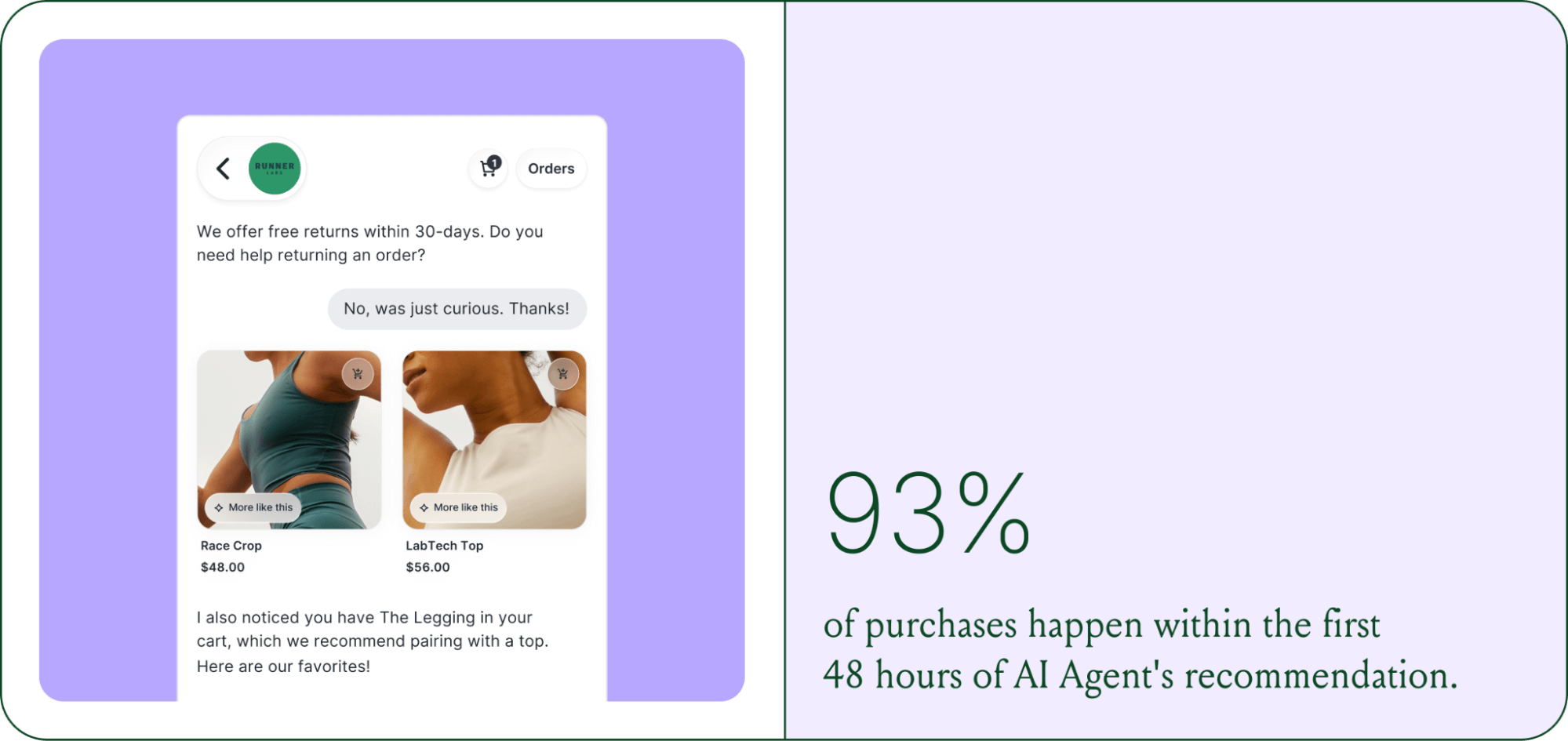
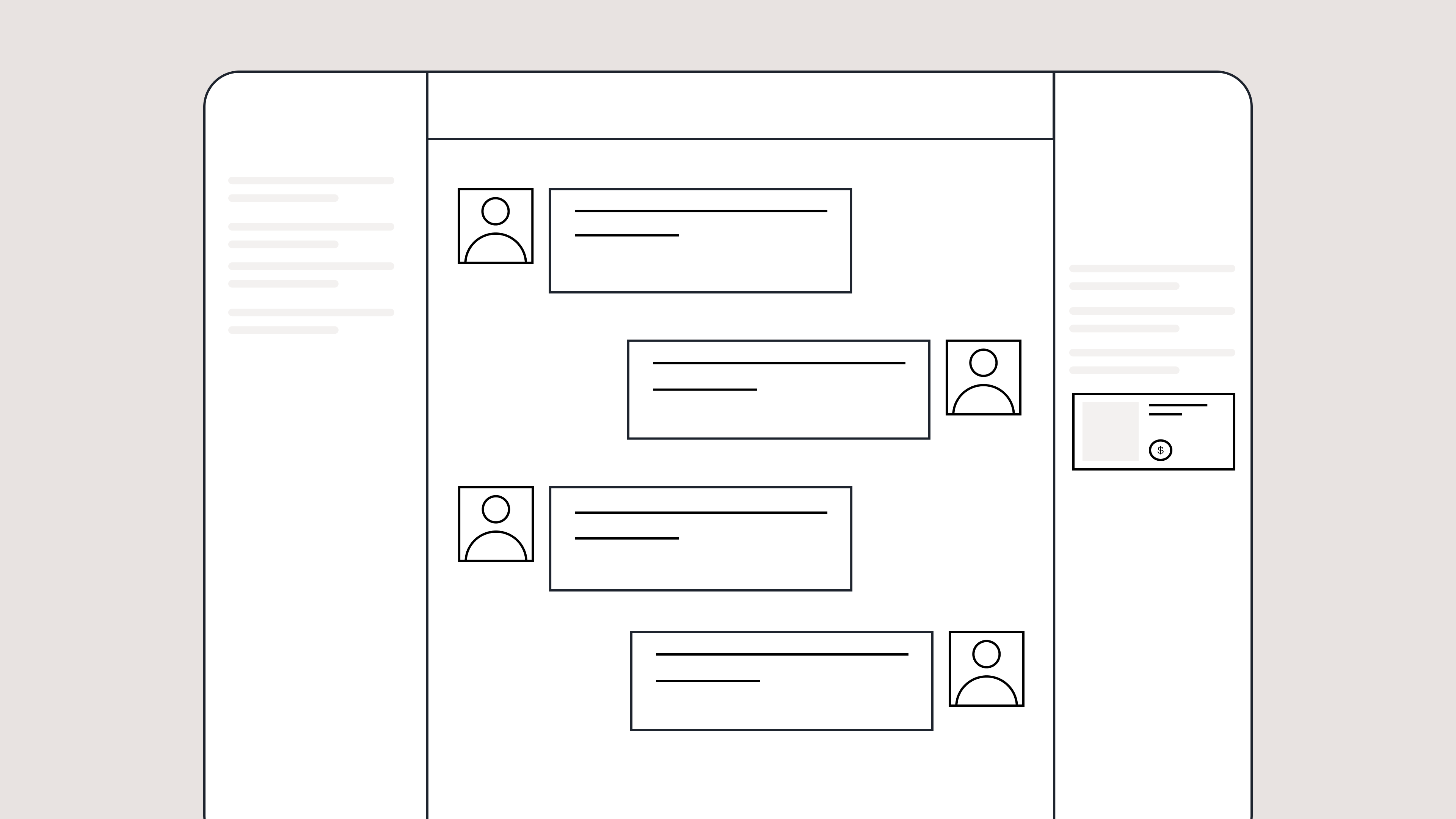
The new design turns live chat into an interactive shopping surface made for modern shoppers. We've brought together multiple ways for shoppers to jump into chat, added clickable replies instead of typing, browsable product cards right in the conversation, and quick cart access.
Let's walk through what's new.
Chat now comes in a softer color palette that adapts to your store’s branding. We removed message bubbles in favor of an airy design that brings in the familiarity of speaking to your favorite conversational AI assistant. Every interaction now has the breathing room for deeper conversation and personalization.

It’s now easier for shoppers to get an answer with quick reply buttons and suggested questions in Chat. This replaces the tree-based flows of the previous Chat, removing the need to follow a fixed path. Shoppers can find answers faster without typing text-heavy explanations.

Browsing and buying within Chat is now possible. Previously, it only supported product links that would open in a new page. With the upgrade, you can view item details without leaving the conversation. Shoppers can browse, compare products, and add to cart in one place.

We’re keeping the context by removing the external redirects. The new interface lets shoppers browse product recommendations right in chat. View key product details, images, descriptions, variants, and pricing without opening a new tab.

Chat adds clickable questions on product pages — like “Is this true to size?” or “What’s the difference between shades?” — designed to match what a shopper is likely wondering in the moment. These context-aware prompts help remove buying hesitation before shoppers even think to ask.

Chat adds instant access to shopper actions, like a cart button and an orders button for returning customers. Shoppers can jump straight to their cart or check on an existing order without waiting for an agent to give them a status update.

Every update in Chat drives performance. We didn’t simply give it a makeover, we also fine-tuned its underlying mechanics.
When product suggestions are easy to browse, shoppers interact with them more. The new product cards make shopping feel natural, allowing customers to explore items at their own pace. That convenience led to a 36% increase in engagement with recommended products.
Chat keeps the entire shopping journey inside the conversation, from browsing and asking questions, to adding to cart and checking out. This new layout removes the usual tab-switching between chat and the website. Less friction has led to more than double add-to-cart actions than before the redesign.
Chat's cleaner design and contextual entry points make it easier for shoppers to start a conversation. With suggested questions on product pages and quick reply buttons, more visitors are choosing to engage earlier in their journey. This has resulted in a 7.3% lift in chat engagement.
Conversational commerce has moved from concept to reality. Chat makes it part of the everyday shopping experience, letting shoppers browse, ask questions, compare products, and check out in one interaction. It brings the ease of the in-person shopping experience into the digital world.
We built Chat to redefine the shopping experience. We hope you see it reflected in your customers’ journeys.
Book a demo to see what's possible with the new experience.
TL;DR:
Your AI sounds like a robot, and your customers can tell.
Sure, the answer is right, but something feels off. The tone of voice is stiff. The phrases are predictable and generic. At most, it sounds copy-pasted. This may not be a big deal from your side of support. In reality, it’s costing you more than you think.
Recent data shows that 45% of U.S. adults find customer service chatbots unfavorable, up from 43% in 2022. As awareness of chatbots has increased, so have negative opinions of them. Only 19% of people say chatbots are helpful or beneficial in addressing their queries. The gap isn't just about capability. It's about trust. When AI sounds impersonal, customers disengage or leave frustrated.
Luckily, you don't need to choose between automation and the human touch.
In this guide, we'll show you six practical ways to train your AI to sound natural, build trust, and deliver the kind of support your customers actually like.
The fastest way to make your AI sound more human is to teach it to sound like you. AI is only as good as the input you give it, so the more detailed your brand voice training, the more natural and on-brand your responses will be.
Start by building a brand voice guide. It doesn't need to be complicated, but it should clearly define how your brand communicates with customers. At minimum, include:
Think of your AI as a character. Samantha Gagliardi, Associate Director of Customer Experience at Rhoback, described their approach as building an AI persona:
"I kind of treat it like breaking down an actor. I used to sing and perform for a living — how would I break down the character of Rhoback? How does Rhoback speak? What age are they? What makes the most sense?"
✅ Create a brand voice guide with tone, style, formality, and example phrases.
Humans associate short pauses with thinking, so when your AI responds too quickly, it instantly feels unnatural.
Adding small delays helps your AI feel more like a real teammate.
Where to add response delays:
Even a one- to two-second pause can make a big difference in a robotic or human-sounding AI.
✅ Add instructions in your AI’s knowledge base to include short response delays during key moments.
Generic phrases make your AI sound like... well, AI. Customers can spot a copy-pasted response immediately — especially when it's overly formal.
That doesn't mean you need to be extremely casual. It means being true to your brand. Whether your voice is professional or conversational, the goal is the same: sound like a real person on your team.
Here's how to replace robotic phrasing with more brand-aligned responses:
|
Generic Phrase |
More Natural Alternative |
|---|---|
|
“We apologize for the inconvenience.” |
“Sorry about that, we’re working on it now.” (friendly) |
|
“Your satisfaction is our top priority.” |
“We want to make sure this works for you.” (friendly) |
|
“Please be advised…” |
“Just a quick heads up…” (friendly) |
|
“Your request has been received.” |
“Got it. Thanks for reaching out.” (friendly) |
|
“I will now review your request.” |
“Let me take a quick look.” (friendly) |
✅ Identify your five most common inquiries and give your AI a rewritten example response for each.
One of the biggest tells that a response is AI-generated? It ignores what's already happened.
When your AI doesn't reference order history or past conversations, customers are forced to repeat themselves. Repetition can lead to frustration and can quickly turn a good customer experience into a bad one.
Great AI uses context to craft replies that feel personalized and genuinely helpful.
Here's what good context looks like in AI responses:
Tools like Gorgias AI Agent automatically pull in customer and order data, so replies feel human and contextual without sacrificing speed.
✅ Add instructions that prompt your AI to reference order details and/or past conversations in its replies, so customers feel acknowledged.
Customers just want help. They don't care whether it comes from a human or AI, as long as it's the right help. But if you try to trick them, it backfires fast. AI that pretend to be human often give customers the runaround, especially when the issue is complex or emotional.
A better approach is to be transparent. Solve what you can, and hand off anything else to an agent as needed.
When to disclose that the customer is talking to AI:
For more on this topic, check out our article: Should You Tell Customers They're Talking to AI?
✅ Set clear rules for when your AI should escalate to a human and include handoff messaging that sets expectations and preserves context.
We're giving you permission to break the rules a little bit. The most human-sounding AI doesn't follow perfect grammar or structure. It reflects the messiness of real dialogue.
People don't speak in flawless sentences every time. We pause, rephrase, cut ourselves off, and throw in the occasional emoji or "uh." When AI has an unpredictable cadence, it feels more relatable and, in turn, more human.
What an imperfect AI could look like:
These imperfections give your AI a more believable voice.
✅ Add instructions for your AI that permit variation in grammar, tone, and sentence structure to mimic real human speech.
Human-sounding AI doesn’t require complex prompts or endless fine-tuning. With the right voice guidelines, small tone adjustments, and a few smart instructions, your AI can sound like a real part of your team.
Book a demo of Gorgias AI Agent and see for yourself.
{{lead-magnet-2}}
The best in CX and ecommerce, right to your inbox

TL;DR:
Customer education has become a critical factor in converting browsers into buyers. For wellness brands like Cornbread Hemp, where customers need to understand ingredients, dosages, and benefits before making a purchase, education has a direct impact on sales. The challenge is scaling personalized education when support teams are stretched thin, especially during peak sales periods.
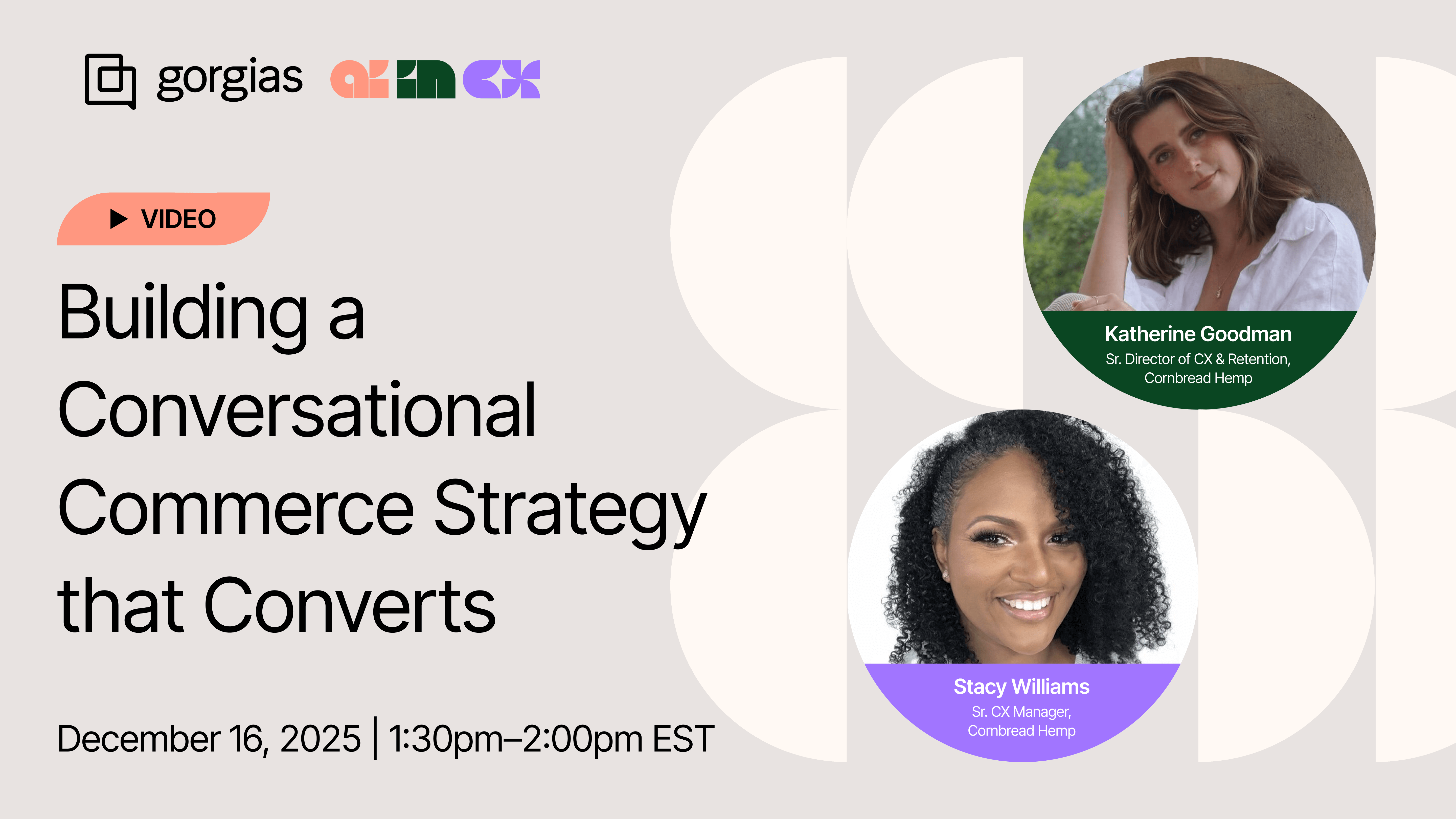
Katherine Goodman, Senior Director of Customer Experience, and Stacy Williams, Senior Customer Experience Manager, explain how implementing Gorgias's AI Shopping Assistant transformed their customer education strategy into a conversion powerhouse.
In our second AI in CX episode, we dive into how Cornbread achieved a 30% conversion rate during BFCM, saving their CX team over four days of manual work.
Before diving into tactics, understanding why education matters in the wellness space helps contextualize this approach.
Katherine, Senior Director of Customer Experience at Cornbread Hemp, explains:
"Wellness is a very saturated market right now. Getting to the nitty-gritty and getting to the bottom of what our product actually does for people, making sure they're educated on the differences between products to feel comfortable with what they're putting in their body."
The most common pre-purchase questions Cornbread receives center around three areas: ingredients, dosages, and specific benefits. Customers want to know which product will help with their particular symptoms. They need reassurance that they're making the right choice.
What makes this challenging: These questions require nuanced, personalized responses that consider the customer's specific needs and concerns. Traditionally, this meant every customer had to speak with a human agent, creating a bottleneck that slowed conversions and overwhelmed support teams during peak periods.
Stacy, Senior Customer Experience Manager at Cornbread, identified the game-changing impact of Shopping Assistant:
"It's had a major impact, especially during non-operating hours. Shopping Assistant is able to answer questions when our CX agents aren't available, so it continues the customer order process."
A customer lands on your site at 11 PM, has questions about dosage or ingredients, and instead of abandoning their cart or waiting until morning for a response, they get immediate, accurate answers that move them toward purchase.
The real impact happens in how the tool anticipates customer needs. Cornbread uses suggested product questions that pop up as customers browse product pages. Stacy notes:
"Most of our Shopping Assistant engagement comes from those suggested product features. It almost anticipates what the customer is asking or needing to know."
Actionable takeaway: Don't wait for customers to ask questions. Surface the most common concerns proactively. When you anticipate hesitation and address it immediately, you remove friction from the buying journey.
One of the biggest myths about AI is that implementation is complicated. Stacy explains how Cornbread’s rollout was a straightforward three-step process: audit your knowledge base, flip the switch, then optimize.
"It was literally the flip of a switch and just making sure that our data and information in Gorgias was up to date and accurate."
Here's Cornbread’s three-phase approach:
Actionable takeaway: Block out time for that initial knowledge base audit. Then commit to regular check-ins because your business evolves, and your AI should evolve with it.
Read more: AI in CX Webinar Recap: Turning AI Implementation into Team Alignment
Here's something most brands miss: the way you write your knowledge base articles directly impacts conversion rates.
Before BFCM, Stacy reviewed all of Cornbread's Guidance and rephrased the language to make it easier for AI Agent to understand.
"The language in the Guidance had to be simple, concise, very straightforward so that Shopping Assistant could deliver that information without being confused or getting too complicated," Stacy explains. When your AI can quickly parse and deliver information, customers get faster, more accurate answers. And faster answers mean more conversions.
Katherine adds another crucial element: tone consistency.
"We treat AI as another team member. Making sure that the tone and the language that AI used were very similar to the tone and the language that our human agents use was crucial in creating and maintaining a customer relationship."
As a result, customers often don't realize they're talking to AI. Some even leave reviews saying they loved chatting with "Ally" (Cornbread's AI agent name), not realizing Ally isn't human.
Actionable takeaway: Review your knowledge base with fresh eyes. Can you simplify without losing meaning? Does it sound like your brand? Would a customer be satisfied with this interaction? If not, time for a rewrite.
Read more: How to Write Guidance with the “When, If, Then” Framework
The real test of any CX strategy is how it performs under pressure. For Cornbread, Black Friday Cyber Monday 2025 proved that their conversational commerce strategy wasn't just working, it was thriving.
Over the peak season, Cornbread saw:
Katherine breaks down what made the difference:
"Shopping Assistant popping up, answering those questions with the correct promo information helps customers get from point A to point B before the deal ends."
During high-stakes sales events, customers are in a hurry. They're comparing options, checking out competitors, and making quick decisions. If you can't answer their questions immediately, they're gone. Shopping Assistant kept customers engaged and moving toward purchase, even when human agents were swamped.
Actionable takeaway: Peak periods require a fail-safe CX strategy. The brands that win are the ones that prepare their AI tools in advance.
One of the most transformative impacts of conversational commerce goes beyond conversion rates. What your team can do with their newfound bandwidth matters just as much.
With AI handling straightforward inquiries, Cornbread's CX team has evolved into a strategic problem-solving team. They've expanded into social media support, provided real-time service during a retail pop-up, and have time for the high-value interactions that actually build customer relationships.
Katherine describes phone calls as their highest value touchpoint, where agents can build genuine relationships with customers. “We have an older demographic, especially with CBD. We received a lot of customer calls requesting orders and asking questions. And sometimes we end up just yapping,” Katherine shares. “I was yapping with a customer last week, and we'd been on the call for about 15 minutes. This really helps build those long-term relationships that keep customers coming back."
That's the kind of experience that builds loyalty, and becomes possible only when your team isn't stuck answering repetitive tickets.
Stacy adds that agents now focus on "higher-level tickets or customer issues that they need to resolve. AI handles straightforward things, and our agents now really are more engaged in more complicated, higher-level resolutions."
Actionable takeaway: Stop thinking about AI only as a cost-cutting tool and start seeing it as an impact multiplier. The goal is to free your team to work on conversations that actually move the needle on customer lifetime value.
Cornbread isn't resting on their BFCM success. They're already optimizing for January, traditionally the biggest month for wellness brands as customers commit to New Year's resolutions.
Their focus areas include optimizing their product quiz to provide better data to both AI and human agents, educating customers on realistic expectations with CBD use, and using Shopping Assistant to spotlight new products launching in Q1.
The brands winning at conversational commerce aren't the ones with the biggest budgets or the largest teams. They're the ones who understand that customer education drives conversions, and they've built systems to deliver that education at scale.
Cornbread Hemp's success comes down to three core principles: investing time upfront to train AI properly, maintaining consistent optimization, and treating AI as a team member that deserves the same attention to tone and quality as human agents.
As Katherine puts it:
"The more time that you put into training and optimizing AI, the less time you're going to have to babysit it later. Then, it's actually going to give your customers that really amazing experience."
Watch the replay of the whole conversation with Katherine and Stacy to learn how Gorgias’s Shopping Assistant helps them turn browsers into buyers.
{{lead-magnet-1}}

TL;DR:
You’ve chosen your AI tool and turned it on, hoping you won’t have to answer another WISMO question. But now you’re here. Why is AI going in circles? Why isn’t it answering simple questions? Why does it hand off every conversation to a human agent?
Conversational AI and chatbots thrive on proper training and data. Like any other team member on your customer support team, AI needs guidance. This includes knowledge documents, policies, brand voice guidelines, and escalation rules. So, if your AI has gone rogue, you may have skipped a step.
In this article, we’ll show you the top seven AI issues, why they happen, how to fix them, and the best practices for AI setup.
{{lead-magnet-1}}
AI can only be as accurate as the information you feed it. If your AI is confidently giving customers incorrect answers, it likely has a gap in its knowledge or a lack of guardrails.
Insufficient knowledge can cause AI to pull context from similar topics to create an answer, while the lack of guardrails gives it the green light to compose an answer, correct or not.
How to fix it:
This is one of the most frustrating customer service issues out there. Left unfixed, you risk losing 29% of customers.
If your AI is putting customers through a never-ending loop, it’s time to review your knowledge docs and escalation rules.
How to fix it:
It can be frustrating when AI can’t do the bare minimum, like automate WISMO tickets. This issue is likely due to missing knowledge or overly broad escalation rules.
How to fix it:
One in two customers still prefer talking to a human to an AI, according to Katana. Limiting them to AI-only support could risk a sale or their relationship.
The top live chat apps clearly display options to speak with AI or a human agent. If your tool doesn’t have this, refine your AI-to-human escalation rules.
How to fix it:
If your agents are asking customers to repeat themselves, you’ve already lost momentum. One of the fastest ways to break trust is by making someone explain their issue twice. This happens when AI escalates without passing the conversation history, customer profile, or even a summary of what’s already been attempted.
How to fix it:
Sure, conversational AI has near-perfect grammar, but if its tone is entirely different from your agents’, customers can be put off.
This mismatch usually comes from not settling on an official customer support tone of voice. AI might be pulling from marketing copy. Agents might be winging it. Either way, inconsistency breaks the flow.
How to fix it:
When AI is underperforming, the problem isn’t always the tool. Many teams launch AI without ever mapping out what it's actually supposed to do. So it tries to do everything (and fails), or it does nothing at all.
It’s important to remember that support automation isn’t “set it and forget it.” It needs to know its playing field and boundaries.
How to fix it:
AI should handle |
AI should escalate to a human |
|---|---|
Order tracking (“Where’s my package?”) |
Upset, frustrated, or emotional customers |
Return and refund policy questions |
Billing problems or refund exceptions |
Store hours, shipping rates, and FAQs |
Technical product or troubleshooting issues |
Simple product questions |
Complex or edge‑case product questions |
Password resets |
Multi‑part or multi‑issue requests |
Pre‑sale questions with clear, binary answers |
Anything where a wrong answer risks churn |
Once you’ve addressed the obvious issues, it’s important to build a setup that works reliably. These best practices will help your AI deliver consistently helpful support.
Start by deciding what AI should and shouldn’t handle. Let it take care of repetitive tasks like order tracking, return policies, and product questions. Anything complex or emotionally sensitive should go straight to your team.
Use examples from actual tickets and messages your team handles every day. Help center articles are a good start, but real interactions are what help AI learn how customers actually ask questions.
Create rules that tell your AI when to escalate. These might include customer frustration, low confidence in the answer, or specific phrases like “talk to a person.” The goal is to avoid infinite loops and to hand things off before the experience breaks down.
When a handoff happens, your agents should see everything the AI did. That includes the full conversation, relevant customer data, and any actions it has already attempted. This helps your team respond quickly and avoid repeating what the customer just went through.
An easy way to keep order history, customer data, and conversation history in one place is by using a conversational commerce tool like Gorgias.
A jarring shift in tone between AI and agent makes the experience feel disconnected. Align aspects such as formality, punctuation, and language style so the transition from AI to human feels natural.
Look at recent escalations each week. Identify where the AI struggled or handed off too early or too late. Use those insights to improve training, adjust boundaries, and strengthen your automation flows.
If your AI chatbot isn’t working the way you expected, it’s probably not because the technology is broken. It’s because it hasn’t been given the right rules.
When you set AI up with clear responsibilities, it becomes a powerful extension of your team.
Want to see what it looks like when AI is set up the right way?
Try Gorgias AI Agent. It’s conversational AI built with smart automation, clean escalations, and ecommerce data in its core — so your customers get faster answers and your agents stay focused.

TL;DR:
Rising customer expectations, shoppers willing to pay a premium for convenience, and a growing lack of trust in social media channels to make purchase decisions are making it more challenging to turn a profit.
In this emerging era, AI’s role is becoming not only more pronounced, but a necessity for brands who want to stay ahead. Tools like Gorgias Shopping Assistant can help drive measurable revenue while reducing support costs.
For example, a brand that specializes in premium outdoor apparel implemented Shopping Assistant and saw a 2.25% uplift in GMV and 29% uplift in average order volume (AOV).
But how, among competing priorities and expenses, do you convince leadership to implement it? We’ll show you.
Shoppers want on-demand help in real time that’s personalized across devices.
Shopping Assistant recalls a shopper’s browsing history, like what they have clicked, viewed, and added to their cart. This allows it to make more relevant suggestions that feel personal to each customer.
The AI ecommerce tools market was valued at $7.25 billion in 2024 and is expected to reach $21.55 billion by 2030.
Your competitors are using conversational AI to support, sell, and retain. Shopping Assistant satisfies that need, providing upsells and recommendations rooted in real shopper behavior.
Conversational AI has real revenue implications, impacting customer retention, average order value (AOV), conversion rates, and gross market value (GMV).
For example, a leading nutrition brand saw a GMV uplift of over 1%, an increase in AOV of over 16%, and a chat conversion rate of over 15% after implementing Shopping Assistant.
Overall, Shopping Assistant drives higher engagement and more revenue per visitor, sometimes surpassing 50% and 20%, respectively.

Shopping Assistant engages, personalizes, recommends, and converts. It provides proactive recommendations, smart upsells, dynamic discounts, and is highly personalized, all helping to guide shoppers to checkout.
After implementing Shopping Assistant, leading ecommerce brands saw real results:
Industry |
Primary Use Case |
GMV Uplift (%) |
AOV Uplift (%) |
Chat CVR (%) |
|---|---|---|---|---|
Home & interior decor 🖼️ |
Help shoppers coordinate furniture with existing pieces and color schemes. |
+1.17 |
+97.15 |
10.30 |
Outdoor apparel 🎿 |
In-depth explanations of technical features and confidence when purchasing premium, performance-driven products. |
+2.25 |
+29.41 |
6.88 |
Nutrition 🍎 |
Personalized guidance on supplement selection based on age, goals, and optimal timing. |
+1.09 |
+16.40 |
15.15 |
Health & wellness 💊 |
Comparing similar products and understanding functional differences to choose the best option. |
+1.08 |
+11.27 |
8.55 |
Home furnishings 🛋️ |
Help choose furniture sizes and styles appropriate for children and safety needs. |
+12.26 |
+10.19 |
1.12 |
Stuffed toys 🧸 |
Clear care instructions and support finding replacements after accidental product damage. |
+4.43 |
+9.87 |
3.62 |
Face & body care 💆♀️ |
Assistance finding the correct shade online, especially when previously purchased products are no longer available. |
+6.55 |
+1.02 |
5.29 |
Shopping Assistant drives uplift in chat conversion rate and makes successful upsell recommendations.
“It’s been awesome to see Shopping Assistant guide customers through our technical product range without any human input. It’s a much smoother journey for the shopper,” says Nathan Larner, Customer Experience Advisor for Arc’teryx.
For Arc’teryx, that smoother customer journey translated into sales. The brand saw a 75% increase in conversion rate (from 4% to 7%) and 3.7% of overall revenue influenced by Shopping Assistant.

Because it follows shoppers’ live journey during each session on your website, Shopping Assistant catches shoppers in the moment. It answers questions or concerns that might normally halt a purchase, gets strategic with discounting (based on rules you set), and upsells.
The overall ROI can be significant. For example, bareMinerals saw an 8.83x return on investment.
"The real-time Shopify integration was essential as we needed to ensure that product recommendations were relevant and displayed accurate inventory,” says Katia Komar, Sr. Manager of Ecommerce and Customer Service Operations, UK at bareMinerals.
“Avoiding customer frustration from out-of-stock recommendations was non-negotiable, especially in beauty, where shade availability is crucial to customer trust and satisfaction. This approach has led to increased CSAT on AI converted tickets."

Shopping Assistant can impact CSAT scores, response times, resolution rates, AOV, and GMV.
For Caitlyn Minimalist, those metrics were an 11.3% uplift in AOV, an 18% click through rate for product recommendations, and a 50% sales lift versus human-only chats.
"Shopping Assistant has become an intuitive extension of our team, offering product guidance that feels personal and intentional,” says Anthony Ponce, its Head of Customer Experience.

Support agents have limited time to assist customers as it is, so taking advantage of sales opportunities can be difficult. Shopping Assistant takes over that role, removing obstacles for purchase or clearing up the right choice among a stacked product catalog.
With a product that’s not yet mainstream in the US, TUSHY leverages Shopping Assistant for product education and clarification.
"Shopping Assistant has been a game-changer for our team, especially with the launch of our latest bidet models,” says Ren Fuller-Wasserman, Sr. Director of Customer Experience at TUSHY.
“Expanding our product catalog has given customers more choices than ever, which can overwhelm first-time buyers. Now, they’re increasingly looking to us for guidance on finding the right fit for their home and personal hygiene needs.”
The bidet brand saw 13x return on investment after implementation, a 15% increase in chat conversion rate, and a 2x higher conversion rate for AI conversations versus human ones.

Customer support metrics include:
Revenue metrics to track include:
Shopping Assistant connects to your ecommerce platform (like Shopify), and streamlines information between your helpdesk and order data. It’s also trained on your catalog and support history.
Allow your agents to focus on support and sell more by tackling questions that are getting in the way of sales.
{{lead-magnet-2}}
TL;DR:
Re:amaze pricing follows a per-user model that starts at $29 per month for the Basic plan. The platform offers three main tiers: Basic, Pro, and Plus. Each tier adds features like SMS support, advanced reporting, and team management tools.
Annual billing reduces costs by roughly 10%, and enterprise options are available for brands with custom needs. Understanding what you get at each tier helps you decide if Re:amaze fits your support strategy and budget. This guide breaks down each plan and compares Re:amaze to platforms built for ecommerce.
{{lead-magnet-1}}
Re:amaze uses per-user pricing, also called per-seat pricing, where you're charged based on the number of team members using the platform. The three main tiered plans—Basic, Pro, and Plus—each build on the previous tier's features. Annual billing saves you 10% compared to monthly pricing.
A flat-rate Starter plan exists for teams handling fewer than 500 responded conversations per month, offering unlimited users for $59 USD/month. Enterprise custom pricing is available for high-volume brands or those requiring specialized implementation.
|
Plan |
Monthly |
Annual (10% off) |
|---|---|---|
|
Basic |
$29/user |
$26.10/user |
|
Pro |
$49/user |
$44.10/user |
|
Plus |
$69/user |
$62.10/user |
|
Enterprise |
Custom |
Custom |
Re:amaze offers a 14-day free trial with access to all Plus plan features and no credit card required. Billing options include monthly, annual, and volume-based pricing for the Starter plan.
Each tier builds on the previous plan's features, adding functionality as you move up. The Basic plan covers core helpdesk capabilities, while Pro and Plus add multi-brand support, advanced reporting, and team management tools.
The Basic plan costs $29/user/month ($26.10/user billed annually) and includes core helpdesk features for teams just getting started with structured support.
Core features included:
What's not included: multi-brand support, SMS and voice channels, advanced reporting, team management features.
Best for solo support agents or very small teams testing helpdesk software without significant channel or reporting needs.
The Pro plan costs $49/user/month ($44.10/user billed annually) and adds multi-brand capabilities and communication channels beyond email and chat.
Everything in Basic, plus:
What's not included: team management features, satisfaction surveys, co-browse and video calls.
Best for growing brands managing multiple stores or needing SMS and voice support alongside email and chat.
The Plus plan costs $69/user/month ($62.10/user billed annually) and adds team management, performance tracking, and advanced collaboration tools.
Everything in Pro, plus:
Note: The 14-day trial includes all Plus plan features, so you can test team management and advanced reporting before committing.
Best for established teams needing full team management, performance tracking, and collaboration features like screen sharing.
Enterprise pricing is custom and starts around $899/month based on volume and contract terms. This tier is for high-volume brands or those signing annual contracts.
It includes customizable features, volume-based or annual pricing discounts, dedicated implementation, and priority support. Contact Re:amaze's sales team for a quote tailored to your needs.
Re:amaze groups features into categories that matter for support operations: channels, automation, reporting, and team management. Understanding how these features stack across plans helps you compare Re:amaze against ecommerce-specific platforms.
Brands like SkyBell use Re:amaze to manage support across multiple channels, but the platform's strengths lean toward general helpdesk functionality rather than deep ecommerce integration.
Re:amaze offers a unified inbox for email, live chat, and social media channels including Facebook, Instagram, and Twitter. SMS and voice support are available in Pro and Plus plans through integrations with Twilio, RingCentral, and similar providers.
A Shopify integration is available and allows you to view customer order data within tickets. However, this help chat Shopify integration isn't as deeply embedded as purpose-built ecommerce platforms that let you edit, cancel, or refund orders directly from the support interface.
Channels supported:
Re:amaze includes chatbots in all plans, with both prebuilt bots for common queries and custom workflows. Workflow automation (called Macros in Re:amaze) is available across all tiers, along with response templates and proactive messages (Cues).
Automation features available:
AI capabilities focus on tagging and suggestions rather than autonomous resolution. Re:amaze doesn't offer an AI agent that fully resolves and closes tickets without human intervention.
Reporting capabilities increase as you move up tiers. Basic plans include volume, response time, and first response rate metrics. Pro and Plus add satisfaction ratings, tag analytics, and workflow performance tracking.
What's available at each level:
Re:amaze offers limited ecommerce-specific metrics compared to platforms built for online stores. You won't find gross merchandise value (GMV) tracking or detailed revenue attribution beyond basic Shopify order data.
Team management features are concentrated in the Plus plan. Departments allow you to assign conversations to specific team groups, while custom staff roles let you control permissions at a granular level. Staff shifts and vacation tracking help you manage coverage.
Plus plan team management features:
Basic and Pro plans include basic user permissions but lack the structured team management suitable for larger support organizations.
Other platforms to consider include Gorgias, Zendesk, Help Scout, Intercom, Freshdesk, Kustomer, and Tidio. Each platform positions differently: some focus on ecommerce (Gorgias, Kustomer), while others target broader markets (Zendesk, Intercom). Comparing features at similar price points helps clarify what you're gaining or losing.
At comparable per-user pricing, Gorgias offers features purpose-built for ecommerce brands. The platform is a Shopify Premium Partner, meaning it has the deepest possible integration with Shopify's order management, customer data, and checkout systems.
|
Feature |
Re:amaze |
Gorgias |
|---|---|---|
|
Starting price |
$29/user/month |
Similar per-user pricing |
|
Shopify integration |
Available (view orders) |
Premium Partner (edit, cancel, refund in-ticket) |
|
AI capabilities |
Tagging, intent detection |
AI Agent (resolves tickets and drives revenue) |
|
Order management |
View orders |
Edit, cancel, refund directly in tickets |
|
Revenue tracking |
Basic Shopify orders |
GMV tracking, revenue attribution |
|
Built for |
General helpdesk |
Ecommerce-specific |
Gorgias's AI Agent autonomously resolves support tickets and converts browsers into buyers, tracking the revenue impact of every conversation. Order management capabilities let agents edit shipping addresses, cancel orders, or process refunds without leaving the support interface. This level of ecommerce integration reduces resolution time and improves the customer experience during critical moments like order issues or returns.
Evaluating helpdesk software means testing it with real conversations and integrations. Re:amaze's trial gives you access to Plus plan features, which helps you assess team management and reporting before deciding.
Follow these steps to evaluate Re:amaze effectively:
If you're looking for a helpdesk built specifically for ecommerce, book a demo with Gorgias to see how our platform handles support and revenue in one place.
{{lead-magnet-2}}
TL;DR:
Freshdesk's pricing looks straightforward at first glance. Per-agent plans start at $15/month for basic ticketing.
But the real cost becomes clear once you add omnichannel support, AI automation, and the integrations your team actually needs.
Session limits expire monthly, collaboration costs scale per seat, and many essential features live behind higher-tier paywalls.
This guide breaks down what you'll actually pay for Freshdesk in 2026, from core ticketing plans to AI add-ons and hidden costs. We'll also show you how Gorgias delivers predictable pricing with ecommerce-native automation built in.
{{lead-magnet-1}}
Freshdesk uses a modular pricing model that splits support tools into separate products. Per-agent licensing means you pay for each support team member who uses the platform, and costs increase as your team grows.
The company offers four main modules:
Each module is priced separately, though some bundles exist. Annual billing saves 15-20% compared to monthly payments.
|
Module |
Starting Price (Annual) |
Starting Price (Monthly) |
Core Use Case |
|---|---|---|---|
|
Freshdesk Ticketing |
$15 USD/agent/month |
$18/agent/month |
Email support and basic ticketing |
|
Freshdesk Omni |
$29/agent/month |
$35/agent/month |
Unified multichannel inbox |
|
Freshchat |
$19/agent/month |
$23/agent/month |
Live chat and messaging |
|
Freshcaller |
$15/agent/month |
$18/agent/month |
Phone support system |
The costs stack when you combine modules. A team using Freshdesk Pro ticketing ($49/agent) plus Omni ($29/agent) pays $78 per agent per month before AI add-ons.
Freshdesk's core ticketing platform offers three paid plans: Growth, Pro, and Enterprise. A free plan exists but lacks fundamental features like advanced automation and multichannel support, making it impractical for most teams.
|
Plan |
Price/Agent/Month (Annual) |
Best For |
Key Features |
|---|---|---|---|
|
Growth |
$15 |
Small teams with basic needs |
Email ticketing, one SLA, basic automation, standard reports |
|
Pro |
$49 |
Growing teams needing routing & analytics |
Multiple SLAs, custom dashboards, multilingual, 500 AI sessions |
|
Enterprise |
$79 |
Large teams requiring security & compliance |
Audit logs, skill-based routing, sandbox, IP whitelisting |
Growth costs $15/agent/month when billed annually. Growth fits small teams needing basic ticketing with simple workflows.
What's included:
Key limitations: Growth doesn't include advanced routing options, multiple SLAs, or multilingual conversation support. You also miss out on custom dashboards and AI Agent sessions. Upgrade to Pro when your team needs more sophisticated automation or serves multiple product lines or regions.
Pro costs $49/agent/month when billed annually. Pro fits growing teams needing advanced routing, multilingual support, and stronger analytics.
Everything in Growth plus:
What's still missing: Enterprise security features like audit logs and IP whitelisting, sandbox environments for testing, and skill-based routing. Freddy Copilot costs extra even on Pro.
Enterprise costs $79/agent/month when billed annually. Enterprise fits large teams requiring advanced automation, security, and global support operations.
Everything in Pro plus:
Note that Freddy Copilot still costs $29/agent/month extra, even at the Enterprise tier.
Freshdesk's core ticketing plans focus on email support. If you need live chat, social media, SMS, or phone support, you'll purchase separate omnichannel modules. Each module is priced per agent, and costs stack when you combine them.
Freshdesk Omni ($29/agent/month) provides a unified inbox that consolidates conversations from email, WhatsApp, SMS, Facebook, Instagram, and other channels. It includes IntelliAssign for intelligent routing and custom portals for different customer segments.
Freshchat ($19/agent/month) focuses specifically on live chat and messaging. It includes chatbot capabilities, proactive messaging, and campaign tools. Teams using this alongside core ticketing pay for both seats.
Freshcaller ($15/agent/month) adds cloud phone system capabilities with call routing, IVR, call recording, and voicemail. Like other modules, it's billed per agent who needs phone access.
|
Module |
Starting Price |
Key Features |
Best For |
|---|---|---|---|
|
Freshdesk Omni |
$29/agent/month |
Unified inbox, WhatsApp, SMS, social media routing |
Teams needing full omnichannel support |
|
Freshchat |
$19/agent/month |
Live chat, chatbots, proactive messaging, campaigns |
Teams prioritizing real-time chat |
|
Freshcaller |
$15/agent/month |
Cloud phone, call routing, IVR, recording |
Teams offering phone support |
The modular approach means flexibility, but total costs add up quickly. A team using Pro ticketing ($49) plus Omni ($29) pays $78 per agent per month. Add Freshcaller ($15) and you're at $93 per agent before AI costs.
Freshdesk offers two AI products: Freddy Copilot and AI Agent. Both are add-ons that cost extra beyond base ticketing plans.
Freddy Copilot is an agent-assist tool priced per user. It helps human agents write better responses with AI suggestions, ticket summaries, and tone adjustments.
AI Agent handles customer conversations autonomously using a session-based pricing model. Sessions are purchased in packs and expire monthly with no rollover.
|
Feature |
Freddy Copilot |
AI Agent |
|---|---|---|
|
Pricing |
$29/agent/month |
$100 per 1,000 sessions |
|
Billing Model |
Per agent subscription |
Session packs with expiration |
|
Core Purpose |
Agent assistance |
Autonomous resolution |
|
Key Capabilities |
Reply suggestions, summaries, tone adjustment |
Auto-resolve conversations, perform actions |
|
Limits |
40 translations per license/month |
Sessions expire end of billing cycle |
|
Availability |
Add-on (included in Pro ticketing) |
Add-on (500 sessions included in Pro) |
Freddy Copilot costs $29/agent/month. You don't need to purchase it for every agent. Only purchase it for those who want AI assistance.
Capabilities included:
The main limitation: Copilot includes only 40 translations per license per month. Teams supporting multiple languages may find this restrictive.
Freddy Copilot is available as a paid add-on for Growth and Enterprise plans. It's included with Pro ticketing plans at no extra cost.
AI Agent sessions cost $100 per 1,000 sessions. A session is one complete customer conversation from start to resolution, regardless of how many messages are exchanged.
How sessions work:
Pro plans include the first 500 AI Agent sessions per month. Beyond that, you purchase additional packs at $100 per 1,000 sessions.
The expiration policy means unused sessions provide no value. A team that purchases 1,000 sessions but only uses 600 loses the remaining 400 at month-end.
Freshdesk's listed prices don't tell the full story. Several non-obvious cost drivers can significantly increase your actual spend.
AI session packs expire monthly with no rollover. If you don't use all 1,000 sessions in a pack, those sessions disappear at billing cycle end. Auto-recharge can surprise teams when it triggers at 400 remaining sessions, adding $100 to your bill.
Freddy Copilot is per-agent, so costs grow with your team. Ten agents with Copilot means $290 extra per month beyond base ticketing costs.
Example: A 10-agent team on Pro ($49/agent = $490) adding Copilot for everyone ($29/agent = $290) plus 2,000 AI Agent sessions ($200) pays $980/month instead of the advertised $490.
Per-agent pricing means every support team member costs money. Adding seasonal or part-time agents increases your bill immediately.
Simple math: Growing from 5 agents to 10 agents doubles your base cost. On the Pro plan, that's jumping from $245/month to $490/month.
Collaborators (view-only users) are free but limited to 5,000. Most teams won't hit this limit, but it exists.
Many essential features live on Pro or Enterprise tiers only. Growth users can't access:
Some integrations require higher tiers or incur separate fees. Application programming interface (API) rate limits exist but aren't publicly documented for paid plans, creating uncertainty about integration costs.
Freshdesk works well for specific use cases, particularly traditional business-to-business (B2B) or business-to-consumer (B2C) support teams with standard ticketing needs.
Freshdesk fits when you need:
Consider alternatives if you're:
For ecommerce businesses, platforms like Gorgias offer better alignment with Shopify workflows, revenue attribution, and predictable pricing.
Unlike Freshdesk's modular approach, Gorgias is purpose-built for ecommerce. The platform integrates directly with Shopify, enabling support teams to manage orders, process returns, and drive revenue without switching tools.
|
Feature |
Freshdesk |
Gorgias |
|---|---|---|
|
Base Pricing |
$15/agent (Growth), modules extra |
Ticket-based, omnichannel included |
|
Omnichannel |
Separate Omni module ($29/agent) |
Included in all plans |
|
AI Automation |
Session-based, expires monthly |
Built-in, up to 60% automation |
|
Ecommerce Integration |
Basic via marketplace apps |
Native Shopify integration |
|
Revenue Features |
None |
Upsells, recommendations, attribution |
Gorgias is built for ecommerce, not generic support. Deep Shopify integration means agents can cancel orders, process refunds, modify subscriptions, and update shipping addresses directly inside tickets—no tab-switching required.
AI Agent automates common ecommerce intents like where is my order (WISMO), return requests, and order modifications.
AI Agent automates common ecommerce intents like where is my order (WISMO), return requests, and order modifications. Instead of deflecting customers to Self-service, it resolves their issues automatically.
Revenue features turn support into a profit center:
Example: A customer asks about sizing. Instead of just answering, your agent recommends a complementary product and applies a bundle discount—all within the same ticket. Support becomes a revenue channel, not just a cost center.
Up to 60% of repetitive tickets can be automated with Gorgias AI Agent. The system learns your brand voice, policies, and common scenarios, then handles conversations that match those patterns.
Unlike Freshdesk's session-based AI, Gorgias AI Agent performs real actions:
The Guidance system gives you control over AI behavior. Set rules for when AI should escalate to humans, which actions require approval, and how to handle edge cases. Your AI stays on-brand and follows your policies automatically.
Gorgias includes omnichannel support—email, live chat, SMS, Instagram, Facebook, voice—in base plans. No separate modules, no per-channel fees, no surprise add-ons.
Predictable pricing means you know what you'll pay:
Implementation takes days, not months. Ecommerce-focused onboarding teams understand Shopify workflows, peak season preparation, and common automation patterns. You get dedicated support from people who've worked with hundreds of online stores.
Selecting the right Freshdesk plan depends on your team size, channel requirements, automation needs, and security posture. Here's how to decide.
Growth fits small teams with simple needs and email-first support models.
What you get:
What you don't get:
Upgrade to Pro when you need sophisticated automation, serve multiple product lines, or require custom analytics.
Pro fits mid-sized teams managing multiple products, regions, or customer segments with different service requirements.
Everything in Growth plus:
What you still miss: Enterprise security controls like audit logs, IP whitelisting, sandbox environments, and skill-based routing.
Upgrade to Enterprise when compliance requirements demand audit trails or when your routing needs become highly specialized.
Enterprise fits large teams with complex routing requirements, strict compliance needs, or global operations requiring advanced governance.
Everything in Pro plus:
Note that Freddy Copilot still costs $29/agent/month extra if you're on the Enterprise Omni or other non-ticketing plans.
Consider alternatives like Gorgias if you're an ecommerce brand that doesn't need enterprise-level security but wants predictable pricing with built-in automation.
Omnichannel modules are separate purchases that significantly increase total cost. Add them only if:
Example cost impact: Pro ticketing ($49/agent) + Omni ($29/agent) = $78/agent/month. For a 10-agent team, that's $780/month instead of $490/month.
Gorgias includes omnichannel in base pricing without separate module fees.
Freshdesk offers standard billing options with modest discounts for annual commitments.
Key billing facts:
Billing cycles start on your purchase date. AI Agent sessions expire at cycle end with no rollover, so plan usage carefully to avoid waste.
Gorgias delivers predictable omnichannel pricing with AI automation built for Shopify brands. See how our platform reduces ticket volume, drives revenue, and scales with your team without hidden costs or session limits. Book a demo to compare Gorgias and Freshdesk side by side.{{
{{lead-magnet-2}}

You might be assuming that there’s really nothing you can do to change this outside of overworking your team, or hiring more people.
This is completely normal, but there’s no need to panic. That’s because with Gorgias you can now integrate Loop in your ecommerce store. In case you’re wondering, Loop is an on-demand portal that allows customers to get the product they want, with less support touchpoints.
Using Loop, there are many ways you can reduce one of the biggest and more time-consuming support-related requests… returns. Plus, they do this while still giving your customers a seamless experience.
So, let’s dive in.
Did you know that 40% of support tickets are order related, with 5% being about returns? It might not seem like something worth looking into, or too problematic, but it is.
Though these customers returning items do deserve a great level of customer care (everyone does), it’s not the most valuable way to actually use your support team’s skills.
Why? Glad you asked.
It’s always good to remember that your support team is juggling a lot more than you think because there’s so many different types of requests that come through. One of those requests that takes a lot of time is, you guessed it, return requests. While these are important, they don’t exactly require a human touch since they’re very straightforward and focus heavily on process.
If your support team isn’t able to address other requests in a timely manner, that could mean losing new customers or returning ones because of those support tickets.
Luckily, return-requests can be easily automated.
It may come as a surprise to hear that your customers don’t actually want a high touch support experience for returns from your team. They actually want to be the ones to choose where and when they want to engage with support teams.
Since customers want a more on-demand experience when it comes to returns and something that happens fast, automation doesn’t hurt in these scenarios since it can be quick.

Bringing Loop and Gorgias together for a seamless customer experience that saves your team time is like a dream come true.
But how exactly, can this address the issues we’ve been discussing?
First off, this partnership will allow your support team to use that extra time in valuable ways that make sense and benefit the business. For example, focusing more on new customers, shipping issues and more.
Secondly, it benefits your customers since it allows them to take control of their returns and do things on their own time. This makes it more seamless and makes them feel like the return process is easier than ever.

Using both Loop and Gorgias together will create a better environment all around, decreasing stress both within your support team and customers so that your team can focus on conversions instead of returns.
Whether you’ve been looking for a way to reduce your support requests related to returns, or if it’s something new on your radar, it’s worth thinking about. Thankfully, you can sign up for a free 7-day trial with Gorgias and add in the Loop integration to see just how much time it can save.
TL;DR:
Zendesk's pricing starts at $19/agent/month for basic ticketing and scales to $169/agent/month for enterprise omnichannel support. But advertised rates rarely tell the full story, as add-ons and implementation costs push total ownership higher.
This guide breaks down Zendesk's plan tiers and true costs so you can budget accurately. We'll also show you where transparent, ecommerce-focused alternatives might be a better fit.
{{lead-magnet-1}}
Zendesk uses per-agent pricing across 2 main product lines: Support (ticketing only) and Suite (omnichannel). Plans range from $19 to $169/agent/month depending on features and channels.
Each person on your support team needs a paid seat. As you hire, your software costs scale directly with headcount. This means a 10-person team pays 10 times what a single agent pays, and a 50-person team pays 50 times that amount.
Annual billing saves roughly 20% compared to monthly. For example, Suite Team costs $55/agent/month annually versus $69/agent/month on monthly billing. The model itself is straightforward:
Support plans focus on ticketing for email and social channels (X, Facebook). They lack phone, chat, and Help Center capabilities.
Suite plans bundle ticketing with live chat, voice, messaging, and a self-service help center. This is Zendesk's omnichannel option.
Choose Support if you only need email ticketing. Choose Suite if customers contact you across multiple channels.
Per-agent pricing means your bill grows with your team. A 10-person team on Suite Professional pays $1,150/month. A 50-person team pays $5,750/month. Understanding the marginal cost of customer service becomes critical at this scale.
Annual billing reduces costs by roughly 20%. Suite Team drops from $69/month to $55/month per agent. Monthly billing costs more but lets you test Zendesk before committing. Useful for seasonal hiring or pilot programs.
Support plans provide ticketing, automation, and reporting for email and social channels. They're Zendesk's entry point but lack phone, chat, and Help Center.
Support Team: $19/agent/month (annual) or $25/agent/month (monthly)
No phone, chat, or Help Center. Best for very small teams handling email only.
Support Professional: $55/agent/month (annual) or $69/agent/month (monthly)
Adds to Team:
Still lacks voice and chat channels. Requires Suite upgrade for omnichannel.
Support Enterprise: $115/agent/month (annual) or $149/agent/month (monthly)
Adds to Professional:
Maximum Support tier but still email-focused. Consider Suite for full channel coverage.
Suite plans include ticketing plus Live Chat, voice, messaging, and Help Center in one package. This is Zendesk's omnichannel solution.
Each tier includes a set number of Help Centers (1, 5, or 300). Multi-brand businesses may hit this limit.
Suite Team: $55/agent/month (annual) or $69/agent/month (monthly)
Single Help Center limits multi-brand setups. Basic AI only.
Suite Growth: $89/agent/month (annual) or $115/agent/month (monthly)
Adds to Team:
Still limited to basic AI. Advanced AI requires $50/agent/month add-on.
Suite Professional: $115/agent/month (annual) or $149/agent/month (monthly)
Adds to Growth:
Good for mid-market but still requires add-ons for full AI capabilities.
Suite Enterprise: $169/agent/month (annual) or $219/agent/month (monthly)
Adds to Professional:
Highest tier but add-ons still required for full AI, WFM, and security features.
Base plans don't include all AI and specialized features. Add-ons cost $25-50/agent/month each and compound quickly across your team.
A 10-agent team adding Advanced AI ($50) and WFM ($25) pays an extra $750/month beyond base plan costs.
Advanced AI: $50/agent/month
Must purchase for all agents. No selective assignment.
Example: 10 agents = $500/month additional cost
WFM: $25/agent/month for scheduling, forecasting, and capacity planning
QA: $35/agent/month for conversation analysis, agent coaching, and performance tracking
Available across all plan tiers. Useful for larger teams managing schedules and quality.
Advanced Data Privacy & Protection: $50/agent/month
Essential for regulated industries like healthcare and finance. Not yet fully available.
Advertised prices rarely reflect the true cost. Implementation, training, and add-ons push total cost of ownership higher. This ultimately impacts your customer service return on investment (ROI).
Hidden costs include:
Small team (5 agents): Starts with Suite Team ($55/agent/month = $275/month). Adds Advanced AI ($50/agent) for holiday rush. Total jumps to $525/month, nearly double.
Mid-market team (20 agents): Needs Suite Professional ($115/agent) plus AI ($50) and WFM ($25). Total: $3,800/month or $45,600/year.
Enterprise (50 agents): Full add-on stack (Suite Enterprise $169 + AI $50 + WFM $25 + QA $35 + Data Privacy $50). Total: $329/agent/month or $197,400/year.
Optimal plan varies by team size, channel needs, and budget. Here's what makes sense for different segments.
1-10 agents
Recommended: Support Team ($19/agent) if email-only. Suite Team ($55/agent) if you need chat or phone.
Considerations:
10-50 agents
Recommended: Suite Professional ($115/agent) for omnichannel, SLAs, and analytics
Considerations:
50+ agents
Recommended: Suite Enterprise ($169/agent) with full add-on stack
Considerations:
Zendesk's per-agent pricing with add-ons can exceed alternatives that include more features in base plans.
Freshdesk starts at $15/agent/month with omnichannel included. Transparent pricing, no hidden add-ons.
HappyFox starts at $29/agent/month with unlimited agents on higher tiers. Better for scaling teams.
Kustomer uses session-based pricing instead of per-agent. Better for high-volume, lower-complexity support.
Ecommerce brands often choose Gorgias for Shopify-native features, transparent pricing, and included AI capabilities without per-agent add-ons.
Pricing models compared:
When Zendesk makes sense:
When to consider alternatives:
Zendesk's pricing works for large organizations with complex needs and dedicated budgets. But the per-agent model with mandatory add-ons pushes total costs higher than many teams expect. For ecommerce brands, platforms built specifically for online retail often deliver better value with clearer pricing.
See how Gorgias delivers transparent pricing and ecommerce-specific features. Book a demo.
{{lead-magnet-2}}

A quick look into BigCommece, and you'll quickly see one of the main advantages about
As eCommerce-Aholic says in their YouTube video: 5 reasons to choose BigCommerce over Shopify, when deciding whether a SaaS ecommerce platform is right for you, you have to consider APIs.
Because more often than not, you don’t have access to the underlying code fuelling your ecommerce website.
This is where APIs come into their own.
In short, API stands for 'Application Programming Interface.' This enables two apps to communicate with each other. As such, this is what allows you to extend the overall functionality of your chosen ecommerce platform.
With that in mind, let’s delve into this subject a little deeper.
BigCommerce's API coverage is incredibly impressive. As is the number of API calls that BigCommerce can process per second. In fact, it can handle 100 times more API calls per second than Shopify Plus!
Shopify limits you to just two API requests a second, or four API per second if you’re a Shopify Plus user. Whereas BigCommerce can handle a whopping 400 API calls per second!
Let’s take synchronizing your entire stock list with BigCommerce’s Catalog API as an example. This API enables you to integrate your BigCommerce store with your POS and multiple online sales channels...so that you can handle everything from a single platform. Needless to say, this makes selling on popular third-party platforms like Amazon, Walmart (Jet), Wayfair, Best Buy, Houz, etc. a breeze!
So, suppose you’re running a large enterprise and have thousands of items to synchronize (or have tons of different product options). In that case, 25,000 products could take over four hours to sync on Shopify! Whereas, with BigCommerce, that same volume of merchants would take around a minute.
Following this same logic, if you're syncing multiple systems with your ecommerce store, you’ll be thankful that BigCommerce handles so many API calls per second. After all, there are only so many hours in the day!
The biggest perk?
But, that isn't the best thing about BigCommerce's APIs. In fact, it's the real-time information your shipping and logistics partners feedback to your store that's of the most value.
Of course, this also has a knock-on effect on the quality of your customer support. Slow and unreliable API calls adversely impact your store's inventory levels and shipping updates for customers.

While we're on the topic of customer service, just think of the kind of high-quality customer support you could provide, using one of your many APIs to connect your BigCommerce store with Gorgias.
You'll be able to offer all the following at lightning speed:
On top of the obvious benefits listed above, you can also use BigCommerce's API points to create mobile apps using data retrieved from your online store. Not only does this make app development much easier, but ultimately, it'll also provide a seamless experience for the end-user. Win-win!
For the sake of ease, we've listed some of the different kinds of BigCommerce APIs you can use and how they could benefit your online store. Hopefully, this provides some much-needed inspiration for making the most out of your abundance of APIs.
Storefront APIs: This enables you to manage customer carts and checkouts (from the client's side and your back end). For instance, you can add products to a shopper’s cart, gather and display customer order info, update billing addresses, and erase current e-shopping trolleys.
GraphQL Storefront API: Similar to above, you can also use this API to access your customer's product info and modify customer details and orders. But more unique to this API, you can build frontend apps. This permits you full control over the look and feel of your brand.
Scripts API: You can insert any scripts for analytics, single-click apps, live chat, support plugins, and theme extensions for any apps or integrations you’ve downloaded, so you'll no longer have to manually paste code into your control panel.
Widgets API: Here, you can create modular blocks of content to reuse wherever you want. Similarly, you can also develop tools to empower non-techy users to manage your content. Trust us, your team will thank you for not making them go to the trouble of modifying the theme files.
Payments API: As its name so aptly suggests, this API facilitates the acceptance of customer payments. You can create custom checkouts either using a Server-to-Server Checkout API Orders endpoint or via the V2 Orders endpoint.
First off, you need to obtain the API credentials.
From there, you can experiment with your APIs using BigCommerce's in-built 'Request Runner.' Here, you just copy and paste your store_hash, client_id ID, and access_token.
Then once you've done that, hit 'Send.'
Alternatively, you can use the REST Client extension to make API requests, using the Visual Studio Code. Once you've installed this extension, you'll need to create a new file called BigCommerce.http.
Then you'll need to paste the following:
@ACCESS_TOKEN = your_access_token
@CLIENT_ID = your_client_id
@STORE_HASH = your_store_hash
###
GET https://api.bigcommerce.com/stores/{{STORE_HASH}}/v3/catalog/products
X-Auth-Token: {{ACCESS_TOKEN}}
X-Auth-Client: {{CLIENT_ID}}
Content-Type: application/json
Accept: application/json
Now, hit 'Save.'
This should trigger a 'send request' link to display above GET. Click 'send request,' and the API response will appear in a split window.
There are other ways to start using BigCommerce APIs, but we don't have time to go through them all in this article. Hopefully, this has been enough to help steer you in the right direction. For more information, take a look at BigCommerce’s API documentation.
We hope having read this article, you have a better idea of what you could achieve with BigCommerce's generous API allowance. The BigCommerce API lets you sync inventory across channels, and locations, connect to apps, and offer exceptional customer support. How have you used the BigCommerce API?

For most retailers, Black Friday is the busiest and most profitable day of the year. However, not everyone is into shopping on Black Friday. Every year, more and more activists are protesting the consumer culture by celebrating ‘Buy Nothing Day.’
Never heard about it? Although the anti-consumerism celebration has been gaining traction in the last couple of years, it’s still not well-known among the general public.
How did we come to this point? That’s what we’ll learn today.
You’ll find out:
{{lead-magnet-1}}
As high-speed Internet spread across the planet so did Black Friday. What initially started as a mall craze has evolved in an online phenomenon. But do you know how Black Friday started? When and where did it happen and how did it spread?
The holiday got started in the early-50s, in Philadelphia. The term was used to describe the heavy traffic on the day after Thanksgiving when hordes of tourists and suburbanites would storm the city in advance of the annual Army-Navy football game.
While we don’t know for certain, the term “Black Friday” was possibly coined by the members of the Philadelphia police department to describe the shoplifting, traffic jams, and general mayhem. Yes, Black Friday incidents are nothing new.
Even though retailers tried to change its name to “Big Friday” during the late 60s in an effort to avoid the negative connotations, the original name persevered. In the mid-80s, marketers started using the term in connection to “being in the black” after a financially bad year.
Black Friday sales became commonplace across the United States, in the early 90s. By the mid-2000s, online shopping started gaining traction. In 2008, online shoppers spent $534 million on Black Friday.
During the same period, Cyber Monday got its start. The holiday took off when the staff at Shop.org noticed a 77% increase in online sales on Monday after the Black Friday weekend. Since Cyber Monday was so successful, some of the largest store chains in the US, like Walmart and Amazon merged the two into a single shopping weekend.
Soon after, retailers started creating different spin-offs of the Black Friday/Cyber Monday weekend. For example, the day after Black Friday is called Small Business Saturday. That’s why some retailers now celebrate Black November all month long.

Last year, retailers from all over the world saw more than 93 million people shopping online, during the Black Friday weekend. While a huge number of people are looking forward to the holiday, there are some that aren’t as nearly excited.
The holiday has its positive and negative sides. Some of the Black Friday pros include:
Of course, we need to take into consideration Black Friday cons as well:
{{lead-magnet-2}}
Not all people see Black Friday as a great opportunity to buy that 40-inch smart TV for a fraction of its price. Some see it as nothing more than a decadent celebration of commercialism. That’s why some people opt to celebrate Buy Nothing Day.
Never heard of Buy Nothing Day before? You’re not alone. A lot of people haven’t. But don’t worry, we’re here to explain everything…
Now, Buy Nothing Day is actually nothing new. The anti-holiday was originally thought out by a Canadian artist by the name of Ted Dave way back in 1992. His anti-shopping campaign started gaining steam once it got picked up by the non-profit magazine, Adbusters.
According to the official Adbusters website, the day is meant for ordinary consumers to re-examine their spending habits and take a look at the “issue of overconsumption.”
During the 90s and 00s, this anti-holiday was mainly “celebrated” in the US and Canada, but in the last couple of years, thanks to the Internet, it reached a worldwide audience. While it’s certainly not popular as Black Friday, it’s slowly catching on.
Seeing how Buy Nothing Day is still new, it’s no wonder that different people celebrate it in different ways. However, over the last decade, certain traditions have developed. Here a few universal ways in which people celebrate Buy Nothing Day:

People who are preoccupied with the negative aspects of commercialism are obviously more likely to participate in the Buy Nothing Day celebration. But just like its consumerism-celebrating counterpart, Buy Nothing Day has its negative and positive sides.
Let’s go over the positive aspects first:
Nothing is perfect and Buy Nothing Day isn’t the exception. Here are some negative aspects:
As a retailer, are you wondering if you should be worried? Can Buy Nothing Day turn some of your customers against you, destroy your relationship, and hurt your sales? Let’s see how the BFCM weekend will stack up against Buy Nothing Day in 2020.
Consumers have become more conscious in recent years. They’re more worried about global problems than ever before, and they would like the companies they’re dealing with to share their concerns.
But if overspending in rampant consumerism is such a problem, why isn’t Buy Nothing Day bigger? You have to remember that the day is competing with well-established holidays. Also, Black Friday backlash has been much more noticeable outside the US.
For example, just last year in France, protesters gathered in an attempt to block an Amazon warehouse in the suburbs of Paris. In other European countries, lawmakers are considering banning Black Friday altogether, due to the negative environmental impact.
Speaking of France, a collective known as MFGA (Make Friday Green Again) recently formed in the country, in order to help the citizens become more conscious about their consumption. More than 450 brands signed up to support the MFGA initiative in 2019.
Faguo, the organization behind the movement is inviting consumers to drop unwanted clothing items into their stores and encouraging consumers to take part in their tree-planting campaign.
In the United States, REI, an outdoor-gear manufacturing company is doing its part to slow-down overconsumption during the BFCM weekend. On Black Friday, the REI officials close all of their stores, give their employees a paid day off, and encourage people to go outside for a walk, hike, or a campaign trip.
Their Opt Outside campaign not only helps their consumers become more physically active and financially responsible, but also spreads awareness about their values. The fact that the healthy activities they promote are what their products are made for is not a coincidence.
Will Black Friday sales suffer from Buy Nothing Day? Not really. While some will choose to ignore the BFCM weekend, most people are either not aware of Buy Nothing Day or don’t feel like they have any trouble controlling their spending.
Large stores probably won’t feel any consequences. However, their small-to-midsize counterparts might feel the hit.
Around 60% of all online spending during BFCM goes to a dozen or so large retailers. None of them will feel the impact of Buy Nothing Day. The rest of the money goes to thousands of small stores. They’re the ones that could potentially feel the hit.
Should you be concerned about Buy Nothing Day? Yes and no. On one hand, you have to be aware that as a small business owner, you can’t afford to lose any customers. On the other, it’s not likely that many of your customers will choose Black Friday to ignore you.
There’s a simple solution if you feel like Buy Nothing Day may be a problem. To get the younger, socially-aware crowd on your side, you just have to show them that you care.
You can use your website to encourage people to spend more time outdoors or promote a good cause. Take DoneGood for example. In 2018, the Boston-based ecommerce website donated Black Friday revenue to the RAINN foundation.
It took nearly 50 years for Black Friday to become a worldwide phenomenon. Although information travels fast nowadays, it’s not realistic to expect for Buy Nothing Day to become a large-scale protest against consumerism any time soon.
When done right, Black Friday can be a great day for both retailers and shoppers. If you’re a store owner and you want to make it great for your customers, here’s what you need to do:
One thing is certain: your customers should always come first. You need to show them that you share their values, respect their concerns, and that you’re ready to take that extra step to keep them satisfied. And you can’t do that without a good helpdesk.
With Gorgias helpdesk, you can attend to your customers, establish, and nurture relationships with ease.
Go ahead, sign up for Gorgias, get your 15-day free trial, and see your customer satisfaction rates skyrocket.

As many of you already know, Gorgias has spilled their blood, sweat, and tears into creating the best customer support platform on the market.
BUT...
We want to provide our customers with more.
More value. More possibilities. And, most importantly, more opportunities to grow and scale your online business.
...Enter our new show Vested Interest.
Like Shark Tank and Dragons Den, Gorgias is partnering with venture capital companies, including Greycroft, Swiftarc, and Rosecliff. You guessed it...successful applicants have the chance to pitch investors and receive valued feedback and advice. Pitching helps brands boost their profile, and may even lead to a second conversation with an investor.
So, in honor of our exciting new initiative, in this blog post, we're delving into ecommerce fundraising in more detail. More specifically, what it is, why you should consider it, and how to raise those all-important funds to transform your business dream into reality.
Does that sound good to you? Fab! Continue reading to find out more...
First things first, we want to clarify what ecommerce fundraising actually is. In short, it's the process online merchants take to secure the funds they need to launch and/or grow their ecommerce businesses.
Traditionally, business fundraising was associated with start-ups, brick and mortar stores, and scaling companies to reach new heights.
But, fast forward to today, more and more DTC brand owners and online merchants are also leveraging capital to launch and/or expand their business.
And there's no reason you can't do the same.
Of course, there are several ways to raise business capital, but some of the more popular routes include:
As we've just said, there are plenty of other fundraising avenues, but for the purposes of this article, we're focusing on these.
Let's explore the options above in a little more detail...
Seeking funds from an angel investor(s) might be the ideal option if you're running a small ecommerce brand that's generating steady profits. I.e., without external funding, you're doing okay. Still, to take your business to the next level, you need a cash injection.
This is where an “angel” investor might come in handy.
Typically speaking, angel investors are wealthy people, or groups, who pool their know-how, research, and resources to provide promising start-ups capital.
Generally, angel investors give companies some sort of financial assistance in exchange for either convertible debt (i.e., the promise of converting part (or all) of the loan into common shares, at some point in the future) or ownership equity.
Usually, you'll approach an angel investor with a pitch outlining who your business is, how much money you want to secure, and what you hope to achieve with their finances.
As the size of angel investments substantially varies (usually anywhere under $50,000 to over $500,000), you'll have to prove how you'll provide reliable results. You need to show investors why your business is worth their time, and more importantly, money. After all, it stands to reason, if you can prove your brand will go the distance, the safer bet you are for them to invest in.
Then, after your initial meeting(s) with the angel investor(s), they'll typically go away and conduct their own research, ask you questions, etc. to help determine whether your proposition is a good fit with their investment portfolio.
In short, crowdfunding is where a wider pool of small-time investors assist a company during its earlier stages. As crowdfunding is typically used to accumulate funds to launch, these businesses often have a minimal (if any) track record of their profits. As such, this fundraising method is ideal for those with a killer business idea, without the financial forecasts to wow angel investors, banks, or venture capital firms.
There are tons of crowdfunding sites online. For instance:
These are just a few of the many online crowdfunding platforms on the web. But, the ones above are a great starting point - here, you can get your brand and business plan in front of loads of people actively looking to invest in fledgling businesses.
Crowdfunding relies on your ability to inspire trust and enthusiasm in your audience. Show them you've done your research and are prepared to put their money to good use. This means breaking up your estimated costs and demonstrating where the money will go. For instance, how much is allocated to production, how much on design? Showing you understand your costs improves your credibility.
Whatever crowdfunding platform you choose to use, post regular updates, and answer questions. Show the community that's building around your idea that you care for their involvement. Investing in a crowdfunding project can be daunting, some investors might fear that you won’t come through. So, demonstrate from the start that you're reliable and fully invested in putting their worries at bay.
Last but not least, make sure your crowdfunding campaign is well presented. Where possible, use high-quality graphics and video content. Proofread your proposal, ensuring all the info is shown in a way that's logical and easy-to-read. Get friends and family to check over your campaign description for you. Professionalism goes a long way in inspiring the confidence of potential investors!
Securing investment from venture capital firms like Greycroft, Swiftarc, and Rosecliff, is (usually) better suited to larger online enterprises. For the uninitiated, 'venture capital' is a form of private equity and financing that investors provide businesses with long-term growth potential.
Entrepreneurs typically secure this kind of financing from affluent investors or investment banks. But, it's worth noting that venture capital doesn't always take a monetary form. Venture capital can also be provided as technical or managerial expertise.
As investments go, plowing money into an ecommerce business is one of the riskier options. But, the potential for above-average returns is enticing, so we're seeing more and more investors adding online brands to their investment portfolio.
However, the main drawback for brand owners is that investors usually get equity in the company. As such, you'll give up the luxury of having full control over your business's operation. You don't need us to tell you that this a big deal. So, take your time weighing up the pros and cons of any investment agreement before signing the dotted line!
Equity investors do precisely what they say on the tin. They're people who provide companies with financial investment in exchange for a share of the business's ownership.
Generally, equity investors don't get a guaranteed return on their investment. But, should the company be liquidated, the equity investor will get a share of the assets (as stipulated in your contract).
Unsurprisingly, as equity investment is a riskier option for investors, they often expect to receive certain benefits to offset these risks. For instance, your investment agreement might stipulate that their initial investment is paid back within a specific time frame. Then, afterward, it's common for investors to be paid a pre-agreed share of the profits once you've paid back their initial investment.
Alternatively, (or as well as) equity investors can receive stock shares. Of course, stocks rise and fall depending on the market. So, again their return on investment isn't set in stone. But, the investor has the luxury of selling their stocks on the stock market or via other trading platforms, whenever they feel like it. So, be sure to bear that in mind while you're drafting up your agreement.
Of course, the more traditional route for securing funding is to apply for a small business loan with a bank or other reputable lending institution.
If this is an avenue you're considering, you'll want to know why business loans get rejected to increase the likelihood of securing your requested funds.
Interestingly, the most common reason cited for why business loans are rejected is 'risk.' This is why thoroughly preparing before meeting to discuss (or applying) for a potential loan is imperative. You want to do your utmost to show you’re ‘low risk.’
Part of this planning phase will be gathering the below details and documents:
As you go about creating your business plan, focus on explaining why the small business loan you're asking for is a low-risk proposition. Be sure to carefully assess how much money you need and why. Outline how you'll spend these funds, and how the loan will specifically help you launch and/or grow your business.
Be prepared to explain how you'll designate every dollar you've asked for, with specific reference to your business's following aspects:
You'll also need to explain how you'll repay the loan through your financial statements and cash flow projections. This should highlight to the potential lender that you're able to repay them over a set amount of time.
Revenue-based financing is sometimes referred to as royalty-based financing, so don't let the interchangeable terminology confuse you. Both terms mean exactly the same thing!
In short, revenue-based financing is a method businesses use to raise capital from investors. In turn, the investors receive a percentage of the company's regular gross revenue until a pre-set amount is paid (in exchange for their original investment). Typically, this sum is three to five times the initial investment. Companies like Clearbanc charge a flat fee for their capital. Uncapped is also another fantastic example of a revenue-based financing company.
Essentially, organizations offering revenue-based financing use data-driven methods to provide ecommerce companies with funding. Capital is typically spent on online marketing and inventory. The best thing about this kind of arrangement for the entrepreneur is that there aren’t any credit checks, personal guarantees, warrants, or covenants involved.
Whether you're leveraging angel investors, an equity investor, or the help of a venture capital firm, there's one significant advantage.
These kinds of investments are (usually) nowhere near as risky as taking out a bank loan. Unlike a loan, (depending on the contract you have with your investor(s)), invested capital doesn't typically have to be paid back if your business flops.
Plus, most experienced investors understand that they're playing the long game. So, there isn't quite as much pressure to make quick decisions and turn high profits immediately.
If you don't like the idea of losing some (or even complete) control of your business, then seeking the support of investors might not be the best option for you. Often investors become part-owners of your company, so depending on their share, there's a good chance they'll have a say about how you run your business. On top of that, should you ever sell your business, they'll also receive a portion of the profits.
For this section of the blog post, we're mainly focusing on angel, venture capital, and equity investors.
When it comes to raising capital to fund an ecommerce brand, there are specific times in the business cycle when you're more likely to secure funding.
Yes, your best bet is to seek investment when you're actually ready to grow your business. But, securing financing, especially from an angel investor, can take roughly six months to a year.
So, it's advisable to start contacting and pitching investors roughly 12 months before you actually need the funds to boost your business to its next phase.
Not only will this increase the likelihood of securing funding for when you actually need it, but for every failed pitch (yes, sadly, there will be failures), you'll benefit from those all-important pointers.
The more investors you talk with, the more apparent it becomes what investors want to see from your company and your business plan before they're happy to invest.
With this info to hand, you're then in a better position to adapt your business (and your pitch), to meet the needs of investors, when you actually need the funding.
Typically, you'll kickstart your relationship with an investor by presenting a business plan. Do your utmost to wow them from the get-go, so they'll only be telephone a call away when you need capital.
As we've just said, if you're preemptively pitching investors before your business is fully investor-ready, the investor will probably point you in the right direction.
You can then go away and mull over this information and make the necessary changes to increase the chance of them investing in your business in the future.
The best thing to do is to write a full business plan. The most important thing for lenders is what they'll get from the arrangement. As we've already hinted at, you'll want to highlight your expected financial projections. This serves as much-needed bait for enticing investors into funding your business.
We talked about business plans a bit earlier. However, they're essential to securing funding, so we're delving a bit deeper into creating a killer business plan (of course, this advice also applies if you're considering a bank loan)...
Here are a few tips:
Don't be tempted to be overly optimistic about where your profit forecasts are concerned. Yes, this might up your chances of securing the desired finances. Still, in the long run, you're more likely to suffer from a cash flow crisis and damage your management credibility. Put simply, it's not worth it - stick to the truth.
Also, ensure your business plan looks as professional as possible. Show the lenders you're taking their investment seriously! So, put a cover on it, include a contents page complete with page numbering, and kickstart your proposal with an executive summary.
For those unsure what an executive summary is, it's just a condensed synopsis of the key points covered in your business. The reader's digest version if you will.
On top of that, you'll also want to highlight the following details:
As you go about creating your pitch, familiarize yourself with your audience. You want to know your potential lenders inside out and back to front to tailor your pitch accordingly.
Yes, specific metrics (like your current profits and profit forecasts) lay the framework for any pitch. Still, you'll need to tailor your core messaging to appeal to each investor's needs.
The key takeaway: Do your homework and modify your presentation accordingly.
Last but not least, remember business financing is a process. It's likely you'll have to divide your financing objectives into two to three rounds. Securing funds for your business when it's brand-new, (and all risk), and has very little revenue behind it, is more of a challenge.
So, when you first start out, you're unlikely to obtain all the money you need to launch and scale your business. But, once you have a working prototype and a loyal customer base, you'll take away some of the risks, and as such, you'll probably secure more funds. Prepare for this in advance by dividing your business's growth into specific sections that you raise funds for accordingly.
There are tons of examples of ecommerce brands furthering their business by raising capital. Take Womenswear retailer, Hush, as an example. Hush sells women’s clothing, shoes, and lifestyle items. Currently, it's retailing its products via its website, its partnership with John Lewis.
But, recently, they've secured investment from a private equity firm, True. Hush, now worth over 50 million dollars, plans to utilize these funds to expand into new sales channels and markets.
True acquired a controlling interest in Hush, (roughly a 50% stake). This is what the owners of Hush had to say about the investment:
“We never thought [Hush] would get to a fraction of the size it is,” “We could have carried on [without outside investment], but we felt...real value in bringing in a partner with a similar vision to us, but different skills, to help us grow.”
Interestingly, this is what True had to say about investing in Hush:
“We think highly profitable, predominantly direct-to-consumer brands such as Hush...will emerge in [good] shape from this current crisis – and completing the transaction now demonstrates that we’re very much open for business and excited about the opportunity ahead of us.”
If you're considering crowdfunding avenue, below are a few brands that smashed their targets. Hopefully, these examples will fuel you with inspiration:
Pebble successfully raised $10.3m, when their target was just $100k!
This is what they had to say about the process:
“We had a pretty firm idea of what Pebble would look like. We just didn’t have a bunch of cash to start actually building the product. So, we thought of some other ways to get funding, and one of them was Kickstarter."
These are interactive toy robots that help teach kids how to code. Product owners, Play-i, managed to raise a whopping $1.4 million when their initial aim was just $250k.
Play-i successfully attracted investors from dozens of countries around the globe, securing 11,000 pre-orders! Interestingly, this company utilized crowdfunding to test the market and get a feel for consumer demand, having already secured $1m from Google Ventures.
How did Play-i manage to entice so many crowdfunding investors?
In short, they provided various benefits to their first buyers:
“We needed to build social proof right off the bat, so we created special perks for the first few buyers. Our first 1,000 backers got limited edition, exclusive outfits for their robots as an incentive to back early. We emailed our existing audience and friends several hours before our campaign went live [to] be among the first to back the project. This gave us the momentum we needed to get off to a good start.”
The team at Play-i also responded personally to all their audience interaction - every email, comment on Facebook, query on Twitter, etc. It stands to reason investors and customers feel more confident in your brand when they have a personal connection with you and your business. By taking the time to write customized responses to each and every person who wrote them, they ensured people got excited about their product!
OpenaCase is described as the 'world’s most functional iPhone case is a bottle opener.'
The ecommerce brand managed to raise an impressive $283k, massively exceeding their $150k target.
This is what the founders had to say about the crowdfunding process:
“We didn’t have the capital, so we turned to crowdfunding... When we put the idea on Kickstarter, we realized... lots of people loved the idea and were willing to put money towards it to make it happen. [There's] Nothing better than having your idea validated by people voting with their wallets.”
They attracted attention to their crowdfunding campaign by creating a Facebook page, and contacting online publications like Tech Crunch and Gizmodo, that's as well as their local paper. They spent lots of time cultivating as much possible PR to gain the traction they needed to raise those all-important funds.
We hope that having read this article, you now have a better idea about raising the funds you need to take your ecommerce brand to the next level.
As we said from the get-go of this article, Gorgias wants to help ambitious e-commerce brands scale up, so we created the Vested Interest event. If you're interested in securing finances from high-quality investors, then what are you waiting for? Apply today to get the ball rolling! If you have any questions about the show, please feel free to reach out, and we'll furnish you with all the info you need. Speak soon!
2020 has seen two crisises so far. Because of the global pandemic, millions of people lost their jobs. We've responded with a plan to offer free credits to businesses that struggle.
George Floyd's death is showed us again how deep racism still is in the US and around the world. Gorgias is committed to supporting members of the Black community against racism, prejudice, and hate.
We're actively taking measures to make a difference now, and tomorrow:
We realize this is only a small contribution to a big problem, but change has to start somewhere. We see lots of businesses take action so we hope the sum of all these initiatives will lead to long lasting change.