

72% of Gorgias Uses AI for Decisions: How We Did It
Four months ago, our analysts were dealing with a barrage of questions. "What's our ARR by segment?" "Build me a dashboard for this quarter's pipeline." Quick asks piled up behind complex deep dives. Stakeholders waited for answers that should have taken seconds, and analysts spent their time fielding requests instead of doing the strategic work that creates the most value.
Today, anyone at Gorgias can ask a question in plain language and get an accurate, contextualized response in seconds. Not from a colleague or dashboard, nor from a generic answer from the internet. But a response built on our business context. We call it Cortex, our flagship internal AI agent.
In two months, Cortex went from an idea to fielding thousands of questions every week, recommending actions across the business, and deprecating the need for manual dashboard creation. While most companies right now are treating AI as an initiative — at Gorgias, AI is already part of how we work. 72% of Gorgias employees use Cortex each week, and that number is only growing.
We didn’t achieve this by simply plugging a large language model into our stack. LLMs are a critical part of the equation, but they aren't the driving force — it’s everything else under the hood: the infrastructure, context, platform architecture, and the team that brings it all together.
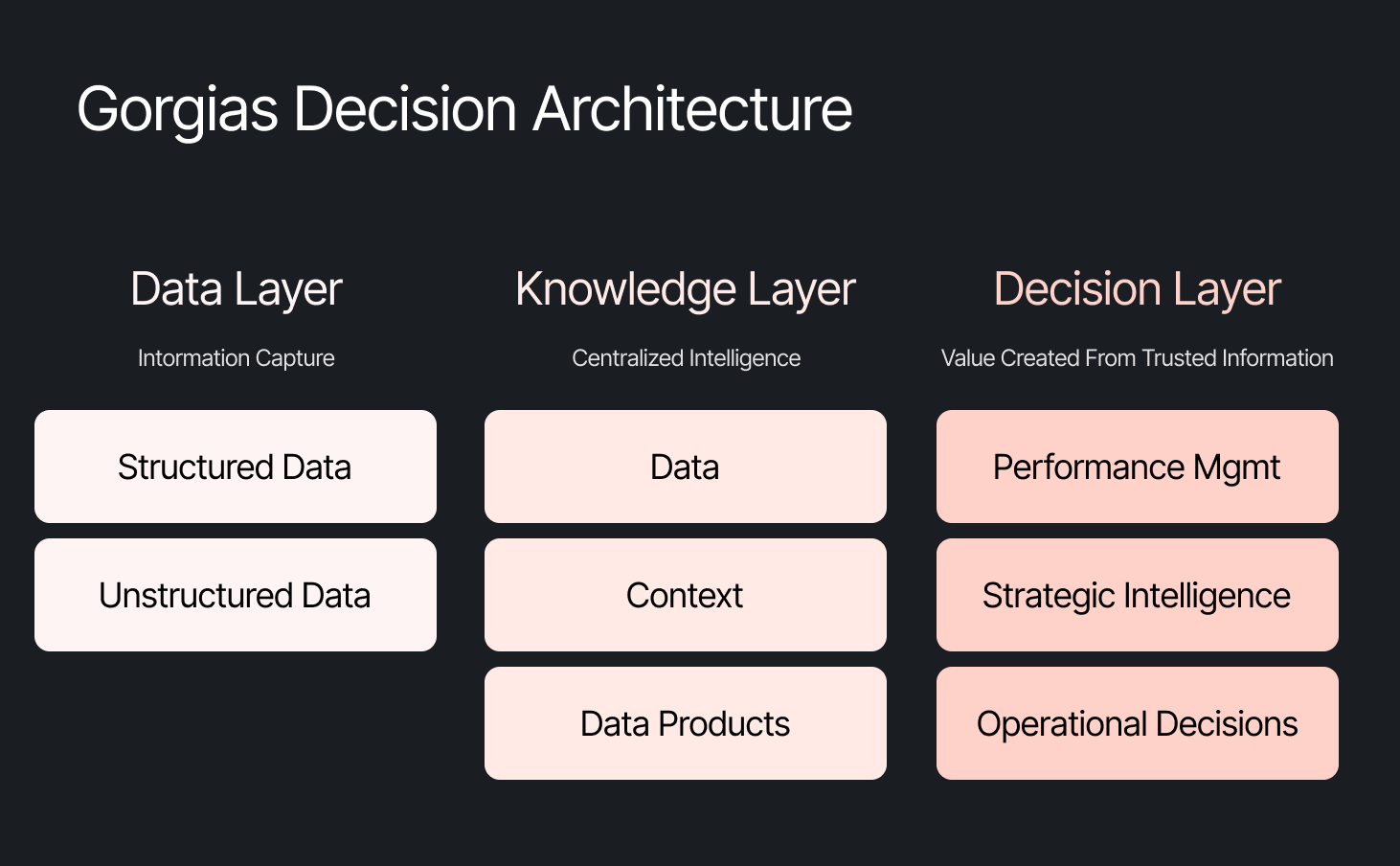
The framing problem most companies get wrong
The instinct across many companies today is to start with the model, pick a provider to solve a specific challenge, or invest heavily in getting the data right. All reasonable starting points, but most of them solve for one use case. Underneath that approach is a framing problem: seeing AI as an initiative — something you assign and measure. Seeing AI as another tool your company uses versus how your company operates.
We started somewhere different. Every company is built on four pillars: customers, people, product, and decisions. AI investments tend to place heavy emphasis on the first three. We started with the fourth. Our bet was that if we built everything around the need to make effective decisions first, asking what Gorgias needed to know to operate well, then our AI would become dramatically more powerful.
Cortex is that philosophy in practice
Cortex is our flagship internal AI agent, and the product where we established the tenets that now run through everything else we build: composable and modular infrastructure, governed context, and accessible from wherever decisions happen. Cortex lives in Slack, as well as across LLM vendors, in its own browser extension, and even on its own dedicated internal site.
Cortex doesn’t stop at answering questions. It can read and write to Notion, file Linear tasks, create HTML apps, automate signal delivery, and more. It operates across every layer of our stack, from dashboards to data pipelines, because we designed it as one integrated system. It is this connection that adds remarkable depth to what people can ask, and what they get in return.
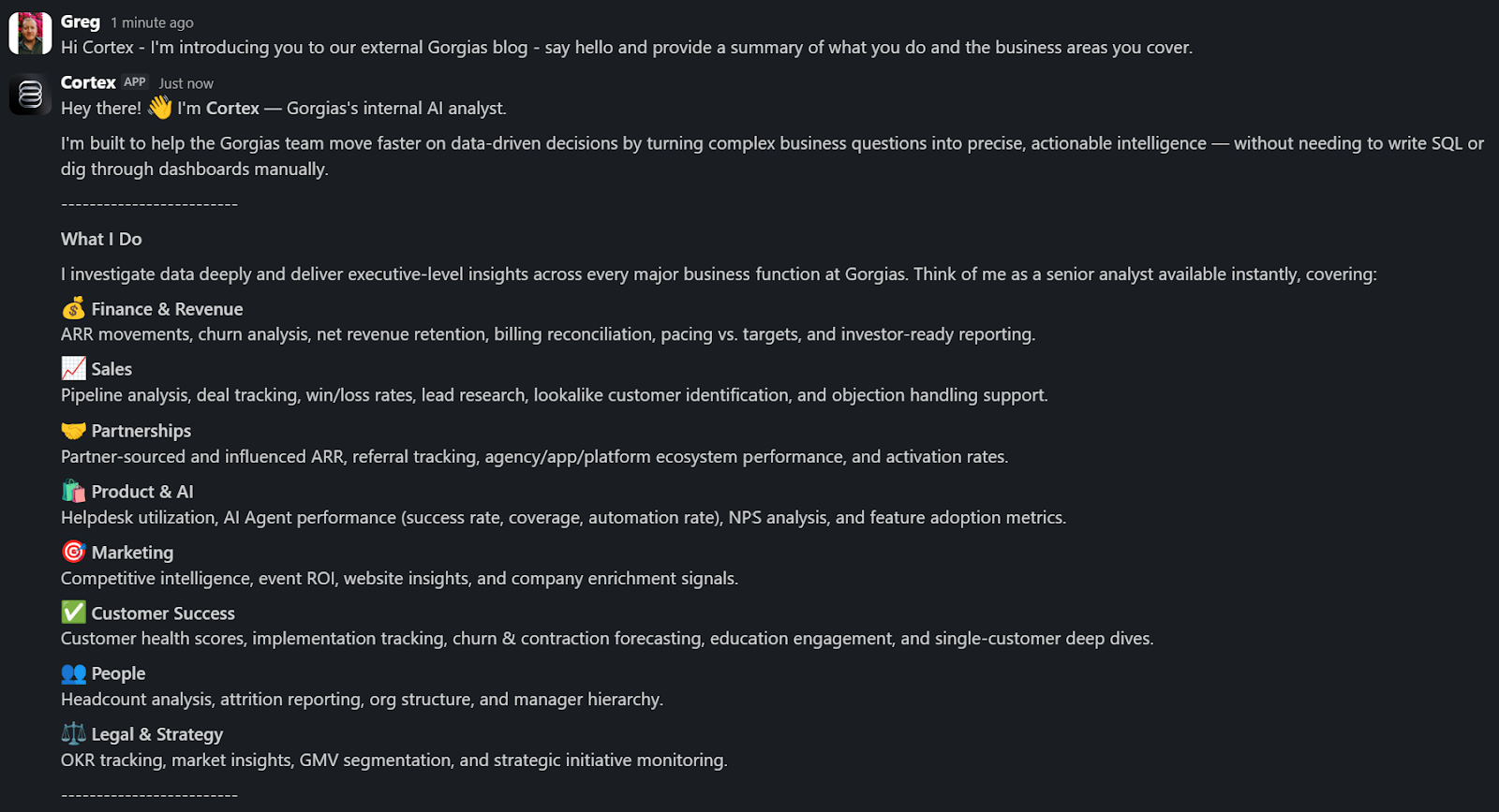
A Sales Lead is pitching and asks Cortex for the full picture of the merchant. In a customized PDF, Cortex lists coverage gaps, pre-sale intent signals, and product fit options. Everything the sales lead needs to walk in with confidence.
A Senior Product leader asks, "How are we performing against OKR #1, and what can my team do to help accelerate it?" Cortex returns a full ARR breakdown, projected end-of-month attainment, segment-level findings, and connects it all back to company-level strategies. A suite of recommendations customized to the leader, the performance, and the signals that bridge how they can support our goals. The kind of answer that used to take someone a week to put together.
These aren't simple lookup queries. They require deep business context spanning multiple areas. Cortex handles these because its Decision Engine gives it the information to reason against governed data, metric definitions, and business context, turning a generic answer into a credible one.
Overnight, teams have built Cortex into how they work. They’re spending less time searching and more time finding answers, not because they were told to, but because Cortex reduced the distance between question and decision.
Flexibility as the foundation
Cortex’s modular infrastructure allows us to experiment and add new capabilities freely. We’ve already built two more internal AI agents made for entirely different use cases, but using the same Decision Engine as Cortex.
GAIA, our internal experimentation AI Agent, helps our customers identify opportunities in their AI Agent Guidance design. It takes institutional knowledge across our teams and turns it into a scalable system that drives automation and value to our customers. Our CEO, Romain Lapeyre, has been its most vocal advocate since day one.
When we needed a platform for investor readiness and board preparation, we built Oracle. Our board decks and talk tracks are informed and built with the same AI, and our numbers are validated every step of the way.
We’re continuing to expand new AI agents internally, exploring how they can create value for customers and our own teams.
AI has transformed how data teams create value, and we’ve already shifted to account for it
When AI handles thousands of analytical questions each week, the highest-value work for a data team shifts permanently. Late 2025, we repositioned from a Data Analytics function into a Decision Intelligence function — a structural change in what we own and how we operate.
Today, our analysts focus on the most sensitive, complex, and forward-looking decisions and analyses. They partner more deeply with stakeholders by driving next steps from signals. They're even building entirely new capabilities that didn't exist in their role descriptions months ago. Things like AI skills for Cortex, context curation, and insight and recommendation delivery. The role of the analyst hasn't diminished. It's expanded to encompass the most meaningful work an analyst can do: driving outcomes and ensuring those decisions can achieve them.
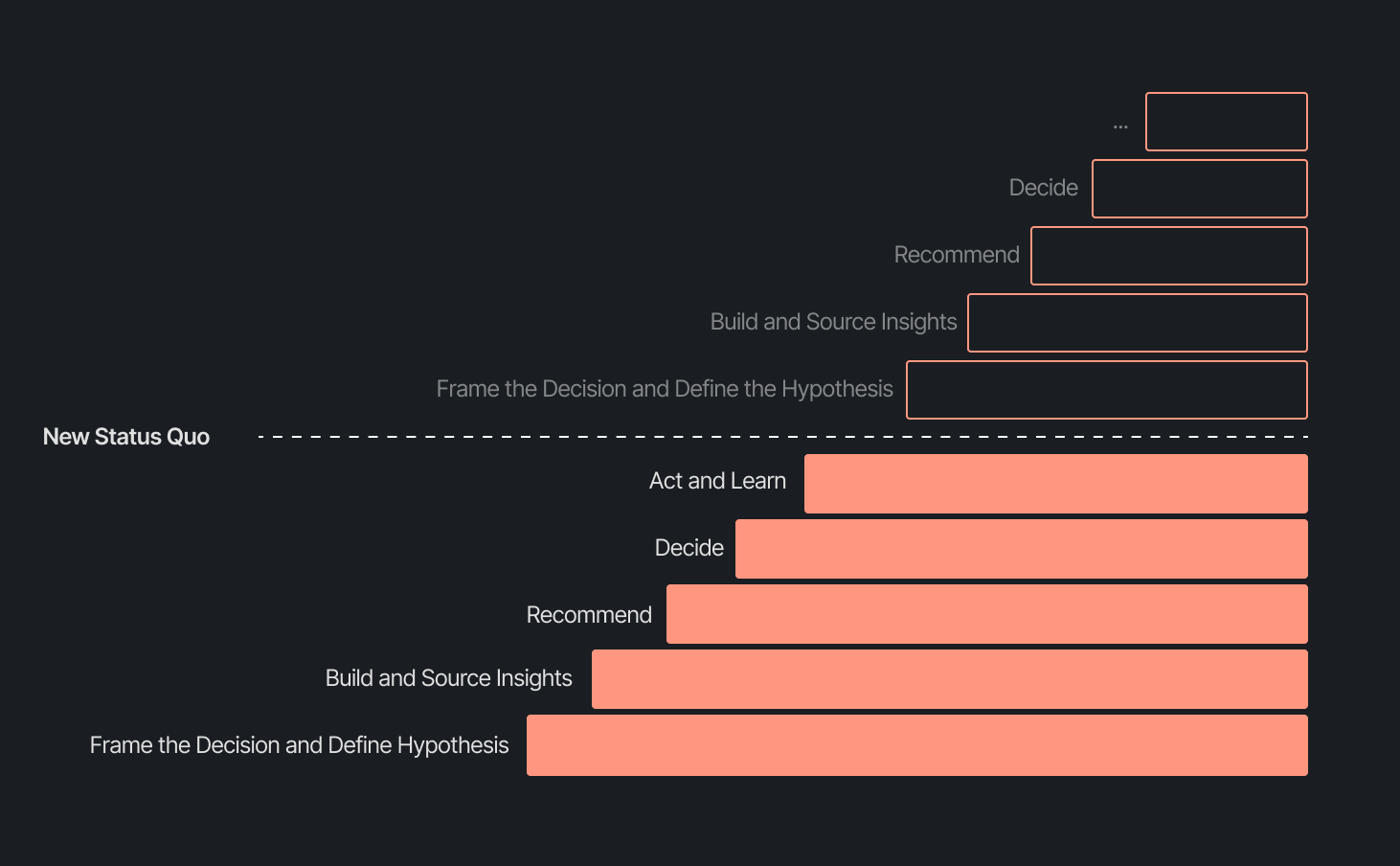
Our business support model has changed, too. Instead of embedding analysts and dedicated engineers within functional teams, we align capacity to the highest-impact company objectives and move fluidly across them. This model works even better because Decision Intelligence brings together both analytics and engineering teams under one roof.
Elliot Trabac leads our Data, Context and AI Engineering teams. The Decision Engine, Cortex, GAIA, and the platforms I've described exist because of the infrastructure his team innovated and built from the ground up. Noemie Happi Nono leads our Decision Strategy and Operations team, driving decision outcomes with stakeholders, advancing the development of Cortex skills and capabilities, and pushing into new areas of analysis every day.
Together, they're shaping what a modern data function looks like when AI becomes a standard building block for how a company operates.
What’s next for the Decision Intelligence team
The question of ROI is long gone. AI has opened the floodgates to more trusted and meaningful signals than ever. The natural next evolution is Proactive Intelligence, signals surfaced toward what you need to know, before you ask. And we're already building this because our architecture is designed to support it.
In the coming weeks, members of the Decision Intelligence team will go deeper into themes I've touched on here. Yochan Khoi, a Senior Analytics Engineer on our team, recently published a technical walkthrough of our context layer and will go further into building context strategies that scale. Others will cover infrastructure, analytical partnerships, evolving data assets into decision assets, and the cost and efficiency gains that make sustained AI investment viable.
AI hasn't changed the most important element of data and analytics functions — delivering outcomes — but it has raised the bar for what it looks like and how far we can take it. We’re just getting started.
TL;DR:
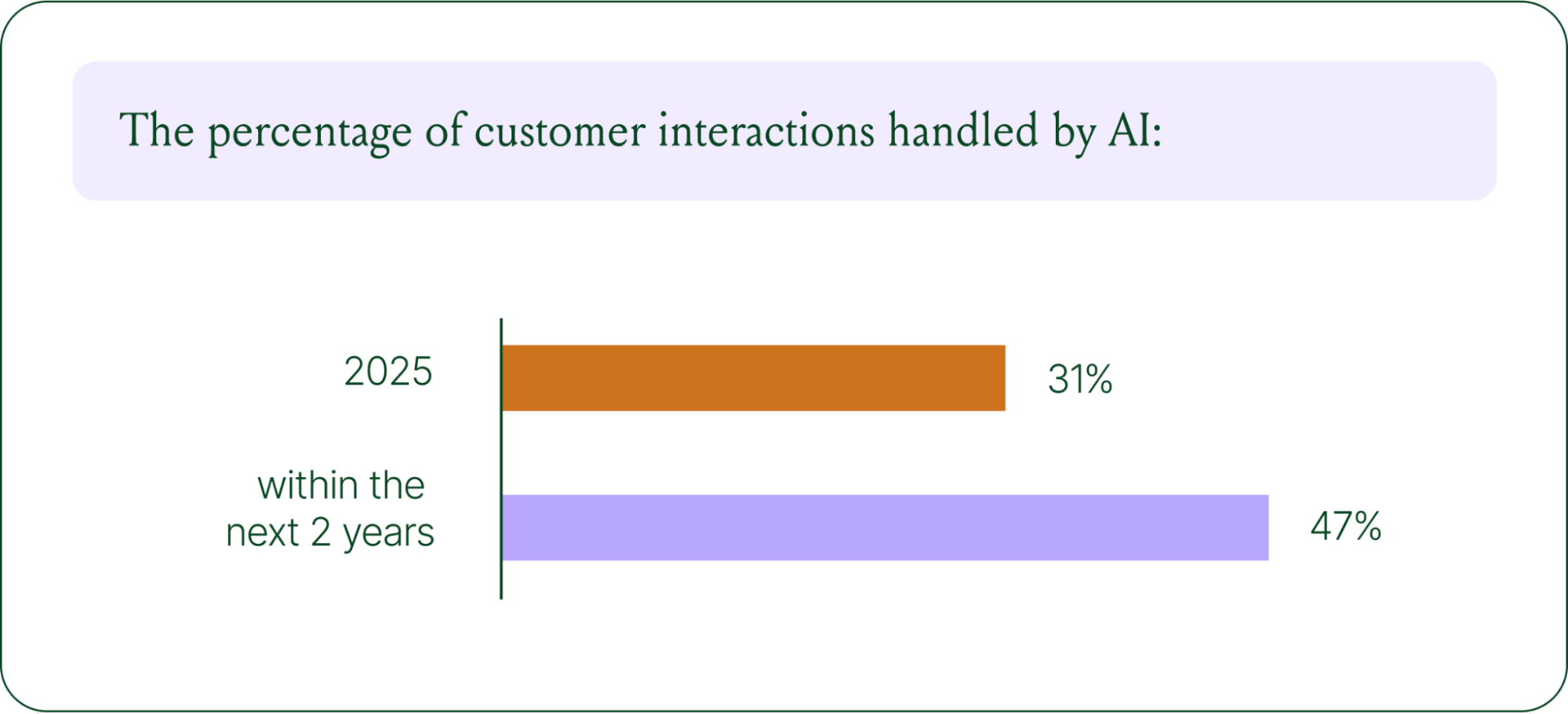
- AI is resolving tickets, not just replying. AI now handles 31% of customer interactions for ecommerce brands, and that number is expected to nearly double within two years.
- Every channel is becoming a storefront. Conversations are replacing the traditional browse-and-buy journey, with 79% of brands reporting sales from AI-driven interactions.
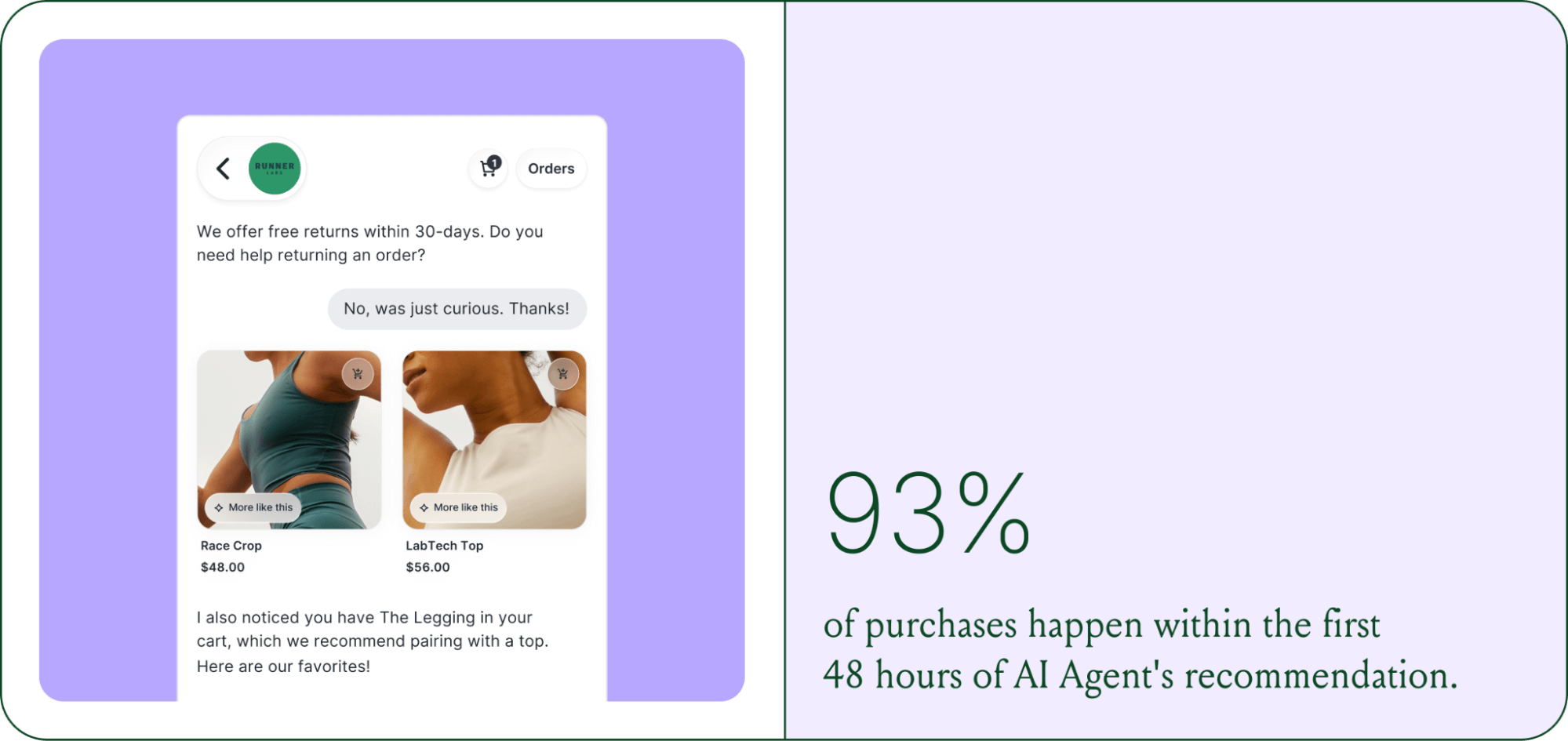
- AI is shortening the buying cycle. 93% of AI-influenced purchases happen within the first 48 hours of the conversation.
- CX teams are changing, not shrinking. Ecommerce brands are actively hiring for more technical roles to implement, coach, and maintain AI.
- The winning model is hybrid. AI handles volume and speed, while humans handle complexity and judgment.
The way shoppers buy online has shifted and customers are at the center.
They no longer want to scroll through product pages, dig through FAQs, or wait 24 hours for an email reply. They open a conversation, ask a specific question, and expect a useful answer in seconds. Brands that can’t deliver these experiences at scale are seeing customer hesitation turn into abandoned carts and lost revenue.
This shift has a name: conversational commerce. It's the practice of using real-time, two-way conversations as your primary sales channel, through chat, AI agents, messaging apps, and voice.
What started as an experiment for early adopters has become a key growth lever, with 84% of ecommerce brands treating conversational commerce as a strategic pillar this year vs. last year.
We surveyed 400 ecommerce decision-makers across North America, the U.K., and Europe to understand how conversational commerce and AI are reshaping the ecommerce landscape. These findings are complemented by aggregated and anonymized internal Gorgias platform data from 16,000+ ecommerce brands.
The State of Conversational Commerce in 2026 trends report breaks down all of the findings, including five key trends shaping the ecommerce landscape.
{{lead-magnet-1}}
Trend 1: AI is table stakes for ecommerce and it’s no longer just about efficiency
A few years ago, adding an AI chatbot to your site that could provide tracking links and Help Center article recommendations was a differentiator. Today, it's table stakes. McKinsey found that 71% of shoppers expect personalized experiences, and 76% get frustrated when they don't get them.
Right now, most ecommerce professionals use AI, with 93% having used it for at least 1 year. Enthusiasm is accelerating quickly, with only 30% of ecommerce professionals rating their excitement for AI at 10/10 in April 2025. Similarly, while AI adoption rose steadily year over year, it reached a clear peak in 2026.
The use cases driving this adoption are practical and high-volume:
- Order tracking and status updates
- Returns, exchanges, and refund requests
- Shipping FAQs and delivery estimates
These are the tickets that flood brands’ inboxes every day. AI agents resolve them instantly, without pulling teams away from conversations that actually require human judgment.
Explore AI adoption and use case data in more depth in the full report.
Trend 2: Conversations are the new path to checkout
The traditional ecommerce funnel, visit site, browse products, add to cart, check out, is losing ground. Shoppers now discover products on Instagram, ask questions via direct message, and complete purchases without ever visiting a website.
Conversational AI is actively increasing revenue, with 79% of brands reporting that AI-driven interactions have increased sales and conversion in their business.

The practical implication is that every channel is becoming a storefront. Creating personalized touchpoints with customers earlier in the journey, through proactive engagement, is impacting the bottom line.
Read the full report to explore how AI conversions have increased QoQ by industry.
Trend 3: AI is accelerating the purchase cycle
Pre-purchase hesitation is one of the biggest conversion killers in ecommerce. A shopper lands on your product page, has a question about sizing or compatibility, can't find the answer quickly, and leaves. That's a lost sale that had nothing to do with your product.
Conversational AI changes that dynamic. When a shopper can ask a question and get an accurate, personalized answer in real time, the friction disappears.
Brands using Gorgias saw this play out at scale in 2025. When AI Agent recommended a product, 80% of the resulting purchases happened the same day, and 13% happened the next day.
Brands are further accelerating the buying cycle through proactive engagement. On-site features such as suggested product questions, recommendations triggered by search results, and “Ask Anything” input bars drove 50% of conversation-driven purchases during BFCM 2025.
Explore how AI is collapsing the purchase cycle in Trend 3 of the report.
Trend 4: AI is making CX teams more technical
There's a persistent narrative that AI is making CX teams redundant. The data tells a different story. 62% of ecommerce brands are planning to grow their teams, not cut them. But the scope of those teams is changing.

New roles are emerging around AI configuration and quality assurance. Teams are investing in technical members to write AI Guidance instructions, develop tone-of-voice instructions, and continuously QA results.
CX teams are also bridging the gap between support goals and revenue goals, as the two functions increasingly overlap.
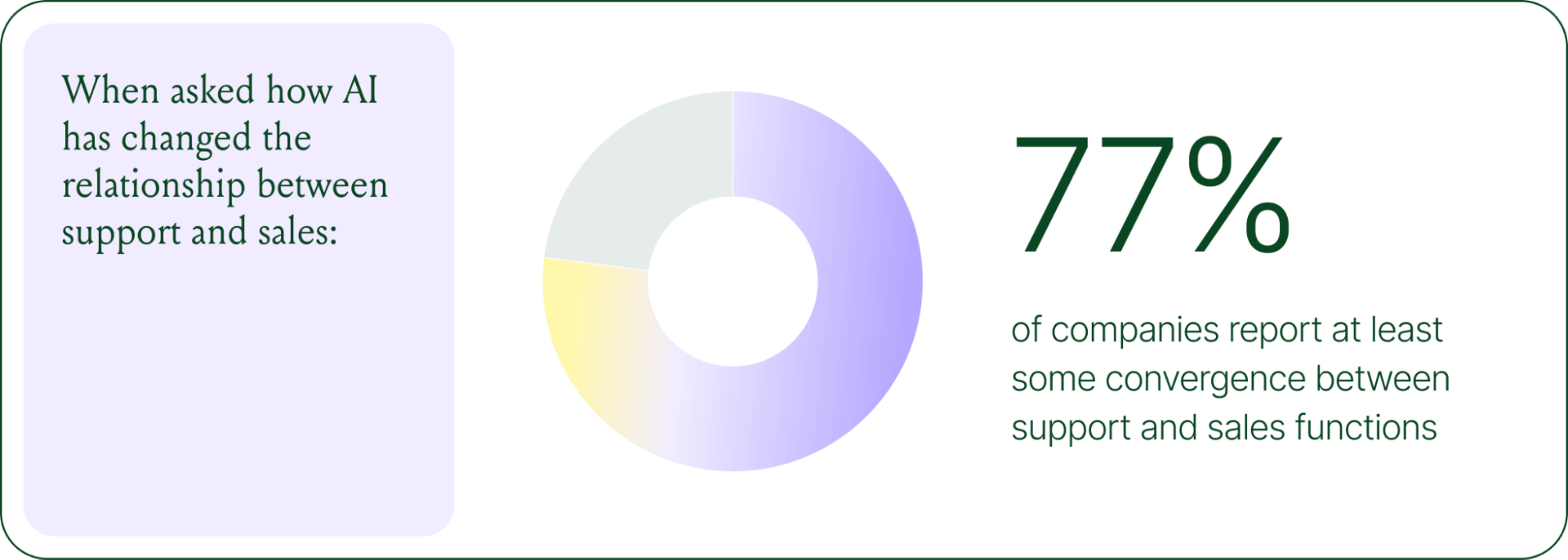
The result is CX teams that are more technical than they were before. Agents who once spent their days answering repetitive tickets are now spending that time on higher-value work: complex escalations, VIP customer relationships, and improving the AI systems and knowledge bases that handle the volume.
Learn more about the evolution of CX roles in Trend #4.
Trend 5: The future is hybrid: AI-first, humans when it counts
Despite increasing AI adoption, data shows that ecommerce brands shouldn’t strive for 100% automation. Winning brands are building systems in which AI handles repetitive tier-1 tickets, and humans handle complex, sensitive cases.

AI handles speed and scale. It resolves order-tracking requests at 2 a.m., processes return-eligibility checks in seconds, and answers the same shipping question for the thousandth time without compromising quality.
Human agents handle conversations that require context, empathy, or decisions that fall outside the standard playbook. There are several topics where shoppers still prefer human support.
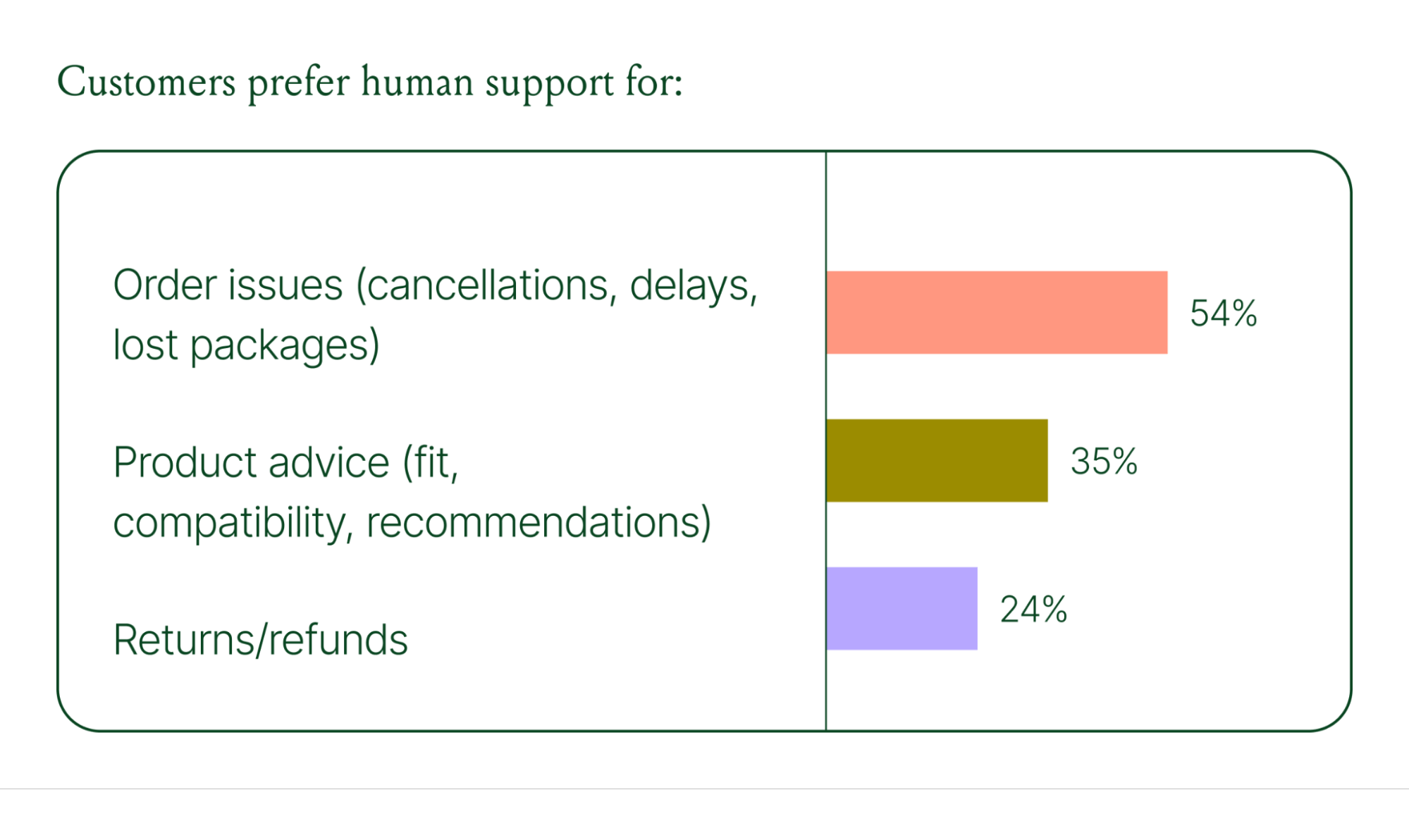
Successful hybrid systems require continuous iteration, meaning reviewing handover topics, Guidance, and reviewing AI tickets on a weekly basis.
Discover how leading brands are balancing human and AI systems in Trend #5.
Where conversational commerce is heading by 2030
The 2026 trends are about expansion and standardization. The 2030 predictions are about what comes next.
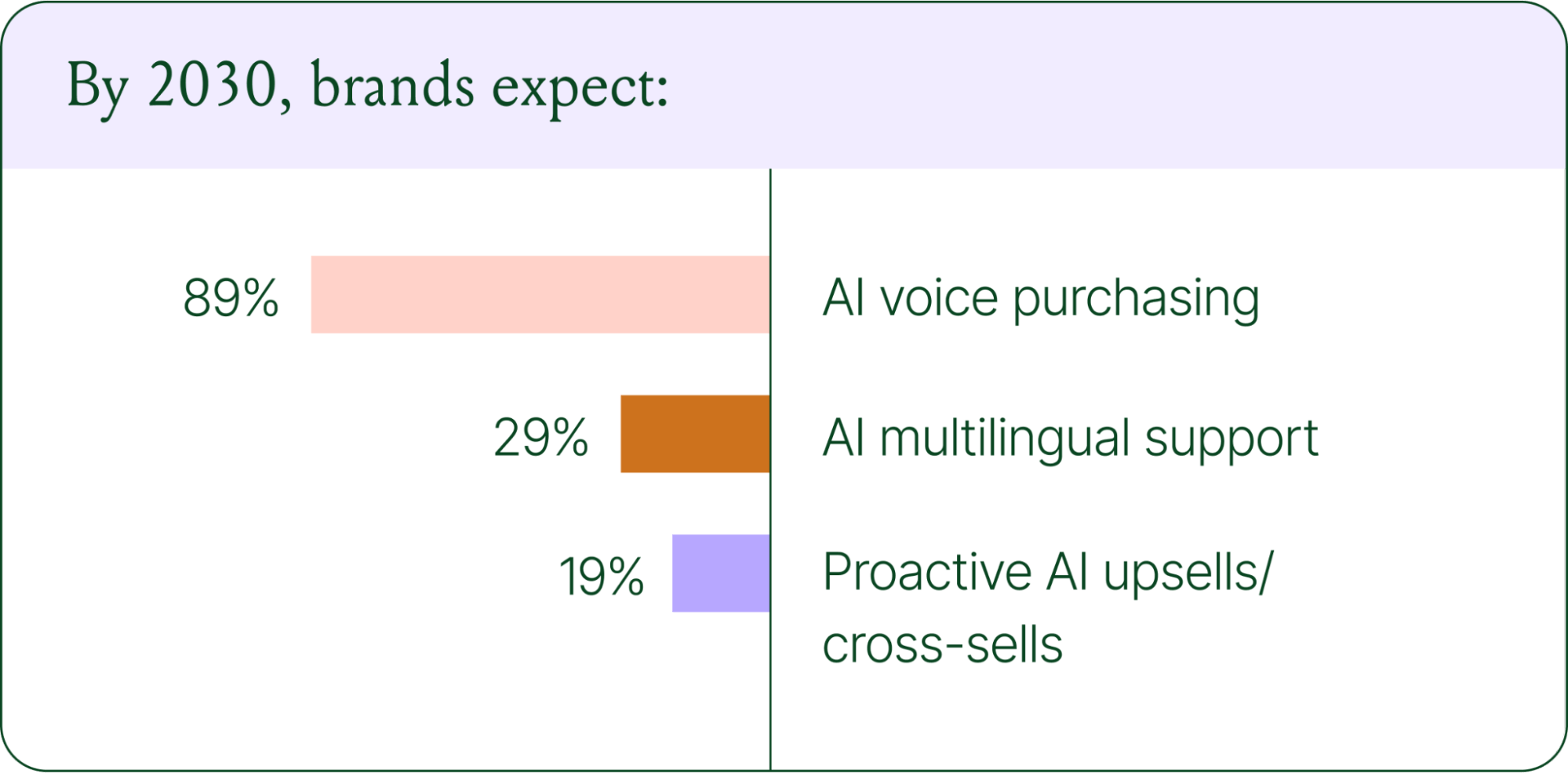
Voice-based purchasing is the biggest bet on the horizon. Only 7% of brands currently use voice assistants for commerce, but 89% expect it to be standard by 2030. The vision is a customer who can reorder a product, check their subscription status, or manage a return entirely over the phone.
Proactive AI is the other major shift. Rather than waiting for a customer to reach out, AI will anticipate needs based on browsing behavior, purchase history, and where someone is in their relationship with your brand. Think of it as the digital equivalent of a sales associate who remembers what you bought last time and knows what you're likely to need next.
Explore where ecommerce brands are allocating their AI budgets in the full report.
Start building your conversational commerce strategy today
The brands winning in 2026 are creating smart, scalable systems where AIhandles volume and humans handle nuance. They’re treating every conversational channel as an opportunity to serve and sell.
The data is clear: AI adoption is accelerating, customer expectations are rising, and the revenue impact of getting this right is measurable.
{{lead-magnet-1}}
Newsletter Signup
The best in CX and ecommerce, right to your inbox
Featured articles

Conversations Are Becoming a Revenue Channel: The Data Proves It
TL;DR:
- Customer journeys are collapsing to a single conversation. The traditional browse-and-buy journey is giving way to AI-guided shopping that moves from discovery to purchase in a single exchange.
- 79% of brands say AI-driven conversational commerce has increased their sales and purchase rates.
- AI-only influenced orders grew 63% in a single year, from 2.7 million in Q1 to 4.4 million in Q4.
- Brands treating conversation as a revenue channel. They’re not just a support function, generating higher AOV, shorter buying cycles, and stronger retention.
The page-based shopping experience dominated for decades. Customers would search, browse, compare, abandon, get retargeted, return, and eventually buy (sometimes).
That journey is no longer the only option.
Shoppers are turning to chat, messaging, and AI-powered tools to find what they need. Instead of clicking through product pages or reading static FAQs, they ask questions, have back-and-forth conversations, and get answers that move them closer to a purchase in real time. The path to checkout has changed, and the brands that recognize this are pulling ahead.
Read our 2026 State of Conversational Commerce Report to learn more about conversation commerce trends from 400 ecommerce decision-makers and 16,000+ ecommerce brands using Gorgias.
{{lead-magnet-1}}
The shopping journey has collapsed into a single thread
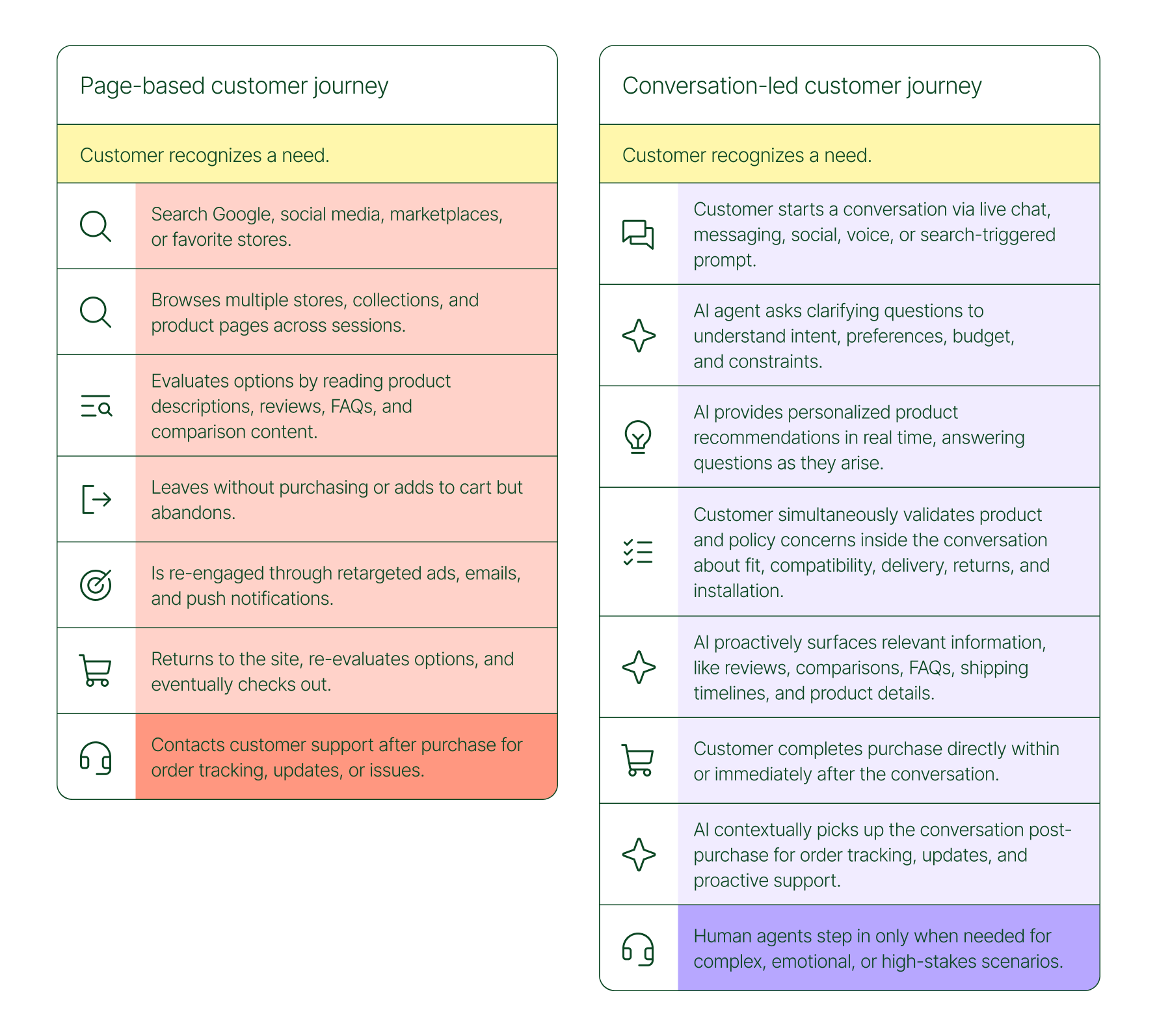
The traditional shopping journey was a solo experience. A shopper had a need, searched for options, browsed across sessions, and eventually made a decision — often days later, after being retargeted multiple times. Support only entered the picture after the purchase.
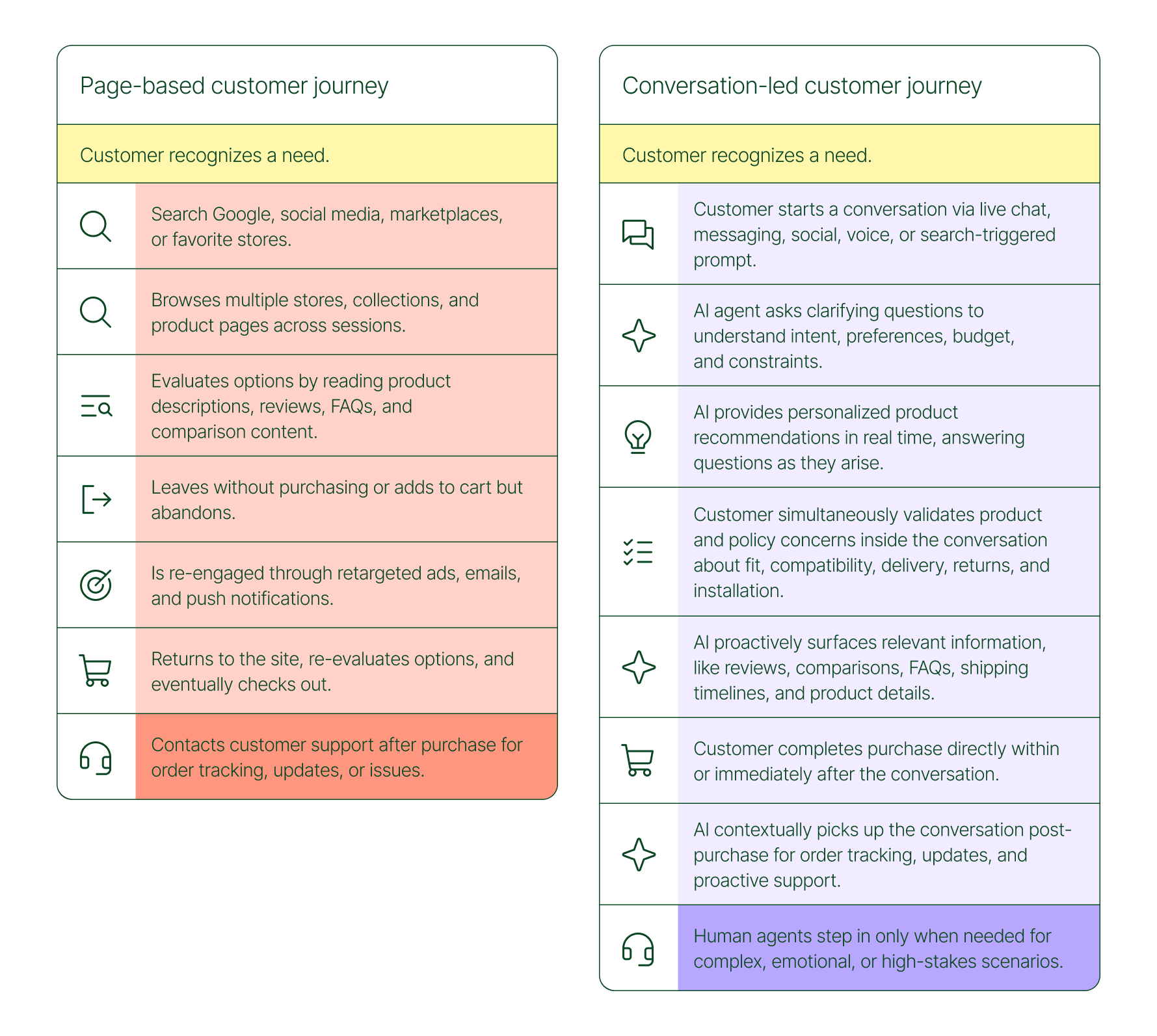
The conversation-led journey collapses that timeline:
- A shopper recognizes a need and starts a conversation via chat, messaging, or a search-triggered prompt
- An AI agent asks clarifying questions about preferences, budget, and constraints
- The AI provides personalized product recommendations in real time
- The shopper validates concerns about fit, compatibility, delivery, and returns, all inside the conversation
- The shopper completes the purchase directly within or immediately after that exchange
- The AI picks up the conversation post-purchase for order tracking and proactive support
- A human agent steps in only when the situation calls for it
What used to take days now takes minutes. Discovery, evaluation, and purchase happen in a single thread.
Conversation is a revenue strategy, not a support upgrade
79% of brands agree that AI-driven conversational commerce has increased sales and purchase rates in their business. When brands were asked to rank the highest-return areas:
- 38% cited improved customer support efficiency
- 23% pointed to higher customer retention and loyalty
- 20% saw improved purchase rates
Those numbers reflect something important: the value of conversation compounds. Faster support reduces friction. Better retention raises lifetime value. More confident shoppers buy more often and spend more per order.
The brands seeing the biggest returns aren't just using AI to deflect tickets. They're using it to create one-to-one shopping experiences at scale.
What the data shows about AI-influenced orders
Looking at AI-only influenced orders across key verticals like Apparel and Accessories, Food and Beverages, Health and Beauty, Home and Garden, and Sporting Goods, the growth across a single year was significant.
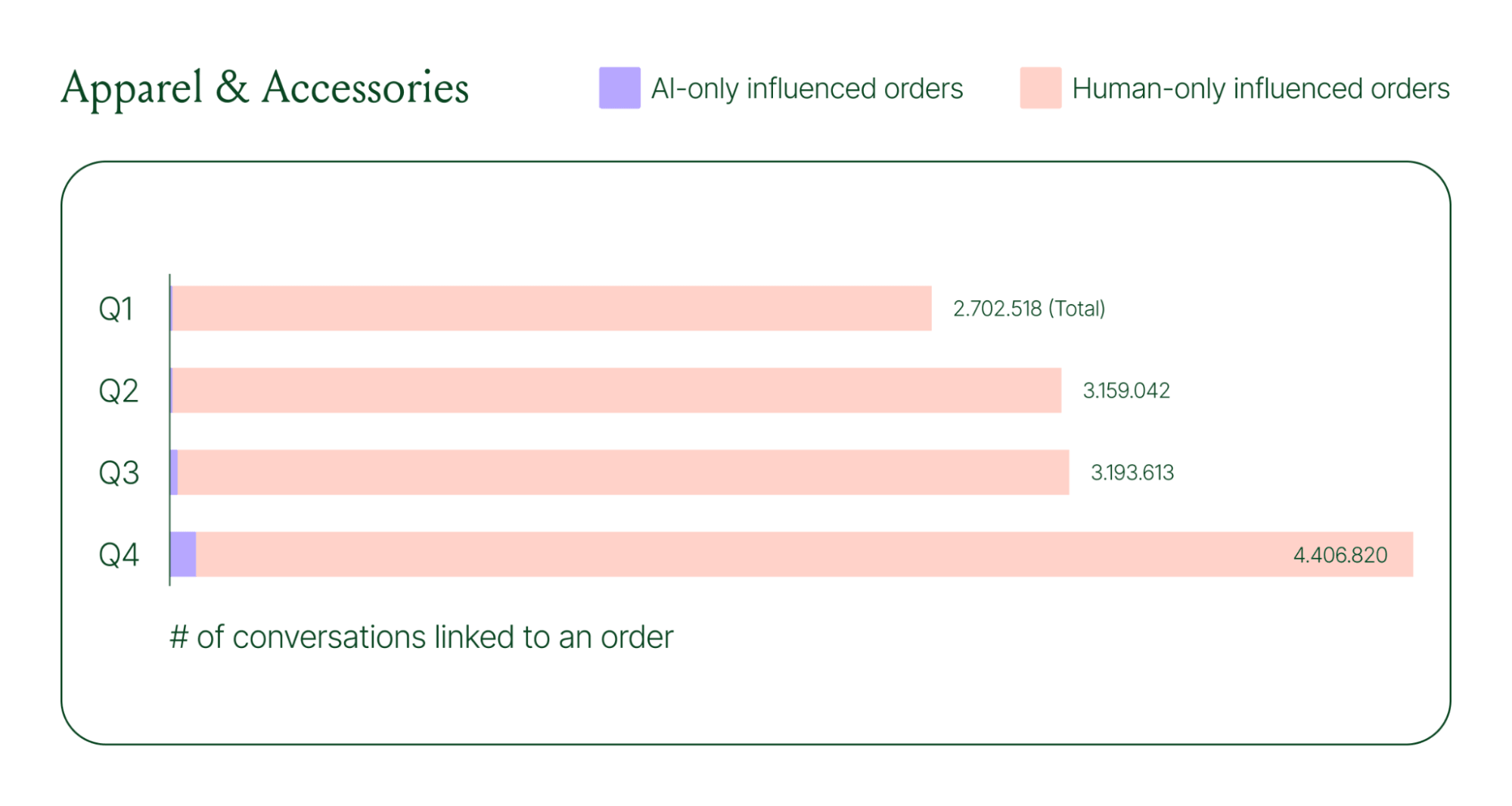
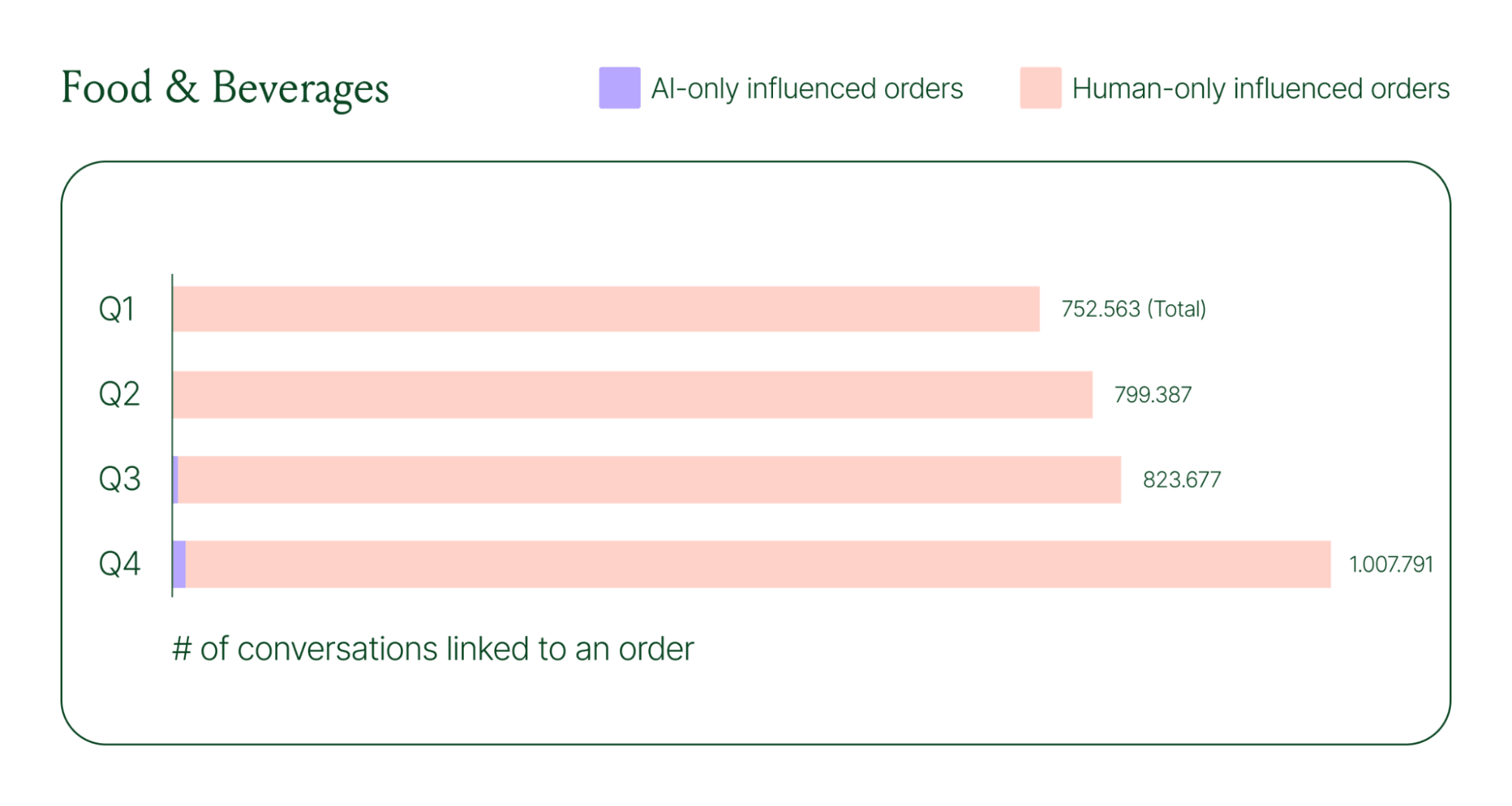
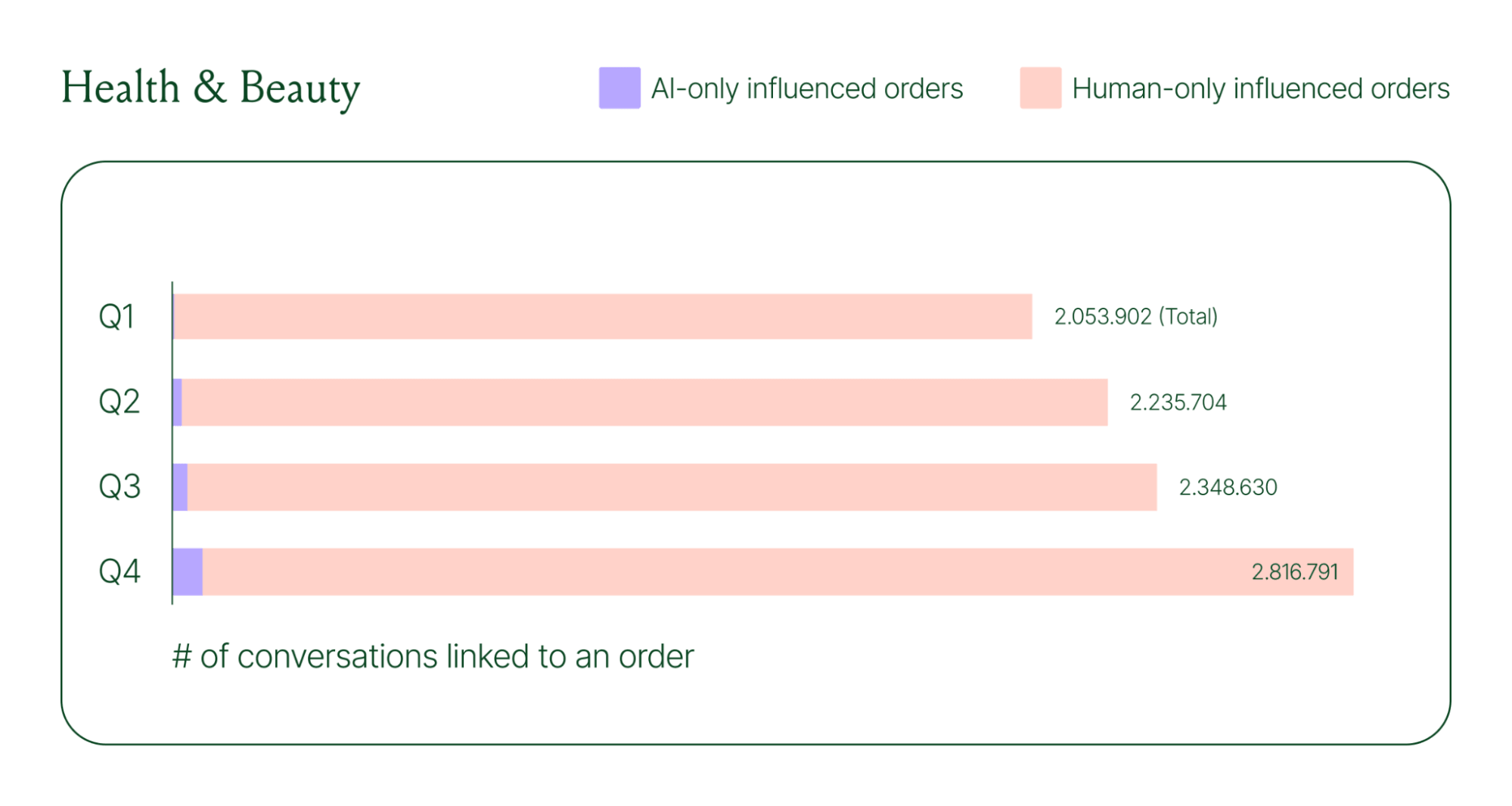
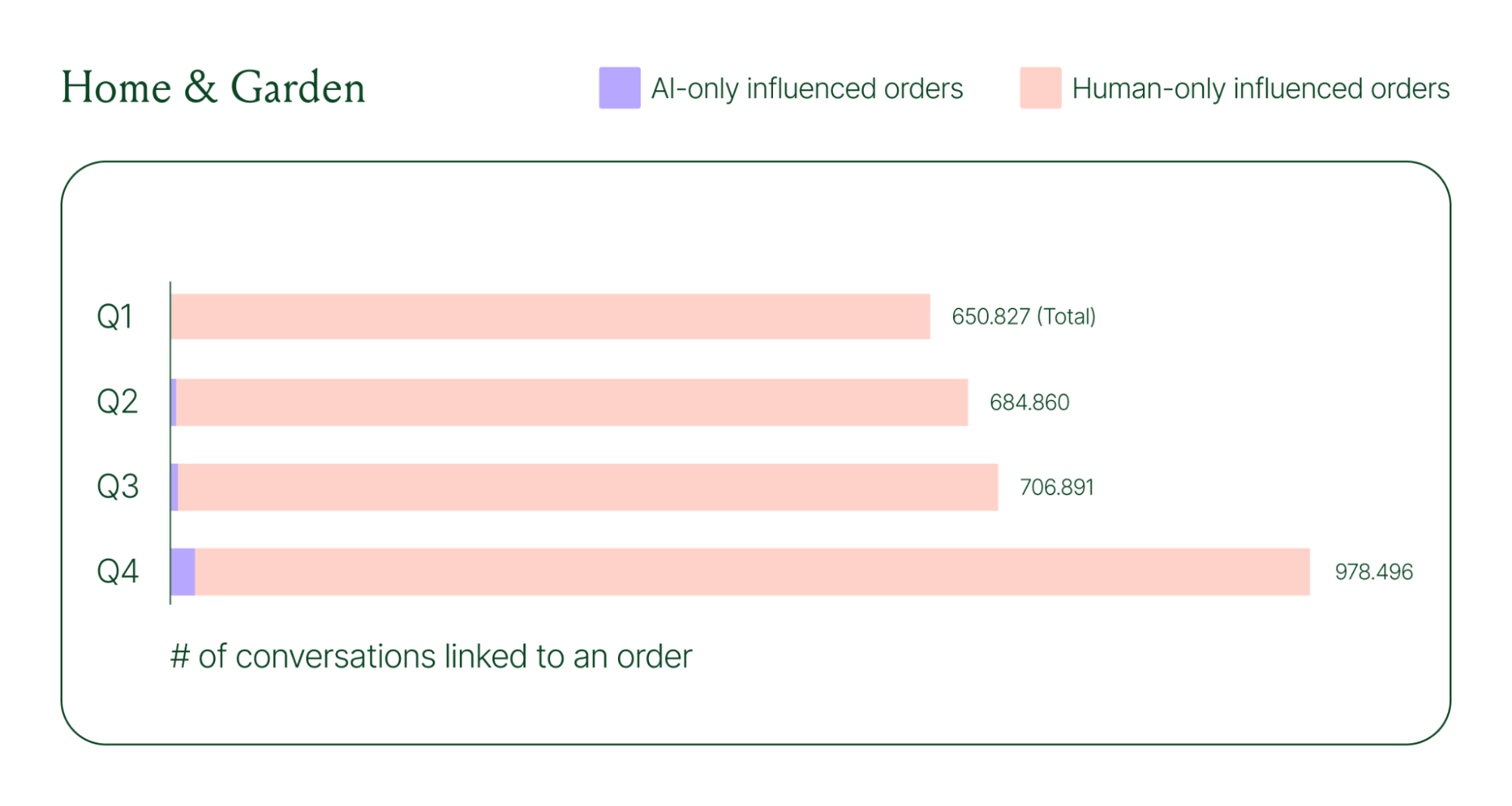
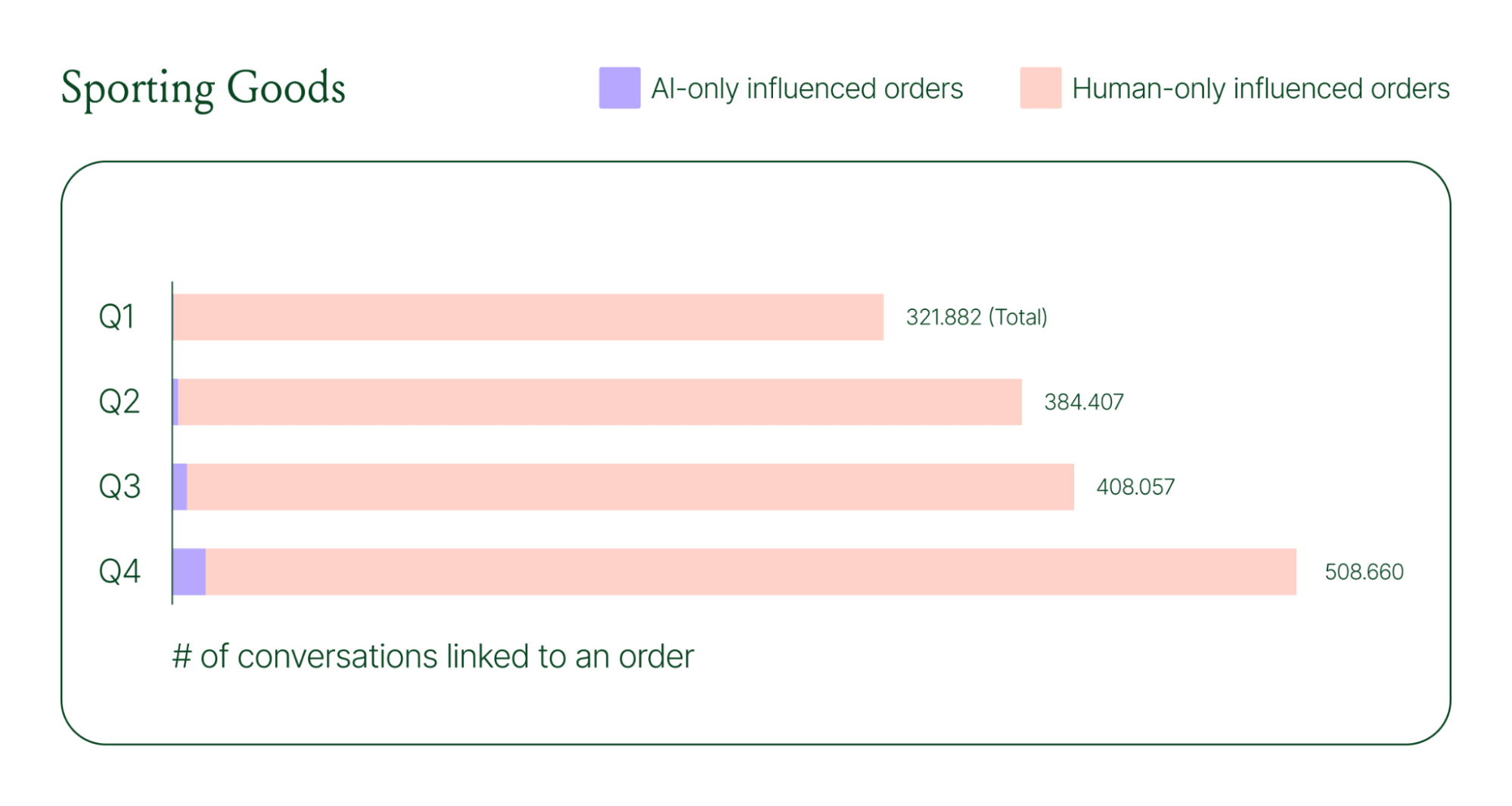
Across industries, ecommerce brands saw AI step into conversations, reduce shopper hesitation, and drive higher QoQ conversion rates.
Learn more about AI-powered revenue generation in the full 2026 Conversational Commerce Report.
Why brands are making this a strategic priority
84% of brands say the strategic importance of conversational commerce is higher than it was a year ago. 82% agree it will be mainstream in their sector within two years.
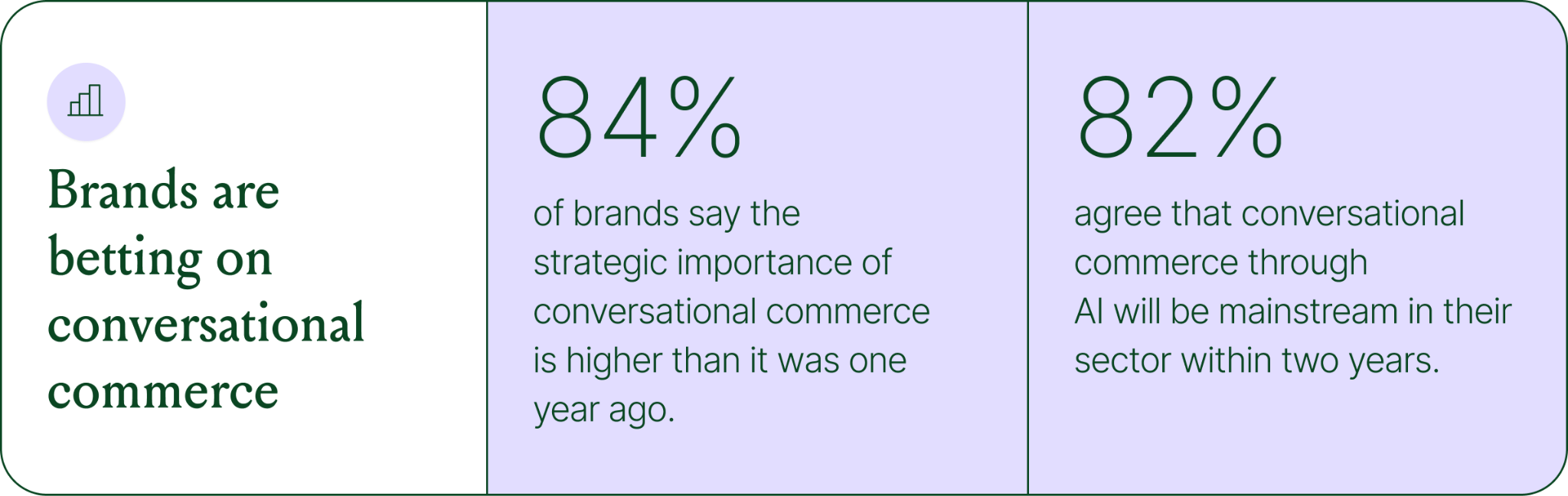
That shift is registering at the leadership level because of what conversational commerce does to the buying experience. Creating one-to-one touchpoints earlier in the journey drives higher AOV, shorter buying cycles, and stronger purchase rates. Shoppers who get real-time answers to their questions are more confident.
What this looks like in practice: TUSHY
TUSHY, known for eco-friendly bidets and bathroom essentials, is a useful example of what happens when you take conversational commerce seriously.
Bidets aren't an impulse purchase. Shoppers have real questions about fit, compatibility, and installation. Those questions used to go unanswered until the CX team could respond, often after the customer had abandoned the cart.
TUSHY used Gorgias's AI Agent and shopping assistant capabilities to automate pre-sales support. AI Agent engaged shoppers in real-time conversations, addressed their concerns directly, and built confidence at the moment of highest intent.
This resulted in a 190% increase in chat-based purchases, a 13x return on investment, and twice the purchase rate of human agents.
How to apply this to your strategy
You don't need to overhaul your entire operation to start seeing results. The most effective approach is to start where the impact is clearest and expand from there.
A few places to begin:
- Pre-sales chat. Identify your most common pre-purchase questions (sizing, compatibility, shipping timelines) and ensure your AI can answer them confidently and promptly.
- Product page engagement. Use proactive chat prompts triggered by page behavior to start conversations before shoppers leave.
- Post-purchase follow-up. Let AI pick up the conversation after checkout with order updates and proactive support, reducing inbound volume and building trust.
- Human escalation. Define clearly which situations require a human agent – complex issues, emotional exchanges, high-stakes decisions.
Want to see the full picture of where conversational commerce is headed in 2026? Read the full report to explore the data, trends, and strategies shaping the next era of ecommerce.
{{lead-magnet-1}}

AI Is Table Stakes for Ecommerce: What the Data Tells Us About 2026
TL;DR:
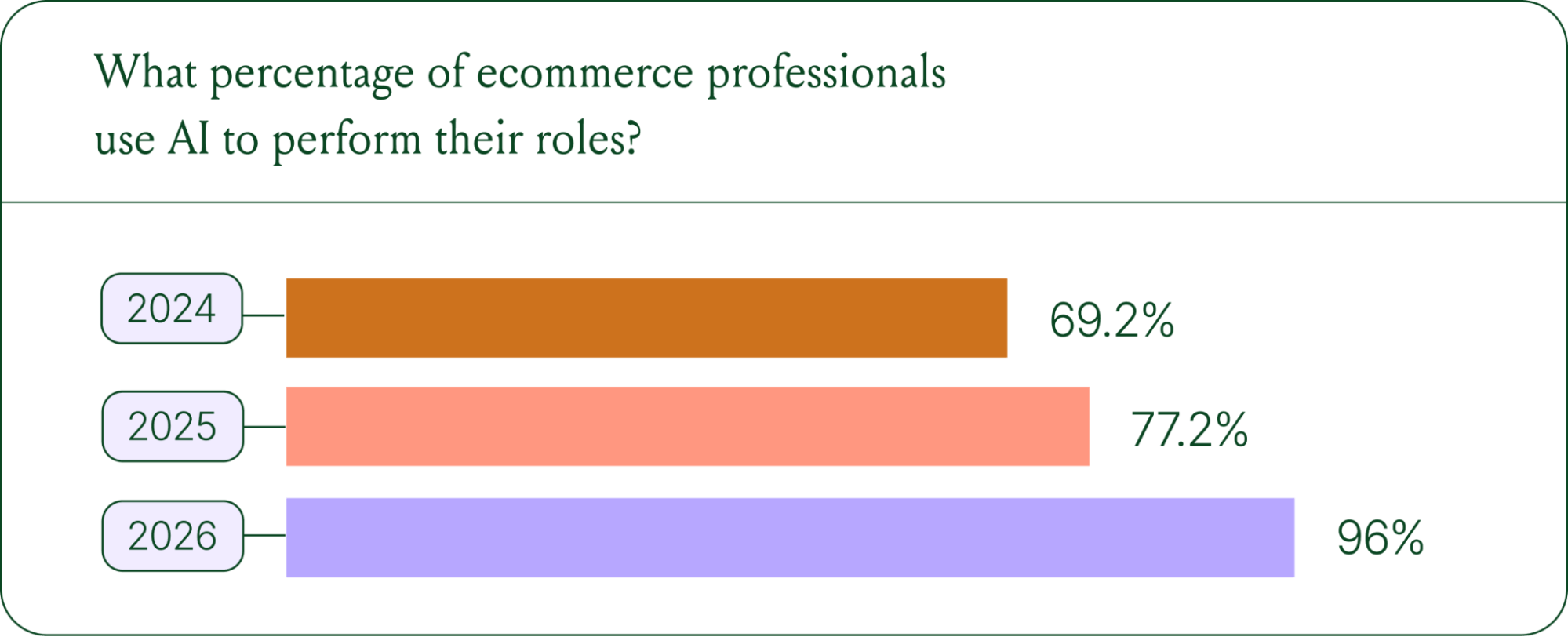
- AI adoption is rapidly accelerating. 96% of ecommerce professionals now use AI in their roles, up from 69% in 2024.
- AI has moved beyond support automation. Use cases have evolved into revenue generation, personalization, and logistics.
- Brands are tying AI success to profit-and-loss outcomes. 60% of brands consider AOV a top indicator of AI effectiveness.
A year ago, ecommerce brands were still debating whether AI was worth the investment. That debate is over. Today, nearly every ecommerce professional uses AI to do their job.
The shift isn't just about adoption. It's about what AI is used for and how brands measure its impact. Support automation was the entry point. Now, AI is embedded across the full operation, from product recommendations to inventory control to real-time shopping conversations.
In our 2026 State of Conversational Commerce Report, we break down trends on AI usage among 400 ecommerce decision-makers and 16,000+ ecommerce brands using Gorgias.
{{lead-magnet-1}}
AI adoption has reached a tipping point
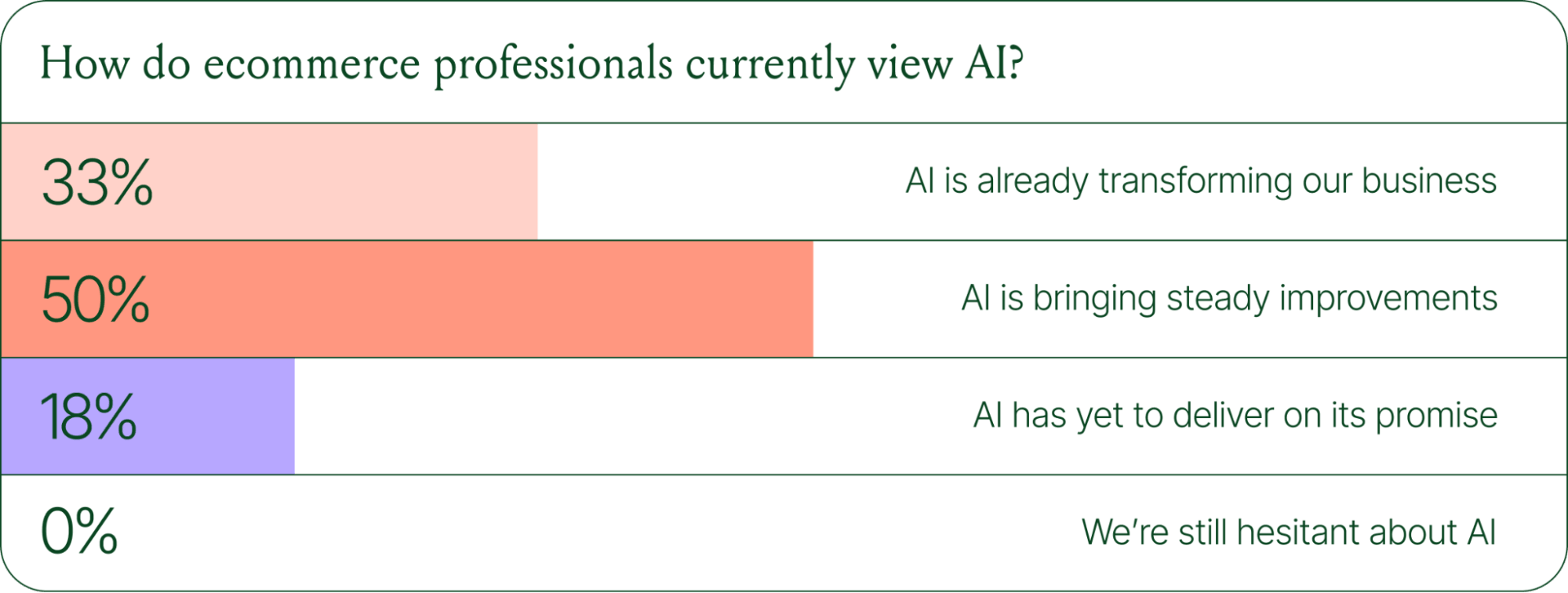
If we rewind 12 months ago, the industry was still split on AI. Some ecommerce professionals were excited, but most were still hesitant. In 2024, 69% of ecommerce professionals used AI in their roles. By 2025, that number reached 77%. In 2026, it hit 96%.
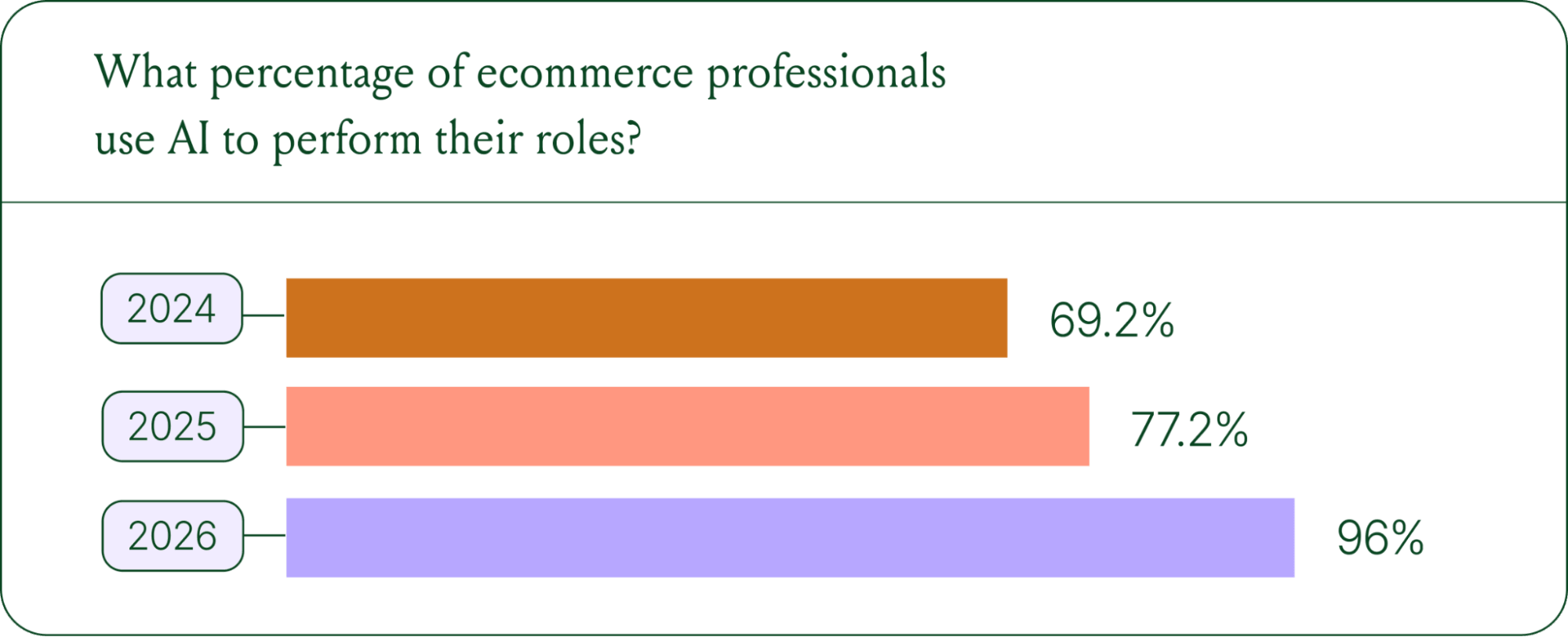
The confidence numbers back it up. 71% of brands say they are confident using AI for ecommerce, and 73% are satisfied with its business impact.
In early 2025, only 30% of ecommerce professionals rated their excitement for AI at 10/10. Today, zero percent of respondents describe themselves as hesitant about AI.
AI use cases now span the full ecommerce stack
Using AI in ecommerce is not new. In fact, it dates back to the 1980s with the invention of algorithms and expert systems. And if you’ve ever leveraged similar product recommendations or chatbots, you’ve already integrated AI into your ecommerce stack.
Modern AI is far more sophisticated.
With the rise of agentic commerce and conversational AI, brands began leveraging AI agents to automate the processing of repetitive support tickets. That’s still happening today, but the scope has expanded beyond the support queue.
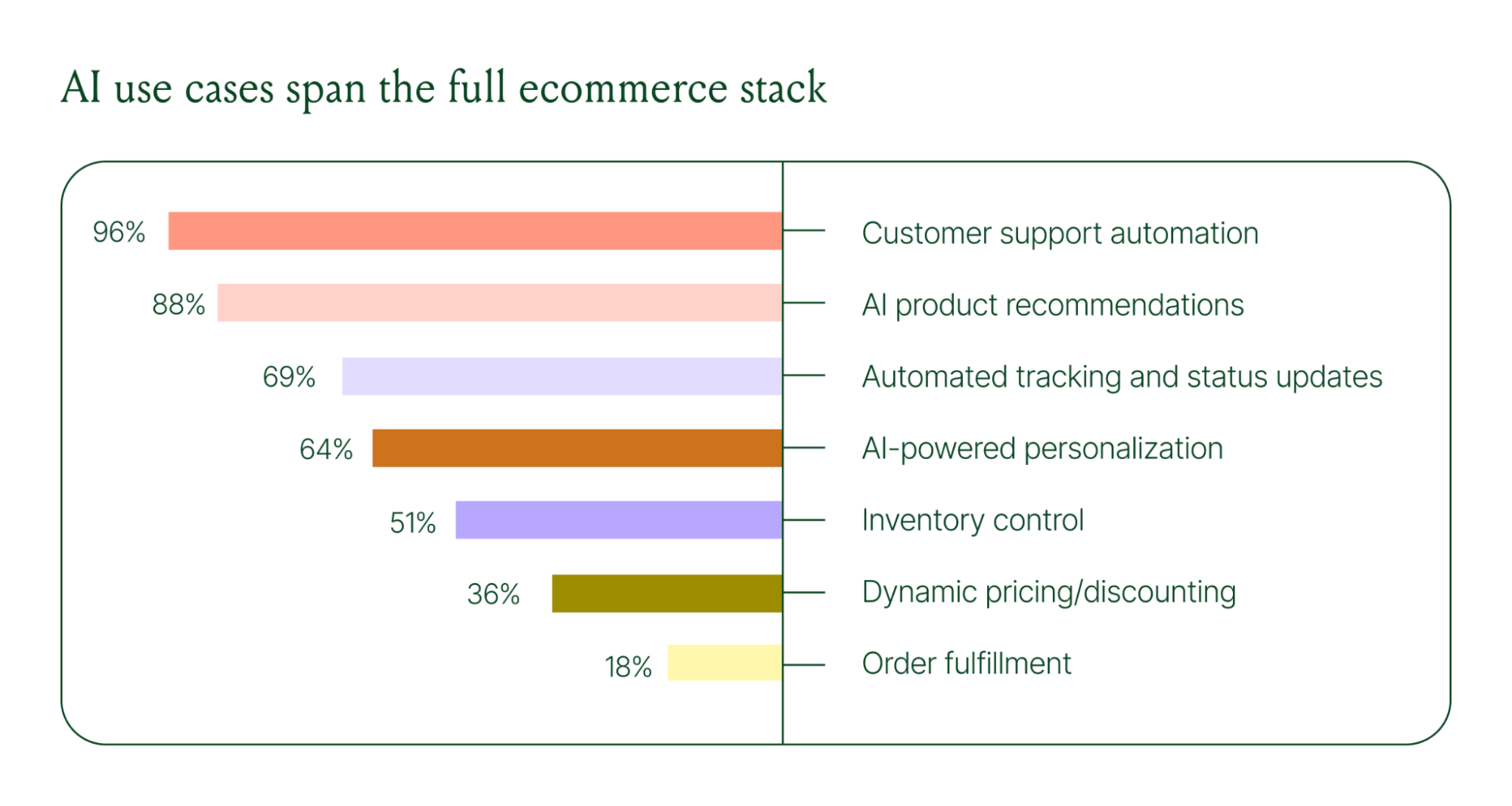
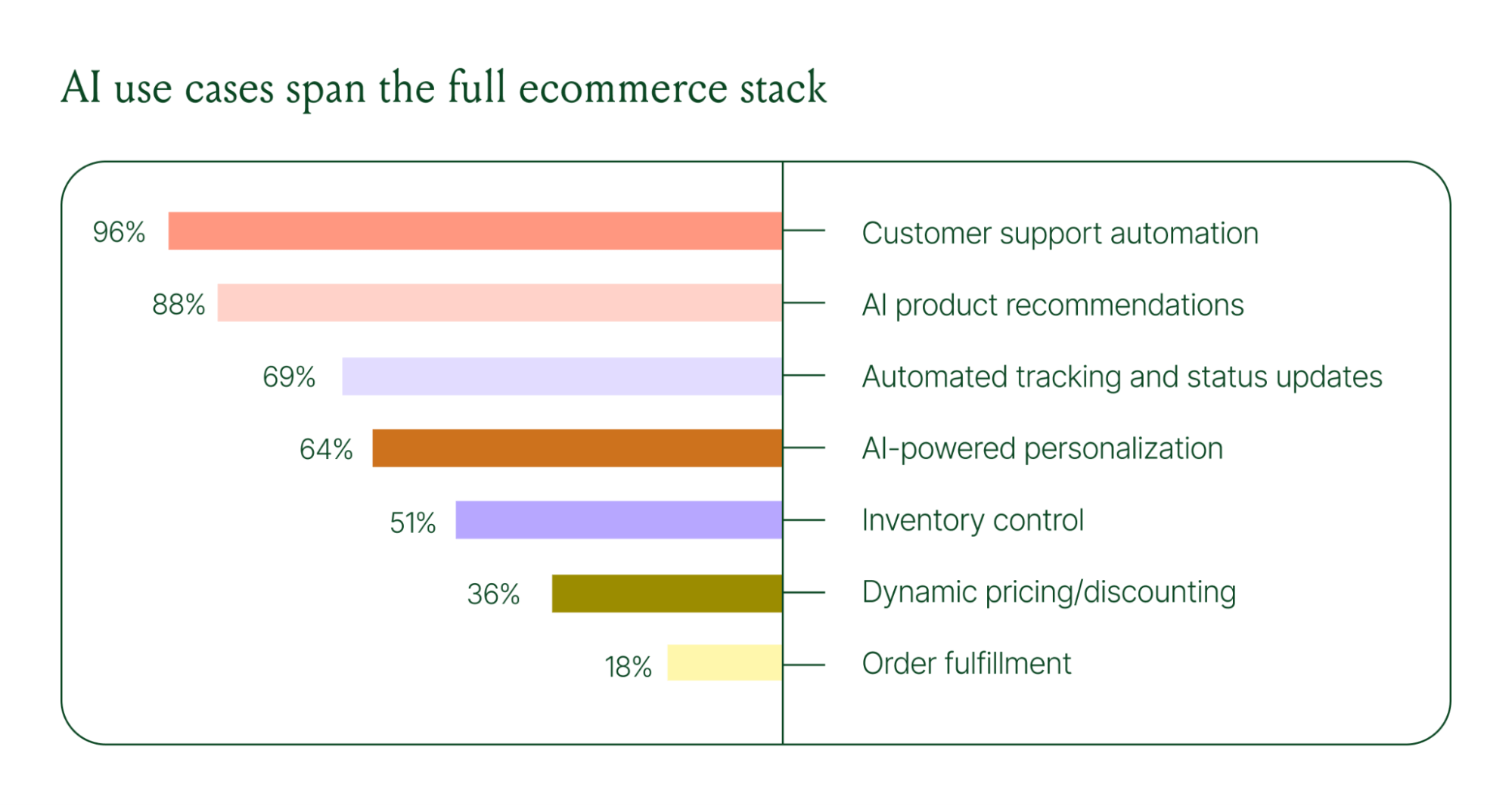
Ecommerce brands are deploying AI across every layer of their operation:
- Customer support automation: 96%
- Product recommendations: 88%
- Automated tracking and status updates: 69%
- Personalization: 64%
- Inventory control: 51%
- Dynamic pricing and discounting: 36%
- Order fulfillment: 18%
When brands were asked which channels contribute most to their AI success, conversational channels dominated. Social media messaging led at 78%, followed by SMS at 70%, and website live chat at 51%. Shoppers want fast, personal conversations, and AI is the best way to deliver that at scale.
Learn more about AI adoption, perception, and use case trends in the full 2026 Conversational Commerce Report.
How AI is changing CX success metrics
For decades, customer support success meant fast response times and high satisfaction scores. Those are still important indicators of success, but leading brands are adding revenue-focused metrics to their dashboards.
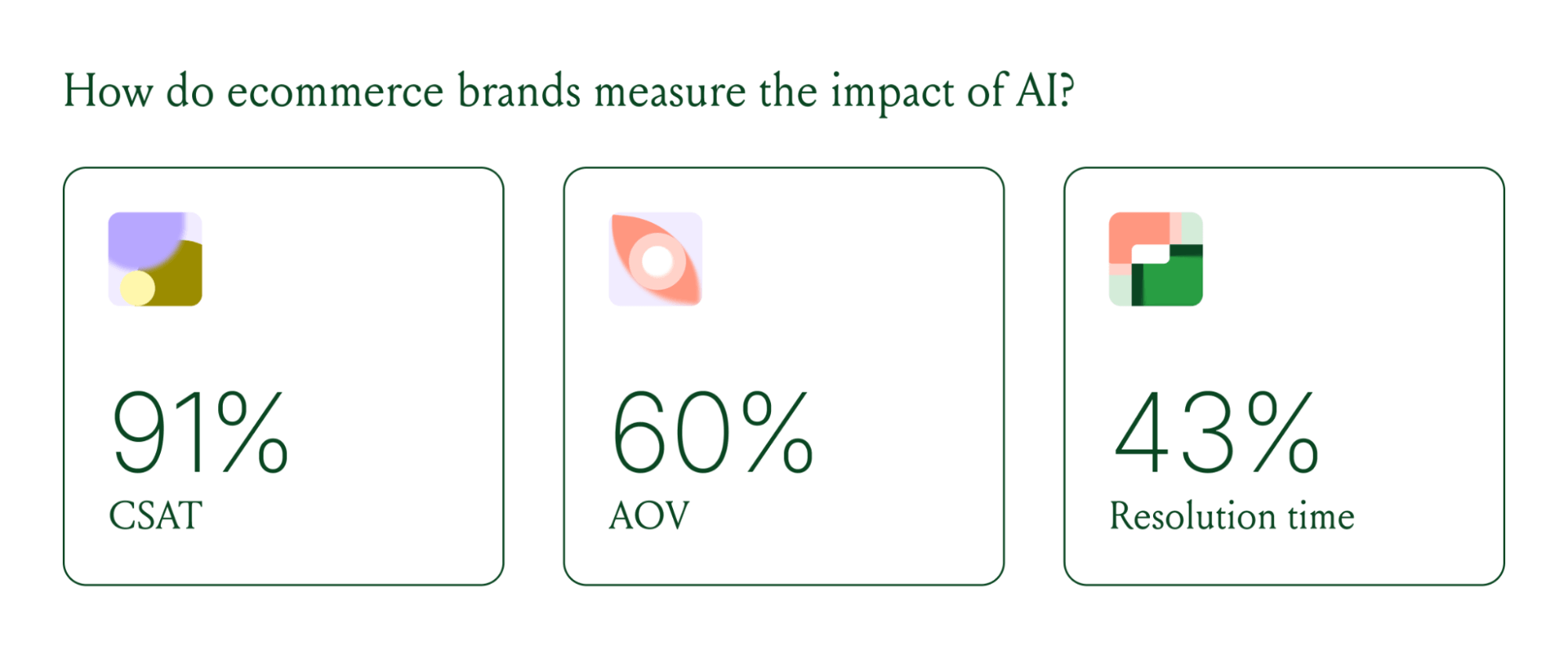
91% of brands still track CSAT as a measure of AI's impact. But 60% now include AOV as a top indicator, and higher-revenue brands earning $20M+ are focusing on metrics like total operating expenses, cost per resolution, incremental revenue, and one-touch ticket rate.
AI can now start a conversation, ease customer doubts, sell, upsell, and recover abandoned carts in a single conversation. When you’re only measuring CSAT, you’re ignoring the real ROI of conversational AI investment.
AI makes every conversational channel a storefront
Virtual shopping assistants now proactively engage shoppers, adapt to their needs in real time, and offer contextual product recommendations and upsells. When the moment calls for it, they can close the deal with a targeted discount.
Gorgias brands using AI Agent's shopping assistant capabilities nearly doubled their purchase rates and converted 20–50% better than those using AI Agent for support only.
Orthofeet, the largest provider of orthopedic footwear in the US, is a concrete example of this in practice. Using Gorgias, they achieved:
- 56% of support tickets automated in 2 months
- Email response times down from 24 hours to 35 seconds
- Double-digit revenue growth without adding headcount.
What this means for your AI strategy
The data tells a clear story: AI has evolved beyond a tool for handling tier 1 support tickets. It’s a core part of your revenue generation strategy.
57% of brands are already using AI for 26–50% of all customer interactions, and 37% expect that share to rise to 51–75% within the next two years. The brands building toward that range now are the ones who will have the operational advantage when it matters most.
The practical question isn't whether to invest in AI. It's where to focus first. Based on where brands are seeing the most impact, three priorities stand out:
- Start with high-volume, low-complexity tickets. WISMO (where is my order) inquiries, return policy questions, and order status updates are where AI delivers the fastest return. Automate these first.
- Expand into conversational channels. Social messaging and SMS are where AI is driving the most success right now.
- Connect AI performance to revenue metrics. If you're only measuring CSAT and response time, you're missing half the story. Add AOV, conversion rate, and incremental revenue to your reporting.
Want to go deeper on the full 2026 conversational commerce trends? Read the complete report for data across every major AI use case in ecommerce.
{{lead-magnet-1}}




Further reading

Gorgias Builds Strong Relationships With Aircall
Aircall is a cloud-based call center software made for support teams. With Aircall, support agents can track everything from A-Z, on any device, with zero hardware to manage. The right tool to increase agent efficiency and customer satisfaction!
Aircall Makes the Gorgias Helpdesk Complete
After listening to early customer feedback, we quickly realized we needed to find a phone integration that empowered users to manage voice calls as easily as emails or chats.
Traditional helpdesk integrations simply log calls as tickets. We wanted to go one step further and associate the phone call with the right customer. This way, agents can see the full conversation history between the brand and the customer.
By building Aircall’s cloud-based phone into the Gorgias platform, agents can also quickly edit orders while on the phone based on the case history they see. After a call has ended, all notes will be added to the correct customer’s profile along with a link to the full call recording.

Why Aircall was the Right Choice
Looking back, the partnership has been mutually beneficial and seamlessly implemented.
Aircall has a well-documented API that our dev team could easily use. We were able to build a working and robust phone integration with Aircall in just a few hours. Four days later, after QA testing, the new solutions were fully functional and ready to use.
Since Gorgias and Aircall both seek to provide the best customer experience possible, cross-company visibility has become a valuable source of new leads and sales. Furthermore, we conduct regular catch-up meetings and share a Slack channel to make sure both teams work hand-in-hand to create the best integration and the best results. The partnership with Aircall is super valuable for both our customers and our respective companies and we strongly recommend each others.
If you're already a Gorgias customer, head to your account and go to Integrations to connect Aircall. If not, you can create an account here and get started in a few minutes.

Event #1: Optimizing Brand Experience To Drive Revenue
Last thursday, we organized our first event at Gorgias. It was the perfect opportunity to celebrate our new round of funding and recent moving to a new office in SOMA, while discussing brand culture and customer experience.
Special thanks to our speakers Renee L. Halvorsen from Marine Layer, Alicia Levine from Sunski, Dorian Greenow from Keto-Mojo and Anthony Benedettini from Dry Farm Wines.
 |
Here are the key takeaways you should remember:
- As an e-commerce brand, you cannot compete on price with Amazon and powerful dropshippers. That’s why brand experience is your key differentiation factor.
- Building a strong brand experience requires to be present on each distribution channel. Don’t let your resellers do the job for you! Sunski for example prepares “environment kits” for their resellers and marketplaces. This way, customers can experience Sunski’s spirit beyond its website.
- When building brand experience, your community is your key success factor. Create a pool of ambassadors who will promote your brand, and reward them with presents, promo codes, and dedicated attention.
- Bet on your own team! Building a great mindset within your team will help you create a strong and consistent brand image. At Keto-Mojo, each member of the team does customer service, so that everyone focus on what customers really need. Besides, the founder should inspire a culture of passion and dedication to the product.
You missed our event? Don’t worry, it was the very first of many!
Curious about how Gorgias can optimize customer service? Create an account here and get started in a few minutes!

Thank you, interns!

Announcing the ReCharge integration
Recharge is the most popular subscription app in the Shopify app store and is the preferred solution for Shopify Plus stores. Over 10,000 Shopify merchants chose ReCharge to help sell products on a recurring basis, including stores like Dr. Axe, Hubble Contacts, and 5 Hour Energy.
The challenge is, when a customer has an issue with their subscription, the support team needs to jump between their helpdesk, Shopify and the ReCharge platform to fix the problem. This negatively impacts response time. Agents end up wasting hours per week going to ReCharge to skip a box for a customer, edit a subscription, etc. One of the key advantages of using Gorgias is to manage all your customer support in one place. A few months ago, our customer Darn Good Yarn asked us to build an integration with ReCharge. They no longer wanted to switch between ReCharge, Shopify and their helpdesk. This was completely aligned with our vision, so we decided to build it.
Today, we're excited to announce we've partnered with ReCharge to launch this integration.
Here are the key benefits:
- Display ReCharge subscriptions next to support tickets.
- Edit ReCharge subscriptions in one click from your helpdesk: refund charges, skip monthly payments or cancel subscriptions from Gorgias
- When a customer ask to edit their subscription, you can send them an auto-response with the link to manage the subscription.
“Gorgias gives us a holistic view of our customers. This way we can provide them with fast and personalized help”
Nicole Snow, DarnGoodYarn
Let’s take the example of Averill John. She wants to cancel her subscription to the Yummy Box and has just sent an email to your support.
Here is how your helpdesk looks like:

You can see that Astrid has been assigned to this ticket and that this ticket is tagged “Ambassador”. It means that Averill is one of your super loyal customers.
On the right, you can see the ReCharge account data of Averill. Here, Averill has a monthly subscription to the Yummy Box and will be charged on the 15th of October.
Astrid can skip the October charge in one-click on the “Skip charge on subscription” button. It will immediately set the action within ReCharge. Response time? Less than 1 minute!
If you're already a Gorgias customer, head to your account and go to Integrations to connect ReCharge. If not, you can create an account here and get started in a few minutes.

Announcing the Aircall integration
One of the key advantages of using Gorgias is to provide a unified support experience to your customers across all channels. A few months ago, some of our customers asked us to build a phone integration. Traditional helpdesk integrations simply log calls as tickets. We wanted to go one step further and associate the phone call with the right customer.
Today, we're excited to announce we've partnered with Aircall to build this integration.
Aircall arms small-to-medium sized business (SMBs) with a phone system built for modern business. With zero hardware to manage, dozens of integration options to explore, and the ability to add local numbers in more than 40 countries, support teams can easily provide phone support in minutes.

Here are the benefits of this new integration:
- When a customer calls your company in Aircall, it creates a ticket in Gorgias and automatically matches it with the corresponding Shopify customer. This way, your staff can edit orders while they are on the phone with the customer.
- Your team sees all previous interactions they had with each customer, under their timeline.
- Get omni-channel statistics. Gorgias stats include Aircall phone data. For instance, you can monitor if you're getting more return requests over the phone or through Facebook Messenger.
If you're already a Gorgias customer, head to your account and go to Integrations to connect Aircall. If not, you can create an account here and get started in a few minutes.

We're joining the Shopify Plus Technology Partner Program

We're integrating with LoyaltyLion!
Great news! Today, we're announcing a new integration with LoyaltyLion. LoyaltyLion is a digital loyalty framework that gives ecommerce stores innovative ways to engage and retain customers.
Our mutual customer Darn Good Yarn uses it to successfully increase customer retention. When they switched from Freshdesk to Gorgias to manage customer support, they wanted to leverage their loyalty program for customer support.
We used their feedback to build the integration with LoyaltyLion, which they have been using for a couple months in beta. Today, we're excited to make it available to all our users.
What is the LoyaltyLion integration?
Here are some of the benefits of this integration:
- Display how many points a customer has when they contact your support team
- When you respond to customer support requests, award loyalty points to customers directly in Gorgias
- Include the customer's personal referral url in your responses. This way, if they are happy about your support, they'll refer their friends to your store.

Overall, this allows your team to use your loyalty program for customer service.
"We love being able to issue our customers loyalty points directly from Gorgias! It's a great way to boost efficiency and also customer retention."
Chloe Kesler, Customer Support manager at Darn Good Yarn
How can I use the LoyaltyLion Integration?
The integration is immediately available on your Gorgias account. If you don't have an account, you can create one here. Then, follow the instructions in our documentation and you can get started!
.avif)
How to leverage customer support to increase sales?
Most customers are loyal to brands because they know what level of service they can expect. As a result, providing an above-average customer experience is key to increase repeat in sales.
It’s relatively easy to provide great support when you get started with your store: your team gets a few dozens of support requests a day, and they respond to them almost instantly. The thing is, this level of service is very hard to maintain as you scale. Response time usually drops, and most brands start using standardized macros to keep up with the pace, which is a poor customer experience.
Your sales have increased, good. Now, you need to get your customer support up to speed

Source: Gorgias customers during the Thanksgiving peak
At Gorgias, we’ve been chatting with 400 stores over the past year, and we’ve seen a lot of them working on crossing this “chasm”.
This post shares learning on how you can build a customer support organization that will scale with your business, and provide best-in-class customer service, which will drive customer retention.
Step 1: Run an audit of your support organization
A good place to start is to list the most common reasons customers are contacting you about. Go ahead and manually classify 200 tickets from your support inbox. This should take you about an hour. You can build categories from scratch, or use this spreadsheet of the most common requests for e-commerce companies we built.

Now, you should be able to understand what problems are causing the most pain to customers.
If a specific type of request is above 10% of requests, then it’s a good candidate for optimization. For instance, if you’re getting a lot of “where is my order” questions, here are a few things you can do to deflect those:
- Add a tracking section for customers to track their package on your site. Aftership can help here.
- Send updates to customers about issues with delivery, through SMS or email.
Now that you have a good understanding of the reasons customers are contacting you for, you can map the customer journey, and identify what actions your agents need to take to respond to tickets.
Later, you can use this for training purposes, and to identify optimization opportunities.
At Piper, we basically studied the whole customer journey and tried to identify all reasons why someone could contact us (based on previous history). This helped us quickly identify where customers were "blocked"
Finally, let’s analyze the efficiency of your team. Of course, every business is different, but you can use this table to figure out how efficient your agents are compared to other stores. A good metric to track it is ticket closed per month. Just make sure that satisfaction remains consistent.

Related: Learn more about the impact of live chat on sales. And see how Gorgias live chat can help you turn more browsers into buyers with chat campaigns.
Step 2: Figure out how you can improve the customer experience
Now, let’s work on creating “wow moments” for your customers. If you manage to exceed customers expectations when they contact you, you’re most likely to increase their loyalty and have them refer your store to their friends.
Here are a few ways you can create “wow moments”.
Make it easy for customers to contact you
You should be where your customers are. For example, if you have a Facebook page with a large audience, consider it as a real customer support channel. The point is, you should provide the same level of assistance across all support channels that your customer will use.
Also, don't be afraid to contact customers first, especially when they have items in their shopping cart. Offering help or a discount code at the right time could make the difference between a sale and an abandoned cart.
Example: providing high quality support on Facebook
70% of customers consider Facebook as a live chat support. To maximize customer satisfaction, your response time should be no more than 1 min. You’ll then be listed as a very responsive page, which will encourage your customers to respond.

You can also leverage public posts to build relationship with your customers. Another easy way to facilitate customer communication is to remove the need for customers to repeat themselves. On your support platform, make sure your merge Facebook conversations with email tickets. This way, if the customer switches channel, your team will have access to the context of what the customer said before.
Related: Check out our trends and best practices for customer support.
Personalize every interaction with customer support
You should leverage every data point you have about the customer to personalize the way you communicate with them:
For how long they have been a customer
Their order preference
Their location
The days of the “we value your business” are over.
Always go an extra mile for your customers. If the customer asks for the status of their order, don’t respond only with the tracking number. Go get the order status on UPS so the customer doesn’t have to do it themselves when they’ll receive your email in the subway with poor network connection.

Another good thing to do is to use a specific tone with your customer, that matches the brand image you want to convey.
If you’re into gifs, you can use them to build a brand tone your own set of gifs, designed for your own brand, and use them in your support emails. You can hire an illustrator on Upwork for that, or build them yourself.
Related: Tips to respond to angry customer emails.
Step 3: Give your team the “ironman suit” for support
Now that you know the level of support you aim at giving your customers, and you know what actions your agents need to take to get the delivery info, create an RMAs, etc., you can start optimizing the process for them.
Display rich customer profiles for your agents
To personalize messages, your agents need to have access to customer data. You can leverage the standard Shopify integration from your help desk as a starting point.
Though, it can be relevant to connect other data points to your help desk:
- Display fulfillment data. Shippo is great for that
- Inventory data: Stitch, display inventory to the reps
- NPS responses
- Responses to last promotions
If you’re on Zendesk, enabling the Shopify integration is a good start: it shows how much the customer has spent, and the past orders.
Some Gorgias customers have pretty advanced widgets that display data from Shopify, Stitch & Shipstation. This way, all the customer information is available.
Empower your reps to perform actions from support conversations
You can create custom widgets for your help desk, so that your agents can trigger actions from your help desk. Here are the most helpful actions:
- Create a coupon
- Place a replacement order
- Cancelling an order
- Create an RMA
This is a bit more tricky to implement. You need to build a custom app with buttons that will trigger actions - there are some good tutorials for Zendesk, Freshdesk & Help Scout. At Gorgias, we’ve built integrations with Stitch, Shipstation to embed these actions in the product, and enable you to add your own.
Other 3rd party apps like Chargedesk enable you to refund customers in one click.

Step 4: Track your progress
Our goal here is to improve the customer experience to drive sales. A good way to track the efficiency of your support work is to compare the behavior of customers that have been in contact with customer support from those who have not.
Shopify helps you easily to this. You can create an integration between your help desk and Shopify to tag customers who reach out to support, using the Shopify API. Say you add a “customer_support” tag to them.

Then, you can use Shopify statistics to monitor how the cohort of customers who have been in touch with your support team behaves, and assess the impact of your efforts with customer support.

Another way to proceed is to tag orders that generated a support tickets. This way, if you work on improving delivery notifications, you can monitor the impact.
Final thoughts
Building a scalable support team that provides an amazing customer experience takes time.
Try to test different “wow moments”, iterate on the way you personalize messages, on the tone you’re using, and always track your progress. Among the teams we surveyed, several mentioned they managed to increase sales repeat by 30% after implementing these tactics.
Want to learn more about how customer support can improve your conversion rate and lead to more purchases? Check out our guides to ecommerce upselling and Shopify abandoned cart recovery.
Building delightful customer interactions starts in your inbox
