Join us for Moments That Matter: Meet the Modern Helpdesk
September 10 at 12PM EST.
Save your seat


Four months ago, our analysts were dealing with a barrage of questions. "What's our ARR by segment?" "Build me a dashboard for this quarter's pipeline." Quick asks piled up behind complex deep dives. Stakeholders waited for answers that should have taken seconds, and analysts spent their time fielding requests instead of doing the strategic work that creates the most value.
Today, anyone at Gorgias can ask a question in plain language and get an accurate, contextualized response in seconds. Not from a colleague or dashboard, nor from a generic answer from the internet. But a response built on our business context. We call it Cortex, our flagship internal AI agent.
In two months, Cortex went from an idea to fielding thousands of questions every week, recommending actions across the business, and deprecating the need for manual dashboard creation. While most companies right now are treating AI as an initiative — at Gorgias, AI is already part of how we work. 72% of Gorgias employees use Cortex each week, and that number is only growing.
We didn’t achieve this by simply plugging a large language model into our stack. LLMs are a critical part of the equation, but they aren't the driving force — it’s everything else under the hood: the infrastructure, context, platform architecture, and the team that brings it all together.
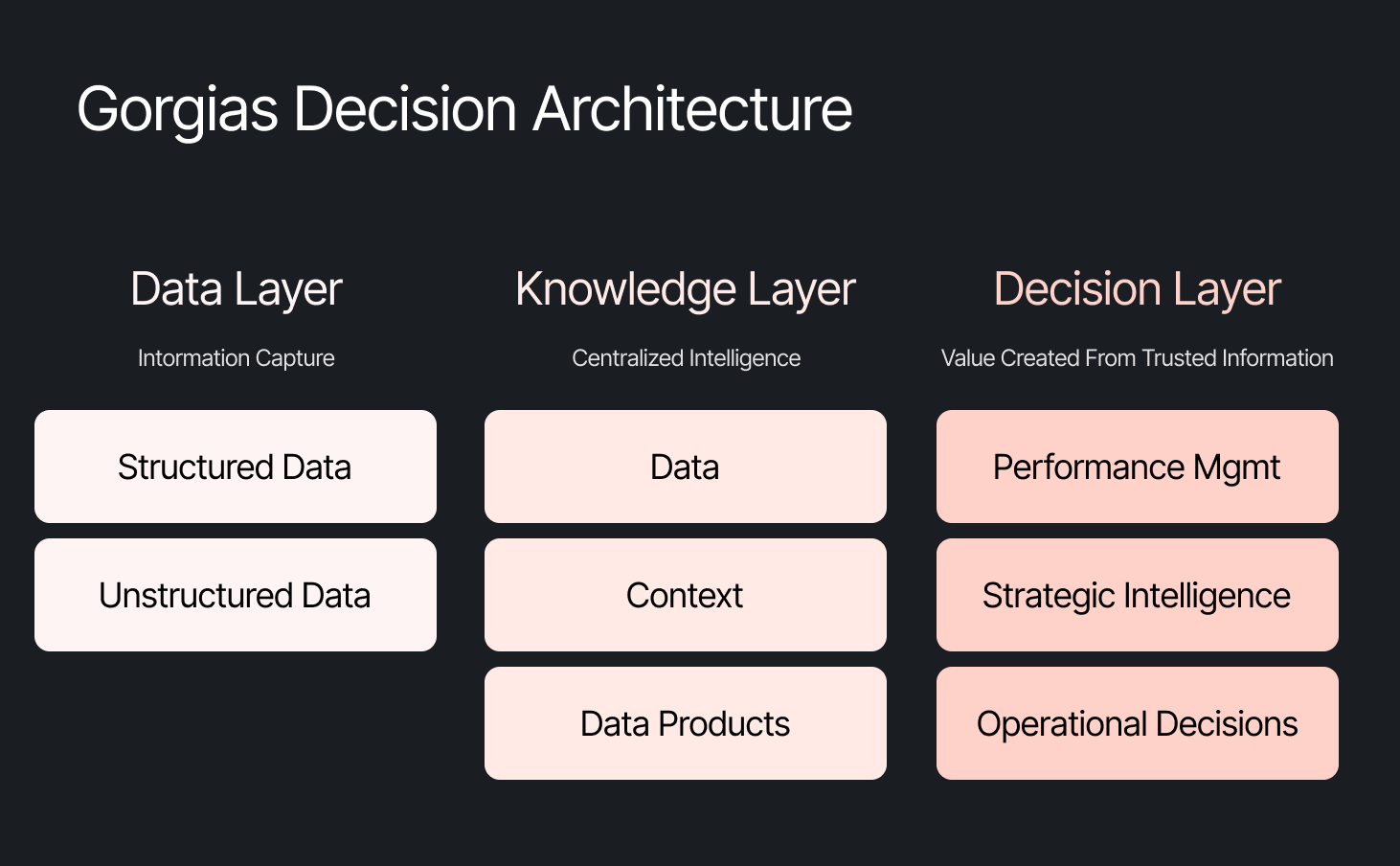
The instinct across many companies today is to start with the model, pick a provider to solve a specific challenge, or invest heavily in getting the data right. All reasonable starting points, but most of them solve for one use case. Underneath that approach is a framing problem: seeing AI as an initiative — something you assign and measure. Seeing AI as another tool your company uses versus how your company operates.
We started somewhere different. Every company is built on four pillars: customers, people, product, and decisions. AI investments tend to place heavy emphasis on the first three. We started with the fourth. Our bet was that if we built everything around the need to make effective decisions first, asking what Gorgias needed to know to operate well, then our AI would become dramatically more powerful.
Cortex is our flagship internal AI agent, and the product where we established the tenets that now run through everything else we build: composable and modular infrastructure, governed context, and accessible from wherever decisions happen. Cortex lives in Slack, as well as across LLM vendors, in its own browser extension, and even on its own dedicated internal site.
Cortex doesn’t stop at answering questions. It can read and write to Notion, file Linear tasks, create HTML apps, automate signal delivery, and more. It operates across every layer of our stack, from dashboards to data pipelines, because we designed it as one integrated system. It is this connection that adds remarkable depth to what people can ask, and what they get in return.
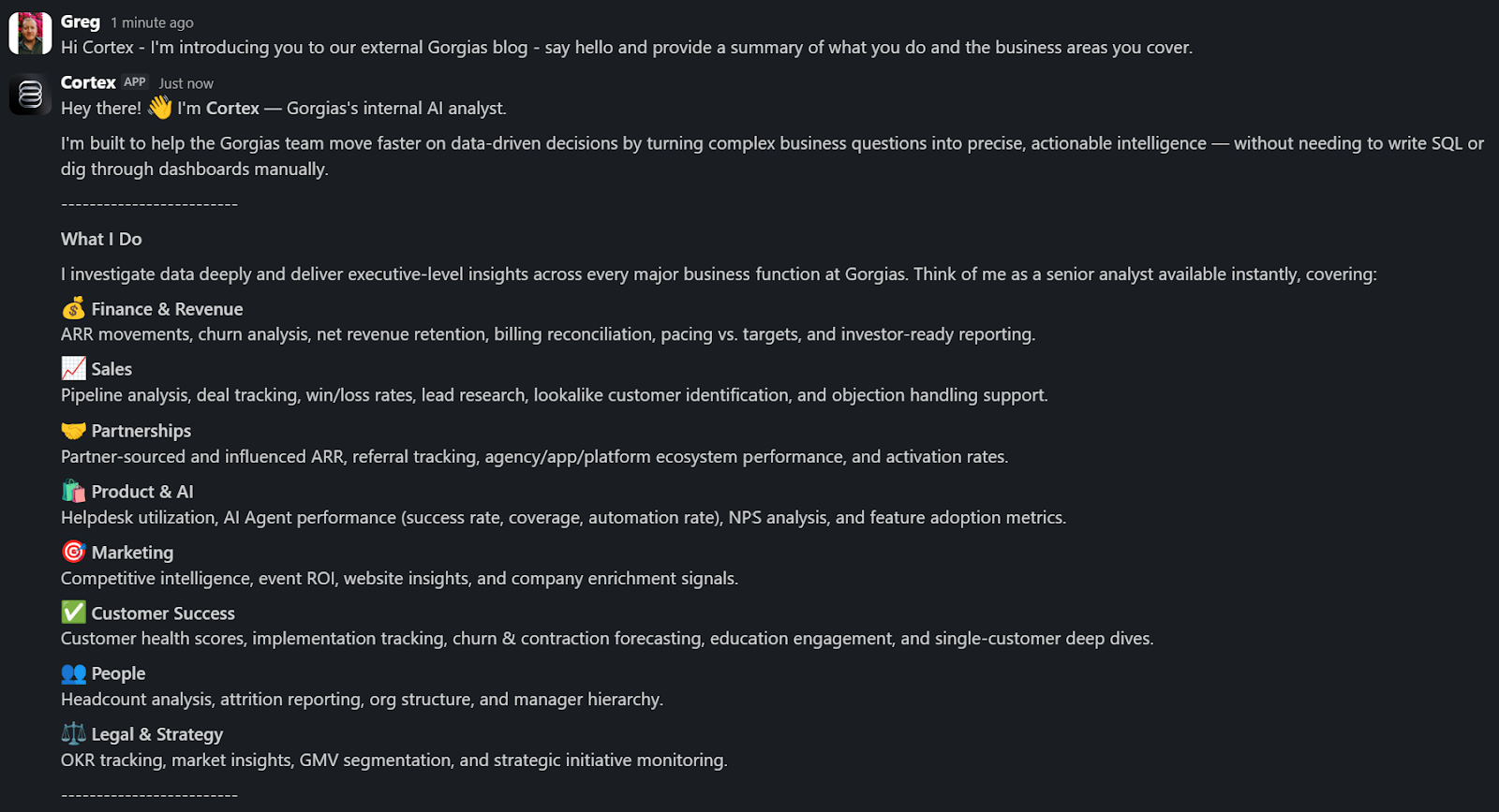
A Sales Lead is pitching and asks Cortex for the full picture of the merchant. In a customized PDF, Cortex lists coverage gaps, pre-sale intent signals, and product fit options. Everything the sales lead needs to walk in with confidence.
A Senior Product leader asks, "How are we performing against OKR #1, and what can my team do to help accelerate it?" Cortex returns a full ARR breakdown, projected end-of-month attainment, segment-level findings, and connects it all back to company-level strategies. A suite of recommendations customized to the leader, the performance, and the signals that bridge how they can support our goals. The kind of answer that used to take someone a week to put together.
These aren't simple lookup queries. They require deep business context spanning multiple areas. Cortex handles these because its Decision Engine gives it the information to reason against governed data, metric definitions, and business context, turning a generic answer into a credible one.
Overnight, teams have built Cortex into how they work. They’re spending less time searching and more time finding answers, not because they were told to, but because Cortex reduced the distance between question and decision.
Cortex’s modular infrastructure allows us to experiment and add new capabilities freely. We’ve already built two more internal AI agents made for entirely different use cases, but using the same Decision Engine as Cortex.
GAIA, our internal experimentation AI Agent, helps our customers identify opportunities in their AI Agent Guidance design. It takes institutional knowledge across our teams and turns it into a scalable system that drives automation and value to our customers. Our CEO, Romain Lapeyre, has been its most vocal advocate since day one.
When we needed a platform for investor readiness and board preparation, we built Oracle. Our board decks and talk tracks are informed and built with the same AI, and our numbers are validated every step of the way.
We’re continuing to expand new AI agents internally, exploring how they can create value for customers and our own teams.
When AI handles thousands of analytical questions each week, the highest-value work for a data team shifts permanently. Late 2025, we repositioned from a Data Analytics function into a Decision Intelligence function — a structural change in what we own and how we operate.
Today, our analysts focus on the most sensitive, complex, and forward-looking decisions and analyses. They partner more deeply with stakeholders by driving next steps from signals. They're even building entirely new capabilities that didn't exist in their role descriptions months ago. Things like AI skills for Cortex, context curation, and insight and recommendation delivery. The role of the analyst hasn't diminished. It's expanded to encompass the most meaningful work an analyst can do: driving outcomes and ensuring those decisions can achieve them.
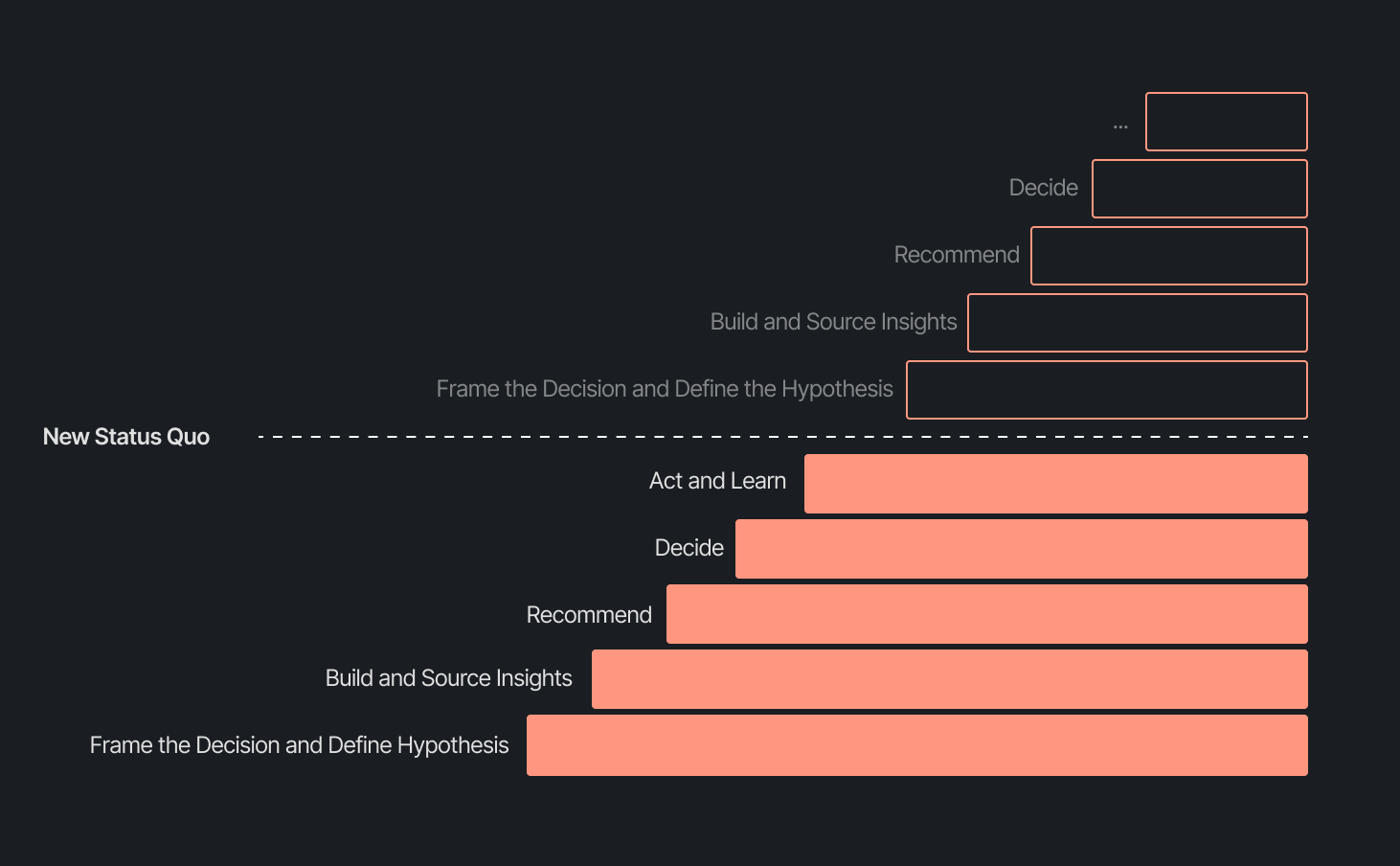
Our business support model has changed, too. Instead of embedding analysts and dedicated engineers within functional teams, we align capacity to the highest-impact company objectives and move fluidly across them. This model works even better because Decision Intelligence brings together both analytics and engineering teams under one roof.
Elliot Trabac leads our Data, Context and AI Engineering teams. The Decision Engine, Cortex, GAIA, and the platforms I've described exist because of the infrastructure his team innovated and built from the ground up. Noemie Happi Nono leads our Decision Strategy and Operations team, driving decision outcomes with stakeholders, advancing the development of Cortex skills and capabilities, and pushing into new areas of analysis every day.
Together, they're shaping what a modern data function looks like when AI becomes a standard building block for how a company operates.
The question of ROI is long gone. AI has opened the floodgates to more trusted and meaningful signals than ever. The natural next evolution is Proactive Intelligence, signals surfaced toward what you need to know, before you ask. And we're already building this because our architecture is designed to support it.
In the coming weeks, members of the Decision Intelligence team will go deeper into themes I've touched on here. Yochan Khoi, a Senior Analytics Engineer on our team, recently published a technical walkthrough of our context layer and will go further into building context strategies that scale. Others will cover infrastructure, analytical partnerships, evolving data assets into decision assets, and the cost and efficiency gains that make sustained AI investment viable.
AI hasn't changed the most important element of data and analytics functions — delivering outcomes — but it has raised the bar for what it looks like and how far we can take it. We’re just getting started.
TL;DR:
The way shoppers buy online has shifted and customers are at the center.
They no longer want to scroll through product pages, dig through FAQs, or wait 24 hours for an email reply. They open a conversation, ask a specific question, and expect a useful answer in seconds. Brands that can’t deliver these experiences at scale are seeing customer hesitation turn into abandoned carts and lost revenue.
This shift has a name: conversational commerce. It's the practice of using real-time, two-way conversations as your primary sales channel, through chat, AI agents, messaging apps, and voice.
What started as an experiment for early adopters has become a key growth lever, with 84% of ecommerce brands treating conversational commerce as a strategic pillar this year vs. last year.
We surveyed 400 ecommerce decision-makers across North America, the U.K., and Europe to understand how conversational commerce and AI are reshaping the ecommerce landscape. These findings are complemented by aggregated and anonymized internal Gorgias platform data from 16,000+ ecommerce brands.
The State of Conversational Commerce in 2026 trends report breaks down all of the findings, including five key trends shaping the ecommerce landscape.
{{lead-magnet-1}}
A few years ago, adding an AI chatbot to your site that could provide tracking links and Help Center article recommendations was a differentiator. Today, it's table stakes. McKinsey found that 71% of shoppers expect personalized experiences, and 76% get frustrated when they don't get them.
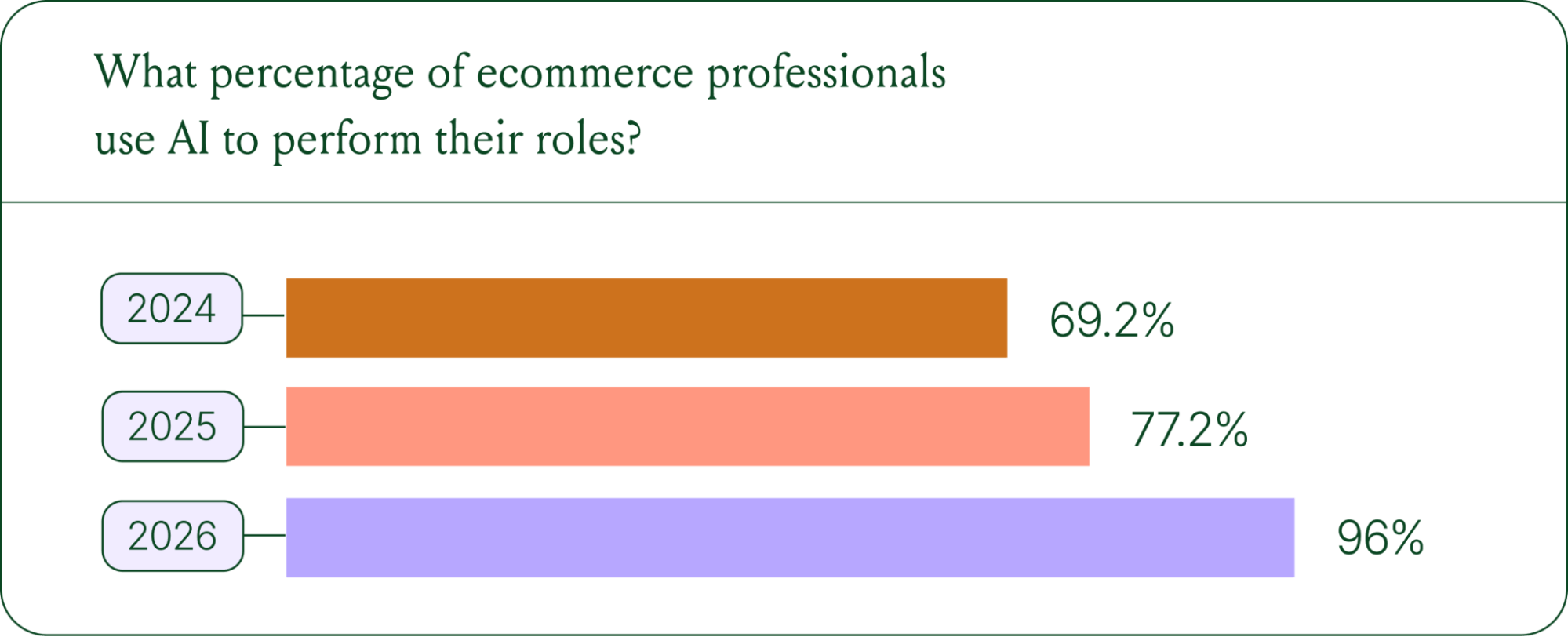
Right now, most ecommerce professionals use AI, with 93% having used it for at least 1 year. Enthusiasm is accelerating quickly, with only 30% of ecommerce professionals rating their excitement for AI at 10/10 in April 2025. Similarly, while AI adoption rose steadily year over year, it reached a clear peak in 2026.
The use cases driving this adoption are practical and high-volume:
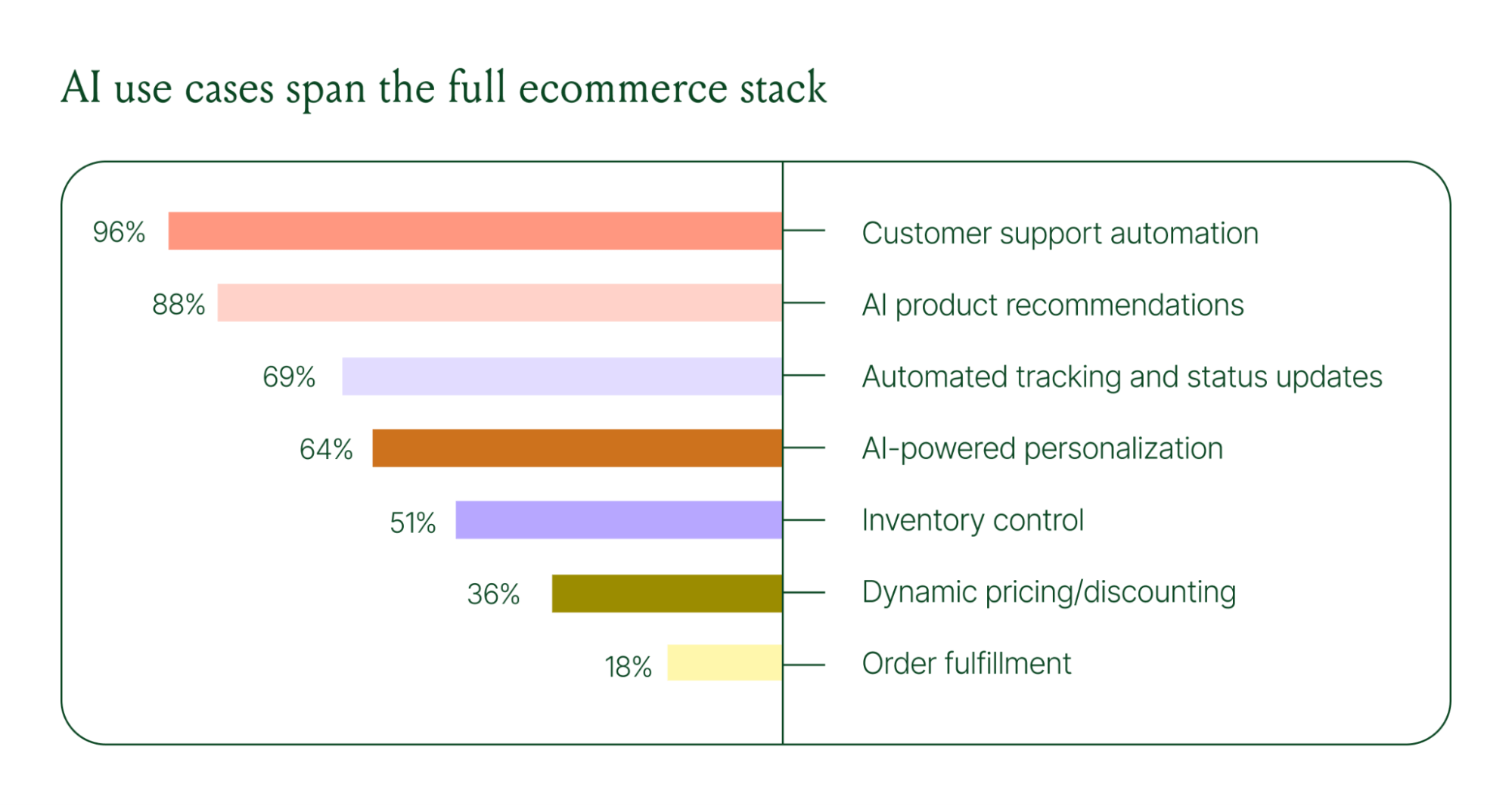
These are the tickets that flood brands’ inboxes every day. AI agents resolve them instantly, without pulling teams away from conversations that actually require human judgment.
Explore AI adoption and use case data in more depth in the full report.
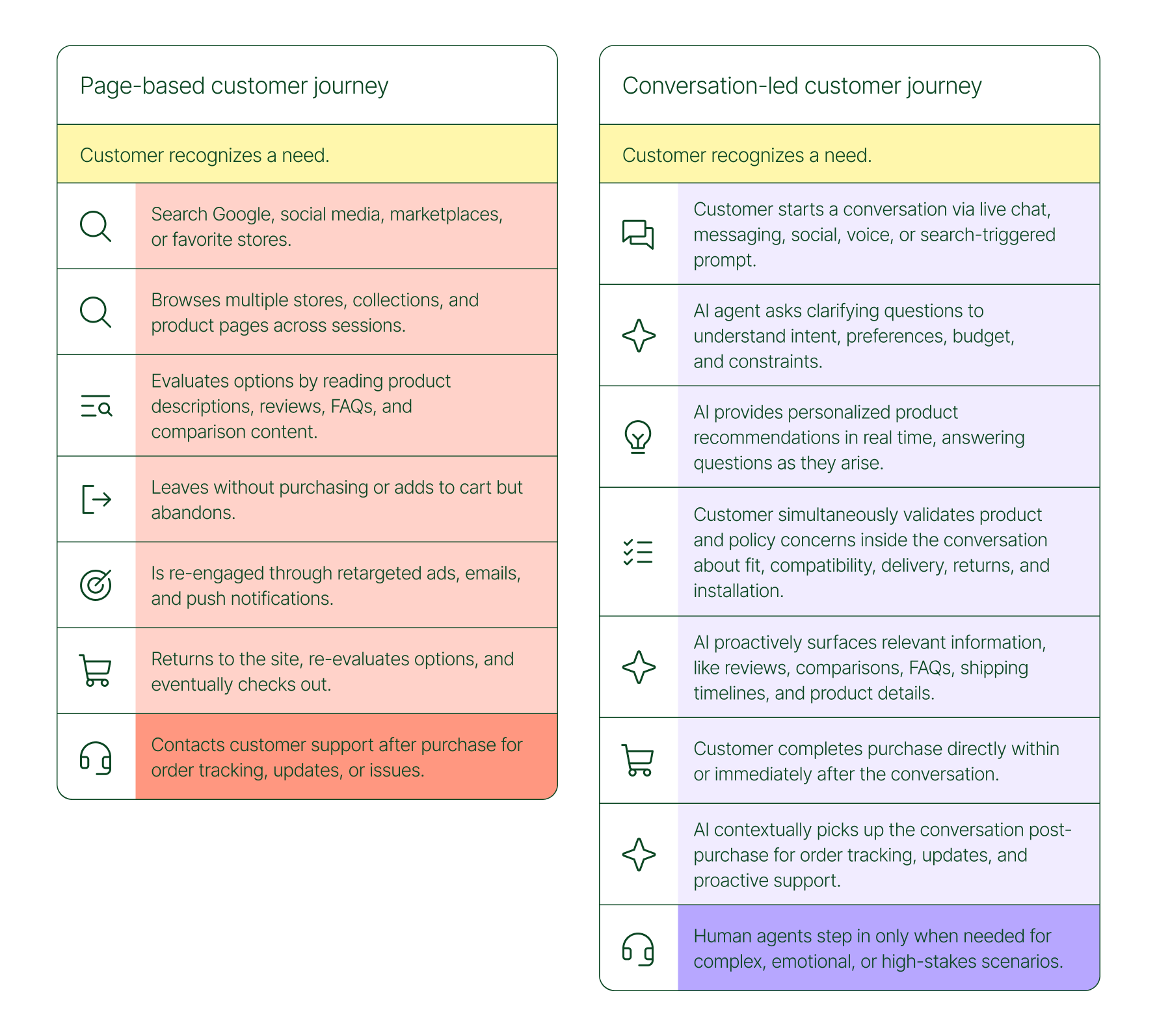
The traditional ecommerce funnel, visit site, browse products, add to cart, check out, is losing ground. Shoppers now discover products on Instagram, ask questions via direct message, and complete purchases without ever visiting a website.
Conversational AI is actively increasing revenue, with 79% of brands reporting that AI-driven interactions have increased sales and conversion in their business.

The practical implication is that every channel is becoming a storefront. Creating personalized touchpoints with customers earlier in the journey, through proactive engagement, is impacting the bottom line.
Read the full report to explore how AI conversions have increased QoQ by industry.
Pre-purchase hesitation is one of the biggest conversion killers in ecommerce. A shopper lands on your product page, has a question about sizing or compatibility, can't find the answer quickly, and leaves. That's a lost sale that had nothing to do with your product.
Conversational AI changes that dynamic. When a shopper can ask a question and get an accurate, personalized answer in real time, the friction disappears.
Brands using Gorgias saw this play out at scale in 2025. When AI Agent recommended a product, 80% of the resulting purchases happened the same day, and 13% happened the next day.
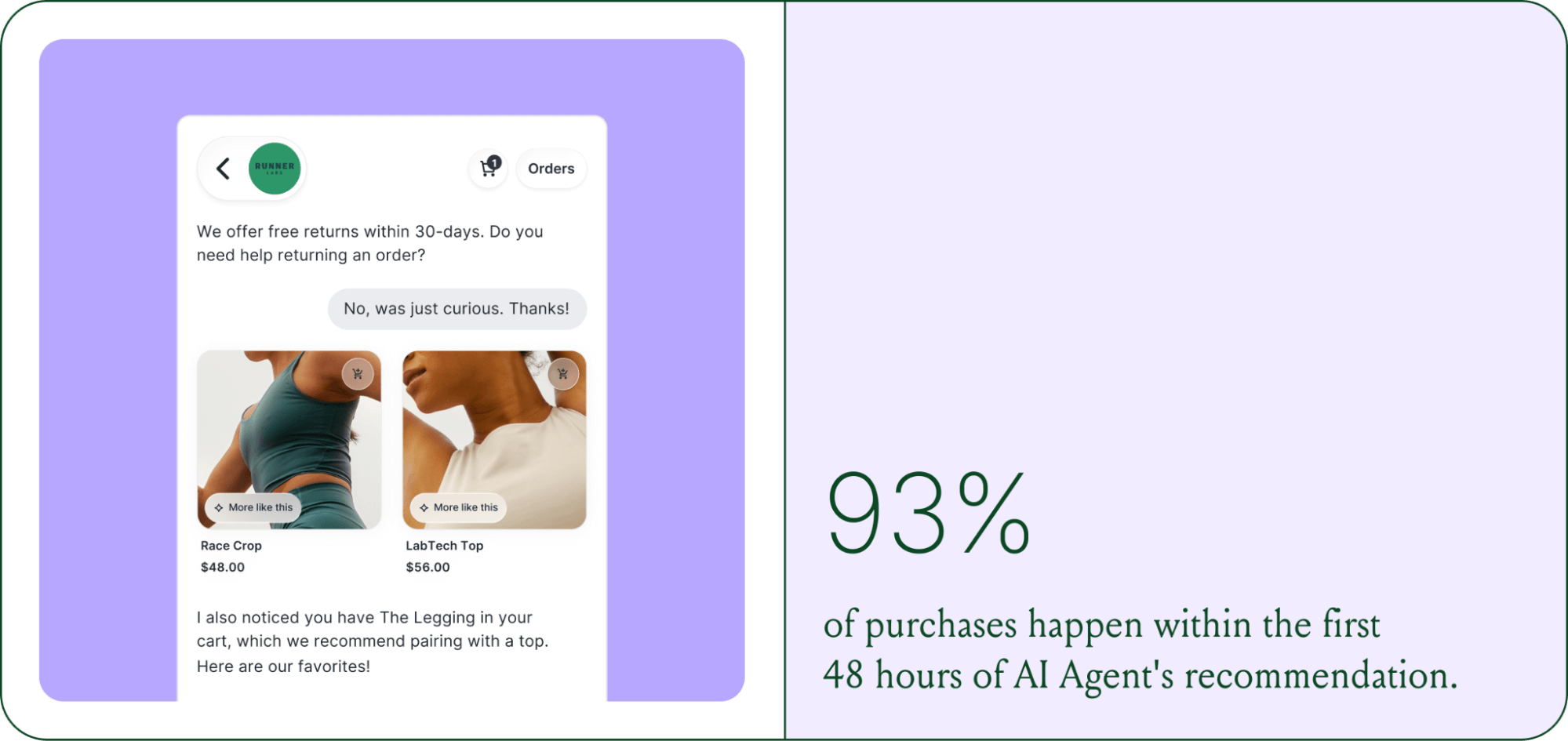
Brands are further accelerating the buying cycle through proactive engagement. On-site features such as suggested product questions, recommendations triggered by search results, and “Ask Anything” input bars drove 50% of conversation-driven purchases during BFCM 2025.
Explore how AI is collapsing the purchase cycle in Trend 3 of the report.
There's a persistent narrative that AI is making CX teams redundant. The data tells a different story. 62% of ecommerce brands are planning to grow their teams, not cut them. But the scope of those teams is changing.

New roles are emerging around AI configuration and quality assurance. Teams are investing in technical members to write AI Guidance instructions, develop tone-of-voice instructions, and continuously QA results.
CX teams are also bridging the gap between support goals and revenue goals, as the two functions increasingly overlap.
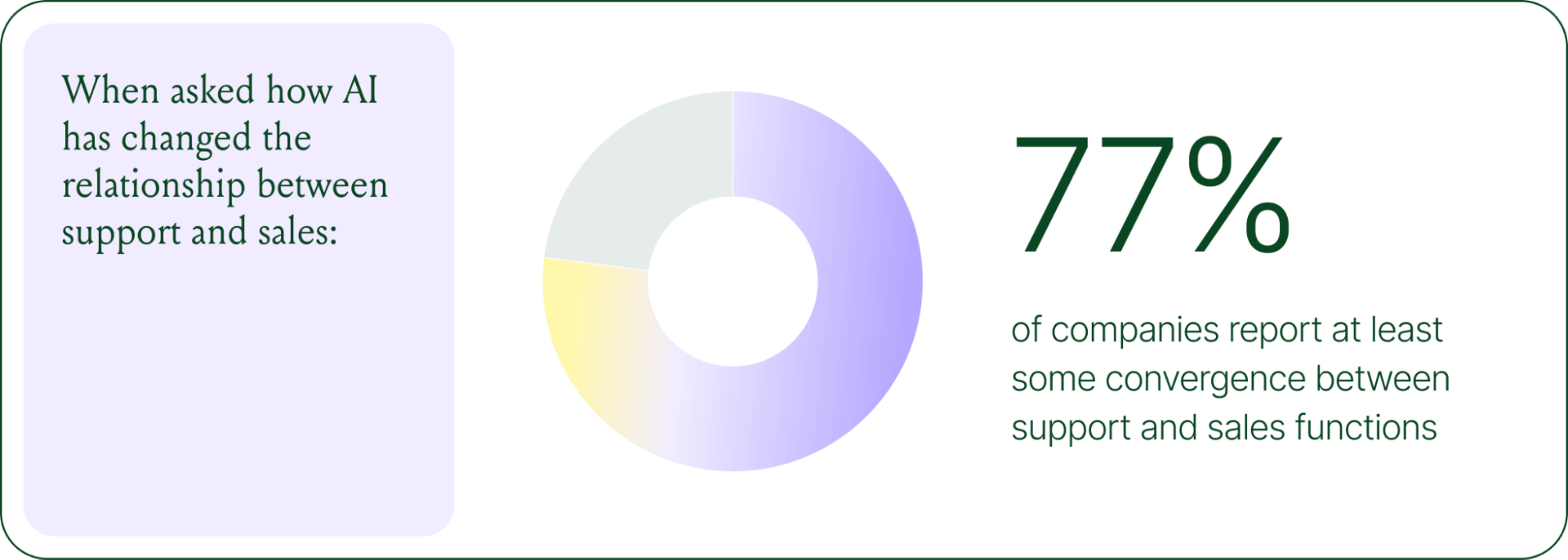
The result is CX teams that are more technical than they were before. Agents who once spent their days answering repetitive tickets are now spending that time on higher-value work: complex escalations, VIP customer relationships, and improving the AI systems and knowledge bases that handle the volume.
Learn more about the evolution of CX roles in Trend #4.
Despite increasing AI adoption, data shows that ecommerce brands shouldn’t strive for 100% automation. Winning brands are building systems in which AI handles repetitive tier-1 tickets, and humans handle complex, sensitive cases.

AI handles speed and scale. It resolves order-tracking requests at 2 a.m., processes return-eligibility checks in seconds, and answers the same shipping question for the thousandth time without compromising quality.
Human agents handle conversations that require context, empathy, or decisions that fall outside the standard playbook. There are several topics where shoppers still prefer human support.
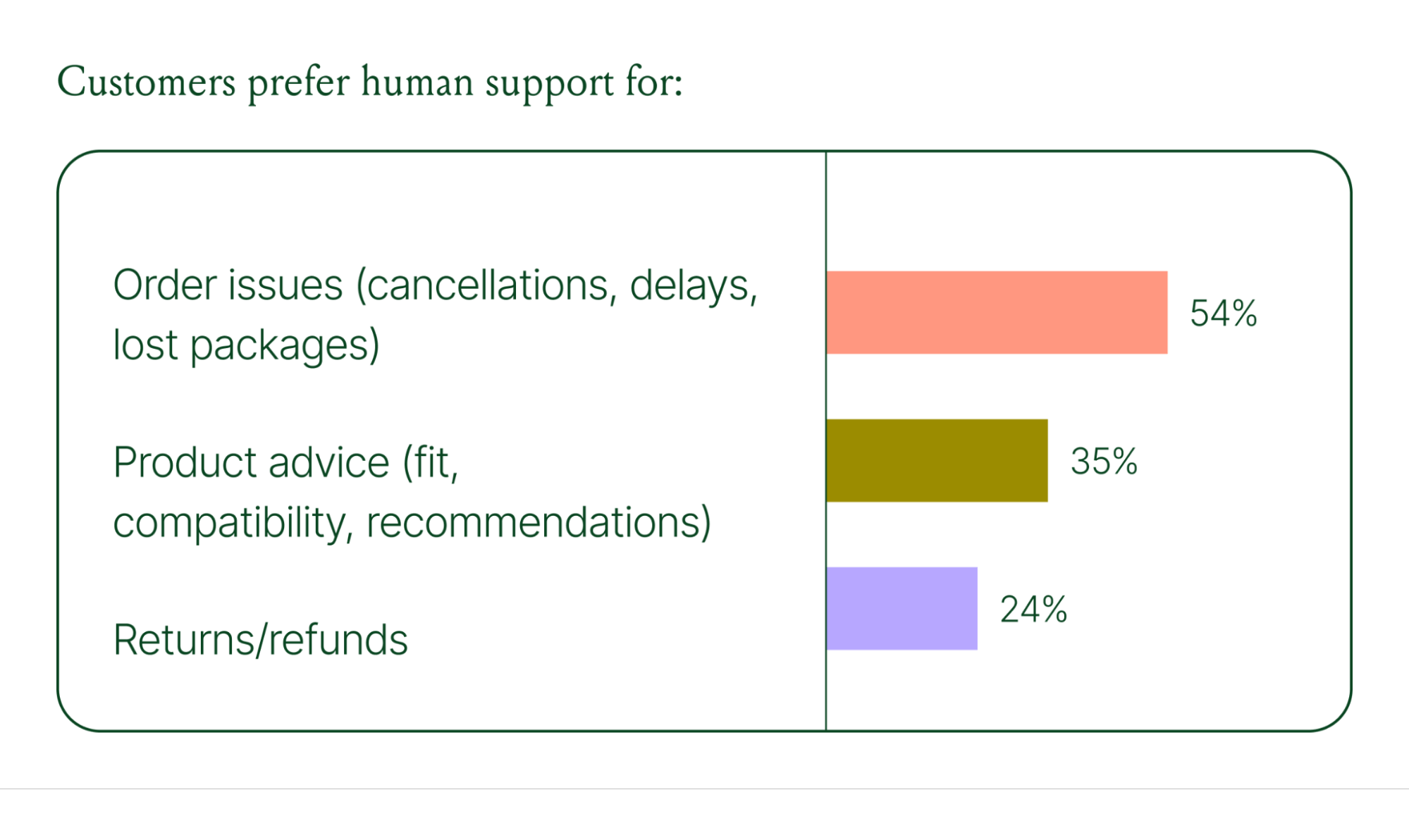
Successful hybrid systems require continuous iteration, meaning reviewing handover topics, Guidance, and reviewing AI tickets on a weekly basis.
Discover how leading brands are balancing human and AI systems in Trend #5.
The 2026 trends are about expansion and standardization. The 2030 predictions are about what comes next.
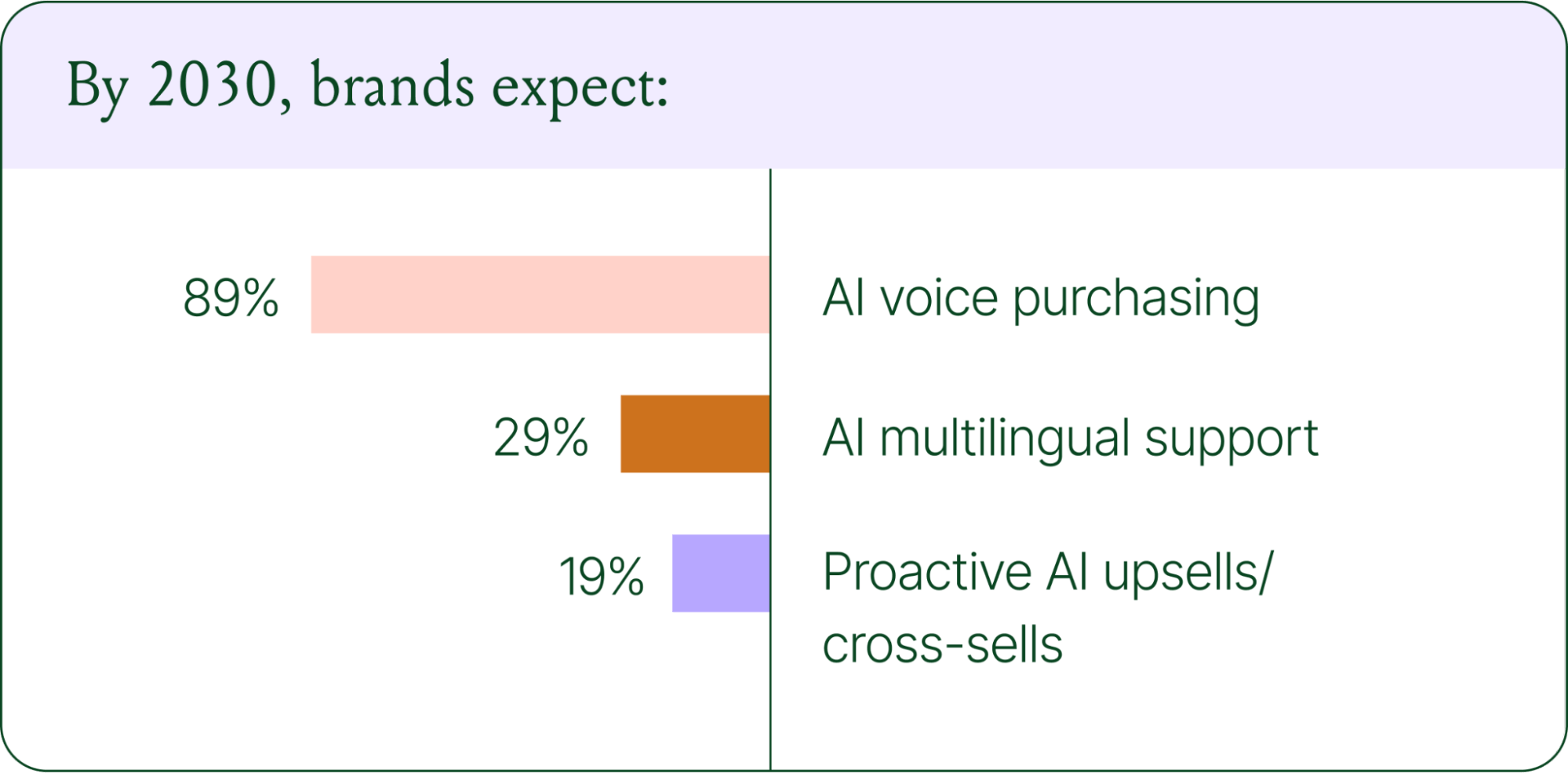
Voice-based purchasing is the biggest bet on the horizon. Only 7% of brands currently use voice assistants for commerce, but 89% expect it to be standard by 2030. The vision is a customer who can reorder a product, check their subscription status, or manage a return entirely over the phone.
Proactive AI is the other major shift. Rather than waiting for a customer to reach out, AI will anticipate needs based on browsing behavior, purchase history, and where someone is in their relationship with your brand. Think of it as the digital equivalent of a sales associate who remembers what you bought last time and knows what you're likely to need next.
Explore where ecommerce brands are allocating their AI budgets in the full report.
The brands winning in 2026 are creating smart, scalable systems where AIhandles volume and humans handle nuance. They’re treating every conversational channel as an opportunity to serve and sell.
The data is clear: AI adoption is accelerating, customer expectations are rising, and the revenue impact of getting this right is measurable.
{{lead-magnet-1}}
The best in CX and ecommerce, right to your inbox

TL;DR:
The page-based shopping experience dominated for decades. Customers would search, browse, compare, abandon, get retargeted, return, and eventually buy (sometimes).
That journey is no longer the only option.
Shoppers are turning to chat, messaging, and AI-powered tools to find what they need. Instead of clicking through product pages or reading static FAQs, they ask questions, have back-and-forth conversations, and get answers that move them closer to a purchase in real time. The path to checkout has changed, and the brands that recognize this are pulling ahead.
Read our 2026 State of Conversational Commerce Report to learn more about conversation commerce trends from 400 ecommerce decision-makers and 16,000+ ecommerce brands using Gorgias.
{{lead-magnet-1}}
The traditional shopping journey was a solo experience. A shopper had a need, searched for options, browsed across sessions, and eventually made a decision — often days later, after being retargeted multiple times. Support only entered the picture after the purchase.
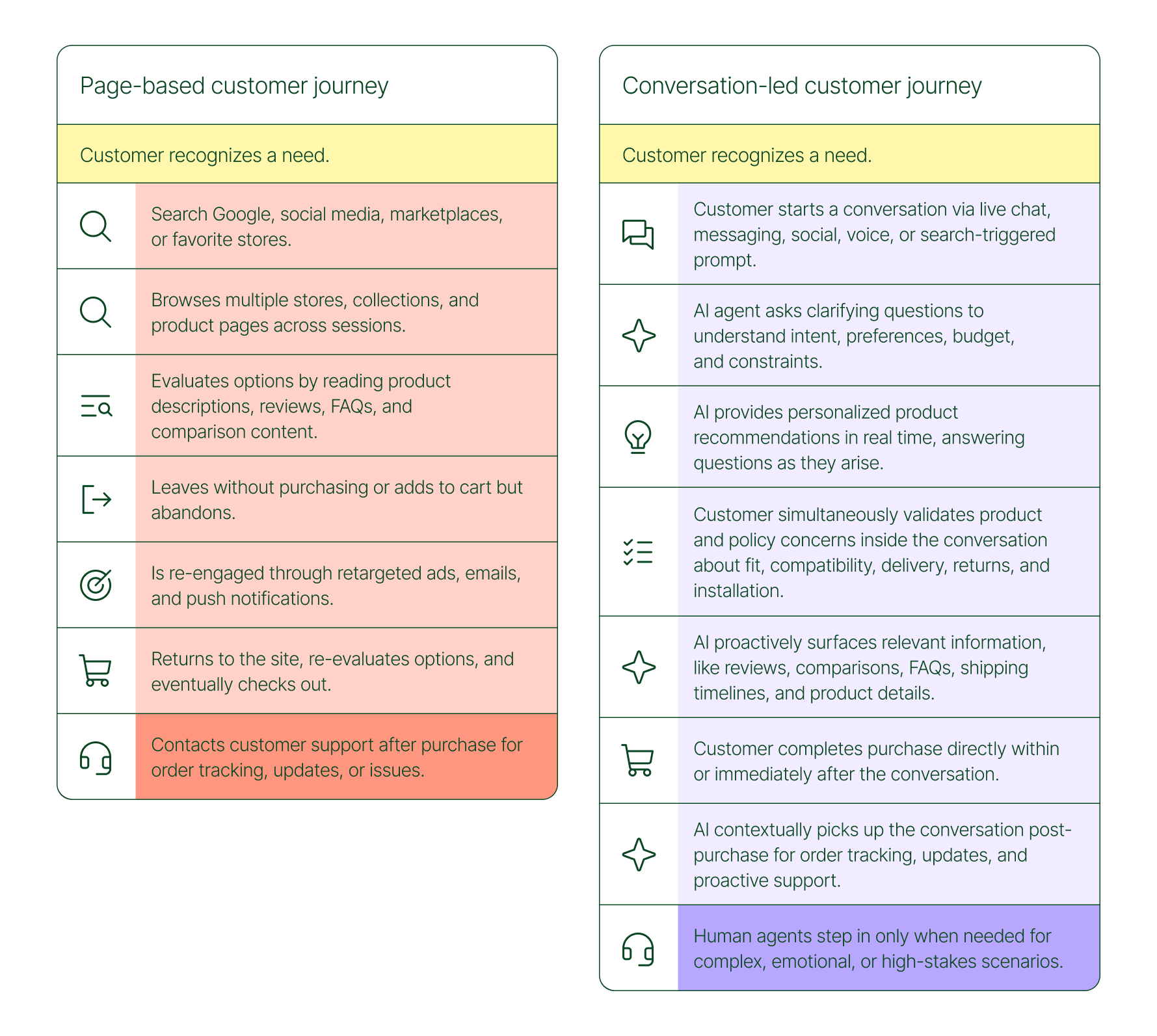
The conversation-led journey collapses that timeline:
What used to take days now takes minutes. Discovery, evaluation, and purchase happen in a single thread.
79% of brands agree that AI-driven conversational commerce has increased sales and purchase rates in their business. When brands were asked to rank the highest-return areas:
Those numbers reflect something important: the value of conversation compounds. Faster support reduces friction. Better retention raises lifetime value. More confident shoppers buy more often and spend more per order.
The brands seeing the biggest returns aren't just using AI to deflect tickets. They're using it to create one-to-one shopping experiences at scale.
Looking at AI-only influenced orders across key verticals like Apparel and Accessories, Food and Beverages, Health and Beauty, Home and Garden, and Sporting Goods, the growth across a single year was significant.
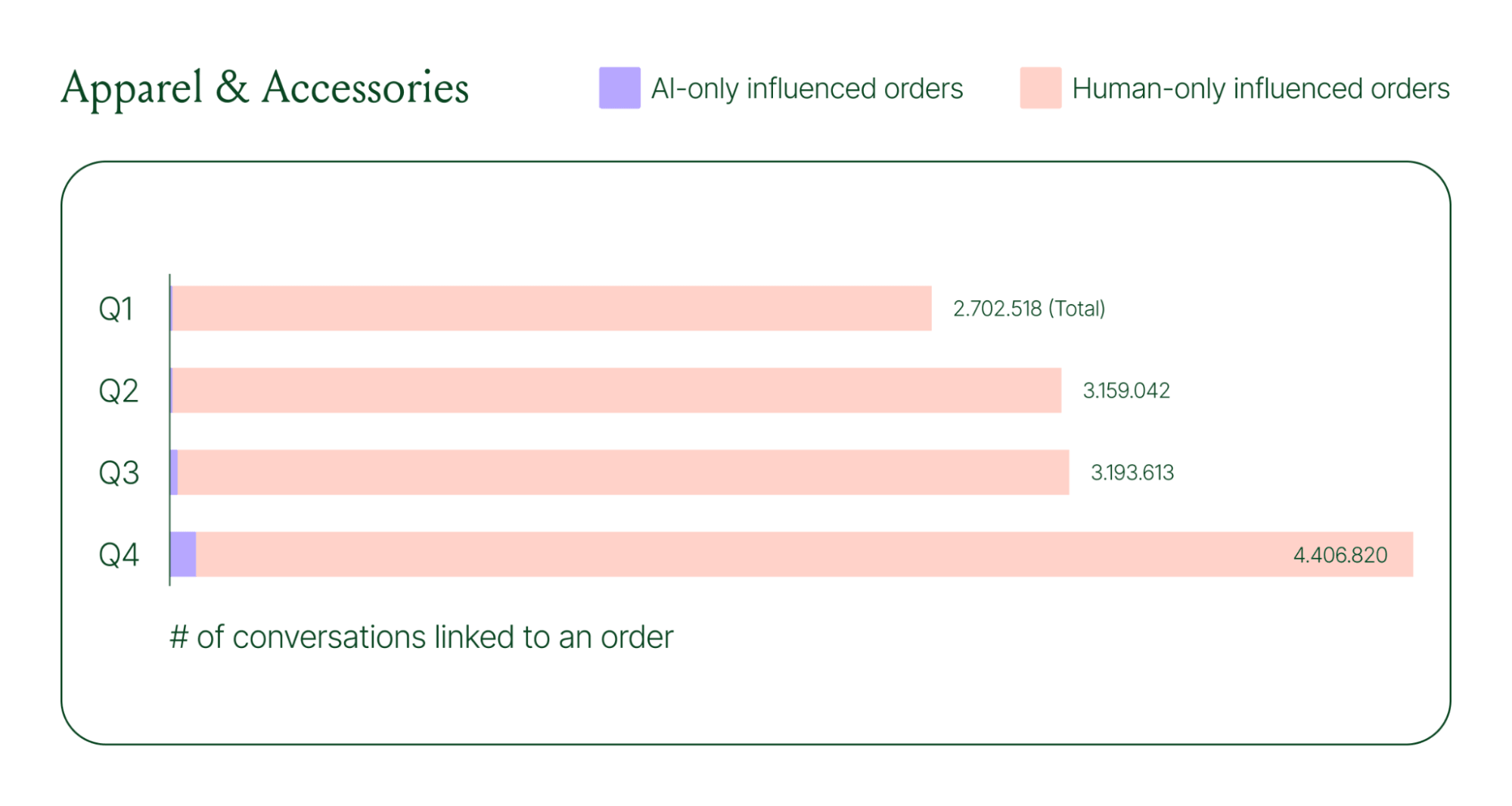
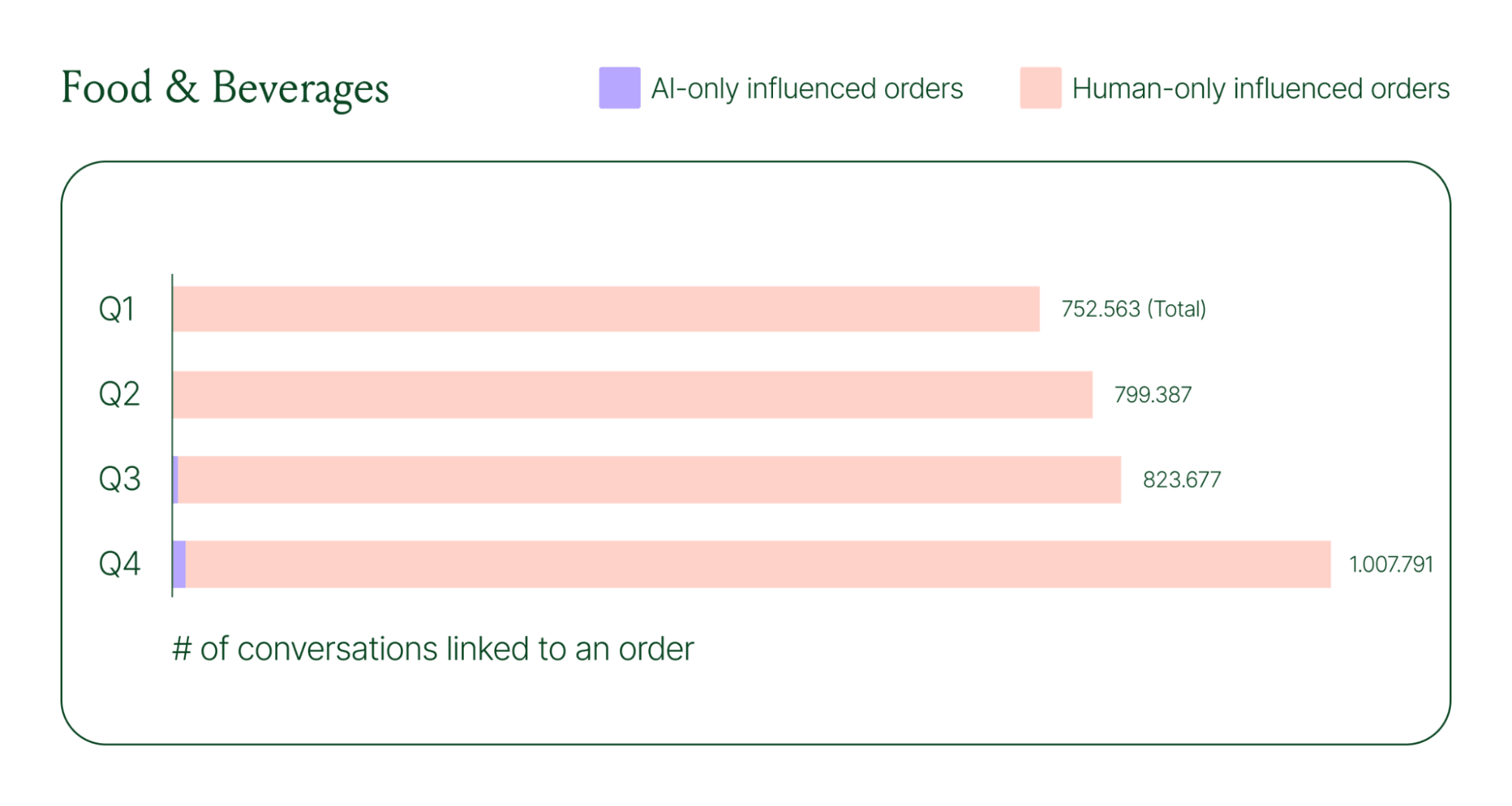
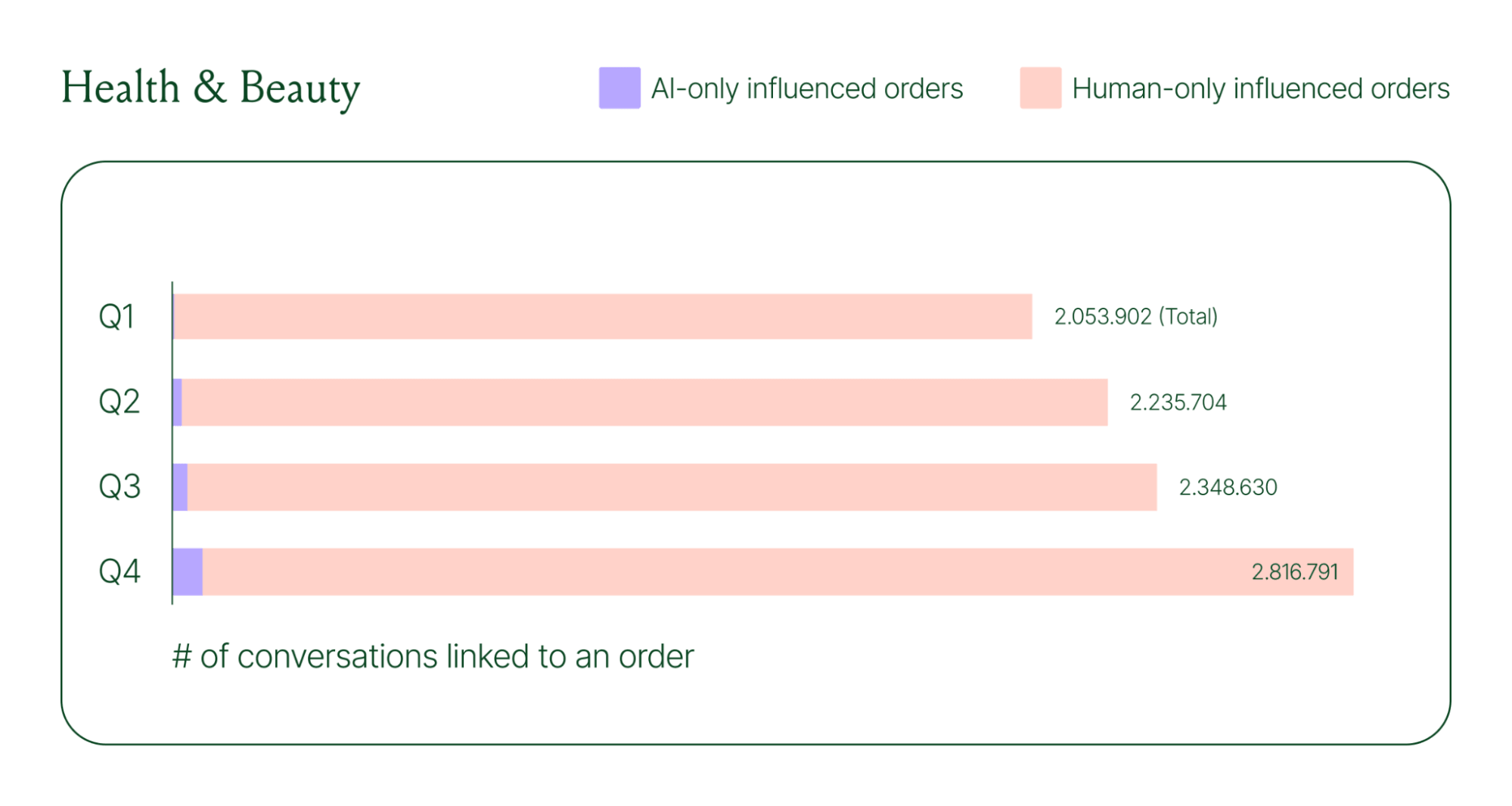
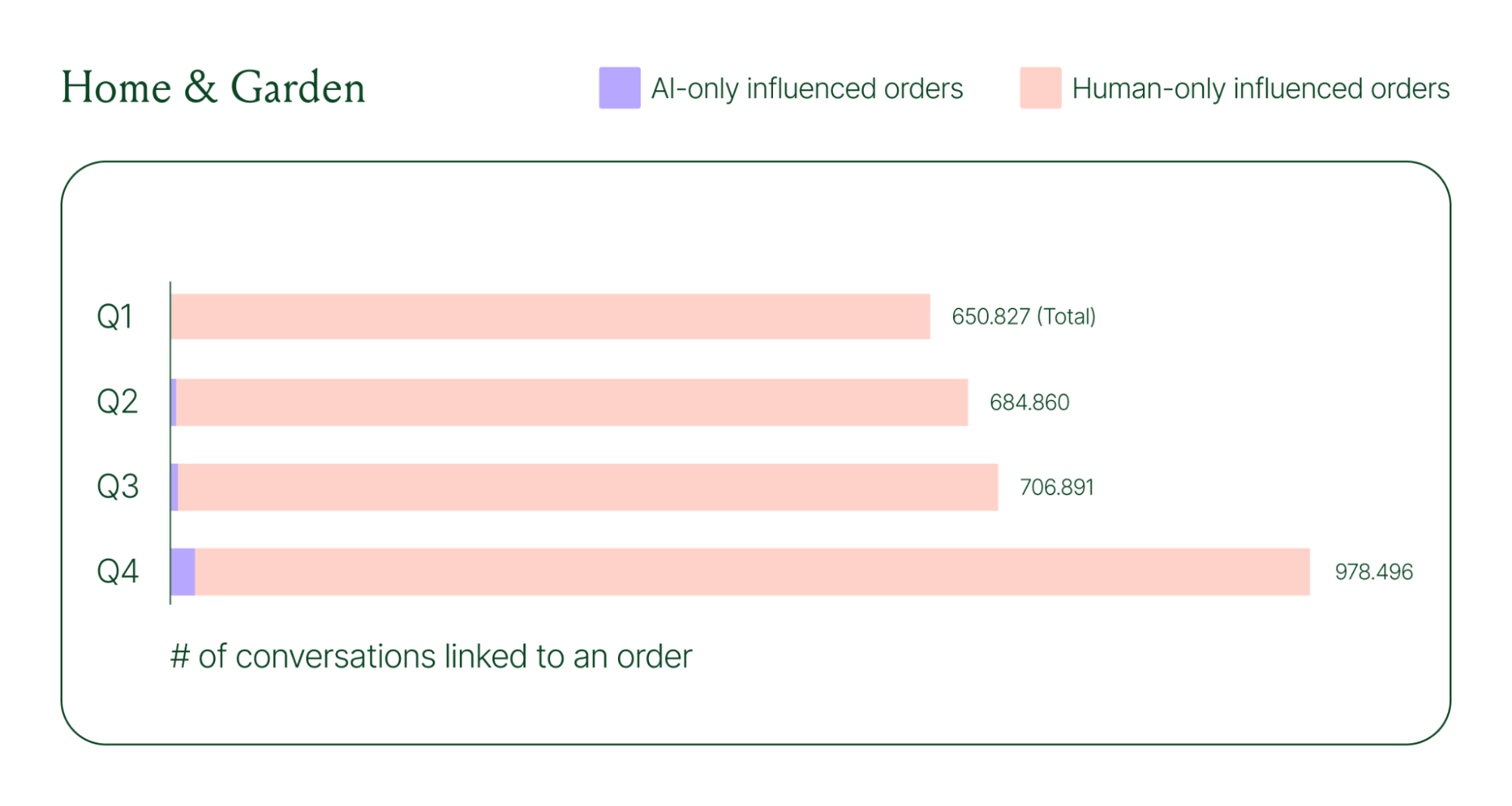
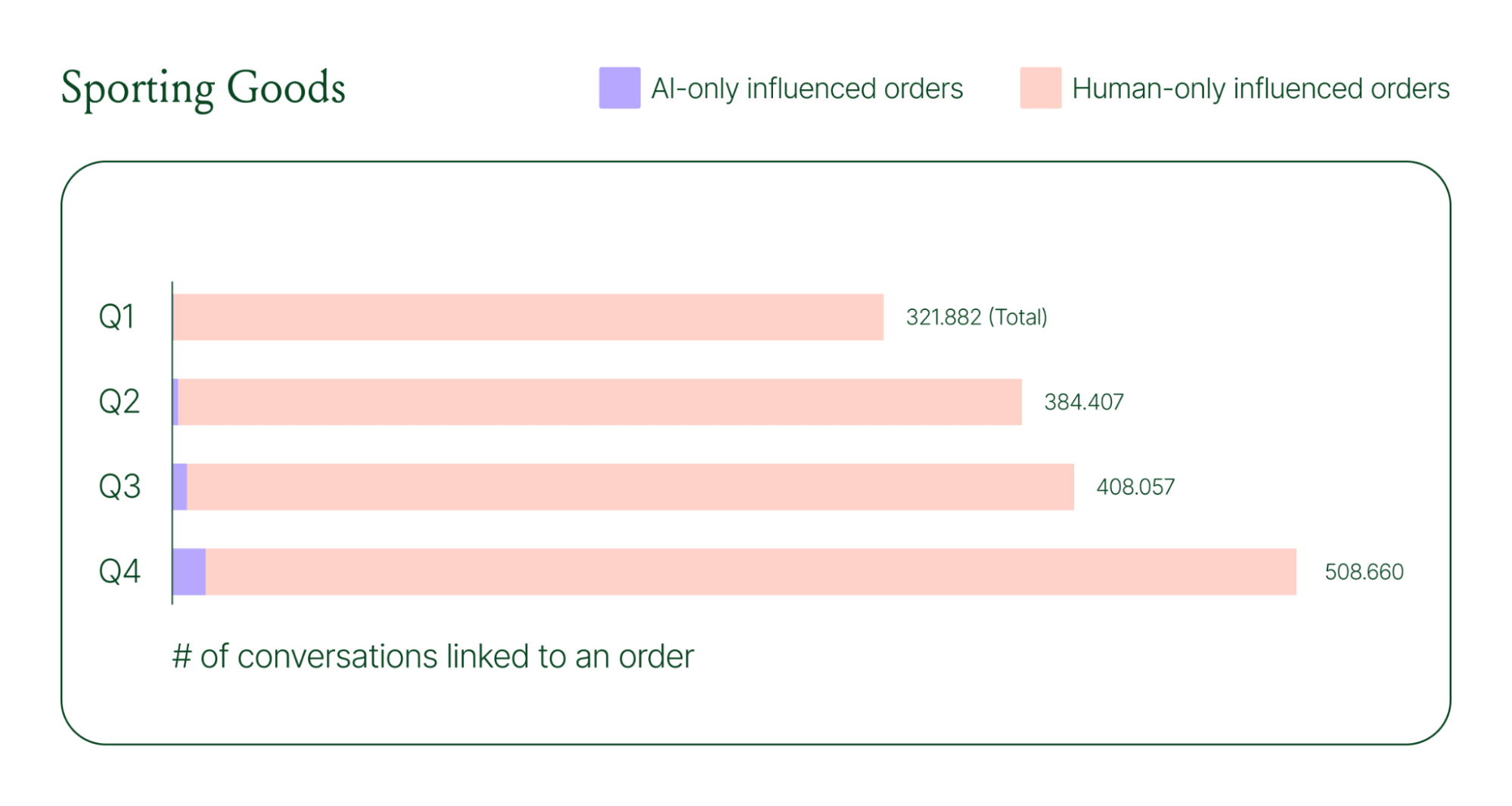
Across industries, ecommerce brands saw AI step into conversations, reduce shopper hesitation, and drive higher QoQ conversion rates.
Learn more about AI-powered revenue generation in the full 2026 Conversational Commerce Report.
84% of brands say the strategic importance of conversational commerce is higher than it was a year ago. 82% agree it will be mainstream in their sector within two years.
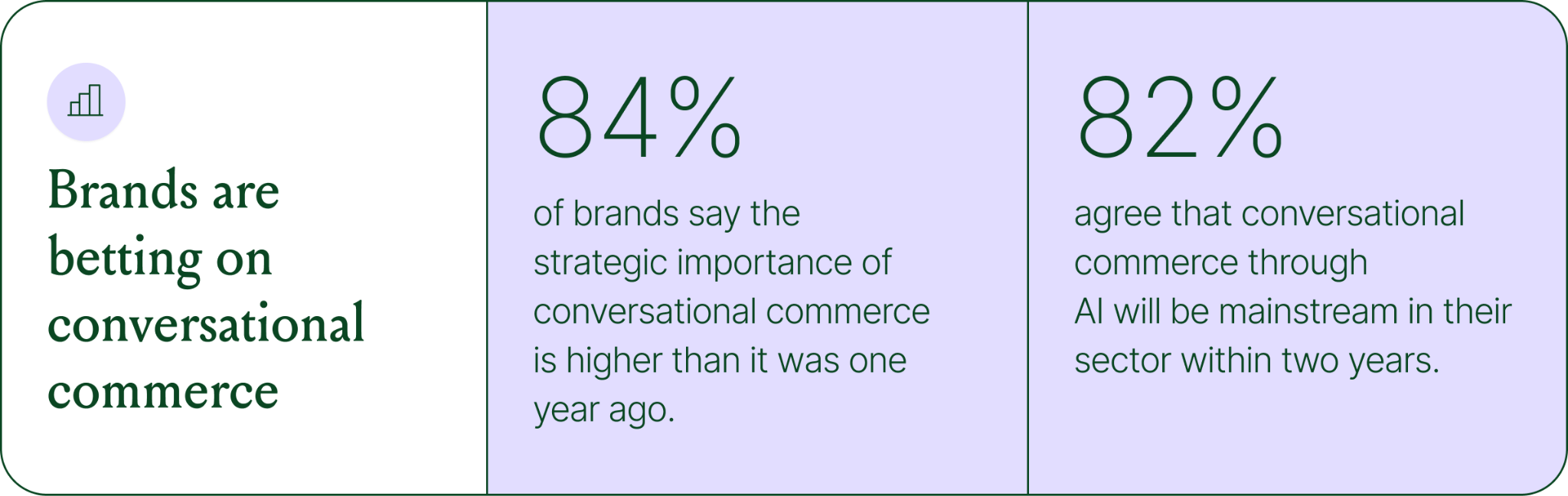
That shift is registering at the leadership level because of what conversational commerce does to the buying experience. Creating one-to-one touchpoints earlier in the journey drives higher AOV, shorter buying cycles, and stronger purchase rates. Shoppers who get real-time answers to their questions are more confident.
TUSHY, known for eco-friendly bidets and bathroom essentials, is a useful example of what happens when you take conversational commerce seriously.
Bidets aren't an impulse purchase. Shoppers have real questions about fit, compatibility, and installation. Those questions used to go unanswered until the CX team could respond, often after the customer had abandoned the cart.
TUSHY used Gorgias's AI Agent and shopping assistant capabilities to automate pre-sales support. AI Agent engaged shoppers in real-time conversations, addressed their concerns directly, and built confidence at the moment of highest intent.
This resulted in a 190% increase in chat-based purchases, a 13x return on investment, and twice the purchase rate of human agents.
You don't need to overhaul your entire operation to start seeing results. The most effective approach is to start where the impact is clearest and expand from there.
A few places to begin:
Want to see the full picture of where conversational commerce is headed in 2026? Read the full report to explore the data, trends, and strategies shaping the next era of ecommerce.
{{lead-magnet-1}}

TL;DR:
A year ago, ecommerce brands were still debating whether AI was worth the investment. That debate is over. Today, nearly every ecommerce professional uses AI to do their job.
The shift isn't just about adoption. It's about what AI is used for and how brands measure its impact. Support automation was the entry point. Now, AI is embedded across the full operation, from product recommendations to inventory control to real-time shopping conversations.
In our 2026 State of Conversational Commerce Report, we break down trends on AI usage among 400 ecommerce decision-makers and 16,000+ ecommerce brands using Gorgias.
{{lead-magnet-1}}
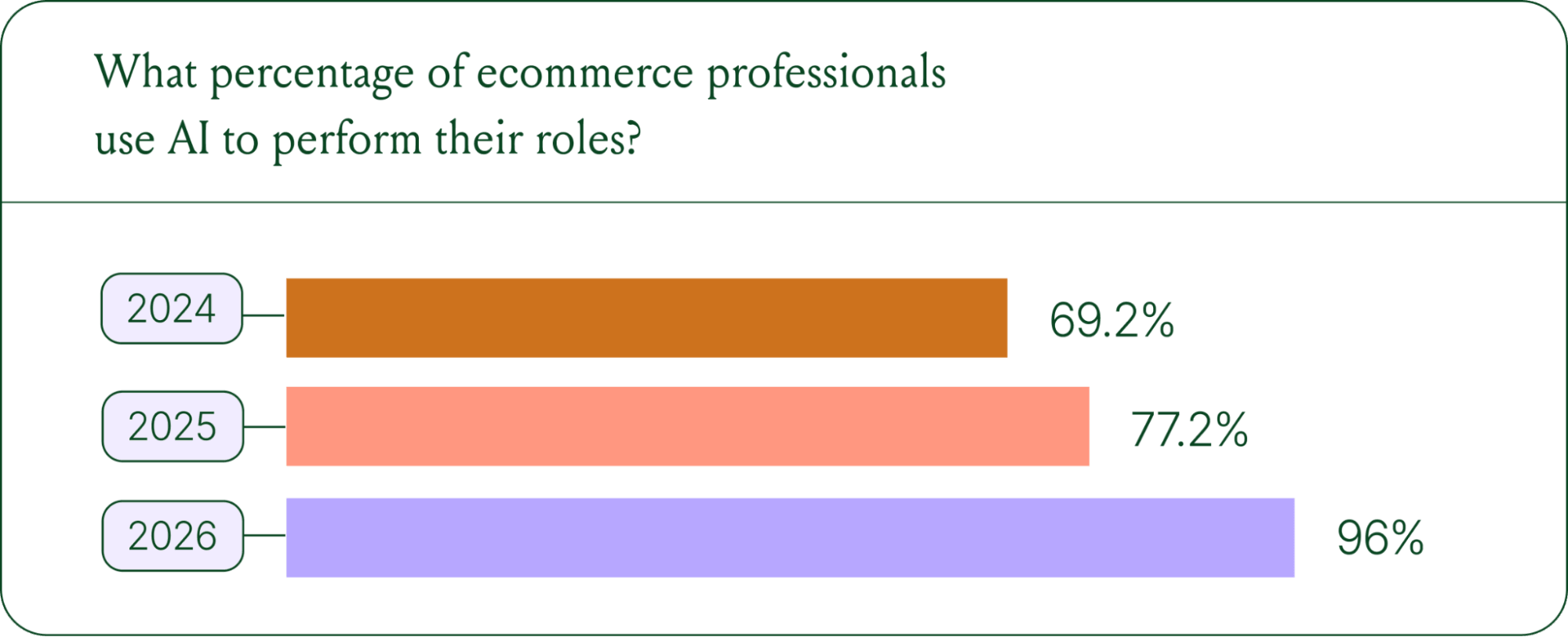
If we rewind 12 months ago, the industry was still split on AI. Some ecommerce professionals were excited, but most were still hesitant. In 2024, 69% of ecommerce professionals used AI in their roles. By 2025, that number reached 77%. In 2026, it hit 96%.
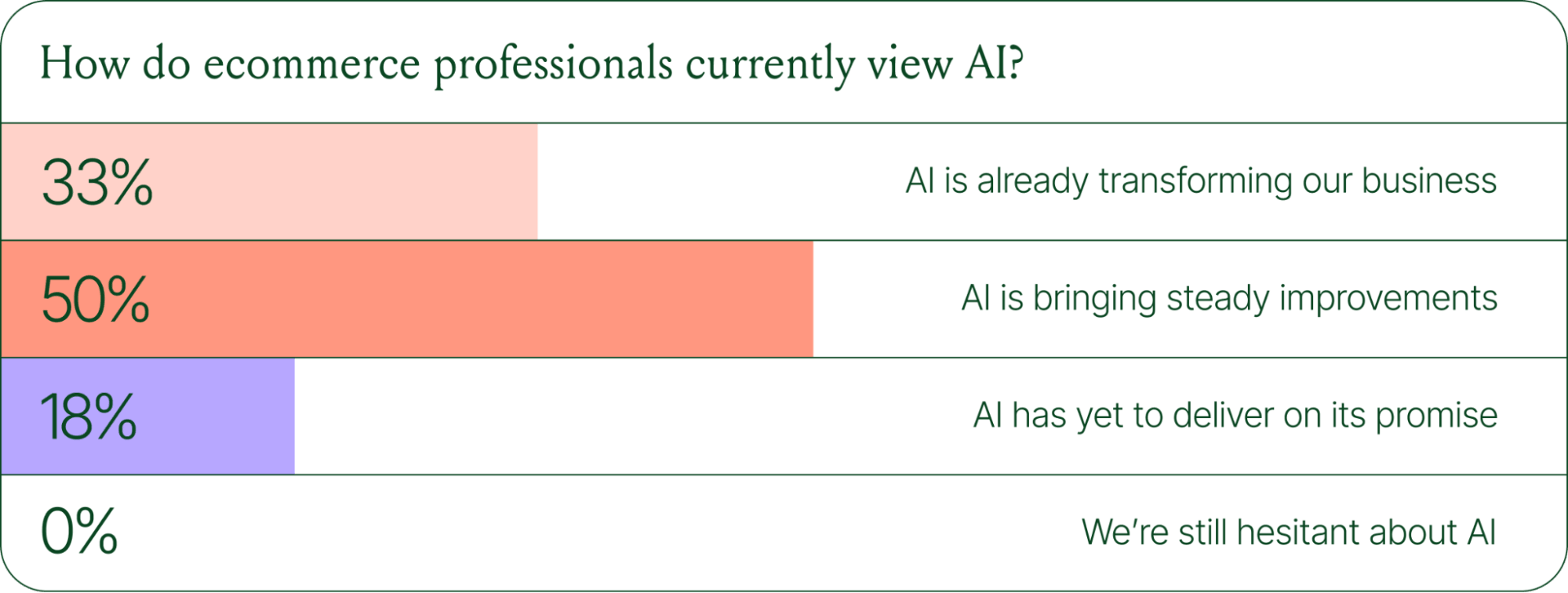
The confidence numbers back it up. 71% of brands say they are confident using AI for ecommerce, and 73% are satisfied with its business impact.
In early 2025, only 30% of ecommerce professionals rated their excitement for AI at 10/10. Today, zero percent of respondents describe themselves as hesitant about AI.
Using AI in ecommerce is not new. In fact, it dates back to the 1980s with the invention of algorithms and expert systems. And if you’ve ever leveraged similar product recommendations or chatbots, you’ve already integrated AI into your ecommerce stack.
Modern AI is far more sophisticated.
With the rise of agentic commerce and conversational AI, brands began leveraging AI agents to automate the processing of repetitive support tickets. That’s still happening today, but the scope has expanded beyond the support queue.
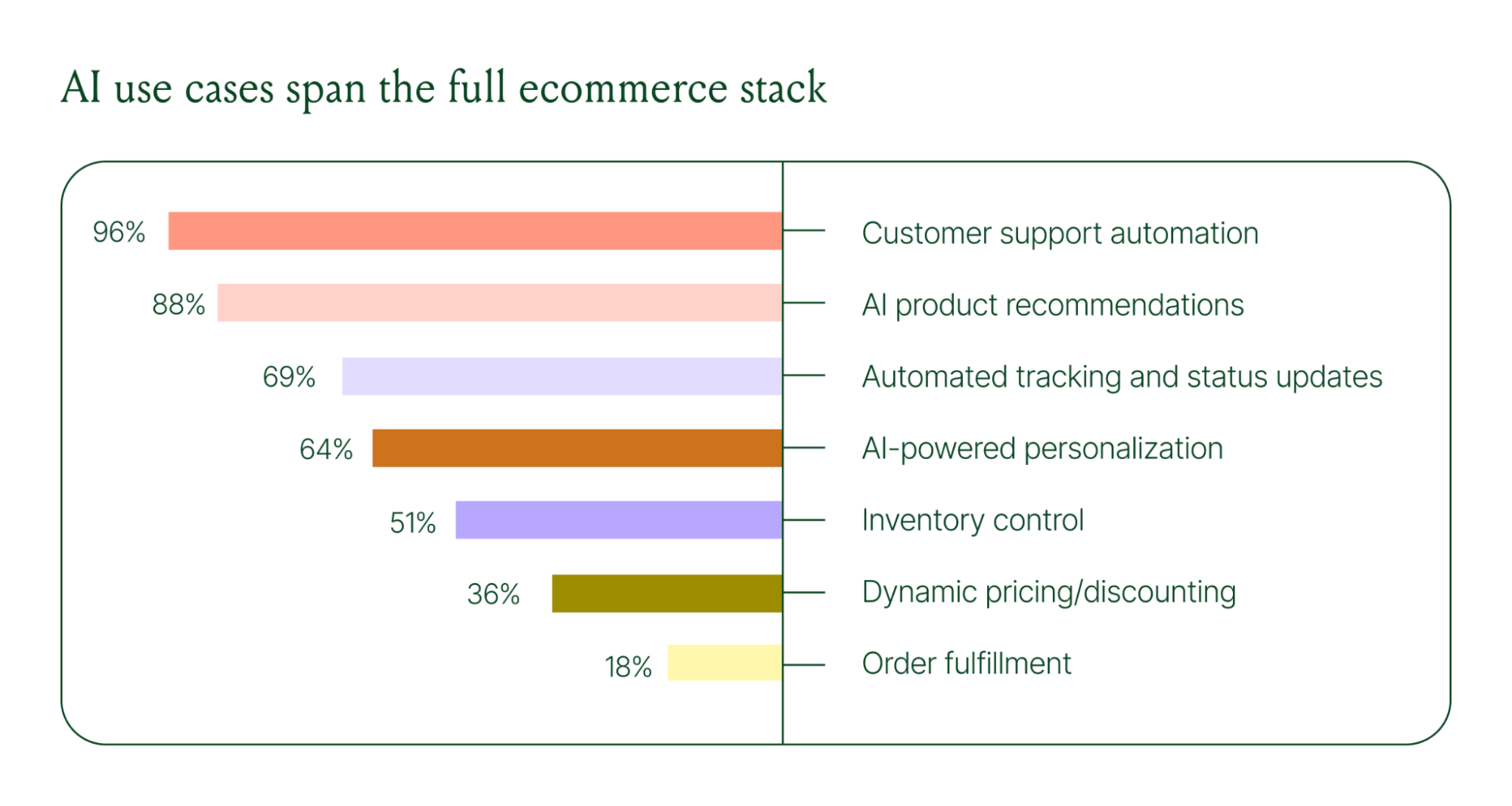
Ecommerce brands are deploying AI across every layer of their operation:
When brands were asked which channels contribute most to their AI success, conversational channels dominated. Social media messaging led at 78%, followed by SMS at 70%, and website live chat at 51%. Shoppers want fast, personal conversations, and AI is the best way to deliver that at scale.
Learn more about AI adoption, perception, and use case trends in the full 2026 Conversational Commerce Report.
For decades, customer support success meant fast response times and high satisfaction scores. Those are still important indicators of success, but leading brands are adding revenue-focused metrics to their dashboards.
91% of brands still track CSAT as a measure of AI's impact. But 60% now include AOV as a top indicator, and higher-revenue brands earning $20M+ are focusing on metrics like total operating expenses, cost per resolution, incremental revenue, and one-touch ticket rate.
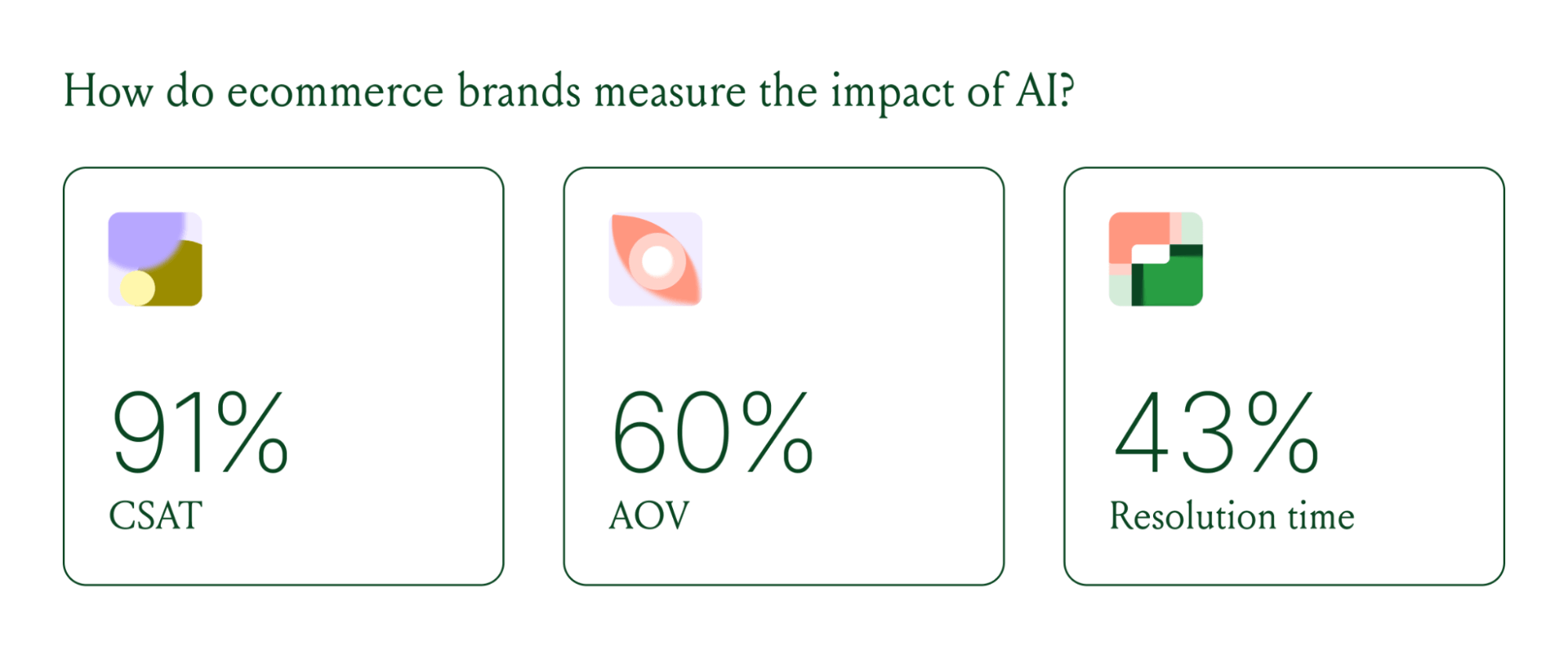
AI can now start a conversation, ease customer doubts, sell, upsell, and recover abandoned carts in a single conversation. When you’re only measuring CSAT, you’re ignoring the real ROI of conversational AI investment.
Virtual shopping assistants now proactively engage shoppers, adapt to their needs in real time, and offer contextual product recommendations and upsells. When the moment calls for it, they can close the deal with a targeted discount.
Gorgias brands using AI Agent's shopping assistant capabilities nearly doubled their purchase rates and converted 20–50% better than those using AI Agent for support only.
Orthofeet, the largest provider of orthopedic footwear in the US, is a concrete example of this in practice. Using Gorgias, they achieved:
The data tells a clear story: AI has evolved beyond a tool for handling tier 1 support tickets. It’s a core part of your revenue generation strategy.
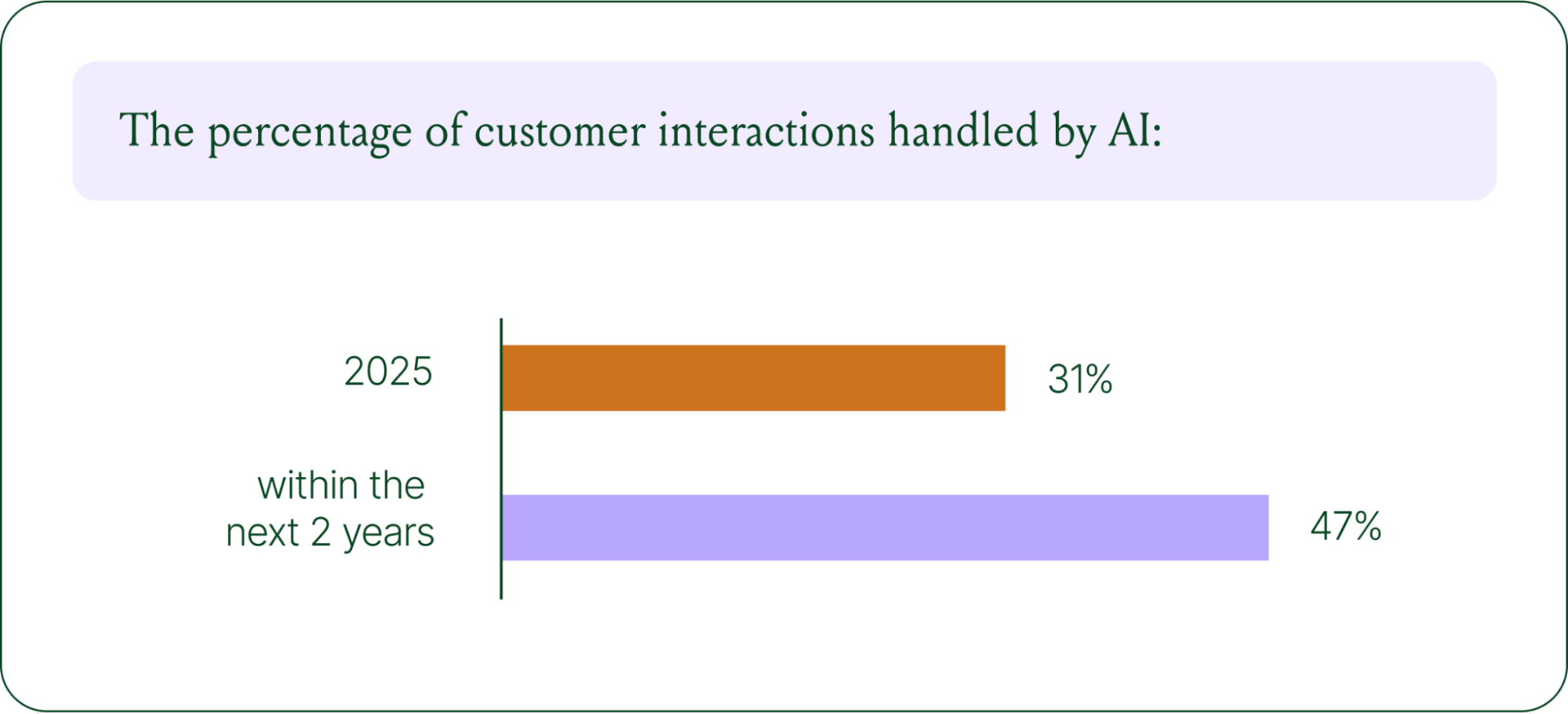
57% of brands are already using AI for 26–50% of all customer interactions, and 37% expect that share to rise to 51–75% within the next two years. The brands building toward that range now are the ones who will have the operational advantage when it matters most.
The practical question isn't whether to invest in AI. It's where to focus first. Based on where brands are seeing the most impact, three priorities stand out:
Want to go deeper on the full 2026 conversational commerce trends? Read the complete report for data across every major AI use case in ecommerce.
{{lead-magnet-1}}


TL;DR:
Shoppers expect instant answers, but support teams can't scale 24/7. FAQ pages bridge this gap by providing self-service resources that work around the clock.
A well-executed FAQ page reduces ticket volume while building trust with shoppers. This guide covers proven examples, creation steps, search engine optimization (SEO) implementation, and strategies to measure your FAQ's impact.
An FAQ page is a self-service resource that answers your shoppers' most frequently asked questions in one centralized location.
The questions typically cover key information relevant to most visitors: operating hours, product availability, pricing, return policy, basic troubleshooting, and more.
By providing these answers proactively, customers get the information they want immediately without contacting your support team. FAQ pages are fairly low-tech but highly strategic.
You can create an FAQ page in just a few hours and start seeing benefits immediately, whereas more advanced customer service strategies like customer service automation and omnichannel customer support require more investment.
A Help Center is a broader knowledge base that includes detailed articles, tutorials, video guides, and, in some cases, community forums. It serves as a comprehensive resource for complex topics that require step-by-step explanations or troubleshooting flows.
An FAQ page, by contrast, is a focused Q&A list designed for high-frequency, straightforward questions that can be answered in a few sentences.
Use an FAQ page when customers need quick answers to common questions like shipping costs, return windows, or order status. Build a full Help Center when your products or services require detailed guidance, technical documentation, or multi-step tutorials. Most ecommerce brands benefit from both: an FAQ page for speed and a Help Center for depth.
We identified the FAQ page as one of our top customer service trends because more brands have realized how much time their customer support teams can save by implementing effective self-service resources. FAQ pages aren't just great for agents, they're great for customer experience.
FAQ pages intercept repetitive inquiries before they reach agents, a strategy called ticket deflection. A Microsoft study shows that 66% of all customers consult self-service resources before contacting an agent. Your team doesn't need to spend hours answering questions about return policies, shipping rates, or order status.
Reducing repetitive tickets improves your customer service response time and frees up agents to work on sensitive, urgent, or higher-value support tickets. self-service resolves up to 60% of common inquiries, letting your team focus on conversations that actually require human expertise and build customer relationships.
Creating an FAQ page to answer common customer questions is one of our top tips in our CX-Driven Growth Playbook. The playbook shares 18 actionable tactics to boost revenue by 44% by improving CX. Our team created it using data from over 10,000 Gorgias merchants and in-depth interviews with 25 top ecommerce brands.
Shoppers experience pre-purchase anxiety about shipping, returns, sizing, and product quality. They need clarity before buying, especially when visiting your site for the first time. An FAQ page addresses this anxiety by demonstrating transparency and making essential information easy to find.
Earning shopper trust is key to growing your store, and a well-organized FAQ page shows customers you have clear policies for essential buying considerations. When answers are readily available, cart abandonment drops because customers feel confident moving forward with their purchase.
If properly search-optimized, your FAQ page becomes another entrance point into your website from Google. A Help Center article from FIGS, a direct-to-consumer (DTC) scrubs brand, appears on the first page of Google's search results for the question:

The person who searched the question might click this link, find their answer, explore FIGS' website, remember the brand, and eventually return to make a purchase. Schema markup, which we'll cover later, helps search engines understand your FAQ content and include it in these valuable search features.
FAQ pages provide 24/7 availability, unlike human support that operates during specific hours. Global customers across time zones can find answers immediately, regardless of when they visit your site. For simple inquiries, 68% of people would rather use self-service resources like an FAQ page than contact an agent and wait for a response.
Mobile accessibility makes FAQ pages even more valuable for shoppers browsing on-the-go. Of course, some customers prefer human support, and many questions are too complex for an FAQ page. Offer a healthy combination of self-service and human support to cover the entire range of customers and questions.
Studying what works on screen helps you understand effective FAQ design patterns. These nine examples from brands of all sizes showcase different approaches to organization, search functionality, and visual presentation.
Amazon's help center creates a tailored experience using customer data and purchase history. When you log in, the FAQ prioritizes topics relevant to your recent orders and browsing behavior. Amazon also integrates AI-powered conversational support alongside traditional FAQ sections, letting customers choose their preferred path to answers.
The platform seamlessly connects FAQ content with account history and order tracking, so customers can resolve issues without leaving the help interface. This contextual approach reduces friction and keeps resolution times low.

WhatsApp's FAQ page features clean categorization with expandable sections that keep the interface uncluttered. The conversational tone matches WhatsApp's brand voice, making technical information feel approachable. Each answer is concise and written in plain language, avoiding jargon that might confuse users.
The mobile-first design loads quickly and works smoothly on small screens, which is essential for an app primarily used on phones. Fast load times and responsive design ensure customers can find answers without frustration.

Wikipedia's main FAQ page exemplifies how text-heavy, comprehensive FAQs can remain effective. It conforms to the overall site design, which creates consistency across the user experience. The page is fully searchable both on-page and using browser search, with a clear list of 11 questions linked to answers lower on the page.
Wikipedia also maintains a FAQ index page listing 20+ different FAQs on the site. While it doesn't list all questions for every FAQ, it includes strategic keywords that quickly guide users to the right FAQ for any use case.

Nike's Get Help page demonstrates how minimalist design with active white space can improve scannability.
The interface uses clear calls to action (CTAs) and simplified navigation that guide users to answers without overwhelming them with options.
This “less is more” approach works particularly well for brands with broad customer bases, where clarity trumps comprehensive detail on the main FAQ landing page.

Microsoft's page for Microsoft 365 mixes content types including video tutorials, community forum integration, and traditional text-based FAQs. This multi-format approach accommodates different learning styles and complexity levels. The robust search and filtering capabilities help users navigate vast amounts of information.
The top questions section smartly pulls the most-asked questions from each category and places them at the top of the page. For companies with complex products, this organizational strategy ensures quick access to high-priority information.

Google's support hub serves as a reference example for organizing vast amounts of information with clear visual hierarchy. The categorization system breaks down complex services into digestible sections, each with intuitive icons and descriptions. Users can drill down from broad topics to specific questions through logical pathways.
The design, layout, and information architecture demonstrate how to scale FAQ content without sacrificing usability. Even with thousands of help articles, users can find answers quickly through strategic organization.

Etsy's help center showcases ecommerce-specific FAQ structure with clear segmentation between seller and buyer resources. The platform spotlights cornerstone content based on engagement data, ensuring the most valuable articles appear prominently. This data-driven approach prioritizes what customers actually need rather than what the company assumes they need.
Etsy's search functionality is robust, with filters that narrow results by user type, topic, and issue category. This makes the Help Center scalable as the marketplace grows more complex.

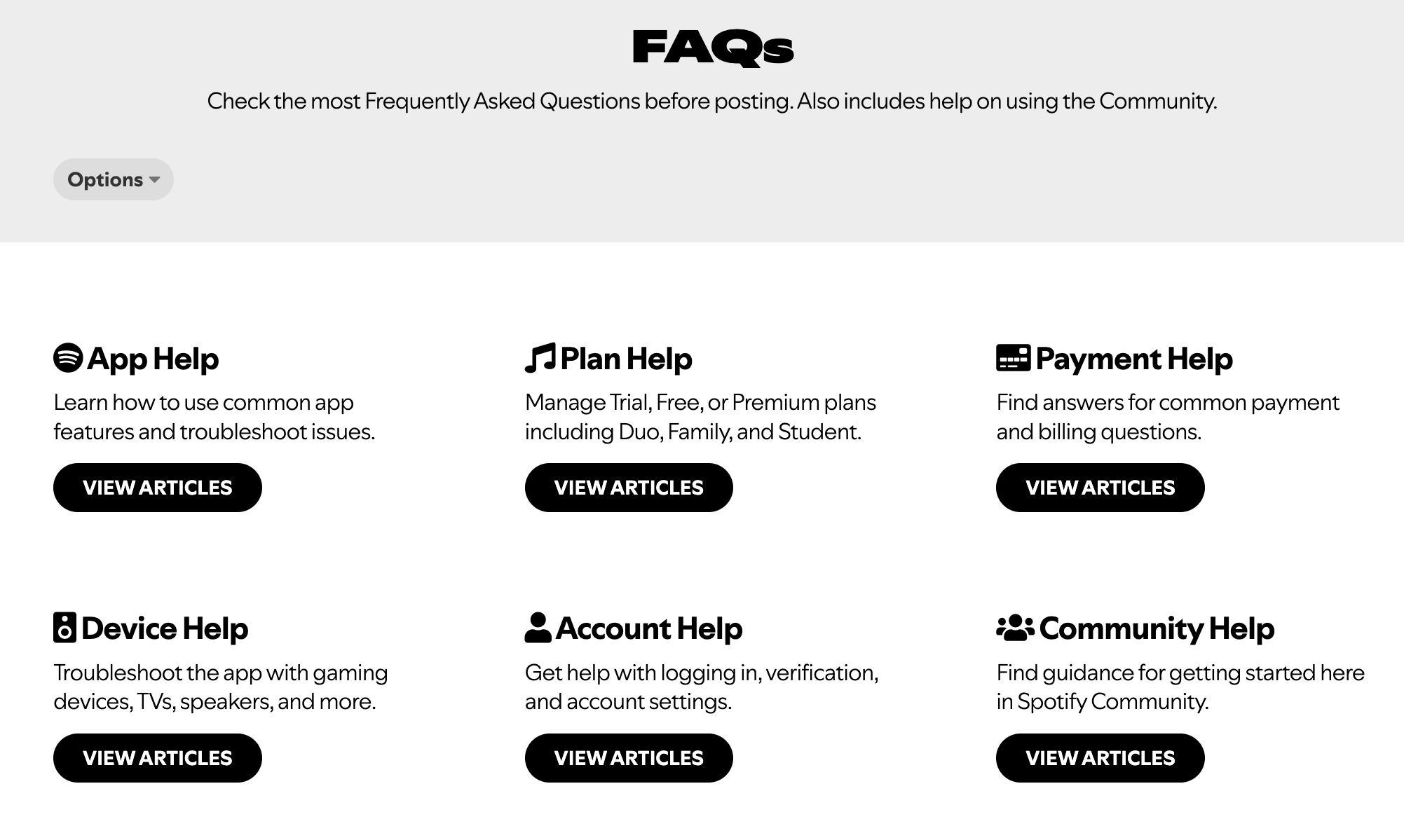
Spotify's community-driven FAQ model combines official answers with peer support through user forums. This push-pull information access lets customers choose between verified company responses and community-sourced solutions. The voting system on community answers helps surface the most helpful responses over time.
Blending official FAQs with peer support creates a scalable support model where engaged users help answer questions. This approach works particularly well for consumer products with passionate user bases.
Brooklinen's FAQ page exemplifies effective DTC ecommerce design with focus on product care, shipping, and returns. The on-brand design matches the rest of their website, creating visual consistency. Simple navigation uses expandable sections to keep the page clean while providing detailed answers when needed.
The emphasis on product care information demonstrates understanding of customer concerns post-purchase. Addressing how to maintain product quality builds confidence in the purchase decision.

Building an effective FAQ page from scratch requires a data-driven approach. Follow these steps to create an FAQ that actually serves your customers and reduces support volume.
Start by mining your support tickets, chat logs, and email conversations for recurring questions. Tag and categorize inquiries by intent to identify patterns in what customers ask most frequently. If you use Gorgias, our shopper intent detection automatically provides this information.
Supplement ticket data with competitive research, customer surveys, and on-site search queries. Focus on questions that appear more than once rather than edge cases that affect only a handful of customers. Look at data from the past three to six months to capture current trends.
Additional data sources include:
Group questions into logical categories that match how customers think about their needs. Common categories include ordering, shipping, returns, account management, and product details. This categorization reduces cognitive load and improves scannability by letting users jump directly to relevant sections.
Use customer-facing language for category names rather than internal jargon. For example, use “Returns” instead of “Reverse Logistics” and “Shipping” instead of “Fulfillment.” Test your categories with a few customers to ensure the organization makes sense from their perspective.
Common category examples:
Answer the question in the first sentence, then provide supporting details if needed. Keep answers to two or three sentences maximum, linking to deeper resources for complex topics. Use active voice and simple language, avoiding jargon unless you define it first.
If you use Gorgias, AI Agent can auto-generate draft answers from existing Macros and Help Center content, giving you a starting point to refine.
Compare these two approaches:
The accordion pattern uses expandable sections to reduce visual clutter while keeping all content accessible. Users see question headlines at a glance and can expand specific answers without scrolling past irrelevant information. This pattern works particularly well for FAQ pages with more than 10 questions.
Include a search bar for users with specific questions who don't want to browse categories. Mobile responsiveness is non-negotiable since many customers will access your FAQ from phones while shopping or awaiting deliveries.
UX best practices:
FAQ answers should be concise starting points, not comprehensive guides. When topics require detailed explanations, link to full Help Center articles, product pages, or contact forms. This keeps your FAQ scannable while ensuring customers can access depth when they need it.
With Gorgias, you can embed links to Help Center articles, product pages, or your live chat widget directly in FAQ answers. For complex topics, link to a full guide instead of cramming details into the FAQ. This tiered approach to information architecture serves both customers who want quick answers and those who need comprehensive detail.
The accordion pattern has become the standard for FAQ pages because it keeps the interface clean while making all content accessible. Users can scan question headlines without opening every answer, then expand only the sections they need. This reduces scroll length and gives customers control over their experience.
Search bar placement matters. Position it prominently at the top of the page with placeholder text that suggests how to use it. Implement keyword matching and autocomplete to help users find answers even if they phrase questions differently than you do.
Accordion benefits:
Use readable font sizes (minimum 16px for body text), sufficient color contrast ratios, and keyboard navigation support to ensure all customers can access your FAQ. Many customers have visual impairments or motor limitations that require assistive technologies. Following Web Content Accessibility Guidelines (WCAG) isn't just ethical, it expands your potential customer base.
Test your FAQ on mobile before publishing. Mobile users represent a significant portion of traffic, and FAQ pages must work smoothly on small screens. Check that buttons are large enough to tap accurately and text is readable without zooming.
Accessibility checks:
Schema markup helps search engines understand your FAQ content structure, potentially earning rich results in search. While implementation requires some technical work, the SEO benefits make it worthwhile.
FAQ schema is structured data that tells search engines which content represents questions and answers. It uses JavaScript Object Notation for Linked Data (JSON-LD) format, a lightweight markup language that sits in your page's code without affecting visible content. When implemented correctly, schema helps search engines parse your FAQ for AI Overviews and featured snippets.
Rich results are limited to government and health sites, but schema still improves SEO for all sites through better indexing and AI Overview inclusion. Even without rich results, search engines understand your content structure more clearly, which can improve rankings for question-based queries.
For complete implementation guidance, check out creating SEO-friendly FAQ pages, which walks through tactics like internal linking and keyword placement. Also see our guides on ecommerce SEO and creating ecommerce blog content that ranks on Google.
Google Search Console shows how your FAQ page performs in organic search. Monitor impressions (how often your page appears in search results), clicks, average position, and click-through rate to understand which questions drive traffic. The URL Inspection tool validates your schema markup and identifies any implementation errors.
Key metrics to track:
Product-specific FAQs reduce pre-purchase friction by answering questions in context. Questions about sizing, materials, compatibility, and care instructions belong on product pages where shoppers are making buying decisions. Contextual FAQs address concerns before they become barriers to purchase.
If you use Gorgias Convert, trigger FAQ modals based on user behavior. If a shopper lingers on a product page, show a modal about sizing or shipping to address common hesitations proactively.
Cart and checkout represent high-anxiety moments where FAQ content can prevent abandonment. Common questions at this stage include shipping costs, delivery times, and return policies. Link to your FAQ page prominently during checkout or embed critical answers directly in the checkout flow.
Consider adding an FAQ link in the cart sidebar or below the checkout button. This placement catches customers who hesitate before completing their purchase.
FAQ articles can be surfaced in live chat conversations before escalating to human agents. This deflects tickets while maintaining customer satisfaction since most customers prefer instant answers over waiting for an agent. With Gorgias, AI Agent auto-suggests relevant FAQ articles based on the customer's question, resolving issues before creating a ticket.
Surface FAQ articles in live chat to resolve questions before creating a ticket. This approach combines the efficiency of self-service with the personal touch of chat, creating a seamless experience.
Key metrics include page views, time on page, bounce rate, conversion rate, and search impressions. Track engagement in Google Analytics 4 (GA4) by setting up events for scroll depth, link clicks, and accordion expansions. FAQ pages should reduce bounce rate by providing answers that keep users on site rather than leaving to search elsewhere.
Set up GA4 events to track FAQ engagement. This data shows which questions get the most attention and which categories might need expansion or clarification.
KPIs to track:
Ticket deflection measures inquiries resolved via FAQ instead of creating support tickets. Calculate the value using this formula: tickets avoided multiplied by cost per ticket equals deflection savings. If your FAQ prevents 100 tickets per month and each ticket costs $5 USD to resolve, that's $500 USD in monthly savings.
Monitor support tickets, on-site search queries, and customer feedback to identify FAQ gaps. New product launches, policy changes, and seasonal trends require FAQ updates to stay relevant. If you see the same question appearing repeatedly in tickets despite having an FAQ page, either the answer isn't clear or customers can't find it.
With Gorgias, use ticket insights and intent statistics to surface emerging questions that should be added to your FAQ. Review ticket data monthly to identify new FAQ topics and update existing answers that generate follow-up questions.
Feedback sources:
Schedule quarterly reviews of FAQ content to verify policies, refresh screenshots, add new questions, and remove outdated content. Assign ownership to your CX or content team to ensure accountability. Without clear ownership, FAQ pages decay over time as policies change and products evolve.
Outdated FAQs erode trust faster than having no FAQ at all. Customers who find incorrect information lose confidence in your brand and may abandon their purchase or leave negative reviews.
Example update checklist:
FAQ pages deliver immediate value through ticket deflection, improved conversion rates, and SEO visibility. The key is treating them as living documents that evolve with your business rather than static pages you build once and forget.
Gorgias makes FAQ implementation seamless, helping you turn FAQ pages into a strategic asset that reduces costs while improving customer experience.
Book a demo to see how Gorgias can transform your approach to self-service support.
{{lead-magnet-2}}

TL;DR:
An ecommerce strategy is a structured plan that connects your product assortment, customer experience, and operational systems to measurable revenue and retention goals. It matters now because customer expectations have shifted. Personalization, speed, and seamless experiences are table stakes.
At the same time, rising acquisition costs mean brands can't rely on traffic alone. They need to convert efficiently and retain relentlessly. A working strategy follows a clear framework: set goals, align your tech stack, and map content to each stage of the shopper's experience.
Customer experience is central to execution. Conversational AI, Self-service tools, and omnichannel support drive conversion, reduce churn, and create operational leverage that scales with your business.
{{lead-magnet-1}}
An ecommerce strategy is a structured plan that connects your product assortment, customer experience, and operational systems to measurable revenue and retention goals. It's not a list of tactics. Strategy is the roadmap—the decisions about what you sell, who you sell to, and how you deliver value. Tactics are the actions you take to execute that roadmap.
Without strategy, brands chase one-off wins: a viral ad, a discount-driven spike, a temporary boost from paid social. With strategy, those same efforts compound. Every channel, message, and customer interaction reinforces the same goals.
A strong ecommerce strategy enables three critical outcomes:
Every ecommerce strategy rests on three interconnected pillars. They're not siloed—decisions in one area affect the others.
Product strategy defines what you sell, how you price it, how you source and manage inventory, and how you differentiate. It's informed by customer demand data, competitive positioning, and operational constraints like lead times and carrying costs.
Customer strategy defines who you sell to, how you acquire and retain them, and how you serve them. This includes buyer personas, lifecycle marketing, personalization, and service excellence. It's where conversion and retention battles are won.
Operational strategy defines how you fulfill orders, manage data across systems, and enable teams to execute. This includes your tech stack, order management, fulfillment workflows, and the integrations that make it all run smoothly.
Product assortment decisions shape everything downstream, from marketing messages to fulfillment complexity. The challenge is balancing breadth (how many categories) with depth (how many SKUs per category).
Too much breadth dilutes focus. Too much depth increases carrying costs and stockout risk.
Stock keeping unit (SKU) rationalization is the process of identifying which products drive revenue and margin, and which create operational drag. Most brands find that a small percentage of SKUs generate the majority of revenue. The goal isn't to cut everything else—it's to be intentional about what you carry and why.
Sourcing considerations include:
Customer demand data and voice of customer (VoC) insights should inform these decisions. What are customers asking for? What problems are they trying to solve? What gaps exist in your current assortment?
Pricing is positioning. It signals value, influences perception, and directly impacts unit economics. There's no single right model—the best approach depends on your market, competition, and brand positioning.
Common pricing models include:
Promotions and discounts play a role, but overuse trains customers to wait for sales. The most successful brands use discounts strategically—to clear inventory, reward loyalty, or convert hesitant first-time buyers—not as a crutch for weak positioning.
Dynamic pricing and unit economics (the profit or loss on each individual sale) become especially important as you scale. Small changes in pricing or cost structure can have outsized effects on profitability.
Brand positioning is how you want customers to perceive your brand relative to alternatives. It's not what you say about yourself—it's the distinct space you occupy in customers' minds.
To identify what makes your brand unique, look at three inputs: customer feedback, competitive gaps, and brand strengths.
Consistency across channels reinforces positioning. Visual identity, messaging tone, and customer interactions should all communicate the same value. A premium brand that delivers slow, impersonal support creates cognitive dissonance. A value brand that overinvests in packaging might confuse customers about what they're paying for.
Inventory is a balancing act. Too little, and you lose sales to stockouts. Too much, and you tie up cash in products that sit on shelves, accruing carrying costs.
Demand forecasting uses historical sales data, seasonality, and market trends to predict future demand. Safety stock is the buffer you keep on hand to account for demand variability or supply delays. Reorder points trigger new orders when inventory hits a predetermined threshold.
Inventory turnover and carrying costs are the two key metrics for inventory efficiency. Inventory turnover measures how many times you sell through your inventory in a given period.
Key inventory KPIs include:
Inventory data also prevents stockouts and overstock situations that erode profitability and customer trust.
Customer feedback doesn't just inform service—it shapes product development. Voice of customer (VoC) data includes support tickets, chat transcripts, product reviews, and survey responses. It's a direct line to what customers want, need, and struggle with.
Use VoC data to identify gaps (features customers ask for that you don't offer), opportunities (unmet needs in the market), and validation (whether a new product idea resonates). Conversational data sources—support interactions, chat logs, social comments—are especially valuable because they capture unfiltered, real-time feedback.
The best brands close the loop: they collect feedback, act on it, and communicate changes back to customers. This builds trust and signals that you're listening.
Buyer personas are semi-fictional profiles representing your ideal customer types. Segmentation is the process of grouping customers by shared characteristics or behaviors. Both help you tailor messaging, offers, and experiences to specific customer needs.
Build personas using behavioral data (what customers do) and demographic data (who they are). Behavioral data—browsing patterns, purchase frequency, channel preference—often predicts outcomes better than demographics alone.
Segment-specific strategies might include different email messaging for first-time buyers versus repeat customers, or different product recommendations based on past purchases. The goal is relevance at scale.
Key persona elements include:
Lifecycle marketing tailors messages and offers to where customers are in their journey with your brand. It's not one-size-fits-all communication—it's contextual, timely, and relevant.
The five lifecycle stages are:
Personalization enhances each stage. In awareness, it might mean serving content based on browsing behavior. In consideration, showing product recommendations based on items viewed. Post-purchase, sending replenishment reminders based on purchase history.
Data sources for personalization include browsing behavior, purchase history, and support interactions. One study finds that 70% of marketers using advanced personalization see an ROI of 200% or more for their efforts.
Retention has been the talk 2022 but I only see it becoming more important in 2023, with brands seeking out ways to truly differentiate their retention experience. It's not enough to have just a post-purchase flow; what are you really doing to personalize the customer experience from order 1 all the way through the course of their life with your brand?
— Brandon Amoroso, Founder and President of Electriq Marketing
Repeat customers are 300% more valuable than first-time shoppers, thanks to behaviors like higher average order values (AOV), referrals, social sharing, and reviews. Retention programs formalize the path from one-time buyer to loyal advocate.
Common retention tactics include:
Engagement channels—email, SMS, push notifications—keep your brand top of mind between purchases. The key is frequency and relevance. Too much communication feels like spam. Too little, and customers forget about you.
Customer lifetime value (CLV), churn rate, and retention rate are the metrics that matter. CLV predicts total revenue from a customer over their entire relationship with your brand. Churn measures how many customers stop buying. Retention measures how many come back.
"Consumers are being more picky with their purchases as cash simply isn't stretching as far, so brands will have to work harder to prove their value. Businesses themselves are also having to navigate smaller budgets, so with customer acquisition prices soaring, it makes sense to switch the focus towards existing customers."
— Georgie Walsh, Content Marketing Manager at LoyaltyLion
Site UX fundamentals determine whether visitors convert or bounce. Navigation structure should be clear and intuitive—minimal clicks to key categories. Search functionality needs autocomplete, filters, and relevant results. Product detail pages (PDPs) require high-quality images, detailed specs, customer reviews, and clear calls-to-action.
Customer experience affects both conversion and retention. A smooth first purchase builds confidence. A frustrating checkout creates abandonment. Given that online shopping cart abandonment rates sit at around 70%, removing friction at every step matters.
Self-service options—Help Centers, FAQ pages, chatbots—reduce the effort customers expend finding answers. They also reduce support volume, freeing your team to focus on complex issues.
Service excellence is meeting or exceeding customer expectations for speed, accuracy, and empathy. Given that 54% of customers will leave a brand after just one bad experience, it's essential for retention.
Service-level agreements (SLAs) define response time expectations. First response time—how quickly you acknowledge a customer's message—and resolution time—how quickly you solve their issue—are the two metrics customers care about most. 42% of customers say they're willing to pay more for a friendly, welcoming experience, and 65% say that a positive experience with a brand is more influential than great advertising.
Self-service options reduce support volume and improve convenience:

Source: ALOHAS
Service quality builds trust. Trust drives repeat purchases. The relationship is direct and measurable.
For a more in-depth analysis of what defines excellent customer service, read our guide to 20 customer service best practices.
Objectives and key results (OKRs) are a goal-setting framework where objectives are qualitative goals (what you want to achieve) and key results are quantitative milestones (how you'll measure progress). A North Star metric is the single metric that best predicts long-term success—revenue per visitor, CLV, or monthly active subscribers, depending on your business model.
KPI hierarchy flows from the North Star down. Your North Star metric is supported by primary KPIs (conversion rate, AOV, retention rate), which are supported by secondary metrics (traffic sources, email open rates, support resolution time). This structure clarifies which metrics matter most and how they connect.
Common ecommerce KPIs by category:
Measurement without iteration is pointless. Use data to test hypotheses, identify bottlenecks, and optimize continuously.
Your tech stack is the set of tools and systems that power your ecommerce operations. A well-integrated stack enables data to flow between systems, automations to run smoothly, and teams to work efficiently.
Core tech stack components include:
Integrations matter because disconnected systems create manual work, data silos, and errors. An API (application programming interface) enables systems to communicate. Composable commerce—building your stack from best-of-breed tools rather than an all-in-one suite—gives flexibility but requires strong integration infrastructure.
"As brick-and-mortar storefronts open up again, a unified customer service across all channels will be important. The unification of systems, operations, experience, and service with composable architectures will set a brand up for success in the next decade to come."
— Steve Krueger, CEO and Founder at JIBE
Content serves different purposes at different funnel stages. Map content types to customer intent:
Search engine optimization (SEO) drives organic traffic and lowers acquisition costs over time. Keyword research identifies the terms customers use when searching for solutions. On-page optimization ensures your pages are structured and written to rank. Technical SEO addresses site speed, mobile-friendliness, and crawlability.
Content also plays a role in self-service and customer education. Help Center articles, video tutorials, and FAQ pages reduce support volume while improving customer confidence.

Omnichannel is a seamless customer experience across all channels and devices. Channel cohesion is the consistency in messaging, data, and functionality across those touchpoints. When done well, customers move between channels without friction—starting a conversation on Instagram, continuing it via email, and completing a purchase on your website.
Consistency matters because customers don't think in channels. They think in problems and goals. If your brand voice shifts from playful on social to formal in email, or if your support team can't see a customer's chat history when they call, the experience feels disjointed.
Unifying customer data across channels requires integration. Your helpdesk should pull order history, browsing behavior, and past interactions into a single view so agents have full context.
Key touchpoints include:
By providing multiple ways for customers to contact your support team, you make your support services more convenient and accessible. Omnichannel customer service entails offering support via channels like email, SMS, Live Chat, and social media.
The post-purchase experience includes every touchpoint after the buy button: order confirmation, shipping updates, delivery, and returns. It's where satisfaction is cemented or eroded.
Post-purchase touchpoints include order confirmation emails or SMS, shipping notifications with tracking links, delivery notifications, and a returns portal with clear policies and refund timelines. The order management system (OMS) orchestrates fulfillment—routing orders to the right warehouse, updating inventory, and syncing tracking data back to the customer.
Fulfillment efficiency affects customer satisfaction. Late shipments, incorrect orders, and complicated returns create support volume and churn. A smooth post-purchase experience, on the other hand, drives retention and advocacy. Customers who feel taken care of come back and refer others.
Conversational CX—AI-powered automation, self-service tools, and omnichannel support—is what turns strategy into operational leverage. AI Agent automates repetitive inquiries like order tracking, return status, and product availability, freeing your team to focus on complex, high-value conversations. Help Centers enable self-service at scale, letting customers find answers on their own time. Omnichannel support meets customers where they are, whether that's Instagram DM, email, or live chat.
The result is speed, personalization, and efficiency. Faster response times improve satisfaction. Personalized interactions build trust. Operational leverage lets you scale support without scaling headcount.
If you want to start creating an optimized experience for your customers that will drive customer loyalty and grow your store's sales, Gorgias can help.
See how Gorgias helps brands execute their ecommerce strategy with conversational CX. Book a demo today.
{{lead-magnet-2}}

Your customer service team's performance can have a major impact on the customer experience and the overall success of your brand. Like any employee, though, customer service agents sometimes need motivation and direction to achieve the best results.
65% of customers have higher expectations for customer support than they did three to five years ago, so offering incentives designed to improve agent performance is now more important than ever. And as customer experience continues to have a larger impact on overall revenue, ensuring agent performance aligns with company goals is mission-critical.
We put together this guide to help you develop an employee incentive program with incentive ideas to boost employee morale, employee satisfaction, and overall performance. We also chatted with Caela Castillo, Director of Customer Experience at men’s jewelry retailer Jaxxon, and share some best practices from her team’s incentive program.
According to Gorgias data from over 10,000 merchants, launching a customer service employee incentive program can lift overall revenue by 1%.
There are a couple of reasons why incentive plans for customer support teams can offer this degree of value. The first and most obvious benefit of these programs is that they are proven to boost agent performance: Properly structured incentive programs can improve employee performance by as much as 44%.
Customer support incentive programs are especially beneficial when you can align your incentive programs with company goals and channel that performance boost toward the areas that matter most.
Along with improving agent performance, customer support incentive programs can also improve employee retention. The cost of replacing an employee is typically one-half to two times the employee's annual salary, and employee recognition programs can help mitigate turnaround and boost retention.
Here’s what Caela says about the impact of customer support incentives at Jaxxon:
Agents love having these goals because it keeps morale high, allows them to show off their performance, and comes with a prize if they hit their goals! We do switch things up often so that the agents don't feel like they have to hit certain goals only when a prize is attached and we have yet to see those scores decline.
The final step in designing an incentive program is choosing the rewards you will provide to your team and individual agents when they reach company goals. The sky's the limit here, and there's a lot of room to create creative goals that will best motivate your agents.
To help you get started choosing the rewards for your incentive program, here are a few great ideas for how to incentivize customer support agents:
Issuing rewards to the top performing team member during a given period encourages healthy competition that inspires agents to do their best work. Extra paid time off is an especially great incentive for companies without budget for monetary compensation.
Issuing an extra paid day off to your top performing team member recognizes the individual efforts of the agents that contribute the most to your company. Those kinds of results deserve to be recognized, and everyone loves paid time off! The biggest benefit of this incentive, though, is that it encourages (healthy) competition. In many cases, the friendly competition and desire to be the top performer will be even bigger motivators than the reward itself.
Along with rewarding individual performance, it's also important to reward team-wide performance in order to encourage teamwork and collaboration. Treating your support team to a free lunch (or a gift card for a local restaurant for remote teams) is a simple and affordable way to reward your entire team for reaching a team-wide goal.
Treating your support team to lunch lets you reward your entire team in one easy, relatively affordable event. It also encourages more team bonding and provides your team with an opportunity to celebrate their accomplishments.
Slack is a great platform for project management and team communication, but you can use it to celebrate accomplishments, too. By creating an internal Slack channel to announce and celebrate individual and team-wide accomplishments, you can ensure that all your agents feel recognized for their hard work.
Recognition alone is sometimes all it takes to motivate an employee — and recondition is free. Setting up an internal Slack channel to celebrate wins provides a medium for recognizing agent performance and allows agents to celebrate together, further encouraging team bonding.
Here at Gorgias, have a #wins channel for informal praise and use Lattice to give employees official recognition:

It might not be the most original or creative incentive, but that doesn't mean it's not effective. No matter who it is that you are rewarding, you can rest assured that they are going to appreciate a cash bonus. Offering bonuses when agents meet individual goals or even team-wide bonuses for team goals is guaranteed to provide your agents with a strong source of motivation.
Cash is king, and few things will incentivize an employee more than cash bonuses. Cash bonuses are also the most straightforward type of reward and don't require extra effort or planning.
The ability to set their own hours is something that employees have come to value more and more, so offering flex time to your support agents can be a great incentive. You can offer this incentive as a one-time reward (for example, letting an agent set their own hours for one week after reaching a goal), or you can provide agents who continually meet their objectives with the option to set their own hours on an ongoing basis.
This is another simple and affordable way to provide support reps with a desirable incentive. Best of all, offering flex time may actually improve your team's performance on its own; according to a 2021 Gartner survey, 43% of employees say that having flexible working hours helps them achieve greater productivity.
There's a reason why "employee of the month" programs are so popular. Recognizing the top performer on your support team each month won't cost your company anything, and it'll promote healthy competition within your team.
Again, recognition alone is often the best reward and most powerful source of motivation. By making something of a spectacle out of recognizing your top performers (company announcement, plaque, etc.), you can incentivize your support team with minimal effort and expense.
Cash is great, but there's still something special about receiving a physical gift. Offering company swag, such as branded t-shirts, pens, and coffee mugs, to top performers is one great option to consider (if your company has swag to offer). Letting employees choose their own gifts from a catalog of available options is another commonly employed method of rewarding employees with physical gifts.
Consider an employee gifting platform like Guusto to recognize employees with a wide variety of gifts. And with Guusto, a dollar of every gift goes toward providing clean drinking water for someone in need:

Gifts are often valued more by the receiver than their monetary value. As a bonus, rewarding your top performers with company swag means that they will be promoting your brand everywhere that they take their new gifts.
{{lead-magnet-1}}
If you would like to design an incentive program that will reward your team's hard work and provide them with intrinsic motivation to offer the best customer service possible, here are the six steps that you should follow:
%2520(1).webp)
One benefit of customer service incentive programs is providing recognition and improving employee engagement and satisfaction. However, the biggest benefit of such programs is that you can use them to steer support teams toward accomplishing key company goals.
Before you can create a program that will incentivize your whole team to work toward important company goals, you first need to define what those goals are. Attracting new customers, generating referrals, and improving customer loyalty or customer retention rates are just a few measurable goals you can build your incentive program around.
One best practice is to design your goals around a demonstrated problem. For instance, if your resolution times are longer than you'd like them to be, creating an incentive program to reward helpful response times may improve customer satisfaction.
Don’t be afraid to think outside the box here. Most customer service teams will default to metrics like first-response time, which is a great option. But as you develop your program further, remember that customer support has a large impact across the customer journey. Don’t be afraid to think about goals related to on-site conversion rate, proactive conversations with customers, conversations on public social media channels, educational content in your knowledge base, and beyond.

For example, Gorgias incentives employees to refer friends and former colleagues to improve our hiring effort. If you are in the midst of customer service hiring, consider using a program like Trusty for employee referrals:

Goals are only beneficial if they are measurable. You can't hand out performance-based awards unless you can keep score, which requires you to identify and track measurable customer service metrics. So once you have an overall company goal in mind, do some digging to see which metric will have the biggest impact:

Customer satisfaction score (CSAT), response and resolution times, net promoter score (NPS), and retention rates are a few of the measurable customer service metrics that you can use to evaluate the performance of individual agents and the performance of your whole team. By pinpointing metrics that align with the company goals you set for your incentive program, you can create a data-based system for measuring and rewarding agent performance that will encourage progress toward essential company objectives.
Here are a couple of examples of the kinds of customer support metrics Caela’s team lowered with incentives:
We used to have Live Chat FRT around 45 seconds. With this program, we have brought it down to under 30s even hitting 15s. With phone answer times our goal used to be 80% answered within 30s and now it's 90% answered within 15s.
Individual and team-wide incentives both have their place in a customer service incentive program. Team-wide incentives encourage teamwork and collaboration and can focus your entire team's efforts toward a common goal. Meanwhile, individual incentives encourage personal responsibility and individual agent performance and ensure that each agent is recognized for their contributions.
As you create your incentive program, developing a rewards system that encourages individual and team-wide performance will deliver the best results.
Here’s how Caela thinks about individual vs. team goals:
We have both individual and team goals. We switch these up month to month or depending on what we want to focus on. I have seen more success with team goals because it keeps everyone motivated and encourages them to hold each other accountable. Team goals are hit almost consistently every month. When we do individual goals, we typically have an 80% success rate.
We've already mentioned the importance of choosing measurable metrics that are aligned with company goals. In many cases, actually measuring those metrics on an ongoing basis is easier said than done.
Helpdesk software such as Gorgias makes tracking key customer service metrics in real time easier than ever before. With Gorgias, you can access detailed metrics and analytics about individual agent performance and team-wide performance — metrics that you can use to form the scoring system for your incentive program.
With a unified dashboard that clearly showcases key metrics regarding revenue generation, customer satisfaction, response times, and much more, Gorgias makes it easy for ecommerce stores to track the performance of their support teams in real-time.
We mostly use Support Performance: Overview, Agents, and Revenue to track those goals. But, we also use Self-Service and occasionally tags. (I’m interested to learn how to use these more efficiently and explore the Macros and Intents stats as well).
Here’s a glance at the Overview of Support Performance Statistics in Gorgias, which you can filter by agent, period of time, channel, and much more:

Gorgias also has other analytics views, including a Revenue Statistics view (which we’ll cover below) and a Customer Satisfaction view to track improvements in CSAT over time:

Like any new program, your customer service policy will only succeed once employees understand how to participate. To get started, keep the program as simple as possible. Simple perks — Jaxxon offers Amazon gift cards, for example — for simple improvements.
If you have a human resources department, consider consulting them to make the policy airtight. Otherwise, here’s a template to get you started:
Purpose: [Company name] is launching a customer service incentive program to make strides toward two company goals: improving employee engagement and customer experience. The program provides monetary bonuses to team members who meet team goals set at the beginning of each quarter. We understand that our customer service team is a large contributor to loyal customers and company revenue, and are thrilled to have a formal employee recognition program to reward these important efforts.
Incentive structure:
Eligibility:
Procedure to claim rewards:
Incentive programs are at their best when they are dynamic, continually adapting to meet new goals and address new challenges. By tracking customer support metrics in real time using Gorgias' helpdesk software, you can easily revisit the metrics you chose for your incentive program and adjust the program's goals as needed.
Ideally, your customer support incentive program will enable you to improve key customer support metrics and move on to new goals as previous goals are met. However, there may also be cases where you determine that a metric might not be the best one to base your program around, and you need to change it. In either case, continually tracking customer support metrics and tweaking your incentive program enables you to keep the program aligned with company goals as your company scales and new challenges and opportunities arise.
One of the best metrics to base your customer support incentive program on is revenue generation. While customer support teams are often viewed as problem-solvers, the reality is that your customer support team can greatly impact your ecommerce store's bottom line in a lot of ways. Generating referrals, promoting customer loyalty, reducing cart abandonment, and driving conversions via upsells and personalized product recommendations are just a few ways that excellent customer support can create revenue for ecommerce stores.

Most brands have trouble understanding the amount of revenue customer support brings in, which is why we developed the Revenue Statistics dashboard in Gorgias. You can see real-time metrics like the conversion rate of customer support conversation and the total sales driven by support:

To learn more about how great customer support can drive revenue for ecommerce stores, check out Gorgias' CX-Driven Growth Playbook.
{{lead-magnet-2}}
Creating an incentive program for your customer support team is one of the best ways to motivate team members and focus their efforts toward company goals. But to create an incentive program around measurable, impactful metrics, you need the right tools by your side.
With Gorgias' industry-leading helpdesk, you can track key support metrics like revenue generation, referrals, customer satisfaction, response time, and much more. Find out how we helped our customers transform their customer support teams into revenue-generating machines, and book a demo to see what we can do for your team.

Your social media presence serves many purposes, from creating a brand image to testing out new product ideas. And whatever type of social media posts your brand creates, one thing is certain: people are going to reach out to you there.
Using social media as a support channel can be unwieldy and time consuming for ill-equipped teams. Customer inquiries pop up in many different places, like in the comments on your paid ads, in direct messages, or as comments on your posts. The tricky part is keeping up with the customer service issues that arise while still maintaining a positive, engaging presence.
However, the benefits of social media customer service outweigh the negatives, especially with the right tools and approach.
Below, learn how to leverage your social media channels for customer support in ways that stand out to your customers and support your team.
Social media customer service is when brands answer support queries through one or more social media platform. Support tickets often come in through direct messages (DMs) or as comments on paid ads or organic posts. This differs from social media marketing, as it’s a largely reactive type of engagement.
Service interactions on social media usually happen:
Social media can be used as a way to further connect with your customers and potential customers in the spaces they’re already active in. When teams answer support across different channels that seamlessly connect, that’s part of an omnichannel customer service approach. And, according to research from Shopify, 58% of people claimed that their purchase decision was influenced by getting support on their preferred channel.
 |
Beyond answering direct messages from customers on social media platforms, maintaining a brand presence on social media helps you keep tabs on mentions of your brand, as well as engage and provide customer support via comments or threads.
Showing customers that your brand is available whenever they have an inquiry builds trust. In fact, 69% of Facebook users in the U.S. who message businesses report that it makes them feel more confident about the brand, according to Meta for Business.
In addition, social media is a public form where anyone can view comments, whether they’re positive or negative. Everyone who looks at your brand’s social page will be able to take a look at what people are saying. Because of this, it can define what people think of you and change your brand’s perception.
These customer queries get the most eyes on them by far as compared to a one-on-one channel like email, direct messages, interacting with a chatbot, or making a phone call.
Not everyone wants to make a phone call when they need help.
Shoppers are more likely to actually reach out to you if they can do it on a channel they like, as opposed to not reaching out and just being upset and posting about that publicly, telling their friends, or simply never purchasing from you again.
📚Recommended reading: Should you delegate social media to your customer support team?
Customer support via social media differs from traditional email or phone support because it’s public, so your customer support team members’ responses are on display for others to see.
While emails, phone calls, or direct messages are handled privately, Instagram comments, public tweets, or Facebook comments are public to your entire audience. The way your support team handles these customer interactions could influence your future sales and brand perception.
Customer service requests on social media can get out of hand quickly because they can come in through many different channels in many different ways. If your team isn’t using some level of automation or a tool to capture each query, it’s easy to lose comments and ignore upset customers who really need support.
To provide excellent customer service on social media, your social media customer support reps have to consider the nuances of each social media platform as well. Depending on your brand, you may use LinkedIn, TikTok, or even Snapchat for customer service. Below, we focus on three of the most common social media channels.
According to research by the Pew Research Center, Facebook is the second most popular social media channel with 69% of US adults saying that they use it. The research center also found that Facebook is popular with all different demographics, so chances are you’ll find some of your target audience there. Because Facebook is such a large platform, it’s important that you have some sort of presence there.
📚Recommended reading: Best practices for using Facebook Messenger for customer service
When answering customer questions on Twitter, opt for speed. Twitter is built on the idea of immediacy and short-form in-the-moment takes. According to a study conducted by Twitter, one in four people Tweet at a brand because they want a faster response.
Note: Gorgias no longer supports Twitter interactions. But you can manage Facebook, Instagram, Messenger, SMS, and WhatsApp posts from within Gorgias.
Instagram has pivoted into a shopping platform. People are scrolling through family photos just as much as they’re shopping for items and discovering new ecommerce stores. According to Shopify’s Future of Commerce report, 30% of US internet users now make purchases without leaving the social platform they’re on. Now, Instagram claims that half of users use Instagram Shopping to make a purchase weekly.
📚Recommended reading: 9 Tips to Improve Customer Service on Instagram
There are four major strategies you can implement in order to use your social media customer service channels in the most successful ways possible.
As mentioned above, social media is casual and customers will reach out on social media instead of a traditional method because they want a genuine answer without the formalness of an email. Use Facebook, Instagram, Twitter, TikTok, or even WhatsApp to build relationships with your customers by having engaging conversations.
When a customer feels that your brand is being genuine they are more likely to trust you, become a loyal customer, and write a review or recommend your brand to their family and friends. This can lead to more new customers because 60% of consumers believe customer reviews are trustworthy, according to HubSpot Research. Even more, SuperOffice finds that 86% of customers are ready to pay more if it means they get a better customer experience. What all of this means is that building relationships with each and every customer will lead to the further success of your brand.
📚Recommended reading: The Ultimate Guide to Personalized Customer Service
When you’re replying quickly to a lot of questions, it's sometimes easy to forget that you’re essentially in a public forum. Make sure you have systems in place to prevent customers’ personal information like phone numbers, shipping addresses, or order numbers from being viewed by the whole internet. Additionally, in the event of more complicated issues, you can comment publicly and ask the customer to private message (DM) you to help them resolve their issue. This shows that your brand is responsive to customer comments, but also that you value your customers’ privacy.
If you’re using a helpdesk like Gorgias, you can send and receive DMs on Instagram, WhatsApp, and Facebook Messenger from right within your helpdesk. You can create a template, called a Macro in Gorgias, for moving public social media conversations to DMs.
📚Recommended reading: Your Live Chat Support Guide: Benefits, Best Practices, and Helpful Tools
Another great use for your brand’s social media account is sharing self-service content. Oftentimes, customers ask the same questions over and over again. To help them get their questions answered quickly and efficiently, it can be beneficial to track which questions are very common and put together a document or self-service page to direct them to.
Information that can be common to include in this type of document is contact information, return policy information, shipping information, and location information if your brand has brick-and-mortar locations. This proactive information also helps keep customer support freed up for the more complicated, in-depth customer inquiries coming through social media.
 |
Though it can be extremely beneficial to direct customers on social media to a separate webpage that allows for self-service options, consider sharing your most popular FAQs on social channels. This will create more ease of use for customers and potentially get their questions answered even quicker.
Depending on the size of your business, it may be a good idea to consider creating separate social media handles dedicated to customer support. This can be especially helpful for customers who have specific support needs. You can cross-promote your two different social pages on both accounts for ease of use. This way customers will be able to identify where to go for the quickest answer. In the event that a customer contacts the wrong social media account, it is important that a customer service rep responds to them from the correct account. This way, they’ll know where to reach out in the future.
This practice can also be beneficial for your internal teams, if you have two different teams within your organization managing social media. For example, your marketing team may be running ads and posting content, while your customer success team is sifting through comments and messages to tend to customers’ needs. Having two separate accounts can make it way easier on your internal teams, as well as keep everything more organized.
As mentioned previously, quick responses are vital to a great customer service experience. This is especially true in the context of social customer service. Social media moves extremely fast, and customers expect speedy replies.
The longer a customer service agent waits to reply, the less likely the customer will be satisfied with the support you provide. However, it can be a tricky balance to respond quickly (which you can measure with metrics like average response time and resolution time) while also maintaining quality (which you can measure with metrics like customer satisfaction or net promoter score).
If you’re first starting out with customer service on social media, it may be helpful to understand what your customer base expects. To do this, you can consider asking them to fill out surveys. Surveys can also be used to continuously track customer satisfaction.
📚 Recommeded reading: Our list of the most important customer support metrics to track.
This can be difficult outside of business hours, but if you have customer care team members who already work at night or on the weekends, this could help immensely. You can also dedicate space in your social profile’s bio to business hours and typical response times. This is a great way to manage expectations if you have a smaller team or are in an extremely busy time period.
When it comes to support, social media management gets challenging quickly. Even though your marketing team could attempt to keep up with comments or messages that require support, as your brand grows, it’ll only get harder.
A helpdesk like Gorgias has functionality that helps you to keep track of all social support mentions in one place, lets you create pre-written templates for common questions, and can even automate responses or like and hide posts on your behalf. It helps create workflow automations for your team to deal with high amounts of volume.
Before you implement a helpdesk like Gorgias, you’ll likely want to let your social team research what kind of responses do and don’t work for your target audience, and then start getting good results. Then, that’s where Gorgias comes in: Take those learnings, manufacture efficiency with Gorgias, and pass the support side of the channel onto your support team to set channels more on autopilot.
Here’s what you can respond to on each channel from Gorgias’s central platform.
Especially on paid ads, sometimes there are just too many comments for a small team to manage without letting support quality falter.
Gorgias lets you autorespond to posts based on sentiment, so you can like promoter posts or auto hide angry or inappropriate comments. Auto-liking shows engagement without spending tons of time on going through each post on every channel daily.
This has helped themed party apparel brand Shinesty increase revenue. “The Facebook ad commenting has been very interesting,” says CX Manager Cody Szymanski. “People have been converting right there thanks to a simple social interaction.”
“Having quick access to the side bar is super convenient and helps us turn our support agents into sales people. For instance, if a potential customer asks a question about sizing, the agent can quickly have a look at their previous order info,” the team at MNML shared.
This way, you can also see the customer’s entire history, including order info, past support interactions, and comments on social channels.
Most likely, you’ll start to see the same questions or comments come in across social channels. Gorgias lets you create Macros, or templates, for the most common customer service messages you get on social media. This saves time for your support team and gets resolutions to your customers faster.
Like a Facebook comment, send a shipping status in a private Instagram message, or answer questions on Instagram – all from Gorgias’s centralized helpdesk.
Now that you have some solid social media customer service strategies, the next step is to understand how to streamline the process through social media customer service tools. Below we’ll cover how Gorgias, Chatdesk, Gatsby, ShopMessage, and Octane AI could help your brand.
Gorgias is an all-in-one customer service platform built specifically for ecommerce brands that seamlessly integrates with your entire stack (Shopify and Shopify Plus, BigCommerce, and Magento).
Through the platform, you can manage all of your organization’s customer service channels in real time, from live chat to email to social media. When it comes to social media specifically, there are many integrations Gorgias has that can allow your team to transition to social media customer service while keeping sales flowing and without slowing down support.
Learn more about how Gorgias can help you manage social media customer service with ease.
Chatdesk is a social media monitoring app that allows your customer support team members to manage social moderation across Facebook, Instagram, and TikTok. It also integrates with email and chat.
Gorgias’ Chatdesk integration could be perfect for your brand if you strive to respond quickly — and around the clock — to all your Facebook comments, Instagram comments, DMs, and more. The app even allows for in-depth response personalization for your U.S.-based super fans.
Related: Our list of the best social media integrations for Shopify.
The next tool within Gorgias that will help your brand with social media customer care is Gatsby. Gatsby is a type of social listening app that allows your customer success team to view and track insights specifically on Instagram when responding to tickets, as well as track mentions and engagement for your brand. This tool can also be used to automate ecommerce influencer workflows
Here’s how it could work for you: With Gorgias and Gatsby integration, the tools can help you identify influential fans among your customer base. So, if someone is reaching out to support, you’ll be able to see if they are of “influencer status” thus, taking into account how they should be prioritized. This information can also be extremely valuable if you’re running customer engagement or customer satisfaction surveys.
If your organization is heavy on Facebook Messenger — or if you’re hoping to expand in that area — ShopMessage could be a worthwhile tool you can integrate within your already-existing Gorgias platform. This tool sends messages to customers that can drive sales. It can contact customers via Facebook Messenger about things like abandoned carts, browser abandonment, welcome communications, upsells, shipping notifications, and custom Messenger menus.
ShopMessage also has the capabilities to help your customer success team with Facebook Messenger Marketing by making it simple to set up automatic, personalized messages to your customers.
Octane AI works as a messenger bot platform to help you and your team automate your brand’s conversations on social media channels. It works like this: When a customer sends a message to your brand via social media, Octane AI will automatically create an open ticket in Gorgias.
Learn more about how Gorgias and Octane AI integrate.
Finally, to complete your understanding of social media customer service, we’ve rounded up some real-life examples of companies using social media for customer service. We hope these leaders of industry can inspire your future strategies.
Trendy squeezable olive oil shop Graza has become the choice for influencers filming content in their kitchens. The fun bottles are filled with liquid gold: high quality olive oil for sizzling and drizzling. With 24k followers on Instagram, the brand is growing, and its audience is highly engaged.
Recently, the brand ran a big promotion — but a loyal customer missed out because they had made a big order before the sale started. Graza responded to their comment, asked them to send in a DM, and implied that they would honor the promotion on that order.
Graza uses Gorgias to help manage their social media interactions at scale.
 |
Nike currently has 9 million followers on its main Twitter page, @Nike, and about 202,000 followers on its customer service Twitter page, @NikeService. Nike is a perfect example of a brand utilizing both types of social media accounts to its advantage. For example, the brand often receives complaints from upset customers on its main Twitter account, but responds to the customer with its @NikeService account.
Here’s an example of a recent Twitter exchange where Nike handled a negative comment from an unhappy customer with ease and professionalism.
 |
Technology company known for its action cameras, GoPro is another great example of solid social media customer service. The brand doesn’t have dedicated customer service accounts on social media, but is highly active and quick to respond to customers posing questions in the comments on their Instagram, Twitter, and Facebook pages.
For technology companies especially, it’s highly beneficial to have customer success reps who can answer customer questions with precision and accuracy. However, regardless of the industry your company is in, quality should always be a priority when responding to customers on social media. This also helps signal to other customers that you take your social media seriously, thus making others feel more comfortable to reach out there if they have a question or concern.
Here’s one recent example of an in-depth response to a vague GoPro customer inquiry.
 |
Beyond staying on top of customer inquiries and troubleshooting on social media, the opportunity social media presents when it comes to building customer loyalty and brand identity can’t be overstated. Starbucks is a great example of a brand that is doing just this. The company has a distinct voice on all of its social media pages (Facebook, Twitter, Instagram, and TikTok) as it interacts with customers on a daily basis. Even something as simple as a heart emoji on Instagram comments, or a quick, sweet encouragement when a customer comments about how much they love a signature Starbucks creation can do a lot to create a brand that customers want to interact with. This also helps customers feel more connected to the brand.
Starbucks also takes this approach further when it comes to responding to customer suggestions. For example, the Facebook post below shows a concerned customer sharing their ideas about creating more accessible Starbucks stores after the brand shared a post about its commitment to inclusivity and accessibility. Starbucks responds promptly and thanks the customer along with more information about how the company is sticking to its inclusivity and accessibility goals.
 |
Online home decor and furniture retailer Wayfair is another brand with standout social media customer service chops. Though the brand doesn’t have separate customer service social media channels, it is constantly keeping up with customer comments. Wayfair currently has 78,000 followers on Twitter, over 7 million likes on Facebook, and 1.7 million followers on Instagram.
Through its social channels, the company displays another great way to interact with customers on social media about its products. Because the brand sells home goods, many social posts are interior design photos featuring their furniture, which elicits a lot of customer questions about which pieces are which, and where they can purchase them. Wayfair does a great job of responding to customers’ product questions with clear and concise information. Take a look at one example below:
 |
Lastly, we want to highlight the video game console company Xbox. The worldwide success of the company means there are also a lot of customers who have questions and want their voices heard. Xbox does a great job responding to customer complaints and questions via Facebook, Twitter, and Instagram, however, the brand also makes it a point to have some fun with their responses, too — further connecting with customers on a personal level.
It can be really challenging for massive brands to show personality and remind customers that there are people behind the scenes who actually care and like to have fun, but social media is the perfect channel to make this fact known. The brand recently launched a marketing campaign featuring actor Andre Braugher where he is promoting Xbox’s new All Access monthly subscription service. The video was posted to all of Xbox’s social channels, and the brand took the opportunity to connect with customers in the comments.
Here are a few snapshots of how they are doing it:
 |
 |
From troubleshooting customer issues and answering their questions to simply showing off your brand's personality, social media customer service can be an extremely effective avenue to explore to boost your company’s customer experience quality.
Jumping into social media customer service for the first time can be exciting but also a lot of work, so to help make the process a bit easier, we recommend checking out Gorgias for an all-in-one solution for your customer service team that also has standout live chat tools and amazing integrations.
{{lead-magnet-2}}
Learn more about Gorgias and how you can get started.arn more about Gorgias and how you can get started.

As an ecommerce store owner, the prospect of losing 70% of your sales probably makes your heart drop. But according to the Baymard Institute, that’s exactly what’s happening: 69.82% of online carts are abandoned.
Even with the ecommerce shopping cart best practices in place, brands of all sizes struggle to get customers to place an order. The good news is that a handful of tweaks to your site’s user experience can greatly reduce cart abandonment.
Below, we’ll dive into some actionable solutions — ranging from offering free shipping to simplifying your checkout process — to lower your abandonment rates and boost your sales.
Shopify cart abandonment occurs when a customer who’s online shopping on a Shopify store adds items to their cart but leaves the website before making the purchase. Ecommerce businesses that track cart abandonment do so by determining the rate of customers who add items to their cart against the rate of purchases.
The formula to calculate your cart abandonment rate is:
[Completed purchases / Carts created] x 100 = Cart abandonment rate
Online shopping is a bit like browsing a shopping mall because you can browse a wide variety of stores without much buying intent. You may carry a few items around the store while you consider buying them, but you may put them down on a shelf and leave for another store — especially if the store associate doesn’t catch you in time to close the sale.
Shopify cart abandonment represents the online version of that lack of commitment — with even less commitment because online shoppers can get distracted by a text message or leave your store without moving an inch. Fortunately, you can tweak your Shopify store to reduce cart abandonment, just like the in-store associate.
But before we share the steps you can take, let's explore the frequency and impact of the overall Shopify cart abandonment problem.
{{lead-magnet-1}}
Reducing shopping cart abandonment is one of the most effective ecommerce growth tactics. Rather than spending tons on ads to get new audiences to your site, you’re instead maximizing the value of the visitors you already get. (And what’s the point of more visitors if they don’t end up placing orders?)
Here are nine of our best tips for reducing cart abandonment to grow your ecommerce business.
You could pick one of the tactics below and cross your fingers that it improves your cart abandonment rates. But you’ll see much better results by using your store’s data to come up with a strategy based on the highest potential impact for your unique store.
Dig into your cart abandonment data to strategize where you can make the most impactful changes. Specifically, you’ll want to pull data like:
With information like this, you can better identify trends that can affect other areas of your ecommerce strategy. For example, if you notice that the majority of your carts are abandoned before the winter holidays, you may want to consider running a Black Friday promotion. Alternatively, you may also learn that your abandoned carts:
As we mentioned above, unexpected taxes, fees, and shipping costs are the most common reasons shoppers abandon carts. For context, 82% of shoppers say they’d rather have free shipping than expedited shipping. And shoppers are used to free and fast shipping because of services like Amazon Prime, so it’s becoming an even bigger disadvantage to require paid shipping.
For some ecommerce stores, especially new or small ones, free shipping for the entire site catalog isn’t always a sustainable option. So instead, offer free shipping for carts that meet a free shipping threshold.
Check out our article on how to offer free shipping for more information.
Once you have a compelling shipping offer, use it as a marketing tool. Mention your free shipping in website banners, on checkout pages, and even on product pages. Look how Jaxxon, a luxury men’s chain retailer, clearly lets the shopper know how much they’ll have to spend to unlock free shipping right from the product page:

Rewards, timely discount codes, and other incentives can push customers over the edge to make a purchase.
Parade, a DTC underwear brand known for its referral programs, uses a refer-a-friend program to get discount codes into the hands of people who haven’t yet shopped at your store. This is particularly smart because first-time shoppers tend to be the most hesitant (and therefore abandon the most carts). But the discount code and social proof from the referring friend work together to push shoppers toward a purchase:

Discount codes and referral programs available to everyone will likely reduce cart abandonment but you should target customers with items in their cart (or customers who recently abandoned a cart) for the greatest impact. Live chat can help you target customers still shopping while exit-intent pop-ups and follow-up SMS or email can help with customers who already left your site. We’ll cover both strategies below.
Incorporate live chat, including proactive chat campaigns, as a way to help your customers during the checkout process and boost sales. A whopping 79% of stores that have live chat enabled report its positive impact on their sales and customer experience.
Every store should enable live chat for support because it’s such a fast, appealing option for customers, especially when they’re actively considering a purchase. Say that a customer isn’t placing an order because they’re not sure whether a small or medium size would fit. If you have a visible (but not intrusive) live chat option in your ecommerce store, the customer can quickly type in their question and ideally have a resolution from your support team or chatbot in minutes:

With certain live chat apps, you can also take a more proactive approach to drive sales through your live chat widget. You can automatically reach out to certain customers (like shoppers hovering on the checkout page for more than a minute, or shoppers with a certain amount of merchandise in their cart) to ask if they have questions, offer discount codes, or remind them that you offer free shipping if they reach a certain amount (to drive upsells).
With Gorgias’ live chat campaigns feature, you can customize your greetings — the below example gives a friendly welcome to people who visit a specific product page:

One simple way to reduce cart abandonment is to offer as many payment options as possible. If customers make it to your checkout page only to find they have limited options to pay — especially if those options require them to divulge personal information — they are more likely to abandon the purchase.
If you have a Shopify store, you can use Shopify Payments to easily accept a wide variety of payment options like credit cards, Apple Pay, and Google Pay without any third-party fees. If you don’t have Shopify Payments enabled, you’ll still be able to use major payment providers (like Paypal) to accept payments, but you may be stuck with limited payment options and fees.

Reducing friction throughout your checkout process is another way to reduce abandoned checkouts. Get rid of unnecessary forms, fields, and questions that may turn your customers away from your store. Likewise, create large checkout buttons that make it obvious how to complete a purchase with the fewer clicks possible. If you’re still creating your store, you may want to try finding a Shopify theme with a streamlined checkout page.
One tip to optimize your checkout process is to include a Buy Now button on the product page itself. This streamlines the buying process and gives shoppers fewer off-ramps away from your website. Check out CROSSNET’s clear button guiding users to make a purchase — not just add items to a cart that will later get abandoned:

This is technically an additional tip to simplify your checkout process, but it’s impactful enough to warrant its own section. While you want customers to create an account for future marketing opportunities, forcing shoppers to create an account in order to place an order halts momentum during the checkout process and turns people off from your store.
Instead, offer a guest checkout option with the choice to make an account for easier purchases next time they come to your store. Or, to make checkout even easier, consider adding one of Shopify’s dynamic checkout buttons. With an express checkout option like Amazon Pay, customers can complete a purchase without even typing out their billing and shipping information by retrieving that information from another service.
Check out CROSSNET’s store, which offers multiple express checkout options:

Making your checkout experience simple is a great start, but some customers may need one final push to place an order. Exit-intent pop-ups, or pop-ups that appear when a customer attempts to leave your store, can be the last-minute nudge (or discount code) that convinces customers to place an order.
You can add a pop-up to your Shopify store through a Shopify app like Privy or Pop-Up Window. However, practice caution with any sort of pop-up. Some customers will get frustrated if pop-ups interrupt their browsing experience, so make sure you provide value with each pop-up and keep a close eye on your purchase data to ensure they don’t hurt your store’s performance.

Check out our guide to Shopify pop-ups for more information.
Personalized push notifications can also be a helpful follow-up tool to help customers return to their carts. Push notifications give the customer a visual of the products still in the cart with clear calls to action. This helps remind customers that they still have unpurchased items waiting to be checked out.
SMS and email are other great options to reach customers even if they don’t return to your store. You can even create a full SMS or email campaign with an automated workflow that triggers emails to customers after a certain amount of time has passed, or after they revisit your website.
Check out this example of a cart recovery email from Braxley Bands, which is a great example of how you can recover carts with humor and attitude — or whatever your brand voice may be.

Another technique you can consider to help bring customers back to their carts in your online store is retargeted ads. Retargeting allows you to get ads in front of customers who visited your website and gave you their information — but didn’t purchase an item.
Most retargeted ads appear in the shopper’s social media feeds in the days after the abandoned checkout. They typically feature an image of the abandoned product, a new-and-improved discount, and a clear call to action (CTA) to purchase the item.
Take a look at this example of a retargeted Facebook ad from Pact Apparel:

While retargeted ads work better than most ads, they still have a clickthrough rate of only .7%, so they may cost more than they provide in terms of recovered purchases.
{{lead-magnet-2}}
To limit shopping cart abandonment and encourage customers to make their purchases, you might need the help of some additional apps and tools.
A better overall customer experience can significantly lower your business’s cart abandonment rate. Why? Customers depend on things like an FAQ page, clear returns policies, and customer support to gain the information and trust they need to make a purchase.
Gorgias is a customer service platform specifically designed to help ecommerce merchants boost revenue through customer experience. Some of the features that help Shopify stores reduce cart abandonment include:
Sign up for a demo of Gorgias to see how we can help you reduce cart abandonment rates, improve customer experience, and drive revenue.
Recart is an app specifically designed to help you recover sales from cart abandonment. It uses Facebook Messenger to send out push notifications on social media to your customers. It can send out reminders for abandoned carts and order-related messages like shipping notifications and receipts, and has pre-written templates for messages to help you save time and optimize your ecommerce cart recovery processes.
See how Gorgias integrates with Recart.
LoyaltyLion is a loyalty-building tool that helps you stand out from your competitors and offer great benefits and rewards to your customers. When a customer is happy with your brand and knows that checking out leads to great rewards down the line, they are much less likely to abandon their carts and instead will return due to the positive experience and relationship you have established with them.
See how Gorgias integrates with LoyaltyLion.
Smile is an app and platform that helps with customer retention. It gives points and rewards to customers that invite others to join them and sign up for your ecommerce rewards program. This helps to increase your customer retention rates and expand your ecommerce business’s customer lifetime value. You can also use Smile to nurture your customers and encourage them to engage with your rewards program.
See how Gorgias integrates with Smile.
Bulk Discount Code Generator allows you to save time and effort while reducing coupon abuse. You can generate reliable discount codes and coupon codes to use with orders on your ecommerce site without difficulty. You can then use those codes in pop-ups, email sequences, win-back strategies, loyalty programs, and more.
PushOwl is a push notification app that directly sends push notifications to mobile devices or desktops. You can quickly get out short, punchy messages that readers can easily consume and respond to. PushOwl is also a great tool with functionality for gathering important data and information from users and is especially effective for mobile shoppers, which are responsible for the highest rate of abandonment per platform.
Omnisend is a complete marketing app for Shopify. It offers advanced segmentation, pre-built automated emails and workflows, email templates, drag-and-drop editors, email list-building capabilities, and powerful analytics. In addition to all of this, Omnisend also has SMS marketing and push notification tools that you can use to create a sense of urgency for your abandoned carts with limited-time deals and time-sensitive rewards. You can also use A/B testing on your email subject lines and track open rates for your cart abandonment emails. Omnisend takes a lot of the work out of using Shopify and increases checkout purchases.
See how Gorgias integrates with Omnisend.
Privy is an ecommerce marketing platform that helps ecommerce store owners increase their store’s conversion rates. The platform offers SMS, email marketing, and pop-ups to stop customers before they leave without making a purchase (or draw them back if they’ve already left).
Cart abandonment is a major issue that affects most ecommerce businesses. As we mentioned above, nearly 70% of all carts are abandoned.
The type of device your customers are shopping on can play into your company’s cart abandonment rate. According to the study linked above, the average cart abandonment rate per device is:
The time of year impacts cart abandonment as well. For example, the surge in people shopping online during Black Friday and Cyber Monday typically results in a higher cart abandonment rate due to the higher number of shoppers.
Some people who abandon their carts do eventually come back to buy the items. Statista’s 2021 study of U.K. shoppers uncovers the following interesting information about consumers’ post-abandonment behavior:

In order to know where the majority of your customers fit into these numbers, it’s important for you to first understand why your customers are abandoning their carts and leaving your ecommerce site before they can checkout.
Understanding why customers leave your checkout page in the first place is key to reducing your number of abandoned shopping carts. According to Baymard Institute, there are five top reasons why online shoppers abandon their carts without making a purchase:

Despite how frustrating cart abandonment is, there are solutions to help guide your customers to complete your checkout process and boost your bottom line. Take a look at how Gorgias customer, Lillie’s Q, was able to increase total sales by 166% with cart-saving support:
“Gorgias' chat allows us to respond to our customers in real time. We can answer customers' questions about a product and how to place an order without them leaving the site or abandoning their cart. We have seen a 75% increase in direct sales as a result of this quick communication.” - Nicole Mann, Marketing Director
Gorgias is an ecommerce helpdesk platform that turns your customer service team into a revenue-generating machine. With Gorgias, you can create an exceptional customer experience that not only encourages your customers to check out, but to come back to your ecommerce business for future purchases. To learn more, check out our case study of three businesses that increased sales with live chat or sign up for Gorgias today.
TL;DR:
Today, order visibility is table stakes. Around 50% of consumers actively track their order status to confirm it's progressing smoothly and staying on schedule.
Whether it’s order anxiety or excitement, shoppers want to see their order's status and location at any given time. Even better when they can get real-time alerts via SMS or at each point in an order’s journey.
So if you haven’t set up order tracking yet, now’s the time, because your customers already expect it. Here’s everything you need to know about the benefits of tracking customer orders and how to implement an order tracking tool for your Shopify store.
{{lead-magnet-1}}
Ecommerce vendors like Amazon have normalized order tracking. Today, most, if not all, customers expect to know where their order is.
Offering real-time tracking data for orders benefits both your customer and your business in five distinct ways:
Recommended reading: Ecommerce returns: 10 best practices for taking your online store to the next level
Here’s how to set up order tracking for Shopify stores:
As an example, we’ll show you how to set up order tracking on a Shopify store with AfterShip Tracking.
First, choose an order tracking tool like ShipBob, ShipStation, or AfterShip. These tools pull order information, tracking numbers, and shipment status to generate shipping updates for your customers.
Pro Tip: It’s best if your order tracking app integrates with your helpdesk, so that you can offer faster, context-rich customer support.
Read more: 12 best shipping software tools for ecommerce stores
Install your order tracking app of choice via the Shopify App Store. For us, it will be AfterShip Tracking.
To complete the integration, go to the AfterShip Tracking dashboard. Click Apps > View more apps > Shopify > Install app. You’ll be redirected to your Shopify settings. Read through the privacy and permission details and click Install app.
Pro Tip: Not sure if you did it correctly? Your store URL will be labelled as “Connected” on the Shopify connection page.
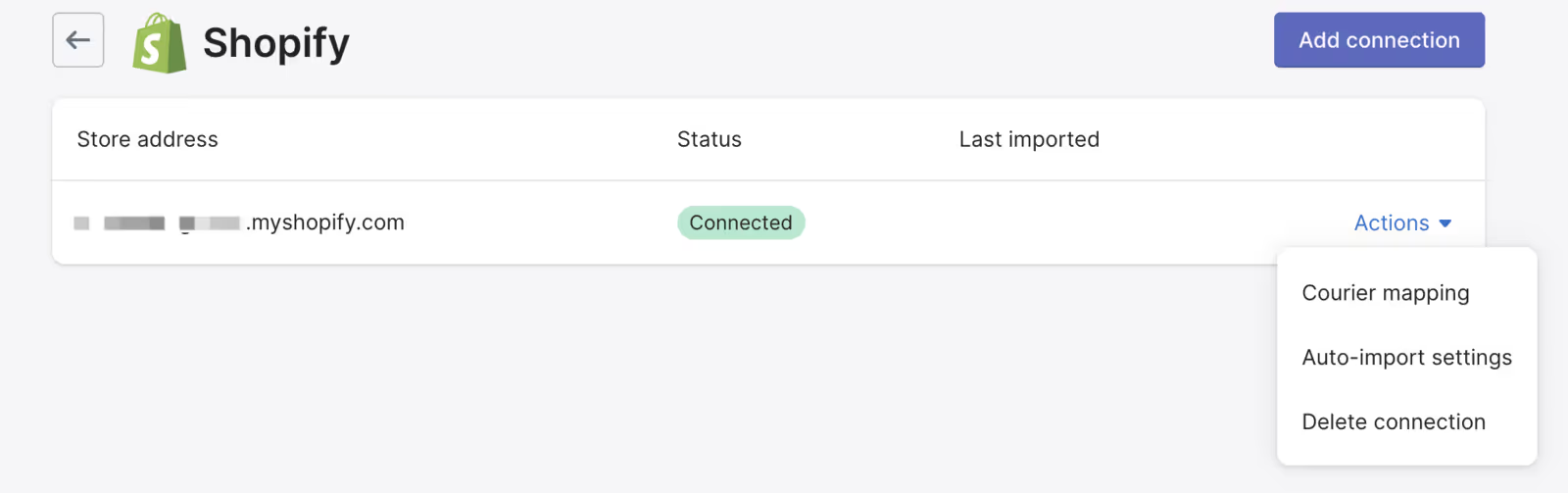
Time to load your order tracking app with your Shopify data. This is a crucial step to ensure your app uses your courier and order details.
On Aftership Tracking, go to Apps > Store connections > Actions to set up these two actions:
Finally, connect your order tracking app to your helpdesk.
When customer messages, shipping data, and tracking information are connected, your team can:

Read more: How to connect AfterShip Tracking to Gorgias
It’s important to make order tracking accessible to customers, wherever they are. And since more than 68% of orders are done through smartphones, it’s critical to design every tracking touchpoint with a mobile-first experience in mind.
Order tracking should be available in:
Depending on your needs and the ecommerce platform you use, choose from options that are both scalable and flexible.
ShipBob is a global logistics platform that helps ecommerce brands provide fast, affordable shipping and best-in-class order fulfillment. Its connected technology and fulfillment network improve delivery times, reduce costs, and elevate the customer experience.
Standout features:
Check out ShipBob in the Shopify App Store or the BigCommerce App Store.
AfterShip is a shipment tracking and notification platform that helps ecommerce brands keep customers informed and improve delivery transparency. It streamlines post-purchase communication and makes it easier to spot delivery issues before they affect customer experience.
Standout features:
Check out AfterShip in the Shopify App Store and the BigCommerce App Store.
ShipStation is a shipping software solution that helps ecommerce businesses save time and money by comparing carrier rates and delivery times in one place. It automates shipping workflows to ensure customers get fast, cost-effective delivery.
Standout features:
Check out ShipStation in the Shopify App Store and the BigCommerce App Store.
ShipMonk is a third-party logistics (3PL) provider that helps ecommerce businesses scale with fast, affordable fulfillment services. Its technology-driven platform streamlines order, inventory, and warehouse management to deliver a seamless post-purchase experience.
Standout features:
Check out ShipMonk in the Shopify App Store.
Whether you ship 50 or 50,000 orders a month, Easyship can help you lower shipping costs and increase conversion rates. Use this extension to manage your post-purchase process in the most efficient way for your business.
Read more about Easyship in the Magento Marketplace.
Recommended reading: 12 best shipping software for ecommerce
The Mageworx Order Editor extension lets you edit customer errors. Quickly fix any mistakes customers make during checkout like incorrect street numbers, phone numbers, names, shipping, or billing details.
You can also add or remove products, change pricing, and add coupons after an order has been placed. This saves your customer support team from having to cancel the order and start it again from the beginning.
Learn more about Mageworx Order Editor in the Magento Marketplace.
Use Gorgias to centralize order tracking, automate status updates, and deliver real-time delivery info, all in one place. By deflecting repetitive WISMO tickets, your team saves time, boosts CSAT, and focuses on higher-value conversations that drive retention and revenue.
Book a demo to see how Gorgias integrates with your order tracking system.