Join us for Moments That Matter: Meet the Modern Helpdesk
September 10 at 12PM EST.
Save your seat


Four months ago, our analysts were dealing with a barrage of questions. "What's our ARR by segment?" "Build me a dashboard for this quarter's pipeline." Quick asks piled up behind complex deep dives. Stakeholders waited for answers that should have taken seconds, and analysts spent their time fielding requests instead of doing the strategic work that creates the most value.
Today, anyone at Gorgias can ask a question in plain language and get an accurate, contextualized response in seconds. Not from a colleague or dashboard, nor from a generic answer from the internet. But a response built on our business context. We call it Cortex, our flagship internal AI agent.
In two months, Cortex went from an idea to fielding thousands of questions every week, recommending actions across the business, and deprecating the need for manual dashboard creation. While most companies right now are treating AI as an initiative — at Gorgias, AI is already part of how we work. 72% of Gorgias employees use Cortex each week, and that number is only growing.
We didn’t achieve this by simply plugging a large language model into our stack. LLMs are a critical part of the equation, but they aren't the driving force — it’s everything else under the hood: the infrastructure, context, platform architecture, and the team that brings it all together.
The instinct across many companies today is to start with the model, pick a provider to solve a specific challenge, or invest heavily in getting the data right. All reasonable starting points, but most of them solve for one use case. Underneath that approach is a framing problem: seeing AI as an initiative — something you assign and measure. Seeing AI as another tool your company uses versus how your company operates.
We started somewhere different. Every company is built on four pillars: customers, people, product, and decisions. AI investments tend to place heavy emphasis on the first three. We started with the fourth. Our bet was that if we built everything around the need to make effective decisions first, asking what Gorgias needed to know to operate well, then our AI would become dramatically more powerful.
Cortex is our flagship internal AI agent, and the product where we established the tenets that now run through everything else we build: composable and modular infrastructure, governed context, and accessible from wherever decisions happen. Cortex lives in Slack, as well as across LLM vendors, in its own browser extension, and even on its own dedicated internal site.
Cortex doesn’t stop at answering questions. It can read and write to Notion, file Linear tasks, create HTML apps, automate signal delivery, and more. It operates across every layer of our stack, from dashboards to data pipelines, because we designed it as one integrated system. It is this connection that adds remarkable depth to what people can ask, and what they get in return.
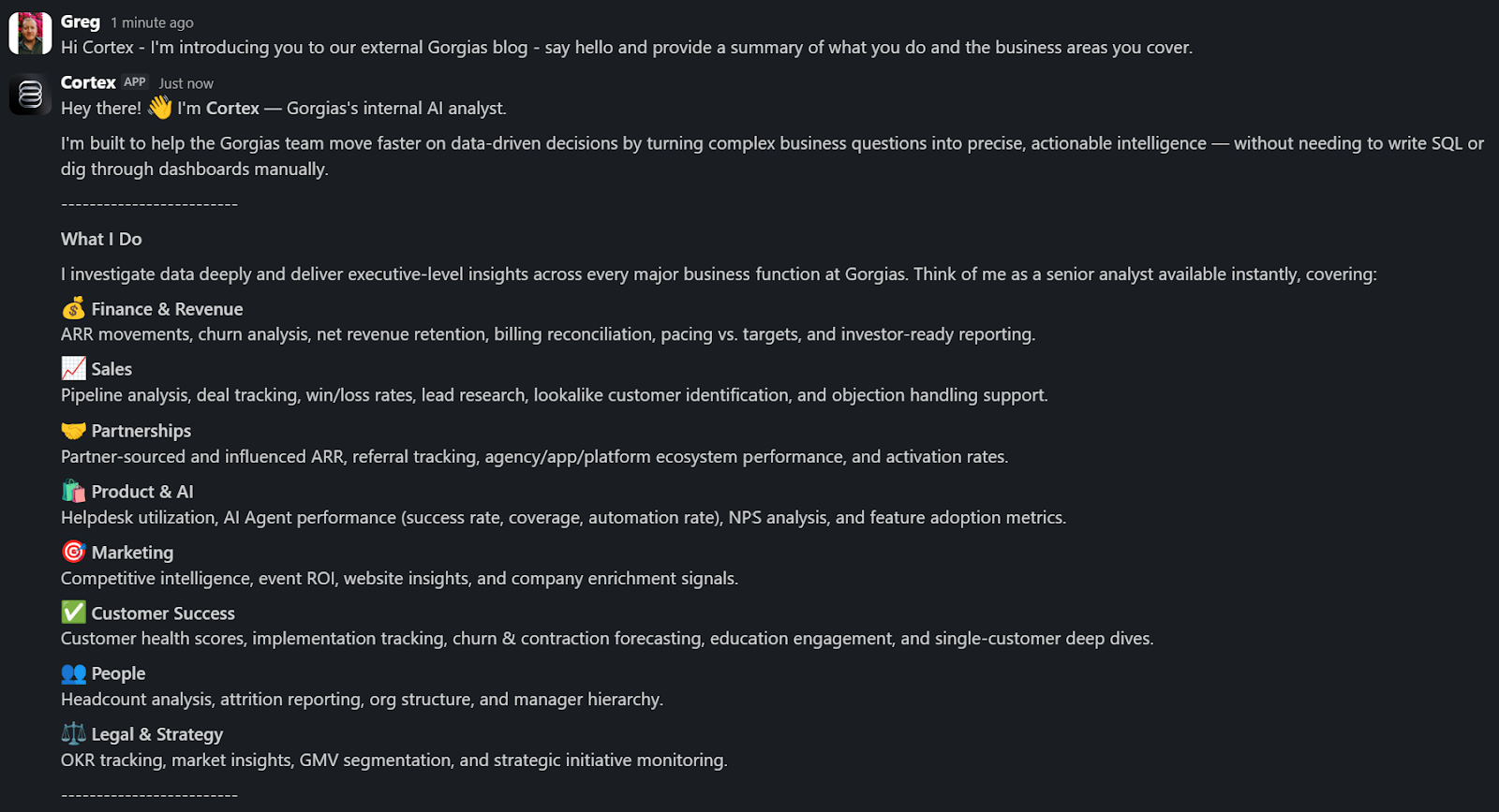
A Sales Lead is pitching and asks Cortex for the full picture of the merchant. In a customized PDF, Cortex lists coverage gaps, pre-sale intent signals, and product fit options. Everything the sales lead needs to walk in with confidence.
A Senior Product leader asks, "How are we performing against OKR #1, and what can my team do to help accelerate it?" Cortex returns a full ARR breakdown, projected end-of-month attainment, segment-level findings, and connects it all back to company-level strategies. A suite of recommendations customized to the leader, the performance, and the signals that bridge how they can support our goals. The kind of answer that used to take someone a week to put together.
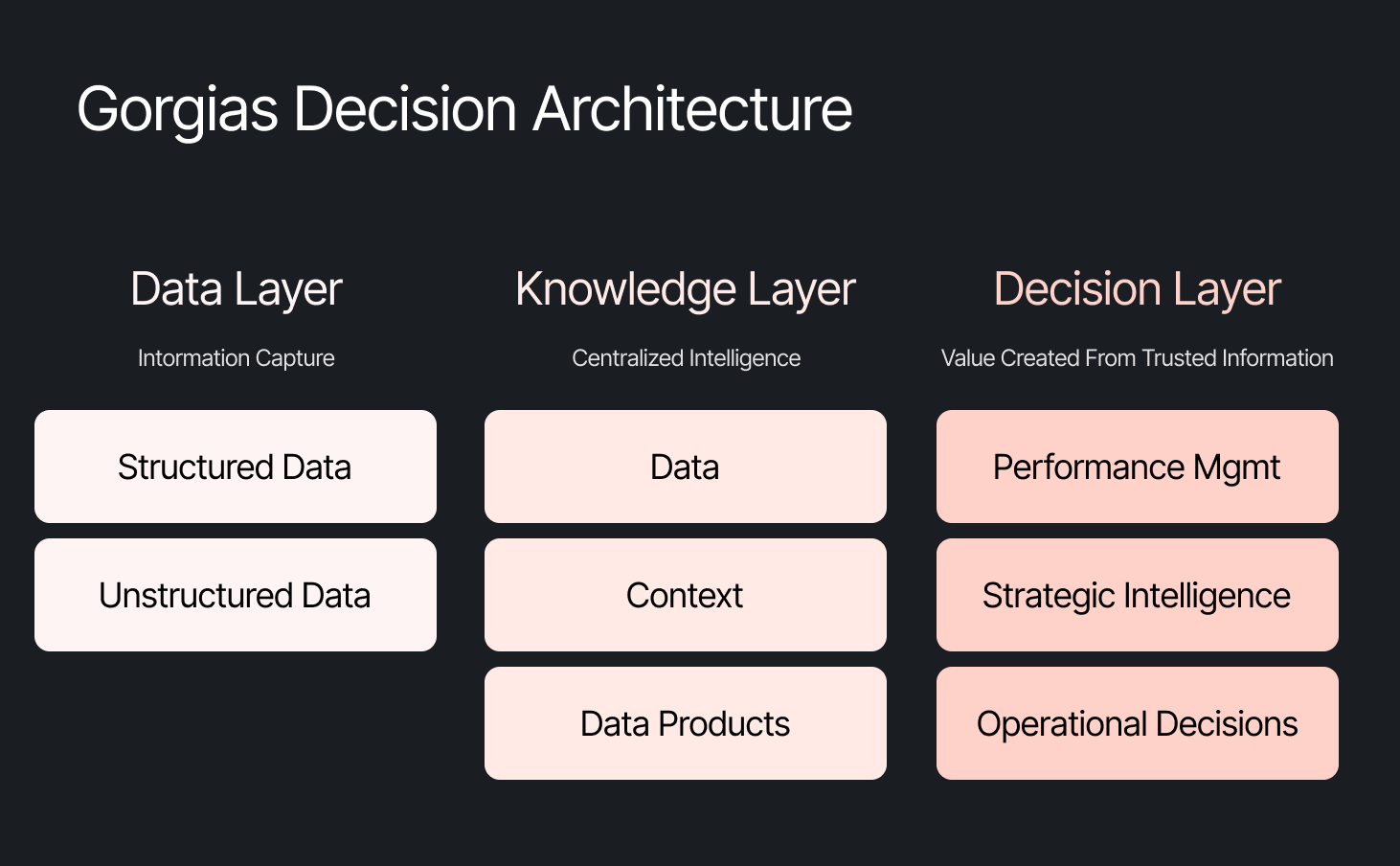
These aren't simple lookup queries. They require deep business context spanning multiple areas. Cortex handles these because its Decision Engine gives it the information to reason against governed data, metric definitions, and business context, turning a generic answer into a credible one.
Overnight, teams have built Cortex into how they work. They’re spending less time searching and more time finding answers, not because they were told to, but because Cortex reduced the distance between question and decision.
Cortex’s modular infrastructure allows us to experiment and add new capabilities freely. We’ve already built two more internal AI agents made for entirely different use cases, but using the same Decision Engine as Cortex.
GAIA, our internal experimentation AI Agent, helps our customers identify opportunities in their AI Agent Guidance design. It takes institutional knowledge across our teams and turns it into a scalable system that drives automation and value to our customers. Our CEO, Romain Lapeyre, has been its most vocal advocate since day one.
When we needed a platform for investor readiness and board preparation, we built Oracle. Our board decks and talk tracks are informed and built with the same AI, and our numbers are validated every step of the way.
We’re continuing to expand new AI agents internally, exploring how they can create value for customers and our own teams.
When AI handles thousands of analytical questions each week, the highest-value work for a data team shifts permanently. Late 2025, we repositioned from a Data Analytics function into a Decision Intelligence function — a structural change in what we own and how we operate.
Today, our analysts focus on the most sensitive, complex, and forward-looking decisions and analyses. They partner more deeply with stakeholders by driving next steps from signals. They're even building entirely new capabilities that didn't exist in their role descriptions months ago. Things like AI skills for Cortex, context curation, and insight and recommendation delivery. The role of the analyst hasn't diminished. It's expanded to encompass the most meaningful work an analyst can do: driving outcomes and ensuring those decisions can achieve them.
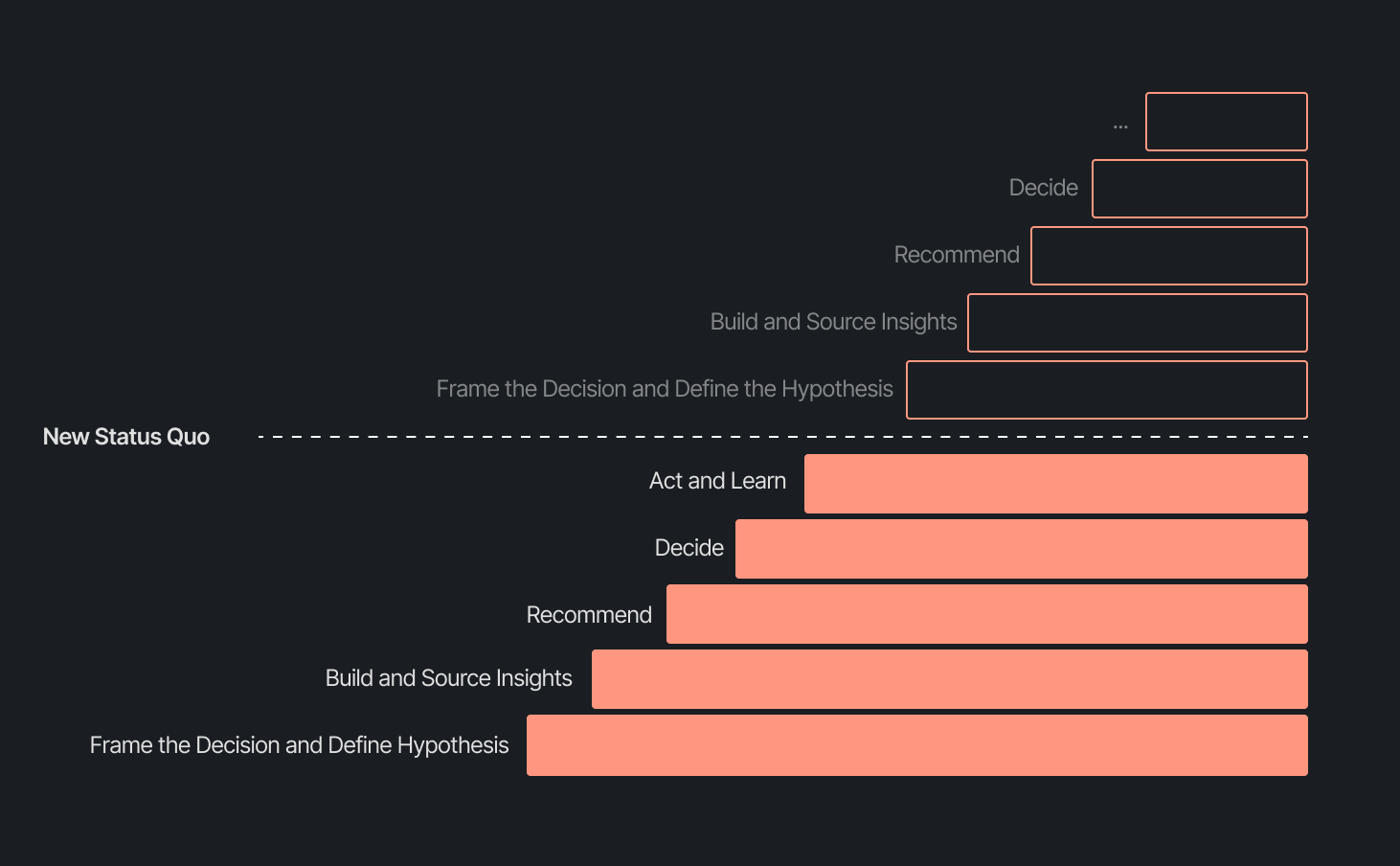
Our business support model has changed, too. Instead of embedding analysts and dedicated engineers within functional teams, we align capacity to the highest-impact company objectives and move fluidly across them. This model works even better because Decision Intelligence brings together both analytics and engineering teams under one roof.
Elliot Trabac leads our Data, Context and AI Engineering teams. The Decision Engine, Cortex, GAIA, and the platforms I've described exist because of the infrastructure his team innovated and built from the ground up. Noemie Happi Nono leads our Decision Strategy and Operations team, driving decision outcomes with stakeholders, advancing the development of Cortex skills and capabilities, and pushing into new areas of analysis every day.
Together, they're shaping what a modern data function looks like when AI becomes a standard building block for how a company operates.
The question of ROI is long gone. AI has opened the floodgates to more trusted and meaningful signals than ever. The natural next evolution is Proactive Intelligence, signals surfaced toward what you need to know, before you ask. And we're already building this because our architecture is designed to support it.
In the coming weeks, members of the Decision Intelligence team will go deeper into themes I've touched on here. Yochan Khoi, a Senior Analytics Engineer on our team, recently published a technical walkthrough of our context layer and will go further into building context strategies that scale. Others will cover infrastructure, analytical partnerships, evolving data assets into decision assets, and the cost and efficiency gains that make sustained AI investment viable.
AI hasn't changed the most important element of data and analytics functions — delivering outcomes — but it has raised the bar for what it looks like and how far we can take it. We’re just getting started.
TL;DR:
The way shoppers buy online has shifted and customers are at the center.
They no longer want to scroll through product pages, dig through FAQs, or wait 24 hours for an email reply. They open a conversation, ask a specific question, and expect a useful answer in seconds. Brands that can’t deliver these experiences at scale are seeing customer hesitation turn into abandoned carts and lost revenue.
This shift has a name: conversational commerce. It's the practice of using real-time, two-way conversations as your primary sales channel, through chat, AI agents, messaging apps, and voice.
What started as an experiment for early adopters has become a key growth lever, with 84% of ecommerce brands treating conversational commerce as a strategic pillar this year vs. last year.
We surveyed 400 ecommerce decision-makers across North America, the U.K., and Europe to understand how conversational commerce and AI are reshaping the ecommerce landscape. These findings are complemented by aggregated and anonymized internal Gorgias platform data from 16,000+ ecommerce brands.
The State of Conversational Commerce in 2026 trends report breaks down all of the findings, including five key trends shaping the ecommerce landscape.
{{lead-magnet-1}}
A few years ago, adding an AI chatbot to your site that could provide tracking links and Help Center article recommendations was a differentiator. Today, it's table stakes. McKinsey found that 71% of shoppers expect personalized experiences, and 76% get frustrated when they don't get them.
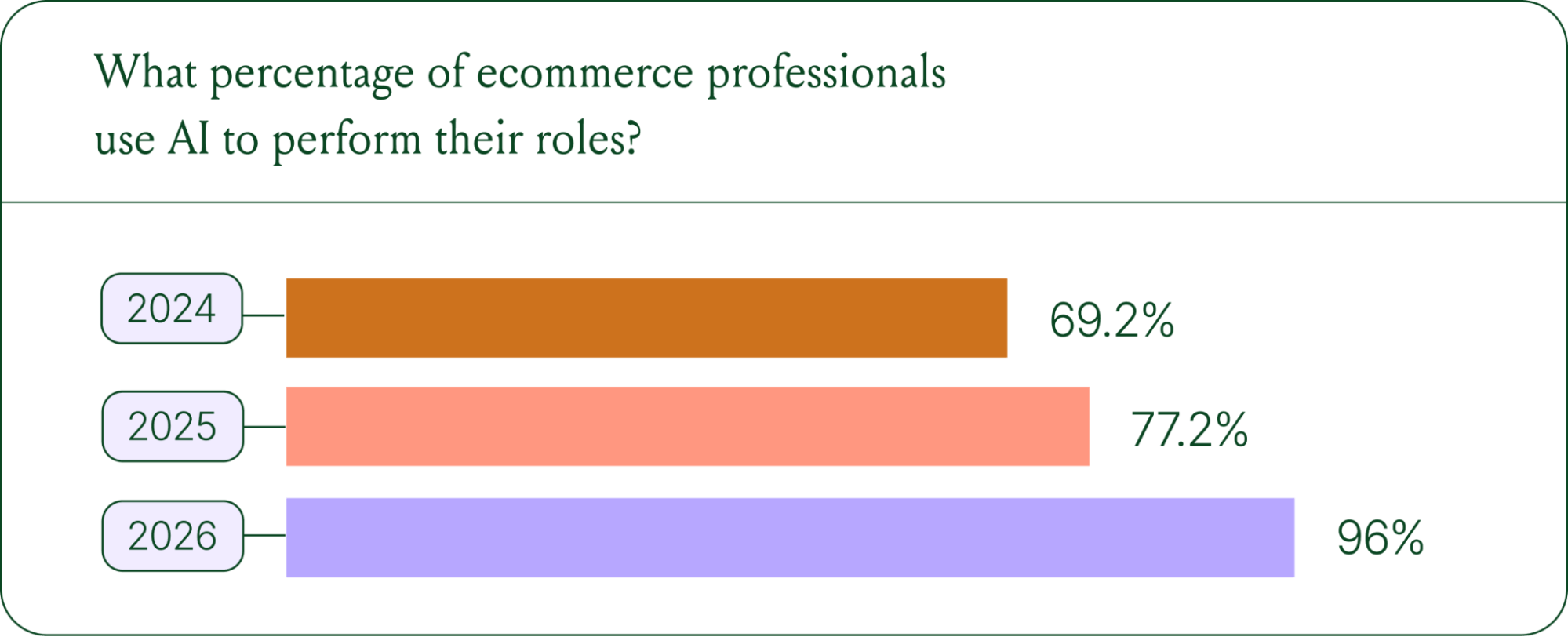
Right now, most ecommerce professionals use AI, with 93% having used it for at least 1 year. Enthusiasm is accelerating quickly, with only 30% of ecommerce professionals rating their excitement for AI at 10/10 in April 2025. Similarly, while AI adoption rose steadily year over year, it reached a clear peak in 2026.
The use cases driving this adoption are practical and high-volume:
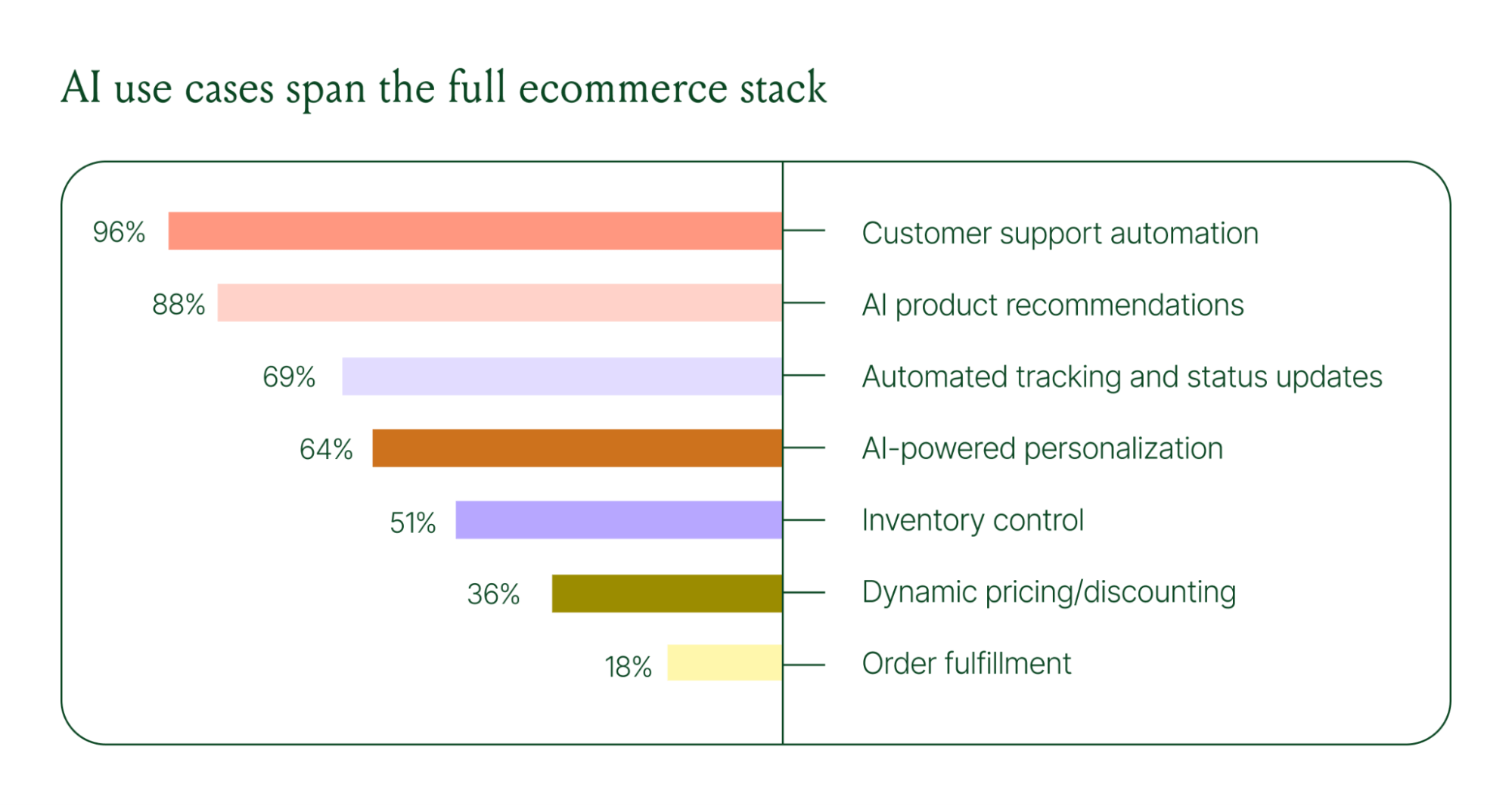
These are the tickets that flood brands’ inboxes every day. AI agents resolve them instantly, without pulling teams away from conversations that actually require human judgment.
Explore AI adoption and use case data in more depth in the full report.
The traditional ecommerce funnel, visit site, browse products, add to cart, check out, is losing ground. Shoppers now discover products on Instagram, ask questions via direct message, and complete purchases without ever visiting a website.
Conversational AI is actively increasing revenue, with 79% of brands reporting that AI-driven interactions have increased sales and conversion in their business.

The practical implication is that every channel is becoming a storefront. Creating personalized touchpoints with customers earlier in the journey, through proactive engagement, is impacting the bottom line.
Read the full report to explore how AI conversions have increased QoQ by industry.
Pre-purchase hesitation is one of the biggest conversion killers in ecommerce. A shopper lands on your product page, has a question about sizing or compatibility, can't find the answer quickly, and leaves. That's a lost sale that had nothing to do with your product.
Conversational AI changes that dynamic. When a shopper can ask a question and get an accurate, personalized answer in real time, the friction disappears.
Brands using Gorgias saw this play out at scale in 2025. When AI Agent recommended a product, 80% of the resulting purchases happened the same day, and 13% happened the next day.
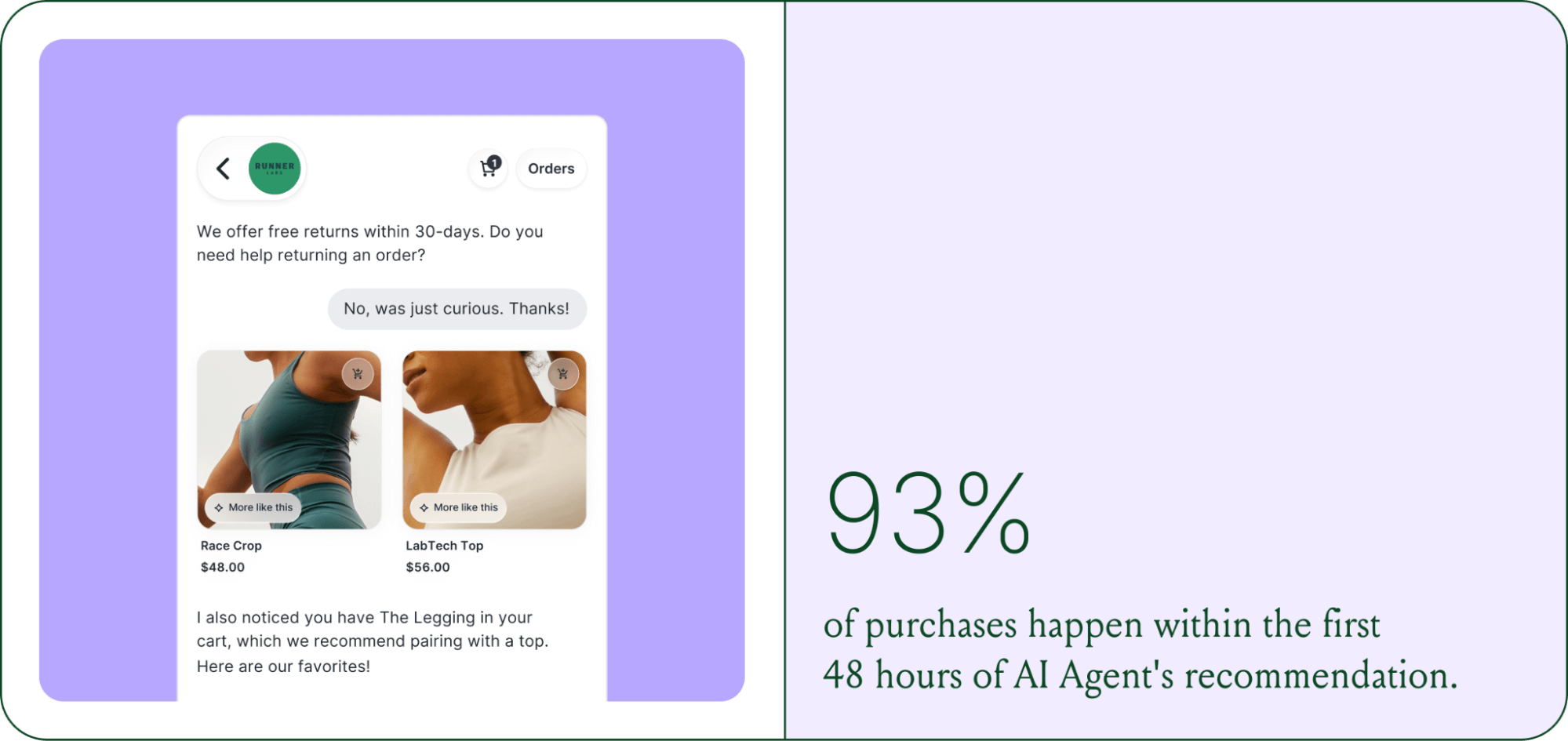
Brands are further accelerating the buying cycle through proactive engagement. On-site features such as suggested product questions, recommendations triggered by search results, and “Ask Anything” input bars drove 50% of conversation-driven purchases during BFCM 2025.
Explore how AI is collapsing the purchase cycle in Trend 3 of the report.
There's a persistent narrative that AI is making CX teams redundant. The data tells a different story. 62% of ecommerce brands are planning to grow their teams, not cut them. But the scope of those teams is changing.

New roles are emerging around AI configuration and quality assurance. Teams are investing in technical members to write AI Guidance instructions, develop tone-of-voice instructions, and continuously QA results.
CX teams are also bridging the gap between support goals and revenue goals, as the two functions increasingly overlap.
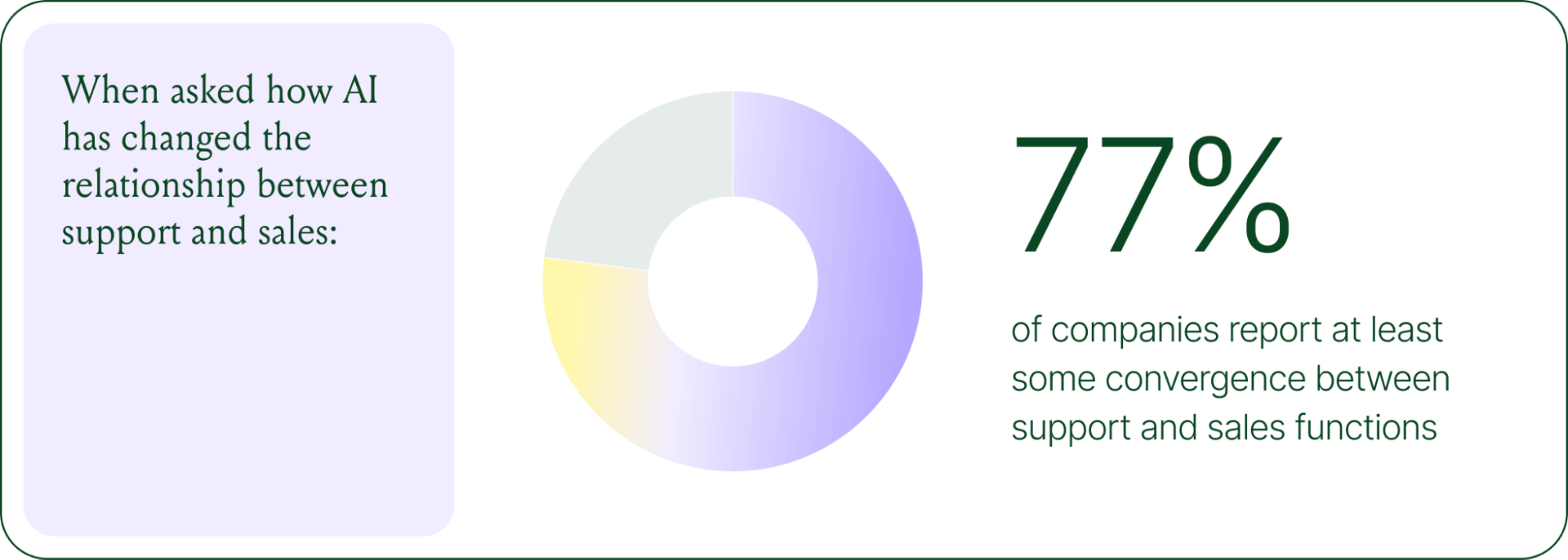
The result is CX teams that are more technical than they were before. Agents who once spent their days answering repetitive tickets are now spending that time on higher-value work: complex escalations, VIP customer relationships, and improving the AI systems and knowledge bases that handle the volume.
Learn more about the evolution of CX roles in Trend #4.
Despite increasing AI adoption, data shows that ecommerce brands shouldn’t strive for 100% automation. Winning brands are building systems in which AI handles repetitive tier-1 tickets, and humans handle complex, sensitive cases.

AI handles speed and scale. It resolves order-tracking requests at 2 a.m., processes return-eligibility checks in seconds, and answers the same shipping question for the thousandth time without compromising quality.
Human agents handle conversations that require context, empathy, or decisions that fall outside the standard playbook. There are several topics where shoppers still prefer human support.
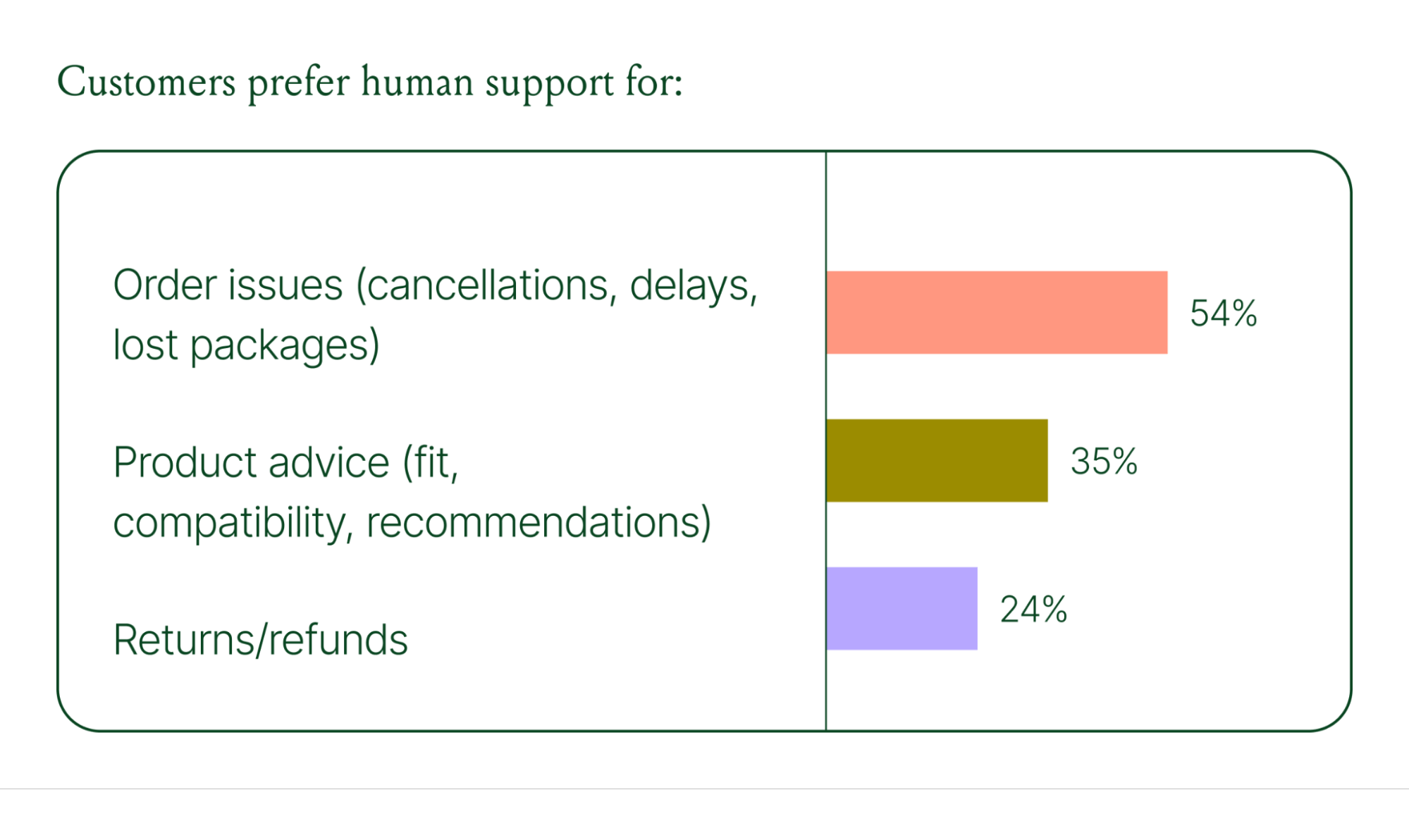
Successful hybrid systems require continuous iteration, meaning reviewing handover topics, Guidance, and reviewing AI tickets on a weekly basis.
Discover how leading brands are balancing human and AI systems in Trend #5.
The 2026 trends are about expansion and standardization. The 2030 predictions are about what comes next.
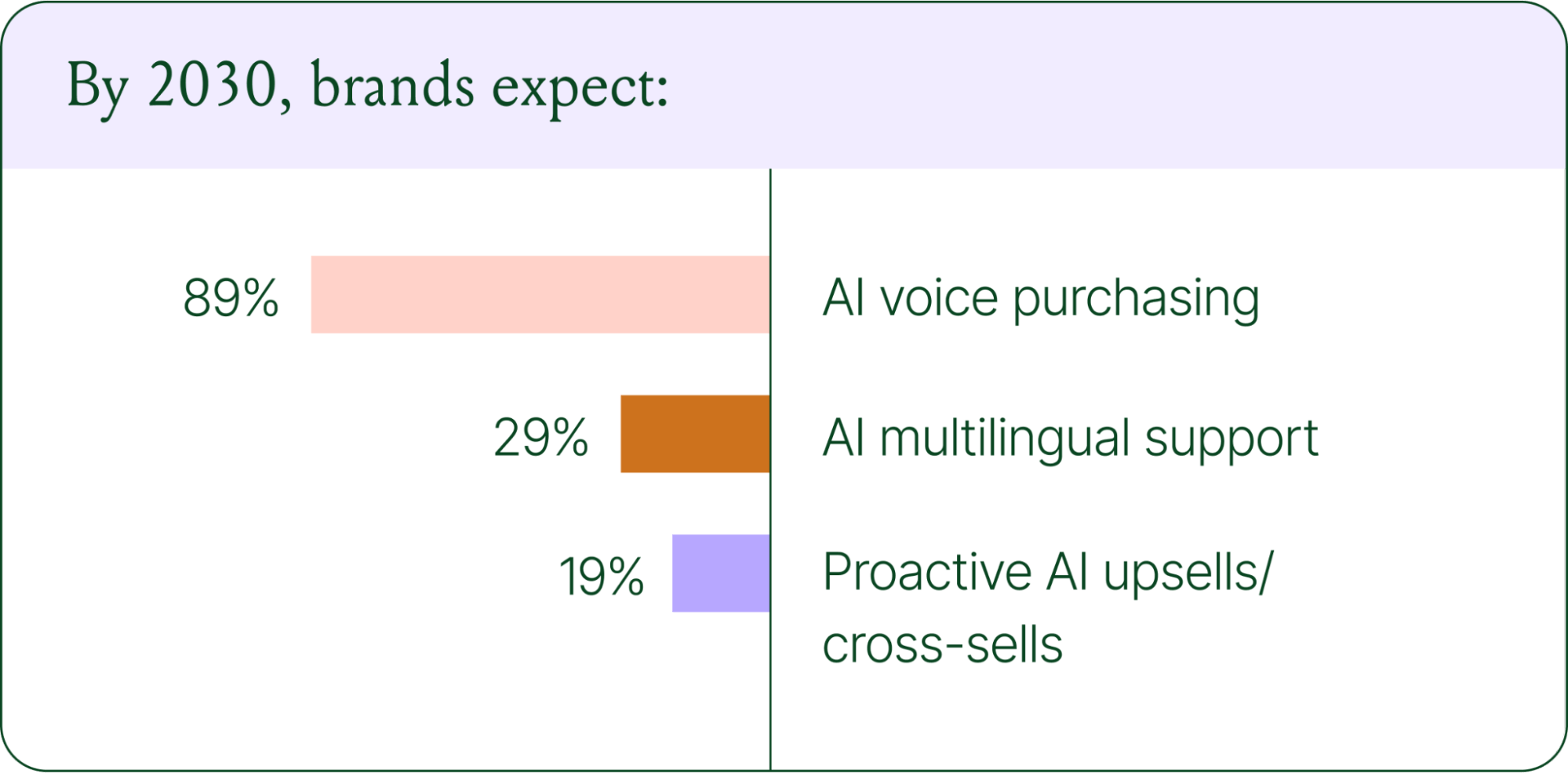
Voice-based purchasing is the biggest bet on the horizon. Only 7% of brands currently use voice assistants for commerce, but 89% expect it to be standard by 2030. The vision is a customer who can reorder a product, check their subscription status, or manage a return entirely over the phone.
Proactive AI is the other major shift. Rather than waiting for a customer to reach out, AI will anticipate needs based on browsing behavior, purchase history, and where someone is in their relationship with your brand. Think of it as the digital equivalent of a sales associate who remembers what you bought last time and knows what you're likely to need next.
Explore where ecommerce brands are allocating their AI budgets in the full report.
The brands winning in 2026 are creating smart, scalable systems where AIhandles volume and humans handle nuance. They’re treating every conversational channel as an opportunity to serve and sell.
The data is clear: AI adoption is accelerating, customer expectations are rising, and the revenue impact of getting this right is measurable.
{{lead-magnet-1}}
The best in CX and ecommerce, right to your inbox

TL;DR:
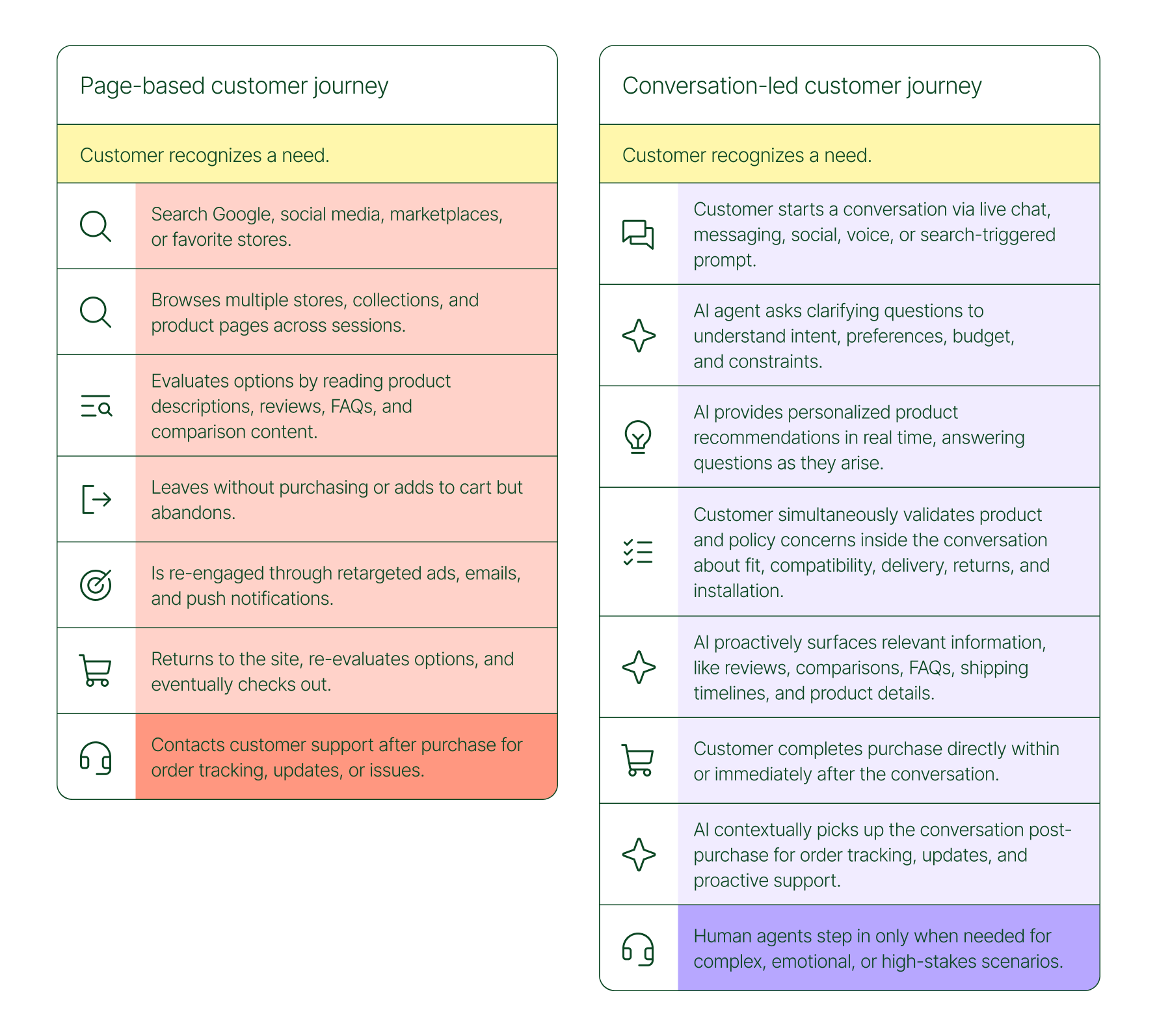
The page-based shopping experience dominated for decades. Customers would search, browse, compare, abandon, get retargeted, return, and eventually buy (sometimes).
That journey is no longer the only option.
Shoppers are turning to chat, messaging, and AI-powered tools to find what they need. Instead of clicking through product pages or reading static FAQs, they ask questions, have back-and-forth conversations, and get answers that move them closer to a purchase in real time. The path to checkout has changed, and the brands that recognize this are pulling ahead.
Read our 2026 State of Conversational Commerce Report to learn more about conversation commerce trends from 400 ecommerce decision-makers and 16,000+ ecommerce brands using Gorgias.
{{lead-magnet-1}}
The traditional shopping journey was a solo experience. A shopper had a need, searched for options, browsed across sessions, and eventually made a decision — often days later, after being retargeted multiple times. Support only entered the picture after the purchase.
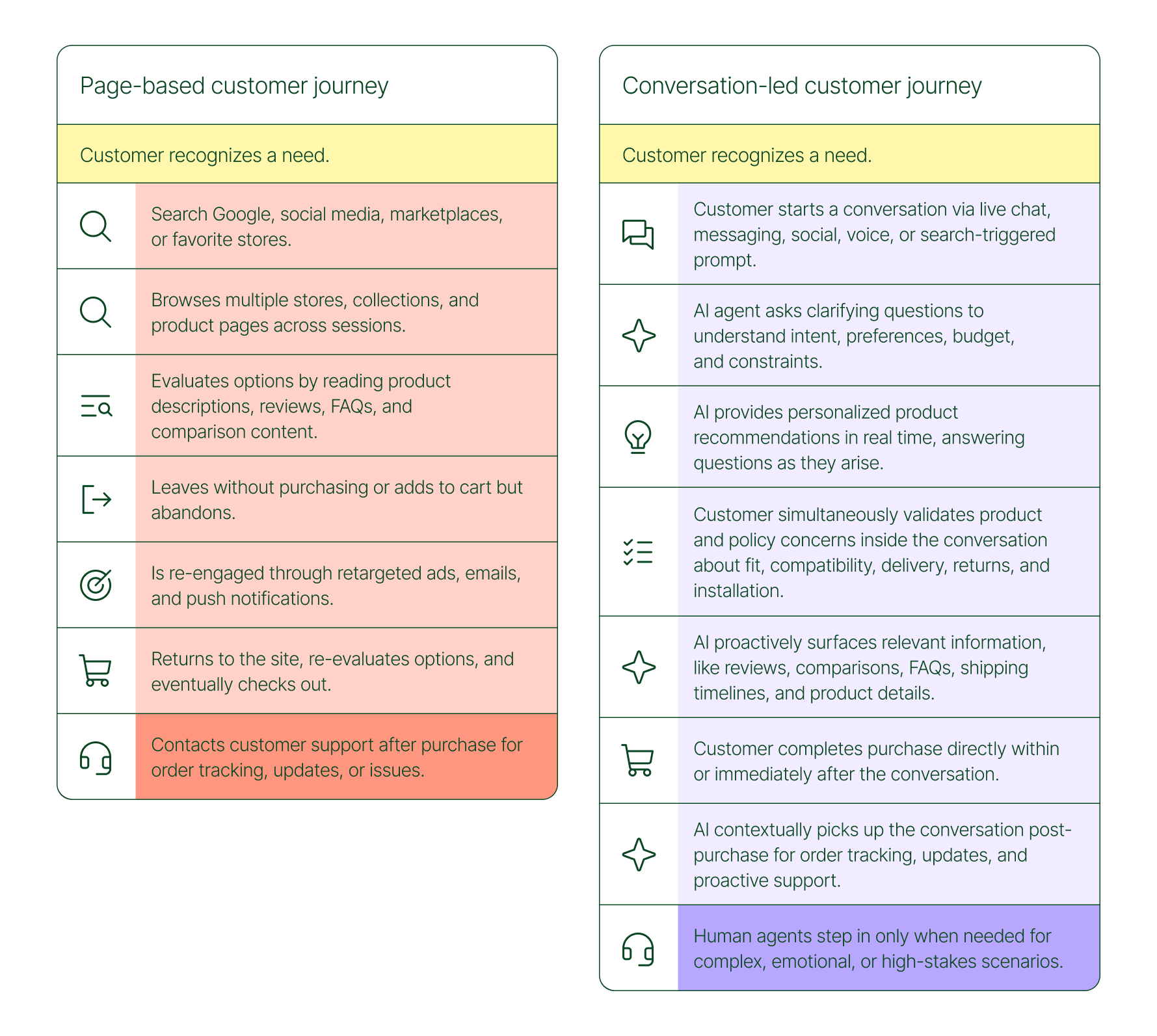
The conversation-led journey collapses that timeline:
What used to take days now takes minutes. Discovery, evaluation, and purchase happen in a single thread.
79% of brands agree that AI-driven conversational commerce has increased sales and purchase rates in their business. When brands were asked to rank the highest-return areas:
Those numbers reflect something important: the value of conversation compounds. Faster support reduces friction. Better retention raises lifetime value. More confident shoppers buy more often and spend more per order.
The brands seeing the biggest returns aren't just using AI to deflect tickets. They're using it to create one-to-one shopping experiences at scale.
Looking at AI-only influenced orders across key verticals like Apparel and Accessories, Food and Beverages, Health and Beauty, Home and Garden, and Sporting Goods, the growth across a single year was significant.
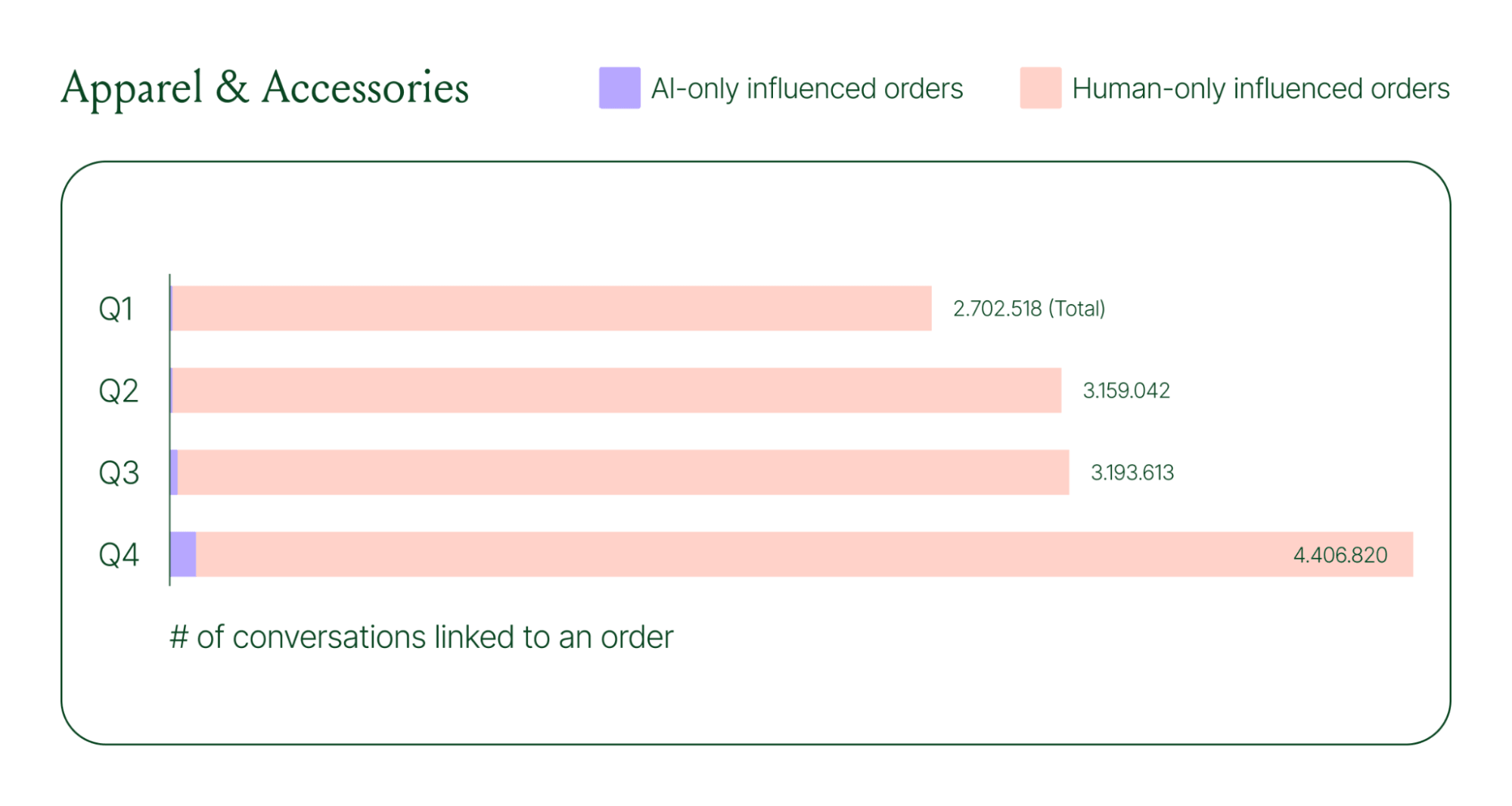
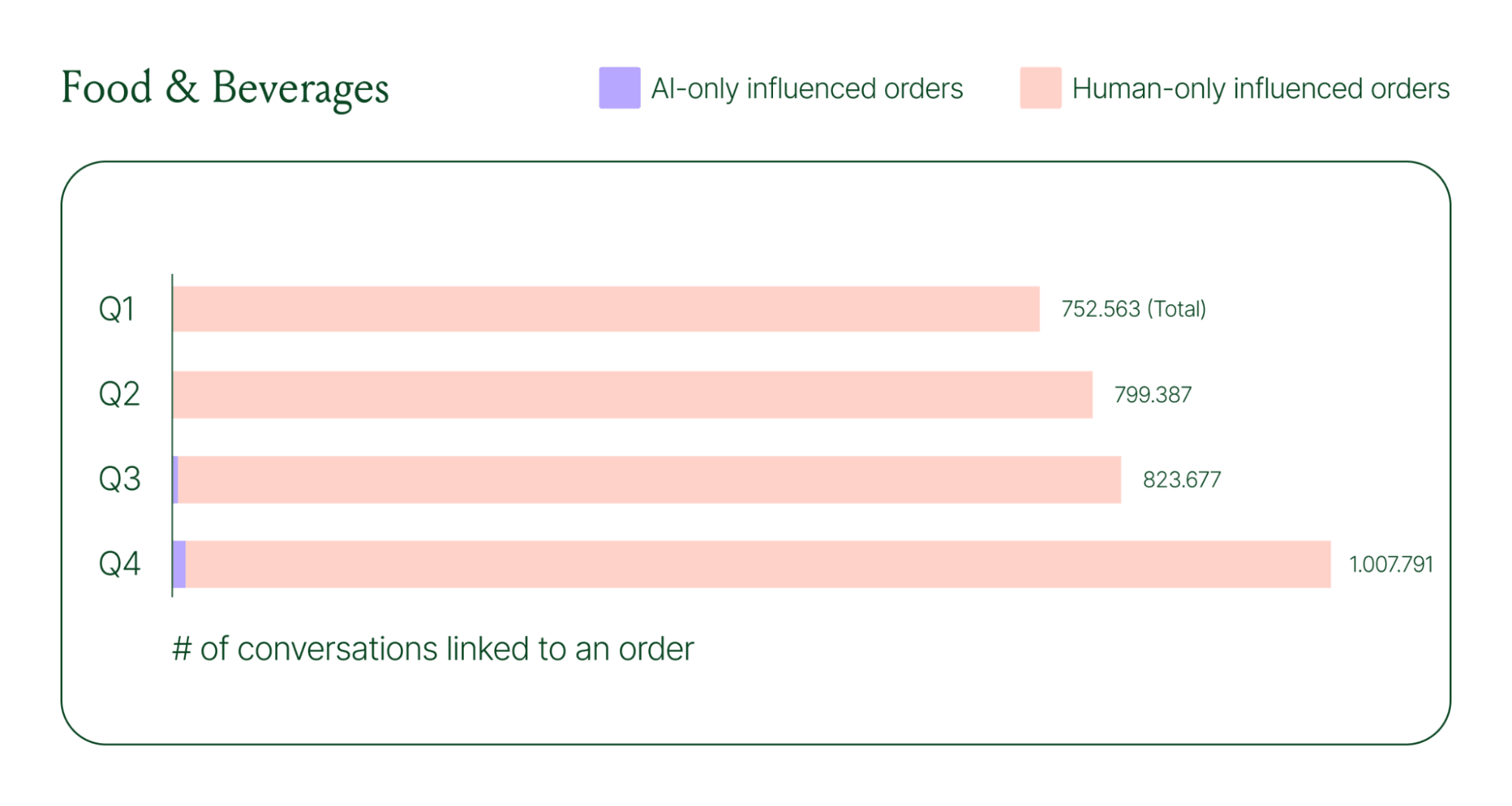
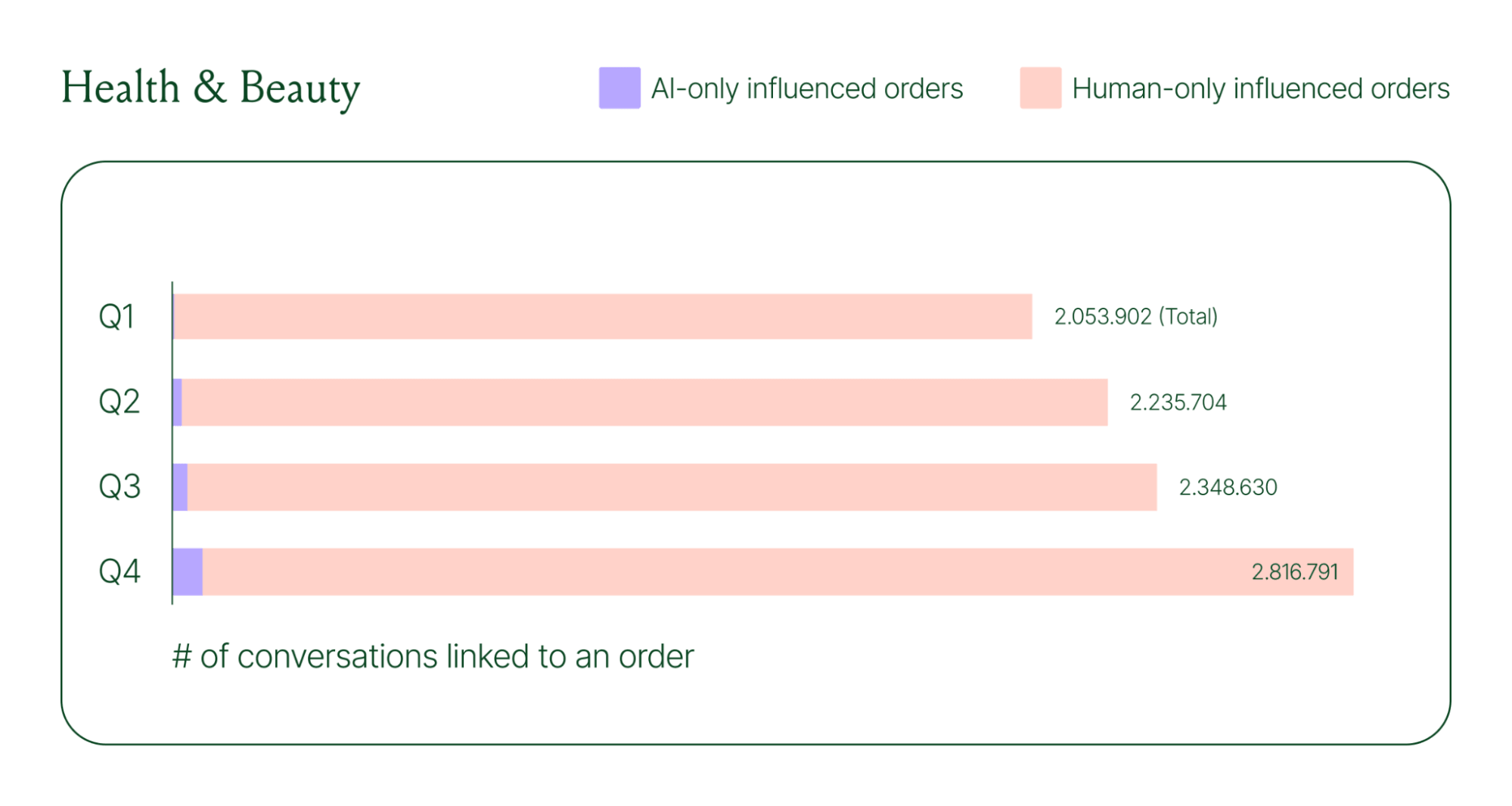
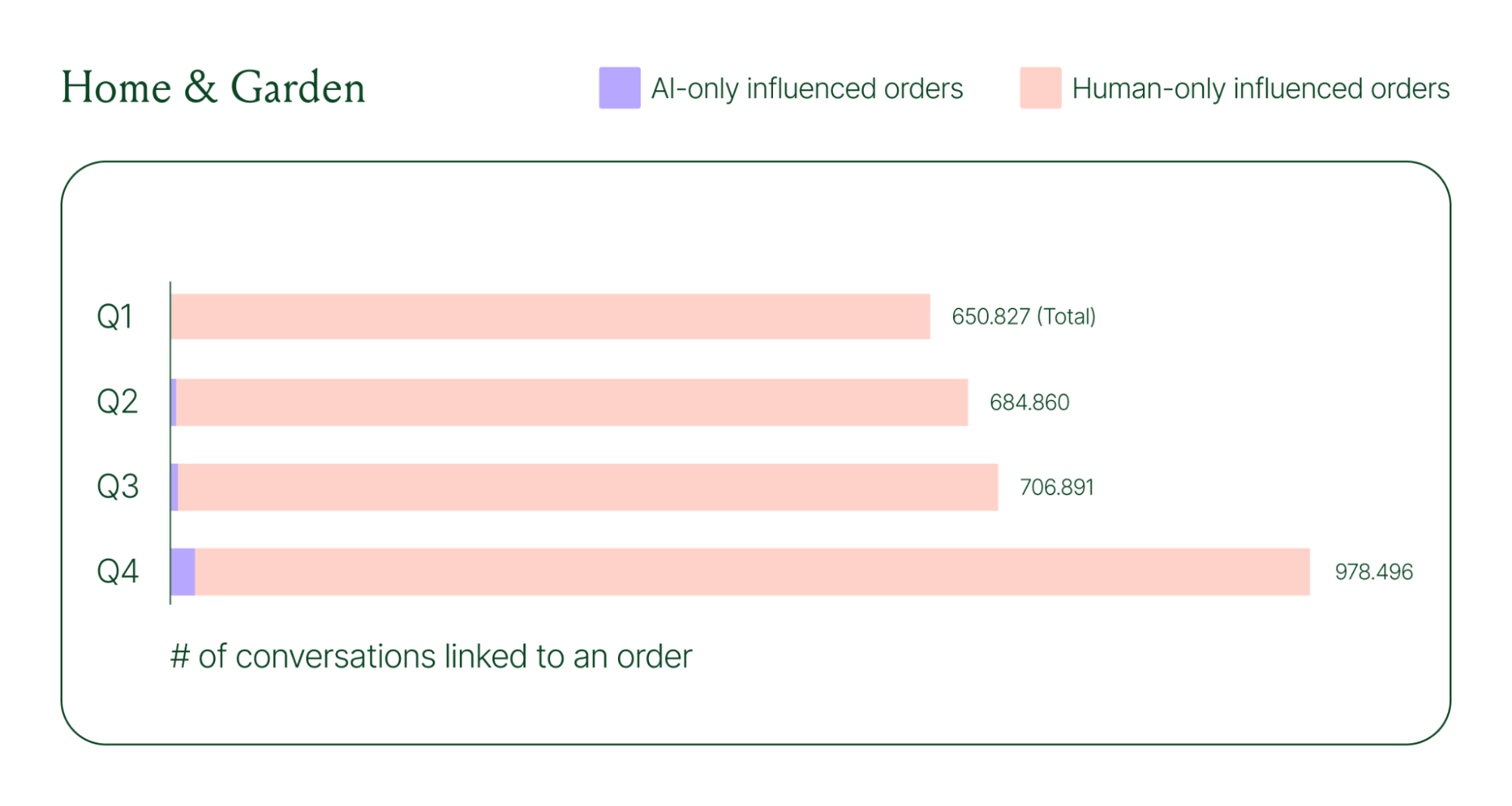
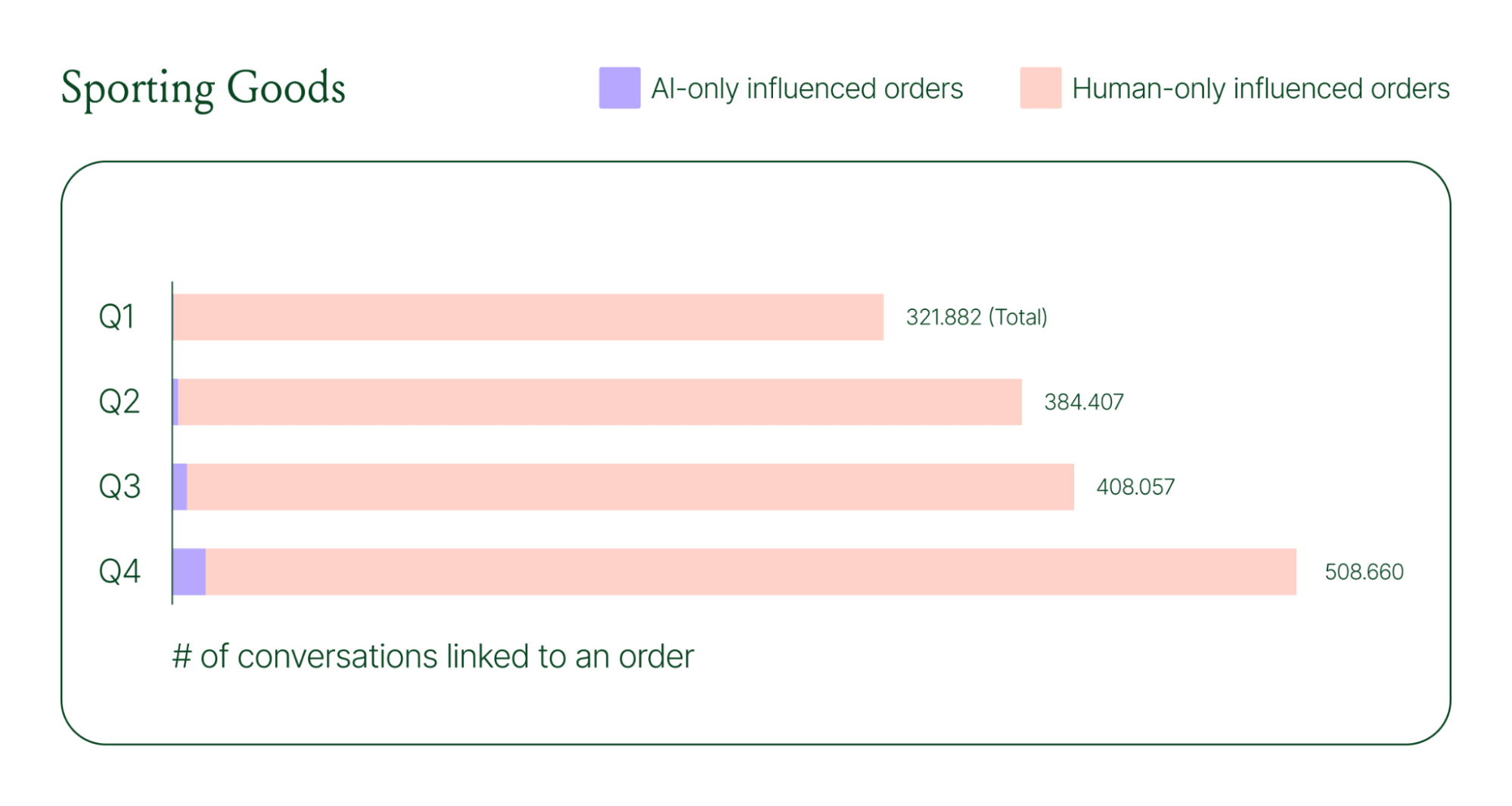
Across industries, ecommerce brands saw AI step into conversations, reduce shopper hesitation, and drive higher QoQ conversion rates.
Learn more about AI-powered revenue generation in the full 2026 Conversational Commerce Report.
84% of brands say the strategic importance of conversational commerce is higher than it was a year ago. 82% agree it will be mainstream in their sector within two years.
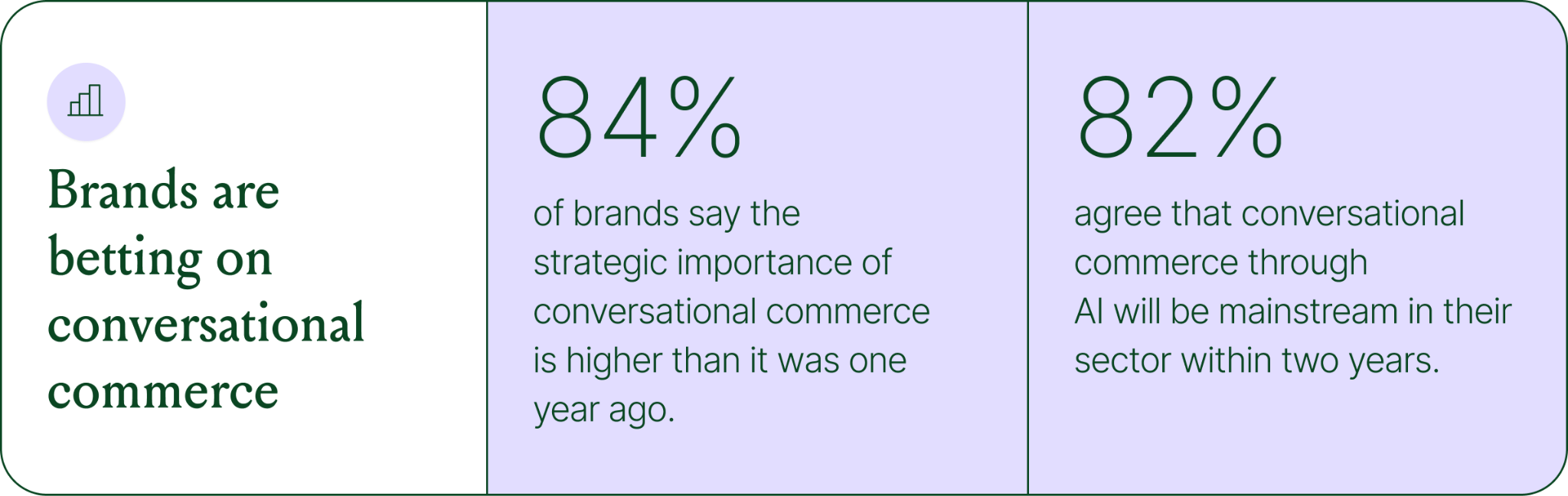
That shift is registering at the leadership level because of what conversational commerce does to the buying experience. Creating one-to-one touchpoints earlier in the journey drives higher AOV, shorter buying cycles, and stronger purchase rates. Shoppers who get real-time answers to their questions are more confident.
TUSHY, known for eco-friendly bidets and bathroom essentials, is a useful example of what happens when you take conversational commerce seriously.
Bidets aren't an impulse purchase. Shoppers have real questions about fit, compatibility, and installation. Those questions used to go unanswered until the CX team could respond, often after the customer had abandoned the cart.
TUSHY used Gorgias's AI Agent and shopping assistant capabilities to automate pre-sales support. AI Agent engaged shoppers in real-time conversations, addressed their concerns directly, and built confidence at the moment of highest intent.
This resulted in a 190% increase in chat-based purchases, a 13x return on investment, and twice the purchase rate of human agents.
You don't need to overhaul your entire operation to start seeing results. The most effective approach is to start where the impact is clearest and expand from there.
A few places to begin:
Want to see the full picture of where conversational commerce is headed in 2026? Read the full report to explore the data, trends, and strategies shaping the next era of ecommerce.
{{lead-magnet-1}}
TL;DR:
A year ago, ecommerce brands were still debating whether AI was worth the investment. That debate is over. Today, nearly every ecommerce professional uses AI to do their job.
The shift isn't just about adoption. It's about what AI is used for and how brands measure its impact. Support automation was the entry point. Now, AI is embedded across the full operation, from product recommendations to inventory control to real-time shopping conversations.
In our 2026 State of Conversational Commerce Report, we break down trends on AI usage among 400 ecommerce decision-makers and 16,000+ ecommerce brands using Gorgias.
{{lead-magnet-1}}
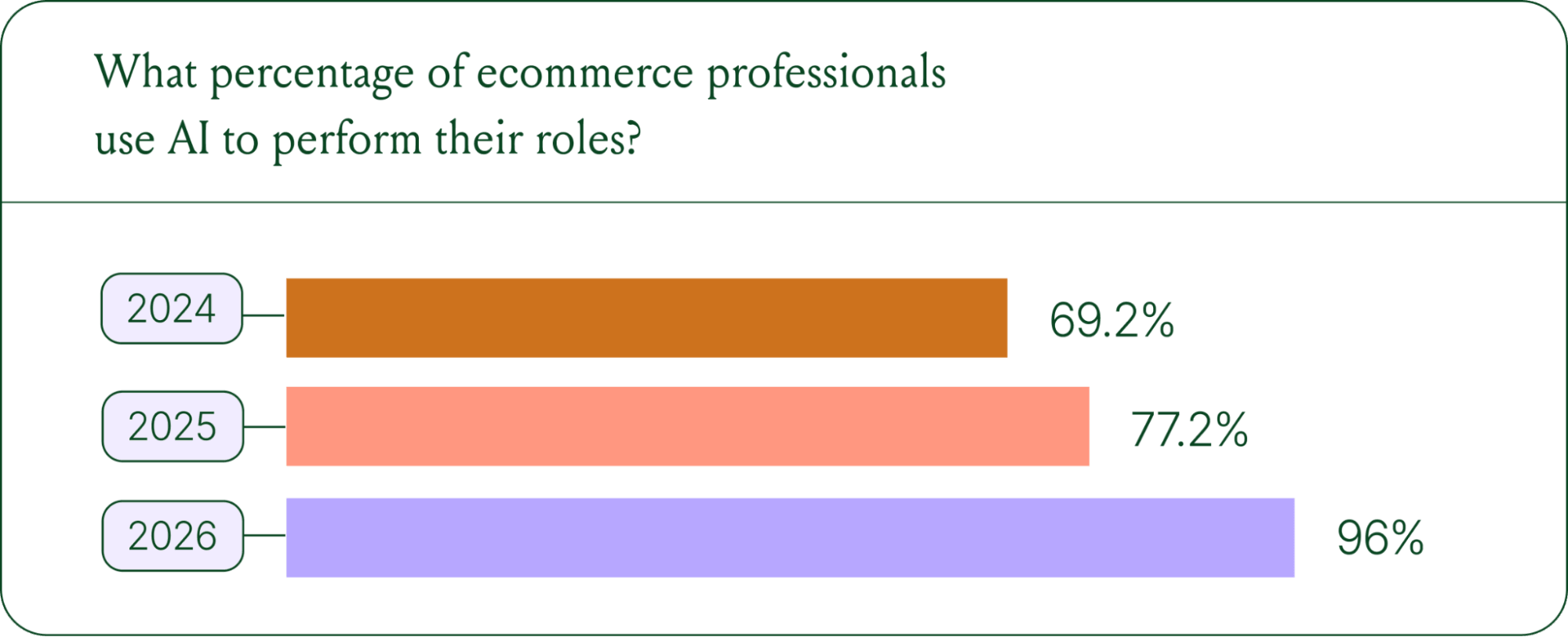
If we rewind 12 months ago, the industry was still split on AI. Some ecommerce professionals were excited, but most were still hesitant. In 2024, 69% of ecommerce professionals used AI in their roles. By 2025, that number reached 77%. In 2026, it hit 96%.
The confidence numbers back it up. 71% of brands say they are confident using AI for ecommerce, and 73% are satisfied with its business impact.
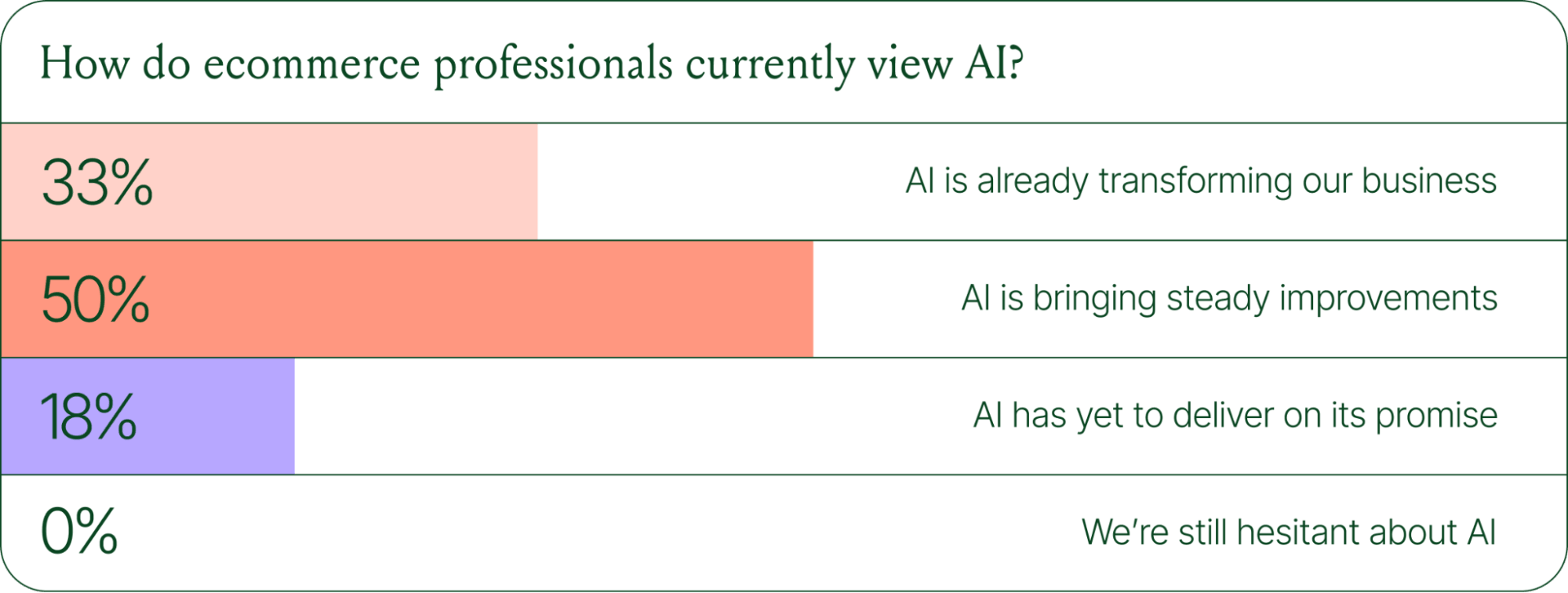
In early 2025, only 30% of ecommerce professionals rated their excitement for AI at 10/10. Today, zero percent of respondents describe themselves as hesitant about AI.
Using AI in ecommerce is not new. In fact, it dates back to the 1980s with the invention of algorithms and expert systems. And if you’ve ever leveraged similar product recommendations or chatbots, you’ve already integrated AI into your ecommerce stack.
Modern AI is far more sophisticated.
With the rise of agentic commerce and conversational AI, brands began leveraging AI agents to automate the processing of repetitive support tickets. That’s still happening today, but the scope has expanded beyond the support queue.
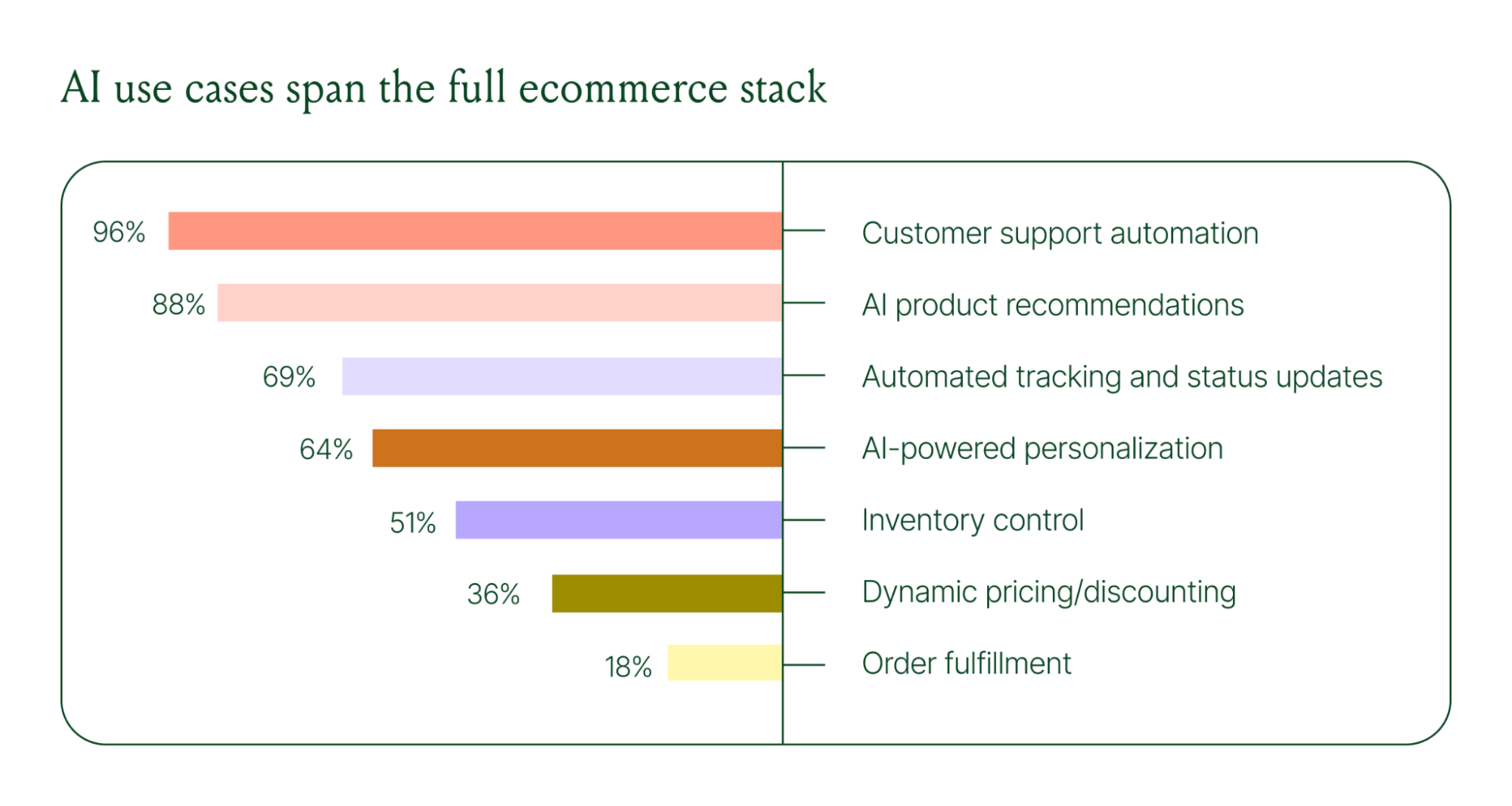
Ecommerce brands are deploying AI across every layer of their operation:
When brands were asked which channels contribute most to their AI success, conversational channels dominated. Social media messaging led at 78%, followed by SMS at 70%, and website live chat at 51%. Shoppers want fast, personal conversations, and AI is the best way to deliver that at scale.
Learn more about AI adoption, perception, and use case trends in the full 2026 Conversational Commerce Report.
For decades, customer support success meant fast response times and high satisfaction scores. Those are still important indicators of success, but leading brands are adding revenue-focused metrics to their dashboards.
91% of brands still track CSAT as a measure of AI's impact. But 60% now include AOV as a top indicator, and higher-revenue brands earning $20M+ are focusing on metrics like total operating expenses, cost per resolution, incremental revenue, and one-touch ticket rate.
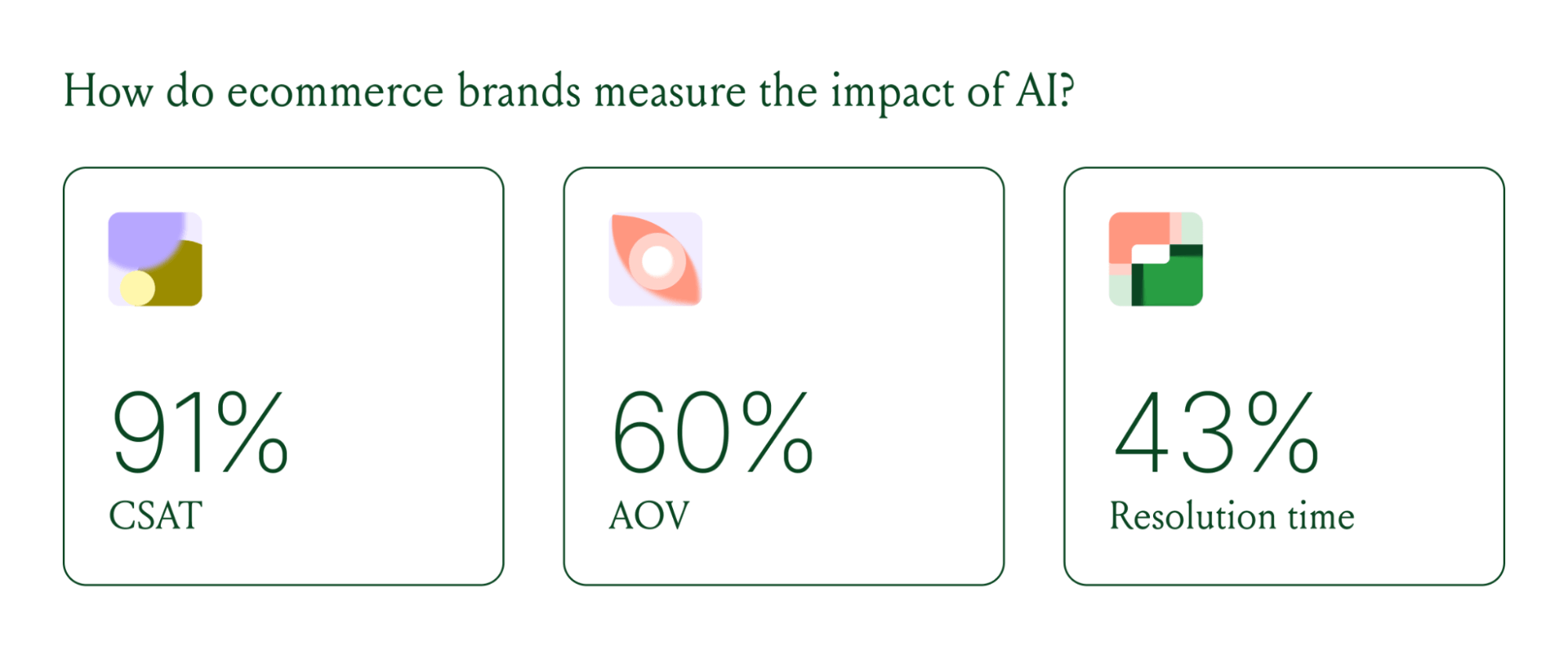
AI can now start a conversation, ease customer doubts, sell, upsell, and recover abandoned carts in a single conversation. When you’re only measuring CSAT, you’re ignoring the real ROI of conversational AI investment.
Virtual shopping assistants now proactively engage shoppers, adapt to their needs in real time, and offer contextual product recommendations and upsells. When the moment calls for it, they can close the deal with a targeted discount.
Gorgias brands using AI Agent's shopping assistant capabilities nearly doubled their purchase rates and converted 20–50% better than those using AI Agent for support only.
Orthofeet, the largest provider of orthopedic footwear in the US, is a concrete example of this in practice. Using Gorgias, they achieved:
The data tells a clear story: AI has evolved beyond a tool for handling tier 1 support tickets. It’s a core part of your revenue generation strategy.
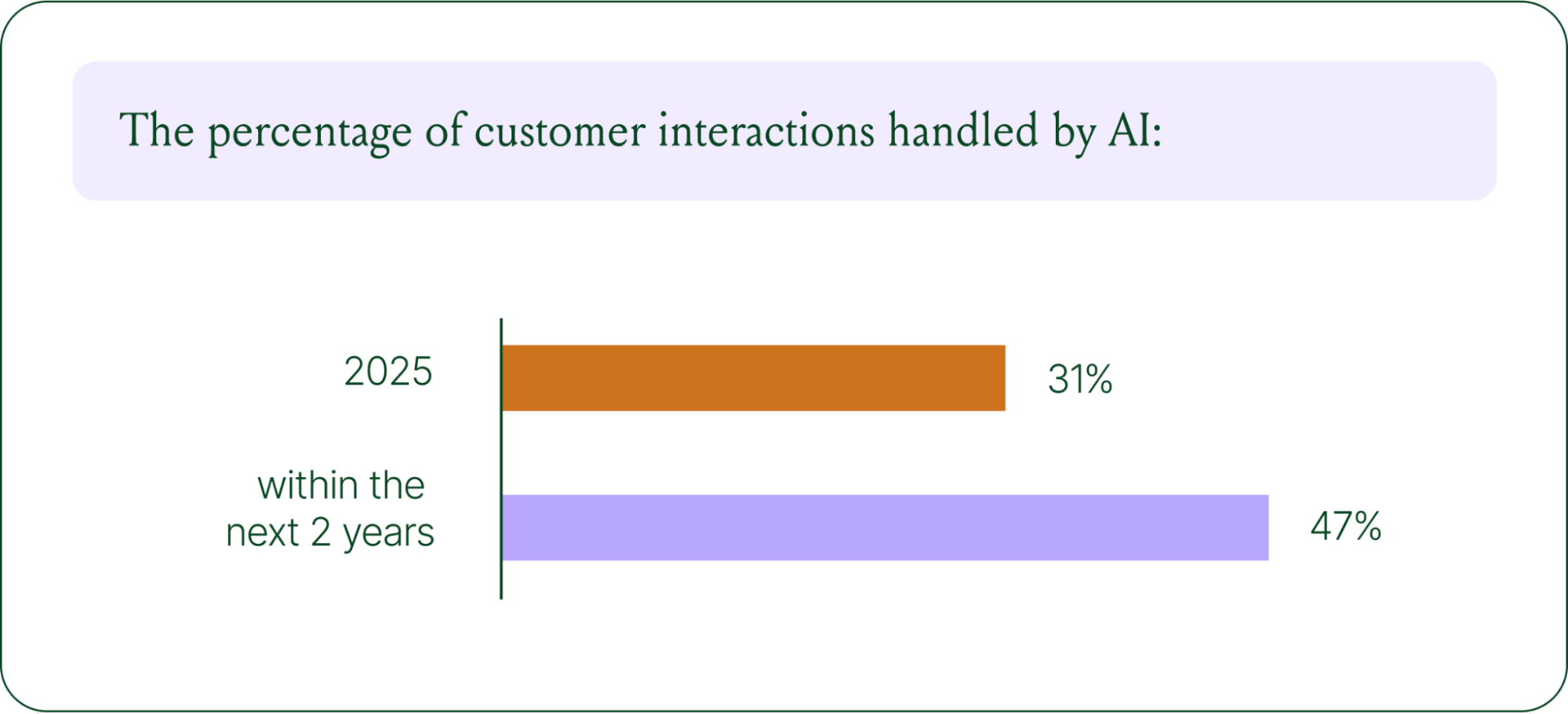
57% of brands are already using AI for 26–50% of all customer interactions, and 37% expect that share to rise to 51–75% within the next two years. The brands building toward that range now are the ones who will have the operational advantage when it matters most.
The practical question isn't whether to invest in AI. It's where to focus first. Based on where brands are seeing the most impact, three priorities stand out:
Want to go deeper on the full 2026 conversational commerce trends? Read the complete report for data across every major AI use case in ecommerce.
{{lead-magnet-1}}


Quick summary:
A great customer experience relies on much more than positivity and kindness — your customers expect personalization at scale, self-service options, and concrete benefits like free shipping. That said, using the right words is an important factor in customer conversations.
Positive scripting is one practice that can help your customer service representative steer customer interactions toward desired outcomes (like upselling shoppers and bringing first-time customers back for a second purchase).
However, over-relying script templates in customer support is a shortcut to unhelpful customer care interactions. Read on to learn how to make the most of positive scripting while also avoiding its pitfalls.
{{lead-magnet-1}}
Positive scripting is the practice of creating canned responses for customer service interactions that use positive language to limit customer frustration and promote desired outcomes.
With positive scripting, brands can provide support reps with resources such as scripts and templates that they can use to help ensure positive customer interactions. These scripts and templates can also be used as training resources to provide reps with examples of constructive interactions and positive language.
There are several goals that brands can accomplish with positive customer service scripts, including:
Positive scripting can be used across numerous contact centers and customer support channels.
 |
Like any customer support practice, positive scripting should be tweaked for each channel.
Providing support via a phone call requires reps to be quick on their feet, and this is where the practice of positive scripting first originated.
Providing call center scripts to your call center agents can go a long way toward helping agents stay positive and on-brand when there isn't much time for them to formulate a response.
Agents have a little more time to think about their SMS responses, but not much. Customers contacting your support team via SMS still expect swift responses, and positive scripting can help ensure that your SMS responses are swift, positive, and on-brand.
Like SMS, live chat conversations tend to be fast-moving — and this is one of the primary reasons why many consumers list live chat as their preferred customer support channel.
With positive scripting and live chat tools like Gorgias live chat, you can provide fast, convenient, and helpful support via this advantageous channel.
📚 Recommended reading: Find out how Gorgias customer Ohh Deer used Gorgias chat to generate $12,500 in revenue — per quarter.
Support reps can typically put a little more time and thought into their email responses.
Nevertheless, email templates with positive scripting can still help keep these responses positive and consistent while also enabling reps to respond to email queries more efficiently.
Providing support via social media is a great way to meet your customers where they're most comfortable — and positive scripting helps keep these responses positive and on-brand.
This is especially important when responding to comments and posts that other potential customers are likely to see.
Scripts, templates, and automated responses should all be built using positive scripting.
If you use a helpdesk, chances are you can build a library of templates in the tool for agents to use during customer conversations.
For example, you can use Gorgias Macros to build positive templates and autoresponses. Unlike most templates, Gorgias Macros pull customer information from ecommerce platforms like Shopify and BigCommerce, as well as other ecommerce tools (like Klaviyo and ShipBob) to automatically personalize the response.
 |
Even better? Thanks to automated Rules, Gorgias can automatically send these personalized templates to customers for basic interactions — like WISMO (where is my order), questions about shipping and return policies, and so on.
This way, your customer service team time saves time while still fostering a great, personalized customer experience.
You can use positive scripting to guide customer service training by using customer support scripts with positive language as examples of beneficial customer interactions.
This helps new team members get a feel for expectations regarding your company's voice and tone, which they can reflect in their individual customer interactions.
When used correctly, positive scripting can improve the quality of a brand's customer support services in several key ways, including:
 |
Did you know that 54% of customers say they would stop purchasing from a brand after just a single bad experience? If you want to promote customer loyalty and repeat business, it's vital to provide positive experiences throughout every step of the customer journey.
Likewise, repeat customers generate 300% more revenue than first-time shoppers, according to our data from over 10,000 ecommerce brands. Repeat customers place repeat orders, place larger orders, refer friends to your store, leave product reviews, and more.
 |
While many different elements go into crafting positive customer experiences, facilitating friendly and welcoming customer interactions with positive scripting is one important step.
Using positive words and language may not solve a customer's problem, but it can help ease their frustrations. Positive scripting is an effective way to de-escalate angry customers — and a great way to prevent customers from ever becoming angry in the first place.
Your customer service agents don’t just need to be positive, they need to follow the same policies and procedures, especially for common customer interactions. Using scripting to guide
Of course, you can also specify which policies agents can bend, and when. For example, if repeat customers ask for an extension on refund eligibility, it’s probably in your best interest to permit the return rather than frustrate a repeat customer.
📚Recommended reading: Our guide to creating a customer service policy that actually provides value.
Positive scripting helps you maintain a consistent brand voice, but, just as importantly, it also helps you maintain a positive brand voice. By using positive scripting to guide your brand's messaging, you can carefully (and intentionally) design your language to encourage customer satisfaction and beneficial outcomes.
A majority of customer interactions can become more pleasant and productive with positive scripting. Here are some scenarios that would benefit from positive scripting:
The biggest potential drawback of positive scripting is one that we've already touched on; customers who contact your call center or other customer support channel want to feel as though they are talking to a real human and not a robot regurgitating a script.
It's also vital to remember that customers are ultimately much more interested in resolving their problems quickly than in the language that your reps use. Many times, a simple message with the information they're looking for (such as a tracking number) will suffice with no flair or positivity required.
 |
To prevent positive scripting from harming your customer interactions rather than improving them, here are a few other key mistakes and pitfalls to avoid:
These are all serious mistakes to avoid if you want to make the most of positive scripting. When used appropriately, though, the benefits of this practice far outweigh its cons.
Positive scripting is a powerful tool for ecommerce brands to leverage, but it's important to use it correctly. Here are the seven best practices that you should employ to make the most of positive scripting (and avoid its pitfalls).
The scripts you give your support reps should be used for the most common, predictable part of customer interactions rather than mapping out the entire conversation.
For example, your agents might use a script to greet customers and share information about your shipping policy (in response to a question about shipping). But, the agent should be flexible enough to include unique information or handle follow-up questions that may not be so predictable.
“I like to think of Macros as guidelines. When you open up a Macro, it's not 100% the right thing to say, because you have to match the customer’s tone and specific query. And it's up to the agent to understand that and adjust along the way — but Gorgias gives you the tools to do that.”
— Leeor Cohen, Founder and CEO at CreateCX
If you require your agents to follow a script from start to finish, you risk sounding robotic and not providing agents with the flexibility they need to keep customers happy.
Customers who cannot track their order, received the wrong item, or want to make a return are just a few examples of common situations where customers are sure to welcome a little friendliness and empathy — along with helpful information and clear next steps.
Using positive scripting to create responses to these common situations helps your brand handle these issues consistently and ensure that they are handled with care and positivity.
All you have to do is identify the questions that your support team receives most frequently and then load positive, brand-consistent responses into your helpdesk:
 |
While each brand varies, some of the most common situations include:
Customer service reps should be free to deviate from scripts when needed or inject them with their unique flair. Encouraging your reps to use scripts as a guide rather than a word-for-word requirement ensures that your brand doesn't script away its human touch.
We love this example of an agent bending a policy and sparking up a delightful conversation:
 |
Along with using customer service scripts to guide customer interactions in the moment, you can also use them as resources for training your representatives. Once again, not everything that your agents say will be scripted, so ensuring they understand the principles behind positive scripting is just as important as providing the scripts themselves.
Using scripts to showcase what positive customer interactions look like will allow your agents to leverage positive language even when they aren't using a script. For example, you can use scripts to demonstrate mock customer service interactions and then dive into the specifics of why the scripted responses you've created work well for those situations.
📚 Recommended reading: Our Director of Support’s guide to customer service training.
Several of the tips we've already covered are geared toward preventing support agents from sounding wooden or robotic, and this is an essential consideration when using positive scripting.
By using scripts to initiate an interaction rather than scripting the entire conversation, giving agents the freedom to add their own flair to the scripts, and adding personality to the scripts you create, you can avoid this common pitfall of positive scripting.
It's also vital for your reps to demonstrate genuine empathy throughout customer interactions to avoid sounding uncaring and robotic. This can't be easily scripted, making it important to ensure that your reps know how to adopt an empathetic tone and approach.
📚 Recommended reading: The ultimate guide to offering personalized customer service at scale.
Your agent's initial greeting to a customer sets the tone for the rest of the interaction. It's also one of the easiest parts of customer interactions to script since the initial greeting will largely remain the same regardless of the customer's specific issue or sentiment.
Stating the company name and the agent's name, asking the customer's name, telling them good morning/good afternoon, and assuring them that you are happy to assist them are all great elements to consider including in your greeting script.
Like almost every aspect of ecommerce, positive scripting in customer service is something you can continually improve with proper testing. CSAT surveys are one excellent way to gather customer feedback following a customer support interaction. You can use the feedback you gather from these surveys to fine-tune your customer support scripts.
For instance, if many customers complain that your reps sound unempathetic or robotic, you may want to revisit the language of your scripts or encourage your agents to inject more of their own personalities. Throughout testing and refining your scripts, keep in mind that script building should be a collaborative experiment, with customer service teams working alongside reps and using data from past customer service interactions to guide the process.
Positive scripting is one effective way to improve the quality of your brand's customer support and encourage more positive customer experiences. However, it's also just one small element of high-quality, revenue-generating customer support.
If you would like to offer the type of fast, positive, and helpful customer service that will set your brand apart from the competition, it's important to use the right customer support tools.
With Gorgias' industry-leading customer support platform, you'll be able to leverage a range of advanced customer support tools and capabilities — all designed to boost customer satisfaction by improving both the speed and helpfulness of your support services.
To get started offering positive, fast, and helpful customer support via the best ecommerce customer support platform on the market, be sure to sign up for Gorgias today!
{{lead-magnet-2}}

Maximizing peak season sales isn’t only about driving customers to your website. If website visitors people encounter a slow, unhelpful, or lackluster customer experience, they’ll click away before buying — flushing away all your marketing efforts and dollars.
In a recent webinar, Caela Castillo, Director of Customer Experience at luxury men’s jewelry brand Jaxxon, shared Jaxxon’s strategies for optimizing customer experience to maximize revenue during peak season.
We’ll start with some of the most concrete strategies Jaxxon leverages, and wrap up with some bigger-picture insights on how Caela manages the team.
You can also hear Caela share these tips herself by watching the webinar here.
Last year, Jaxxon had what Caela describes as a very successful but challenging peak season, when customer support tickets skyrocketed to three times normal levels. As a result, Jaxxon has stepped up its approach to optimizing customer support for efficiency and self-service during the 2022 peak season.
Here are the tactics and tools Jaxxons used to manage ticket spikes this year:
Jaxxon uses Gorgias Quick Response Flows to answer frequently asked questions during peak season. Caela and her team customize the questions and answers so that customers can get an instant response to common queries.
 |
“We really noticed that adding automated self-service with Gorgias took part of the load off us. A lot of customers’ questions are answered by self-service, so then they’re happy and we don’t have to do anything further with those tickets,” Caela says.
Automating these responses has two-fold benefits:
“If the customer has additional questions, then our agents have the time to have an authentic conversation with them, and give them a really great experience.”
Caela regularly reviews recent customer conversations to monitor individual agent performance and identify areas for improvement or lessons learned. Using Gorgias tags — automatically applied to customer tickets for categorization and filtering — Caela can also get a sense for the most common customer questions and issues.
“If we're noticing a trend with a certain issue, then we want to solve it right away rather than figure it out weeks from now when it’s a bigger issue,” Caela explains. “So we don't want to only review tickets once a month. We want to do it in real time.”
Jaxxon realizes that any peak season is a starting line, not a finish line. Providing an awesome first customer experience doesn’t just net a sale. It nurtures longterm relationships and turns happy customers into loyal brand advocates.
“We want to make sure that first shopping experience is really great — everything from the customer support to the shipping to the box it arrives in — so they want to come back and buy again. We listen to our customer reviews and we really want to help people have a great experience.”
Jaxxon invests in ongoing training and support to ensure its customer service agents have the knowledge, skills, and tools they need to do their job confidently and effectively.
“Sometimes customers are a little hesitant about buying something as expensive as solid gold online. And our agents can explain to them the difference between our products, or suggest an upgrade, or say, hey, would you like this bracelet to go with the Cuban link chain you bought last time?” says Caela.
“For our agents to be able to upsell and cross-sell like that is super important for us — and it works.”
Quick Response Flows help Jaxxon open the door to some of these conversions. Providing quick, helpful answers about product restocks, sizing, shipping and more, lays a positive foundation that human agents can easily build on.
One of the biggest challenges during any peak season is thinking ahead so that your team — not just your customers — succeed.
First off, make sure you have enough customer service agents in place to cope with soaring demand. Jaxxon has increased its customer support team for this year’s peak season.
Caela uses a zoning plan to stagger agents’ shifts across different time zones and locations, so there is always enough coverage for Jaxxon’s 24/7 customer support. She adapts this as peak season unfolds to meet shifting demand.
“Having open communication is essential. We always say there are no stupid questions. We’re here to help each other. Even though we work remotely, we're still able to communicate really well and work as a team.
Once the team is in place, get them ready. “Training your team is really important, and making sure they have the resources and support they need,” Caela says.
📚 Related reading: How to stand out during Black Friday with 18 marketing strategies
“Keeping morale high is so important for peak season, because it’s a busy time in life, not just at work,” Caela says. This is a unique situation in ecommerce — did anyone else have a turkey in the oven while answering support tickets during BFCM?
“Everyone gets stressed; sometimes people get sick. It's hard to sustain motivation sometimes. So we want to make sure everyone's really taken care of and set up for success. And we try to make it fun for the team.”
A culture of mutual support among the Jaxxon customer service team is reinforced by team-based incentives to win gift cards, jewelry and more when certain targets are met.
“A positive attitude goes a long way to keeping people motivated. You get so much farther if you're kind and positive. And I’m very big on looking at difficult situations as learning experiences. And if someone is struggling, other team members will help them so we all rise together.”
📚 Related reading: How Jaxxon offers motivates agents with rotating customer support incentives.
Having the right systems in place to manage customer support more efficiently is important at any time of year. But it has the biggest impact during peak periods when demand balloons.
“You have to prepare for the worst, in terms of very high demand. Things just get crazier as peak season progresses! So make sure to have your self-service and automation set up and ready to go,” says Caela. “After last year’s challenges, we've made sure to have stronger systems in place this year.”
Jaxxon now uses Gorgias to manage all customer conversations. This helps the team work more efficiently in several ways:
Implementing self-service chat has cut Jaxxon’s live chat volume by 17%, yet increased conversions by 6%. Meanwhile, revenue generated by chat has shot up by an impressive 46%. The overall impact has been positive for customer experience and Jaxxon’s bottom line.
Read more about how Jaxxon uses Gorgias to speed up response times without sacrificing the quality of customer service.
By assembling a larger, well-trained customer service team and putting the right tools in place, Jaxxon is poised to continue delivering high-quality customer service this peak season — even when ticket volumes triple. Caela and her team are excited to dive into the peak season. With Gorgias by their side, they are ready to ride out whatever challenges come their way.
To hear the full story of Caela’s tips, lessons learned, and Jaxxon’s preparations for peak seasons, watch the webinar replay.

Yohan Loyer started his job at Gorgias as the first Customer Success Manager for Europe. His current position is EMEA Partner Manager, with the goal of growing Gorgias’ presence in Europe, the Middle East, and Africa (EMEA). The role boils down to building meaningful relationships and being a reliable, trustworthy partner for our agency partners.
In this interview, Yohan tells his story and we learn more about his internal career development and the environment Gorgias provided to nurture it accordingly.
My role is to help our ecommerce agency partners:
As a social person who likes to interact with other people and has hands-on experience working with Gorgias customers, this role is a great fit for me. There really is no chance to be bored in Partnerships!
I did my undergraduate degree in international business in New York, where I got a scholarship to play for my university’s soccer team. Then, I did my master's in Business Consulting and Information Systems Management in France.
Right after university, I worked as an IT consultant and then moved to Salesforce as part of the EMEA customer success team in Dublin. I worked as a Customer Success Manager (CSM) for 3.5 years, when my main focus was helping the company’s customers get the most out of the Salesforce platform and resources.

Apart from that, I have always been passionate about new technologies and how they impact the world, so continuing to work in tech and ecommerce at Gorgias is not a coincidence.
I was looking for a role in a fast-growing company in the ecommerce space with an innovative product, strong company culture, and competitive package. I did some research online and found out about Gorgias on an ecommerce blog, if I remember correctly.

Gorgias had everything I was looking for. They were also hiring for their first Customer Success Manager in Europe at that time, so it was perfect timing for me to apply!
I was initially recruited as the first Customer Success Manager (CSM) in Europe. We already had one Onboarding Manager in Europe when I joined (Emna Charfi, who is now the manager of our Customer Success team).
She was already working as a CSM with some customers (on top of her main role as Onboarding Manager). Even after I joined as the first full-time CSM in Europe, she continued as the CSM for some of our largest customers while I onboarded.
After a few months, I took over as the Customer Success Manager for our largest European customers for about 1.5 years, before transitioning to the Partnerships team last July.
I worked closely with Louis Lavedan from the Partnership team when I was a CSM, so I got to see what Partnerships was like. When he moved to San Fransico, taking over his role as Partner Manager for EMEA seemed like a logical next step.
The Gorgias team has always been super helpful and available with me and new team members in general.

Learning directly from colleagues has definitely been one of the highlights of my onboarding and overall experience with Gorgias. Whether it is answering questions on Slack, sharing screens, recording Loom videos, or jumping on a quick call, there is always a Gorgian ready to help!
The two managers I worked with both have hands-on experience with Gorgias customers and partners, and a genuine desire to be helpful and see their team members grow. They are always reliable and helpful when needed, which builds trust and promotes a culture of feedback and transparency.
Gorgias as a company is obsessed with scaling and automating processes, and my managers have definitely lived up to those values and helped me become more efficient and see the big picture when working on projects.

At Gorgias, we are also lucky to have a best-in-class product and grow at a very rapid rate, which comes with a lot of super interesting challenges and opportunities. The company has a really unique positioning with an obsession for customer satisfaction, which all contribute to a great environment to work in.
My experience at Gorgias so far has been very much aligned with our core values, especially “Customer first”, and “Maximize your impact”.

We live and breathe for customers, automate time-consuming tasks, share best practices with the rest of the team, and try out new tools and processes — all with the end goal of providing a better product and experience to merchants who use Gorgias.
Our managers highlight Gorgians who are living up to our core values weekly on our Slack channels, so we get to see first-hand all the great things our team does in accordance with our values.
As someone who worked closely with customers for all of my career, I think that my favorite thing at Gorgias is our huge focus on customer experience and satisfaction. Making our customers happy and successful, independent of their size, is our target and biggest investment as a company.
Whether it is reviewing our processes to make sure they benefit our customers, going the extra mile when helping our customers out, finding workarounds, prioritizing product features, or letting our customers get on a call with our highly available success and support teams, we are always doing things with our customers’ interest in mind.
I guess it would maybe be the name of the company (haha). Simply because it’s hard to pronounce. Also, people don’t read or hear “Gorgias” for the first time and instantly know what we do.
As I started my new role as EMEA Partner Manager recently, my focus is becoming a great Partner Manager, first and foremost.
We have a pretty good presence and network in Europe, but it’s still in the early stages compared to the US. I am learning and getting a lot of help from our US team who built a very strong market presence and brand in the US, and I am super excited to help develop the Gorgias brand and customer base in Europe, the Middle East, and Africa!
Interested in joining Yohan and the rest of Gorgias team? Check out our jobs page to learn more about our benefits, interview process, and open roles.

Free shipping has become so ubiquitous in ecommerce that shoppers now expect it.
According to a survey conducted by Forbes, 77% of respondents abandoned their cart because they were unhappy with the shipping options. 84% made a purchase because it qualified for free shipping.
Free shipping isn’t always an option for ecommerce stores though, especially for those with small margins or where shipping is expensive for every order.
These are the best strategies for how to offer free shipping, even if you’re unsure it’s something your business can afford.
{{lead-magnet-1}}
Free shipping has become a key differentiator in a very crowded ecommerce ecosystem, with 75% of customers now expecting it on all orders.
Offering free shipping can drive more revenue for your business, encourage repeat business, decrease cart abandonment, and even pull customers away from your competition.
Let’s be clear: Offering free shipping for all products is not sustainable for most businesses. But free shipping is not all-or-nothing. Below, explore why providing free shipping in some capacity is worth the expense for your business.

One survey found that 90% of consumers consider free shipping to be the primary factor driving them to shop with online retailers more frequently. And, according to Gorgias, repeat shoppers generate 300% more revenue than first-time shoppers, on average.

When customers are online shopping, they remember easy experiences, which includes not having to pay for shipping when they find something they love. A stress-free experience (without unpleasant surprises at checkout) creates loyal customers who want to shop with your business long term.
📚 Recommended reading: Learn why customer experience is a largely untapped revenue stream for most ecommerce brands.
On top of that, some free shipping models encourage customers to place larger orders, generating more revenue per customer.
Take the minimum order value model (what you might call the Amazon not-Prime model), where shipping only becomes free once the cart reaches a certain subtotal. Depending on which study you prefer, at least 84% — and perhaps as many as 93% of customers — have added items to their cart to qualify for free shipping, increasing average transaction value and potentially total revenue per customer.
When you offer free shipping and a competitor doesn’t, that single difference can pull new customers your way — and away from the competition. When 90% of consumers consider free shipping their top incentive and a full 60% of them expect free shipping no matter what, offering it is a huge differentiator for your customer base.
📚Recommended reading: 7 Strategies for Creating a Customer-Centric Post-Purchase Experience
One firm determined the overall rate of cart abandonment in ecommerce stores is north of 75%, and unexpected charges (including shipping charges) at checkout are the top culprit.

In other words, providing free shipping — and keeping other unexpected fees out of the checkout process — will reduce cart abandonment and increase conversion rate for typical ecommerce businesses.
{{lead-magnet-2}}
Making the decision to implement free shipping isn’t always as simple as flipping a switch. It takes careful planning and even more careful execution. Consider the following factors to help you understand the cost of free shipping for your business and decide if it’s the right move for you.
The demand for free shipping has changed the way that small businesses choose to operate. For example, writer Amanda Mull at The Atlantic reveals how free shipping priorities (and algorithms favoring the vendors who offer it) have hurt numerous small business owners on Etsy.
If you’re operating on razor-thin margins and you’re already struggling to be price-competitive, pivoting to an always-free shipping model might not be feasible. Even if your margins are healthy, for many smaller ecommerce retailers, blanket free shipping isn’t sustainable or feasible—nor are the extra costs that come with it.
On a spreadsheet, compile the shipping costs for every product you sell — from the smallest and lightest to the largest and bulkiest — to all four corners of the US (if you’re a US-based store) and anywhere you ship internationally.
This cost will differ based on your preferred shipping carrier, too. Compare rates between FedEx, UPS, and USPS to see who has the most affordable option — we’ve linked shipping calculators for each above. Once you have these numbers, calculate your average shipping cost. Then, multiply it by the average number of orders you get in one month.
You’ll also want to look at your best-selling items and calculate how much it costs to ship them, as you’ll likely be sending these out more often than other items in your catalog.
Don’t worry about exact numbers here. The goal is to get a ballpark number to compare with your monthly revenue. If your estimated shipping costs will put you in the red, free shipping may not be the best option (even with the bump in orders). If this is the case, consider qualified or flat-rate shipping instead — more on both below.
📚 Recommended reading: Our list of shipping best practices for ecommerce businesses.
Offering a flat-rate shipping charge is one way to give customers a low-cost shipping option without absorbing the entire cost yourself.
Even if you can’t afford free shipping, charging one flat shipping cost for all orders on your site incentivizes larger orders. And, if you can keep the flat rate low, it can convince customers who just want to make a small order to convert.
Setting up flat rate shipping is quick and easy if you use Shopify: Here’s how to do it.
Most brands can’t support universally-free shipping. That’s why a qualified free shipping option based on factors like order size or location is such a good option.
The most straightforward way to offer qualified free shipping is to set a minimum order amount. But in terms of your bottom line, this minimum threshold needs to be high enough that you aren’t losing money on most transactions.
Here’s a formula for calculating your free shipping threshold:

Free shipping threshold = (Average shipping cost per order / gross profit margin percentage as a decimal) + average value of an order
Free shipping threshold = ($10 / .30) + $50
Free shipping threshold = $83.33
The result you get from this formula is the average amount at which free shipping won’t create a loss for you.
Now in some cases that figure will be too high to be all that relevant. “Free shipping on orders $350+” can make sense for some retailers, but not those with an average ticket of $50.
Fit Small Business gives additional formulas for calculating a minimum threshold that still operates at a loss.
Consider free shipping for returns
Customers hate paying for return shipping. If you can afford it, letting shoppers return an item for free is a great way to avoid driving them away. It also can create repeat business, low-effort experiences, and encourage loyalty.
Of course, free returns leave you vulnerable to expensive spammers and order spikes. So, tighten up your return policy and try to incentivize exchanges over returns to protect lost revenue.
Ecommerce is a wide field, and your business is competing for only a small slice of the market. Look for differentiators with lower cost pressures and high levels of impact that may be unique to your industry or market.
Free shipping isn’t the only thing that matters. Fast delivery also makes a difference in many industries and markets. Can you outmaneuver your competition by offering next-day shipping, even at a premium price? Perhaps your customers will be willing to pay for faster service if it isn’t available elsewhere.
Here are a few other areas you might explore in search of other ecommerce differentiators:
Similarly, you may not be able to prioritize free shipping until you figure out other logistics like inventory management, order management, order fulfillment, order tracking, and returns management.
If you’re ready to put together your free shipping strategy, use these tips to craft a program that’s enticing to online shoppers without destroying your bottom line.
According to research from the Baymard Institute, 48% of shoppers abandoned their cart because the extra costs were too high. People like the transparency of seeing one price without getting surprised by additional fees at checkout.
Speaking generally, most customers would prefer to pay $50 for an item that ships free than spend $45 on the same item, only to discover an additional $5 charge for shipping in their shopping carts. Even though you’re passing shipping costs onto the customer in other ways, you still give buyers the perception of lower costs overall.
Consider raising your prices to include shipping costs to limit surprises at checkout and increase transparency.
Offering free shipping when a customer reaches a minimum price threshold can be a powerful strategy for raising ticket value.
Customers will frequently add more items to reach that threshold, increasing average order value (AOV), overall revenue, and your business’s order volume as a whole.
To make it easy for customers to see how close they are to free shipping, add an app to your ecommerce store (like the Essential Free Shipping Bar for Shopify stores) that shows progress visually. For example, Gorgias customer OLIPOP makes it easy for folks to see how many more packs of soda they need to purchase to get free shipping.

This is also a great way to build upselling into your strategy. When customers are looking for additional items to meet the free shipping threshold, consider showing items that pair well at checkout. This automation is easy to add via the app store if you’re on Shopify, and you can see how OLIPOP sneaks in suggestions in the screenshot above.
If you’re going to offer completely free shipping, make sure you use it as a marketing tool and make it very clear to shoppers. For example, Woxer uses a banner at the top of its site to announce that it offers free shipping across the US no matter the order total.

A cohesive and realistic shipping strategy is highly valuable to any company that ships products to people because it is part of your brand image.
📚 Recommended reading: Our guide to creating an ecommerce shipping and fulfillment strategy.
In a survey conducted by Salesforce for CFO, more than half of survey respondents said that 40% of their revenue was made up of subscriptions.
A subscription format is powerful because it ensures repeat purchases and raises the overall lifetime value (LTV) of customers who opt in. If you choose to become part of the subscription economy, you could choose to offer free shipping on subscriber orders only. That way you limit the amount of free shipping you give, and further incentivize shoppers to sign up for a subscription.
Stores with wide product catalogs that include many low-dollar items may not be able to offer blanket free shipping. But, you can limit free shipping to certain high-dollar product categories, select items within those categories, people who live within a certain distance, or VIP customers.

Here are a few approaches you can use to limit free shipping:
Partnering with a third-party logistics company allows you to split inventory across multiple fulfillment centers throughout the nation. That means they’ll end up closer to customers’ homes, which reduces shipping costs because of location proximity, and means that you can offer faster shipping for less cost.
ShipBob is a great option for this, as they’re a trusted global fulfillment company.
Take care of your shoppers with the Gorgias + ShipBob integration. Sync shipping data with your helpdesk, reduce tab-shuffling, and help you improve customer experience during fulfillment.
Shipping fees are calculated based on item weight, size, speed, and distance to destination. And the size and weight of your packaging contribute to that cost. Cutting down on the dimensions of your packaging where possible and using lighter-weight mailers can lower the cost of each package.
📚Recommended reading: 8 Tips to Minimize Shipping Costs and Maintain Quick Delivery
There’s nothing quite as powerful as a ticking timer, whether it’s a 15% off coupon that’s only good for the next hour or a sale that only lasts for the weekend. Discounts are powerful, but free shipping can be just as enticing.
Consider adding free shipping promotions to existing promotional events such as holiday sales, store anniversary sales, Black Friday and Cyber Monday, and other seasonal events pertinent to your industry and market.
Time-limited holiday sales can be effective, but they also tend to be some of your busiest sales windows in any given year. If you could use some additional help with your logistics this upcoming Black Friday and Cyber Monday, check out our complete guide to BFCM logistics.
📚Recommended reading: The 12 Best Shipping Software Tools for Ecommerce Stores
Free shipping is often one key to a world-class customer experience in ecommerce. But whatever you choose to do with your shipping policies, you absolutely must pair it with world-class customer service and support. Customers will appreciate your free shipping, but they’ll love you (and show it through repeat business) when you outpace the competition in terms of customer service.
Gorgias is an all-in-one customer service and helpdesk platform built for ecommerce businesses like yours. It integrates with a variety of different apps, like LoyaltyLion, Attentive, and Klaviyo. We operate at the speed of ecommerce, empowering you to serve and scale like never before. We also offer support for logistics like free shipping and order management, largely thanks to our many ecommerce integrations.
Ready to see what Gorgias can do? Get started for free right now!

When you say the word “growth,” most brand leaders think of customer acquisition, paid ads, or the newest marketing trend — probably something about TikTok influencers. And while acquiring customers is important, we know that truly sustainable growth comes from loyal customers, organic referrals, reviews, and repeat buyers — all of which stem from your customer experience. And at the core of that customer experience is your customer service team.
Your customer service agents spend more time interacting with customers than any other department, including marketing and sales. They manage VIP customers, repair at-risk relationships, and have the opportunity to chat with customers at make-or-break moments (like right before a sale). In other words, your brand’s growth hinges on the quality of your customer service team.
We can’t offer any algorithms or magical software to find and hire talented agents. Hiring takes time, experience, and a strategic approach. That last part — a strategic approach to hiring — is what I’m here to provide.
At HelpFlow.com, we run 24/7 live chat and customer service teams for over 100 brands. We’ve hired hundreds of customer service agents successfully and built scalable, robust customer service operations that provide great customer experiences and drive growth for brands we work with.
In this post, I’ll walk through the framework we use step-by-step. My goal is to help you or your hiring managers simplify your customer service hiring process, find high-impact customer service professionals, and transform your brand’s customer service from a frustrating cost center to a seamless and scalable revenue driver.
But first, what’s really at stake here?
{{lead-magnet-1}}
If you are like most ecommerce brands, you hire customer service reps when your team needs additional support to keep up with tickets. This purely reactive approach means your support team will always be buried in tickets or onboarding new team members. The constant scramble means they’ll never have the bandwidth to think strategically, improve processes, or work on higher-impact initiatives to help the business.
Here’s the snowball effect we often see. First, your agents become overworked with an ever-growing number of tickets to process each day. This endless sprint to keep up contributes to extremely high turnover in the customer service industry. According to Harvard Business Review, CS reps typically last a job for about a year.

As agents start to burn out and fall behind, customer service experience quality suffers. Customers feel frustrated with slow response times and often disappointed with incomplete or ineffective solutions from junior agents hired just a few months before. A downtrend in customer satisfaction is common with brands as they start to scale.
Eventually, a poorly run customer service operation starts to have a direct effect on sales. First-time shoppers give low NPS scores and never develop brand loyalty. Customer complaints start to appear, scaring off potential customers, and referrals dry up.
As the quality of service goes down, the cost of customer service goes up because you have to spend more time hiring and training customer service representatives that won’t be productive for weeks, if not months. Replacing an employee typically costs 1.5-2x their annual salary when you factor in all the costs, according to Gallup.
The business sees these poor results and high costs, and refuses to invest in the department, which leaves them even more under-resourced. The cycle continues.
A great customer service team (that’s not over-worked and under-resourced) will stop this vicious cycle. But beyond answering customer inquiries and managing ticket load, they’ll systematically improve your brand’s customer experience and, by extension, growth engine.
An excellent customer service team will create replace the vicious cycle with a positive one by:

Ready to learn how to fill your customer service positions with agents who will make an impact? Let’s get into it. Here’s our 6-step framework to hire the best customer service teams around.
The first step to hiring great customer service reps is to shift from a reactive hiring process to a proactive one. When you hire reactively, you tend to rush hiring and training to get a body in a seat processing tickets as quickly as possible. Of course, this leads to low-quality interactions and dings to brand perception. By proactively forecasting customer service needs, you’ll have time to run a more thorough hiring process to find and hire the ideal candidate.
Here is a quick overview of how to forecast customer service volume:

Forecasting will help you predict your future needs and shift to a more proactive approach. Remember to give yourself enough time to conduct a thorough hiring process and onboarding program. If you anticipate needing two new agents in Q4, start collecting applications by early Q3.
Forecasting is just one strategy to understand when you should hire. Here are a few additional signals that could mean your team is understaffed:
You may find that you need additional support, but you may not need to hire people full-time to solve the problem. You may be able to support your core team with other solutions such as:
{{lead-magnet-2}}
That said, you may conclude that you need to hire new agents. Here’s how to do it well.
Before you start your search, I recommend taking some time to understand your hiring needs and describe your ideal candidate.
First, take stock of:
Once that’s done, you’ll be better prepared to understand:

A target persona is a tool we developed to build clarity around your jobs to be done, the skills needed to accomplish those jobs, the type of person who would succeed in this role, and how you’ll measure that person’s success.
The value is similar to an ideal customer profile (ICP) for sales and marketing. By defining the core qualities you need ahead of time, you can create a sharper job description, distribute the job posting in more targeted channels, and decrease the time it takes to find the right person.

Below are the key sections to include in a target hire persona:
Mission:
Outcomes:
Competencies:
Culture fit:
We put together a full customer service agent target hire persona example that you can access and modify for your own needs. Consider revising the mission and outcomes slightly to match your needs, and adjust the target experience for your specific company.
Have questions? Feel free to reach out!
Once you have a target hire persona completed, it’s time to start marketing- yes, I said marketing, just like how you grow your business.
Typically, when someone is hiring they simply put together a job description, post it on a few job boards, and work with the applicants that come in. This is especially true for customer service hires, which are unfortunately seen as low-value.
This approach leads to a small number of low-quality applicants. The kinds of A-players you’re looking for aren’t scouring job boards and responding to basic job postings — they’re likely crushing it at their current role.
Here’s how to create and distribute a job posting that reaches the right people and convinces them to apply:
Remember, hiring is a two-way street. You have to impress the candidate just as much as they have to impress you. Don’t just publish a list of duties and requirements on a job posting website with an application link. Instead, sell the role (and the company) by using parts of the target hire persona above:

Clearly explain the company’s current position, mission, and goals. Share a bit of the journey you’ve been on so far and the successes you’ve had. The right candidate will be excited about your particular growth stage and the opportunity to help you with the next leg of the journey.
Also, dedicate some space to selling your team and unique company culture. This doesn’t need to be all rainbows and unicorns: great candidates know building a great company takes hard work. But they should be able to get an understanding of your company’s unique values, priorities, and ways of working. Describe and share examples about how your teams collaborate, the level of autonomy, accountability, coaching, and support they can expect, and the general vibe of a day-in-the-life of your team.
Finally, paint a very clear picture of what success looks like by sharing the outcomes and target metrics. This will ensure the applicants understand what you want to accomplish before your first conversation. Clear success metrics will also attract goal-driven people with an “I can do that” attitude.
This may seem like a lot of work, but you’ll save time by getting higher-quality candidates quickly, and in the long run, having to rehire due to rushing into a bad hire.
An enticing job description gets you halfway to an inbox full of strong applications. Now, you have to get that job description seen by a lot of high-quality candidates.
Remember, great team members don’t typically spend their days scouring job boards to find a new job. You need to catch their attention in other ways to spark their interest in jumping ship and joining your brand.

Here are multiple ways to drive a lot of great applicants for your role:
Publish on multiple job boards. For example, if you are working with a remote team, consider publishing on WeWorkRemotely or Remote.co. If you are hiring locally, leverage a few different job boards such as Indeed.com or ZipRecruiter.com to get the best coverage. LinkedIn is also a good option for both local and remote hires. If possible, make the extra investment to make a premium or boosted posting. And, especially if you are in a challenging niche, consider specialized job boards and communities. The Support Driven Slack community, for example, has a job board for ecommerce community service positions.
Another best practice is to share the role with your network. Send a few messages to peers who may know someone fit for the role and publish the posting on your social media. Also, encourage your team to do the same — they’ll be working with this new hire, after all. Again, don’t just copy/paste the link. Sell the role to attract the best candidates.
Finally, involve your customers in the recruitment process. One of your customers may want the job or know someone else who could be a good fit. Customers who love and use your products have a great head start: they’re familiar with your brand, your shopping experience, and the benefits of your products. And since customer service skills can be transferred from many other types of roles, your customer base may have more qualified candidates than you expect.
A great job description effectively shared means you’ll have a steady stream of applicants. You might feel overwhelmed with the workload of screening applicants to find the right hire. And rightfully so: Applicant screening can turn into a lot of work if you do it with typical in-depth reviews of each applicant and blocking out time for interviews.
Interviews are important, and we’ll explain how to hold a customer service interview below (including interview questions to use). But first, here’s how to effectively screen the large number of applicants you’ll receive to find the best possible hires.
Screening starts by gauging how well applicants read through the details of the job posting. If they’re not willing to spend the time reading and following the instructions on the job posting, odds are they won’t be detail-oriented in the role.
By asking a simple question or making a request deep within the content of the job posting, you can quickly screen whether applicants read it. For example, you can ask applicants to start their cover letter with, “ready to rock!’“ This way, you can skip over anyone that didn’t catch and follow the instruction.
At HelpFlow.com, we skip take-home assignments because our hiring process is so thorough. However, since customer support agents spend most of their days writing, you may choose to request a short writing sample at this stage.
If you opt to include this step, consider keeping the writing sample very short — something applicants can complete in 10-15 minutes. However, be aware that more up-front work from your candidates means:
Send them a common customer question or one of your most common customer problems. Give them resources like a knowledge base article and your policies so they have all the necessary information. At this stage, you’re looking for their ability to communicate clearly and empathetically.
Rather than jumping straight to an interview, send a brief questionnaire to the applicant so they can tell you more about their experience in a short video message. There are tools such as Spark Hire that make this easy. But a simple list of questions and instructions to send a response using a screencast tool like Loom is just as easy.
For the questionnaire, you should ask open-ended questions to get a sense of how their experience and capabilities fit your needs. You might also choose to include a fun, get-to-know-you question to get a better sense of their personality.
Asking why they think they are the best fit for the role is a good starting point, as it gives them the ability to provide more context than they typically would in a text response. Also, this gives you the ability to compare their experience to the target hire persona. The way someone answers this question typically makes clear if they’re a fit at a high level.
Consider asking questions like:
In their video response, you’ll see their communication skills, confidence, and personality — without having to schedule dozens or hundreds of 30-minute meetings.
Interviews can be time-consuming. They take time to schedule and conduct, especially if you put too many people through the entire interview process. Multiple rounds of screening ensure you only invest time in the most promising candidates.
Ideally, your job posting results in hundreds of applicants. Your first screening (described above) gets you down to about a dozen, max. The first interview we’re about to describe gets you down to the single digits — about four or five. Then, you’ll only have to deeply interview those four or five candidates to find your new hire(s).

This first interview is a brief (20- or 30-minute) phone call to learn more about each applicant's skill set, goals, and mindset. Skills aren’t the only prerequisite for success: True rock stars have a growth mindset and will look at this opportunity as the next step in a passionate career.
At the beginning of this interview, we like to build up the candidate’s confidence by saying something like, “We had ### applicants and you’ve made it this far, so you’re definitely a strong person for this role. We’re confident you’ll be successful regardless of whether you work for us or get scooped up by someone else.”
Then, you’re ready to start asking questions.
These questions should feel familiar, and that’s because they should roughly align with the mission and outcomes you chose in the target hire persona. Of course, candidates didn’t read that document so it’s unfair to expect perfect alignment. But they will help you understand which applicants are the best fit for your needs.
For example, if your target hire persona was a systems thinker who can help with problem-solving and organization across your team, you might look for answers about strong processes and great teamwork. Alternatively, if you’re looking for a brilliant customer-facing agent, you might seek answers related to empathy and customer advocacy.
Also, a lack of clear, focused goals at this stage is a red flag. If someone answers vaguely or responds with a variation of “I just want a good customer service job and your company seems great,” then they’re not going to be a rock star on your team.
Skills are a difficult thing to discuss. If the candidate prepared well, they’ll likely know what skills you need for the role based on the job posting and find ways to weave those skills into their answers. They may also have completed courses or customer service certifications that indicate what they can do, but it's important to go beyond that and get a sense of real-world applications of these skills.We like to ask a series of questions that force candidates to reflect on their skills in a slightly different way. Here’s how we get there:
Again, you’re looking for clear answers and alignment with your target hire persona.
Second, gauge which parts of the job they’re least skilled and excited about. Here’s how we might get at this answer:
To make this question a bit less intimidating, we usually share an example. We’ve often used the example, “I’m able to whip up some graphic designs for our website and they look pretty good. But graphic design is something I just hate doing. It’s a tedious process and I would rather have a marketing person handle that if at all possible, so I can focus on my strengths.”
This question allows the candidate to essentially complain about select aspects of the role. You’re not looking to trick someone into disqualifying themselves from the running. However, you are trying to avoid a situation in which you hire someone to spend all week doing something they’d rather avoid.
Once they answer, consider asking follow-up questions to get more examples and context.
These questions are quick and help you understand whether their previous answers were honest and self-aware.
Ask them for the name of two previous bosses and two previous colleagues. Explain that you won’t reach out to those people yet, but might if you extend an offer.
Once they give you names, ask how each person would rate them on a scale of 1-10 — insist on a single number for each. You’re looking for lots of 8s and 9s. If you see a trend of 7 or lower, that could indicate this person has — and may have oversold themselves when discussing their skillset earlier in the interview. Also, 10s across the board show a lack of self-awareness and growth mindset.
By the end of this interview, you’ll have a solid understanding of whether each candidate’s skills and mindset fit your needs. Move the best candidates onto the final interview, thank the rest for their time, and invite them to re-apply for future roles — after all, each role should have a specific target hire persona, and they might just fit your next opening a bit better. To thank them for their time, you can also refer them to anyone else in your network that’s hiring.

Each candidate that makes it to this final interview should be a pretty great fit for the role. Some companies might go straight to a job offer at this stage, but the risk of bringing on the wrong new hire still exists.
The deep-dive interview will last two hours. Two hours might seem like a big investment. But two hours is nothing compared to investing two or three months into a candidate before realizing you need to start the hiring process over because they’re not a great fit.
A deep-dive interview gives you a crystal-clear understanding of each candidate’s entire career history, their ability to communicate clearly and effectively in a long-format meeting, and their personality. After this conversation, you’ll have zero doubts about which candidate is your rock star.
Here’s how the deep-dive interview works.
When you invite the candidate to this meeting, be clear about:
If you give the candidate some context behind such a long meeting, they can approach the interview with more preparation and less anxious energy.
As far as the list of attendees, you can make a decision based on your team’s makeup and availability. If possible, we recommend inviting the hiring manager, a senior manager, and a peer to introduce the interviewee to the team they’ll work with (and vice versa). However, you can also run the interview solo if that works better for your team.

Once you assemble the panel and schedule the interview, the long-form interview itself is quite straightforward and formulaic. Here’s what it looks like:
Start from the beginning of the candidate’s resume and discuss each and every full-time role in their job history. For early parts of their career (or jobs that are not related to your open role) you can move quickly through these questions. But it is important to discuss each role.
By digging into every single part of the candidate’s career with a standard set of questions, you will get a clear overview of how they’ve performed and what makes them tick.
What makes this interview process effective and simple is that you ask the same questions for each role. This gives the interview a conversational flow that produces powerful insights. Here are the questions:
Together, these answers give you a good idea of their specific experience in customer service roles, their experience with handling a helpdesk and the challenges of customer service, and some insight into their soft skills that a shorter interview could never provide.
Many companies will assign a test assignment this late in the process to do a final check on the skillset and quality of candidates. We don’t recommend a test assignment — especially at this point — because assignments are too simple to game and sometimes give candidates a bad impression of your company because you asked them to do “free work.”
If you want to use an assignment, keep it short and earlier in the process. But at this point in the process, the deep-dive interview will give you much richer information. Specifically, it helps you understand what the candidate will actually be like on your team before you invest in onboarding and two or three months of work.
Most people treat reference checks as a way to make sure the candidate told the truth on their resume and during the hiring process. That can be part of the process, but the greater value of reference checks is to get even deeper context into the candidate’s skills and work style.

Here’s how to approach reference calls:
Each call takes fewer than 10 minutes but gives you valuable insight into the highs and lows of working with this person. Again, similar to the deep-dive interview, you’re looking for patterns across reference calls more than any single answer. If the candidate’s answers line up with the answers you get during the reference checks, the candidate has high self-awareness and emotional intelligence — both important qualities in customer service.
By the time you go through the entire process with multiple candidates, you’ll be certain about the best fit(s) for your open role(s). And once you’ve run this interview process a few times, it will become much more efficient and much less daunting.
As we mentioned earlier in this guide, hiring is a two-way street. You have to win a candidate over just as much as they have to win you over. Once you choose a candidate, here’s how to give yourself the best chance for an accepted offer and a successful start.

If all went well, the candidate should be thrilled that you offer them the job. However, they may be considering other offers and it never hurts to demonstrate that you’re a thoughtful employer that’s genuinely excited about working with them.
First, consider giving them a call before sending the offer letter. Most candidates will appreciate hearing the enthusiasm in your voice and getting the news directly from the hiring manager, who they spent the entire process getting to know. Plus, you have the opportunity to get a verbal yes.
When you send the letter, give them a sign-by date. This gives them some parameters, adds a bit of urgency to the decision, and helps you develop a contingency plan with other top candidates in case your top choice declines the offer.
Last, consider asking everyone involved in the interview process to send a personal note to the candidate, especially if the candidate is on the fence. The candidate will end up working with these people, so an authentic and personalized note expressing excitement could make the difference between an acceptance and a declined offer.
Throughout the interview process, you should clarify when the candidates hope to start. Once you make the offer, don’t be afraid to encourage them to take a week or two off before starting the new job — they’ll appreciate the time off, plus it’s a signal that your company takes preventative measures against employee burnout. And if you’ve moved away from reactive hiring, this shouldn’t be too big of a hassle for your team.
Last, if you’re hiring multiple agents, work to start them on the same day. This way, you can onboard in cohorts, giving each new hire a buddy for support and companionship. Plus, you’ll save time by giving each training session once instead of multiple times for each hire.
The hiring process isn’t about filling seats, it’s about building a team that strengthens morale, tackles challenges, and ultimately drives your brand forward. While it’s definitely possible to hire agents more quickly, quicker isn’t always better. A single bad experience with a customer service agent can cost you customers and damage brand equity. A team of bad hires can kill the future of your entire company.
If you rush the hiring process, problems during onboarding, new-hire retention plummets, and the top talent you had before these bad hires start to leave. It’s better to invest time upfront to ensure you only hire A-player team members.
Want help scaling your customer support team with agents who can provide an amazing customer experience and work with larger company goals in mind? HelpFlow runs customer service teams for over 100 brands and can help you level up your customer service operation. Check out our Gorgias Premier Partner profile and contact us today to learn more.
And if you’re struggling to streamline the workflow of your team and turn customer service into a profit center, check out Gorgias — the customer service platform built for ecommerce. Sign up for a free trial today.

According to data from Kepios, there are a total of 4.62 billion social media users in the world as of January 2022 — accounting for well over half of the earth's population. In other words, if you want to go where your customers are as a Shopify store owner, social media platforms are mission-critical.
Social media may be a great opportunity but it isn't exactly low-hanging fruit. Social media is complex and time-consuming. Even seasoned digital marketing professionals can get bogged down by tedious tasks, low-return initiatives, and frustrating obstacles when it comes to marketing products to potential customers on social media.
The good news is that utilizing the right Shopify social media apps can go a long way toward making your social media marketing campaigns more efficient and effective. To help you choose the ideal apps for your social media marketing and social media customer service needs, let's take a look at the 10 most powerful social media apps currently available on the Shopify app store.
{{lead-magnet-1}}
With Outfy, store owners are able to automate much of the work that goes into managing social media profiles by curating, scheduling, and publishing posts automatically. In addition to its convenient automation features, Outfy also enables you to easily create high-quality collages, videos, and GIFs to promote your products and boost brand awareness on social media.
Shopify rating ⭐4.8 (1214)
Price: From $15/month
Related: Our guide to customer service automation — set repeatable, low-impact tasks to autopilot.
According to data from Microsoft, 90% of Americans use customer service as a factor in deciding whether or not to do business with a company. With Chatdesk, you are able to outsource your customer support responsibilities to a team of hand-chosen customer support agents who are already fans of your brand. In addition to providing 24/7 live chat and email support, Chatdesk customer support agents also respond to all social media comments, mentions, and direct messages in real-time.
Shopify rating ⭐5.0 (14)
Price: Free plan available
For Gorgias customers, learn more about our Chatdesk integration here.
Facebook Messenger Marketing is a Shopify app by ShopMessage that allows you to create automated Facebook Messenger marketing flows. These flows are triggered based on a wide range of customer actions, such as cart abandonment and first-time purchases from new customers. This app also offers customizable opt-in popups designed to help you grow your Facebook Messenger subscriber list and shareable links that will direct to a FB Messenger marketing flow when clicked.
Shopify rating ⭐4.3 (129)
Price: $9/month
For Gorgias customers, learn more about our ShopMessage integration here.
According to data from DemandGen, interactive content elicits twice as much engagement as static content. Interactive content such as surveys and quizzes in particular can be especially useful for providing ecommerce store owners with zero-party data on their customers.
With Octane AI, you can create customizable surveys for your Shopify store, which you can use to learn what your customers like and dislike about their experience with your brand and products. Octane AI also gives you the ability to create customizable quizzes that you can use to provide customers with targeted product information and recommend new products. Best of all, quizzes and surveys created using Octane AI are easily shareable across all social platforms.
Shopify rating ⭐4.8 (200)
Price: From $50/month
For Gorgias customers, learn more about our Octane AI integration here.
Recart is an SMS, email, and FB Messenger marketing tool that lets you create popup opt-ins for growing your email list. It also offers a variety of automated flows and templates that you can use to make your FB Messenger marketing strategy more efficient. Additionally, Recart provides built-in SMS stats and a real-time dashboard for you to track your campaigns.

Source: Recart
Shopify rating ⭐4.8 (5506)
Price: Free plan available
For Gorgias customers, learn more about our Recart integration here.
Zotabox is a platform that offers over 20 different useful sales tools, including customizable banners, countdown timers, social sharing buttons, customizable forms, and push notifications. Whatever you might need to make your social media marketing efforts a success, there's a high likelihood that you'll find what you're looking for on Zotabox.
Shopify rating ⭐4.8 (469)
Price: From $12.99/month
Related: How to transform live chat into your a top sales tool.
Instafeed is an app that displays your Instagram feed on your website. Instafeed also enables you to tag products in your Instagram posts in order to create a shoppable Instagram feed.
Shopify rating ⭐4.9 (1183)
Price: Free plan available
Related: Our guide to Instagram for customer service.
Facebook Channel is an app by Shopify that automatically syncs products from your store to your Facebook account, making it easy to sell and promote products on Facebook. Facebook Channel also allows you to easily create a variety of Facebook Ads campaigns, including audience-building campaigns and dynamic retargeting campaigns.
Shopify rating ⭐3.5 (3785)
Price: Free to install, additional charges apply
Related: Our guide to Facebook Messenger for customer service.
With Minta Technology, Shopify store owners can construct professional social videos and design image posts using a variety of attractive pre-built templates. Minta Technology also gives you the option to schedule social media posts for automatic publishing.
Shopify rating ⭐4.8 (520)
Price: Free plan available
Related: Our guide to product photography to set customer expectations and boost sales.
Gorgias is an all-in-one customer service helpdesk platform for Shopify stores. Gorgias offers a range of features designed to help you improve your online store’s quality of customer support, while simultaneously reducing your customer support team's workload.
But what makes Gorgias such an excellent social media Shopify app is the fact that Gorgias integrates with Facebook, Instagram, and WhatsApp. This allows your customer support agents to respond to messages and mentions across all social media channels from a single, user-friendly dashboard.
Shopify rating ⭐4.4 (533)
Price: From $10/month
Using Shopify Inbox? Compare Gorgias vs. Shopify Inbox.
Related: The best customer service software on the market.
Choosing the right social media apps for your ecommerce tech stack can provide you with a number of powerful capabilities, from the ability to automatically publish posts across numerous social networks to the ability to turn your social media profiles into convenient customer support channels.
At Gorgias, we are committed to helping our clients make the most of their chosen social media apps by ensuring that Gorgias is capable of integrating with a variety of popular Shopify apps, including Recart, Octane AI, ShopMessage, ChatDesk, and beyond. To learn more about Gorgias's powerful integrations, be sure to check out our social media app integration page.
{{lead-magnet-2}}