

72% of Gorgias Uses AI for Decisions: How We Did It
Four months ago, our analysts were dealing with a barrage of questions. "What's our ARR by segment?" "Build me a dashboard for this quarter's pipeline." Quick asks piled up behind complex deep dives. Stakeholders waited for answers that should have taken seconds, and analysts spent their time fielding requests instead of doing the strategic work that creates the most value.
Today, anyone at Gorgias can ask a question in plain language and get an accurate, contextualized response in seconds. Not from a colleague or dashboard, nor from a generic answer from the internet. But a response built on our business context. We call it Cortex, our flagship internal AI agent.
In two months, Cortex went from an idea to fielding thousands of questions every week, recommending actions across the business, and deprecating the need for manual dashboard creation. While most companies right now are treating AI as an initiative — at Gorgias, AI is already part of how we work. 72% of Gorgias employees use Cortex each week, and that number is only growing.
We didn’t achieve this by simply plugging a large language model into our stack. LLMs are a critical part of the equation, but they aren't the driving force — it’s everything else under the hood: the infrastructure, context, platform architecture, and the team that brings it all together.
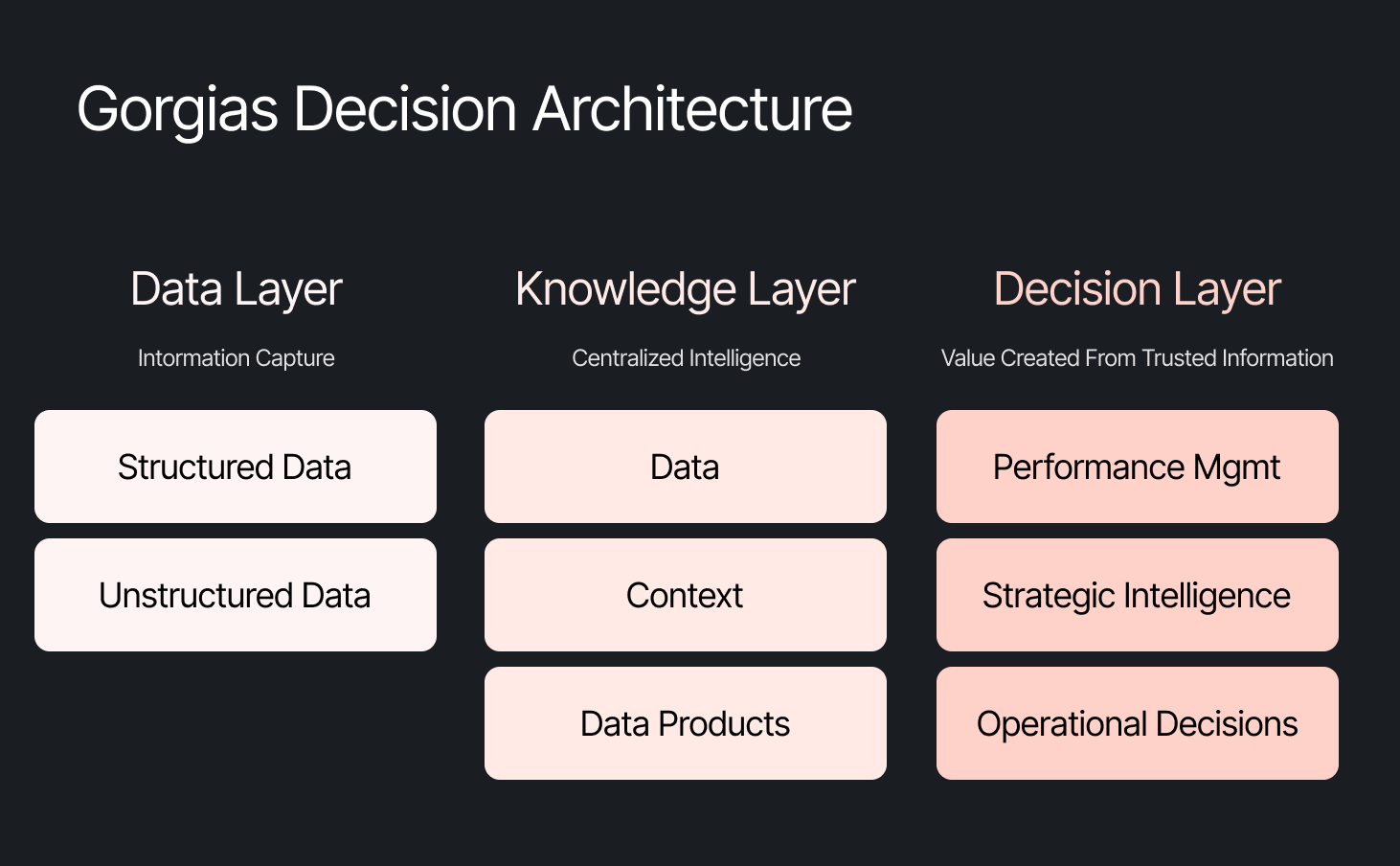
The framing problem most companies get wrong
The instinct across many companies today is to start with the model, pick a provider to solve a specific challenge, or invest heavily in getting the data right. All reasonable starting points, but most of them solve for one use case. Underneath that approach is a framing problem: seeing AI as an initiative — something you assign and measure. Seeing AI as another tool your company uses versus how your company operates.
We started somewhere different. Every company is built on four pillars: customers, people, product, and decisions. AI investments tend to place heavy emphasis on the first three. We started with the fourth. Our bet was that if we built everything around the need to make effective decisions first, asking what Gorgias needed to know to operate well, then our AI would become dramatically more powerful.
Cortex is that philosophy in practice
Cortex is our flagship internal AI agent, and the product where we established the tenets that now run through everything else we build: composable and modular infrastructure, governed context, and accessible from wherever decisions happen. Cortex lives in Slack, as well as across LLM vendors, in its own browser extension, and even on its own dedicated internal site.
Cortex doesn’t stop at answering questions. It can read and write to Notion, file Linear tasks, create HTML apps, automate signal delivery, and more. It operates across every layer of our stack, from dashboards to data pipelines, because we designed it as one integrated system. It is this connection that adds remarkable depth to what people can ask, and what they get in return.
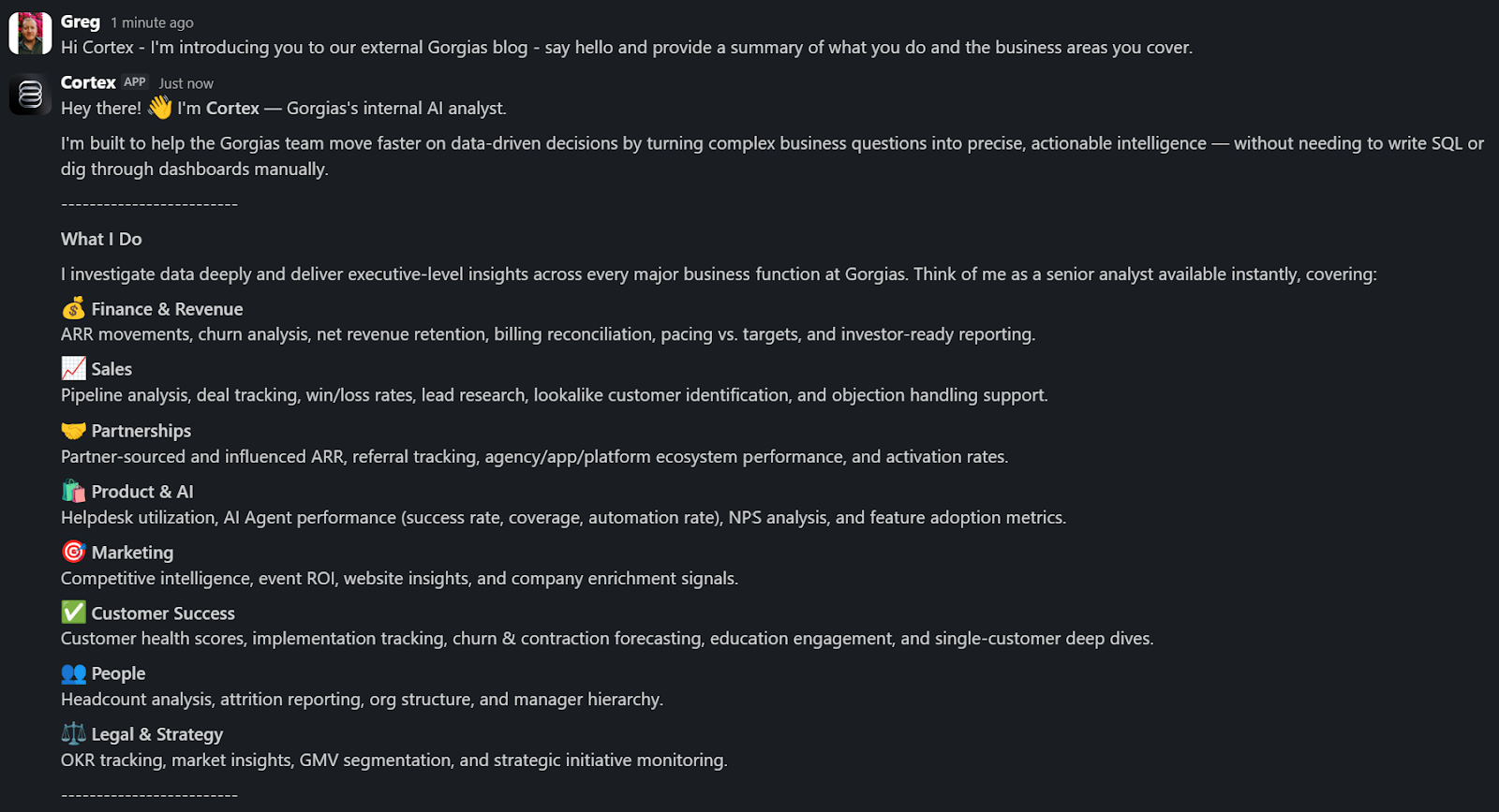
A Sales Lead is pitching and asks Cortex for the full picture of the merchant. In a customized PDF, Cortex lists coverage gaps, pre-sale intent signals, and product fit options. Everything the sales lead needs to walk in with confidence.
A Senior Product leader asks, "How are we performing against OKR #1, and what can my team do to help accelerate it?" Cortex returns a full ARR breakdown, projected end-of-month attainment, segment-level findings, and connects it all back to company-level strategies. A suite of recommendations customized to the leader, the performance, and the signals that bridge how they can support our goals. The kind of answer that used to take someone a week to put together.
These aren't simple lookup queries. They require deep business context spanning multiple areas. Cortex handles these because its Decision Engine gives it the information to reason against governed data, metric definitions, and business context, turning a generic answer into a credible one.
Overnight, teams have built Cortex into how they work. They’re spending less time searching and more time finding answers, not because they were told to, but because Cortex reduced the distance between question and decision.
Flexibility as the foundation
Cortex’s modular infrastructure allows us to experiment and add new capabilities freely. We’ve already built two more internal AI agents made for entirely different use cases, but using the same Decision Engine as Cortex.
GAIA, our internal experimentation AI Agent, helps our customers identify opportunities in their AI Agent Guidance design. It takes institutional knowledge across our teams and turns it into a scalable system that drives automation and value to our customers. Our CEO, Romain Lapeyre, has been its most vocal advocate since day one.
When we needed a platform for investor readiness and board preparation, we built Oracle. Our board decks and talk tracks are informed and built with the same AI, and our numbers are validated every step of the way.
We’re continuing to expand new AI agents internally, exploring how they can create value for customers and our own teams.
AI has transformed how data teams create value, and we’ve already shifted to account for it
When AI handles thousands of analytical questions each week, the highest-value work for a data team shifts permanently. Late 2025, we repositioned from a Data Analytics function into a Decision Intelligence function — a structural change in what we own and how we operate.
Today, our analysts focus on the most sensitive, complex, and forward-looking decisions and analyses. They partner more deeply with stakeholders by driving next steps from signals. They're even building entirely new capabilities that didn't exist in their role descriptions months ago. Things like AI skills for Cortex, context curation, and insight and recommendation delivery. The role of the analyst hasn't diminished. It's expanded to encompass the most meaningful work an analyst can do: driving outcomes and ensuring those decisions can achieve them.
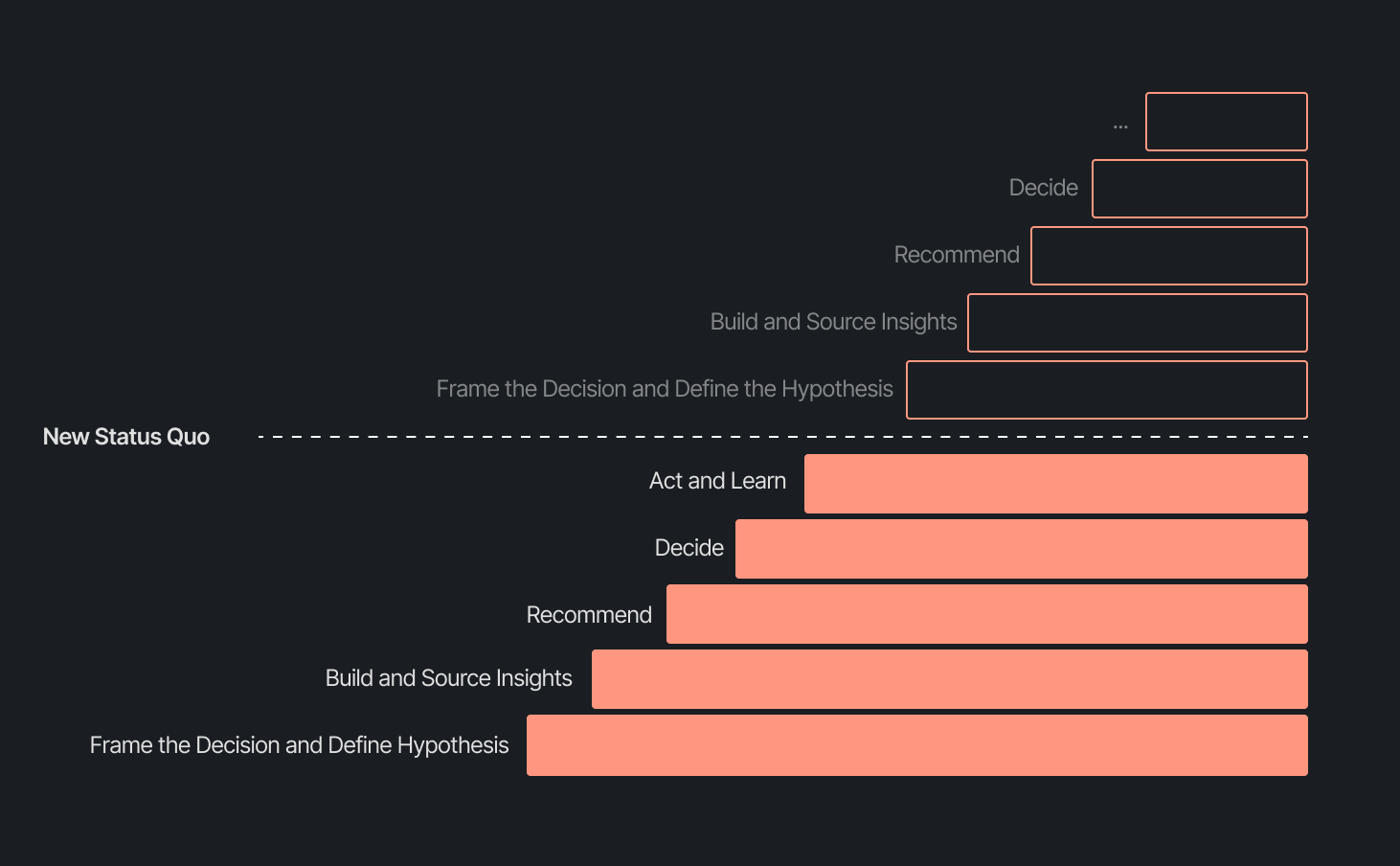
Our business support model has changed, too. Instead of embedding analysts and dedicated engineers within functional teams, we align capacity to the highest-impact company objectives and move fluidly across them. This model works even better because Decision Intelligence brings together both analytics and engineering teams under one roof.
Elliot Trabac leads our Data, Context and AI Engineering teams. The Decision Engine, Cortex, GAIA, and the platforms I've described exist because of the infrastructure his team innovated and built from the ground up. Noemie Happi Nono leads our Decision Strategy and Operations team, driving decision outcomes with stakeholders, advancing the development of Cortex skills and capabilities, and pushing into new areas of analysis every day.
Together, they're shaping what a modern data function looks like when AI becomes a standard building block for how a company operates.
What’s next for the Decision Intelligence team
The question of ROI is long gone. AI has opened the floodgates to more trusted and meaningful signals than ever. The natural next evolution is Proactive Intelligence, signals surfaced toward what you need to know, before you ask. And we're already building this because our architecture is designed to support it.
In the coming weeks, members of the Decision Intelligence team will go deeper into themes I've touched on here. Yochan Khoi, a Senior Analytics Engineer on our team, recently published a technical walkthrough of our context layer and will go further into building context strategies that scale. Others will cover infrastructure, analytical partnerships, evolving data assets into decision assets, and the cost and efficiency gains that make sustained AI investment viable.
AI hasn't changed the most important element of data and analytics functions — delivering outcomes — but it has raised the bar for what it looks like and how far we can take it. We’re just getting started.
TL;DR:
- AI is resolving tickets, not just replying. AI now handles 31% of customer interactions for ecommerce brands, and that number is expected to nearly double within two years.
- Every channel is becoming a storefront. Conversations are replacing the traditional browse-and-buy journey, with 79% of brands reporting sales from AI-driven interactions.
- AI is shortening the buying cycle. 93% of AI-influenced purchases happen within the first 48 hours of the conversation.
- CX teams are changing, not shrinking. Ecommerce brands are actively hiring for more technical roles to implement, coach, and maintain AI.
- The winning model is hybrid. AI handles volume and speed, while humans handle complexity and judgment.
The way shoppers buy online has shifted and customers are at the center.
They no longer want to scroll through product pages, dig through FAQs, or wait 24 hours for an email reply. They open a conversation, ask a specific question, and expect a useful answer in seconds. Brands that can’t deliver these experiences at scale are seeing customer hesitation turn into abandoned carts and lost revenue.
This shift has a name: conversational commerce. It's the practice of using real-time, two-way conversations as your primary sales channel, through chat, AI agents, messaging apps, and voice.
What started as an experiment for early adopters has become a key growth lever, with 84% of ecommerce brands treating conversational commerce as a strategic pillar this year vs. last year.
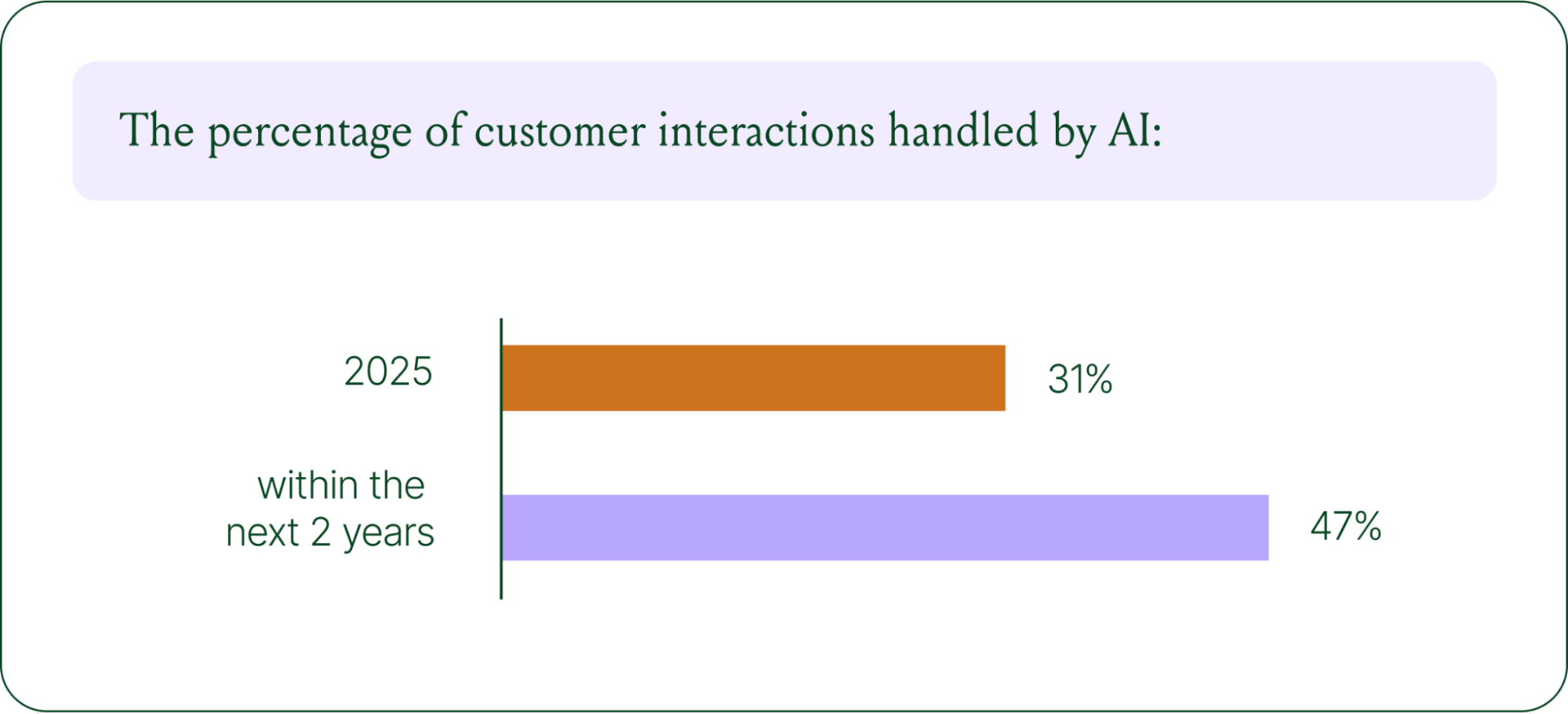
We surveyed 400 ecommerce decision-makers across North America, the U.K., and Europe to understand how conversational commerce and AI are reshaping the ecommerce landscape. These findings are complemented by aggregated and anonymized internal Gorgias platform data from 16,000+ ecommerce brands.
The State of Conversational Commerce in 2026 trends report breaks down all of the findings, including five key trends shaping the ecommerce landscape.
{{lead-magnet-1}}
Trend 1: AI is table stakes for ecommerce and it’s no longer just about efficiency
A few years ago, adding an AI chatbot to your site that could provide tracking links and Help Center article recommendations was a differentiator. Today, it's table stakes. McKinsey found that 71% of shoppers expect personalized experiences, and 76% get frustrated when they don't get them.
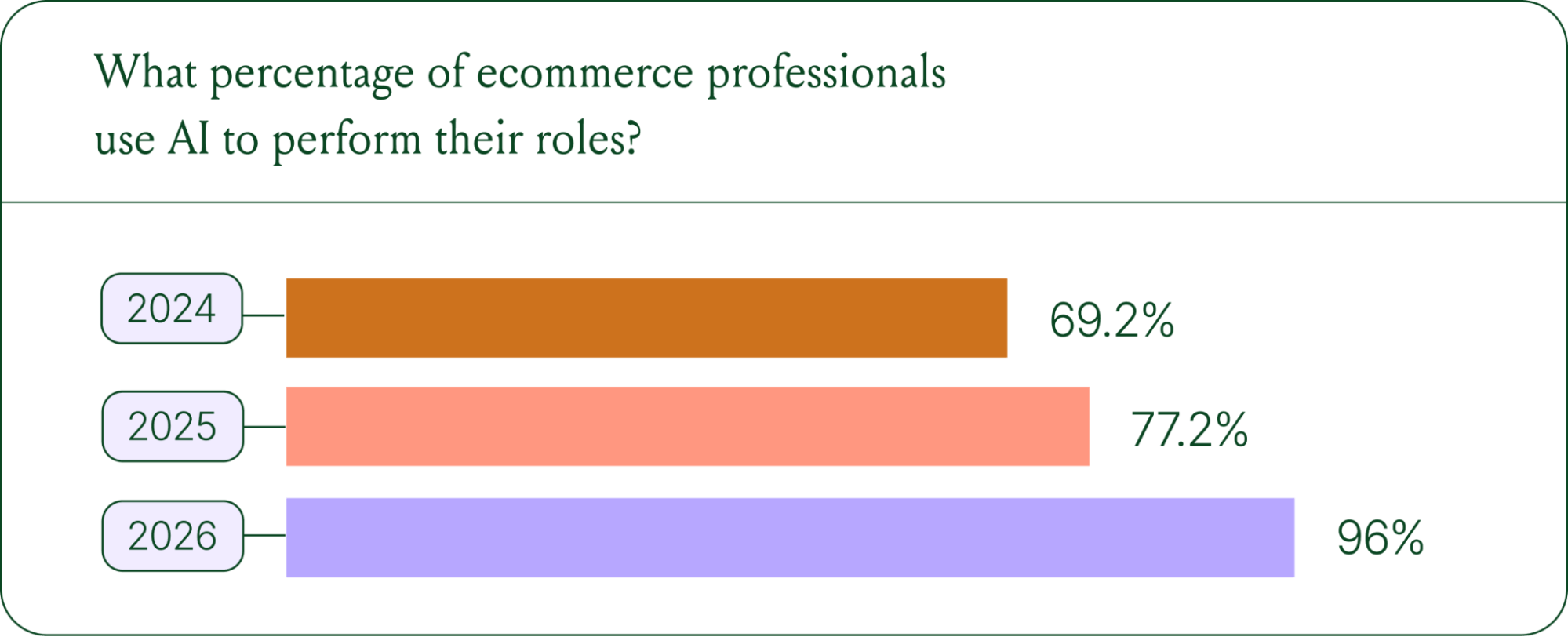
Right now, most ecommerce professionals use AI, with 93% having used it for at least 1 year. Enthusiasm is accelerating quickly, with only 30% of ecommerce professionals rating their excitement for AI at 10/10 in April 2025. Similarly, while AI adoption rose steadily year over year, it reached a clear peak in 2026.
The use cases driving this adoption are practical and high-volume:
- Order tracking and status updates
- Returns, exchanges, and refund requests
- Shipping FAQs and delivery estimates
These are the tickets that flood brands’ inboxes every day. AI agents resolve them instantly, without pulling teams away from conversations that actually require human judgment.
Explore AI adoption and use case data in more depth in the full report.
Trend 2: Conversations are the new path to checkout
The traditional ecommerce funnel, visit site, browse products, add to cart, check out, is losing ground. Shoppers now discover products on Instagram, ask questions via direct message, and complete purchases without ever visiting a website.
Conversational AI is actively increasing revenue, with 79% of brands reporting that AI-driven interactions have increased sales and conversion in their business.

The practical implication is that every channel is becoming a storefront. Creating personalized touchpoints with customers earlier in the journey, through proactive engagement, is impacting the bottom line.
Read the full report to explore how AI conversions have increased QoQ by industry.
Trend 3: AI is accelerating the purchase cycle
Pre-purchase hesitation is one of the biggest conversion killers in ecommerce. A shopper lands on your product page, has a question about sizing or compatibility, can't find the answer quickly, and leaves. That's a lost sale that had nothing to do with your product.
Conversational AI changes that dynamic. When a shopper can ask a question and get an accurate, personalized answer in real time, the friction disappears.
Brands using Gorgias saw this play out at scale in 2025. When AI Agent recommended a product, 80% of the resulting purchases happened the same day, and 13% happened the next day.
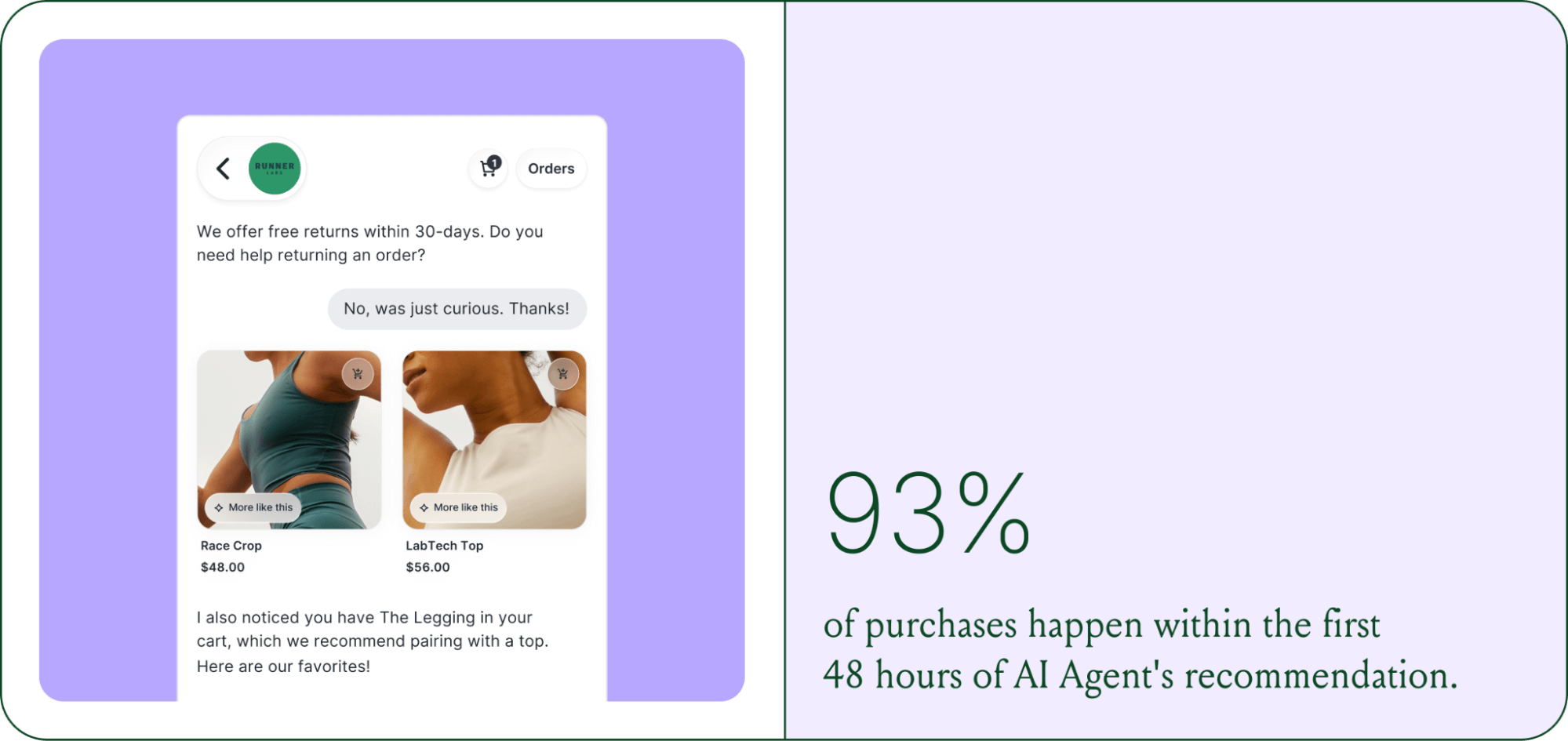
Brands are further accelerating the buying cycle through proactive engagement. On-site features such as suggested product questions, recommendations triggered by search results, and “Ask Anything” input bars drove 50% of conversation-driven purchases during BFCM 2025.
Explore how AI is collapsing the purchase cycle in Trend 3 of the report.
Trend 4: AI is making CX teams more technical
There's a persistent narrative that AI is making CX teams redundant. The data tells a different story. 62% of ecommerce brands are planning to grow their teams, not cut them. But the scope of those teams is changing.

New roles are emerging around AI configuration and quality assurance. Teams are investing in technical members to write AI Guidance instructions, develop tone-of-voice instructions, and continuously QA results.
CX teams are also bridging the gap between support goals and revenue goals, as the two functions increasingly overlap.
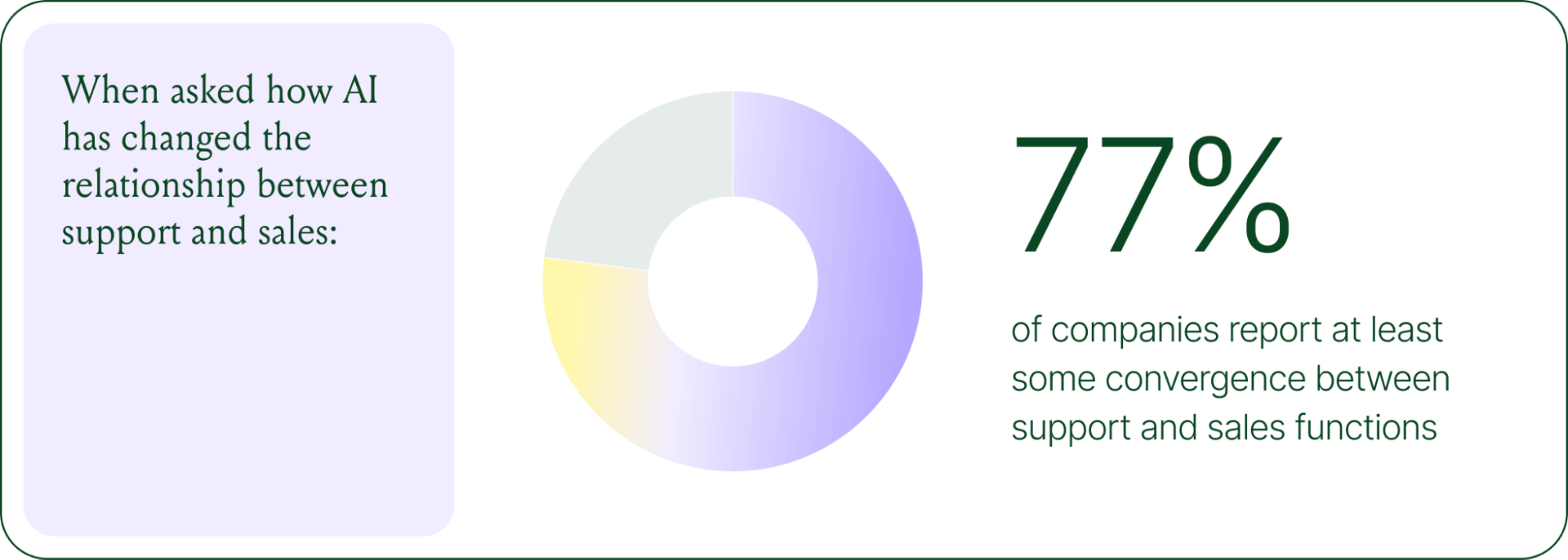
The result is CX teams that are more technical than they were before. Agents who once spent their days answering repetitive tickets are now spending that time on higher-value work: complex escalations, VIP customer relationships, and improving the AI systems and knowledge bases that handle the volume.
Learn more about the evolution of CX roles in Trend #4.
Trend 5: The future is hybrid: AI-first, humans when it counts
Despite increasing AI adoption, data shows that ecommerce brands shouldn’t strive for 100% automation. Winning brands are building systems in which AI handles repetitive tier-1 tickets, and humans handle complex, sensitive cases.

AI handles speed and scale. It resolves order-tracking requests at 2 a.m., processes return-eligibility checks in seconds, and answers the same shipping question for the thousandth time without compromising quality.
Human agents handle conversations that require context, empathy, or decisions that fall outside the standard playbook. There are several topics where shoppers still prefer human support.
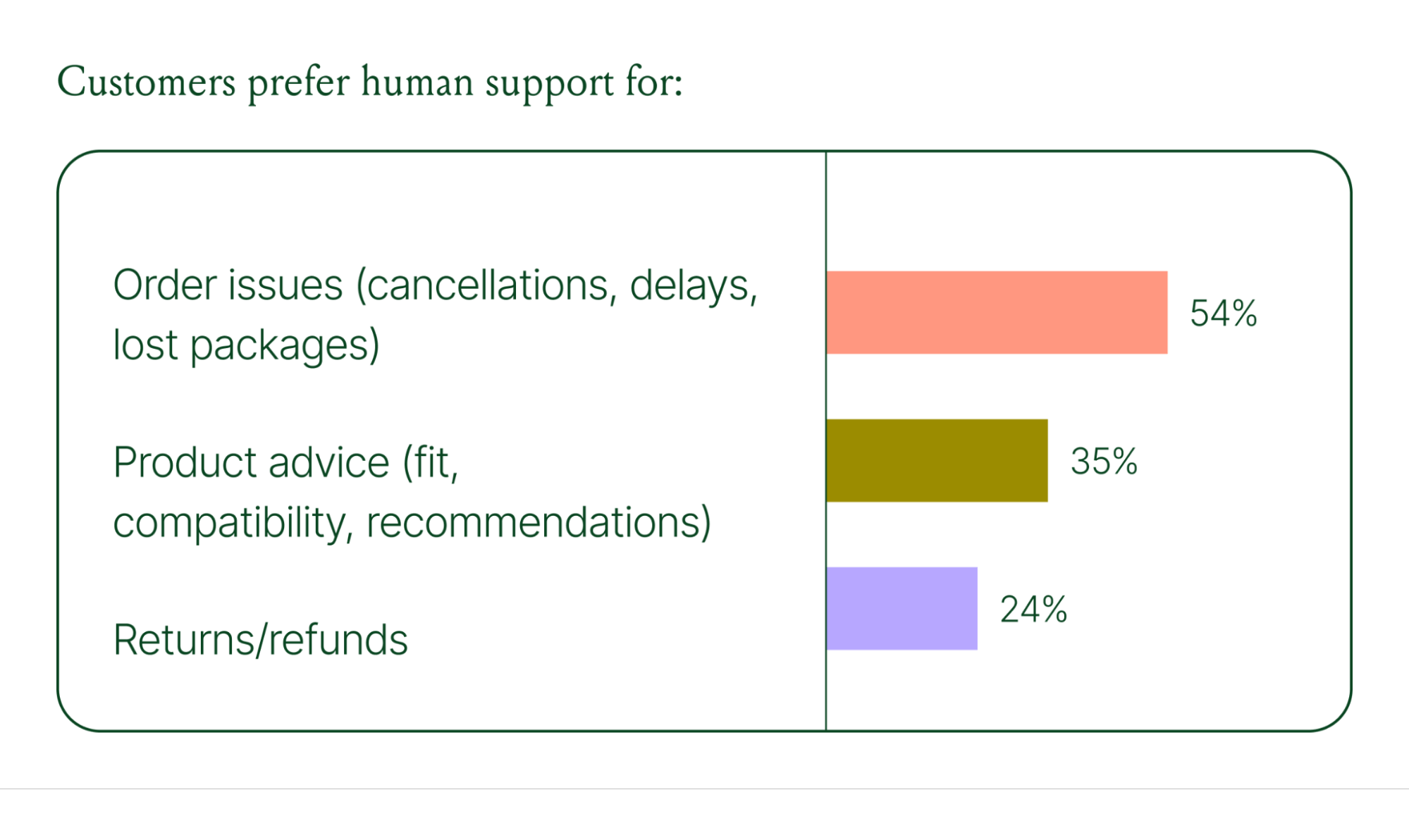
Successful hybrid systems require continuous iteration, meaning reviewing handover topics, Guidance, and reviewing AI tickets on a weekly basis.
Discover how leading brands are balancing human and AI systems in Trend #5.
Where conversational commerce is heading by 2030
The 2026 trends are about expansion and standardization. The 2030 predictions are about what comes next.
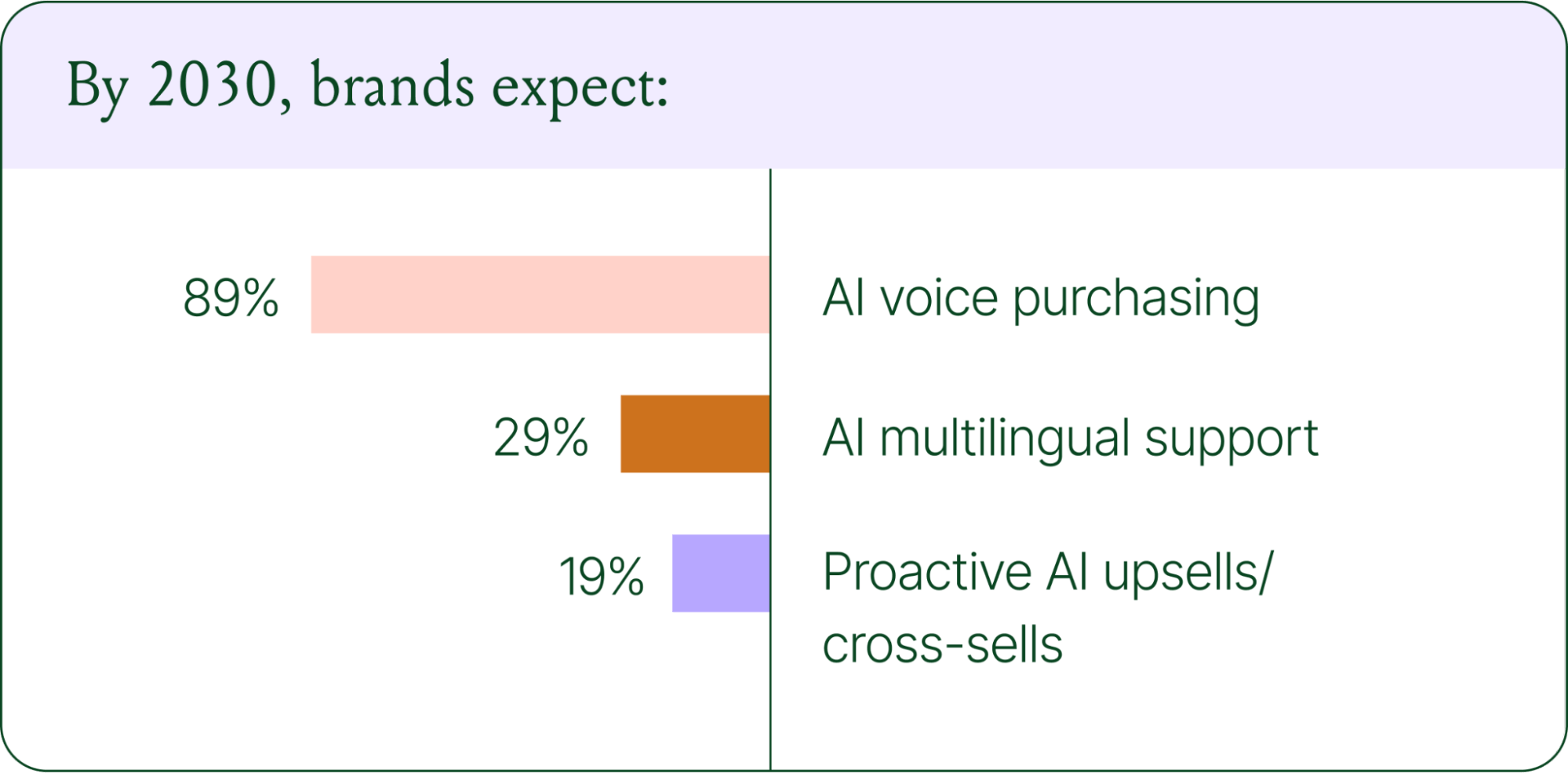
Voice-based purchasing is the biggest bet on the horizon. Only 7% of brands currently use voice assistants for commerce, but 89% expect it to be standard by 2030. The vision is a customer who can reorder a product, check their subscription status, or manage a return entirely over the phone.
Proactive AI is the other major shift. Rather than waiting for a customer to reach out, AI will anticipate needs based on browsing behavior, purchase history, and where someone is in their relationship with your brand. Think of it as the digital equivalent of a sales associate who remembers what you bought last time and knows what you're likely to need next.
Explore where ecommerce brands are allocating their AI budgets in the full report.
Start building your conversational commerce strategy today
The brands winning in 2026 are creating smart, scalable systems where AIhandles volume and humans handle nuance. They’re treating every conversational channel as an opportunity to serve and sell.
The data is clear: AI adoption is accelerating, customer expectations are rising, and the revenue impact of getting this right is measurable.
{{lead-magnet-1}}
Newsletter Signup
The best in CX and ecommerce, right to your inbox
Featured articles

Conversations Are Becoming a Revenue Channel: The Data Proves It
TL;DR:
- Customer journeys are collapsing to a single conversation. The traditional browse-and-buy journey is giving way to AI-guided shopping that moves from discovery to purchase in a single exchange.
- 79% of brands say AI-driven conversational commerce has increased their sales and purchase rates.
- AI-only influenced orders grew 63% in a single year, from 2.7 million in Q1 to 4.4 million in Q4.
- Brands treating conversation as a revenue channel. They’re not just a support function, generating higher AOV, shorter buying cycles, and stronger retention.
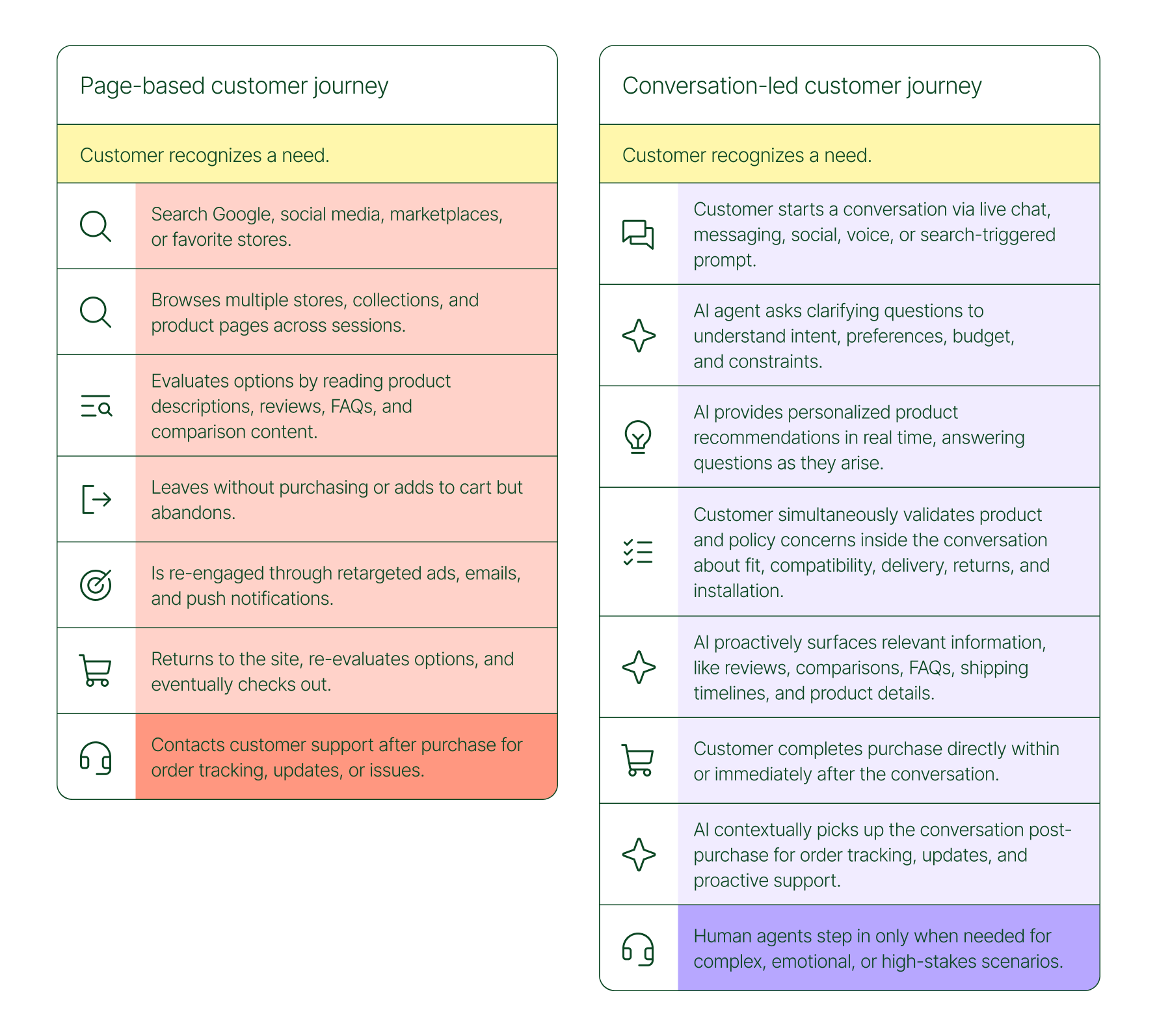
The page-based shopping experience dominated for decades. Customers would search, browse, compare, abandon, get retargeted, return, and eventually buy (sometimes).
That journey is no longer the only option.
Shoppers are turning to chat, messaging, and AI-powered tools to find what they need. Instead of clicking through product pages or reading static FAQs, they ask questions, have back-and-forth conversations, and get answers that move them closer to a purchase in real time. The path to checkout has changed, and the brands that recognize this are pulling ahead.
Read our 2026 State of Conversational Commerce Report to learn more about conversation commerce trends from 400 ecommerce decision-makers and 16,000+ ecommerce brands using Gorgias.
{{lead-magnet-1}}
The shopping journey has collapsed into a single thread
The traditional shopping journey was a solo experience. A shopper had a need, searched for options, browsed across sessions, and eventually made a decision — often days later, after being retargeted multiple times. Support only entered the picture after the purchase.
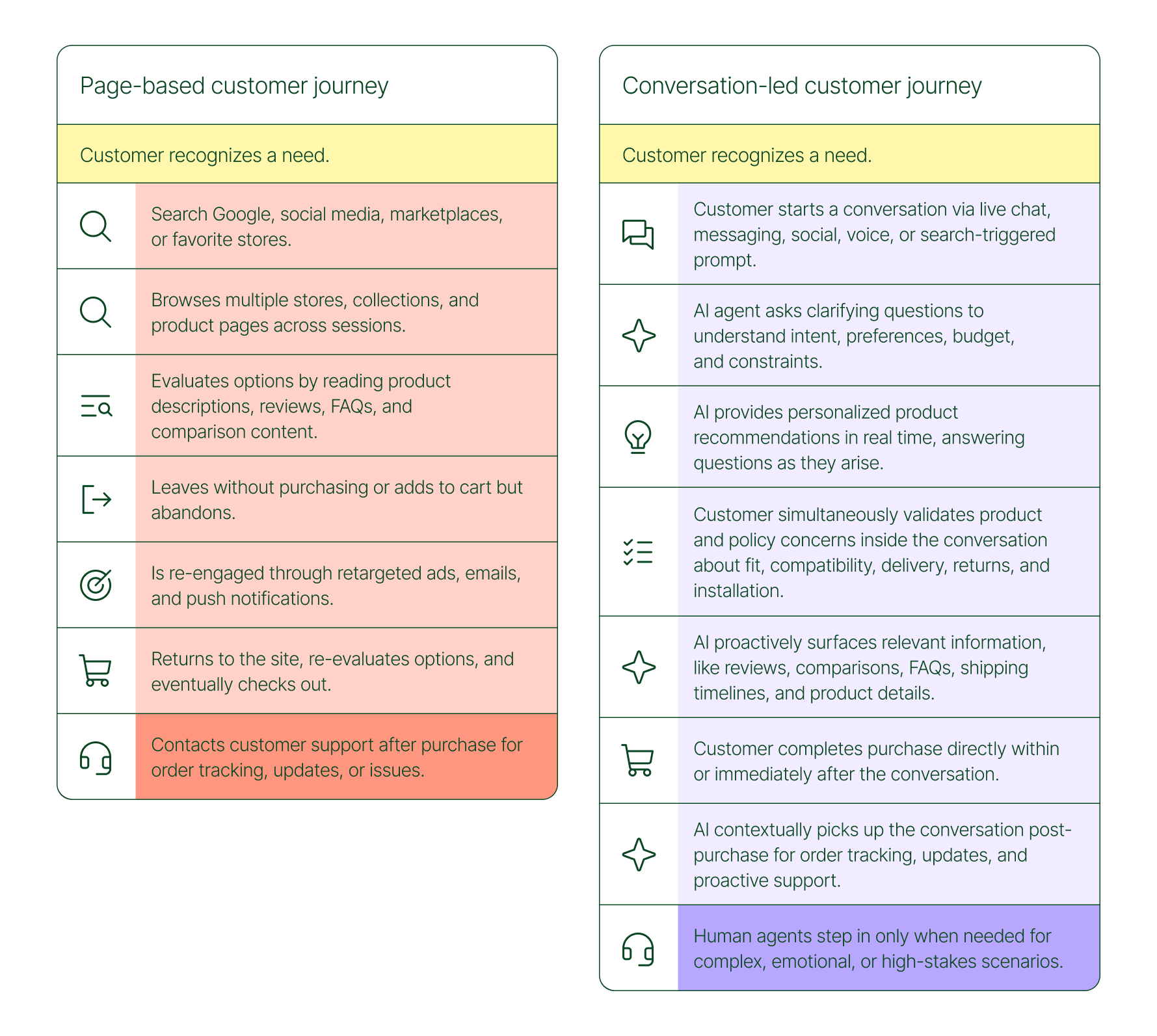
The conversation-led journey collapses that timeline:
- A shopper recognizes a need and starts a conversation via chat, messaging, or a search-triggered prompt
- An AI agent asks clarifying questions about preferences, budget, and constraints
- The AI provides personalized product recommendations in real time
- The shopper validates concerns about fit, compatibility, delivery, and returns, all inside the conversation
- The shopper completes the purchase directly within or immediately after that exchange
- The AI picks up the conversation post-purchase for order tracking and proactive support
- A human agent steps in only when the situation calls for it
What used to take days now takes minutes. Discovery, evaluation, and purchase happen in a single thread.
Conversation is a revenue strategy, not a support upgrade
79% of brands agree that AI-driven conversational commerce has increased sales and purchase rates in their business. When brands were asked to rank the highest-return areas:
- 38% cited improved customer support efficiency
- 23% pointed to higher customer retention and loyalty
- 20% saw improved purchase rates
Those numbers reflect something important: the value of conversation compounds. Faster support reduces friction. Better retention raises lifetime value. More confident shoppers buy more often and spend more per order.
The brands seeing the biggest returns aren't just using AI to deflect tickets. They're using it to create one-to-one shopping experiences at scale.
What the data shows about AI-influenced orders
Looking at AI-only influenced orders across key verticals like Apparel and Accessories, Food and Beverages, Health and Beauty, Home and Garden, and Sporting Goods, the growth across a single year was significant.
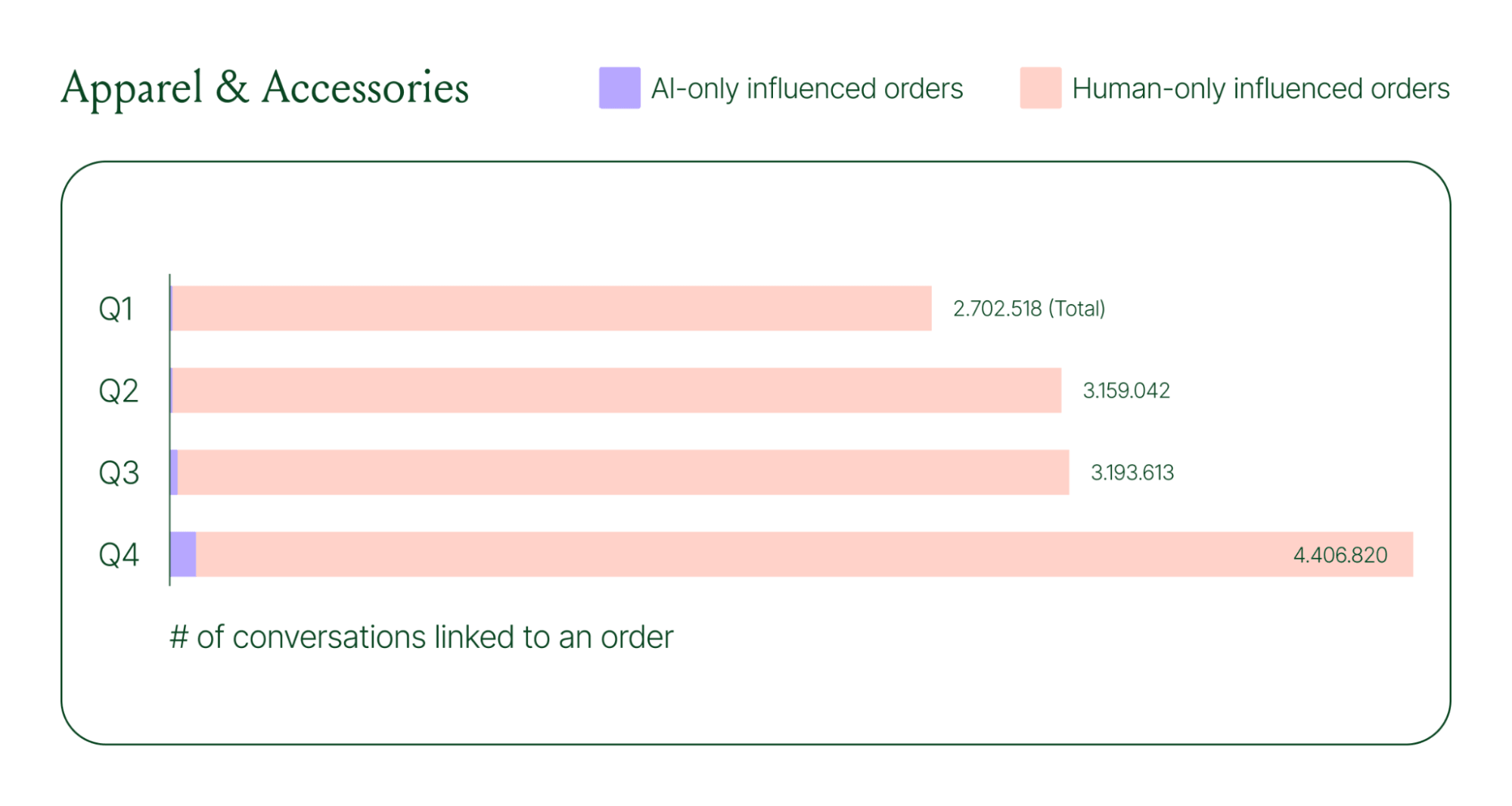
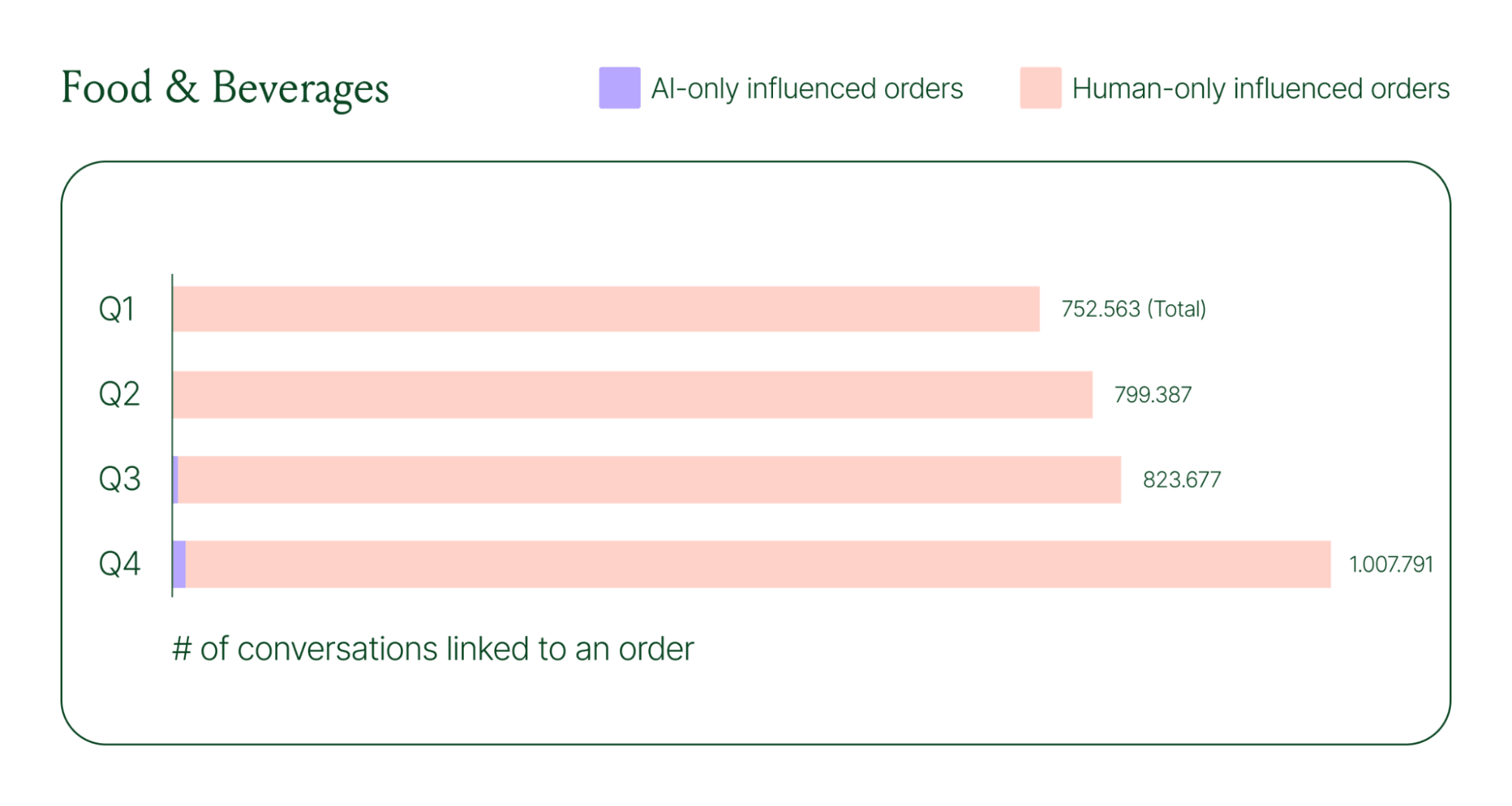
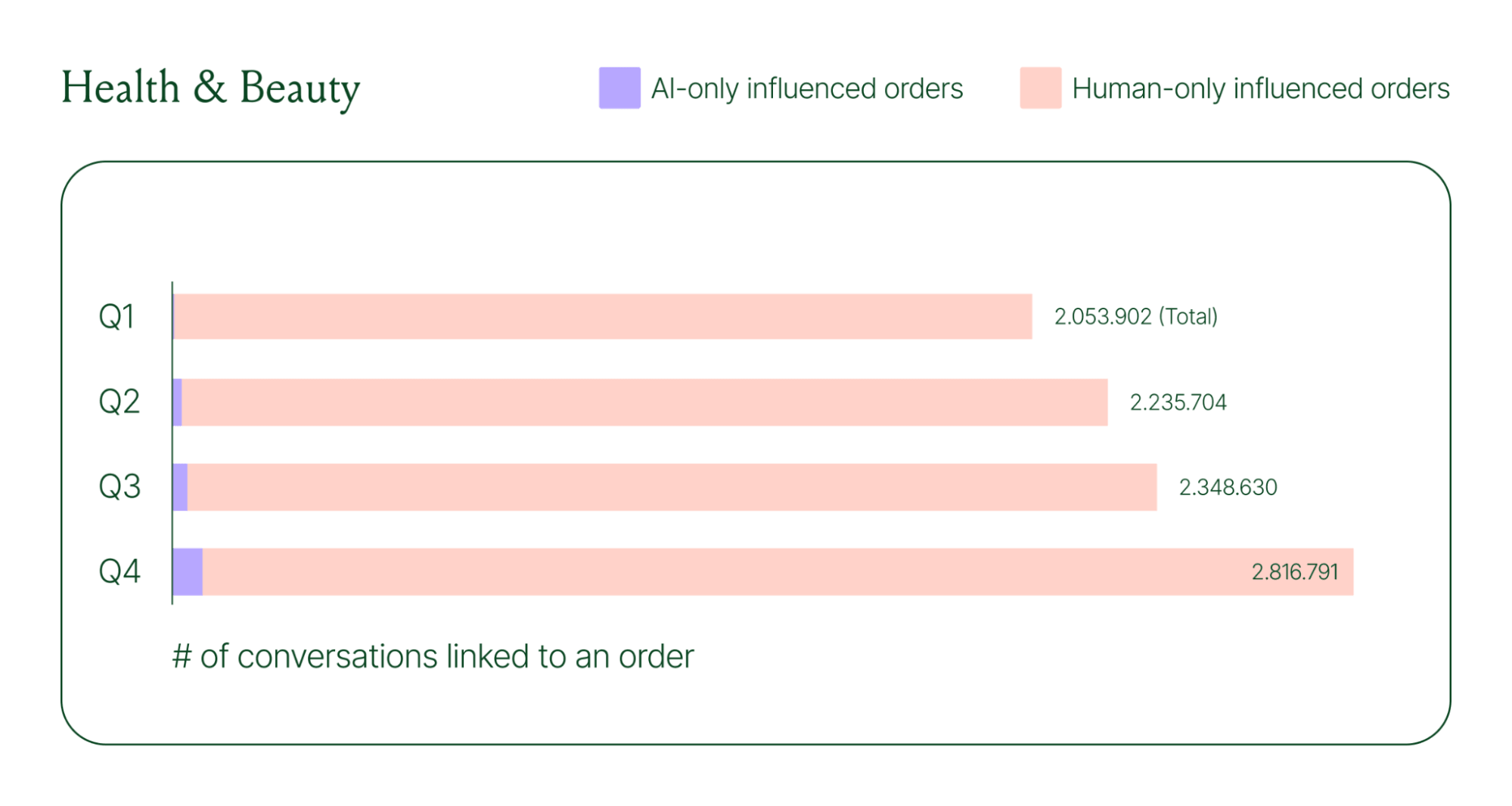
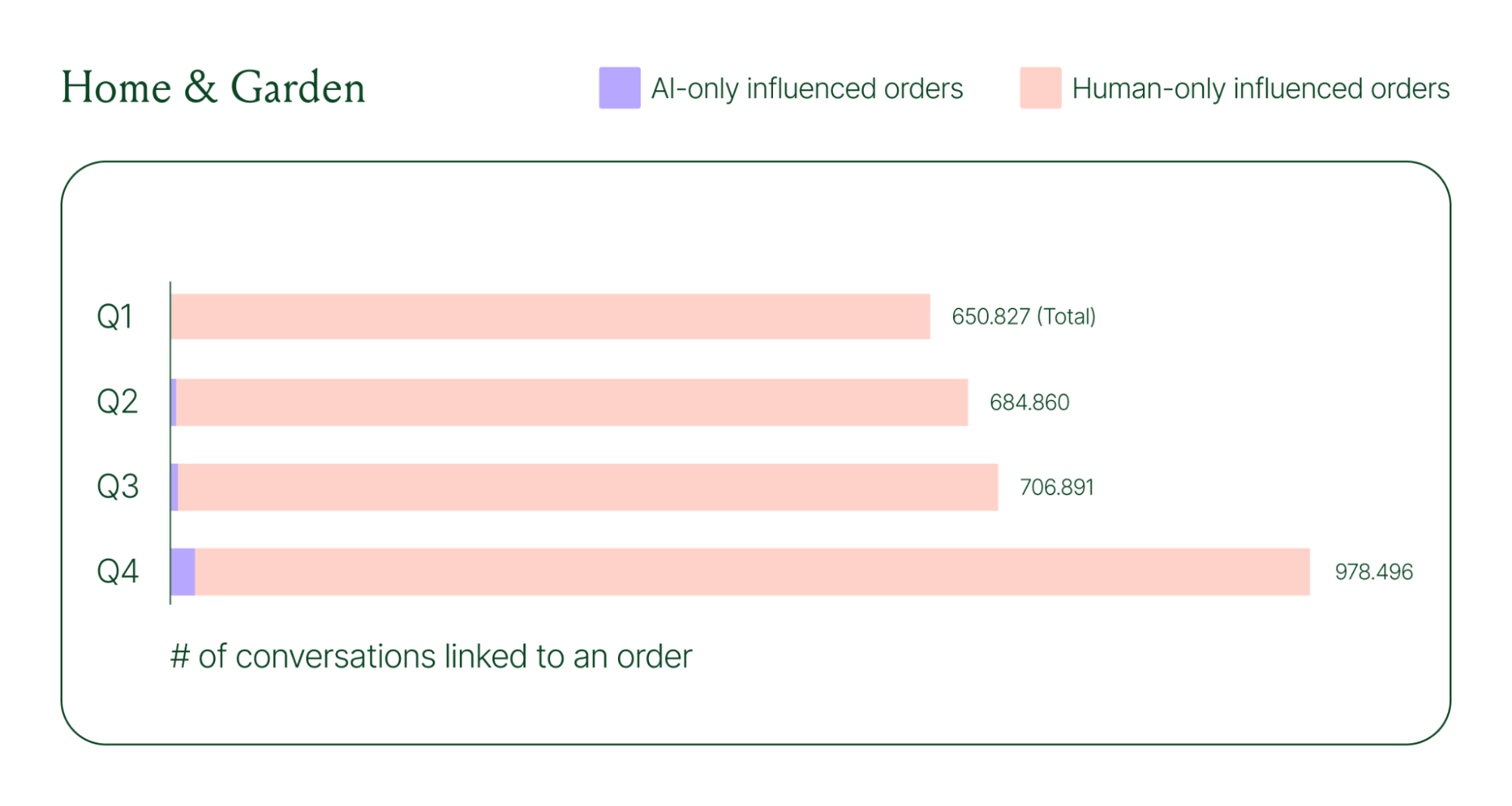
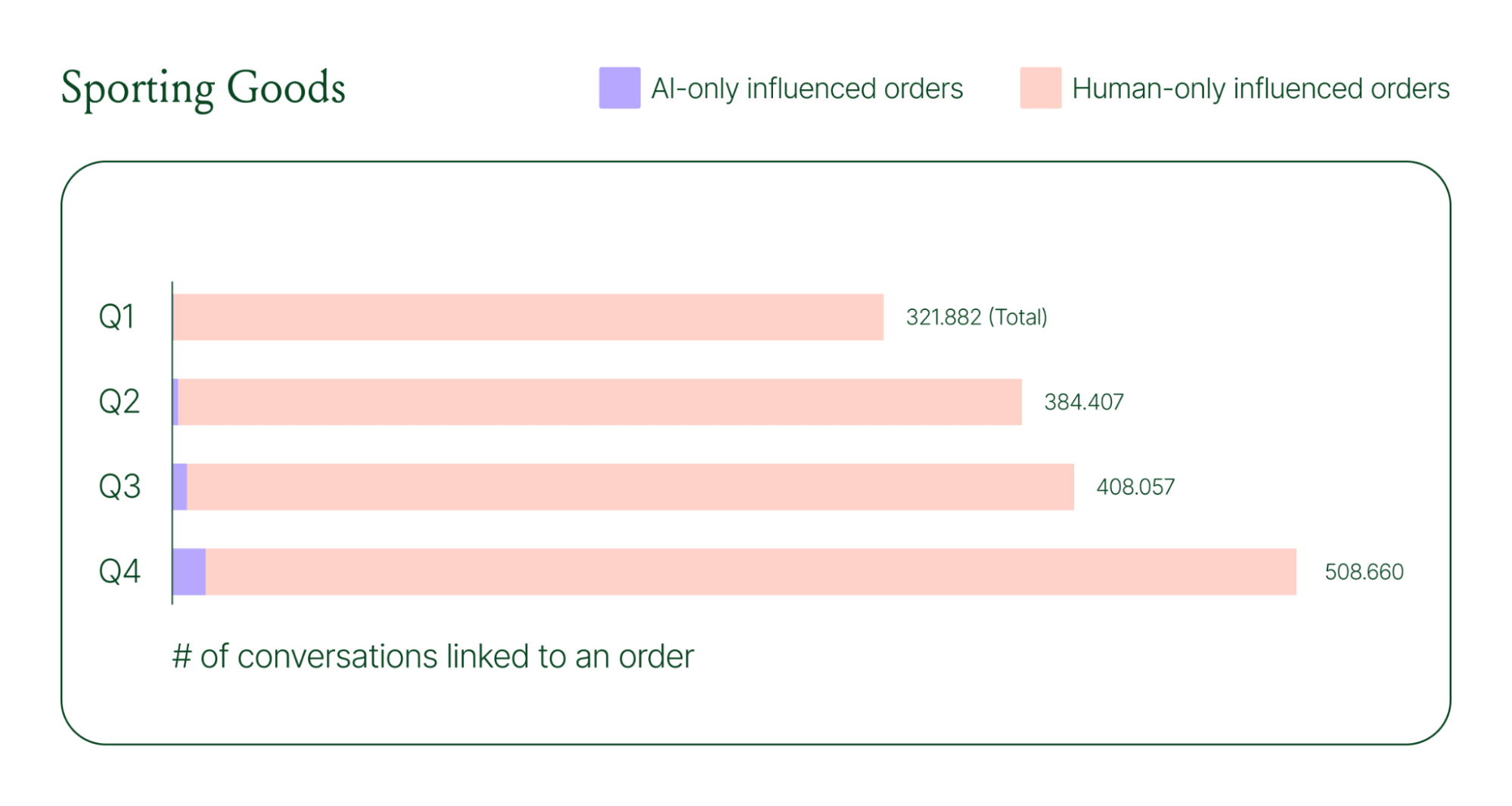
Across industries, ecommerce brands saw AI step into conversations, reduce shopper hesitation, and drive higher QoQ conversion rates.
Learn more about AI-powered revenue generation in the full 2026 Conversational Commerce Report.
Why brands are making this a strategic priority
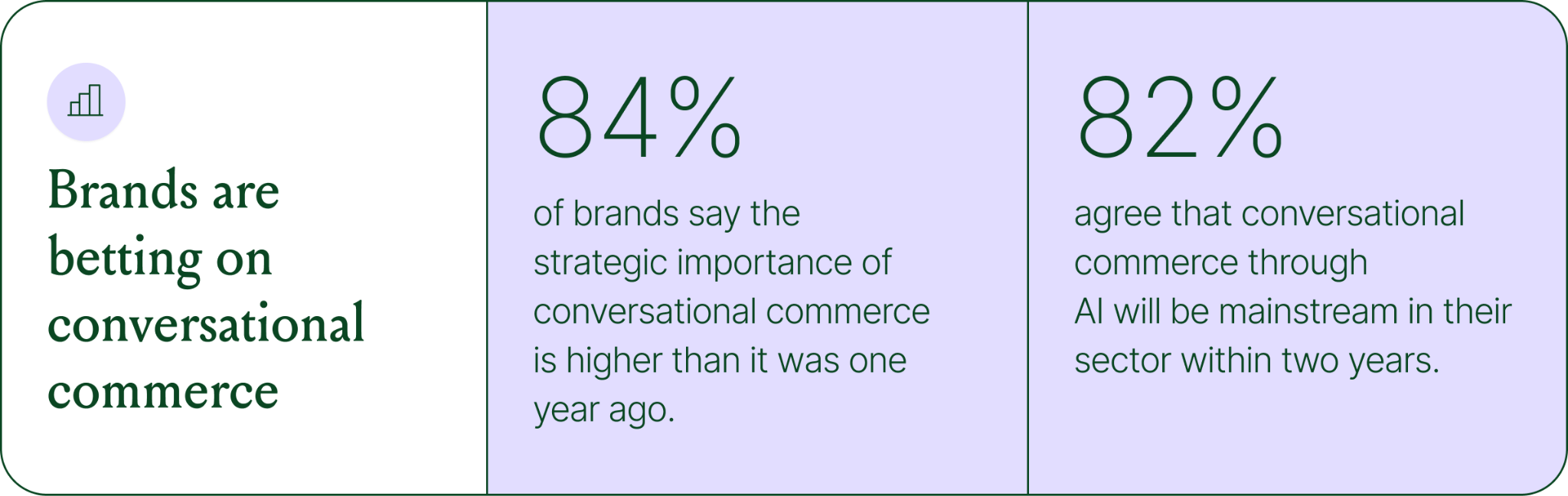
84% of brands say the strategic importance of conversational commerce is higher than it was a year ago. 82% agree it will be mainstream in their sector within two years.
That shift is registering at the leadership level because of what conversational commerce does to the buying experience. Creating one-to-one touchpoints earlier in the journey drives higher AOV, shorter buying cycles, and stronger purchase rates. Shoppers who get real-time answers to their questions are more confident.
What this looks like in practice: TUSHY
TUSHY, known for eco-friendly bidets and bathroom essentials, is a useful example of what happens when you take conversational commerce seriously.
Bidets aren't an impulse purchase. Shoppers have real questions about fit, compatibility, and installation. Those questions used to go unanswered until the CX team could respond, often after the customer had abandoned the cart.
TUSHY used Gorgias's AI Agent and shopping assistant capabilities to automate pre-sales support. AI Agent engaged shoppers in real-time conversations, addressed their concerns directly, and built confidence at the moment of highest intent.
This resulted in a 190% increase in chat-based purchases, a 13x return on investment, and twice the purchase rate of human agents.
How to apply this to your strategy
You don't need to overhaul your entire operation to start seeing results. The most effective approach is to start where the impact is clearest and expand from there.
A few places to begin:
- Pre-sales chat. Identify your most common pre-purchase questions (sizing, compatibility, shipping timelines) and ensure your AI can answer them confidently and promptly.
- Product page engagement. Use proactive chat prompts triggered by page behavior to start conversations before shoppers leave.
- Post-purchase follow-up. Let AI pick up the conversation after checkout with order updates and proactive support, reducing inbound volume and building trust.
- Human escalation. Define clearly which situations require a human agent – complex issues, emotional exchanges, high-stakes decisions.
Want to see the full picture of where conversational commerce is headed in 2026? Read the full report to explore the data, trends, and strategies shaping the next era of ecommerce.
{{lead-magnet-1}}
AI Is Table Stakes for Ecommerce: What the Data Tells Us About 2026
TL;DR:
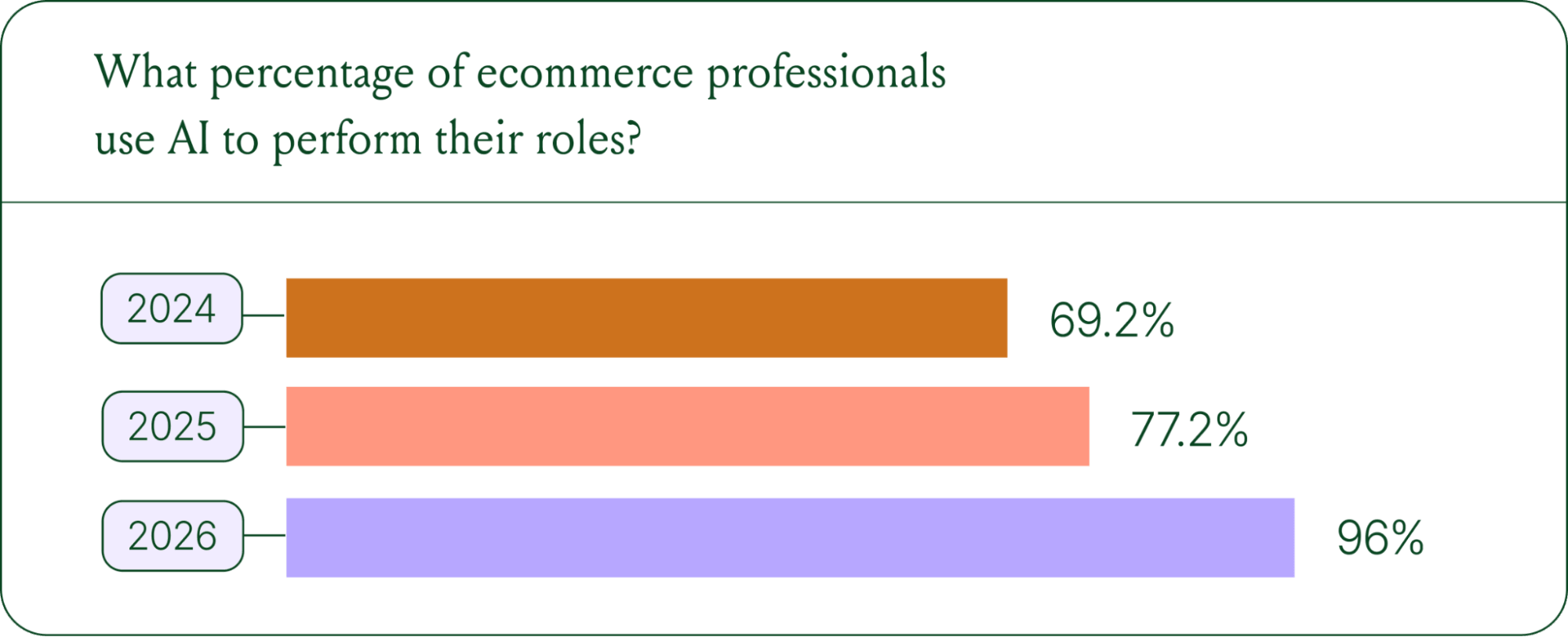
- AI adoption is rapidly accelerating. 96% of ecommerce professionals now use AI in their roles, up from 69% in 2024.
- AI has moved beyond support automation. Use cases have evolved into revenue generation, personalization, and logistics.
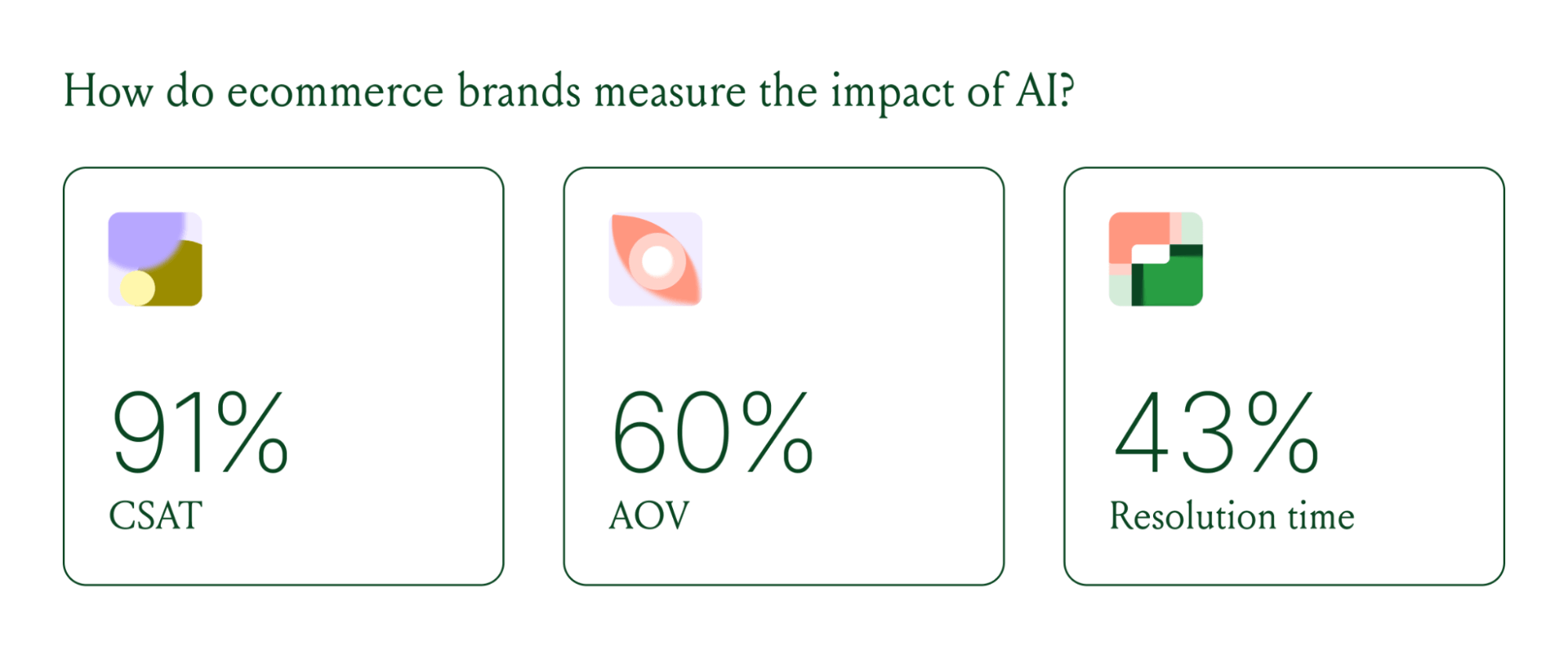
- Brands are tying AI success to profit-and-loss outcomes. 60% of brands consider AOV a top indicator of AI effectiveness.
A year ago, ecommerce brands were still debating whether AI was worth the investment. That debate is over. Today, nearly every ecommerce professional uses AI to do their job.
The shift isn't just about adoption. It's about what AI is used for and how brands measure its impact. Support automation was the entry point. Now, AI is embedded across the full operation, from product recommendations to inventory control to real-time shopping conversations.
In our 2026 State of Conversational Commerce Report, we break down trends on AI usage among 400 ecommerce decision-makers and 16,000+ ecommerce brands using Gorgias.
{{lead-magnet-1}}
AI adoption has reached a tipping point
If we rewind 12 months ago, the industry was still split on AI. Some ecommerce professionals were excited, but most were still hesitant. In 2024, 69% of ecommerce professionals used AI in their roles. By 2025, that number reached 77%. In 2026, it hit 96%.
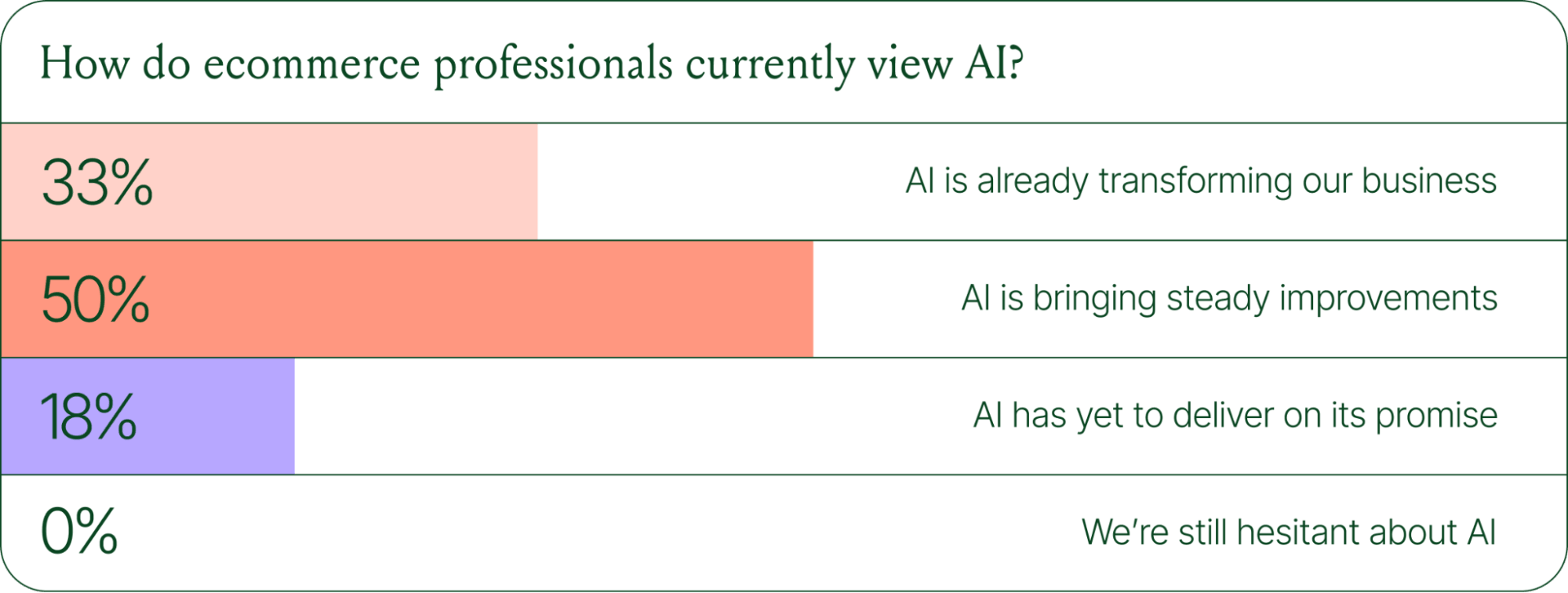
The confidence numbers back it up. 71% of brands say they are confident using AI for ecommerce, and 73% are satisfied with its business impact.
In early 2025, only 30% of ecommerce professionals rated their excitement for AI at 10/10. Today, zero percent of respondents describe themselves as hesitant about AI.
AI use cases now span the full ecommerce stack
Using AI in ecommerce is not new. In fact, it dates back to the 1980s with the invention of algorithms and expert systems. And if you’ve ever leveraged similar product recommendations or chatbots, you’ve already integrated AI into your ecommerce stack.
Modern AI is far more sophisticated.
With the rise of agentic commerce and conversational AI, brands began leveraging AI agents to automate the processing of repetitive support tickets. That’s still happening today, but the scope has expanded beyond the support queue.
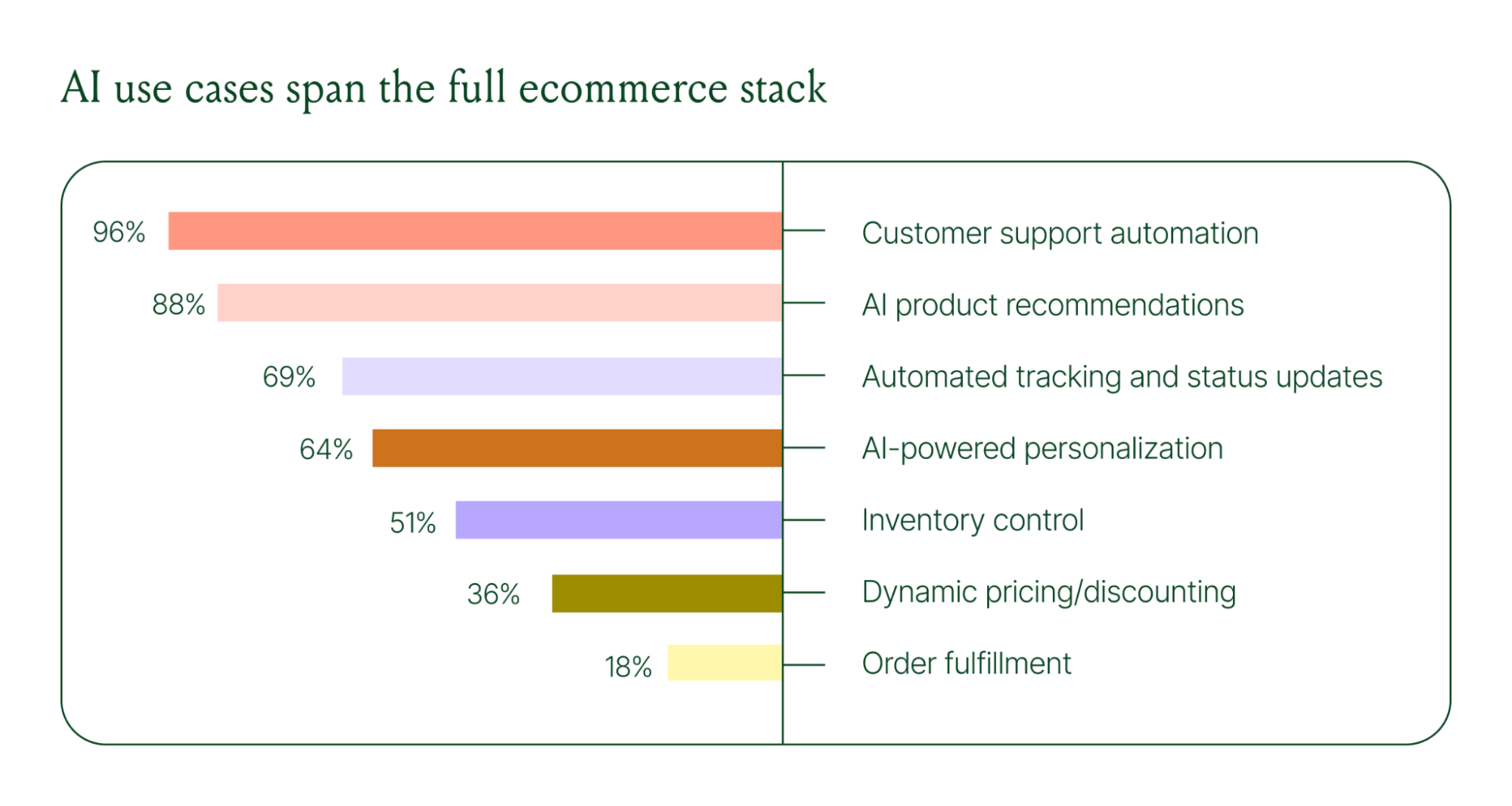
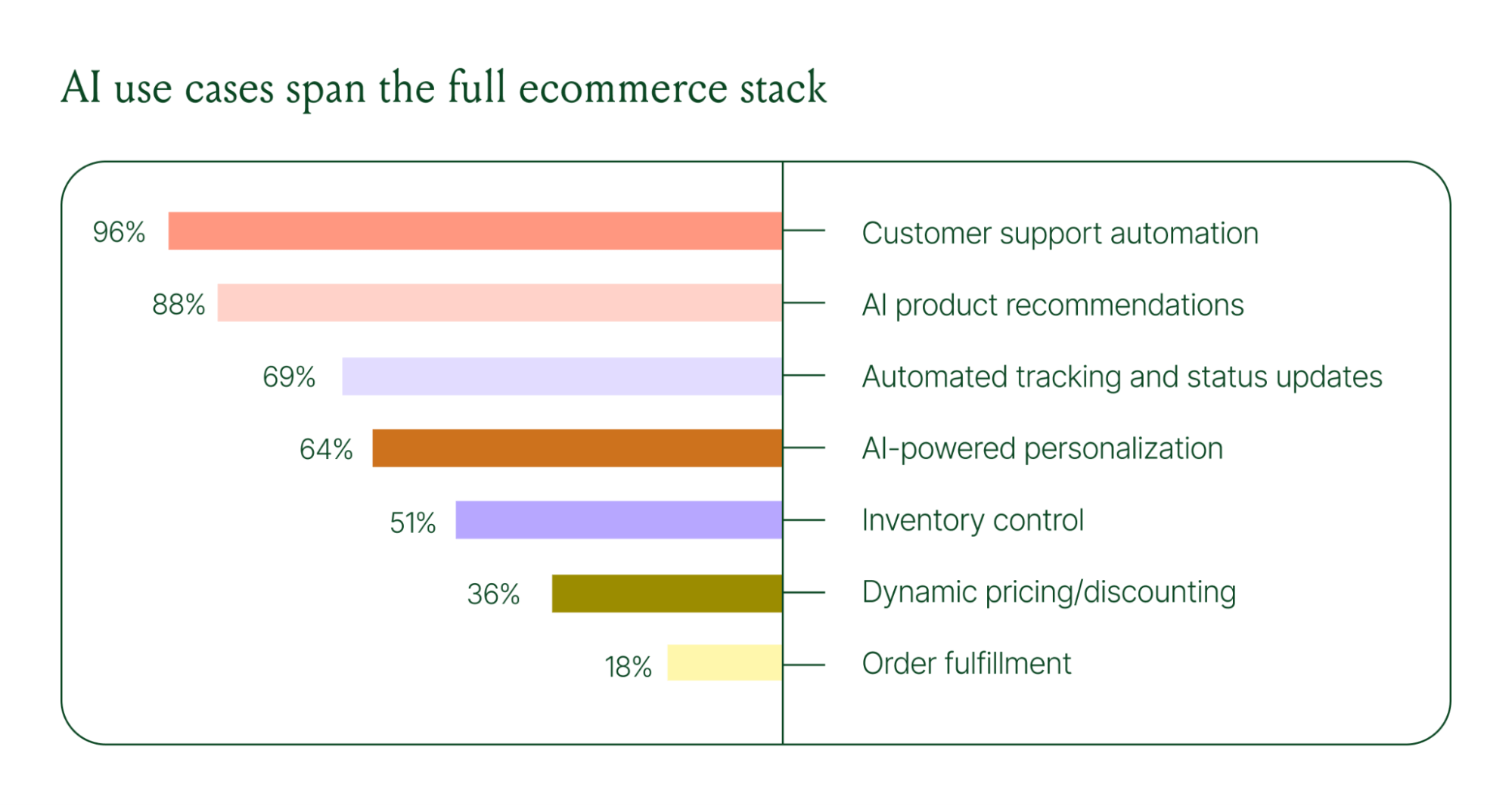
Ecommerce brands are deploying AI across every layer of their operation:
- Customer support automation: 96%
- Product recommendations: 88%
- Automated tracking and status updates: 69%
- Personalization: 64%
- Inventory control: 51%
- Dynamic pricing and discounting: 36%
- Order fulfillment: 18%
When brands were asked which channels contribute most to their AI success, conversational channels dominated. Social media messaging led at 78%, followed by SMS at 70%, and website live chat at 51%. Shoppers want fast, personal conversations, and AI is the best way to deliver that at scale.
Learn more about AI adoption, perception, and use case trends in the full 2026 Conversational Commerce Report.
How AI is changing CX success metrics
For decades, customer support success meant fast response times and high satisfaction scores. Those are still important indicators of success, but leading brands are adding revenue-focused metrics to their dashboards.
91% of brands still track CSAT as a measure of AI's impact. But 60% now include AOV as a top indicator, and higher-revenue brands earning $20M+ are focusing on metrics like total operating expenses, cost per resolution, incremental revenue, and one-touch ticket rate.
AI can now start a conversation, ease customer doubts, sell, upsell, and recover abandoned carts in a single conversation. When you’re only measuring CSAT, you’re ignoring the real ROI of conversational AI investment.
AI makes every conversational channel a storefront
Virtual shopping assistants now proactively engage shoppers, adapt to their needs in real time, and offer contextual product recommendations and upsells. When the moment calls for it, they can close the deal with a targeted discount.
Gorgias brands using AI Agent's shopping assistant capabilities nearly doubled their purchase rates and converted 20–50% better than those using AI Agent for support only.
Orthofeet, the largest provider of orthopedic footwear in the US, is a concrete example of this in practice. Using Gorgias, they achieved:
- 56% of support tickets automated in 2 months
- Email response times down from 24 hours to 35 seconds
- Double-digit revenue growth without adding headcount.
What this means for your AI strategy
The data tells a clear story: AI has evolved beyond a tool for handling tier 1 support tickets. It’s a core part of your revenue generation strategy.
57% of brands are already using AI for 26–50% of all customer interactions, and 37% expect that share to rise to 51–75% within the next two years. The brands building toward that range now are the ones who will have the operational advantage when it matters most.
The practical question isn't whether to invest in AI. It's where to focus first. Based on where brands are seeing the most impact, three priorities stand out:
- Start with high-volume, low-complexity tickets. WISMO (where is my order) inquiries, return policy questions, and order status updates are where AI delivers the fastest return. Automate these first.
- Expand into conversational channels. Social messaging and SMS are where AI is driving the most success right now.
- Connect AI performance to revenue metrics. If you're only measuring CSAT and response time, you're missing half the story. Add AOV, conversion rate, and incremental revenue to your reporting.
Want to go deeper on the full 2026 conversational commerce trends? Read the complete report for data across every major AI use case in ecommerce.
{{lead-magnet-1}}




Further reading

.avif)
A Guide to All the Different Types of Customer Service Companies Need to Know
I’m Colin Waters and I’m the Director of Customer Experience at The Feed. You might know me from my experience at BrüMate, where I was the Associate Director of Customer Experience. In three years, I worked my way up from answering tickets and being on the front line with customers to overseeing the entire customer experience team.
My different roles have shown me the various ways to adapt your customer service to fit your team’s and customer’s needs.
In this article, I’ll walk you through the different types of customer service, support channels, strategies, and philosophies you can offer based on what your company requires.
3 types of customer service + when and how to use each
Customer service is kind of like a sandwich. You’ve got your bread or the necessary foundational elements like a great customer service strategy and philosophy, and then you’ve got your support channels which can be more varied and customizable, like the sandwich fillings.
We’ll start with support channels, which you can take care of first, and move onto the strategies and philosophies of customer service. Let’s get into it!
Channels
There are many different support channels out there. But instead of offering them all — which can actually harm your support team in the long run — take a look at your customer service responsibilities, resources, and business needs to figure out which channels make the most sense for you.
Here’s a rundown of the different support channels you can offer and what they’re best used for.
Email is flexible in terms of the type of customer inquiries they’re best for (most of them!) and turnaround time, unlike more instantaneous and short-form support channels like live chat and social media.
Provide email support if…
- Customer inquiries are lengthy and detailed. Email is best suited for comprehensive responses that can handle file attachments and additional resources like images, videos, and links.
- Your operating hours are flexible. Customers can reach out to your support team outside of regular business hours, no matter their time zone.
- You deal with sensitive issues. Email provides a private platform for discussing sensitive matters that customers might not want to share publicly.
- You provide technical support. You can easily share resources like documents, videos, and screenshots in a continuous conversation that would be harder to do through other support channels like voice or social media.
Social media
Social media customer service is fairly new. However, as 26% of people learn about a product through social media, it’s a good idea to follow the trend and use your social media platforms to not only assist new customers, but take note of feedback.
Provide social media support if…
- You want to reach a younger audience. With Gen Z on apps like TikTok and Instagram, offering your presence and assistance where they are in their free time can boost exposure and conversions.
- Your marketing strategy is social media-focused. Take advantage of the brand recognition you’re getting by personally connecting with followers and getting them closer to your brand.
- Many of your brand mentions are on social media. Mentions are a fantastic way to build a connection with your followers and turn them into customers, exhibit how your brand prioritizes customer service, and collect criticisms to pass along to your team.
- You have a product or service that’s going viral. Get excited with your customers, or provide important information like restock timing or shipping delays.

Live chat, chatbots & automation
If your main source of traffic comes from your company’s website, using live chat or chatbots can easily capture your customer inquiries and lessen the load for your team. Sometimes, however, chatbots may provide inconsistent answers — that’s when using automation to create templated conversations will be your best option.
Provide live chat, chatbots, and automation if…
- You receive a lot of customer inquiries. A chat widget with automatic responses or a chatbot is one of the easiest ways to decrease tickets that contain the same inquiries.
- You’re a small team. With fewer hands on board, routing tickets to AI and automatic responses can keep your customer service reps focused on more complex issues.
- It’s the holiday season or peak hours. Getting a barrage of tickets, especially on Black Friday-Cyber Monday when most people are hunting for sales, can be a nightmare for customer service teams. Let a chat widget be your first line of defense.
- You sell personal or specialized products. Think of products like skincare and health supplements when most of your consumers will need to divulge personal information to get the answers they need. With live chat, customers can resolve their worries with an empathetic agent on their side.

Help center
A help center (also referred to as a knowledge base) is a collection of self-service resources that customers and employees can use to resolve questions and issues. They can contain FAQs, troubleshooting guides, instruction manuals, video tutorials, and more.
Provide a help center or knowledge base if…
- You update or change your products regularly. If you release new versions of your products or services every year, a one-stop hub to update documents will be extremely helpful.
- You sell specialized products. If your products need additional explanation before using them, a knowledge base can answer all customer questions and curiosities.
- You want to optimize your website for SEO. On top of being a helpful resource hub, a knowledge base can point eyes to your website. In turn, it earns your brand more exposure and new customers.

On BrüMate, our Help Center is made with Gorgias. It’s organized in sections like FAQs, shipping, and returns and exchanges which can be modified when our product lineup expands.
Voice, messaging & SMS
Voice support can still be an extremely valuable channel when you want to resolve tricky situations. In fact, 42% of Americans still prefer to resolve customer service issues via phone conversations.
Provide voice support if…
- You deal with technical and complex issues. Having a support agent empathize and understand a customer’s problems is crucial not only to boost customer satisfaction but also to lay out solutions in a clear way.
- You serve customers internationally. Language barriers can make written communication difficult. With voice support, it can be easier to resolve issues when you can talk through instructions in real-time.
- Your customer issues are time-sensitive. Offering phone support can give customers an option to resolve urgent issues within minutes, instead of waiting for an email or social media reply back.
{{lead-magnet-1}}
Strategies
Depending on your goals as a customer service team, there are a few strategies you can choose from. In my experience, employing a mix of strategies allows you to adapt to more types of customers, resulting in higher customer satisfaction.
Let’s look at the four customer service strategies, omnichannel, proactive, self-service, and personalized. I’ll go through what they are, their purpose, how to employ them, and my experience with each strategy at BrüMate.
Omnichannel support
What is it? Omnichannel customer service is offering support on multiple channels to create a seamless customer service experience.
Purpose: To make your support as accessible as possible, so all customers can reach you from whichever channel they prefer.
How to implement it: Use a helpdesk that can combine support channels.

At BrüMate, we use Gorgias to combine all customer conversations in one tool. Our main channels are email, social media, and live chat.
Using Gorgias as a single source of truth for all of our channels helps to ensure that our customers get consistent responses. And, it means that all messages from a customer, regardless of channel, are visible in one place and can be handled by the same agent.
Proactive support
What is it? Proactive customer service is an approach to customer service that anticipates customer needs and meets customer expectations.
Purpose: To lessen the effort customers need to make to find answers to their questions.
How to implement it: Monitor your most common customer tickets and implement resources in advance to avert future inquiries.
We work closely with our marketing and digital teams to deflect issues as they come in and solve them at the root. For example, based on customer feedback, we might add more details to our product pages, update language at checkout, or highlight specific reviews.
Self-service support
What is it? Self-service support is a customer service approach that empowers customers to independently find solutions to their problems using available resources and tools.
Purpose: To speed up resolution time by allowing customers to find answers on their own without waiting for an agent.
How to implement it: Provide self-service options (like a Help Center, automated responses in chat, or ways to easily track orders) at all customer touchpoints, from pre-sales and product inquiries to order status emails and returns.
On the BrüMate website, we display helpful self-service resources in the Gorgias chat widget so that it’s easy for folks to get the help they’re looking for quickly.
We strategically show links for customers to check order status, get warranty or return information, or learn more about the products that would best fit their lifestyles.
We also leverage this area to highlight new products or call out any major issues at the moment (i.e. preorders, shipping delays, etc.) and drive those back to more detailed help center articles and resources.

Personalized support
What is it? Personalized customer service focuses on personalizing customer interactions.
Purpose: To enhance customer satisfaction by customizing interactions to each customer’s preferences and needs.
How to implement it: When interacting with customers, adjust to their voice, acknowledge their history, and suggest solutions relevant to their preferences.
A majority of the BrüMate customer base is female and, fittingly, the majority of our Customer Experience agents are female as well.. This takes empathy to a new level since our team knows exactly what our customers are going through, whether they’re a mom of three or a college student. We’re also big brand ambassadors which helps make the connection more individualized.
Philosophies
What are your priorities when it comes to customer service? Do you prioritize speed? Or would you rather go slow and build out from there?
The way you approach customer service will dictate the overall customer experience. Like customer service strategies, your team can follow more than one philosophy. But make sure to pick one philosophy as your north star to create a clear path towards your goals.
Below are four customer service philosophies that can help establish brand loyalty.
Long-term foundation
Since BrüMate’s CX team is still pretty small, our core philosophy is to build a strong foundation. Delivering good customer service starts with making sure you’ve got all your bases covered, so you can prevent headaches along the way. Make it easy for the customer to find you early in their experience and that CX is a valuable resource along any point in their journey.
When I’m onboarding new agents, I want them to take their time learning our process. For instance, our team is very particular with naming conventions for ticket tags and Macros. While some will find it tedious, the upside is anybody could come in — agent or not — and start answering tickets without too much guidance.
The customer is (not) always right
As a customer service representative, it’s easy to realize that the customer is not always right. Products wear down over time, delays happen, and unpredictable changes come up. The goal is to prepare your team to handle difficult situations that still align with your brand’s values.
For example, I’ve had to deal with a customer being irritated because we couldn’t cancel an order a few hours after it was placed. From their point of view, cancellations should be a given. They were unaware of the complex behind-the-scenes process and that our team will start fulfilling an order immediately after it is placed.
We started educating customers on our order fulfillment process and giving them insight on the reason the cancellation was no longer available. Fortunately, the context allowed them to cool down and forgive the inconvenience. We also provided them with options once the item was delivered.
Balancing human support & automation
Automation is handy for handling smaller customer hiccups. It’s important to note, though, that the best customer service balances automation with human touch.
When customers reach out to the BrüMate support team, we try our best to keep them with the same agent until their ticket is resolved. This way, their experience with BrüMate is tied to a personal connection. On occasion, I have a few customers who I prefer to work directly with to resolve their issue to ensure they are satisfied with their experience. They are even willing to wait until I’ve returned from vacation due to this level of personalized touch.
Surprise and delight
The concept of "surprise and delight" is a philosophy that makes the customer experience unexpected but delightful. This can come in the form of exceptional, personal customer service (like at BrüMate!) or through gifts and discounts.
Our customer support team at BrüMate plays a pivotal role in building strong relationships. We like to turn the perception of customer service upside down and give customers a pleasant experience. It's an amazing thing to hear when customers mention our agents by name because we've gone above and beyond to build a connection with them.
Customer support as a revenue center
Many people think of customer service teams as a way to resolve problems. I see our team as a marketing and revenue driving machine that can take it a step further by taking a sales approach. This means support’s main goals are to divert unsatisfied customers by using methods of upselling and cross-selling.
Your team should be experts and help close orders. Incentive your team to be one part customer service and sales. I guarantee you’ll see results!
With a help desk you can deliver support whenever, however, and wherever you need
Gorgias makes multitasking look like a breeze. Its simple user interface makes it easy for new and experienced agents to use. You can speak to multiple customers at one time across different channels and integrate with ecommerce tools like Shopify, Affirm, and Yotpo without leaving the window.
Take a look at what Gorgias has helped some of my other favorite CX brands do:
- Pit Viper’s first response time and CSAT skyrocketed to 4.9
- Oger boosted its first response time by 69%
- Kulani Kinis saved $400K in refunds by using Gorgias and Loop Returns
If you’re ready to join me and these other amazing companies using Gorgias, book a demo today.
{{lead-magnet-2}}

How to Evaluate the Effectiveness & Impact of Your Customer Service Team
As the Customer Experience Manager at Dr. Squatch, a men's naturally-derived personal care company, I’m constantly looking for ways to craft exceptional experiences for our customers. But the question to ask is: does it actually make a difference to our revenue?
Unearthing the impact of your customer service team starts with evaluation. To do this, it’s essential to track metrics and key performance indicators (KPIs) around customer service.
Evaluating the impact of a customer service team can sometimes be an ambiguous task. That’s why I’m here to outline the most important customer service metrics to watch, so you can effortlessly recognize the ways your customer service team directly moves the needle.
{{lead-magnet-1}}
What is customer support evaluation?
Customer support evaluation is the process of measuring your customer service program's impact on the business.
It requires using metrics and KPIs to understand whether your support team is providing a great customer experience that can generate repeat customers, positive reviews, referrals, and more.
Evaluating your customer support also requires understanding the return on investment (ROI). In other words, do the benefits produced by your support efforts outweigh the cost of your support program?
The benefits of evaluating customer service
In almost every business, a developed support program is worth its weight in gold. Evaluating your program is how you prove it to company leadership, earning you additional budget for tools and team members.
You can think of a strong customer experience as a rising tide that lifts all ships — the impact is vast but also hard to quantify.
At Dr. Squatch, we’re close with our customers and even closer to the numbers. Once we started employing a data-driven approach to customer support management, it made a huge difference in both customer satisfaction and hitting company targets.

Let’s look at the five incredible benefits you get after you make evaluation a regular part of your customer service program.
1) Detailed insight into your customers’ needs
Customer inquiries are a treasure trove of rich data for you to dig into to create a better experience for future interactions. By evaluating metrics like customer satisfaction (CSAT) or average resolution time, you can identify key trends and issues online shoppers are dealing with and update your customer service strategy.
On Gorgias, your incoming tickets are automatically sorted by AI-powered intent and sentiment detection, giving you a quick overview of which customer issues should be at the top of the list.

2) Identifies which customer service tasks can be automated
It’s not enough to have a talented team replying on behalf of your brand. You need to make sure your team is focusing on the right activities and not wasting their time on the wrong ones.
By measuring metrics related to your team’s performance — like first response time and resolution time — you can identify which tasks can be done with automation. You’ll also be able to figure out which agents on your team may need more training and support.
3) Balances your revenue and expenses
Customer acquisition is becoming more expensive, so keeping track of customer service can give you an idea of how much customer service truly provides within your organization.

4) Lets you calculate the true customer lifetime value
True lifetime value is the measure of a customer’s worth over the duration of the customer-business relationship.
Keep in mind, it’s less expensive to keep current customers than to find new ones. This is increasingly true as customer acquisition costs and social media ad prices soar.
5) Helps to create predictable support quality
Solid customer support quality is predictable. And that’s not a bad thing. That means when anything new, surprising, or daunting happens, you don’t need to call in a special task force.
Thanks to your stable operations, your whole team will simply need short-term and long-term action plans, like establishing a list of steps to take and point of contacts and to inform.
{{lead-magnet-2}}
Four key indicators that your customer service program needs a makeover
Beyond bad reviews and customer complaints, there are a few quick ways you can tell if your customer service program is not doing well.
These four key indicators are major signs that your customer service program needs some refining.
1) High contact rate (over 33%)
A contact rate of over 33% means something about your customer journey, communication, or product is not quite right. Your customers aren’t getting the answers they need.
The goal of your customer service team should always be to resolve tickets efficiently. If a customer has to reach out to your brand multiple times, you most likely need to update your support resources.
Leading indicator: Multiple touchpoints per customer
How to fix it: Include more self-service options to give customers quick answers without having to wait to talk to an agent. Add a Help Center, chat widget, or send informative confirmation and post-purchase emails. For example, our chat widget at Dr. Squatch suggests common questions and answers them via an automated quick response flow based on the customers’ reply.

2) A customer satisfaction score (CSAT) under 4/5
Your customers should be coming away from interactions feeling good about your brand and the support it provides. There’s no acceptable reason for a low CSAT score, so you should always take a closer look when it starts to fall.
Leading indicator: Friction in customer conversations
How to fix it: Provide additional training to your support agents to ensure they’re equipped to handle the most pressing customer requests effectively and empathetically. Then, actively seek feedback from customers and use their input to make continuous improvements to your program.
3) Inconsistent first response time and resolution time
Your first response time (FRT) will fluctuate, and most people understand that, but waiting 4 days for an email from support is unacceptable for today’s shoppers. In general, customers want answers within 10 minutes.
Leading indicator: More customer complaints and a low CSAT
How to fix it: Align with your team and identify your customer base’s main complaints. To deflect repeat inquiries, immediately add self-service options like a Help Center or a chat widget to your online store. You can also use automated responses to acknowledge inquiries right away.
4) Significant percentage of revenue spent on support
Ecommerce companies should aim to spend anywhere from 10% to 15% of revenue on customer service. If you’re spending significantly more than that, it may be a sign that it’s time to reprioritize and take a closer look at how your agents are performing.
Leading indicator: Low agent efficiency
How to fix it: Analyze ticket volume and estimate how many tickets each agent should be able handle and in what set amount of time. When expectations are set within a service level agreement (SLA), align your team and train them on your new methods.
Challenges that impact your customer service program
Managing a customer service program comes with challenges that typically start from the top of the organization and quickly become a domino effect.
Here are the most common challenges a customer service program faces:
- A lack of buy-in from your company. Executive teams may not understand the value in investing in a support team. They often think customer service is there to keep problems away, instead of bringing new value in.
- Under-supported agents. A lack of trust in the customer service team trickles down to agents. It results in insufficient resources and, in turn, overworked and unmotivated support reps.
- Inadequate policies and guidelines. Since agents don’t have the proper resources, the quality of policies take a hit. Whether customer-facing or internal, these policies can suffer from being too broad or unenforced.
- High ticket volumes. An non-cohesive team ultimately affects how customer service runs and the biggest indicator is a workflow that can’t handle a large number of customer inquiries.
These challenges usually exist for one reason: your company hasn’t seen the tangible value your customer service program brings.
So, how do you prove it? By prioritizing data collection and evaluating your customer service program, of course.
📚 Read more: 12 customer service challenges harming your team and revenue (+ how to solve them)
How to evaluate your customer service program’s success
Let’s dive into 12 of the most important customer service KPIs to track to help evaluate your customer service program. By doing so, you’ll be able to recognize how the assistance you provide directly impacts your goals, revenue, and customers.
Note: It’s hard to create a one-size-fits-all reporting template — due to the differences between industries and companies — but a solid understanding of these metrics will help you create a plan for tracking the ones that matter most to your business.

1) Customer satisfaction score (CSAT)
The customer satisfaction score tracks how satisfied customers are with your company’s products and services. A high CSAT is a reliable measure of good customer service.
How is it measured?
First, you’ll need to collect customer data through a customer satisfaction survey, typically sent through email. It includes a single question like, “On a scale from 1 to 5, how satisfied are you with your experience today?”
Once you’ve collected enough responses, use this formula:
CSAT = (Satisfied customers / Total customers surveyed) x 100
Tools for measuring CSAT
There are a ton of tools out there to help you track your organization’s CSAT, but a few to check out include:
Why is it important?
Tracking your company’s CSAT gives you important insight into exactly how satisfied customers are right after an interaction with a member of your team. It can even help identify potential issues before they grow too large.
2) Net promoter score (NPS)
Net promoter score (NPS) measures how likely a customer is to recommend your brand to another person. It indicates how effective your customer service is as well as how satisfied customers are by gathering data about how likely they are to promote your brand.
How is it measured?
Like measuring CSAT, you can use a survey approach. Through email, you can ask your customers, “How likely are you to recommend our brand to a family member or friend?”
To determine your NPS, subtract the percentage of detractors (people who say they wouldn’t promote your brand) from the percentage of promoters (those who said they would promote your brand). The resulting score is a whole number between -100 and 100.
Here’s the formula:
NPS = Percentage of promoters - Percentage of detractors
Similar to tracking CSAT, NPS data can be continuously gathered, but we recommend checking in on a monthly basis.
Read more about NPS scores and how they’re calculated.
Tools for measuring NPS
Check out our guide to how to create an NPS survey that gets responses.
Why is it important?
Your brand’s NPS directly ties to the customer relationship as well as how well your customer success team is doing. Tracking NPS along with CSAT can give you a clearer picture of how customers feel about your brand.

3) Customer retention rate (CRR)
As mentioned previously, retaining customers is always less expensive than finding new customers, that’s why your customer retention rate is a vital metric to keep track of. In particular, ecommerce companies have an average CRR of about 30%, according to Omniconvert, so if your company’s CRR is lower than that, it could be a sign that your customer support isn’t as effective as it could be.
How is it measured?
To calculate CRR, you’ll need the following information: number of customers at the end of a given time period (E), number of customers gained within that time period (N), number of customers at the beginning of the time period (S).
Then, plug those numbers into this formula:
CRR = [(E-N)/S] x 100
Tools for measuring CRR
Why is it important?
Your company’s ability to retain customers directly relates to its success because when customers disappear, so does revenue.
4) Net retention rate (NRR)
Sometimes known as net dollar retention (NDR) or net revenue rate, NRR is the percentage of recurring revenue retained from your existing customer base over a period of time. This period can be monthly, quarterly, or annually. According to Klipfolio, a good NRR can range between 90% and 125% depending on your brand’s target customer size.
How is it measured?
NRR = [(Monthly recurring revenue (MRR) at the start of a month + expansions + upsells - churn - contractions) / MRR at the start of the month] x 100
Tools for measuring NRR
Why is it important?
Net revenue retention is another extremely valuable metric that helps you understand how your customers are feeling about your brand and products, as well as how your business is doing from a financial standpoint.

5) First reply time (FRT)
First reply time, or first response time is how long it takes one of your customer service reps to respond to a customer inquiry on average. This could be over email, phone, or chat. Typically, a “good” first reply time is less than 24 hours in a ticketing system, less than 90 seconds for live chat, and three minutes for phone, according to Klipfolio.
If your brand dedicates a lot of time to live chat, check out these metrics specific to live chat.
How is it measured?
You can calculate your first reply time by measuring the duration of time between when a customer submits a request and the time when a member of your customer support team responds.
FRT = Total first response times during period of time / Total number of tickets resolved in that period
Tools for measuring FRT
Why is it important?
First reply times are directly related to your brand’s CSAT. No customer wants to wait days for an email response, or sit on hold for several minutes. Decreasing your first reply times will inevitably increase customer satisfaction.
6) First contact resolution (FCR)
First contact resolution, or first call resolution (FCR), measures an agent’s ability to resolve a customer’s problem or question within the first interaction without requiring a follow up. The average standard benchmark for FCR is 70% to 75%, according to global research.
How is it measured?
You can use this simple formula to calculate FCR:
FCR = Total number of inquiries resolved on the first call / Total number of unique inquiries
Tools for measuring FCR
Why is it important?
Your company’s FCR also directly ties to boosting customer satisfaction. According to McKinsey & Company, 83% of customers expect to be able to resolve their complex issues within one interaction. When you meet customer expectations, you encourage brand loyalty and repeat customers, and reduce encountering difficult customers.

7) Average resolution time (ART)
Customers are happier when they don’t have to wait a long time, and average resolution time (ART) is another metric that keeps track of this data. ART shows how customer service team members are performing, and lets you see who may need additional training or support.
How is it measured?
To measure average resolution time, take the total duration of all resolved conversations and divide that by the number of customer conversations that took place over a specific period of time. This metric is also sometimes referred to as the mean time to resolve, or MTTR.
ART = Total resolution time for all resolved tickets / Total number of tickets solved
Tools for measuring ART
Why is it important?
Your ART is a vital metric that helps keep tabs on how efficient your customer service team is. If your ART is long, or you notice that it’s getting longer, this is a sign that you need to give your processes a closer look and adjust your strategies if needed.
8) Total resolution time
Resolution time is the total time it takes to complete a customer interaction. This is similar to average resolution time, but focuses on the total time spent resolving tickets rather than the average time spent resolving tickets.
How is it measured?
To measure your total resolution time, note the start and end time of each customer conversation over a specific time frame, such as a one-month period.
Measuring your total resolution time doesn’t require a formula, but is much easier to track with a helpdesk that includes support performance statistics like Gorgias.
Tools for measuring total resolution time
Why is it important?
Total resolution time gives you a deeper look into how long your customer service team spends helping customers solve their issues, which can help inform further strategy and business direction.
For example, if the total response time steadily increases over several months, you may need to look at hiring additional customer support reps.
9) Customer effort score (CES)
Your customer effort score (CES) tracks how much effort customers feel like they need to put into resolving an issue. The effort customers should have to put into resolving the issue should be minimal, so you want this score to be as low as possible.
How is it measured?
To measure your brand’s CES, you can use a questionnaire with a scale and ask the question, “On a scale of 1 to 5, how easy was your experience today?” with 1 being “very easy” and 5 being “very hard.”
Once you have your responses, tally up how many of each score you received — meaning, how many times were you rated a 1, a 2, etc. Then, you can use this formula to determine your CES:
CES = Percentage of “very easy” responses - Percentage of “very hard” responses
Much like NPS, CES is a whole number between -100 and 100.
Tools for measuring CES
Why is it important?
CES gives you the opportunity to see how your support team is performing through the eyes of your customers. It can also help identify areas for improvement within your operations if you give customers a place to voice feedback within your questionnaire.
10) Conversation abandonment rate
Your brand’s abandonment rate is a simple, yet highly informational metric. Whether the conversation is happening via email, chat, or phone, if a customer abandons the session, it should be a red flag that there is friction in the process.
How is it measured?
All you need to track is the number of abandoned incidents and the total number of incidents. In this context, “incidents” refers to either calls, emails, or live chat sessions. Once you have those two numbers, you can plug them into the following formula:
Conversation abandonment rate = (Number of abandoned incidents / Total number of incidents) x 100
Tools for measuring conversation abandonment rate
Why is it important?
A customer abandoning a conversation they initiated is a bad sign and can lead to poor net promoter scores and high churn rates.
11) Contact rate

Contact rate, also known as customer contact rate, measures the percentage of active customers who ask for help in a given time period — usually a month.
How is it measured?
To calculate your company’s contact rate, you can divide the number of customers who contact your customer service team for help over the course of a month by the number of total customers. Then, multiply that number by 100.
Contact rate = (Number of customers who contact you in a month / Total number of customers) x 100
Tools for measuring contact rate
Why is it important?
Contact rate is helpful in diagnosing your company’s overall health. For example, a high contact rate may indicate that customers are contacting your support team about everything because you don’t have alternative resources like a Help Center or FAQ page.
12) Backlog
Otherwise known as revenue backlog, backlog is a metric that determines how much revenue will be coming into your business. This metric can be especially helpful if you’re an ecommerce brand that operates on a subscription-based model.
How is it measured?
The only thing you need to determine your revenue backlog is the sum of the values of your customers’ subscriptions. However, this can be much more complicated in practice if your business model has multiple types of subscriptions, so it’s beneficial to use tools to track this metric.
Tools for measuring backlog
Why is it important?
Keeping tabs on your revenue is vital to ensuring the growth and continued success of your brand. By tracking your revenue backlog, you’ll be able to see if revenue is going to drop before it actually does.
How to evaluate individual agent performance in 5 steps
Understanding your customer service program at an organizational level is an excellent step. But what about individual employee performance?
A customer service performance review is key. It gives the agent constructive feedback and provides clear guidance for improvement. The goal of a performance evaluation is to assess their abilities, yes, but also motivate them towards even better performance.
Let’s look at the common performance review phases step by step.
1) Decide the objective of your review
Lay out the objectives of the review. Is it to assess past performance, set future goals, identify areas of improvement, or all of the above?
2) Analyze relevant data
Take a look at the relevant metrics to gauge agent performance. Make sure you have a record of any previous performance reviews, goals set, training undergone, and feedback received.
Key metrics to pinpoint individual performance:
- First contact response time
- Total resolution time
- Average ticket volume
- Error rate

With Gorgias, it’s easy to keep track of every agent’s performance with Support Performance Statistics. Their intuitive dashboard provides a quick look at the health of your support team and even gives you detailed information on each of your team member’s stats, like their first response time, total closed tickets, and more.
3) Run a soft skills and behavioral assessment
How effectively does the agent communicate with customers? Are they clear, empathetic, and responsive? Assess the agent’s ability to diagnose customer problems and find solutions. Look at important customer service skills like problem solving, communication skills, as well as teamwork skills.
4) Present your findings to the agent
Share the metrics you’ve collected and any feedback received from customers. Present this so customer service agents understand how customers perceive them. Discuss the agent’s strengths and achievements, where they need improvement.
5) Set goals and expectations
Discuss immediate and future objectives with the agent. Encourage open dialogue and assure them to come to you with any feedback or concerns.
At the end of the day, you have to care. Make feedback a regular occurrence. It doesn’t have to be scary. Give feedback whether it's positive, negative, or you just want to tell someone to continue going in the same direction.
Be prepared to create action plans and reset expectations for bottom performers or people you just want to improve. Having a low performer doesn't necessarily mean that they're tanking, but maybe there's just one area of improvement they can really work on. It's just a matter of having an action plan.
Do customer service metrics really affect business growth?
Absolutely.
Customer service is the backbone of a business’s success. When you focus on giving outstanding customer service (in addition to product quality, of course), you get customer satisfaction, which turns into new and repeat customers and more revenue.
The customer service metrics outlined in this article are helpful tools to set you on the right path toward building a more successful customer service program. Paying closer attention to the data that matters most can help you identify areas for improvement, which is necessary in order for any business to grow.
Make your customers happy and your business happier with Gorgias
Now that you know which customer service metrics are the best to track to ensure your ecommerce business’s success, you can start evaluating your customer service program.
Every metric I included above can offer your business better insights into what your current customer service program is doing right, and where there’s room for improvement. You don’t have to track all of these KPIs, but I highly recommend using a platform like Gorgias to keep your customer conversations and metrics in one spot.
If you’re ready to revamp your customer service program and improve your level of service, learn more about what Gorgias can do for ecommerce businesses or sign up today.
.avif)
A Behind-the-Scenes Look at Customer Service Operations
Customer service agents are front and center when they provide customers with outstanding support. But once you pull back the curtains, you’ll find the support operations team behind the scenes supporting conversations, tools, and more.
Like backstage managers, a customer support operations team identifies opportunities for your support team to be more efficient while keeping both your company and customers happy.
I’m Bri Christiano, the Director of Customer Support at Gorgias, and I know first-hand how hectic it can be to perfect your customer service processes. We'll go through how a support operation team functions, the benefits, how to build the team including key roles.
What does customer support operations do?
Customer support operations oversees the technical, operational, and organizational parts of customer support. As a distinct team, they support the customer service team, including the representatives and managers.
You may think, but isn’t that what customer service managers are for?
Not quite.
Customer support managers are on the frontline with agents and ensure the operations run smoothly. A support ops team member enables the frontline team to do their best work.
What is a support operations team?
A support operations team constructs the blueprint that makes your company’s customer service processes run more efficiently while hitting your business targets. Some common roles on a support ops team include managers, analysts, developers or product managers, trainers, and specialists.
{{lead-magnet-1}}
A guide to support operations teams
Investing in a support operations team is a step toward improving the customer experience, which can lead to a 2-7% increase in sales revenue.
Below we'll explore the advantages of establishing a support ops team, show you the tell-tale signs of when it's time to invest, and provide an overview of each role and function.
Benefits of having a support ops team
When you enlist the help of a strategic support ops team, you gain:
- Predictable, stable operations. A support ops team standardizes your customer service processes, which can help managers and agents stay on the same page and deliver consistent, high-quality service.
- A better future for the customer service team. CS leads may only forecast a few months or a year ahead. A support ops team can strategize years in advance and plan for more scenarios with their reporting expertise.
- A louder voice of support across the org. A support ops team aligns customer service with the company’s targets and has the power to bring relevant issues to other teams. This allows the often-isolated customer service team to be better represented across the company.
- A stronger, alternate perspective to customer service. The support ops team provides a big-picture view that a customer service team doesn’t have the time to look into. You can arrive at a more complete view with the help of support ops.
Every support ops role & responsibility, ranked by budget
A full-fledged support ops team includes a manager, developer, analyst, trainer, and specialist. However, not all organizations have the budget for every support ops role. In that case, you’ll want to find candidates who can take on the responsibilities of multiple roles.
Below, we’ve ranked each support ops role based on your company’s hiring budget.
1. Support ops specialist
Hiring budget: Low
Customer operations specialists provide support to customer service teams by managing technical aspects, including assisting with setup, analyzing metrics, and reporting, while also lending a hand to enhance customer experience.
Responsibilities:
- Identify when to help customers and note signs of potential issues or opportunities for more sales
- Understand how the product works and know who to ask for help with specific product issues
- Collect important data and make reports about how satisfied customers are, what products they like, and takes note of what competitors are doing
2. Support trainer
Hiring budget: Low
A customer support operations trainer is responsible for educating and preparing customer service representatives to effectively handle inquiries, issues, and interactions with customers.
Responsibilities:
- Create and update training materials that the customer support team uses
- Deliver onboarding and ongoing training sessions and workshops to keep team members up-to-date with industry best practices
- Assess the effectiveness of training programs through feedback collection, performance metrics analysis, and evaluations
3. Support operations analyst
Hiring budget: Medium
A customer support operations analyst analyzes data and metrics related to customer interactions and customer service processes to identify trends and improve the overall quality of customer support.
Responsibilities:
- Create a complex staffing model with multiple inputs and considerations
- Create reports based on KPIs and present findings to the customer support team
- Assess support workflows and processes to identify inefficiencies and bottlenecks, and makes recommendations for optimization
- Evaluate and implement tools and automation solutions to streamline tasks
4. Developer or Product Manager
Hiring budget: High
A customer support operations developer (also known as a product manager) creates and maintains the systems, tools, and processes used to enhance and streamline customer support operations.
Responsibilities:
- Create and maintains tools and applications that enhance the efficiency and functionality of support operations, including self-service tools and chatbots
- Automate repetitive tasks and processes within support operations to reduce the manual work done by agents
- Assist and troubleshoot technical issues for support agents to ensure they can effectively use the necessary tools
5. Support operations manager
Hiring budget: High
A support ops manager oversees and coordinates the operational aspects of customer support teams.
Responsibilities:
- Oversee the support ops team and recruit, train, and mentors team members
- Analyze data and key performance metrics to identify areas for improvement and make data-driven decisions for customer service
- Develop strategies to align support operations with overall business objectives, including budget management and resource allocation
- Planning for each upcoming quarter and setting key performance metrics
- Working with customer service managers and aligning on goals with them
When to build a support ops team
There are a few signs that indicate you’re ready to expand and join forces with a support ops team.
1. New roles and duties are popping up
As your business grows, new roles start to emerge to accommodate your team’s size and customer base. This may look like managers and agents finding themselves taking on more operational tasks like leading training sessions, tool workshops, or focusing on data to increase profits.
If these duties are taking away time for you to do your regular customer service responsibilities (like resolving customer issues or supervising your agents), it’s time to invest in support ops.
2. Your support leads are spread across multiple time zones
If support leads are located in various time zones, it’s harder for your team to get on the same page. For instance, one team lead may prioritize using brand voice more than another lead does. This results in inconsistent and confusing brand messaging.
To align your team leads, you’ll need one source of information to standardize your processes — and that can be fulfilled by a support ops manager.
3. Your current workflow can’t keep up with complex tickets
If your workflow fails to cover all your customer inquiries, it may be time to redesign your processes. Unfortunately, building an efficient workflow from scratch takes time that managers typically don’t have. Support ops is exactly the team you need to ideate, test, and deploy these workflows.
Processes, policies, and automation: a framework for optimizing customer support operations
Focus on building a sound hiring process
Rushing to fill positions will only harm your brand and customers in the long run. When hiring for customer service, use a proactive hiring process. This means taking the time to take stock of your needs and resources, and being selective about your candidates.
Here are three ways to be intentional with the hiring process:
- Determine which specialized support roles are needed. Are new operational duties being delegated to managers or agents? Maybe you need an analyst to make better use of your data or a training specialist for your growing team.
- Assess the inefficiencies in your current support operations. Certain support ops roles can fill in the gaps that your support team doesn’t have the time for. For example, a support ops developer can improve your tools, while a support ops manager can take care of hitting your business targets.
- Consider your budget. Your budget will determine the size of your support ops team. Be realistic and adjust your expectations according to your needs. This can mean hiring for one support ops team member or outsourcing.
🧠 Learn more: Why proactive customer service is essential for growing your business
Implement a customer service policy as soon as possible
A customer service policy is a document containing a set of guidelines, rules, and standards for customer service teams. Its goal is to help agents handle day-to-day tasks and set benchmarks for great customer service.
These documents are essentially guides for how the customer service team should work. Agents can use them when they onboard or need a refresher. They can even be adapted into customer-facing policies.
📚 Related reading: How to build an FAQ page + 7 examples
Set realistic SLAs
A service level agreement (SLA) is a contract that outlines the minimum acceptable service between one party and another. In your case, the ops team and the support team. An SLA typically covers topics like SLA best practices, including service availability and average response times.
Here’s how to create one:
- Define objectives and metrics: Clearly define the objectives and expectations of the support ops team and the customer support team. Identify specific key performance indicators that both teams can stick to.
- Agree on responsibilities: Specify who’s responsible for what tasks on both teams, including training, reporting, and development to avoid miscommunication.
- Set performance targets: Establish targets and deadlines for meeting performance metrics. These targets should be realistic and aligned with the organization's goals and customer expectations.
- Compose, review, and publish the document: Share your document with all members of the support ops and customer service team. You may even conduct a meeting to align on your new agreement.
- Continuously improve: Schedule regular SLA review meetings between the support ops and customer support teams to assess performance, identify areas for improvement, and create new initiatives.
Create a solid training plan for the customer service team
Elevating the quality of training for the support team significantly increases customer satisfaction. Improvement is key: 40% of customers claim that they stop doing business with companies who have poor customer service.
Some ideas for useful training activities:
- Improve customer interactions by reviewing tickets as a team
- Deepen product knowledge with Loom videos
- Drill down empathy by mapping the customer journey together
- Refine soft skills with workshops dedicated to active listening, empathy, and effective communication
- Practice responding to public social media reviews and comments
When you put these strategies together, you empower your ops team with the expertise and resources needed to excel in their roles, allowing them to pass the knowledge on to your customer service reps.

Write templates that your agents can use in various circumstances
Agents shouldn’t have to spend their time crafting templates — that’s a job for the support ops team. With templates, agents can speed up resolution times and increase customer satisfaction scores (CSAT).
Here are the key templates to prep for customer service agents:
- Where is my order? (WISMO) response
- Order shipment update
- Returned/refunded order
- Abandoned cart recovery
- Complaint acknowledgment
- Follow-up emails for prior tickets
- Feedback/survey requests
On Gorgias, you can quickly create a library of templates with Macros. Whenever you need to send a canned response, just click the template or Macro you need and you’re done — no need to type anything out.
🧠 Learn more: 25+ customer service scripts inspired by top ecommerce brands
Use tagging to organize and prioritize tickets
An unorganized inbox can ruin customer experience and risk your highest-value customers. By implementing a system that strategically tags and prioritizes tickets, the customer support team can focus on delivering exceptional customer experiences.

To create a library of useful tags, ask yourself these questions:
- What are the most common inquiries?
- Which channels receive the most urgent inquiries?
- Which types of tickets require escalation?
- Can you identify high-value customers from the inquiry?
Based on these questions, you can start creating Tags based on the most relevant customer query topics, ticket urgency, high-value vs. low-value tickets, and response urgency.

Harness automation to streamline workflows
Automating parts of the customer service workflow can be a game-changer. Work with the customer service team to identify the repetitive tasks in their day that they can go without and offload to automation.

On Gorgias, you can create Rules to…
- Auto-tag tickets. Automatically apply tags to tickets to categorize them based on keywords, issue types, or other criteria for easier tracking.
- Send automated responses. Send pre-written responses (called Macros) to customers based on specific triggers or ticket attributes.
- Assign tickets to specific agents. You can assign incoming tickets to specific support agents or teams based on criteria like keywords or urgency.
- Auto-close resolved tickets. Automatically close tickets when certain criteria are met, such as a customer confirming issue resolution.
Check out our customer service automation guide for more tips on which automations can speed up your support.
How Princess Polly built a seamless customer service operations system
Princess Polly, the leading Australian fashion DTC brand, is an expert when it comes to establishing streamlined customer service operations.
With their priorities set on comprehensive metrics and a constant feedback loop, they entrusted Gorgias to do the heavy lifting. Immediately after using Gorgias, Princess Polly managed to increase their efficiency by 40%, decrease resolution time by 80%, and decrease first response time by 95%.
📚 Read more: Princess Polly improves their CX team efficiency by benefiting from Gorgias-Shopify integration
Optimize your support ops team’s efficiency with Gorgias
Whether you're starting your support ops team from scratch or expanding it, Gorgias can be there to build it with you. With powerful features like Macros for automating routine tasks and detailed support performance and revenue statistics at your fingertips, Gorgias empowers your support ops team to work smarter, not harder. Unlock a new level of productivity by booking a Gorgias demo today.
{{lead-magnet-2}}


First Response Time: Your Guide to Understand + Lower the Metric
It's tough to point to a single most important metric in customer service. But if we had to, first response time would be a top contender.
First response time (FRT) is the time between a customer asking a question and your team’s initial response. When your FRT is too long, customers are left wondering whether you even received their question, let alone will get them an answer.
"Of course, the best-case scenario is quickly answering the customer's question (or automating the answer). But even if you can't solve the question right away, letting the customer know you received their inquiry — and that it didn't get sent into the void — is great for customer confidence and satisfaction.” —Bri Christiano, Director of Customer Support at Gorgias
Let’s dive into first response time to understand why it’s so make-or-break for your team. Then, we’ll unpack best practices you can use to lower FRT for your team, plus how to use this KPI alongside other metrics to support your overall customer service strategy.
Why is first response time important in ecommerce?
A quick first response time is a key way to build customer trust, letting customers know right away that you are taking their inquiry seriously and that you will resolve the issue as fast as possible.

Here are a few reasons a strong FRT improves your customer experience and your support team’s impact on the business:
Meet customer expectations
According to our research, 90% of U.S. customers say an immediate customer service response is “important” or “very important.” Plus, 60% of people who need support want it in 10 minutes or less.
In other words, near-instant FRTs are important to 90% of shoppers — and after 10 minutes, you’re disappointing over half of your shoppers.
Drive conversion rate
First-response time is especially important for pre-sales support questions, like "Will this arrive before Christmas?" or "Which size is right for me?". Any customer reaching out about pre-sales support likely needs their questions answered before they commit to click checkout, or before they hop over to Amazon to buy it.
A speedy response is just the thing to give the shopper the information they need to make a confident purchase decision and boost their trust in your brand — two factors that can contribute to high conversion rates.
Increase revenue-related KPIs
First response time also impacts other important support metrics, including ones that impact your revenue:
- Resolution time: A fast response time often leads to a quicker resolution — and a customer who’s more likely to cite a positive shopping experience with your brand.
- Lower return rate: Give a customer a fast response to their questions, especially in pre-sales moments, and they’ll have the information they need to make a confident purchase decision. This lowers the likelihood that they’ll need to return the item later.
- Higher conversion rate: If a customer has a question about a product, they need a quick response to convince them to click checkout. Otherwise, they’re just going to go to a competitor.
- Customer satisfaction: Fast response times go a long way to show a customer they are valued. Offer a quick response to increase brand trust, which leads to improved customer satisfaction.
{{lead-magnet-1}}
How to calculate and track first response time
Luckily, you don’t have to be a math wiz to find your brand’s first response time.
Start by simply looking at your tickets. Compare the time the ticket came in with the time a support agent responded. That time difference is your FRT.

For example, if a ticket comes in at 8 am Monday, and an agent responds at 8 am Tuesday, your response time is 1 day.
You can also keep track of first response times across a certain period, or from a certain agent, to understand the average response time. Simply collect response times over a certain period, then, divide that number by the total number of resolved tickets during that same time frame.
The equation looks like this:
Total first response times during chosen time period / total # of resolved tickets during chosen time period = Average first response time

Here’s what calculating FRT averages looks like, using real numbers: 85,000 seconds / 900 resolved tickets = 94.4 seconds (average first response time)
That means that, on average, your agents are able to respond to customer tickets within 94.4 seconds of receiving a request (for that period).
If math isn’t your thing, don’t sweat it. Most helpdesks these days automatically calculate and report on average first response time for you.
Gorgias calculates important metrics, like first response time, automatically. Plus, you can slice and dice the information to understand FRT by factors like:
- Channel (email, SMS, social media, etc.)
- Contact reason (to understand what kind of questions to automate)
- Agent (to inform coaching)
- Time period (to understand if it changed after implementing something)

This way, you’re never left in the dark about how your support strategy is performing.
First response time benchmarks by support channel
Customers want the option to get in touch with your customer service team on the channel of their choice. Even more, Salesforce reports that 74% of shoppers want a variety of channels to choose from.
If you’ve adopted an omnichannel support strategy, keep in mind different channels have varying response times.
We’ve broken down a few of the most popular channels to give you an idea of what to expect — and what response times Gorgias customers achieve, on average.

- Stellar: 1 hour
- Above average: 2 hours
- Average: 1 day
- Unacceptable: More than 24 hours
Gorgias customers see an average email FRT of 7 minutes and 57 seconds.
Chat
- Stellar: Under 1 minute
- Above average: Under 5 minutes
- Average: 10 minutes
- Unacceptable: Over 1 hour
Gorgias customers see an average chat FRT of 7 minutes and 54 seconds.
SMS
- Stellar: Under 1 minute
- Above average: Under 5 minutes
- Average: 10 minutes
- Unacceptable: Over 1 hour
Gorgias customers see an average SMS first response time of 59 seconds.
Social media
- Stellar: A few minutes
- Above average: Under 2 hours
- Average: 1 day
- Unacceptable: More than 1 day
Gorgias customers see a slightly different average FRT depending on the social media platform.
- Facebook Messenger: 4 hours and 30 seconds
- Instagram DM: 7 hours and seven minutes
- Twitter DM: 7 hours and 58 minutes
Automation is preferable to offer a quick response to your customers. Either an instant automated answer to their question, or an automation to let them know you’re on the way.
5 tactics to reduce first response time
Reducing your FRT is a great way to optimize for customer satisfaction. Luckily, there are a few tactics you can take now to reduce FRT that also reduce the load on your support team.
1. Automate repetitive questions to reduce ticket volume
Automating responses to repetitive customer questions has a two-fold benefit:
- Automating answers with a helpdesk effectively means achieving one-touch resolutions for your most common customer inquiries.
- It reduces the overall number of tickets reaching your agents, letting them focus on high-impact inquiries that automation can’t handle.
How this works in Gorgias
Gorgias Automate deflects up to 30% of tickets (meaning 30% of customer issues were resolved without human interaction.) If 30% of your helpdesk is cleared, that means you can get to the leftover tickets faster.
Two great features in Automate are Flows and Article Recommendations, which provide personalized, automated answers to customer FAQs.
Both features give customers a 0-second first response time, but these interactions don’t impact your measured FRT since no ticket is created.
You can then track how much time and money automation saves your customers in first response time:

Take a look at how skincare brand Topicals implemented Flows to help shoppers navigate their product offerings. So, when a customer asks, “How do I find the right face wash?” Flows will ask a series of questions and offer a personalized recommendation based on the customer’s answers.

2. Automatically send a message that you’re on your way
Even if you can’t use automation to answer a customer question, it can let customers know their message has been received and that an agent is on their way to help.
Leaving customers in the dark about when they’ll receive a response is likely to make any customer anxious. An automated response not only lowers your FRT by responding immediately, but it also quells your customers’ fears that their questions will not be answered.
"Offer an automated message to fire almost instantly so customers know their question was received and someone will be looking into it shortly. Fire it off regardless of channel — the only exception being if your human agent happens to be available to respond."
—Bri Christiano, Director of Customer Support at Gorgias
Berkey Filters built a Rule using Gorgias to automatically reply to SMS messages as they came in.

In their message, Berkey Filters starts by thanking the customer for reaching out. It also sets expectations by sharing customer support’s hours of operation. That way, if a customer messages outside of operating hours, they aren’t left waiting for a response.
By adding in an "If the message from agent is false" condition, it also protects you from accidentally firing off this response if a live agent has already responded.
This is only one example of how to use Rules, or Gorgias automations, to automatically reply to tickets. With Gorgias, you could set this up for any channel, or set up a Rule so that it only fires outside of your set business hours, on live chat, when your agents are away, and so much more.
3. Assign and prioritize tickets automatically
Some tickets need a more immediate response than others. Angry or upset customers require ticket escalation to try and salvage the relationship and prevent negative reviews, returns, or customer churn.
Prioritizing your incoming tickets will help your agents lower FRT on tickets that need the fastest responses. They can respond to high-priority tickets first. Any other tickets that automation can’t cover can wait.

Instead of manually sorting your tickets day in and day out, Gorgias can automatically prioritize tickets as they come in.
Gorgias makes use of AI to analyze incoming tickets based on natural language processing (NLP). The platform also lets you create Rules to determine a ticket’s priority level. Then, it processes language on incoming tickets using the Rule you set in order to take an automatic action.

This is also where Gorgias’s deep integration with Shopify really shines. The integration lets you pull in customer information, like order number and order status, to help prioritize tickets.
For instance, you can prioritize cancellation requests from customers that placed an order in the last 24 hours, to avoid shipping products with the wrong shipping address. You could also prioritize messages from customers who have spent more than $100 (or any amount) from your store, to make sure your VIP customers are taken care of.
4. Drive support traffic to messaging channels (and away from email)
Email is notoriously one of the slowest customer support channels out there. The good news? This aligns with customer expectations: A customer who sends an email isn’t waiting at the computer for a response, whereas one who sends a live chat message probably is.
With all the faster options out there, don’t rely on email as your most prominent support channel. Deprioritize email by adding a live chat option, or by making your email address a little harder to find on your website. Consider also adding a robust Help Center and guiding shoppers toward self-service channels.
You can easily use email as a springboard to push customers to other, faster channels.
Berkey Filters does this by using an automated response to inform customers about faster options to connect with an agent. Plus, they share a link to the Help Center, so customers can see if they can find a solution to their problems themselves, without needing human interaction.

Customers were informed right away that they were placed in the email queue, but were offered the option of texting or joining a chat with a live agent to resolve their problem even faster.
5. Give your agents templates and Macros
One of the most time-saving tools you can give yourself and your team is templated responses, which help your agents avoid typing messages from scratch, or copy/pasting customer information.

At Gorgias, these templates are called Macros. These are canned responses you can use to populate answers to customer questions. You can also personalize these responses by pulling data from your Shopify account.
If you can't automate an answer, the Macro gives your agents a headstart so they aren't wasting time remembering what the right policy is, typing out a message from scratch, or manually copying/pasting the customer's information (like name or order number).
First response time works best when it’s combined with other metrics
First response time isn’t a be-all, end-all KPI — it’s just one metric, best used in concert with others to get a broader understanding of how your team is performing.
Average Resolution time
Average resolution time (ART) is the amount of time it takes your customer support team to fully solve a customer’s problem and close the ticket.
Gorgias customers have an average resolution time of 1.67 hours.
Read our guide on resolution time to learn best practices to improve this metric for your brand.
How Average Resolution Time works alongside FRT
The initial response time is vitally helpful to understand how quickly your agents can spring into action, but it’s your resolution time that speaks to how helpful your responses are.
If you have a great first response time but have unhelpful answers, or just go back and forth with a customer, your resolution time is going to suffer. Calculating both helps you make sure you're balancing speed (FRT) with quality answers that lead to a full Resolution (RT)
OLIPOP grew quickly and needed help from Gorgias to keep up with their exceptional customer support.
Gorgias helped them reduce Response Time by 88% and Resolution Time by 91%, which led to a 1,200% increase in revenue from customer support.
"We wanted to make sure customers can reach out to us via any platform and we'd have the ability to quickly answer it all in one place." —Eli Weiss, Director of CX, OLIPOP
📚 Related reading: How OLIPOP decreased their response time by 88% and resolution time by 91% with 25x ROI
CSAT
Customer satisfaction score, or CSAT is an important metric to measure your customer base’s level of satisfaction with their shopping experience.
The more satisfied a customer is, the more likely they are to become a repeat shopper, refer friends, or leave a great review.
Using Gorgias, you can automatically send customer satisfaction surveys and track your scores over time. Learn more about our satisfaction survey and dashboard:

How CSAT works alongside FRT
First response time is a metric that goes hand-in-hand with your CSAT.
If you slow response time, you can expect your CSAT to be similarly low. A customer who has to wait days for an email response, or several minutes on hold during a phone call is likely to have an unsatisfactory experience.
Decreasing your first reply times will inevitably increase customer satisfaction.
Read our Director of Support's guide to improving CSAT scores for more guidance.
Contact rate
Customer contact rate is a metric to measure the percentage of active customers in contact with your support team over a specified period.
Generally speaking, you want your customer contact rate to be low. A low rate means most customers are satisfied with their shopping experience and don’t require further support.
One tactic to lower your contact rate is to offer more self-service options, like a knowledge base or FAQ. That way, your customers can help themselves with frequently asked questions like “Where’s my order?” or “Do you accept returns?” Then, higher-priority tickets can be tackled by your reps.
How Contact Rate works alongside FRT
While you want your first response time to be low, even better is reducing your contact rate.
That means your customers are running into fewer issues that would lead them to reach out to customer support in the first place. Or, that they turn to self-service resources when they do have an issue.
Gorgias: your ecommerce helpdesk for cutting first response times
If your support agents have to answer every question by hand, or toggle between a dozen different tabs to respond to different challenges, your first-response time will always suffer.
A helpdesk like Gorgias has an immediate positive impact on your FRT because it collects messages from every channel, automatically responds to basic questions, and gives agents powerful tools to respond to messages as fast as possible.
Before implementing Gorgias, Timbuk2’s customer service team took, on average, 2 days to respond to customer inquiries. They knew they needed to centralize and automate their customer support — that’s where Gorgias came in.
Making the leap to Gorgias helped Timbuk2 streamline its support strategy, gaining a 96% faster response time and a nice 35% boost in revenue.
"Increased customer support should go hand in hand with revenue growth. We want to turn customer experience into a profit center and we have more opportunities to grow with Gorgias." —Joseph Piazza, Senior Customer Experience Manager, Timbuk2
Gorgias helps ecommerce companies improve their first response time, along with other key metrics, to build exceptional customer experiences that drive revenue.
Sign up for Gorgias or book a demo to start tracking and improving your first response time today!
{{lead-magnet-2}}


Playbook: How Love Wellness Gets Every Employee Into Gorgias To Improve Cross-Functional CX
At my company, every single employee — from office manager to the CEO — must create a Gorgias account and spend 20+ hours answering customer support tickets. It’s an unusual program, but it’s incredibly impactful.
My name’s Amanda Kwasniewicz, VP of Customer Experience at Love Wellness, a brand dedicated to helping women improve their gut, brain, and vaginal health.

When everyone interacts with customers and learns how customer support operates, we become a more customer-centric, collaborative company. Below, I’ll share more details about this program so you can build something similar at your company.
Why you should have non-support employees answer support tickets
In my eyes, this program truly adds so much value back to the company. It always generates insights and improvements for the CX team (as well as other departments). Plus, it facilitates ongoing collaboration between support and other departments, long after the program ends.
Here are some specific benefits, each illustrated by real-life wins, to help you understand why this program is so impactful:
Establish respect for support
Customer support was never disrespected. But this program helped the entire company understand how much we’re responsible for. Plus, it gives everyone a better idea of how our work impacts the rest of the business (and vice versa).
At many companies, all kinds of decisions are made in silos that impact customer experience, and a handful of people on the CX team are left to clean up the mess. This program helps the rest of the company consider the downstream impact on the customer’s experience for whatever they’re working on — whether that’s updating the website, developing a product, or planning logistics.
In other words, it helps give CX a seat at the table and encourages everyone to think proactively about how their work will impact customers.
Find areas to improve support
Getting all kinds of skill sets and perspectives into the helpdesk has sparked many smart improvements to the CX team’s processes. A couple of examples:
- Someone from our Ops team recognized a high number of DNRs (orders the customer never received). They suggested we turn on an “Order delivered” notification so customers can grab the order the minute it hits their doorstep, or can reach out to our team right away if they can’t find it.
- Another Ops team member suggested an app that tracks delivery issues (like failed delivery attempts and returns to sender). Now that we track these issues, we can proactively reach out to impacted customers to better manage the issue. (By the way, the app we use is Trackhive, but it’s no longer available — a simple app like TrackingMore should work!)
Find areas of opportunity outside of support
When other departments get into the helpdesk, they discover tons of ways their work impacts the customer. This program always sparks ideas for changes in other parts of the business to improve CX:
- The Product Development Team noticed customer complaints about our packaging and pushed our manufacturers to update the packaging so it’s easier to open.
- A marketing email was sent out with a broken link and an incorrect promotion, which led to an influx of support tickets. The marketing built a new process to test marketing emails before they go live, preventing countless mistakes going forward.
- Our Retail Team discovered a product issue caused by the way retailers stored one of our products. They jumped on the issue, and are now attuned to these kinds of issues, and quickly help solve issues stemming from retail orders.
- Our VP of Finance learned we had an effective system to track replacement orders and was able to use that data to improve the company’s operational budgeting.
Improve cross-functional collaboration
Once non-CX employees understand the value and processes of Support, they’re more likely to rope you into conversations and support your team down the road.
Here are a couple of examples from my experience:
- When the company evaluated a new 3rd-party logistics (3PL) partner, we were roped into the conversation to ensure we chose an option that let us automate more support tasks, like canceling orders and editing addresses.
- During a particularly busy period, our small team of 5 needed help managing the support inbox. 3 non-CX employees (who had previously gone through this program) stepped in to catch up with our inbox. It’s a great strategy to manage the Black Friday — Cyber Monday surge!
{{lead-magnet-1}}
How I structure this kind of program
Getting non-CXers into the helpdesk and answering tickets requires customer service training and guidance. Especially since we’re pulling employees away from their roles, we need to make sure it’s an efficient and effective program.
Here’s how my team manages it:
Train a cohort every 4-6 weeks
Training new hires one at a time would be a big timesuck for my team. So instead, we train a group of new hires (or anyone else we missed in the past) once every few months or so. For us, groups of 6-8 work well — but adjust for the size of your team.
Onboarding is a 2-hour session run by me, where we cover the fundamentals of CX, the tools we use, and the processes they need to know to answer tickets. Here’s a checklist of what I cover:
- Customer Experience fundamentals (including Love Wellness’s CX philosophies)
- Where our information lives (the Help Center for customer-facing content, and Guru for employee-facing content)
- Shopify 101: A tour of the checkout flow and order details
- Gorgias 101: A tour of the helpdesk, including how to respond to tickets
- A tour of Macros (listed in the image below), so they rarely have to draft emails from scratch

Set up a dedicated View in Gorgias
During the last 30 minutes of onboarding, we give each employee their own Gorgias login and set them free to start answering emails. To make the inbox more digestible (and steer trainees away from complex emails), we set up a View with simple inquiries as a sort of training ground, in addition to adding them to a Training Team.
We prefer to manually add tickets to this view when the CX team stumbles across simple questions. But you could easily set up an auto-tag to send simple questions — like subscription renewals or requests to edit orders — to this View.
We also have a simple process for trainees to hand off tickets that become complicated to the CX team. They simply send the handoff Macro, which lets the customer know an answer is coming and automatically assigns the ticket to the CX team.

Require 20 hours of support work over 4 weeks
Once training is complete, the cohort is set free! The expectation is that everyone who participates in this program spends 20 hours on CX over a month.
How they choose to spend that 20 hours is choose-your-own-adventure style. They can answer 1-2 emails daily, for 3-4 days a week, to meet the 20-hour requirement. During lighter periods, they can also study past tickets or read FAQ content — anything that helps them better understand CX and how we communicate with customers.
Appoint a CX’er to be available for support
While trainees self-guide their 20 hours, one member of the CX team is available to answer questions or jump in to provide support. We also schedule a 30-minute, 1-on-1 shadowing session so the trainee and the CXer can deep-dive on any topics that come up.
These 1-on-1 sessions are where we spark a lot of great ideas. Naturally, the trainee and the CXer learn more about one another’s departments and processes and find opportunities to collaborate or support one another.
The CXer that manages the program has a few additional responsibilities over the 4 weeks:
- Monitoring a Slack channel where trainees can ask for help
- Sending weekly updates on each trainee’s stats
- Running a survey to gather feedback from the trainees
How to get buy-in
This program requires 20 hours from every employee, which is no small ask. If you’re excited about implementing something like this at your company, I recommend preparing a business case to convince your boss that it’s worth the investment.
Here are some tips as you prepare your case:
Find an executive champion
I was lucky that a previous boss had an operational background and understood how CX is deeply interconnected with other parts of the business. She was actually the one who suggested this program, and her executive support was essential to put the plan into action.
If possible, find someone with leadership status to champion this program. They can help convince whoever has the power to approve the program and get the rest of the company excited to participate.
Regardless of whether you’re trying to implement this program, I want to encourage you to frequently showcase the work of your CX team to executives and the rest of the company. It’s not often that CX gets a spotlight for their work — unless something is on fire. By showing how complex and impactful the team’s work is, you’ll boost team morale and get buy-in for out-of-the-box initiatives like this.
Emphasize the cross-functional benefits
This program is great for your CX because you’ll get new ideas to improve processes and a trained staff of agents who can step in during busy periods. But the larger benefits — the ones to emphasize when building your case — are the cross-functional collaboration and improvements.
Be sure to underscore how this program orients the entire company to think about CX and adopt a more customer-centric mindset. Plus, share a few examples about how Marketing, Product, and other teams (like Logistics and Wholesale) could refine processes by understanding how their work overlaps with the CX team’s work.
Share this article
A testimonial from someone with first-hand experience goes a long way — let this article be that testimonial! My anecdotes about the benefits of this program are 100% real, and I’m confident any company could see similar improvements.
Plus, you’re welcome to use my structure as a template to get started.
Choose a helpdesk with unlimited seats
Most helpdesks charge per user seat, which makes this kind of program impossibly expensive. You’d have to pay for each account, limiting your ability to get additional help in a pinch or share CX insights from customer conversations with the rest of your team.
One of the (many!) reasons we chose Gorgias is because it allows you to have unlimited users, so every single person in the company can create an account, interact directly with customers, develop a great understanding of CX, and find ways to refine processes and implement customer feedback throughout the business.
If you haven’t yet, I strongly recommend chatting with the Gorgias team — it’s a no-brainer for any ecommerce brand looking to make their CX more effective and efficient.
{{lead-magnet-2}}
Building delightful customer interactions starts in your inbox
