

72% of Gorgias Uses AI for Decisions: How We Did It
Four months ago, our analysts were dealing with a barrage of questions. "What's our ARR by segment?" "Build me a dashboard for this quarter's pipeline." Quick asks piled up behind complex deep dives. Stakeholders waited for answers that should have taken seconds, and analysts spent their time fielding requests instead of doing the strategic work that creates the most value.
Today, anyone at Gorgias can ask a question in plain language and get an accurate, contextualized response in seconds. Not from a colleague or dashboard, nor from a generic answer from the internet. But a response built on our business context. We call it Cortex, our flagship internal AI agent.
In two months, Cortex went from an idea to fielding thousands of questions every week, recommending actions across the business, and deprecating the need for manual dashboard creation. While most companies right now are treating AI as an initiative — at Gorgias, AI is already part of how we work. 72% of Gorgias employees use Cortex each week, and that number is only growing.
We didn’t achieve this by simply plugging a large language model into our stack. LLMs are a critical part of the equation, but they aren't the driving force — it’s everything else under the hood: the infrastructure, context, platform architecture, and the team that brings it all together.
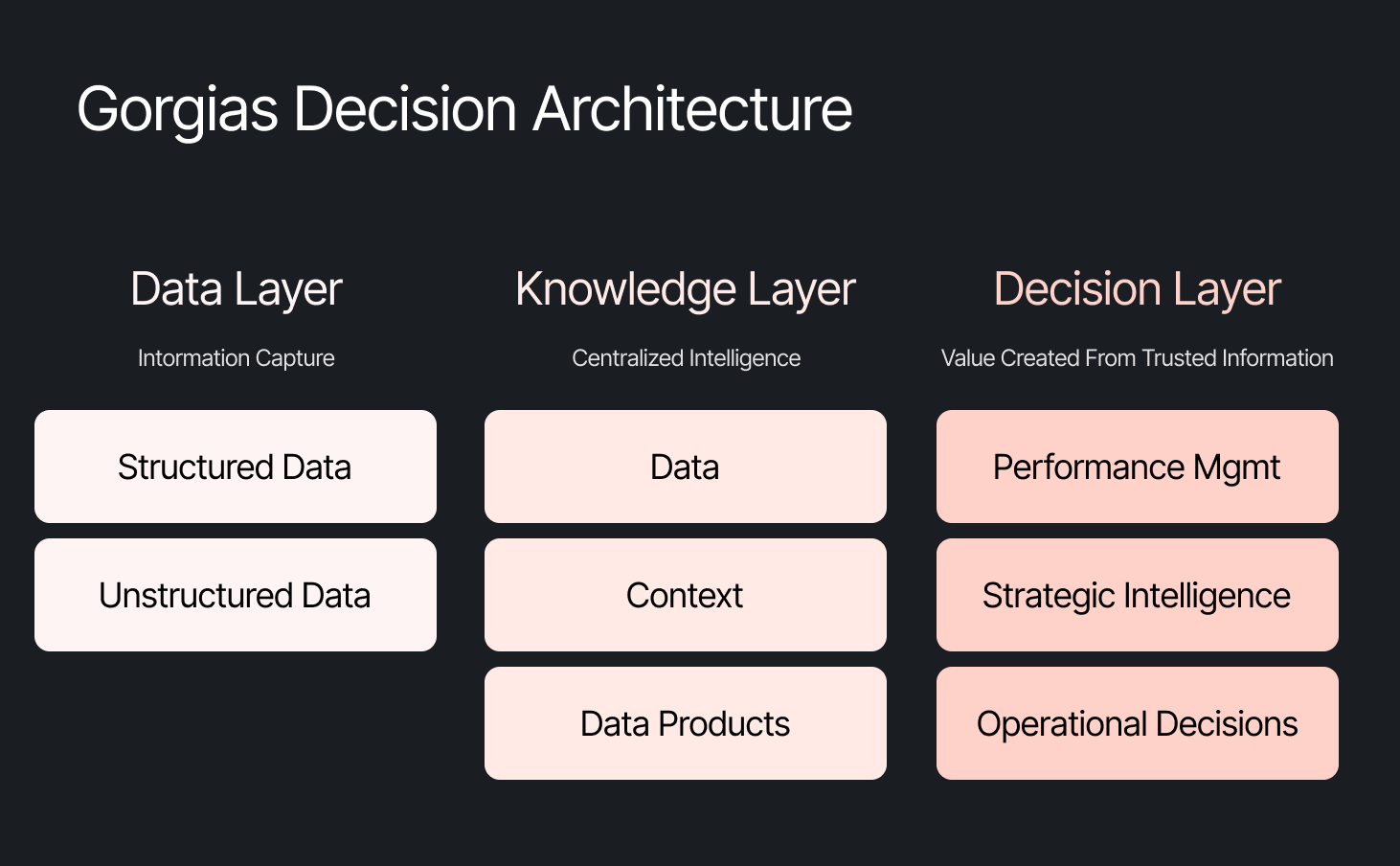
The framing problem most companies get wrong
The instinct across many companies today is to start with the model, pick a provider to solve a specific challenge, or invest heavily in getting the data right. All reasonable starting points, but most of them solve for one use case. Underneath that approach is a framing problem: seeing AI as an initiative — something you assign and measure. Seeing AI as another tool your company uses versus how your company operates.
We started somewhere different. Every company is built on four pillars: customers, people, product, and decisions. AI investments tend to place heavy emphasis on the first three. We started with the fourth. Our bet was that if we built everything around the need to make effective decisions first, asking what Gorgias needed to know to operate well, then our AI would become dramatically more powerful.
Cortex is that philosophy in practice
Cortex is our flagship internal AI agent, and the product where we established the tenets that now run through everything else we build: composable and modular infrastructure, governed context, and accessible from wherever decisions happen. Cortex lives in Slack, as well as across LLM vendors, in its own browser extension, and even on its own dedicated internal site.
Cortex doesn’t stop at answering questions. It can read and write to Notion, file Linear tasks, create HTML apps, automate signal delivery, and more. It operates across every layer of our stack, from dashboards to data pipelines, because we designed it as one integrated system. It is this connection that adds remarkable depth to what people can ask, and what they get in return.
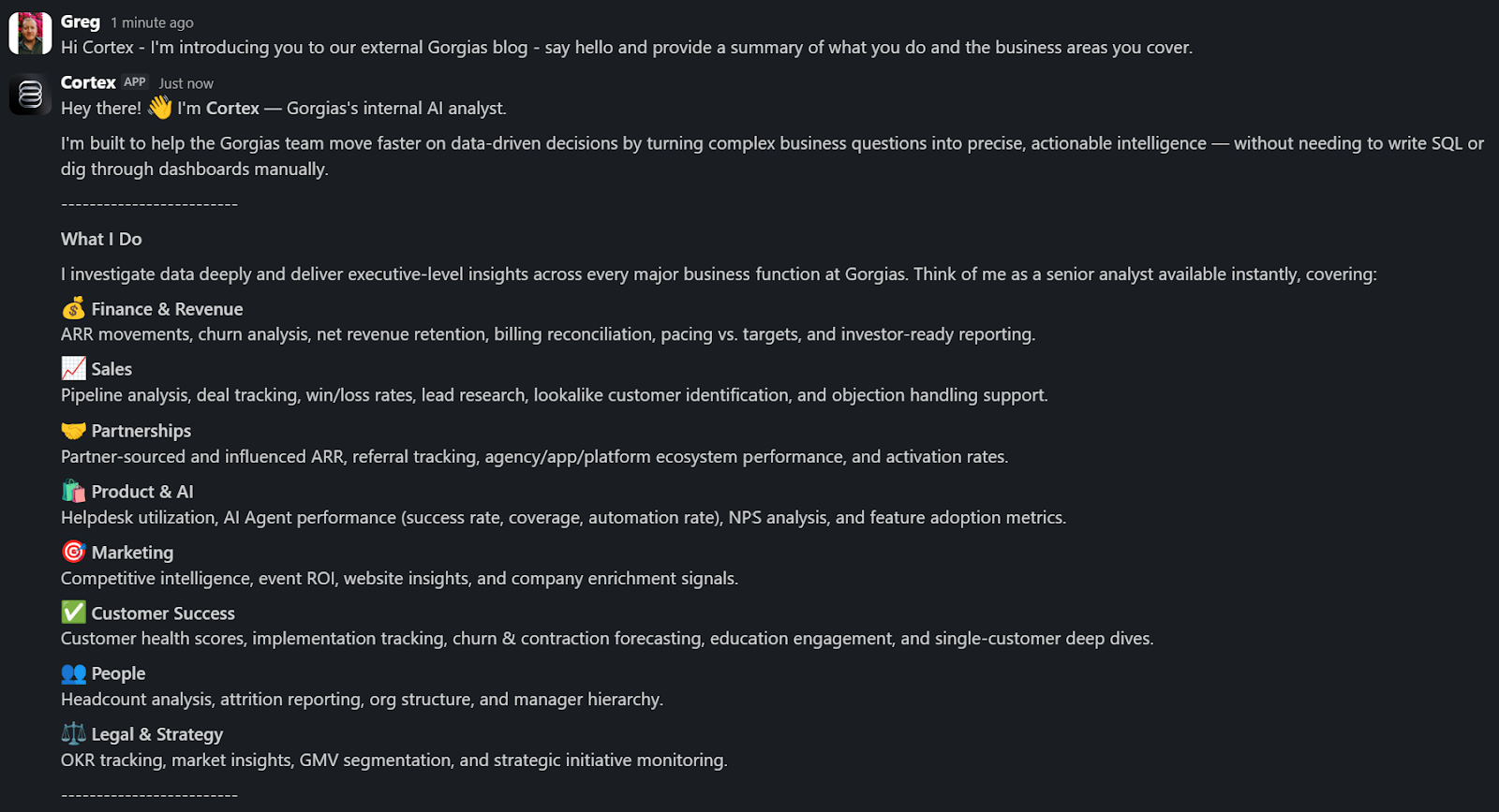
A Sales Lead is pitching and asks Cortex for the full picture of the merchant. In a customized PDF, Cortex lists coverage gaps, pre-sale intent signals, and product fit options. Everything the sales lead needs to walk in with confidence.
A Senior Product leader asks, "How are we performing against OKR #1, and what can my team do to help accelerate it?" Cortex returns a full ARR breakdown, projected end-of-month attainment, segment-level findings, and connects it all back to company-level strategies. A suite of recommendations customized to the leader, the performance, and the signals that bridge how they can support our goals. The kind of answer that used to take someone a week to put together.
These aren't simple lookup queries. They require deep business context spanning multiple areas. Cortex handles these because its Decision Engine gives it the information to reason against governed data, metric definitions, and business context, turning a generic answer into a credible one.
Overnight, teams have built Cortex into how they work. They’re spending less time searching and more time finding answers, not because they were told to, but because Cortex reduced the distance between question and decision.
Flexibility as the foundation
Cortex’s modular infrastructure allows us to experiment and add new capabilities freely. We’ve already built two more internal AI agents made for entirely different use cases, but using the same Decision Engine as Cortex.
GAIA, our internal experimentation AI Agent, helps our customers identify opportunities in their AI Agent Guidance design. It takes institutional knowledge across our teams and turns it into a scalable system that drives automation and value to our customers. Our CEO, Romain Lapeyre, has been its most vocal advocate since day one.
When we needed a platform for investor readiness and board preparation, we built Oracle. Our board decks and talk tracks are informed and built with the same AI, and our numbers are validated every step of the way.
We’re continuing to expand new AI agents internally, exploring how they can create value for customers and our own teams.
AI has transformed how data teams create value, and we’ve already shifted to account for it
When AI handles thousands of analytical questions each week, the highest-value work for a data team shifts permanently. Late 2025, we repositioned from a Data Analytics function into a Decision Intelligence function — a structural change in what we own and how we operate.
Today, our analysts focus on the most sensitive, complex, and forward-looking decisions and analyses. They partner more deeply with stakeholders by driving next steps from signals. They're even building entirely new capabilities that didn't exist in their role descriptions months ago. Things like AI skills for Cortex, context curation, and insight and recommendation delivery. The role of the analyst hasn't diminished. It's expanded to encompass the most meaningful work an analyst can do: driving outcomes and ensuring those decisions can achieve them.
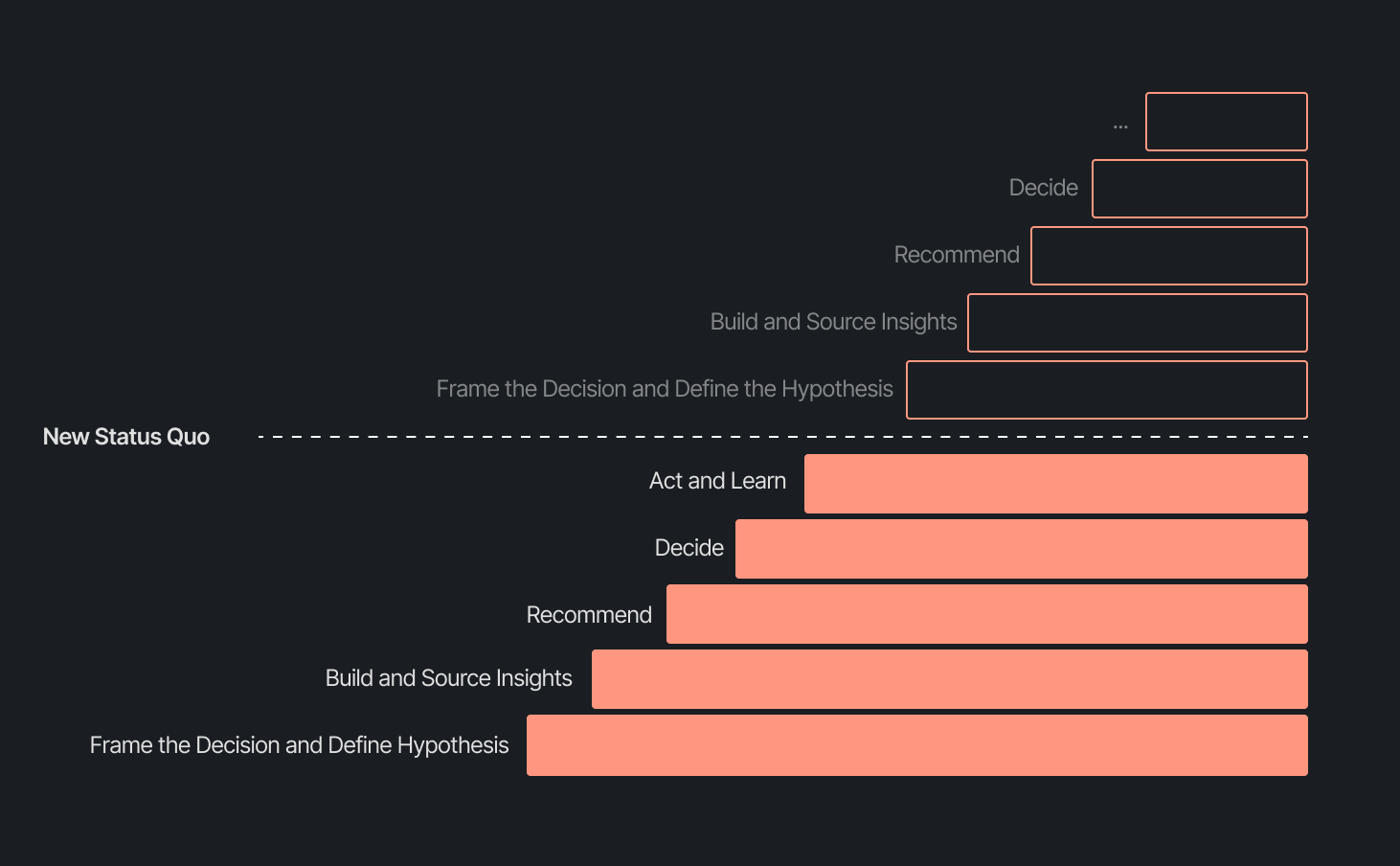
Our business support model has changed, too. Instead of embedding analysts and dedicated engineers within functional teams, we align capacity to the highest-impact company objectives and move fluidly across them. This model works even better because Decision Intelligence brings together both analytics and engineering teams under one roof.
Elliot Trabac leads our Data, Context and AI Engineering teams. The Decision Engine, Cortex, GAIA, and the platforms I've described exist because of the infrastructure his team innovated and built from the ground up. Noemie Happi Nono leads our Decision Strategy and Operations team, driving decision outcomes with stakeholders, advancing the development of Cortex skills and capabilities, and pushing into new areas of analysis every day.
Together, they're shaping what a modern data function looks like when AI becomes a standard building block for how a company operates.
What’s next for the Decision Intelligence team
The question of ROI is long gone. AI has opened the floodgates to more trusted and meaningful signals than ever. The natural next evolution is Proactive Intelligence, signals surfaced toward what you need to know, before you ask. And we're already building this because our architecture is designed to support it.
In the coming weeks, members of the Decision Intelligence team will go deeper into themes I've touched on here. Yochan Khoi, a Senior Analytics Engineer on our team, recently published a technical walkthrough of our context layer and will go further into building context strategies that scale. Others will cover infrastructure, analytical partnerships, evolving data assets into decision assets, and the cost and efficiency gains that make sustained AI investment viable.
AI hasn't changed the most important element of data and analytics functions — delivering outcomes — but it has raised the bar for what it looks like and how far we can take it. We’re just getting started.
TL;DR:
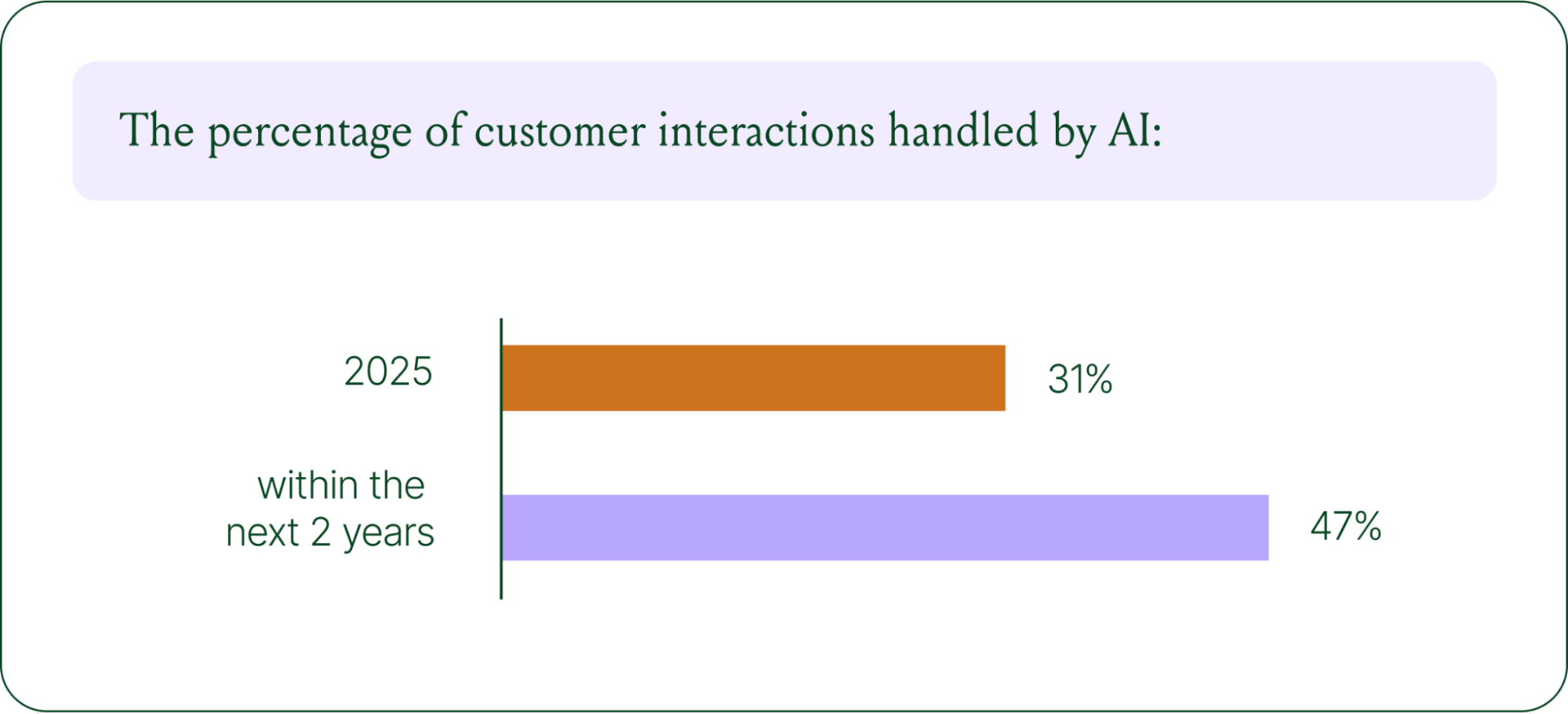
- AI is resolving tickets, not just replying. AI now handles 31% of customer interactions for ecommerce brands, and that number is expected to nearly double within two years.
- Every channel is becoming a storefront. Conversations are replacing the traditional browse-and-buy journey, with 79% of brands reporting sales from AI-driven interactions.
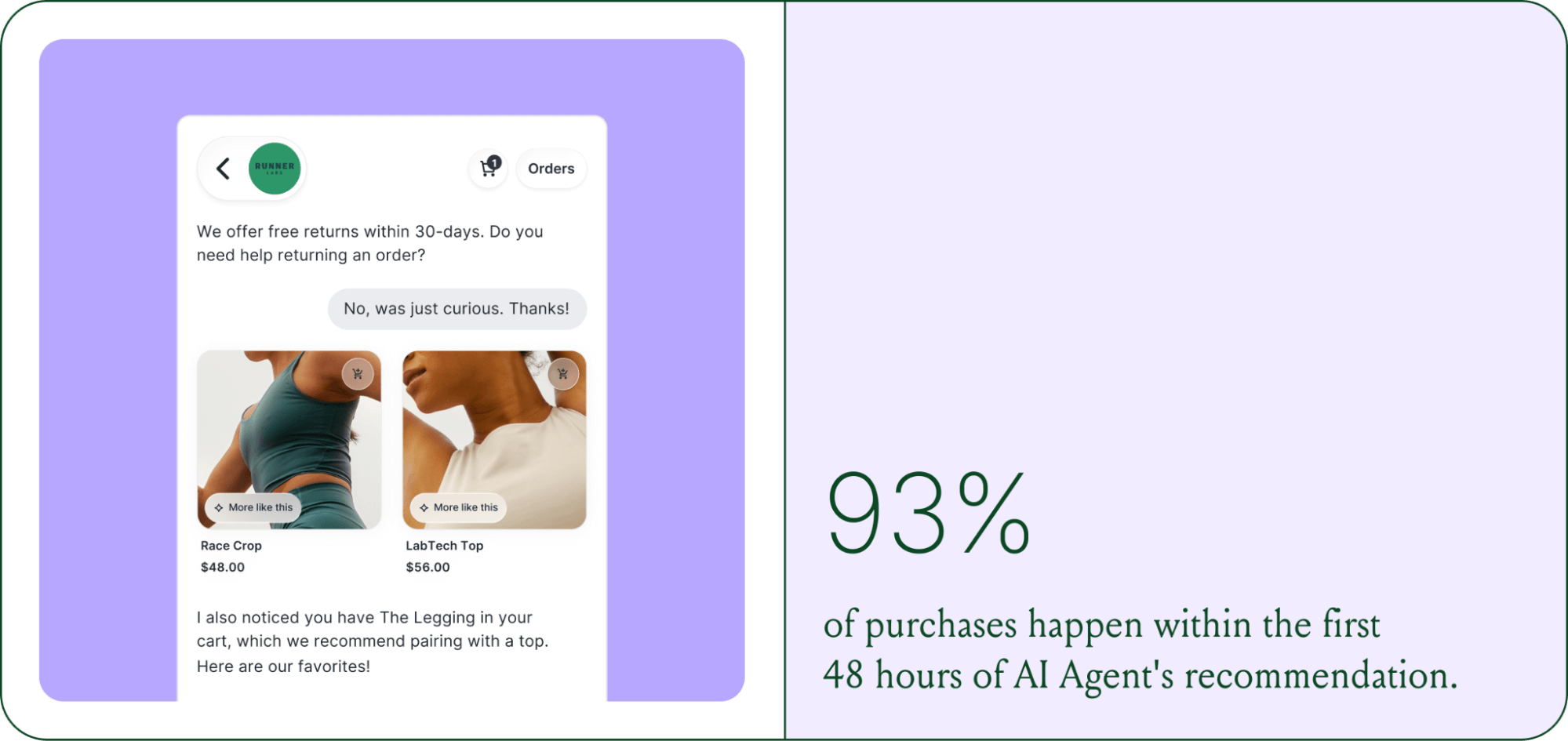
- AI is shortening the buying cycle. 93% of AI-influenced purchases happen within the first 48 hours of the conversation.
- CX teams are changing, not shrinking. Ecommerce brands are actively hiring for more technical roles to implement, coach, and maintain AI.
- The winning model is hybrid. AI handles volume and speed, while humans handle complexity and judgment.
The way shoppers buy online has shifted and customers are at the center.
They no longer want to scroll through product pages, dig through FAQs, or wait 24 hours for an email reply. They open a conversation, ask a specific question, and expect a useful answer in seconds. Brands that can’t deliver these experiences at scale are seeing customer hesitation turn into abandoned carts and lost revenue.
This shift has a name: conversational commerce. It's the practice of using real-time, two-way conversations as your primary sales channel, through chat, AI agents, messaging apps, and voice.
What started as an experiment for early adopters has become a key growth lever, with 84% of ecommerce brands treating conversational commerce as a strategic pillar this year vs. last year.
We surveyed 400 ecommerce decision-makers across North America, the U.K., and Europe to understand how conversational commerce and AI are reshaping the ecommerce landscape. These findings are complemented by aggregated and anonymized internal Gorgias platform data from 16,000+ ecommerce brands.
The State of Conversational Commerce in 2026 trends report breaks down all of the findings, including five key trends shaping the ecommerce landscape.
{{lead-magnet-1}}
Trend 1: AI is table stakes for ecommerce and it’s no longer just about efficiency
A few years ago, adding an AI chatbot to your site that could provide tracking links and Help Center article recommendations was a differentiator. Today, it's table stakes. McKinsey found that 71% of shoppers expect personalized experiences, and 76% get frustrated when they don't get them.
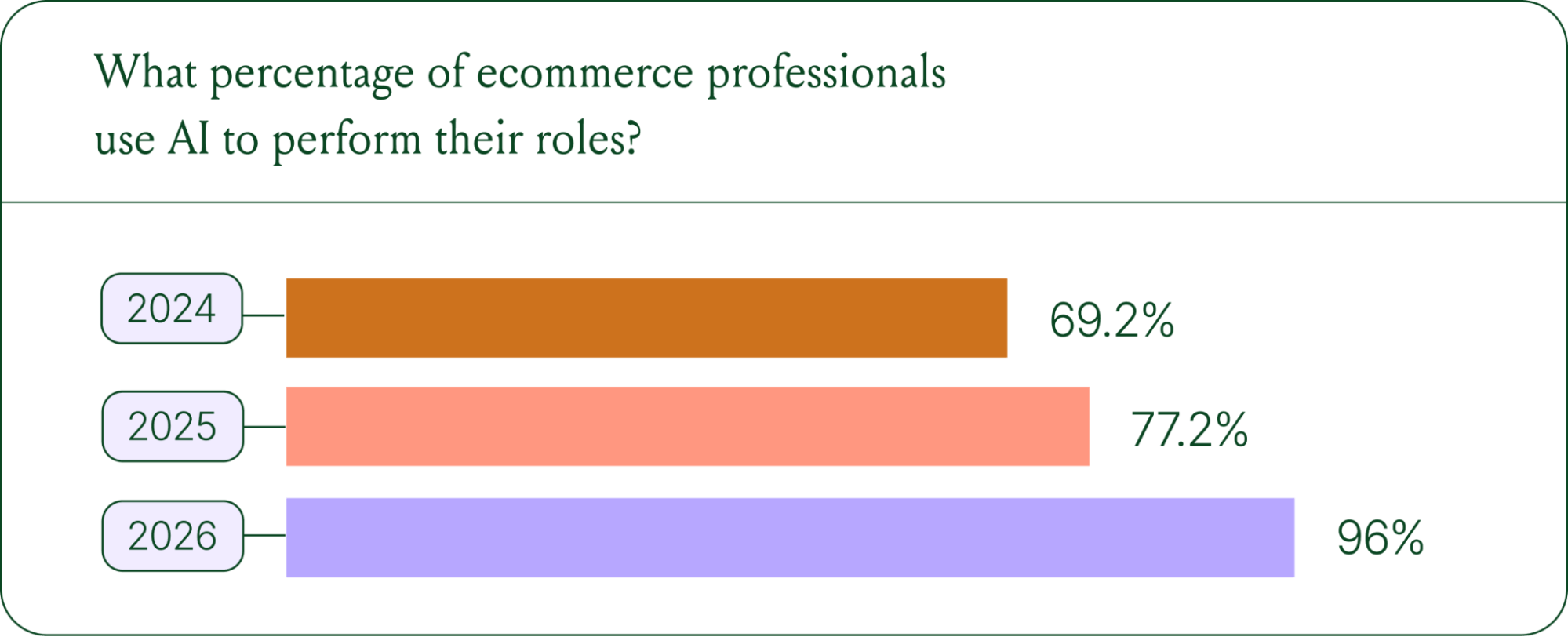
Right now, most ecommerce professionals use AI, with 93% having used it for at least 1 year. Enthusiasm is accelerating quickly, with only 30% of ecommerce professionals rating their excitement for AI at 10/10 in April 2025. Similarly, while AI adoption rose steadily year over year, it reached a clear peak in 2026.
The use cases driving this adoption are practical and high-volume:
- Order tracking and status updates
- Returns, exchanges, and refund requests
- Shipping FAQs and delivery estimates
These are the tickets that flood brands’ inboxes every day. AI agents resolve them instantly, without pulling teams away from conversations that actually require human judgment.
Explore AI adoption and use case data in more depth in the full report.
Trend 2: Conversations are the new path to checkout
The traditional ecommerce funnel, visit site, browse products, add to cart, check out, is losing ground. Shoppers now discover products on Instagram, ask questions via direct message, and complete purchases without ever visiting a website.
Conversational AI is actively increasing revenue, with 79% of brands reporting that AI-driven interactions have increased sales and conversion in their business.

The practical implication is that every channel is becoming a storefront. Creating personalized touchpoints with customers earlier in the journey, through proactive engagement, is impacting the bottom line.
Read the full report to explore how AI conversions have increased QoQ by industry.
Trend 3: AI is accelerating the purchase cycle
Pre-purchase hesitation is one of the biggest conversion killers in ecommerce. A shopper lands on your product page, has a question about sizing or compatibility, can't find the answer quickly, and leaves. That's a lost sale that had nothing to do with your product.
Conversational AI changes that dynamic. When a shopper can ask a question and get an accurate, personalized answer in real time, the friction disappears.
Brands using Gorgias saw this play out at scale in 2025. When AI Agent recommended a product, 80% of the resulting purchases happened the same day, and 13% happened the next day.
Brands are further accelerating the buying cycle through proactive engagement. On-site features such as suggested product questions, recommendations triggered by search results, and “Ask Anything” input bars drove 50% of conversation-driven purchases during BFCM 2025.
Explore how AI is collapsing the purchase cycle in Trend 3 of the report.
Trend 4: AI is making CX teams more technical
There's a persistent narrative that AI is making CX teams redundant. The data tells a different story. 62% of ecommerce brands are planning to grow their teams, not cut them. But the scope of those teams is changing.

New roles are emerging around AI configuration and quality assurance. Teams are investing in technical members to write AI Guidance instructions, develop tone-of-voice instructions, and continuously QA results.
CX teams are also bridging the gap between support goals and revenue goals, as the two functions increasingly overlap.
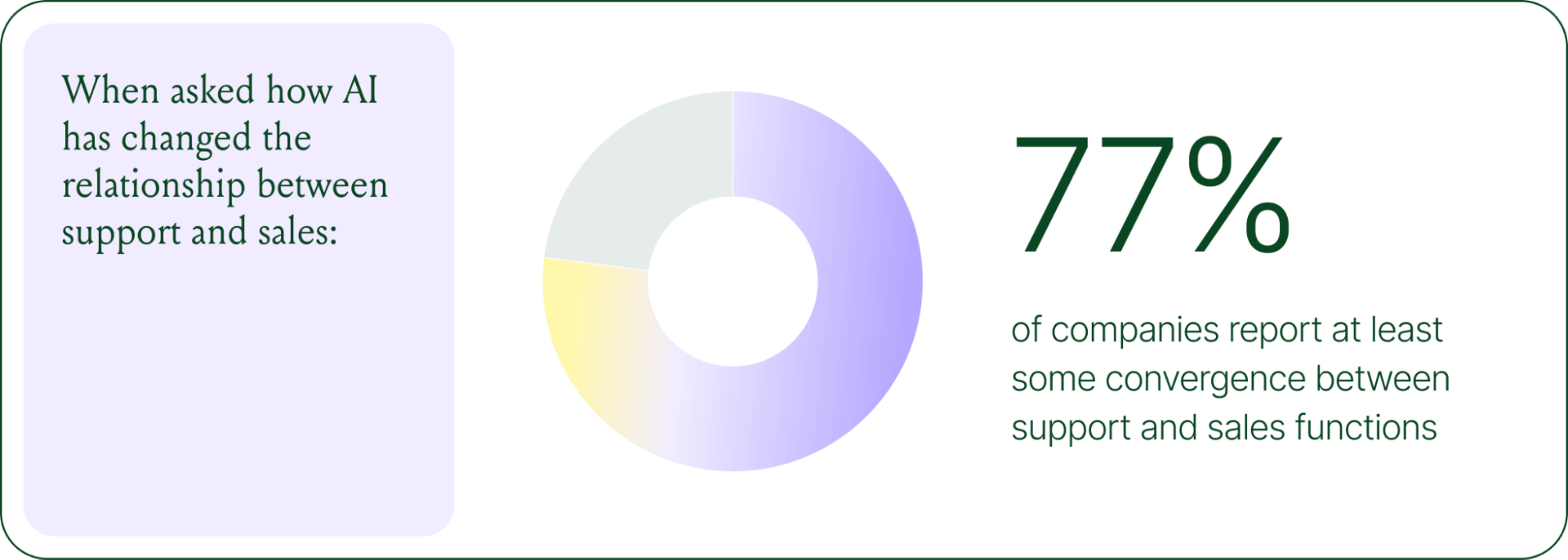
The result is CX teams that are more technical than they were before. Agents who once spent their days answering repetitive tickets are now spending that time on higher-value work: complex escalations, VIP customer relationships, and improving the AI systems and knowledge bases that handle the volume.
Learn more about the evolution of CX roles in Trend #4.
Trend 5: The future is hybrid: AI-first, humans when it counts
Despite increasing AI adoption, data shows that ecommerce brands shouldn’t strive for 100% automation. Winning brands are building systems in which AI handles repetitive tier-1 tickets, and humans handle complex, sensitive cases.

AI handles speed and scale. It resolves order-tracking requests at 2 a.m., processes return-eligibility checks in seconds, and answers the same shipping question for the thousandth time without compromising quality.
Human agents handle conversations that require context, empathy, or decisions that fall outside the standard playbook. There are several topics where shoppers still prefer human support.
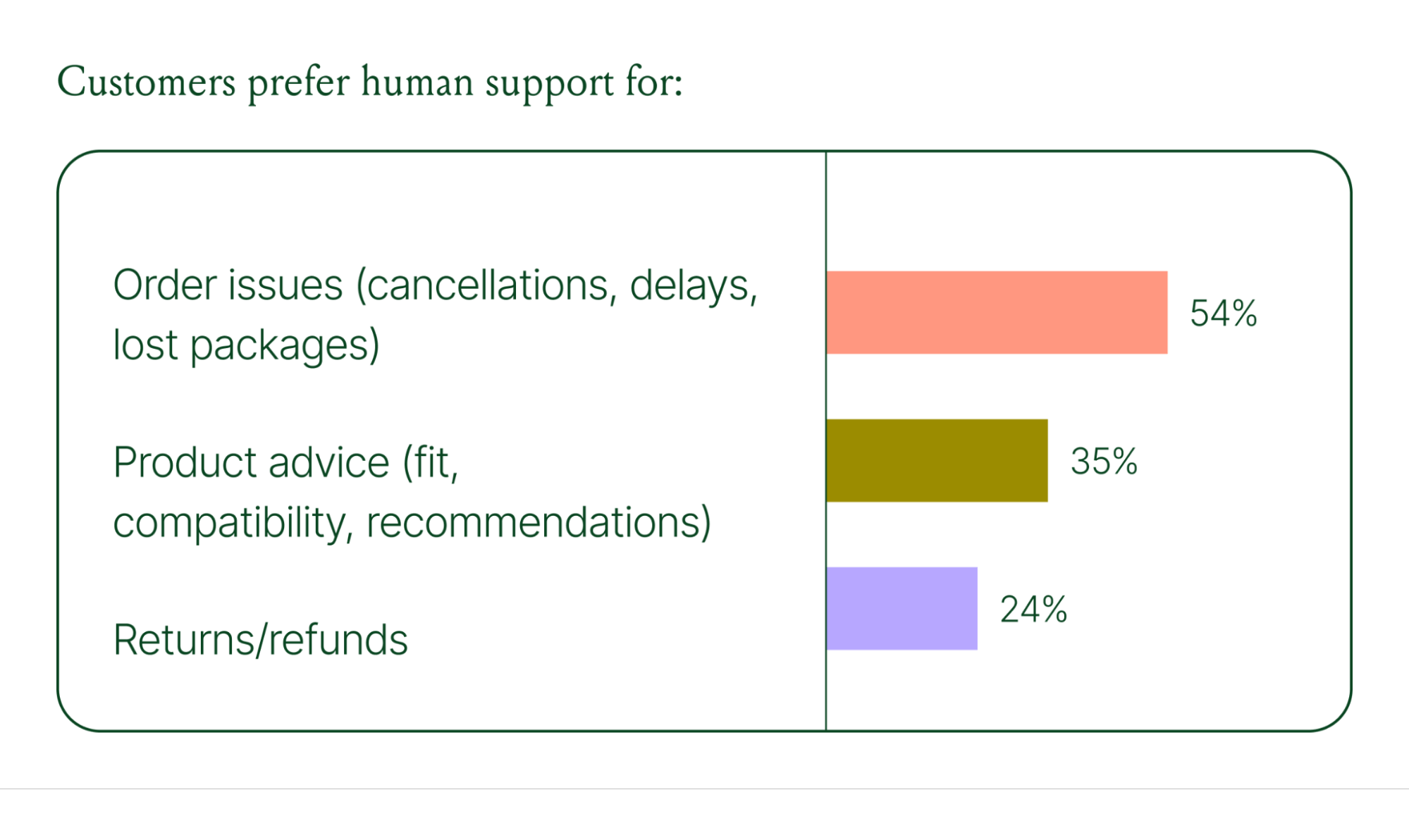
Successful hybrid systems require continuous iteration, meaning reviewing handover topics, Guidance, and reviewing AI tickets on a weekly basis.
Discover how leading brands are balancing human and AI systems in Trend #5.
Where conversational commerce is heading by 2030
The 2026 trends are about expansion and standardization. The 2030 predictions are about what comes next.
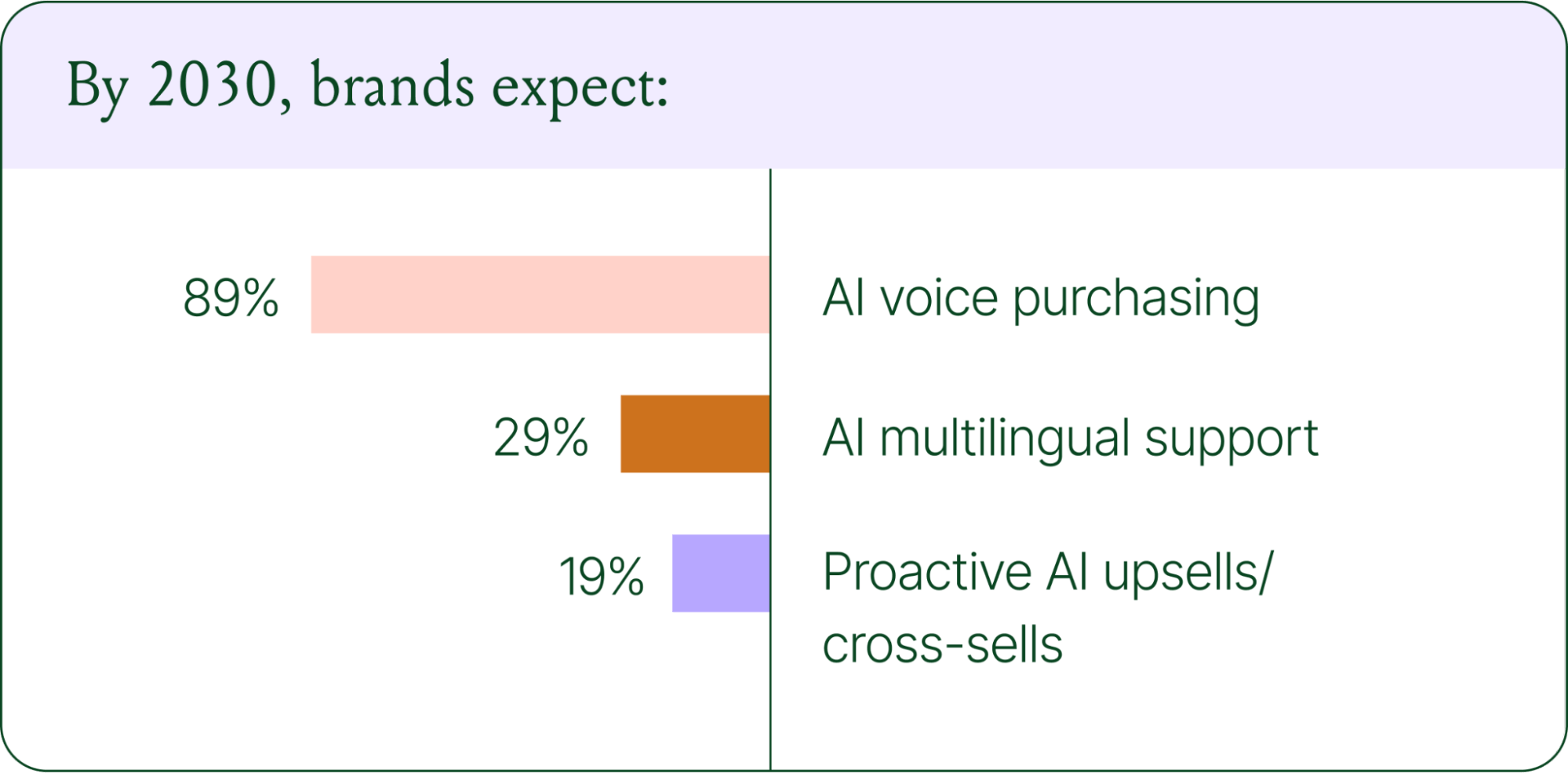
Voice-based purchasing is the biggest bet on the horizon. Only 7% of brands currently use voice assistants for commerce, but 89% expect it to be standard by 2030. The vision is a customer who can reorder a product, check their subscription status, or manage a return entirely over the phone.
Proactive AI is the other major shift. Rather than waiting for a customer to reach out, AI will anticipate needs based on browsing behavior, purchase history, and where someone is in their relationship with your brand. Think of it as the digital equivalent of a sales associate who remembers what you bought last time and knows what you're likely to need next.
Explore where ecommerce brands are allocating their AI budgets in the full report.
Start building your conversational commerce strategy today
The brands winning in 2026 are creating smart, scalable systems where AIhandles volume and humans handle nuance. They’re treating every conversational channel as an opportunity to serve and sell.
The data is clear: AI adoption is accelerating, customer expectations are rising, and the revenue impact of getting this right is measurable.
{{lead-magnet-1}}
Newsletter Signup
The best in CX and ecommerce, right to your inbox
Featured articles

Conversations Are Becoming a Revenue Channel: The Data Proves It
TL;DR:
- Customer journeys are collapsing to a single conversation. The traditional browse-and-buy journey is giving way to AI-guided shopping that moves from discovery to purchase in a single exchange.
- 79% of brands say AI-driven conversational commerce has increased their sales and purchase rates.
- AI-only influenced orders grew 63% in a single year, from 2.7 million in Q1 to 4.4 million in Q4.
- Brands treating conversation as a revenue channel. They’re not just a support function, generating higher AOV, shorter buying cycles, and stronger retention.
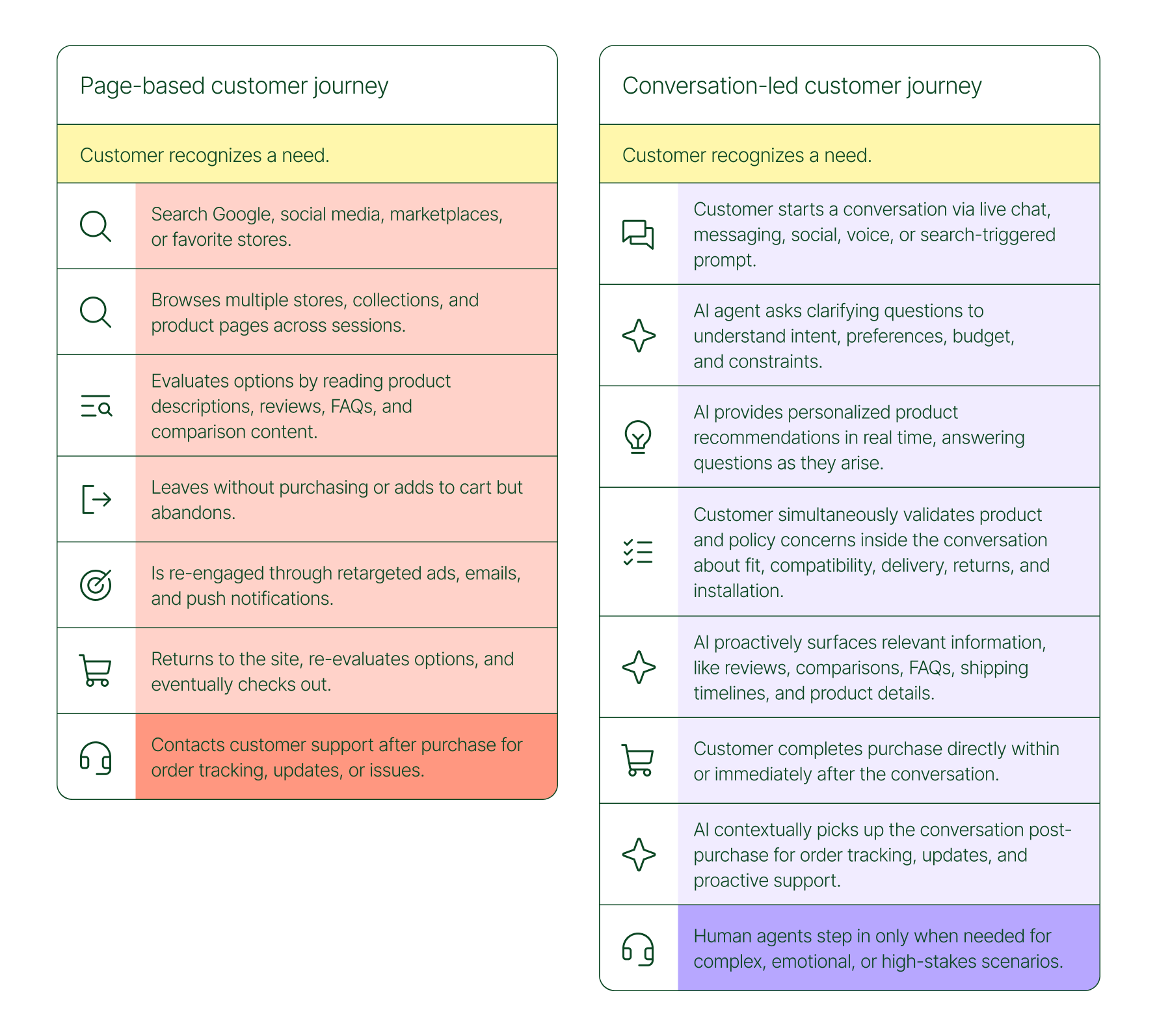
The page-based shopping experience dominated for decades. Customers would search, browse, compare, abandon, get retargeted, return, and eventually buy (sometimes).
That journey is no longer the only option.
Shoppers are turning to chat, messaging, and AI-powered tools to find what they need. Instead of clicking through product pages or reading static FAQs, they ask questions, have back-and-forth conversations, and get answers that move them closer to a purchase in real time. The path to checkout has changed, and the brands that recognize this are pulling ahead.
Read our 2026 State of Conversational Commerce Report to learn more about conversation commerce trends from 400 ecommerce decision-makers and 16,000+ ecommerce brands using Gorgias.
{{lead-magnet-1}}
The shopping journey has collapsed into a single thread
The traditional shopping journey was a solo experience. A shopper had a need, searched for options, browsed across sessions, and eventually made a decision — often days later, after being retargeted multiple times. Support only entered the picture after the purchase.
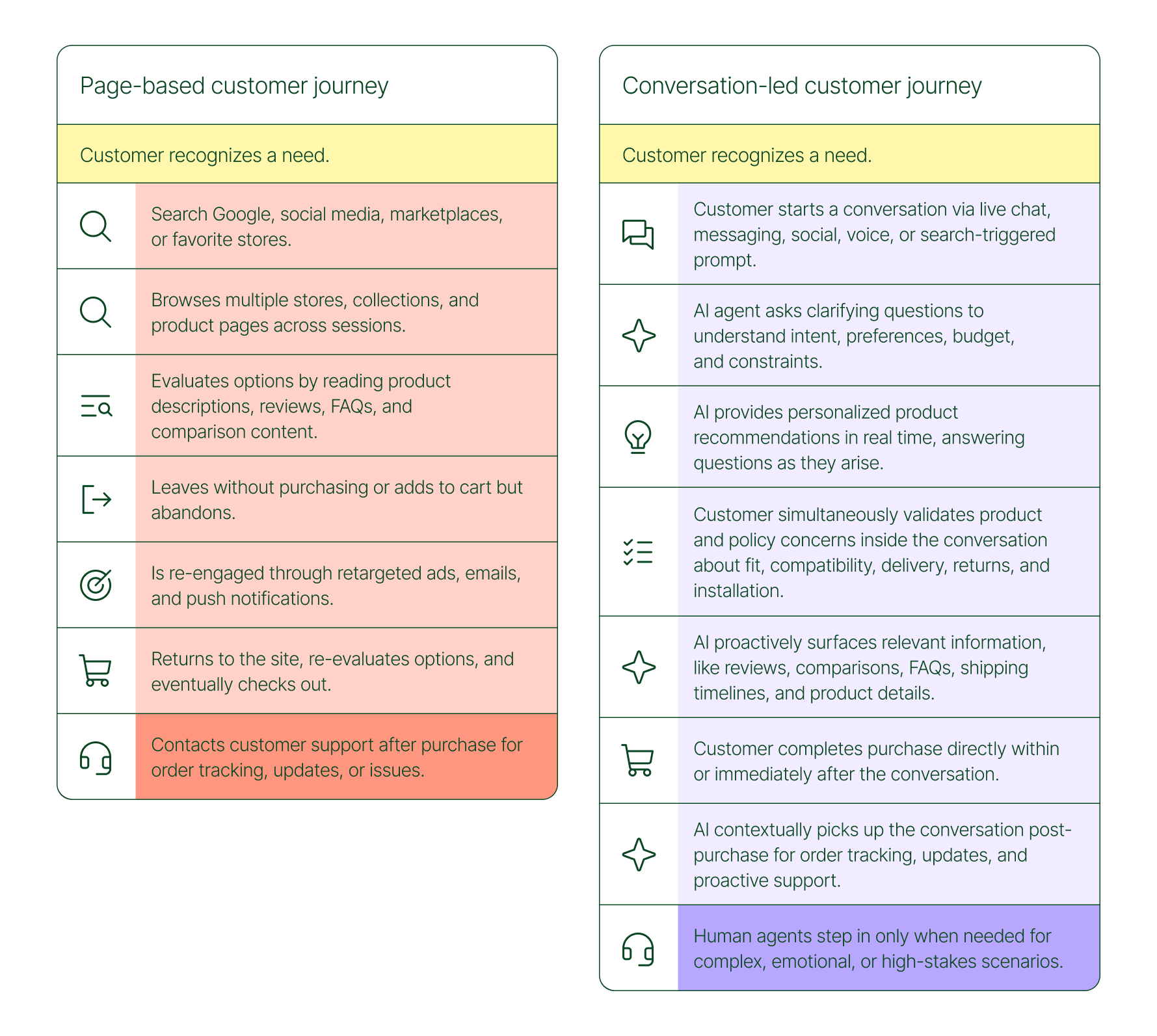
The conversation-led journey collapses that timeline:
- A shopper recognizes a need and starts a conversation via chat, messaging, or a search-triggered prompt
- An AI agent asks clarifying questions about preferences, budget, and constraints
- The AI provides personalized product recommendations in real time
- The shopper validates concerns about fit, compatibility, delivery, and returns, all inside the conversation
- The shopper completes the purchase directly within or immediately after that exchange
- The AI picks up the conversation post-purchase for order tracking and proactive support
- A human agent steps in only when the situation calls for it
What used to take days now takes minutes. Discovery, evaluation, and purchase happen in a single thread.
Conversation is a revenue strategy, not a support upgrade
79% of brands agree that AI-driven conversational commerce has increased sales and purchase rates in their business. When brands were asked to rank the highest-return areas:
- 38% cited improved customer support efficiency
- 23% pointed to higher customer retention and loyalty
- 20% saw improved purchase rates
Those numbers reflect something important: the value of conversation compounds. Faster support reduces friction. Better retention raises lifetime value. More confident shoppers buy more often and spend more per order.
The brands seeing the biggest returns aren't just using AI to deflect tickets. They're using it to create one-to-one shopping experiences at scale.
What the data shows about AI-influenced orders
Looking at AI-only influenced orders across key verticals like Apparel and Accessories, Food and Beverages, Health and Beauty, Home and Garden, and Sporting Goods, the growth across a single year was significant.
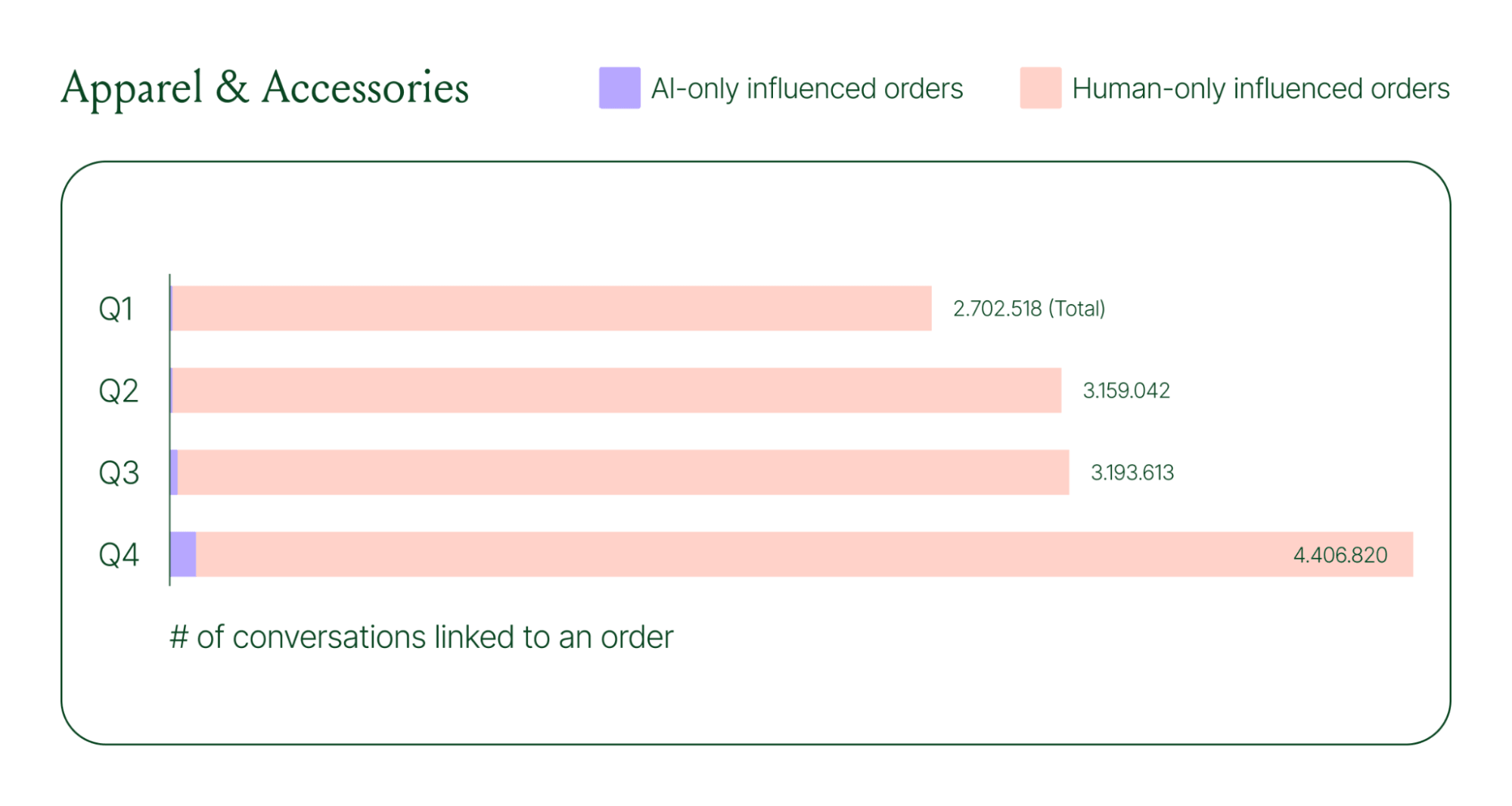
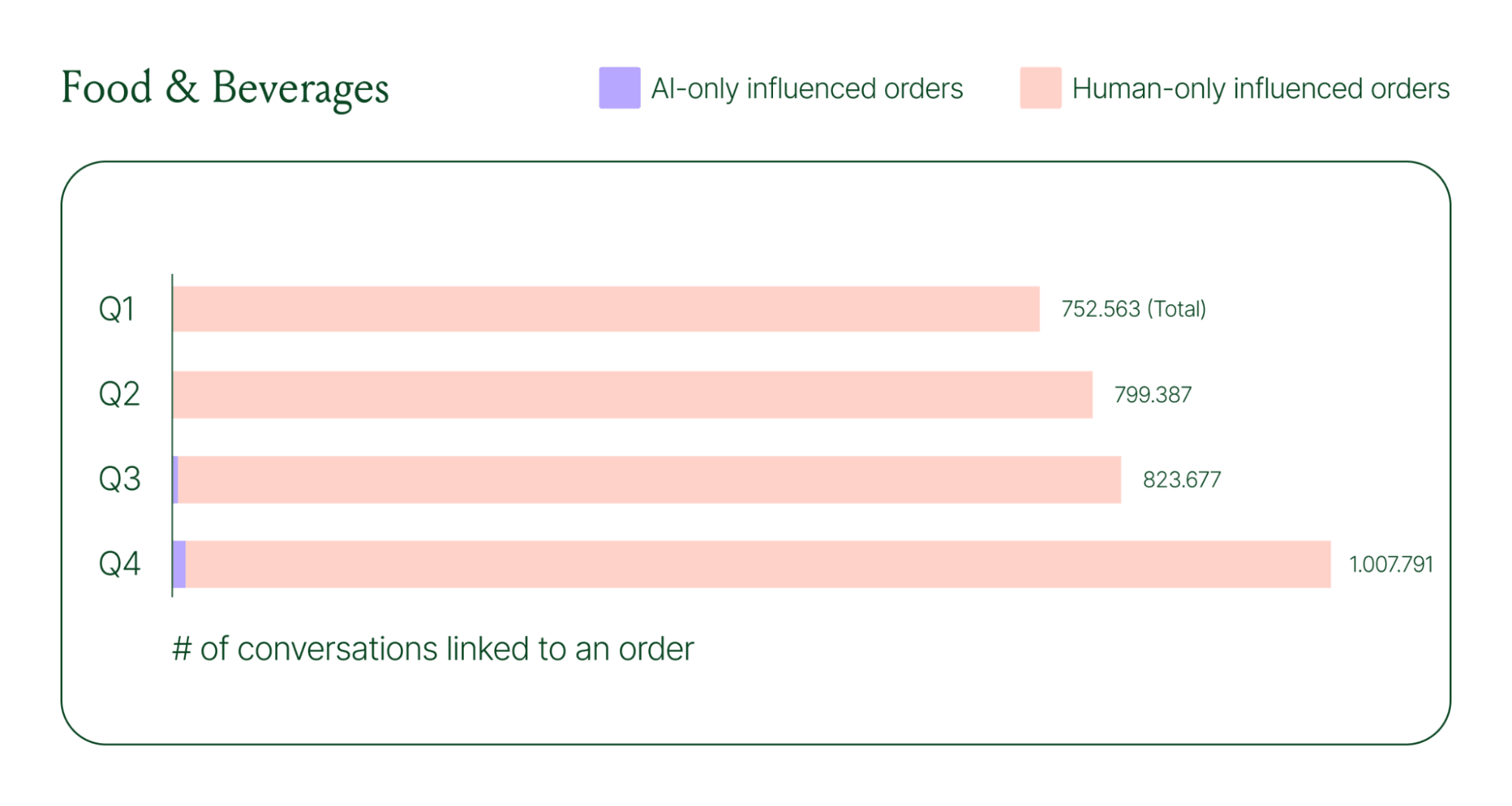
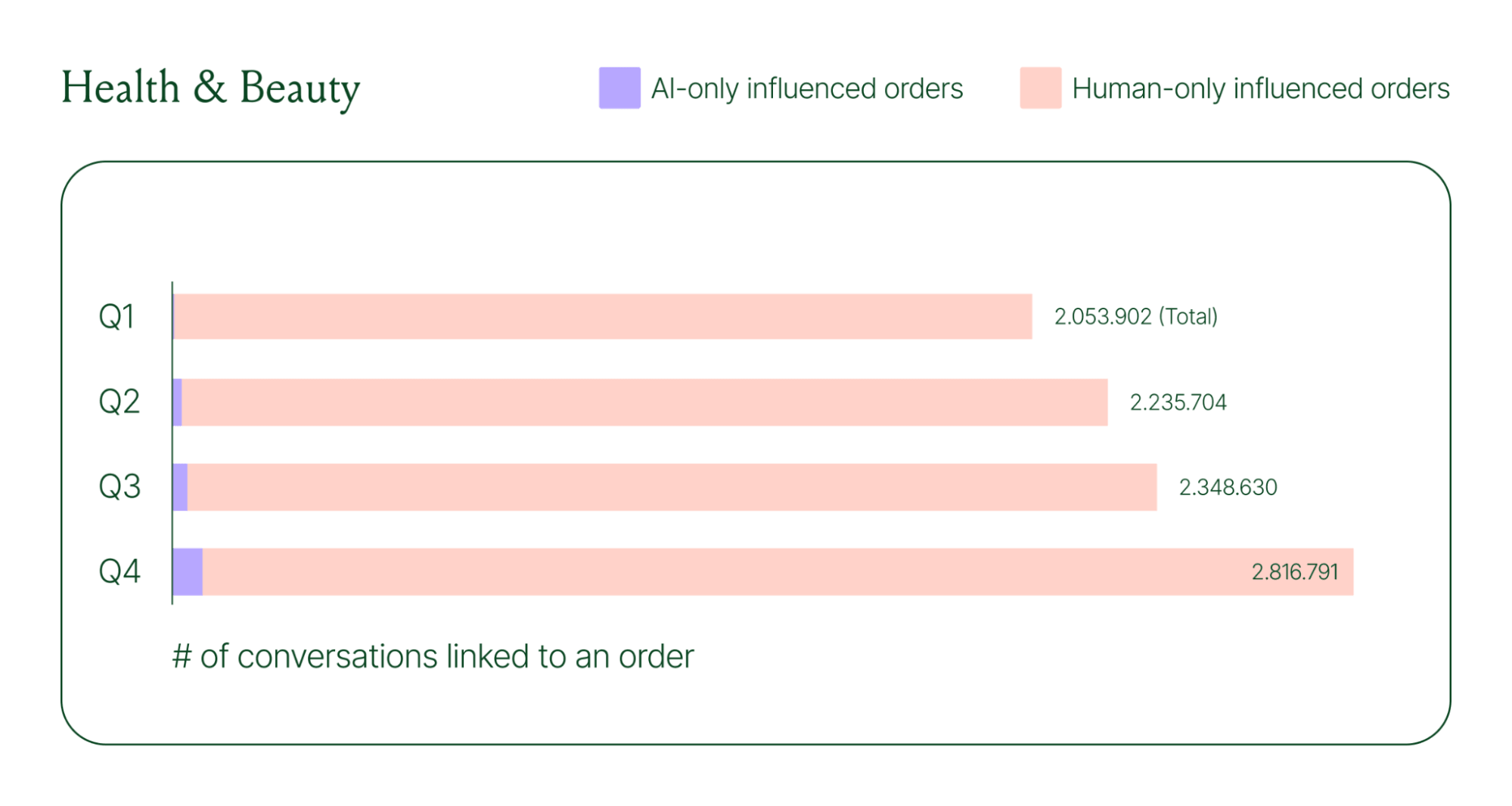
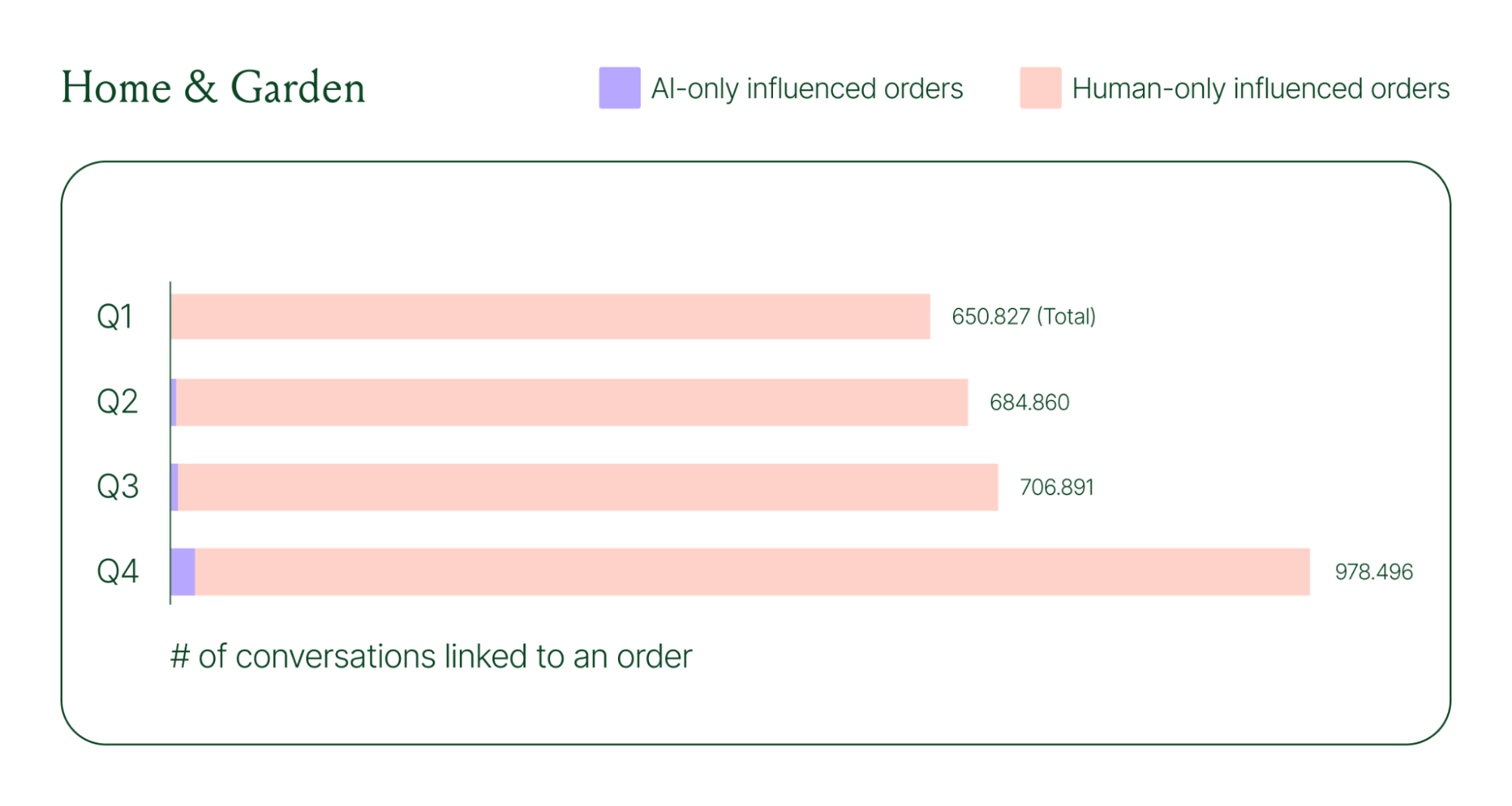
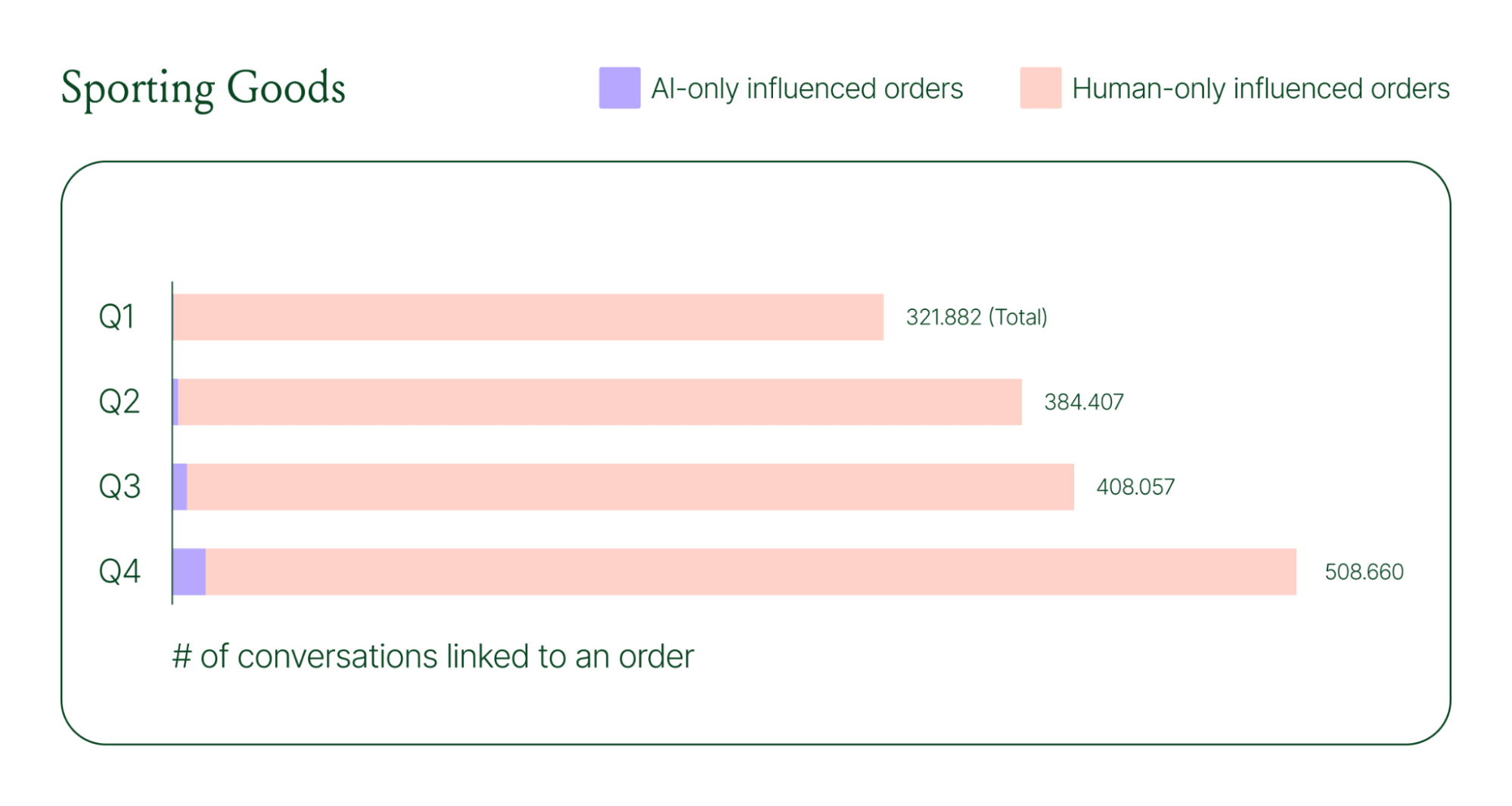
Across industries, ecommerce brands saw AI step into conversations, reduce shopper hesitation, and drive higher QoQ conversion rates.
Learn more about AI-powered revenue generation in the full 2026 Conversational Commerce Report.
Why brands are making this a strategic priority
84% of brands say the strategic importance of conversational commerce is higher than it was a year ago. 82% agree it will be mainstream in their sector within two years.
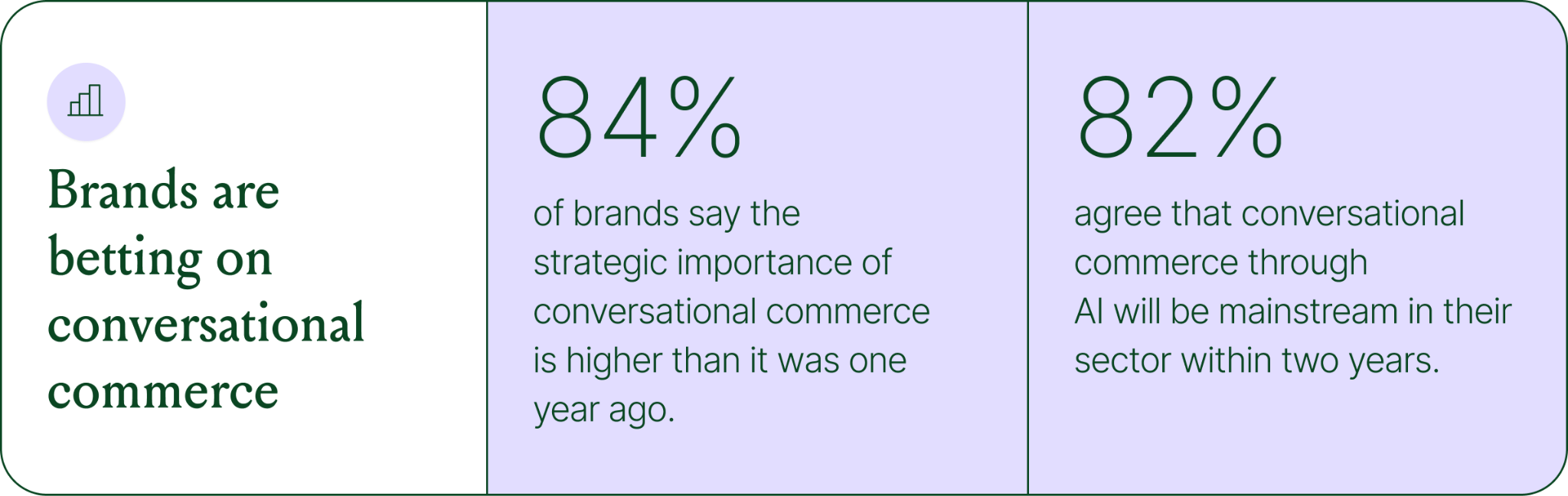
That shift is registering at the leadership level because of what conversational commerce does to the buying experience. Creating one-to-one touchpoints earlier in the journey drives higher AOV, shorter buying cycles, and stronger purchase rates. Shoppers who get real-time answers to their questions are more confident.
What this looks like in practice: TUSHY
TUSHY, known for eco-friendly bidets and bathroom essentials, is a useful example of what happens when you take conversational commerce seriously.
Bidets aren't an impulse purchase. Shoppers have real questions about fit, compatibility, and installation. Those questions used to go unanswered until the CX team could respond, often after the customer had abandoned the cart.
TUSHY used Gorgias's AI Agent and shopping assistant capabilities to automate pre-sales support. AI Agent engaged shoppers in real-time conversations, addressed their concerns directly, and built confidence at the moment of highest intent.
This resulted in a 190% increase in chat-based purchases, a 13x return on investment, and twice the purchase rate of human agents.
How to apply this to your strategy
You don't need to overhaul your entire operation to start seeing results. The most effective approach is to start where the impact is clearest and expand from there.
A few places to begin:
- Pre-sales chat. Identify your most common pre-purchase questions (sizing, compatibility, shipping timelines) and ensure your AI can answer them confidently and promptly.
- Product page engagement. Use proactive chat prompts triggered by page behavior to start conversations before shoppers leave.
- Post-purchase follow-up. Let AI pick up the conversation after checkout with order updates and proactive support, reducing inbound volume and building trust.
- Human escalation. Define clearly which situations require a human agent – complex issues, emotional exchanges, high-stakes decisions.
Want to see the full picture of where conversational commerce is headed in 2026? Read the full report to explore the data, trends, and strategies shaping the next era of ecommerce.
{{lead-magnet-1}}
AI Is Table Stakes for Ecommerce: What the Data Tells Us About 2026
TL;DR:
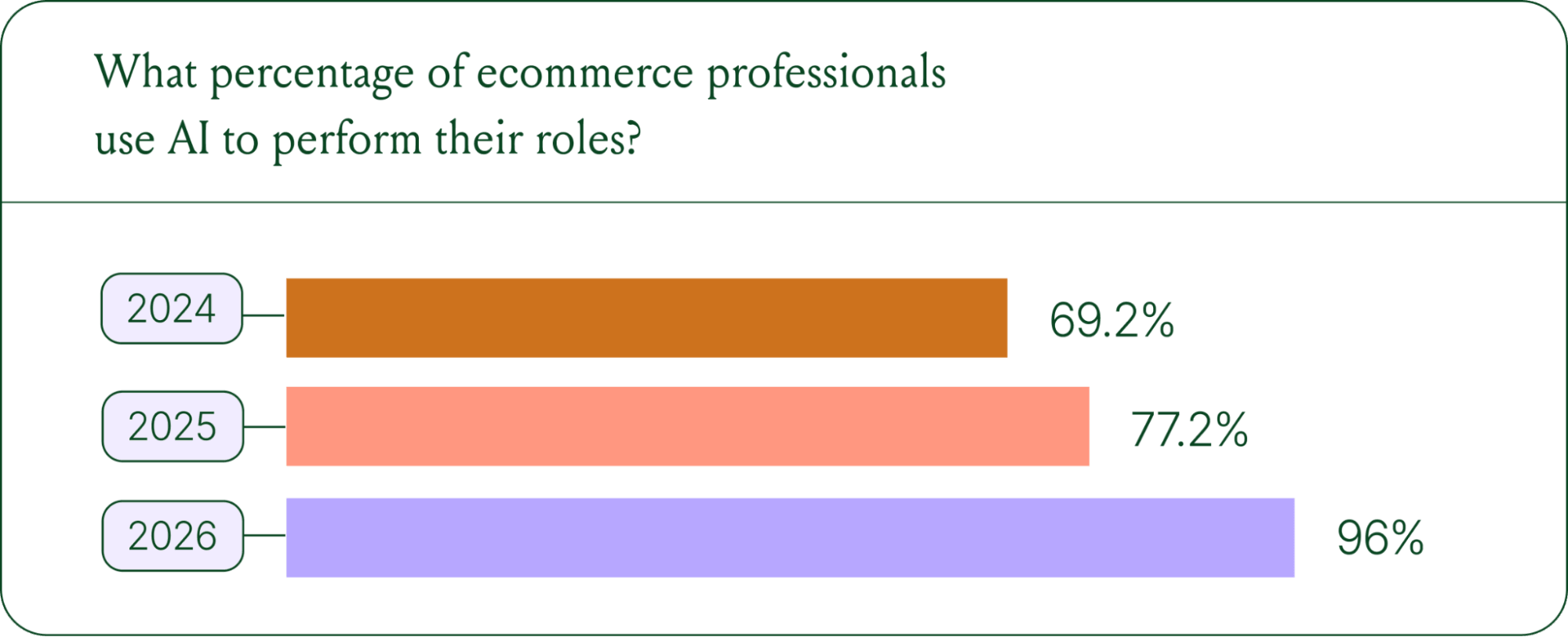
- AI adoption is rapidly accelerating. 96% of ecommerce professionals now use AI in their roles, up from 69% in 2024.
- AI has moved beyond support automation. Use cases have evolved into revenue generation, personalization, and logistics.
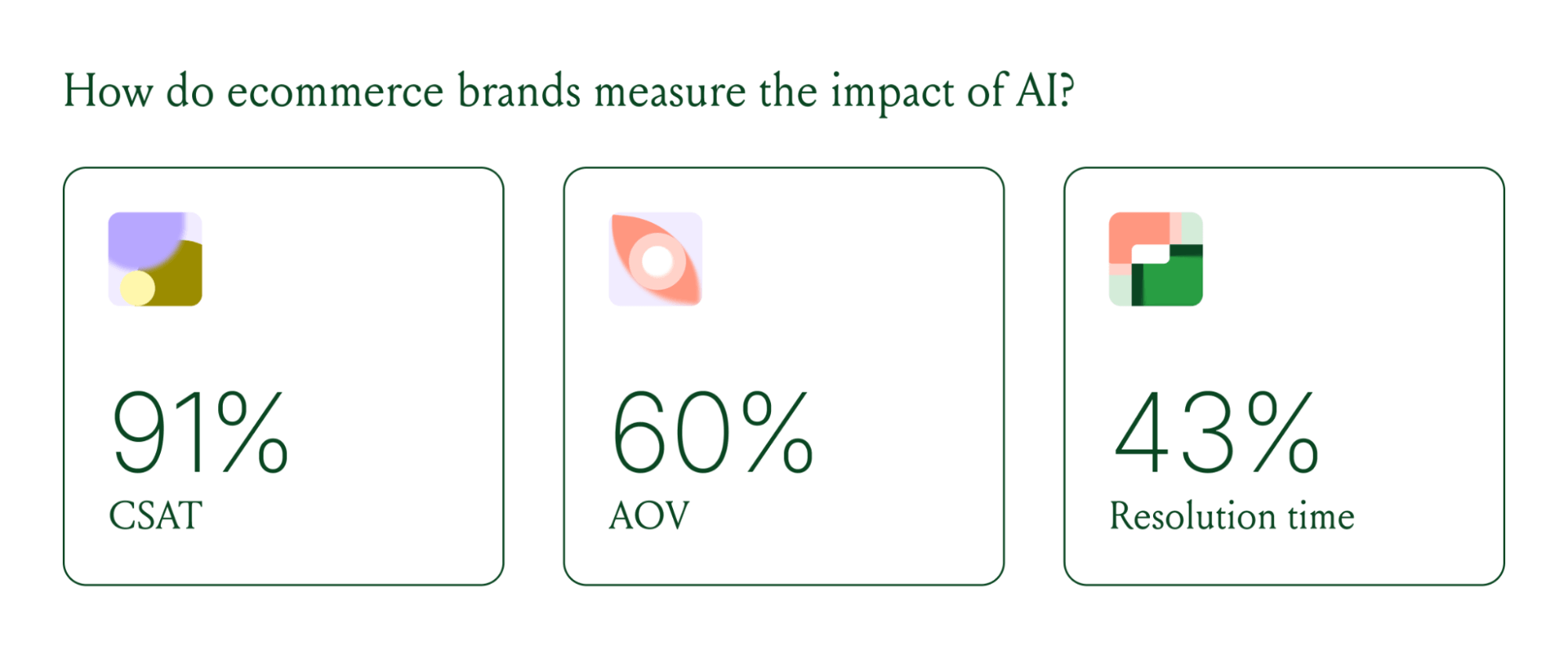
- Brands are tying AI success to profit-and-loss outcomes. 60% of brands consider AOV a top indicator of AI effectiveness.
A year ago, ecommerce brands were still debating whether AI was worth the investment. That debate is over. Today, nearly every ecommerce professional uses AI to do their job.
The shift isn't just about adoption. It's about what AI is used for and how brands measure its impact. Support automation was the entry point. Now, AI is embedded across the full operation, from product recommendations to inventory control to real-time shopping conversations.
In our 2026 State of Conversational Commerce Report, we break down trends on AI usage among 400 ecommerce decision-makers and 16,000+ ecommerce brands using Gorgias.
{{lead-magnet-1}}
AI adoption has reached a tipping point
If we rewind 12 months ago, the industry was still split on AI. Some ecommerce professionals were excited, but most were still hesitant. In 2024, 69% of ecommerce professionals used AI in their roles. By 2025, that number reached 77%. In 2026, it hit 96%.
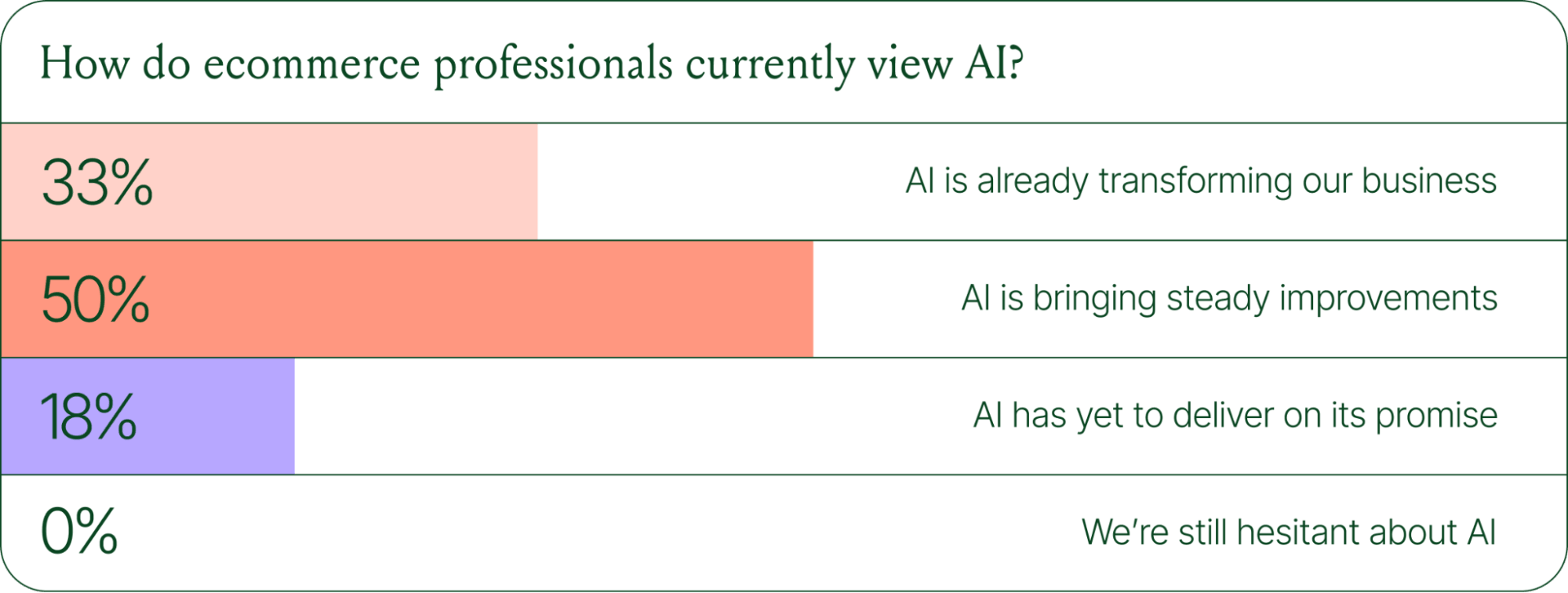
The confidence numbers back it up. 71% of brands say they are confident using AI for ecommerce, and 73% are satisfied with its business impact.
In early 2025, only 30% of ecommerce professionals rated their excitement for AI at 10/10. Today, zero percent of respondents describe themselves as hesitant about AI.
AI use cases now span the full ecommerce stack
Using AI in ecommerce is not new. In fact, it dates back to the 1980s with the invention of algorithms and expert systems. And if you’ve ever leveraged similar product recommendations or chatbots, you’ve already integrated AI into your ecommerce stack.
Modern AI is far more sophisticated.
With the rise of agentic commerce and conversational AI, brands began leveraging AI agents to automate the processing of repetitive support tickets. That’s still happening today, but the scope has expanded beyond the support queue.
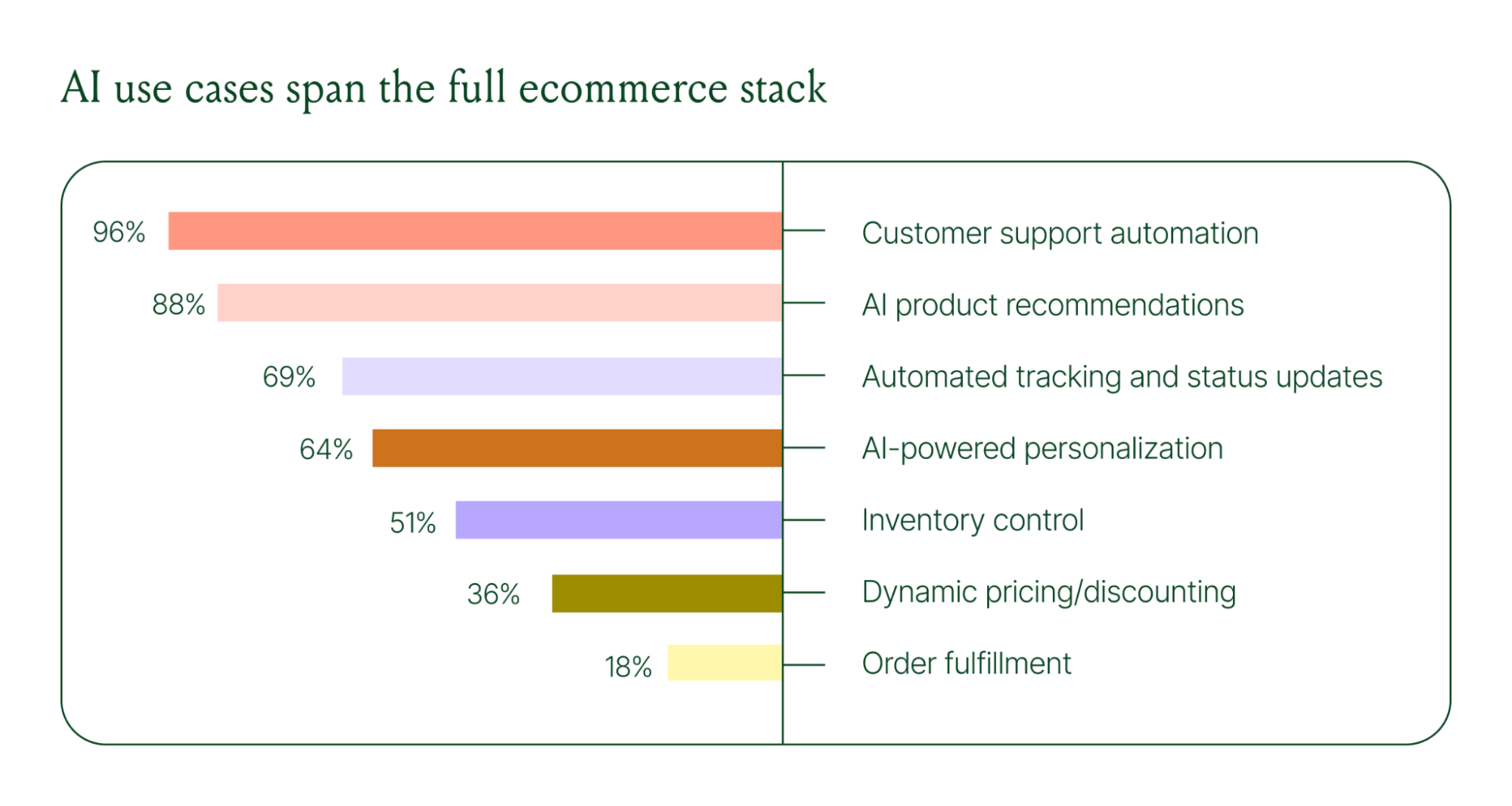
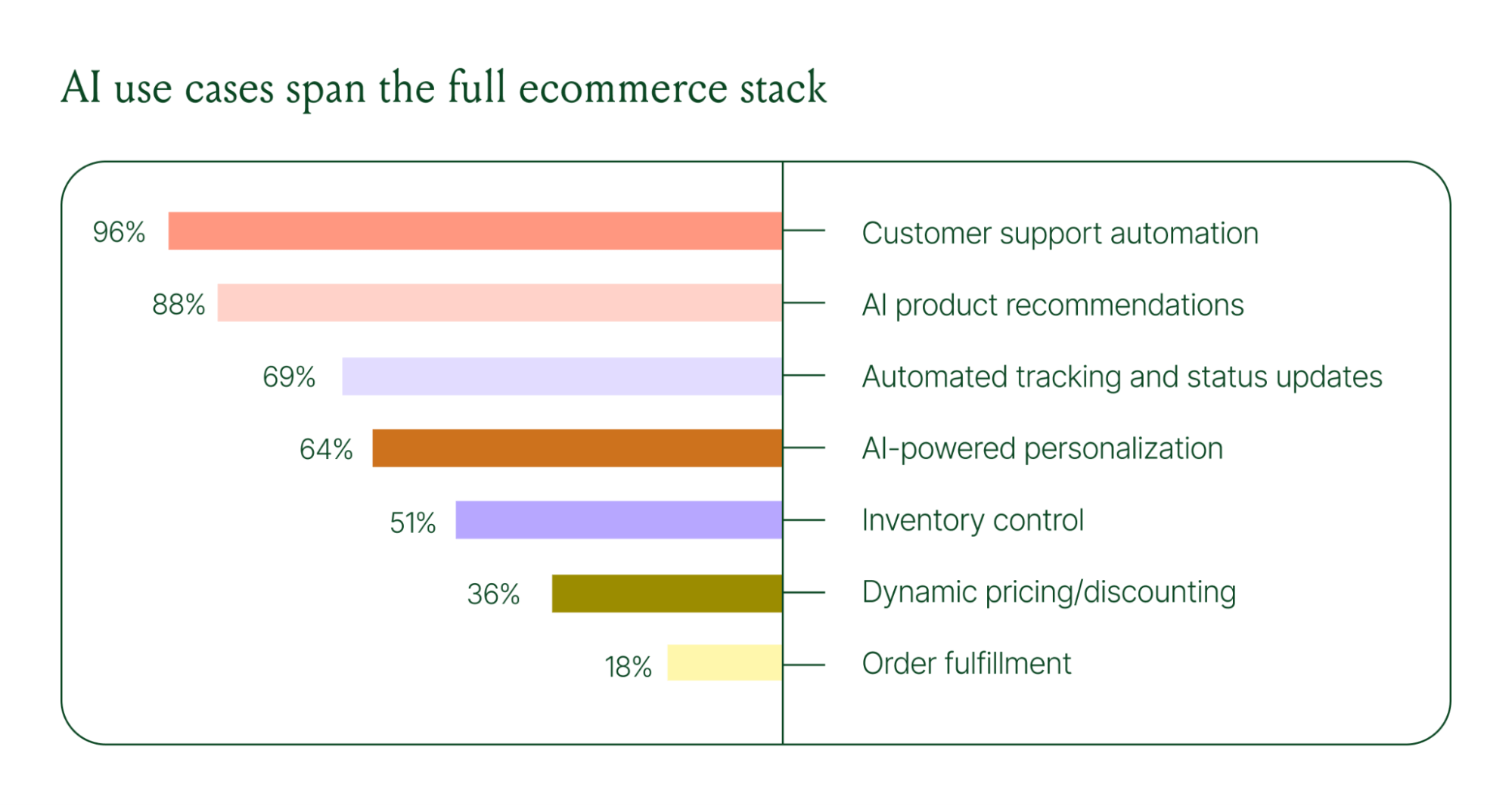
Ecommerce brands are deploying AI across every layer of their operation:
- Customer support automation: 96%
- Product recommendations: 88%
- Automated tracking and status updates: 69%
- Personalization: 64%
- Inventory control: 51%
- Dynamic pricing and discounting: 36%
- Order fulfillment: 18%
When brands were asked which channels contribute most to their AI success, conversational channels dominated. Social media messaging led at 78%, followed by SMS at 70%, and website live chat at 51%. Shoppers want fast, personal conversations, and AI is the best way to deliver that at scale.
Learn more about AI adoption, perception, and use case trends in the full 2026 Conversational Commerce Report.
How AI is changing CX success metrics
For decades, customer support success meant fast response times and high satisfaction scores. Those are still important indicators of success, but leading brands are adding revenue-focused metrics to their dashboards.
91% of brands still track CSAT as a measure of AI's impact. But 60% now include AOV as a top indicator, and higher-revenue brands earning $20M+ are focusing on metrics like total operating expenses, cost per resolution, incremental revenue, and one-touch ticket rate.
AI can now start a conversation, ease customer doubts, sell, upsell, and recover abandoned carts in a single conversation. When you’re only measuring CSAT, you’re ignoring the real ROI of conversational AI investment.
AI makes every conversational channel a storefront
Virtual shopping assistants now proactively engage shoppers, adapt to their needs in real time, and offer contextual product recommendations and upsells. When the moment calls for it, they can close the deal with a targeted discount.
Gorgias brands using AI Agent's shopping assistant capabilities nearly doubled their purchase rates and converted 20–50% better than those using AI Agent for support only.
Orthofeet, the largest provider of orthopedic footwear in the US, is a concrete example of this in practice. Using Gorgias, they achieved:
- 56% of support tickets automated in 2 months
- Email response times down from 24 hours to 35 seconds
- Double-digit revenue growth without adding headcount.
What this means for your AI strategy
The data tells a clear story: AI has evolved beyond a tool for handling tier 1 support tickets. It’s a core part of your revenue generation strategy.
57% of brands are already using AI for 26–50% of all customer interactions, and 37% expect that share to rise to 51–75% within the next two years. The brands building toward that range now are the ones who will have the operational advantage when it matters most.
The practical question isn't whether to invest in AI. It's where to focus first. Based on where brands are seeing the most impact, three priorities stand out:
- Start with high-volume, low-complexity tickets. WISMO (where is my order) inquiries, return policy questions, and order status updates are where AI delivers the fastest return. Automate these first.
- Expand into conversational channels. Social messaging and SMS are where AI is driving the most success right now.
- Connect AI performance to revenue metrics. If you're only measuring CSAT and response time, you're missing half the story. Add AOV, conversion rate, and incremental revenue to your reporting.
Want to go deeper on the full 2026 conversational commerce trends? Read the complete report for data across every major AI use case in ecommerce.
{{lead-magnet-1}}




Further reading

Resolution Time: What It Is and How to Reduce It
TL;DR:
- Resolution time (also called time to resolution or TTR) measures how long it takes to fully resolve a customer support ticket from start to finish
- Faster resolution times improve customer satisfaction and retention, but only when you maintain quality
- Calculate average resolution time by dividing total resolution time by the number of resolved tickets
- Ecommerce brands should track resolution time by channel, ticket type, and complexity to set realistic targets
- Automate high-volume FAQs and order actions with an AI Agent to reduce resolution time without adding headcount
Resolution time measures how long it takes to completely resolve a customer support ticket from the moment they reach out until their issue is closed.
For ecommerce brands, this metric directly impacts customer satisfaction, retention, and revenue. Shoppers expect fast answers to urgent issues like lost packages or billing problems. Tracking resolution time helps you understand team efficiency, identify bottlenecks, and improve the overall customer experience.
This article covers how to calculate average resolution time and set realistic benchmarks by channel and ticket type. We'll also show you how to use tools like Gorgias to reduce resolution time without sacrificing quality.
What is resolution time?
Resolution time is a customer service metric that measures the total time from when a customer reports an issue until that issue is completely resolved and the ticket is closed. Also called time to resolution (TTR) or mean time to resolution (MTTR), this metric tracks the full lifecycle of a support ticket.
Resolution time includes all time spent on a ticket:
- Wait time before the first response
- Investigation time while agents research the issue
- Communication time across all back-and-forth messages
Resolution time is different from first response time. First response time measures how long customers wait before getting an initial acknowledgement, while resolution time measures how long it takes to fully solve their problem and close the ticket.
Why resolution time matters for ecommerce brands
Faster resolutions improve CSAT and retention for online stores
Resolution speed directly impacts customer satisfaction and retention for ecommerce brands. When customers get quick answers to urgent questions like order status or return policies, they're more likely to complete purchases and shop again. Slow resolutions frustrate customers and increase the likelihood they'll abandon carts or leave negative reviews.
Fast resolution time signals to customers that you value their time. This builds trust and encourages repeat purchases, especially when combined with helpful, personalized support.
Reducing ART without hurting quality protects revenue and LTV
The goal is to provide efficient, accurate resolutions. Don't rush through tickets at the expense of quality. Low-quality fast answers damage trust and lifetime value because they often fail to fully resolve issues, leading to repeat tickets and escalations. Maintaining quality standards while improving speed ensures customers receive accurate, complete resolutions.
Customers who receive incomplete or incorrect answers may churn entirely. Balancing speed with thoroughness protects revenue by ensuring customers feel heard and their problems are actually solved.
How to calculate average resolution time (ART)
The ART formula is total resolution time divided by resolved tickets
Average resolution time = Total resolution time in a defined period / Total number of customer interactions resolved in that period
For example, if 3 tickets resolved in 2, 4, and 6 hours, your average resolution time is 12 hours ÷ 3 tickets = 4 hours. This simple formula gives you a baseline to track improvement over time.
Measure ART in business hours when you evaluate team speed
You can measure resolution time in business hours or calendar time. Business hours exclude nights, weekends, and holidays, giving you a clearer view of your team's actual performance during work hours.
Calendar time includes all hours and reflects the customer's experience of waiting. Customers don't care if it's Saturday. They still want fast answers. Track both views to get a complete picture.
Exclude reopened and non-support tickets to keep ART accurate
Clean data requires filtering out tickets that skew your average:
- Reopened tickets count as resolved initially, then restart the clock when reopened
- Non-support tickets like marketing inquiries or internal requests aren't customer service interactions
- Spam and test tickets should be tagged and excluded from reports
Tag and filter these categories to maintain accurate resolution time metrics that reflect actual support performance.
Track ART in Gorgias with built-in dashboards
Gorgias calculates and displays resolution time automatically, so you don't have to manually track timestamps or build spreadsheets. You can filter by channel, agent, and ticket type to identify where resolution times are fastest or slowest.
Gorgias tracks both business hours and calendar time, letting you switch between views depending on whether you're evaluating team performance or customer experience.

Orange represents average resolution time, while red represents the resolution time of the 10% of tickets that took the longest to resolve.
Benchmarks for resolution time and how to set targets
Most ecommerce brands target same-day email resolution
Email is the most common support channel for ecommerce brands. Same-day resolution (within 8 to 12 business hours) is a common target because customers expect email responses to take at least a few hours.
Complex cases like technical troubleshooting or multi-step returns may take longer than one day. The key is setting expectations upfront and keeping customers informed about progress.
Live chat and social DMs should resolve in under 10 minutes
Real-time channels like live chat and social media DMs require faster resolution because customers expect near-instant answers. Simple questions like order status or return policies can resolve in two to five minutes, while more complex inquiries should still close in under 10 minutes.
Customers choose these channels specifically for speed. If resolution takes longer than 10 minutes, they may switch to email or abandon the conversation entirely.
Voice support aims for one-call resolutions
Phone support should resolve issues on the first call whenever possible. One-call resolution (also called first-call resolution or FCR) reduces customer effort and saves time for both customers and agents.
Complex cases may require follow-up, but the goal is to collect all necessary information and provide a complete answer before ending the call. This prevents back-and-forth callbacks and improves satisfaction.
Set targets by ticket type, customer expectations, and seasonality
Not all tickets are equal. Simple FAQs like "Where is my order?" should resolve faster than complex technical issues. Segment your targets by ticket type and customer tier to set realistic goals.
Consider these factors when setting targets:
- Ticket complexity (simple FAQs vs. technical troubleshooting)
- Customer tier (VIP customers may get faster responses)
- Peak season volume (BFCM and holidays may require adjusted targets)
- Historical data showing your team's baseline performance
Review your data regularly and adjust targets based on customer feedback and team capacity. What worked in January may not work during holiday peak.
Factors that influence resolution time
Issue complexity is the biggest driver of ART
Issue complexity determines how long tickets take to resolve. Simple questions like "What's your return policy?" can close in seconds with a templated response, while multi-step technical troubleshooting requires investigation and back-and-forth communication.
Complex issues aren't a problem. They're an opportunity to provide high-quality support. The key is automating simple tickets so agents have time for complex ones.
Volume spikes and staffing levels shift ART up or down
High ticket volume during peak season increases wait times and resolution times because agents have more tickets to handle. Staffing levels also impact resolution speed — understaffing creates backlogs, while adequate coverage keeps queues moving.
Monitor volume trends throughout the year and adjust staffing during peak periods. Seasonal hires or flexible schedules can help maintain resolution time targets when volume spikes.
Agent training and knowledge access reduce investigation time
Well-trained agents resolve tickets faster because they know where to find answers and how to handle common scenarios. Easy access to knowledge bases and internal documentation speeds up resolution by reducing time spent searching for information.
Ongoing agent training also reduces escalations. When agents can handle more ticket types independently, fewer issues require handoffs to senior team members or other departments.
Tools and integrations shorten handle time and avoid tab-switching
Integrated helpdesks like Gorgias connected to Shopify let agents resolve tickets in one tab without switching between platforms. Integrations pull customer data, order history, and tracking information directly into the ticket view, eliminating manual lookups.
Automation and Macros reduce manual work for repetitive tasks. Lack of integration forces agents to toggle between tools, copy-paste information, and manually update systems, all of which inflate resolution time.
Cross-team handoffs and unclear processes inflate ART
Tickets requiring input from engineering, logistics, or third-party vendors take longer to resolve because of handoff delays. Unclear escalation paths create confusion about who should handle each issue and when to escalate.
Define clear handoff protocols to reduce delays:
- Document which team handles each issue type
- Set internal SLAs for cross-team responses
- Create escalation templates with all necessary context
- Track handoff metrics to identify bottlenecks
How to reduce resolution time without hurting quality
Automate high-volume FAQs and order actions with AI Agent
AI Agent instantly resolves common questions like "Where is my order?" and "What's your return policy?" without human intervention. It can also perform actions like canceling orders, sending return links, and updating shipping addresses.
Automation frees agents to focus on complex cases that require empathy, problem-solving, and personalization. Customers get instant answers to simple questions, and agents have more time for high-value interactions.
Deflect simple tickets with a self-service help center
A Help Center lets customers find answers before creating tickets. Self-service reduces ticket volume and speeds up resolution for remaining tickets because agents aren't overwhelmed with repetitive FAQs.
Gorgias Help Center integrates with AI Agent for seamless Self-service. Customers can search for answers, and if they still need help, they can start a conversation with an agent or AI without leaving the page.
Route and prioritize VIP and urgent tickets automatically
Automatic routing sends tickets to the right agent or team immediately based on channel, language, or ticket type. Prioritization ensures urgent issues or VIP customers get attention first, preventing high-value tickets from sitting in the queue.
Gorgias Rules automate routing and prioritization. For example, you can route all refund requests to your billing team and push VIP customer tickets to the top of the queue based on Shopify purchase history.
Equip agents with macros and Shopify actions to resolve in one tab
Macros provide pre-written responses for common questions, letting agents respond with a click instead of typing the same answer repeatedly. Personalization variables like customer name and order number make macros feel custom, not canned.
Shopify actions let agents edit orders, process refunds, and update shipping information without leaving Gorgias. One-tab resolution reduces handle time by eliminating platform-switching and manual data entry.
Create clear escalation paths for technical and 3PL issues
Some tickets require input from engineering, logistics, or third-party vendors. Clear escalation protocols prevent delays by defining who to contact, when to escalate, and expected response times.
Best practices for escalation:
- Document escalation criteria for each issue type
- Set internal SLAs for cross-team handoffs
- Create escalation templates with all necessary context
- Track escalation metrics to identify process gaps
How to measure and report resolution time in Gorgias
Use Gorgias dashboards to track ART by channel, agent, and intent
Gorgias dashboards provide built-in resolution time reports without requiring manual tracking. You can filter by channel (email, chat, social), agent, and ticket intent (WISMO, returns, pre-sales questions) to identify bottlenecks.
Segmented Views help you understand which channels or ticket types have the longest resolution times. This data guides where to focus automation or training efforts.
Set SLAs and alerting to enforce targets
Gorgias lets you define SLA targets for different ticket types and channels. Alerts notify agents when tickets are approaching or breaching SLA thresholds, helping teams stay accountable.
SLA tracking also helps managers spot capacity issues before they impact customer experience. If many tickets breach SLA targets, it's a signal to adjust staffing or improve automation.
Combine ART, FRT, and CSAT with support performance score
Resolution time is one of several key metrics that matter. Gorgias tracks first response time (FRT), customer satisfaction (CSAT), and resolution time together to give you a holistic view of support performance.
Track these metrics alongside resolution time:
- First response time (how long customers wait for initial contact)
- Customer satisfaction score (whether customers are happy with the outcome)
- Ticket volume and deflection rate (how much Self-service reduces load)
A holistic view prevents over-optimizing one metric at the expense of others. Fast resolution time doesn't matter if customers are unsatisfied with the answers they receive.
See how Gorgias helps ecommerce brands reduce resolution time with AI Agent, Help Center, and Shopify integrations. Book a demo to learn more.
{{lead-magnet-2}}

40+ Best Shopify Apps To Optimize Your Ecommerce Store
Shopify comes equipped with everything you need to get your ecommerce store up and running, but if you really want to optimize it for time-saving efficiency and maximized sales, you are going to need to rely on some third-party apps from the Shopify app store.
From automating your email marketing campaigns to helping you better manage your inventory and much, much more, there is a large number of capabilities offered by the best Shopify apps. To help you decide which of these apps is the best choice for your ecommerce business, we'll take a look at the most important qualities to look for in a Shopify app before diving into the 40+ best Shopify apps available today.
For easy skimming, we've pulled out the top 10 Shopify apps for ecommerce stores below.
- Best customer service app: Gorgias
- Best email marketing app: Klaviyo
- Best SMS app: Attentive
- Best sales & conversion app: Recharge
- Best checkout app: One Click Upsell
- Best inventory management app: ShipBob
- Best returns app: Loop Returns
- Best social media app: Instafeed
- Best SEO app: SEO Manager
- Best loyalty and retention app: Yotpo
What to look for in a Shopify app
While the exact features and functions of Shopify apps can vary dramatically from app to app, there are still a few essential qualities that you will want to look for no matter what type of app you are needing. This includes qualities such as:
1) Integrates with your other ecommerce tools and platforms
Like people, Shopify apps work best when they work together. Being able to integrate your email marketing app with your shipment tracking app, for example, means that you'll be able to send automated shipping updates to customers.
Integrating your customer support platform with your call center app, meanwhile, means that your agents providing phone-based customer support will have a wealth of data on the customers they are speaking with at their fingertips throughout each call.
These are just two examples of how it can be beneficial to choose apps that can integrate with your other ecommerce tools. Of course, it's also important to choose apps that will integrate with your ecommerce platforms, which is why all of the apps in our list are capable of integrating with Shopify, Shopify Plus, or both.
2) Allows for customizations
Plug-n-play solutions that don't offer much room for customization may seem convenient at first. As your business grows and scales, though, you are likely to find that these solutions no longer meet your needs like they once did.
While learning how to navigate Shopify apps that offer a wide range of customization options might require a bit of a learning curve, it's almost always worth it in the end.
3) Receives regular updates
Even the most well-polished apps still require regular updates and maintenance to continue functioning correctly. In addition to scheduled updates and maintenance, it is also essential to choose apps whose providers are willing to work with you to quickly correct any bugs or issues that come up while you are using the app.
This makes great customer support a vital quality to look for in Shopify app providers no matter what type of app you are purchasing.
Best Shopify customer service apps
1) Gorgias
Gorgias is an all-in-one customer support platform (including a helpdesk and live chat support) that provides a centralized help center for your customer support agents to provide great, revenue-generating customer experiences.
Gorgias lets ecommerce brands centralize conversations from every channel, empowered with features including:
- Rules to automatically respond to simple tickets, prioritize customer service requests, and more
- Macro templates to provide personalized customer service at scale
- Self-service features like easy order tracking, FAQs, and help centers
- Detailed analytics to help you evaluate your customer service program and ROI
If you are looking for a tool that will improve the customer experience on your website while at the same time reducing the burden of your customer support team, then Gorgias for Shopify is an excellent app to consider.
Key features
- Streamlines and automates the process of creating, organizing, and assigning customer support tickets
- Live-chat support via a fast-loading chat widget
- Provides a user-friendly dashboard for customer support agents to work from
- Detailed analytics and reporting of customer service data
Pricing
- A Basic plan that costs $60/month and includes 350 tickets/month
- A Pro plan that costs $300/month and includes 2,000 tickets/month plus revenue statistics and a Magento integration
- An Advanced plan that costs $750/month and includes 5,000 tickets/month plus a dedicated Success Manager
- Custom pricing available upon request for companies with larger tickets per month needs and/or the need for custom services
Available on Shopify Plus?
- Yes
{{lead-magnet-1}}
2) Tidio

Tidio is an app that provides both live chat and chatbot capabilities for your Shopify store, with AI-powered chatbots that allow you to automate up to 40% of your customer support conversations.
Key features
- Receive live visitor notifications when someone visits your site
- The ability to easily share pictures, videos, and other files directly within the chat widget
- The ability to program chatbots to showcase promotions and discounts to improve your conversion rate and boost sales
Pricing
- A Free plan that costs $0/month
- A Chatbots plan that costs $39/month and includes additional features such as unlimited active chatbots and chatbot templates
- A Communicator plan that costs $15/month per operator and includes additional features such as live typing and the ability to track viewed pages
Available on Shopify Plus?
- No
3) HelpCenter
Help Center is a customer support solution that provides tabs for organizing your product descriptions, live chat software, a HelpDesk ticketing system, and an FAQ builder that allows you to create a comprehensive FAQ page in just a matter of minutes.
Key features
- The ability to automatically flag and organize tickets based on priority
- Automated workflows for speeding up time-consuming customer support tasks
- Customers are able to access live chat support on-site or through Facebook Messenger
Pricing
- A Free plan that costs $0/month and includes basic features plus 50 tickets/month
- An FAQ plan that costs $3.99/month and includes full FAQ set-up, basic Tabs features, and 3,500 tickets/year
- A Tabs plan that costs $3.99/month and includes unlimited product page tabs, basic FAQ features, and 3,500 tickets/year
- A HelpDesk plan that costs $9.99/month and includes full HelpDesk setup and features, basic Tabs and FAQ features, and 17,000 tickets/year
- A Professional plan that costs $14.92/month and includes full HelpDesk, Tabs, and FAQ features plus 17,000 tickets/year
Available on Shopify Plus?
- No
Best email marketing and SMS Shopify apps
According to data from the Content Marketing Institute, 31% of B2B marketers say email newsletters are the best way to nurture leads. With these must-have Shopify apps for email marketing, you can automate your email marketing campaigns, create stunning branded emails, better segment your list for improved targeting, and beyond.
4) Automizely Email Marketing

With Automizely Email Marketing, online store owners are able to create email campaigns that are both personalized and automated in addition to helping them create professional-quality emails using Automizely's drag-and-drop email editor.
Key features
- The ability to add a broad range of features to your emails such as product recommendations and a countdown timer
- The option to filter and segment your subscriber list based on a range of customer behaviors and other criteria
- All email templates are 100% mobile responsive
Pricing
- Automizely Email Marketing offers flexible pricing depending on the size of your contact list and how many emails you send each month. For more information on Automizely Email Marketing pricing, you can check out the app's pricing calculator.
Available on Shopify Plus?
- No
5) Omnisend

Omnisend is a highly-popular email marketing tool that provides access to pre-built email and SMS workflows and templates, gives you the ability to segment your subscriber lists based on a wealth of data, and allows you to create automated email marketing campaigns that are sent out based on customer activity triggers.
Key features
- Detailed analytics and reporting that you can use to segment your subscriber lists
- The ability to create a wide range of custom triggers for launching automated email campaigns
- Excellent 24/7 customer support
Pricing
- A Free plan that costs $0/month and offers up to 500 emails and 60 SMS messages per month
- A Standard plan that costs $16/month and offers up to 6,000 emails and 60 SMS messages per month
- A Pro plan that costs $59/month and offers unlimited emails and up to 3,933 SMS messages per month
Available on Shopify Plus?
- Yes
See how Omnisend integrates with Gorgias.
6) Klaviyo

With Klaviyo, you are able to easily segment your email list for personalized targeting before creating automated email campaigns that can be sent out based on a variety of custom triggers.
Key features
- Automatically send out emails and SMS messages based on triggers such as cart abandonment triggers, price drop triggers, and back-in-stock triggers
- A centralized analytics dashboard that provides well-organized data regarding all of your SMS and email campaigns
- An extensive library of pre-built templates and workflows that you can use to speed up your campaign creation process
Pricing
- Pricing for Klaviyo depends on how many emails/SMS messages you intend to send each month, but you can check out this link for a Klaviyo pricing calculator.
Available on Shopify Plus?
- Yes
See how Klaviyo integrates with Gorgias.
7) Attentive

Attentive is an SMS and email marketing solution that makes it easy to build and optimize campaigns while remaining compliant with SMS and email marketing regulations. This platform is designed to help store owners grow their subscriber lists and engage with these lists more effectively with segmentation and targeting functionality to generate high-impact campaigns.
Key features
- Custom integrations using Attentive's Public APIs and developer resources
- Rewards management
- Design editor to create sign-up forms for your website and social media platforms
- A/B testing
- Audience manager to target customers with personalized messages
- Business intelligence to help measure campaign performance
Pricing
- Attentive’s pricing models aren’t publicly available, but they do offer demos and a free trial.
See how Attentive integrates with Gorgias.
Available on Shopify Plus?
- Yes
Best sales and conversions Shopify apps
Selling more products is the ultimate goal of every Shopify store owner. With these sales and conversions Shopify apps, you can boost your sales with sales enablement tools such as SMS messaging tools, loyalty and referral programs, list segmentation tools, and beyond.
8) Cartloop

Marketed as a conversational text marketing ecommerce platform, Cartloop is designed to help ecommerce brands grow their subscriber base and engage with them on a more personal level. With highly targeted campaigns, Cartloop leverages simple text messages to help Shopify store owners increase revenue.
Key features
- 24/7 live support
- ROI tracking
- Campaign segmentation for more effective targeting
- Campaign management and analytics
- Auto-responders and event-triggered actions
- Engagement tracking
Pricing
- A Growth plan that costs $99/month with a 14-day free trial
- A Pro plan that costs $299/month with a 14-day free trial
Available on Shopify Plus?
- Yes
9) Recharge
Recharge is a Shopify app for store owners who sell subscription-based products or services that makes it easy to set up and manage subscription programs in addition to providing your customers with the ability to manage their subscriptions either via SMS or through a user-friendly customer portal.
Key features
- Reduces churn by giving customers the option to pause or alter their subscription rather than canceling it
- Integrates with all popular payment processing solutions to allow subscription-based payments
- Provides a wide range of actionable insights that you can use to optimize your subscription offerings
Pricing
- A Standard plan that includes basic features and costs $0/month plus 1% + 10¢/transaction
- A Pro plan that includes additional features such as a customizable shopper portal and product variants and costs $300/month plus 1% + 19¢/transaction
Available on Shopify Plus?
- No
See how Recharge integrates with Gorgias.
10) Postscript

Postscript is an SMS marketing tool that allows you to grow your SMS subscriber list with customizable opt-in tool templates, create hyper-targeted list segments based on your Shopify store data, and easily message customers with both one-on-one and mass messages.
Key features
- Customizable opt-in popups for generating new leads
- Allows you to create an unlimited number of "text to join" keywords
- Allows you to create automated SMS messaging campaigns that are triggered by over 65 different customer events
Pricing
- Pricing for Postscript is dependent on the number of messages you send each month. Check out this link for a Postscript pricing calculator.
Available on Shopify Plus?
- Yes
See how Postscript integrates with Gorgias.
11) Spently

With Spently, Shopify store owners are able to turn their standard Shopify post-purchase notification emails into customizable, branded emails complete with product recommendations, discount codes, and other custom features.
Key features
- Allows you to create automated email campaigns based on triggers such as cart abandonment and back-in-stock alerts
- Provides a drag-and-drop email designer for customizing all 27 Shopify email notification templates
- Access ROI-based reporting and analytics from Spently's in-app dashboard
Pricing
- Pricing for Spently is dependent on the number of orders your store processes each month. Check out this link for a Spently pricing calculator.
Available on Shopify Plus?
- No
Best development Shopify apps
Shopify provides all of the tools you need to create a basic online store. If you would like to create new features for your store that are not already supported by Shopify, though, you are sure to find these Shopify development apps highly beneficial.
12) Omega Instant Search

Shopify's default product search function can be somewhat limited. With Omega Instant Search, though, you are able to develop a product search function for your store that is much more powerful thanks to features such as spell correction, fallback search, redirects, and synonyms.
Key features
- The search module requires no preliminary configuration and is ready for your customers to use immediately after it is installed
- The search module allows for customizable configurations
- Provides customers with filters for narrowing down their search
Pricing
- Pricing for Omega Instant Search is only available upon request
Available on Shopify Plus?
- No
13) Buddha Mega Menu

A mega menu is a feature that allows you to display multiple menus from a single dropdown in your store's navigation, making it much easier for customers to find the specific products and collections that they are looking for. With Buddha Mega Menu, you can create an attractive and fully-functional mega menu for your Shopify store in a matter of minutes and cross-sell like a pro.
Key features
- Easy to configure and install
- Provides a range of design features such as countdown timers, featured products, and banners to highlight your promotions
- The ability to create a customizable mega menu for your Shopify store
Pricing
- Buddha Mega Menu is free to download and use
Available on Shopify Plus?
- No
14) Smart Bar

Smart Bar is an app that allows you to quickly create promotional bars and banners for your online store and populate these promotion bars and banners with conversion-boosting features such as countdown timers and free shipping bars.
Key features
- An impressive library of promotional bar and banner templates that are fully-customizable
- The ability to display multiple promotional bars and banners on one page
- Analytics tools that record clicks, views, click-through-rate, and heatmap
Pricing
- A Free plan that costs $0/month that includes basic features and the ability to create up to three promotional bars
- A Premium plan that costs $0/month that includes additional features and the ability to create unlimited promotional bars
Available on Shopify Plus?
- Yes
15) Easy Redirects

404 page errors can potentially cost your store a lot of customers by both encouraging would-be customers to navigate away from your website and harming its SEO. With Easy Redirects, though, you can automatically find and fix all 404 errors on your Shopify store.
Key features
- One-click install with no coding required
- Quickly and easily import bulk URL redirects into Shopify from a CSV file
- Automatic 404 tracking, error reports, and resolution
Pricing
- A Basic plan that costs $0/month and bulk 301 redirects, group redirects, and statistics and analysis
- A Premium plan that costs $10/month and includes everything found in the Basic plan as well as redirect patterns to automate redirects, automatic 404 tracking, and 404 page error alerts and reminders
Available on Shopify Plus?
- No
16) Hextom
Hextom is a SaaS company that offers a number of different development solutions for Shopify stores, including a bulk image edit solution, a bulk product edit solution, an email collection bar, a payment processing tool for converting foreign currencies, a countdown timer bar, and more.
Key features
- Offers a total of 13 Shopify store development solutions
- Easily edit your product descriptions and images with bulk image edit and bulk product edit capabilities
- The option to pick and choose the specific solutions you need for your Shopify store
Pricing
- Pricing for Hextom is dependent on the specific solutions that you choose
Available on Shopify Plus?
- No
17) Vela

Vela is a solution that provides a centralized dashboard for managing multiple Shopify stores as well as the ability to bulk edit every aspect of your product descriptions.
Key features
- The ability to manage multiple Shopify stores from a single Vela account
- Bulk edit all product attributes including descriptions, photos, variants, and prices
- Optimize your product photos with filters, refinements, and cropping
Pricing
- A Vela Lite plan that costs $5/month and includes basic listing editing features
- A Vela Pro plan that costs $10/month and includes everything in the Vela Lite plan as well as copy and publish functionality, profiles, a photo library and editor, and early access to new integrations and features.
Available on Shopify Plus?
- No
Best checkout Shopify apps
According to data from Baymard Institute, 70% of shopping carts are abandoned before the customer completes their checkout. By enabling you to create fast and optimized checkout pages, these checkout Shopify apps can help you lower your abandoned cart rates and ultimately increase sales.
18) One-Click Checkout

One-Click Checkout is an app that enables you to create "Buy Now" buttons for your products that take customers directly to the checkout page as well as create a checkout popup that shows customers the items in their cart each time they add a new item to the cart.
Key features
- 24/7 customer support via phone, chat, or email
- Provides an Amazon-like one-click checkout experience
- Checkout popup and "Buy Now" buttons are both fully-customizable
Pricing
- A Free plan that costs $0/month and includes "leads to checkout" functionality for "Add to Cart" and "Buy Now" buttons
- An Unlimited plan that costs $9.95/month and includes "cart summary popup" functionality for "Add to Cart" and "Buy Now" buttons plus flexible checkout flow management
- A Priority Support plan that costs $18.95/month and includes everything in the Unlimited plan plus up to 3 hours/month of customizations, a dedicated manager, setup assistance, and priority queue for customer support
Available on Shopify Plus?
- No
19) Klarna

Integrating payment processing app Klarna into your online store provides your customers with the ability to split the cost of their purchase into four interest-free payments while still ensuring that you get paid upfront and in-full.
Key features
- On-site messaging to let customers know that Klarna financing is available for their purchases
- Allows you to create "try before you buy" promotions by giving customers an extra 30 days to complete their payment
- As a credit service, Klarna pays merchants upfront and in-full even if the customer is financing their purchase
Pricing
- Karina charges a fee of $0.30 per transaction along with a variable fee of up to 5.99% of the purchase total
Available on Shopify Plus?
- No
20) Fast Checkout In One Click

Fast Checkout In One Click is an app that allows you to create animated "Buy Now" buttons that direct customers straight to checkout, skipping the cart page and reducing the likelihood of an abandoned cart. Make your sales channels work harder for your brand.
Key features
- The option to add a cart page popup window that is displayed after a customer clicks "Buy Now"
- Animated "Buy Now" buttons to capture customers' attention complete with a variety of animation styles to choose from
- Utilizes native theme style to be compatible with most Shopify store themes but can be customized if needed
Pricing
- Fast Checkout In One Click costs $4.49/month
Available on Shopify Plus?
- No
21) Transcy

Transcy is a language and currency conversion app that will automatically translate both the content and USD prices on your online store into the language and currencies of the customer viewing them, making it one of the best apps for stores that sell to a lot of international customers.
Key features
- Detects the customer's location then auto-translates your store into the customer's native currency and language with support for all major currencies and 111 different languages
- Currency exchange rates are updated daily and can be adjusted manually
- Allows you to display separate images for different languages to better target your store to specific demographics
Pricing
- A Free plan that costs $0/month and includes translation for one additional language and two additional currencies
- An Economy plan that costs $9.90/month and includes translation for two additional languages and all major currencies as well as additional features such as multilingual SEO
- A Starter plan that costs $19.90/month and includes translation for 111 additional languages and all major currencies as well as additional features such as image replacement options
- An Essential plan that costs $39.90/month and includes translation for 111 additional languages and all major currencies as well as additional features such as a dedicated customer success manager
Available on Shopify Plus?
- No
22) Buy Me Button

Buy Me Button is a Shopify checkout solution that offers features such as "Buy Me" buttons that take customers straight to checkout, a cart preview popup that appears when customers add a new item to their cart, and "Quick Buy" buttons that allow customers to purchase products from any page or listing on your website.
Key features
- "Quick Buy" buttons allow customers to purchase products directly from any product listing pages
- All buttons automatically inherit the design of the Shopify store where they are installed and can be further customized upon installation
- Shareable links allow customers to share products on social media
Pricing
- A Free plan that costs $0/month for up to 50 "add to carts" per month
- A Small plan that costs $2.95/month for up to 250 "add to carts" per month
- A Medium plan that costs $4.95/month for up to 750 "add to carts" per month
- A Large plan that costs $6.95/month for unlimited "add to carts"
Available on Shopify Plus?
- No
{{lead-magnet-1}}
23) One Click Upsell

One Click Upsell is a Shopify app designed to help store owners increase their average order value by presenting customers with upsell opportunities at checkout. With One Click Upsell, you can create one-click upsell options that are shown to customers either before or after checkout that allow them to add additions to their purchase with just a single, convenient click.
Key features
- Upsell offer page templates that have been tested by high-volume Shopify stores
- The option to choose different upsell options for various products, product variants, and collections
- Built-in split testing
Pricing
- A Tier 1 plan that costs $24.99/month for up to $200 in total monthly upsell revenue
- A Tier 2 plan that costs $49.99/month for up to $400 in total monthly upsell revenue
- A Tier 3 plan that costs $59.99/month for up to $500 in total monthly upsell revenue
- A Tier 4 plan that costs $79.99/month for $500+ in total monthly upsell revenue
Available on Shopify Plus?
- Yes
Best inventory management and returns Shopify apps
Keeping track of your inventory and ensuring that you always have the appropriate amount of products in stock to meet customer demand can sometimes be a time-consuming challenge.
With these inventory management Shopify apps, though, you can streamline and automate your various inventory management processes, freeing you up to focus on bringing in new customers and growing your store's revenue.
24) Katana Manufacturing ERP

Katana Manufacturing ERP is an inventory management solution that allows you to optimize inventory movements by setting up reorder points and prioritizing your sales orders.
Key features
- Manage production, scheduling, and resources from one location
- Omnichannel order management
- End-to-end traceability for tracking batches, materials, expiration dates, and beyond
Pricing
- An Essential plan that supports up to three warehouses and costs $99/month
- A Pro plan that supports unlimited warehouses and costs $299/month
Available on Shopify Plus?
- Yes
25) Stock Sync

With Stock Sync, store owners are able to set up automatic inventory updates, update existing products via over 80 different connection methods, and set quantity rules to avoid overselling.
Key features
- Provides a centralized and easy-to-understand overview of your inventory levels
- Capable of integrating with up to 80 different channels, including Amazon S3, QuickBooks, eBay, Google Drive, Etsy, and OneDrive
- Capable of reading all file formats
Pricing
- A Free plan that costs $0/month and supports up to 2,000 SKUs
- A Basic plan that costs $5/month and supports up to 2,000 SKUs and 1 update feed/supplier
- A Pro plan that costs $10/month and supports up to 10,000 SKUs and 2 update feeds/suppliers
- An Enterprise plan that costs $49/month and supports 35,000 SKUs and 5+ update feeds/suppliers
Available on Shopify Plus?
- No
26) QuickBooks Commerce

One of the most well-known inventory management solutions, QuickBooks Commerce is a platform that allows you to manage your product listings across multiple channels, track products from inventory to fulfillment, automatically update your inventory levels, and much more.
Key features
- Automatically adjust stock levels for new products, damage, shrinkage, returns, or promotions
- Detailed stock history for all products
- Barcode scanning capabilities for searching for products by barcode and entering product information into sales and purchase orders
Pricing
- QuickBooks Commerce costs $50/month
Available on Shopify Plus?
- Yes
27) Stocky

Stocky is an inventory management solution offered by Shopify that enables Shopify store owners to achieve complete visibility over their inventory through detailed inventory analytics and insights such as demand forecasting. Stocky also makes it easy to create and manage purchase orders from one place.
Key features
- Provides inventory management recommendations based on profitability and rate of sales
- Enables staff to use a barcode scanner to receive and place inventory quickly and accurately
- Provides a user-friendly dashboard for creating and tracking purchase orders
Pricing
- Stocky is free to install with a Shopify POS Pro subscription
Available on Shopify Plus?
- No
28) ShipBob

More of a logistics service provider than an application, ShipBob is a service that allows ecommerce store owners to ship their products in bulk to ShipBob warehouses across the country. Once you've delivered your products, ShipBob then takes over all inventory management and order fulfillment responsibilities on behalf of your online store — picking, packing, and shipping products to customers as they're ordered.
ShipBob is a common alternative to Shopify Fulfillment Network.
Key features
- ShipBob completely eliminates the burden of order fulfillment, including managing product returns
- Strategically located warehouses allow you to offer faster shipping to locations across the country
- Includes built-in reports and analytics that provide a window into product performance
- Offers a comprehensive help center that will help you master the platform and resolve any issues that you might experience
Pricing
- ShopBob is free to install and bills for orders shipped, receiving inventory, warehouse storage, and custom projects.
- Request pricing for a custom quote or use the U.S. to U.S. shipping calculator to get started.
Available on Shopify Plus?
- Yes
See how ShipBob integrates with Gorgias.
29) AfterShip Returns Center

AfterShip Returns Center is a solution for managing customer returns that allows store owners to create a branded and interactive self-service returns page, provide customers with automated real-time updates regarding the status of their orders and returns, and set up smart routing rules to ensure that items are sent back to the right place at minimal cost.
Key features
- Detailed analytics on returned products that you can use to improve both your returns process and your product offerings
- Tools for encouraging customers to exchange their items rather than returning them for a refund
- Offers customers flexible return options such as in-store dropoff or the ability to print prepaid shipping labels
Pricing
- A Free plan that costs $0/month and offers up to three returns per month
- An Essentials plan that costs $9/month and offers up to 20 returns per month
- A Pro plan that costs $199/month and offers up to 1,000 returns per month
- An Enterprise plan with custom pricing that offers 3,000+ returns per month
Available on Shopify Plus?
- Yes
See how Aftership integrates with Gorgias.
30) Loop Returns

Encouraging exchanges for returned products rather than refunds is a great way to reduce the often substantial impact that product returns have on a store's bottom line. With Loop Returns, Shopify store owners can let customers take control of their returns and exchanges and free up their team.
Key features
- Customizable product return portals allow customers to manage returns themselves and reduce your support team's workload
- Meaningful metrics provide insight into your returns and refunds and identify supply chain, positioning, and other issues
- Enables customers to automatically apply the value of their return to any order using the "Shop Now" feature
- Allows you to apply variable bonus credits to customers who choose to exchange their returned product
Pricing
- A Starter plan that costs $59/month and supports up to 1,000 returns/year
- An Essential plan that costs $200/month and includes automatic return approval, cross-border shipping, and more
- An Advanced plan that costs $415/month and has unlimited destinations, unlimited return policies, and more
Available on Shopify Plus?
- Yes
See how Loop integreates with Gorgias.
Best social media marketing Shopify apps
According to a report from eMarketer, the number of US customers who purchased products directly from social media platforms grew to 80.1 million in 2020 and is expected to increase to 96.1 million in 2022. With these social media marketing Shopify apps, you can ensure that you are leveraging the advantages of social media marketing to their full potential.
31) Outfy

With Outfy, Shopify store owners are able to automate the process of promoting their products on social media by creating and scheduling product promotion posts that can be automatically posted across multiple social media channels at once. Outfy also makes it easy to create collages, videos, and GIFs that you can use to make promotional posts really stand out.
Key features
- Capable of auto-generating and publishing product promotion posts that are created based on a range of predefined settings
- Enables you to turn your product pictures into GIFs, videos, and collages
- Provides a variety of promotional post templates to choose from
Pricing
- A Starter plan that costs $15/month and includes basic features and support for one account on Facebook, Instagram, YouTube, Pinterest, and Twitter for a total of five social media accounts
- A Pro plan that costs $30/month and includes additional features such as video posts and support for one account on Facebook, Instagram, YouTube, Pinterest, and Twitter for a total of five social media accounts
- An Ultimate plan that costs $60/month and includes everything in the Pro plan plus support for two accounts on Facebook, Instagram, YouTube, Pinterest, and Twitter for a total of ten social media accounts
- An Enterprise plan that costs $100/month and includes everything in the Pro plan plus support for five accounts on Facebook, Instagram, YouTube, Pinterest, and Twitter for a total of 25 social media accounts
Available on Shopify Plus?
- No
32) Zotabox

Zotabox is an all-in-one ecommerce marketing platform that offers over twenty different marketing tools in one package, including tools such as a landing page builder, a Facebook reviews integration, Facebook live chat, and a promo popup.
Key features
- Exit intent tools for reducing your cart abandonment and bounce rates
- Promote customer testimonials with Facebook/Google integration
- Advanced display options available for all tools
Pricing
- A Starter plan that costs $12.99/month for websites with up to 5,000 visits per month
- An Express plan that costs $29.99/month for websites with up to 25,000 visits per month
- A Platinum plan that costs $79.99/month for websites with up to 150,000 visits per month
Available on Shopify Plus?
- No
33) Instafeed

With Instafeed, Shopify store owners are able to display content from their Instagram profile on their Shopify store in order to create social proof and expand the reach of their Instagram content.
Key features
- Image and video support
- Fully-customizable Instagram feed that allows you to choose the feed title, the number of rows and columns, and the space between posts
- Tag products in your posts to create shoppable Instagram feeds
Pricing
- A Free plan that costs $0/month and includes basic features and one Instagram feed
- A Pro plan that costs $4.99/month and includes additional features such as product tagging and the ability to display likes plus support for up to three Instagram feeds
- A Plus plan that costs $19.99/month and includes the option to filter your posts by hashtag plus support for unlimited Instagram feeds
Available on Shopify Plus?
- No
34) Facebook Channel

Facebook Channel is a tool that allows you to sell your Shopify products directly on Instagram and Facebook by making it easy to set up Facebook and Instagram shops.
Key features
- Automatically syncs products from your Shopify store to Facebook and Instagram shops
- Provides free and paid marketing tools such as audience builder Facebook ads and retargeting ads that you can use to promote your products on social media and grow your audience
- Allows you to easily manage all of your Facebook and Instagram stores within the app
Pricing
- Facebook Channel is free to install
Available on Shopify Plus?
- No
Best SEO Shopify apps
If a Shopify store has great products but no one ever visits it, does it make a profit? Unlike the well-known "tree falling in a forest" puzzle, there's a simple answer to this question, and the answer is "no.” By utilizing these search engine optimization (SEO) Shopify apps, you can ensure that Google lists your store snippets as high as possible in the results for relevant searches and boost the number of potential customers who find your site.
35) Plug In SEO

Plug In SEO is an app for Shopify stores that automates the tedious SEO process by automatically detecting and resolving a wide range of SEO issues such as broken links and missing metadata.
Key features
- A keyword tool that provides keyword suggestions for your site's content
- Offers templates for adding meta titles and meta descriptions in-bulk, for better search snippets
- Periodic SEO audit reports delivered to your inbox
Pricing
- A Free plan that costs $0/month and includes basic features such as SEO checks and broken link checks
- A Plus plan that costs $20/month and includes additional features such as automatic SEO improvements and SEO reports
- A Pro plan that costs $29.99/month and includes additional features such as a homepage speed report and premium support/training videos
Available on Shopify Plus?
- No
36) SEO Manager

SEO Manager is an app that provides a range of features for boosting your website's SEO, including features such as detecting and automatically fixing broken links, JSON-LD data support, automated title, description, and image alt text templating, Google sitemap submission, and much more.
Key features
- 404 error logging and real-time 404 repairs
- A keyword suggestion tool
- Reconfigures your website with SEO-boosting JSON-LD data
Pricing
- SEO Manager costs $20/month
Available on Shopify Plus?
- No
37) TinyIMG SEO & Image Optimizer

If the images in your Shopify store are not optimized, they could slow down your loading speeds and thus harm your site's SEO. With TinyIMG SEO & Image Optimizer, you can automatically compress all of your site's images without reducing their quality, speeding up your loading times and boosting your SEO. TinyIMG SEO & Image Optimizer also provides a range of other SEO features such as broken link detection and redirect and metadata optimization.
Key features
- Provides the option to optimize images automatically or manually
- Provides SEO and page speed audits
- Provides automatic JSON-LD microdata and metadata optimization
Pricing
- A Pay As You Go plan that costs $0/month for up to 50 free image optimizations per month. Additional image optimizations cost 3¢/image.
- A 24 Months plan that costs $47.76/year for up to 5,000 free image optimizations every two years. Additional image optimizations cost 1¢/image.
- A Monthly plan that costs $9.99/month for up to 1,000 free image optimizations per month. Additional image optimizations cost 2¢/image.
- A Special Offer plan that costs $19.99/month for up to 3,000 free image optimizations per month. Additional image optimizations cost 1¢/image.
Available on Shopify Plus?
- No
Best loyalty and retention Shopify apps
38) Yotpo

Yotpo is a review app that lets you stay engaged with customers, using email or SMS and a variety of customizable opt-in tools. Segment your lists based on detailed customer analytics, whether new or returning. The most unique selling point of Yotpo, however, is its tool set for encouraging customer reviews and dynamically displaying those reviews on your website.
Key features
- Provides customers with the ability to include photos and videos in their product reviews
- A powerful SMS flow builder
- Customizable on-site opt-in solutions
Pricing
- A Free plan that costs $0/month
- A Growth plan that costs $19/month
- A Prime plan that costs $59 a month
- Premium and Enterprise plans with custom pricing
Available on Shopify Plus?
- Yes
See how Yotpo integrates with Gorgias.
39) Retention Rocket
Retention Rocket is an SMS marketing platform that allows you to grow your SMS subscriber list and encourage long-term loyalty with TCPA compliant opt-in templates. Message individual customers or entire subscriber lists directly from the app, and create automated SMS messaging campaigns that can be triggered by a wide range of customer events.
Key features
- Allows you to create automated SMS flows and series such as an abandoned cart flow, a customer win-back series, a welcome series, and more
- Provides TCPA compliant opt-in methods such as "text to join" keywords, opt-in landing pages, and opt-in popups
- Provides the option to send customer browser push notifications
Pricing
- A Free plan that costs $0/month and includes up to $5 in free SMS messages per month
- A Bronze plan that costs $10/month and includes up to 333 free SMS messages per month
- A Sliver plan that costs $49/month and includes up to 2,450 free SMS messages per month
- A Gold plan that costs $199/month and includes up to 19,900 free SMS messages per month
- An Enterprise plan with custom features and pricing
Available on Shopify Plus?
- No
40) Smile.io

Smile.io is an app designed to help you improve your customer retention and increase your lifetime customer value by making it easy for you to create and manage loyalty and referral programs for your Shopify store.
Key features
- Allows you to create points programs that reward customers for desirable actions such as repeat purchases and referrals
- On-site nudges that remind customers when they have points available to spend
- Allows you to search for customers by name in order to adjust their points manually
Pricing
- A Free plan that costs $0/month and includes basic features such as options for creating points and referral programs
- A Starter plan that costs $49/month and includes additional features such as program branding and rewards emails
- A Growth plan that costs $199/month and includes additional features such as on-site nudges and points expiry
- A Pro plan that costs $599/month and includes additional features such as a VIP program and unlimited integrations
- An Enterprise plan that starts at $1,000/month and includes additional features such as API access and custom reporting
Available on Shopify Plus?
- Yes
See how Gorgias integrates with Smile.io.
41) LoyaltyLion

With LoyaltyLion, Shopify store owners can retain more loyal customers and increase repeat purchases with customized loyalty programs. This platform simplifies the management of your customer loyalty program and offers a number of promotional marketing tools that help you promote your program to new and existing customers.
Key features
- Notifications that alert customers that they have reward points available for incentives
- CRM
- Loyalty features that you can embed on product and post-purchase pages
- Referral tracking
- Point statements for customers
- Rewards management
- Loyalty tiers
Pricing
- A Classic plan that costs $399/month and includes 2,000 monthly orders
- An Advanced plan that costs $699/month and includes 4,000 monthly orders (with the option to add more)
- A Plus plan that costs $1,500/month and includes 10,000 monthly orders (and scales as your business grows)
Available on Shopify Plus?
- Yes
See how Gorgias integrates with LoyaltyLion.
Find out why companies use Gorgias for Shopify customer service
Tthe right Shopify apps can provide you with a broad range of revenue-boosting capabilities, from tools to grow your subscriber lists to tools for improving the quality and efficiency of your customer support (and everything in between).
At Gorgias, we are dedicated to helping Shopify store owners grow by providing their customers with the best possible experience as efficiently as possible.
If you would like to see for yourself the many benefits that Gorgias provides to Shopify store owners, see how Gorgias works with Shopify and sign up for Gorgias today.
{{lead-magnet-2}}

Templates and Tips to Respond to Frustrated Customer Emails
If you’ve ever worked in customer service, you know that unhappy customers are unavoidable. Customer satisfaction has plummeted since 2018, according to the American Customer Satisfaction Index.

That’s why top brands don’t wait until angry customer emails arrive to decide how to respond. By setting up processes and templates ahead of time, your customer support team doesn’t need to craft responses from scratch. Especially while emotions are running high and angry customers are waiting for responses.
Below, you’ll find step-by-step instructions on how to process and respond to angry customer emails, considerations for handling angry or rude customers without making the situation worse, and tips to prevent angry customers by improving your customer experience (CX). We'll also share templates and sample emails for how to respond to:
- Customers who are having product issues
- Customers with shipping and delivery problems
- Customers with missing or late orders
- Customers who got the wrong product
- Customers who have a cancellation request (purchase or subscription)
- Customers who want a refund or exchange
- Customers who had a bad support experience
- Customers with no clear reason to be upset
{{lead-magnet-1}}
Is it worth it to deal with angry customers?
When customers aren’t happy with your product, service, or customer support, the stakes are high. You could lose them as a repeat customer, but that’s just the tip of the iceberg. Angry customers also go and tell their friends and family, either by word-of-mouth, on social media, or via a Google review.

The Effortless Experience found that 96% of disgruntled customers who had a high-effort or bad experience with a brand feel disloyal to that brand afterward. In other words, a frustrating, high-effort experience will irreversibly damage your brand's reputation for almost any customer, whether they’re first-time or regular shoppers. That spells trouble for your bottom line.

Also, your customer service team doesn’t want to respond to nasty emails all day long. Customer service can already be an emotionally challenging role, and spending all day dealing with angry customers is a quick path toward burnout and quitting.
📚 Related reading: Read our guide to hiring A+ customer service agents, written in partnership with customer service agency Helpflow.com.
8 steps to take when responding to frustrated customer emails
Respond to angry customer emails by acknowledging the customer's frustration, owning any mistakes, gathering additional context, confirming you understand the entire situation, and fully resolving the issue.
These messages are high-stakes: When someone writes to your organization with an angry message, they’re angry enough to sit at their keyboard and express their anger. You’re lucky they wrote to you — the next message could be on a review website or social media.
You’re lucky they wrote to you — the next message could be on a review website or social media.
It’s imperative to respond to every single angry customer email — ideally with fast response times.
0) Set up automated responses if you can’t quickly respond
If you have a small team or are only online for certain parts of the day, consider setting up a standard automated reply to confirm receipt of their email. We listed this as step 0 because it’s not a catch-all solution: You should not send this kind of email if you’re able to provide a human response within an hour or two. Nobody likes an extra, unnecessary email.
If you do choose to activate this kind of response, it should:
- Confirm that you received the customer’s email so they don’t have to wonder if it went through
- Tell the customers when they can expect to receive an email response from a human agent
- Thank the customer for writing in
Here’s a mockup of how to create this kind of automated response with Gorgias Rules:

📚 Recommended reading: Get more tips and tricks to improve your response times.
1) Read the email first
This may seem obvious, but unless you address every point the customer makes, you’re only prolonging the correspondence and further irritating them.
It’s easy to overlook something the customer says, particularly if the email’s pretty emotive or raises several points. So, try to summarize what they’re complaining about in a separate text document or as a note on the ticket in your helpdesk.

Consider bullet-pointing each issue to ensure you answer every aspect of their message, as shown in the internal note above.
2) Do your research to understand the problem and context
Before responding, consider if there’s any research you can do on your end to resolve the issue faster. For example, if a customer asks whether an item will come back in stock, you may look up similar items currently available if that customer is in a time crunch (like for the holidays).
You’ll also want to ensure you have all of the context you need to provide a full resolution for that customer.
For example, if a customer is trying to track down a lost package, take a look at the package history and order date to better understand why they’re upset and whether you’ll need to re-send the item or reach out to the carrier on their behalf.
Ideally, your helpdesk has integrations with shipping software (like AfterShip) so you can see this information right next to the customer’s message (rather than having to navigate to a new tool).

3) Escalate if necessary (based on policy)
Some requests, whether from a VIP customer, the urgency of the issue, or its scale, need to be escalated right away. Based on the policy you’ve set out for your support team members, encourage them to forward major concerns to the correct team quickly.

📚 Recommended reading: Read our Director of Support’s guide to prioritizing customer service requests.
4) Thank them for writing
Yes, you've already done this in your automated message – but it doesn't hurt to do it again. So, always say thank you at the start of your email. You must acknowledge their complaint and show you care about their feedback.
For instance, if a customer has written to complain, you could start with something along the lines of:
Thank you for contacting [your company name] and letting us know about your experiences with our [insert name of the product/situation]. We appreciate you contacting us to let us know. We value customer feedback so that we can work to provide you with gold-plated customer service.’
5) Use their name and take a personalized approach
If you're not already, it's time to take a personalized approach to customer service. While this means taking a more holistic approach to the service process in general, the first step is to take note of small details, like using a customer’s name in correspondence.
Consumers crave a personalized experience; they want to be treated as individuals, not as just another support ticket. That means avoiding asking them for information they’ve already given you again. It also means using a customer support tool that provides all of their historical account information in one place. Your helpdesk should show all past orders, correspondence with support, shipping address information, and even marketing emails they’ve received and clicked on.
For example, Gorgias’ Customer Sidebar provides customer information right next to the ticket that can help you personalize the message.

6) Acknowledge their problem
If your customer has taken the time to bring an issue to your attention, it’s polite and good practice to acknowledge that. So, in your response, reflect on what they’ve told you.
For example, you could write something like this:
‘I can see that you’re frustrated [insert a suitable empathic summary of the customer’s feelings] about your experiences with our product/customer service. We can see how, on this occasion, we didn’t reach our normally high standards of delivery.’
7) Provide a solution
Always focus on solving the customer’s problem. Find a solution and clearly explain the resolution to the customer’s complaint.
For example, if they’re upset about a product’s quality or performance, you need to refer them to your returns and replacements policy. On some occasions, it may be necessary to escalate a complaint if it’s not within your power to resolve. In which case, again, follow the protocol your company has to handle the specific issue so that it complements your current chain of command.
According to a research study conducted by Gartner and later coined The Effortless Experience, 45% of customers who have a positive support experience tell less than three people. In contrast, 48% of customers with a negative experience shared it with over ten people.

While a positive, low-effort solution is a short-term expense for you, it could keep the customer on your side, netting future purchases or at least minimizing negative word of mouth and reviews.
8) Avoid offering the same solution twice
If a customer is still upset after you’ve already offered a solution, chances are it wasn’t the right one. Ensure that you’re able to give the customer a few different options for a resolution in case the original one didn’t work for them (or wasn’t the result they hoped for).
Of course, this should only go as far as your support policy states. If possible, tag in a customer service lead to see if you can make an exception to your policy. In a helpdesk like Gorgias, you can tag specific agents or an escalated team.

Considerations when writing responses to angry customer emails
Above, we covered the steps to follow when responding to angry emails. Below, we’ll share some high-level considerations to keep in mind when crafting responses.
Check your language and tone
Use clear language and show empathy. Always consider your audience. Remember, your audience doesn’t know your organization's internal workings or technical aspects.
Interestingly, 65% of online shoppers prefer casual over a formal tone in their customer service interactions. That said, if the customer isn’t happy with your response or solution, 78% said that an overly casual style would elicit an adverse reaction from them.
Why? Because it sounds like you're not taking their problem seriously.
Also, consider the words you use. For example, remove any uses of the “but” from your responses. By eliminating negative terms like this, you’ll exude more of a positive tone, which works wonders for altering perception.
For example:
“Thank you for contacting us, but we don’t provide that service.”
Vs.
“Thank you for contacting us. Unfortunately, we're unable to provide that service. We do, however, provide the following….”
See the difference?
Through practice and experience, you’ll be better positioned to sense your customer’s tone. For example, if the customer’s frustration radiates through their message, show empathy by offering reassurance and the right level of apology.
Check your grammar and spelling
There’s nothing worse than grammatical and spelling errors. Re-read your response and run it through a spelling and grammar checker. If in doubt, ask a colleague to double-check it for you.
Some reputable online spell checkers include Grammarly, Reverso, and Language Tool. Your organization may already have a subscription for marketing or other purposes, so check what’s available.
Decide whether they are frustrated or truly irate
The key to understanding whether a customer is truly angry is empathy and context.
Use empathy to dissect the tone and language a customer uses in their correspondence with you. Then, use the context they've given you and that you have about their order history to piece together their entire situation.
For example, a customer might write in about a lost or delayed package. Based on the language they’re using, and the fact that they paid to upgrade shipping to get it in time for a friend’s birthday, tells you that this customer is angry and in need of a fast resolution.
You should strive to provide top-notch support no matter if a customer is merely frustrated versus angry. But, your communication, time to resolution, and the solution you offer need to be even more considerate when dealing with someone who is truly irate.
Deal with profanity in a professional manner
Sometimes, angry or frustrated customers will use profanity when complaining about an issue. The best responses to rude customers involve focusing on what the problem is to help get them to a solution.
Some customer service phrases to use include:
- “I understand why you’re upset – I would be upset as well in this situation. We will figure out a solution that makes you happy and that fully resolves this issue for you.”
- “I understand how frustrating this must be, especially since it sounds like we really missed the mark here.”
- “I understand how disappointed you are. What kind of solution do you feel would make this right for you?”
17 email templates you can use to respond to different customer issues
You may already have a series of customer service email templates you and your team use to handle various customer complaints. However, it’s always worth doing a little housekeeping to ensure they reflect your commitment to great customer service.
This is especially true if your customer service software comes with a set of templates already in existence. Don't make the mistake of just using these as they are. Instead, personalize them to reflect your own brand’s voice and tone.
With that in mind, we’ve put together a summary version of some of the examples above to illustrate how to respond to an upset customer:
Dear [insert customer name],
Thank you for contacting us. I'm very sorry to hear you experienced poor customer service from the [insert your brand name] team.
It’s important to us that our customers are happy, so we're sorry we could not provide our usual high service standards to you.
Possible paragraph:
Having investigated your complaint about [insert a summary of the complaint]. I'm happy to tell you; we can offer you the following solution [insert an explanation of the answer].
Alternative paragraph:
We're currently investigating your complaint about [insert a summary of the complaint]. Because your complaint involves several departments/strands/suppliers, it will take us a couple of days to get to the bottom of why, on this occasion, you received less than a gold standard of service from us. Thank you for your patience while we investigate this matter. I'll get in contact with you in two days to update you on our progress.
Once the complaint is resolved, you could offer a discount to reduce the number of returns, which are more expensive to your business than exchanges:
We’d like to prove just how important you are to us by offering you a discount of [x%] on your next purchase.
Sign off:
Thank you for bringing this negative experience to our attention. Once again, I apologize for any inconvenience caused.
If there's anything else I can help you with or you have any further questions, please feel free to contact me.
Best wishes,
[Name and contact details]
If you use Gorgias, a helpdesk that deeply integrates with your entire ecommerce tech stack (including Shopify, Magento, and BigCommerce), feel free to use the copy above as a Macro (which is what we call templated responses).
Your agents can use the template as a starting point and tweak it to meet each customer's unique needs.
Below, we’ve put together a series of templates that you can implement for different angry customer situations.
Customers who are having product issues
1) General frustration with the product or experience
Hi {{Customer first name}},
Thank you for reaching out and letting us know about your experience with us. This is not up to our standard and I've passed this along to our team to ensure this doesn't happen again.
In addition, I've {{Insert policy: refund, added a credit, send a replacement, etc.}} to make this right.
We truly value you as a customer and apologize for the inconvenience this caused.
Please let me know if I can help with anything else.
{{Current agent first name}}
Customers with shipping and delivery problems
1) Order/shipping status (Where is my order?): Not shipped
Hello {{Customer first name}},
Thank you for reaching out! Your order {{Number of last order}} has been received and we are working on getting it shipped out. Our processing time to ship an order is 3-5 business days, excluding weekends.
We will email you a confirmation once it ships, which will include your tracking information as well.
If you have any questions in the meantime, please don’t hesitate to reach out.
Thanks,
{{Current agent first name}}
2) Order not shipped because the item is out of stock
Hi {{Customer first name}},
We wanted to let you know that your most recent order {{Number of last order}} is currently out of stock. We’re doing everything we can to get more in stock soon and we apologize for the delay!
The good news is that our next shipment should arrive by {{Date of availability}}, and you should receive your order within {{Number of business days}} once the item(s) gets to our warehouse.
Thanks for your patience! We’ll get you taken care of as soon as possible.
{{Current agent first name}}
3) Item arrived damaged
Hi {{Customer First Name}},
Thanks for reaching out about your recent order {{Number of last order}}. I’m sorry to hear about your experience. As we try our best to provide exceptional service, some factors like shipping and handling are out of our control and issues like this can happen.
Please send us a photo of the broken/damaged item(s) you received and we’ll do our best to resolve this as soon as possible.
{{Current agent first name}}
Customers with missing or late orders
1) Order is lost
Hi {{Customer First Name}},
Thank you for reaching out! I’m so sorry to hear that you were unable to locate the missing package. Rest assured we will remedy this situation for you.
I have two options to offer: we can ship a replacement to you or issue a full refund for the order instead. If you prefer a replacement order, we kindly ask that you confirm the shipping address of where you would like the replacement order sent. We look forward to receiving your reply.
{{Current agent first name}}
2) Order/shipping status (Where is my order?): Delivered, not received
Hi {{Customer first name}},
I'm sorry to hear that you haven't received your order yet. It does appear to be in a delivered status. Sometimes this can be due to an incorrect scan by the carrier. If the package doesn't show up in the next {{Insert the number of days according to your policy}} please reach back out and we will {{insert internal policy}}.
In the meantime, I've contacted the carrier and will be investigating on my end.
Please reach out if I can help with anything else and I will keep an eye out for your email regarding the package.
{{Current agent first name}}
3) Order is late
Hi {{Customer First Name}},
We regret to inform you that your order {{order number}} has been delayed.
We apologize for any inconvenience, and we appreciate your understanding. The reason for the delay is {{reason for the delay}}.
You can track the status of your order using this tracking link {{Link to tracking portal}}.
If you’d like to return or exchange your order, you can do so here {{Link to return/exchange portal}}.
Once again, we apologize for the inconvenience. Please let us know if you have any questions or can provide further assistance.
Best,
{{Current agent first name}}
Customers who got the wrong product
1) Wrong item delivered
Hi {{Customer First Name}},
Thank you for letting us know we sent you the wrong product. We apologize for the inconvenience. We are sending you the correct product, the {{correct product name}} and it will be shipped by {{estimated shipping date}}.
We sent it using expedited shipping, so you should receive it {{estimated delivery date}}. Please return {{old product}} in the original shipping box and packaging using the attached shipping label and instructions. Please contact us with any additional questions.
{{Current agent first name}}
Customers who have a cancellation request (purchase or subscription)
1) Order already shipped
Hi {{Customer first name}},
Thank you for reaching out to us!
Unfortunately, it looks like your order {{Number of last order}} has already been shipped from our warehouse. Therefore, I’m unable to make any changes to it at this time.
If possible, refuse the package at delivery. If that’s not possible, please let me know and I will send you a prepaid shipping label so that you can send the order back to us. Once we receive the order back at our warehouse, I will send a {{Replacement or refund}} to you right away.
{{Current agent first name}}
2) Order change/cancel before the item ships
Hi {{Customer First Name}},
Absolutely! I’ve swapped out {{Item name}} for the {{Item name}} you originally selected for order {{Number of last order}}.
If you need anything else, just say the word.
Best,
{{Current agent first name}}
Customers who want a refund or exchange
1) Item is eligible
Hi {{Customer first name}},
Thanks for reaching out! For your order that was delivered on {{Shipping date of last order}}, we’d be happy to process a refund for you.
To get the return process started, please go to our {{Link to returns portal}} and follow the steps.
If you have any questions, please don’t hesitate to reach out.
{{Current agent first name}}
2) Item not eligible
Hi {{Customer First Name}},
Thank you for contacting us. Unfortunately, your order {{Number of last order}} is unable to be returned because it is outside of the time window (30 days) outlined in our return policy.
I apologize for any inconvenience that you’ve experienced because of this.
If there is anything else I can help you with, feel free to reply to this email or visit {{Link to help center}} at any time.
Thank you again,
{{Current agent first name}}
3) Exchange request after the order arrives
Hey there {{Customer first name}},
Thanks for reaching out about your recent order {{Number of last order}}. I see that you are interested in a product exchange. We do allow exchanges, and I’m happy to help you with this right away.
{{Exchange policy and instructions}}
Once you have {{Required action(s)}}, I can process your exchange and get a new {{Product name}} shipped out to you right away.
Thanks again,
{{Current agent first name}}
Customers who had a bad support experience
1) Non-escalation
Hi {{Customer first name}},
Thank you for reaching out and letting us know about your service experience with us. This is not up to our standard and I've passed this along to our team to ensure this doesn't happen again.
In addition, I've {{Insert policy: coupon, refund, added a credit, send a replacement, etc.}} to make this right.
We truly value you as a customer and apologize for the inconvenience this caused.
Please let me know if I can help with anything else.
{{Current agent first name}}
2) Escalate to technical support
Hi {{Customer first name}},
Thank you for reaching out and letting us know about your experience with us. This is not up to our standard and I've passed this along to our team to ensure this doesn't happen again.
I have CC’d {{Technical/Lead agent first name}} on this email. They will be able to figure out what happened here and will follow up to ensure that we resolve this for you.
{{Current agent first name}}
3) Customer hasn’t received a response or resolution to their problem
Hi {{Customer first name}},
Thank you for following up with us.
We sincerely apologize that we didn’t get back to you — we’ve been overloaded with requests lately and yours slipped through the cracks. This is not the type of support experience we strive to provide.
To answer your original question {{Provide context and a resolution to the original issue or request}}.
I hope this helps!
All the best,
{{Current agent first name}}
Customers with no clear reason to be upset
1) General, sincere apology
{{Customer First Name}},
Thanks so much for your feedback on {{Concern or issue they had with the brand or their experience}}.
We strive to provide an amazing experience for all of our customers, and sometimes we fall short of doing that. We sincerely apologize for the experience you’ve had with our brand.
As a token of our appreciation, we’d like to offer you {{Discount code, free gift, free shipping on next order; whatever aligns with your policy}}.
Have a great day,
{{Current agent first name}}
2) Reply to a bad customer review
{{Customer First Name}},
Thanks so much for your feedback on {{Customer survey, review site, etc.}}.
I wanted to check in and get a little more information from you about your experience. This will help our team improve future experiences for you and other shoppers. If you’re open to it, you can just reply to this email and share your thoughts.
Thanks for your time,
{{Current agent first name}}
How to identify an angry customer (with examples)
Angry customers use harsh language and accusatory words, and often make demands to your company or service team.
Some examples of phrases and words to look out for include:
- I’m very frustrated
- I’m upset because…
- I needed this for an {{important event}} and it’s not here
- You need to fix this right away
- This is all your fault
- I’ll never shop with you again
- This is ridiculous
Additionally, keep an eye out for any language that includes profanity.
As your team grows, you can also use a helpdesk with Intent and Sentiment Detection, which automatically scans tickets to tell you what a customer’s looking for and how they’re feeling. The main benefit is that you can send different automatic responses depending on the customer’s intent and sentiment.

How a frictionless customer experience can prevent angry customers
While every brand deals with angry customers from time to time, the best ones design a customer experience that, hopefully, doesn't produce so much frustration. Customer experience is a broad term, but there are a few areas of opportunity to mitigate customer frustration more proactively.
Build customer self-service resources
Customer self-service resources is a type of customer experience automation (CXA) that allows customers to quickly solve their own problems. They include:

Being able to self-serve information gets them an immediate resolution and saves them the time and hassle of reaching out to you. You might be surprised how many angry emails you avoid by:
- Making your shipping policy easily accessible
- Creating a simple returns process
- Offering real-time order tracking
- Providing visual product troubleshooting guides in your help center
Create a seamless post-purchase experience
A positive post-purchase experience sets the customer up for success from the very beginning, starting with quick order confirmation emails to fast order fulfillment and going all the way to returns.
A great post-purchase experience involves:
- Figuring out the touchpoints on your customers’ journey where you need to be in contact with them
- Setting up email campaigns like welcome emails, order confirmation details, shipping and tracking information, an order tracking page, and notifications when an item gets delivered
- Providing a fun and exciting unboxing experience
- Sharing links to your help center and to how-to content for assembling and using your products
- Creating a simple returns and exchanges portal via a tool like Loop Returns
- Share information about rewards and loyalty programs
- Ask for feedback, both positive and negative, and implement it
- Involve new customers in your brand community
- Provide omnichannel support to meet new customers where they are
Introduce faster support channels
If customers need to reach out to you to ask a question, either pre or post-purchase, your best bet is to make it quick and easy to do so. Channels like live chat support, social media support, and SMS messaging support are more immediate channels where customers can see fast responses.
Live chat and social media, for example, can help you make more sales by answering product questions to quell any objections before a customer makes a purchase. Water filter brand Berkey Filters even advertises their faster channels (live chat and SMS) on the website to steer customers to those fast channels:

The quicker and more seamless you make getting support for your customers, the more likely they are to reach out to you when they have a problem, rather than simply not purchasing from you again.
In addition, some customers look at what support options are available before they make a purchase. Having these options available can help shoppers feel more comfortable and confident that if they have an issue, you’ll be there quickly to help them resolve it.
📚Recommended reading: Check out our CX-Driven Growth Playbook for a more robust list of tactics to improve your customer experience, reduce customer anger, and boost revenue by up to 40%.
Are you ready to improve your customer service copy?
You’re now fully prepped to polish your customer support email copy, so even the most unhappy customers walk away happy. Exceptional copywriting isn’t rocket science; it's a skill you can certainly nurture over time, so keep practicing and paying attention to customer responses.
And when you pair great customer service copy with the right customer service automations, you can delight customers at scale. How? You can respond to low-impact tickets (like, "Where is my order?") with helpful, dynamic responses so you have more human time to deal with high-impact tickets like angry customer complaints.
And you don’t need us to tell you that happy customer relationships lead to higher profits. Check out our guide to customer service ROI to learn how to translate your customer service into meaningful business results.
{{lead-magnet-2}}


Tips for Using Facebook Messenger for Customer Service
The best way to make customer service as convenient as possible is for ecommerce stores to meet customers where they already are.
With that in mind, responding to customer interactions on a messaging platform can be an excellent way to provide better customer service — especially on one as popular as Facebook Messenger.
According to research by Statista, Messenger has 106 million active daily users in America. And if a customer comes across one of your Facebook pages, your Facebook ad, or a Facebook comment that mentions you, the Facebook messaging app might be the first place they’ll go to ask you a question.
Below, learn how to use Messenger for business as an optimized customer service channel.
Why teams use Facebook Messenger for customer service
According to data from Review42, 1.3 billion people around the globe use Facebook Messenger each month. This makes Facebook Messenger the second most popular mobile app for messaging in the world, behind WhatsApp (and, if you count it, SMS).
Providing customer care via a channel customers already spend a lot of their time creates an easier, more comfortable experience for them overall. Here are some other benefits of implementing customer support on Facebook Messenger.
 |
Provide an omnichannel experience
Asking customers to report a problem via your company's website or its customer support phone number may not seem like a big ask. However, allowing them to contact your company via the social media messaging apps that they are already most comfortable with increases the chances that they will reach out. If contacting support is too cumbersome or unfamiliar, they may simply take their business elsewhere without giving you the opportunity to make it right.
Answering customer queries seamlessly across channels is called omnichannel customer service, and it’s become a critical way for brands to offer better customer experiences. Research shows that getting support on the channels they love even influences purchase decisions.
📚Recommended reading: How to usse social media for customer service.
Make customer engagement more personal
Messenger is one of the more personal communication channels to choose from, especially since many people use Facebook Messenger to communicate with friends and family.
Because of this, managing customer relationships via Facebook Messenger is a more relaxed, natural, and personal way for customers to engage with your brand.
📚Recommended reading: How to offer personalized customer service at scale.
Make public conversions private
If a customer is upset, they might leave an angry comment on one of your Facebook posts. Bringing that conversation into a direct message takes that public conversation private, allowing you to offer more personalized support without the eyes of your entire follower base (or prospective customers) on you.
- For curious or excited customers, you can have more personalized conversations, send over a small discount, and have a longer conversation that isn’t possible in public comment
- For escalated or upset customers, you can remove the heated conversation from a public forum and resolve the issues with minimal damage to your brand
Just be sure to ask them to message you first to comply with privacy standards.
📚Recommended reading: How to deal with angry and escalated customers.
Integrate with a helpdesk and centralize communication
When you open the floodgates to social media customer support, you or your team will likely be overwhelmed by the sheer volume of comments, questions, or posts that include your brand. While not all of these mentions will require support, the more you can stay on top of them, the better your brand perception will be.
 |
Facebook Messenger can integrate with a CRM or helpdesk that can centralize conversations from all of your other support channels (like email, live chat, SMS, voice, and social media) under one user-friendly dashboard. This makes it much easier to organize conversations so that reps can respond to things in real time or automate responses to common questions.
For example, Gorgias lets you create templated responses to common questions which saves your support reps time. It also lets you set business hours and automate responses to set customer expectations and let them know when you’ll respond.
Learn more about how Gorgias integrates with Facebook Messenger.
Messenger saves each customer's chat history and makes it easy to re-engage at any time
Even without any integrations, Facebook Messenger still automatically saves customers’ chat history. This makes it easy to re-engage with customers anytime you wish, which simplifies the customer service process and can potentially save your support team (and customers) a lot of time and hassle.
📚Recommended reading: Should You Delegate Social Media to Customer Support?
Use chatbots and automation to provide quick responses
Chatbots offer near-immediate response and resolution times to simple customer inquiries. By addressing common issues without the need for a live support agent, chatbots can also reduce your support ticket volume and free your support team up to focus on more complex and pressing issues.
However, practice caution here. Most chatbots provide sub-optimal customer service. That’s why we prefer automation features that offer the same convenience (without deceiving your customers). While it’s not currently available on Facebook Messenger, take a look at how we build automation features into live chat to offer a better experience than chatbots:
https://gorgias.wistia.com/medias/gb277k8th0
📚Recommended reading: 2022 Customer Service Automation Guide [+Benefits and Best Practices]
7 Facebook Messenger best practices for customer support teams
If you’d like to get as much value as possible from Facebook Messenger, here are seven best practices for using Facebook Messenger as a customer service channel.
1) Mind Facebook Messenger’s privacy policy
Keep in mind that, as stated in Messenger’s privacy policy, you can only send messages to people who message you first.
When moving from a public channel (like a Facebook comment) to a private channel, ask customers to make the move rather than messaging them. One way to maneuver this conversation is to ask the customer to message you something specific, privately, to resolve the issue. For example:
“No worries, {{Customer name}}! Your order hasn’t shipped so we can still change the mailing address. Please send us the new shipping address in a private message and we’ll make the change.”
2) Respond quickly, whether via a live chat experience or a chatbot
According to data from SuperOffice, 46% of customers expect a response time for customer service inquiries of four hours or less. Further, 12% of customers expect companies to provide a quick response in 15 minutes or less.
Using Messenger chatbots can be a great way to ensure speedy responses to common customer questions. However, responding quickly is still important if you’re offering customers a live chat experience via Facebook Messenger rather than directing them to a chatbot. Even if you do use live chat, you can still set up chatbots to send an auto-response that thanks them for their inquiry and lets them know that an agent will assist them soon.
Here’s how to set up that kind of automatic response Rule within Gorgias:
 |
In all cases, it’s essential to make every effort to respond to customer inquiries as quickly as possible.
📚Recommended reading: Check out our case study of Berkey Filters, who achieved low response rates and high channel adoption rates after launching a new customer service messaging channel.
3) Automate simple questions that come through Facebook Messenger
In addition to lowering the average first response time of your customer support team, using bots to automate simple questions that come through Facebook Messenger can also free up a lot of time in your team's schedule.
According to data from Tidio, 62% of customers would rather use a chatbot than wait for a customer service representative to take their call, making Facebook Messenger chatbots an excellent way to ensure that your customer service process is as speedy and convenient as possible. If you use a helpdesk, a plugin like ShopMessage can create this type of automation for you.
If you use Gorgias, set up autoresponse rules to make each day’s workflow easier for your team. For example, set business hours and an autoresponse rule that fires if a customer does or doesn’t reach you during that time.
For shoppers who message outside of business hours, automate text to let them know when you’ll be back online. For those who message during business hours, automate a message that approximates wait times:
 |
4) Use content, FAQs, and knowledge base material to get customers to solutions faster
Resources like blog posts, FAQs, and knowledge base material can all serve as excellent customer service tools to supplement the support you offer via Facebook Messenger.
 |
Link your help center prominently on Facebook, send over links to your help articles for additional details or step-by-step walkthroughs once you answer their questions, or share blog posts that provide additional helpful information directly via chat.
Providing helpful self-service tools like these as part of your Facebook Messenger support strategy can go a long way toward making Facebook a more effective customer service channel.
5) Create short, Facebook-appropriate templates for FAQs
To save yourself or your team time, create templated responses for the most common questions that come through Facebook Messenger.
Like a Facebook message would be, keep these responses short and sweet. Prioritize the messages that tend to come through Facebook. For example, shoppers will likely send in a message about an ad they saw or a product they’re interested in rather than asking for an update on their order status.
📚Recommended reading: 10 Best Practices for Providing Exceptional Customer Service on Twitter
6) Seek out context to help customers with support requests
While it can certainly be beneficial for support agents to direct customers to resources such as knowledge base material, the reverse is true as well. Resources customers send in while seeking assistance can offer a lot of value.
Facebook Messenger makes it easy for people to send photos, videos, and documents. These resources can provide helpful additional information about an issue support reps are attempting to resolve. For example, an agent might need to take a closer look at a crack in a defective product or see the color of an item they need to send a replacement for.
Seeking context starts with having your agents ask customers the right questions. For example, asking customers how they are using the product that they purchased can provide agents with a lot more context regarding the issue that the customer is facing. Asking customers if there is anything else that you can help them with after the initial problem has been resolved is another question that can ensure that no issues go unaddressed.
By making an effort to seek out as much context as possible, your customer support agents can ensure that they provide relevant information that fully resolves each issue.
{{lead-magnet-1}}
7) Respond to every customer who sends you a message
It isn't always easy, but responding to every customer who sends you a message through Facebook Messenger is essential if you want to optimize customer satisfaction and reduce churn. This is especially evident when you consider the fact that Facebook Messenger shows users when their message has been seen.
In other words, if you choose to ignore a customer's message, they’ll know about it. Thankfully, tools such as autoresponders and dashboards for centralizing customer conversations can make replying to each and every customer message a much more feasible goal. For example, if you use Gorgias, all open tickets will appear prominently until you close them.
Respond to Facebook messages in your helpdesk to provide omnichannel service
Centralizing all of your customer conversations across channels under one easy-to-use dashboard makes managing Facebook Messenger conversations much more efficient for your support team. It lessens the possibility that high-priority messages will get lost, and allows teams to assign different conversations to the right agent who is best suited to support.
This is where customer service platforms like Gorgias come in. Those that offer integrations will also show a customer's entire history with your business like their purchase history, past support conversations, and even social comments on different platforms. This allows your support agents to provide more helpful and personalized assistance.
 |
Omnichannel experiences help meet customers where they are, ensure a smooth, hassle-free experience, and let them message you from the app where they’re most comfortable. This increases the likelihood they will actually reach out to you, rather than deciding not to shop with you again instead.
How to set up a Facebook customer service channel with Gorgias
With Gorgias, ecommerce stores can centralize customer conversations across multiple channels under one user-friendly dashboard, employ customer experience automation features complete with AI-powered customer intent and sentiment detection, create automated customer service workflows for Facebook Messenger, and much more. You can also expand your support messaging capabilities with our SMS feature.
Setting up the Gorgias and Facebook integration is quick and easy. Just visit Settings -> Integrations -> Facebook, Messenger & Instagram on your Gorgias dashboard. Make sure you’re logged into the correct Facebook account, authorize Gorgias on Facebook, select the page you want to add and your import settings, and then add the page!
 |
To see for yourself how Gorgias can streamline your customer service process by integrating with Facebook to create a unified customer service workspace, check out our social media features or sign up for a free trial today.
{{lead-magnet-2}}
A Complete Guide to BFCM Logistics
Black Friday and Cyber Monday are two of the biggest retail days in a year, for most businesses.
A good number of online businesses 11 months analyzing data, planning discounts, and building inventories just to prepare for the Thanksgiving week. One mistake many ecommerce businesses make is not paying enough attention to logistics.
During the Thanksgiving rush, a single mistake can throw off your entire supply chain. The holiday rush can get so hectic that last year, UPS hired more than 100,000 additional employees, in order to handle the anticipated increase parcel volume.
Seeing how order numbers are about to skyrocket during Black Friday, it’s important to prepare your business to handle it.
If your business isn’t ready just yet, this blog post is for you. We’re going to cover:
- What can you do to make sure your store is prepared for BFCM
- The biggest logistic challenges your store will face during the holidays
- How to create a complete logistics plan in five easy-to-follow steps
So let’s dive into it.
How to Prepare Your Online Store for BFCM
During the holidays, the competition for consumers’ attention can be fierce. By the time Thanksgiving comes around, most store owners have already spent months developing BFCM marketing strategies and planning deals.
But if your website isn’t fully prepared for the occasion, you say goodbye to BFCM profit. Check out our complete guide to BFCM for ecommerce for more tips.
Check Website Performance
Around 45% of consumers buy only from brands they trust. Nothing can destroy your credibility and customer relationship quicker than a low-functioning website. Having a website capable of handling a huge surge of visitors is especially important during the holidays.
For starters, make sure that the store functions properly on both mobile and desktop devices. Last year, almost 40% of Black Friday online sales came from phones and tablets.
There are a lot of things that can slow your website down. In order to see if everything is working as it should, you need to check it. You can do this by going to Google PageSpeed Insights and running a checkup for free.
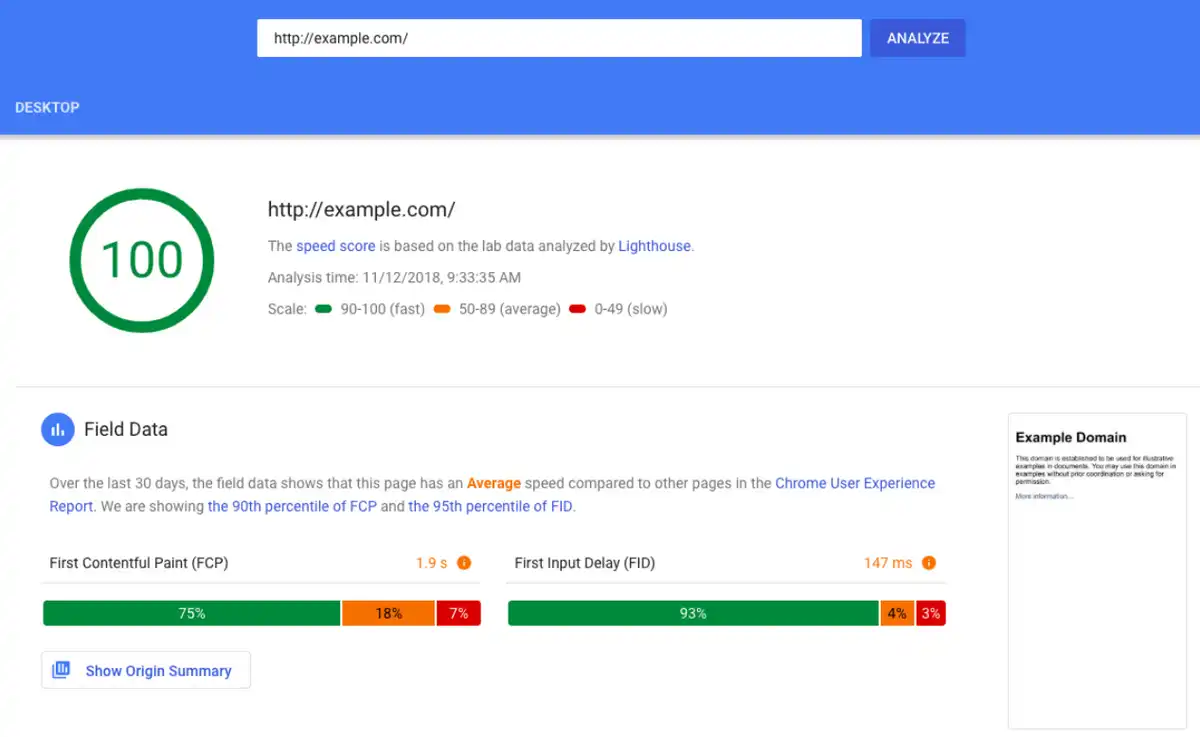 |
Have a Look at Your Inventory
While keeping track of inventory may be low on your totem pole of customer support Black Friday tasks, it’s important to be aware of. Your inventory can affect everything from advertising to logistics.
One possible solution is to start using inventory management software in the months leading up to the Black Friday weekend. One solution is to use the Emerge App, which allows you to keep track of every single piece of inventory.
Inventory management solutions will help you know which products need to be restocked and which ones you can start pushing early. If a certain item has failed to sell out after more than 12 months, you can put a high discount on it. Examine your inventory in time and plan everything accordingly.
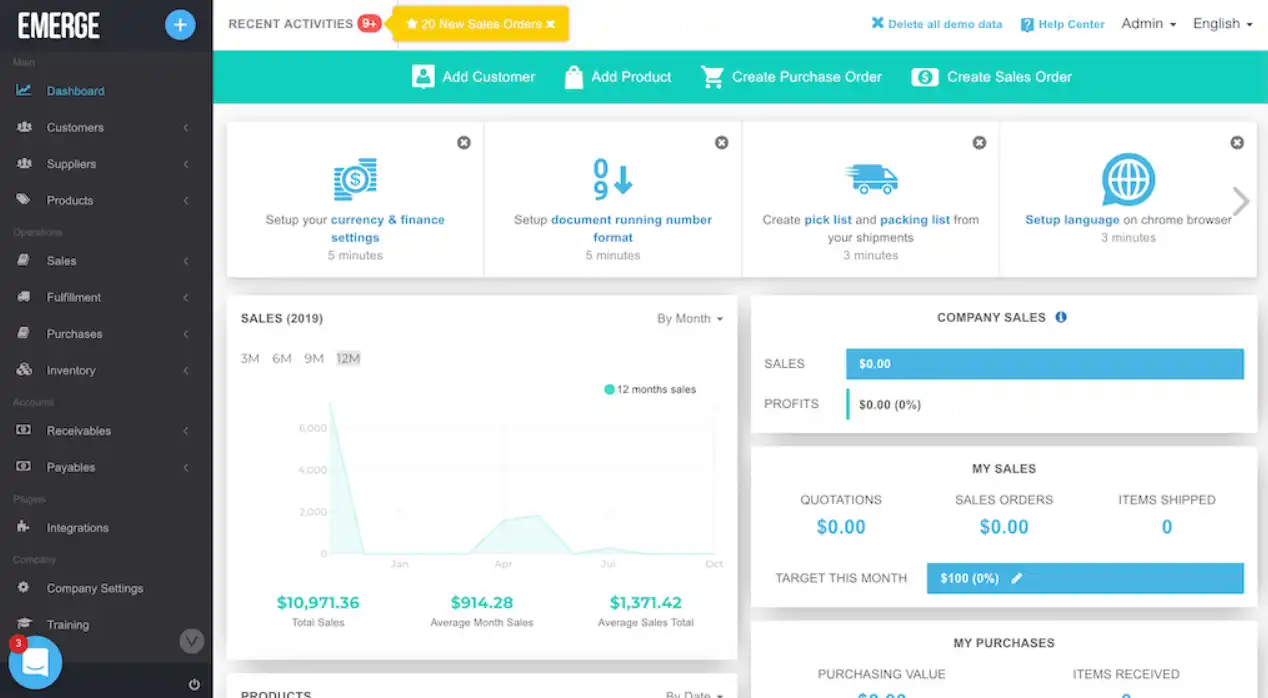 |
Prepare Your Workers
Once Black Friday comes around, your workers better be ready to handle the increase in orders, BFCM returns, and complaints. If you want to keep satisfaction levels high, customer service agents need to do their jobs correctly. And in order for them to do their job, you need to make sure that they’re trained.
Talk to your staff. See if they’re aware that things are about to become more frantic than usual. Some workers thrive under pressure. Others aren’t accustomed to working in stressful situations. The best way to eliminate their fear – and subsequent mistakes – is to put in work and train them.
If they want to nail customer service, your workers need to:
- Respond to inquiries immediately
- Use positive/professional language
- Take a proactive approach to problem-solving
Logistics Challenges During BFCM
Last year, many retailers were caught by surprise by BFCM. Due to high discounts, many consumers hurried to make their purchases early. Those discounts pulled a bulk of sales into a narrow timeframe. Unsurprisingly, some merchants weren’t expecting such a high demand.
Since most people will do a majority of their shopping online this BFCM weekend, you can expect a busy year again. Here are some logistic challenges that you’ll face in 2022.
The Demand Can Vary Significantly
The biggest logistics challenge is the lack of control retailers have during the Black Friday weekend. Year-to-year, demand isn’t consistent. This can happen for many reasons. For instance, this year, in the United States, the demand may not be so high.
That’s because the last November payday falls after Black Friday. This will eliminate the spur-of-the-moment purchases. On the other hand, more people have probably saved up money during quarantine. All of these factors make the entire ordeal hard to predict.
Lack of Communication
As we said earlier, even the biggest players in the delivery game like FedEx are forced to add capacity to meet the ever-increasing demands during BFCM. No matter what company you’re working with, chances are, they might not be able to deliver all of your product on time.
But you have to talk to them and find out for yourself.
If you’re not communicating with your logistics partner, you won’t be able to create a delivery commitment schedule that’s manageable. By making unrealistic claims, you can jeopardize your entire operation and lose a lot of customers.
Unrealistic Delivery Expectations
Large online stores like Amazon, Walmart, and Target all offer next-day delivery. To compete with them, many small and mid-sized companies are offering this option as well. However, during Black Friday, this may be impossible to maintain.
While you want to offer fast delivery you need to be realistic with yourself as well as your customers. You can discuss this with your delivery company. If the delivery company you're working with can’t handle the load, notify your customers.
And don’t worry, most consumers prefer honesty over speed.
How to Plan BFCM Logistics in 5 Steps
Black Friday is unpredictable and so are the consumers. If you really want to have a successful Thanksgiving week, you need to be able to adapt to any situation. And you can do this by making sure that your business is prepared for the unexpected.
Here are five steps you need to take in order to bulletproof your logistics and get your store ready just in time for BFCM.
1. Conducting Demand Forecasting
If you take the time to prepare for Black Friday, you can expect good results. And by results, we do mean sales. But make sure you’re communicating delivery times, and following through with orders. Otherwise, you risk a ton of complaints, emails, and negative comments.
To be prepared, you need to do some demand forecasting.
What’s demand forecasting, you might ask? Simply put, it’s a way of calculating how many sales you can expect to generate during a certain period.
Your supply chain management solution probably has the ability to give you a demand forecast. In addition, talk to your supplier, they’re probably watching Black Friday trends closely and doing their own market research. They can possibly help you find the right level of product you should be carrying on BFCM.
2. Preparing Great Shipping Deals
When talking about customer satisfaction levels, you can’t overlook delivery. Your customers want to be in the know. They want to know exactly when their order will arrive. As a matter of fact, 9 out 10 shoppers feel that on-time delivery is extremely important.
Timely delivery is one thing, but you know what will really make you look good in the eyes of your customers? Making the shipping free. Not sure about it? Well, just consider this: more than 85% of Black Friday sales Salesforce tackled in 2019 had free shipping.
If you’re afraid that you’ll lose a lot of money this way, just consider this an investment. Your customers will be happy with their purchase and will surely come back after BFCM. Keep this in mind: 85% of customers prefer free shipping to fast delivery.
If you need shipping support, check out our list of the top shipping software for ecommerce.
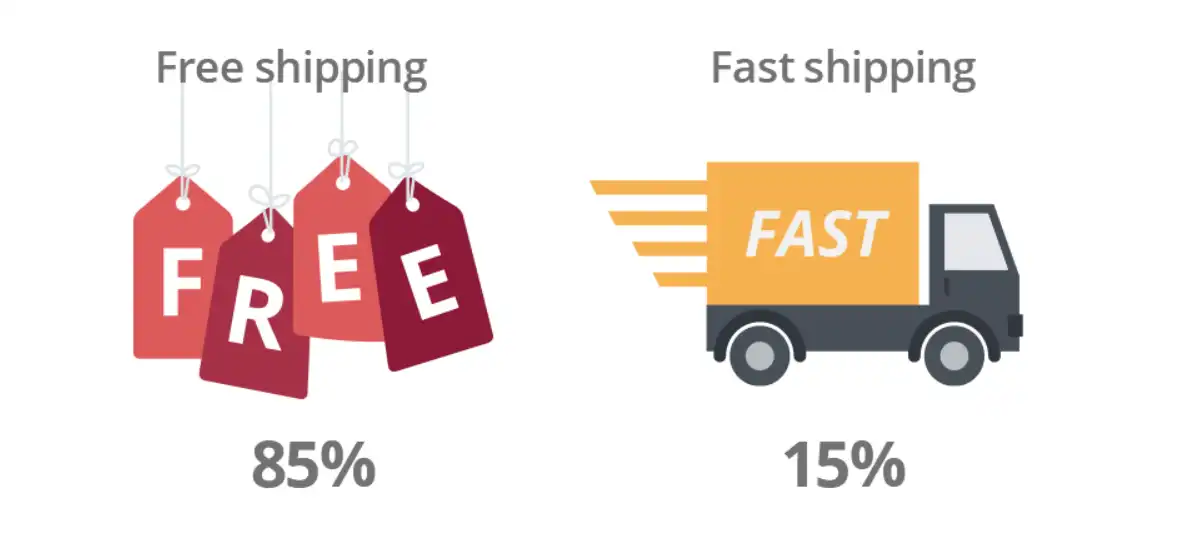 |
3. Making an Effort With Customer Service
Everyone feels overwhelmed at times during a Black Friday sale. But no matter how hectic things become, you need to make sure that every customer question and request gets answered in short amount of time.
Customer service is important all year round, but during the holiday season, it’s extremely important. Many customers will come across your website for the first time during the BFCM weekend. You want to leave a great first impression, don’t you?
Some customers will contact you directly, while others will message you on social media. Your help desk should allow you to see and answer all of these messages as quickly as possible. With Gorgias, you can decrease your first -response time by 78%.
4. Automate As Much As You Can
Many aspects of your business operations can be automated. Countless companies lose countless hours every month on needless tasks. Now is the perfect time to get ahead and start looking into customer experience automation. Customer support is a great place to start to solve tickets quicker and drive revenue.
By notifying your customers about the status of their purchase quickly, you’ll undoubtedly let them know that they can trust you. Also, if you’re working with a small delivery company, you should check to see if your supplier is up-to-date.
According to a recent study, one-third of warehouses in the United States are working with outdated storage and management equipment. New equipment is much faster and will prevent any delays in delivery. Make sure that your 3rd-party supplier is legitimate.
5. Setting Up Reverse Logistics
The reality of any holiday seasons is: people can change their minds in a second. That’s why we see so many abandoned shopping carts and returned products. Even though you’ll hope for no returns, you need to be prepared for them.
You can do this by doing some reverse logistics. This should be a part of every supply chain. In reverse logistics, the goods move from the end user back to the seller. The returned products may be disposed of in some cases, but more often than not, they’re resold.
Reverse logistics may relate to any of these activities after the purchase:
- Product returns
- Product refurbishing
- Damaged packaging
- Delivery failure
To prevent delivery failure, you can easily set up an order tracking page that will allow your customers to know about the status of their purchase at any time.
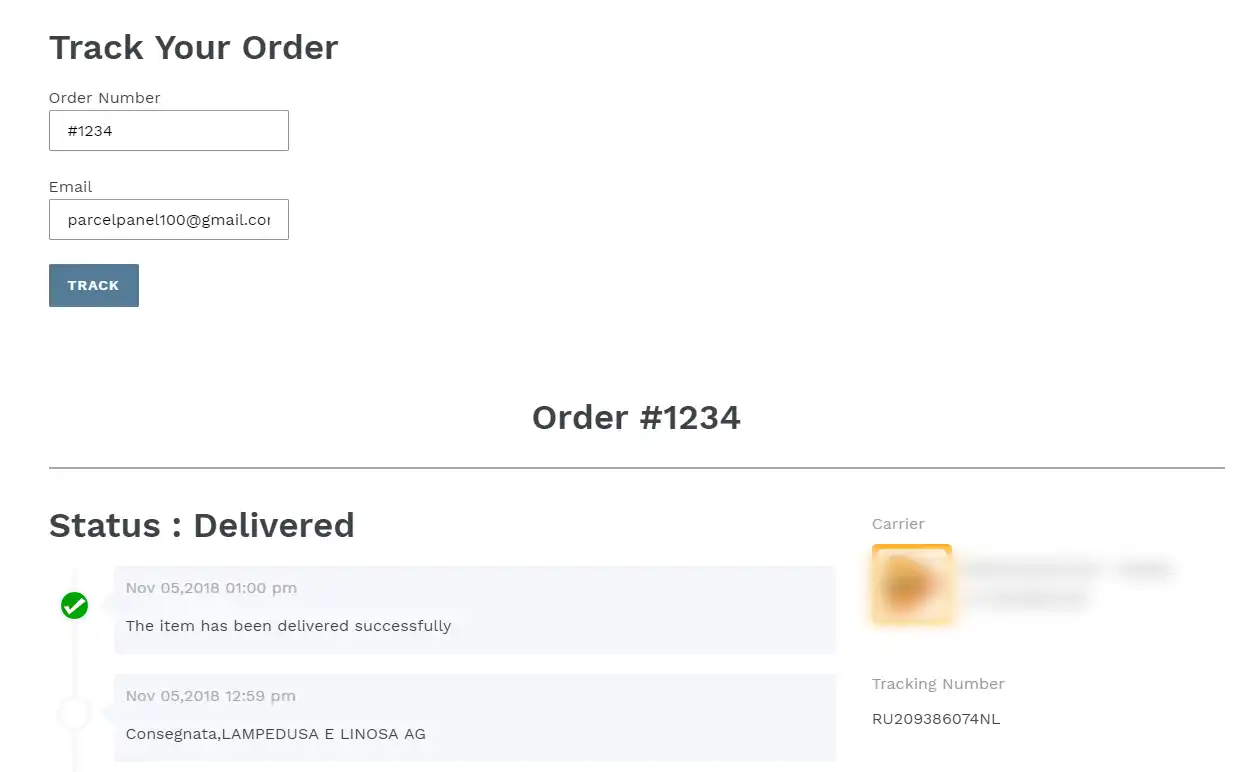 |
Don’t Forget to Keep Your Shoppers in the Loop!
Preparing for the Black Friday weekend can be stressful. There are dozens of business aspects you need to prepare for the increase in orders. Logistics is one of the most important elements of your operation, so you need to put in extra work.
Let’s go over the basics again. In the months leading up to BFCM, your business should:
- What’s the demand for your products and restock accordingly
- Prepare good shopping deals for your customers worldwide
- Beef up your customer service and implement live chat
- Automate tickets and work with automated warehouses
- Set up reverse logistics to prepare for product returns
Keeping the customers satisfied should be your #1 concern. If you manage to do that during the BFCM weekend, they’ll surely come back to your stare after the holiday.
You can’t leave the customers waiting for their shipment or a response. To ensure that, you need a handy helpdesk. That’s why you should try out Gorgias.
Gorgias is an ecommerce help desk that allows users to provide multichannel customer service from a single dashboard.
Go ahead, sign up for Gorgias, get your 15-day free trial, and see your customer satisfaction rates skyrocket.

9 Apps for Ecommerce That Every Early-Stage Brand Needs
Starting a new ecommerce business can be a whirlwind of responsibilities and decisions — like choosing which ecommerce apps you'll use to run your business. When your time and budget are limited, how do you determine which apps and plug-ins will:
- Be easy to manage?
- Have the biggest impact on your business?
- Make sense for an new store’s priorities?
Some ecommerce apps are a must-have right out of the gate, while others can wait until you get more budget and staff.
To help determine which apps are necessary for your new business, we share the most important criteria early-stage brands should look for in an app before covering nine ecommerce apps that every online business needs to download.
The best ecommerce apps for small-but-mighty brands
Now that we've covered the specific criteria that new ecommerce stores should look for in their apps, let's take a look at a few of the most essential ecommerce apps to set your business up for success.
1) Shopify: An ecommerce platform for building your online store
The first and most essential app for anyone starting a new ecommerce store is an ecommerce platform for building and hosting a shopping app or website. As the most popular ecommerce platform on the market today, Shopify makes it easy for new stores to offer online shopping essentials, like:
- Mobile optimization for shoppers on mobile devices
- Multiple payment options (like credit card, PayPal, Apple Pay, and more)
- Simple checkout processes to limit cart abandonment
With Shopify, app development is easy-breezy: You can build a customized online store using simple drag-and-drop commands. Best of all, Shopify has an app store full of integrations with just about all popular ecommerce apps and tools, enabling you to expand on all of these features. For example, you can download a Shopify app to:
- Sell your product on marketplaces like Amazon or Ebay
- Search-engine optimize (SEO) your store
- Add pop-ups to reduce shopping cart abandonment
Key features
- Easy-to-use store creator
- Hundreds of customizable themes and templates
- Hundreds of apps and integrations available on the Shopify app store
Pros
- Intuitive and easy-to-use interface
- Affordable pricing
- Great customer support
Cons
- Not as customizable as more advanced ecommerce platforms such as Magento and BigCommerce
- Does not support email hosting
Pricing options
Shopify offers three pricing plans:
- Basic plan for $29 per month
- Shopify plan for $79 per month
- Advanced plan for $299 per month
While Shopify is a favorite choice for many, it’s not the only ecommerce platform. Popular alternatives include WooCommerce, BigCommerce, and Magento. We recommend staying away from general website builders like WordPress and Wix, which offer limited support for ecommerce.
2) Huboo: Order fulfillment and tracking
Huboo is an order fulfillment solution that enables effortless order tracking and much more. With Huboo, you can outsource all of your company's order fulfillment responsibilities, shipping your products in bulk to Huboo warehouses, where they are stored, picked, packed, and delivered on behalf of your brand.
Customers demand the ability to track their orders. 90% of consumers who engage in online shopping actively track their packages, with 20% of consumers tracking their packages multiple times a day. If you want to keep your customers happy and avoid a flood of "where is my order?" tickets, you will need to provide order tracking.
Using your Huboo Dashboard, you can see sales and listings by channel, courier tracking, inventory, costs, and billing, making it easy to provide order updates to your customers.
To learn more about Huboo, check out our Huboo partner page.
Key features
- Capable of integrating with all popular sales channels and marketplaces
- Huboo Dashboard for easily tracking orders along with important fulfillment metrics and KPIs
- Wide-ranging fulfillment network in the EU and UK capable of fulfilling orders all over the world
Pros
- Helps eliminate fulfillment errors with 99.9% picking accuracy
- Removes the burden of order fulfillment and warehouse management
Cons
- Per-item pricing adds to your company's shipping costs
- Does not accept bulky, chilled, or frozen goods
Pricing options
Huboo charges per-item rates for every package shipped, varying based on the package size and how quickly it is delivered. For a detailed breakdown of these rates, check out Huboo's pricing page.
3) ShipHero: Warehouse management and order fulfillment
Another excellent warehouse management and order fulfillment app, ShipHero offers two solutions to ecommerce stores:
- A warehouse management system for managing your own warehouses more efficiently
- Completely outsourced fulfillment.
With ShipHero’s fully outsourced fulfillment services, store owners can ship their products in bulk to ShipHero warehouses, where they are picked, packed, and delivered with 99%+ shipping accuracy.
ShipHero’s warehouse management system lets you automatically process orders and returns, manage your inventory, and access insightful analytics and reporting.
Key features
- Fully outsourced warehouse management and order fulfillment
- Built-in reporting features covering everything from COGS to Picker/Packer Efficiency to Replenishment
- Automation rules, including smart warehouse routing, shipping method mapping, and address validation
Pros
- Provides the option to manage inventory and order fulfillment yourself using ShipHero’s warehouse management system or the option to outsource these responsibilities
- Includes excellent automation features for improving order fulfillment efficiency and accuracy
- Enables 30% faster shipping and a 35% reduction in warehouse costs
Cons
- Somewhat difficult to set up and navigate by some reports
- Higher shipping costs
Pricing options
ShipHero offers three pricing plans for its warehouse management system:
- Standard WMS for Brands plan starting at $1,850 per month
- WMS for 3PLs plan starting at $1,995 per month
- Enterprise WMS for Brands plan with custom pricing available upon request
However, pricing for their outsourced fulfillment services is only available upon request.
4) Gorgias: Helpdesk and live chat
89% of customers are more likely to make another purchase with a company following a positive customer service interaction. While most brands want to offer great customer experience, doing so as a small team can be difficult.
Luckily, helpdesks like Gorgias make it easy to offer great customer support without all the hassle, thanks to automation and self-service features.
Thankfully, Gorgias makes it easy for brands of all sizes to offer personalized customer support via an industry-leading customer support platform. This includes features such as:
- A centralized dashboard for managing tickets and customer messages across numerous support channels
- Automation of tedious customer support tasks
- Help Centers and other self-service support options
- A fast-loading live chat widget for offering live chat support
- And much more
Key features
- Macros and Rules to provide automatic, personalized responses to common customer questions
- Centralized customer support dashboard that pulls in and organizes tickets from live chat, email, social media, SMS, phone, and more
- Advanced automation features to automatically respond to up to 30% of support requests
Pros
- Detailed customer support data and analytics for further fine-tuning your support services
- Broad range of customer support tools and features in a single platform
- Revenue-generation focused so that you can turn customer support into profits
Cons
- Can take some time to master all of Gorgias' tools and features
- Revenue statistics are only available on upper-tier plans
Pricing options
Gorgias offers five pricing plans:
- Starter plan for $10 per month
- Basic plan for $60 per month
- Pro plan for $360 per month
- Advanced plan for $900 per month
- Enterprise plan with custom pricing available upon request
5) Klaviyo: SMS and email marketing
Klaviyo is an SMS and email marketing platform with unparalleled personalization possitbilitieis. With Klaviyo, you can:
- Design attractive custom emails and text for your ecommerce website’s shoppers without any coding experience
- Manage and segment contact lists with built in customer relationship management (CRM) features
Create and launch automated SMS and email marketing campaigns - Track the results of those campaigns with detailed reports
Email marketing remains one of the most effective of all digital marketing channels and is something that every ecommerce store should take advantage of. Plus, SMS marketing has been one of the most trending marketing channels for the past few years thanks to texting’s highly visible push notifications.
Take a look at how Klaviyo and Gorgias integrate for even more powerful experiences.
Key features
- A/B testing and segmentation features for honing your email marketing strategy
- Drag-and-drop email builder
- Advanced campaign automation
Pros
- Easy to set up and use
- Affordable pricing, including a forever free plan
Cons
- Limited SMS marketing features
- Support team is sometimes unresponsive
Pricing options
Klaviyo offers three pricing plans:
- Free plan for $0 per month that supports up to 500 monthly email sends
- Email plan with pricing based on how many contacts your business has
- Email and SMS plan with pricing based on how many contacts your business has
6) Canva: Design and content creation
Whether it's creating graphics for your emails, website, social media posts, or anything in between, creating and running an online store requires you to design a lot of content. Canva makes content design and creation easy regardless of your artistic experience.
With Canva, you can use attractive design templates and user-friendly drag-and-drop commands to create all manner of designs, including logos, flyers, banners, and much more.
Key features
- Drag-and-drop content designer
- Premium content library with 100 million+ photos, graphics, video, audio, and fonts
- Time-saving design tools such as Magic Resize and Background Remover.
Pros
- Very easy to use regardless of your design experience
- Advanced functionality that rivals expensive competitors like Photoshop
Cons
- Can't move one design to another, requiring you to create each design completely from scratch
- Limited video editing tools
Pricing options
Canva offers three pricing plans:
- Free plan for $0 per month
- Pro plan starting at $12.99 per month
- Teams plan starting at $14.99 per month
7) Typeform: Customer feedback surveys
Customer feedback is an invaluable resource for ecommerce stores of all sizes, enabling you to take a data-based approach to optimizing your store's customer experience.
With Typeform, you can start gathering more customer feedback by using templates to create customer feedback surveys.
Along with these customer feedback survey templates, Typeform also offers signup forms, report forms, order forms, and a ton of other professional templates.
Key features
- Hundreds of high-quality survey and form templates
- Quiz maker for creating customer quizzes (such as product recommendation quizzes)
- Brand kit for creating a set of custom fonts, colors, and media that you can use on any form
Pros
- Supports a long list of integrations with other popular ecommerce tools
- Makes it easy to create high-quality customer feedback surveys regardless of your design experience
Cons
- Only for creating surveys and forms; you'll need integrations to actually send these forms out and gather responses
- Offers mobile app for iOS but not for Android
Pricing options
Typeform offers three pricing plans:
- Basic plan for $25 per month
- Plus plan for $50 per month
- Business plan for $83 per month
8) Triple Whale: Analytics and reporting
Triple Whale is a complete ecommerce hub for Shopify stores that lets you track the metrics that matter most to your brand in one easy-to-use dashboard.
https://youtu.be/RIaCgvdr2mc
Triple Whale's attribution features allow you to track how much you spend on each marketing channel and your return on these investments. If you are looking for a single solution that gives your brand access to all of the data and insights it needs to grow and improve, you'll find a lot to like about Triple Whale.
Key features
- Six attribution models and journey mapping for unlocking key insights in real-time
- Creative analysis tools for measuring ad performance
- Mobile app for viewing your data on the go
Pros
- Real-time insights provide much more flexibility and proactivity than monthly reports
- Single source of truth for your ecommerce store
Cons
- Somewhat costly for the features that it provides
- Only available for Shopify stores
Pricing options
Triple Whale offers five pricing plans:
- Dashboard plan for $100 per month
- Attribution plan for $300 per month
- Full Whale plan for $450 per month
- Custom plan with custom pricing available upon request
9) Recharge: Subscription management
It might surprise you to learn that 54% of online shoppers are subscribed to at least one ecommerce subscription. Leveraging the subscription model is a good way to create a reliable, recurring revenue stream for your business. However, it's also a model that entails its own unique requirements and complexities.
The best way to create and manage a subscription service for your online store is to utilize a subscription management app, and Recharge is a great one to consider. Recharge lets you quickly set up a subscription program, packaging your products or services into monthly or annual subscription plans.
The app processes recurring subscription payments and makes it easy to manage every aspect of your subscription programs, providing detailed analytics into the performance of your program. Recharge also allows you to create a customer-facing subscription management portal where customers can easily view, change, or cancel their subscriptions.
Learn how Recharge and Gorgias integrate for powerful subscription management.
Key Features
- Developer Hub for quickly creating and setting up subscription offers
- Analytics suite that provides insights into revenue, customers, and subscriptions
- Subscription management via RechargeSMS or a customer portal
Pros
- Gives customers the option to skip or delay deliveries rather than canceling, helping reduce customer churn
- Makes it quick and easy to create subscription offers
Cons
- Limited customization options
- The only subscription management app on the market for Shopify stores
Pricing options
Recharge offers three pricing plans:
- Standard plan with no monthly fees and 1% + 10 cents per transaction
- Pro plan for $499/month and 1% + 19 cents per transaction
- Custom plan with tailored pricing available upon request
{{lead-magnet-1}}
Key ecommerce app features small businesses should look for
Most new ecommerce businesses don't have the budget or the sales volume to justify purchasing a broad range of ecommerce apps right away. So, you'll need to narrow down your selection to the apps with great bang for your buck.
With that in mind, here are the most important features that small business owners should look for in ecommerce apps:

Provides flexible, affordable pricing
Some ecommerce solutions can cost thousands of dollars a month or more, putting them out of reach for most small businesses and early-stage brands.
These high-priced apps are almost always geared toward larger organizations anyway, meaning that you aren't likely to need all of the features they offer until your business grows.
The good news is that there’s also a wide range of affordable ecommerce apps designed to support smaller stores and brands — those are the ones we’ll focus on below.
Automates manual tasks and ecommerce processes
Starting a new business requires a lot of hard work. The more manual tasks and workflows you can automate, the more time you have to focus on important activities like developing new products and growing your audience.
Creating automated email marketing campaigns rather than sending out emails manually is one example of how apps that offer automation features can save you time. Using automation to provide canned responses to common customer questions is another example of the time-saving benefits that automation can provide.
Monitors ecommerce performance
Whatever function of your ecommerce business that an app is designed to facilitate (whether it's customer support, marketing, sales, or order fulfillment), it also needs to be able to track your store's performance in these key areas.
This is especially important for small stores, who don’t have full time data analysts to pull insights from tools. Choosing apps that provide detailed analytics and reporting will give your business the data and insights it needs for continual optimization.
Integrates with other ecommerce tools
Integrating all your ecommerce apps can enable powerful new features and capabilities. For instance, integrating your customer support app with your order tracking and fulfillment app might allow you to easily provide tracking numbers and order updates when customers request them.

Along with choosing apps that offer a broad range of possible integrations with other popular ecommerce tools, it's especially important to ensure that the apps you select are capable of integrating with whatever ecommerce platform you use.
Supports your most important ecommerce KPIs
When you don't have the budget to purchase every app you might want, it's important to focus on the apps that align most closely with your important KPIs. Business of all sizes, but especially small businesses, do well to focus on one area at a time. Are you looking to:
- Increase customer satisfaction?
- Boost conversion rate?
- Raise brand awareness?
- Improve customer retention?
Identifying the KPIs most important to your business and choosing your ecommerce apps based on these KPIs will ensure that you purchase apps that will have the biggest impact on your store's success.
Offers "try it before you buy it" model
When budgets are tight, you need to ensure that the app you purchase will meet your business's needs before you break out your wallet. For this reason, small businesses should prioritize apps that offer a free trial, a free version, or, at the very least, a free demo.
Includes customer success or support
Ecommerce apps are often challenging to set up and use. And as a small business owner, you can't afford to spend all your time troubleshooting issues with your ecommerce apps. This makes it important to choose apps with high-quality customer support or customer success services.
Offers additional pricing plans
While it's great to find an app with free or affordable pricing, you also need solutions that can scale alongside your company. Choosing apps with multiple pricing plans allows you to upgrade your subscription as your company grows, without having to switch to a new app.
Learn why ecommerce stores of all sizes favor the Gorgias app
Choosing the right customer support platform is just one of the many vital decisions you will need to make as an ecommerce store owner. While you’ve got plenty of options, only one is exclusively built for ecommerce and offers features and plans that scale from small stores to large enterprises.
{{lead-magnet-2}}
If you want to get started enjoying the many benefits of the best ecommerce customer support platform on the market, sign up for Gorgias today!
Building delightful customer interactions starts in your inbox
