

72% of Gorgias Uses AI for Decisions: How We Did It
Four months ago, our analysts were dealing with a barrage of questions. "What's our ARR by segment?" "Build me a dashboard for this quarter's pipeline." Quick asks piled up behind complex deep dives. Stakeholders waited for answers that should have taken seconds, and analysts spent their time fielding requests instead of doing the strategic work that creates the most value.
Today, anyone at Gorgias can ask a question in plain language and get an accurate, contextualized response in seconds. Not from a colleague or dashboard, nor from a generic answer from the internet. But a response built on our business context. We call it Cortex, our flagship internal AI agent.
In two months, Cortex went from an idea to fielding thousands of questions every week, recommending actions across the business, and deprecating the need for manual dashboard creation. While most companies right now are treating AI as an initiative — at Gorgias, AI is already part of how we work. 72% of Gorgias employees use Cortex each week, and that number is only growing.
We didn’t achieve this by simply plugging a large language model into our stack. LLMs are a critical part of the equation, but they aren't the driving force — it’s everything else under the hood: the infrastructure, context, platform architecture, and the team that brings it all together.
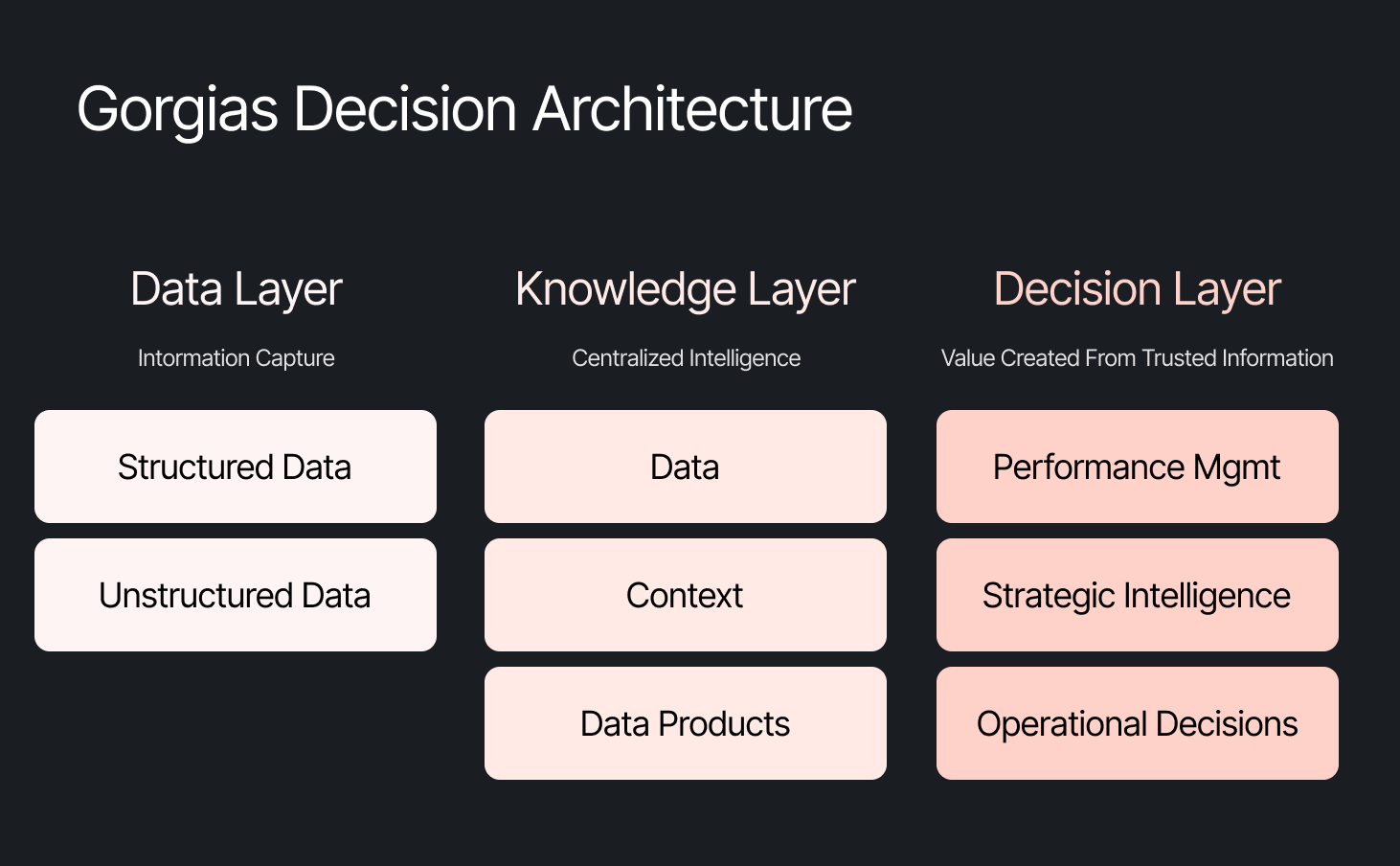
The framing problem most companies get wrong
The instinct across many companies today is to start with the model, pick a provider to solve a specific challenge, or invest heavily in getting the data right. All reasonable starting points, but most of them solve for one use case. Underneath that approach is a framing problem: seeing AI as an initiative — something you assign and measure. Seeing AI as another tool your company uses versus how your company operates.
We started somewhere different. Every company is built on four pillars: customers, people, product, and decisions. AI investments tend to place heavy emphasis on the first three. We started with the fourth. Our bet was that if we built everything around the need to make effective decisions first, asking what Gorgias needed to know to operate well, then our AI would become dramatically more powerful.
Cortex is that philosophy in practice
Cortex is our flagship internal AI agent, and the product where we established the tenets that now run through everything else we build: composable and modular infrastructure, governed context, and accessible from wherever decisions happen. Cortex lives in Slack, as well as across LLM vendors, in its own browser extension, and even on its own dedicated internal site.
Cortex doesn’t stop at answering questions. It can read and write to Notion, file Linear tasks, create HTML apps, automate signal delivery, and more. It operates across every layer of our stack, from dashboards to data pipelines, because we designed it as one integrated system. It is this connection that adds remarkable depth to what people can ask, and what they get in return.
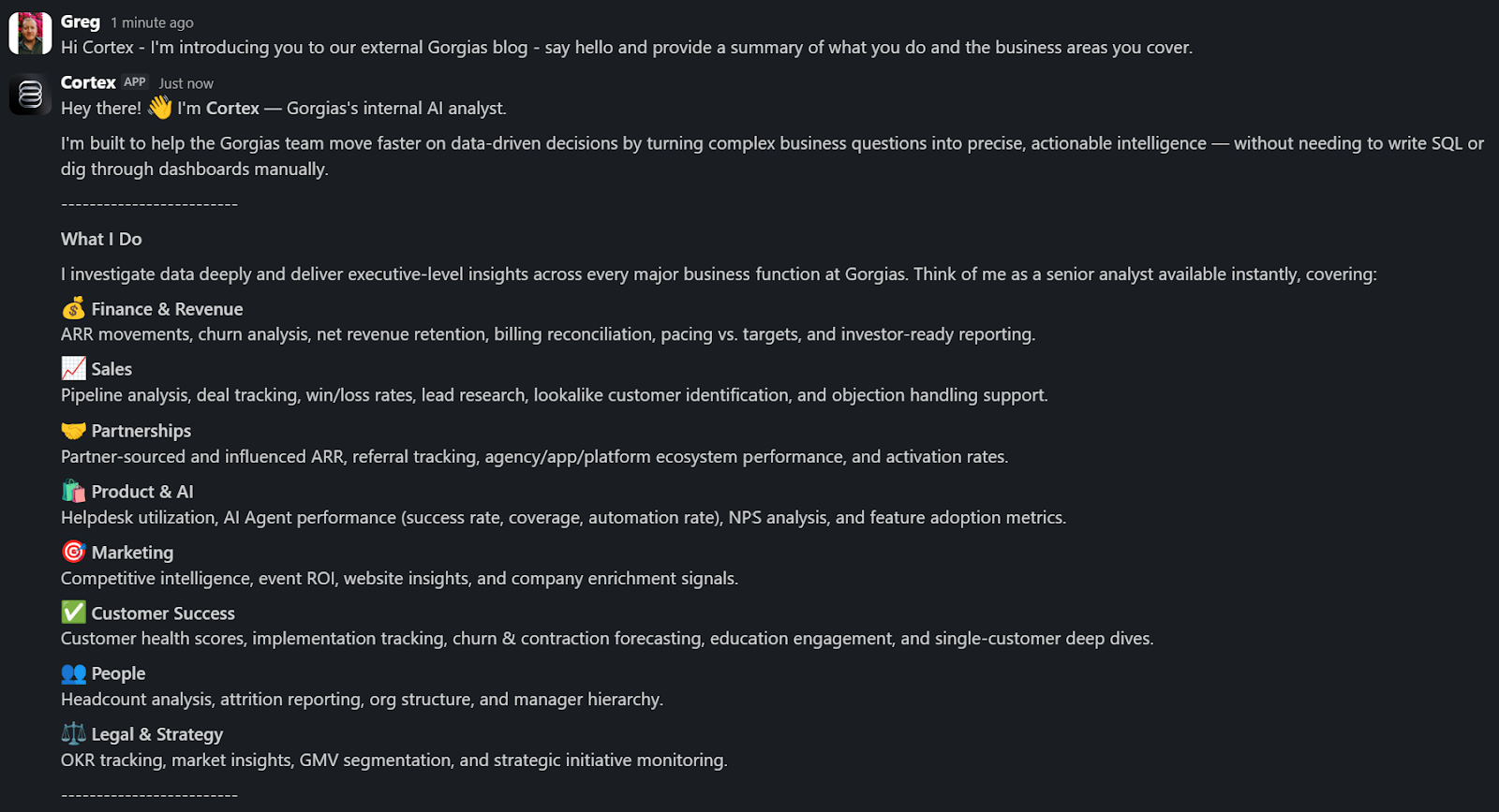
A Sales Lead is pitching and asks Cortex for the full picture of the merchant. In a customized PDF, Cortex lists coverage gaps, pre-sale intent signals, and product fit options. Everything the sales lead needs to walk in with confidence.
A Senior Product leader asks, "How are we performing against OKR #1, and what can my team do to help accelerate it?" Cortex returns a full ARR breakdown, projected end-of-month attainment, segment-level findings, and connects it all back to company-level strategies. A suite of recommendations customized to the leader, the performance, and the signals that bridge how they can support our goals. The kind of answer that used to take someone a week to put together.
These aren't simple lookup queries. They require deep business context spanning multiple areas. Cortex handles these because its Decision Engine gives it the information to reason against governed data, metric definitions, and business context, turning a generic answer into a credible one.
Overnight, teams have built Cortex into how they work. They’re spending less time searching and more time finding answers, not because they were told to, but because Cortex reduced the distance between question and decision.
Flexibility as the foundation
Cortex’s modular infrastructure allows us to experiment and add new capabilities freely. We’ve already built two more internal AI agents made for entirely different use cases, but using the same Decision Engine as Cortex.
GAIA, our internal experimentation AI Agent, helps our customers identify opportunities in their AI Agent Guidance design. It takes institutional knowledge across our teams and turns it into a scalable system that drives automation and value to our customers. Our CEO, Romain Lapeyre, has been its most vocal advocate since day one.
When we needed a platform for investor readiness and board preparation, we built Oracle. Our board decks and talk tracks are informed and built with the same AI, and our numbers are validated every step of the way.
We’re continuing to expand new AI agents internally, exploring how they can create value for customers and our own teams.
AI has transformed how data teams create value, and we’ve already shifted to account for it
When AI handles thousands of analytical questions each week, the highest-value work for a data team shifts permanently. Late 2025, we repositioned from a Data Analytics function into a Decision Intelligence function — a structural change in what we own and how we operate.
Today, our analysts focus on the most sensitive, complex, and forward-looking decisions and analyses. They partner more deeply with stakeholders by driving next steps from signals. They're even building entirely new capabilities that didn't exist in their role descriptions months ago. Things like AI skills for Cortex, context curation, and insight and recommendation delivery. The role of the analyst hasn't diminished. It's expanded to encompass the most meaningful work an analyst can do: driving outcomes and ensuring those decisions can achieve them.
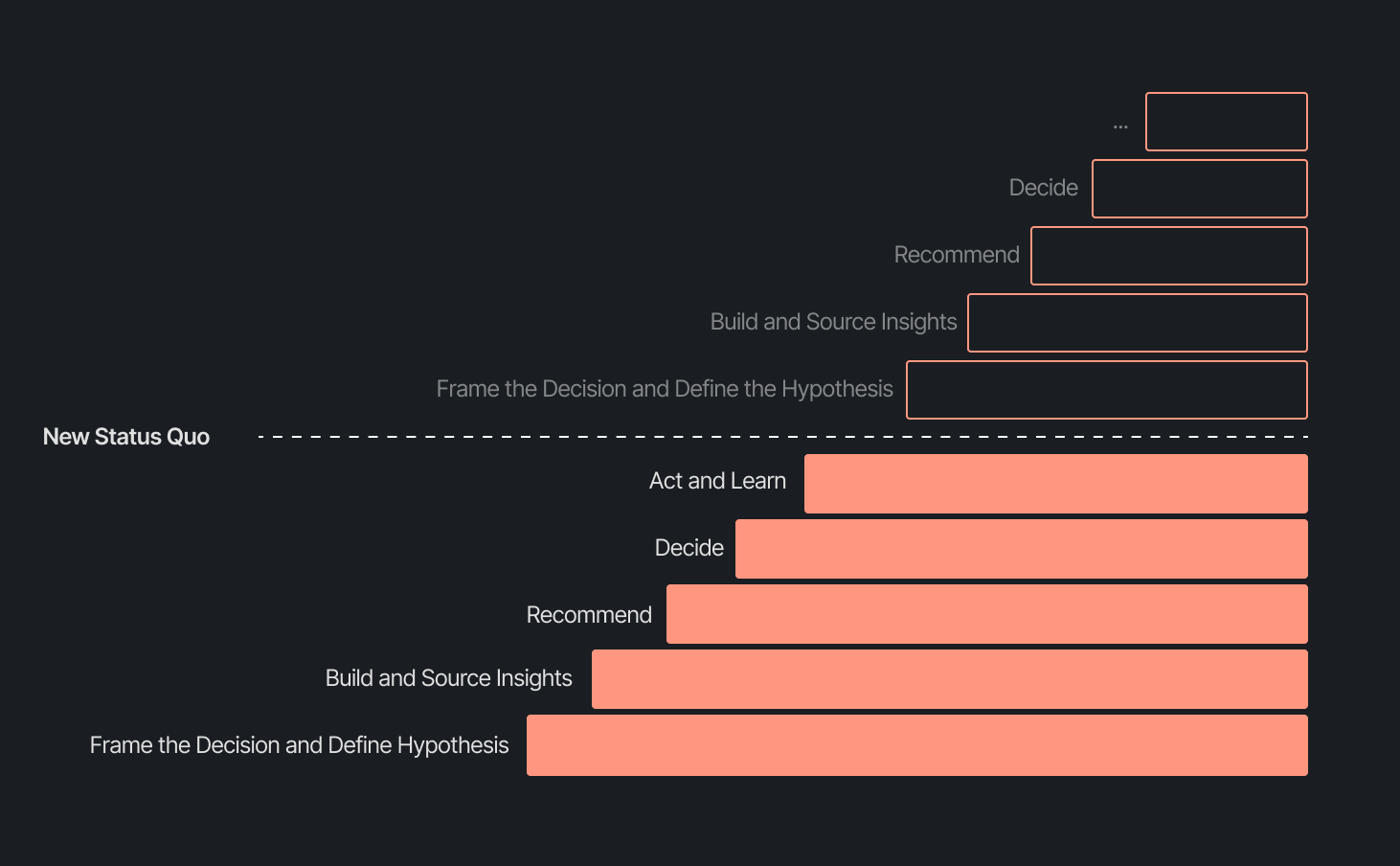
Our business support model has changed, too. Instead of embedding analysts and dedicated engineers within functional teams, we align capacity to the highest-impact company objectives and move fluidly across them. This model works even better because Decision Intelligence brings together both analytics and engineering teams under one roof.
Elliot Trabac leads our Data, Context and AI Engineering teams. The Decision Engine, Cortex, GAIA, and the platforms I've described exist because of the infrastructure his team innovated and built from the ground up. Noemie Happi Nono leads our Decision Strategy and Operations team, driving decision outcomes with stakeholders, advancing the development of Cortex skills and capabilities, and pushing into new areas of analysis every day.
Together, they're shaping what a modern data function looks like when AI becomes a standard building block for how a company operates.
What’s next for the Decision Intelligence team
The question of ROI is long gone. AI has opened the floodgates to more trusted and meaningful signals than ever. The natural next evolution is Proactive Intelligence, signals surfaced toward what you need to know, before you ask. And we're already building this because our architecture is designed to support it.
In the coming weeks, members of the Decision Intelligence team will go deeper into themes I've touched on here. Yochan Khoi, a Senior Analytics Engineer on our team, recently published a technical walkthrough of our context layer and will go further into building context strategies that scale. Others will cover infrastructure, analytical partnerships, evolving data assets into decision assets, and the cost and efficiency gains that make sustained AI investment viable.
AI hasn't changed the most important element of data and analytics functions — delivering outcomes — but it has raised the bar for what it looks like and how far we can take it. We’re just getting started.
TL;DR:
- AI is resolving tickets, not just replying. AI now handles 31% of customer interactions for ecommerce brands, and that number is expected to nearly double within two years.
- Every channel is becoming a storefront. Conversations are replacing the traditional browse-and-buy journey, with 79% of brands reporting sales from AI-driven interactions.
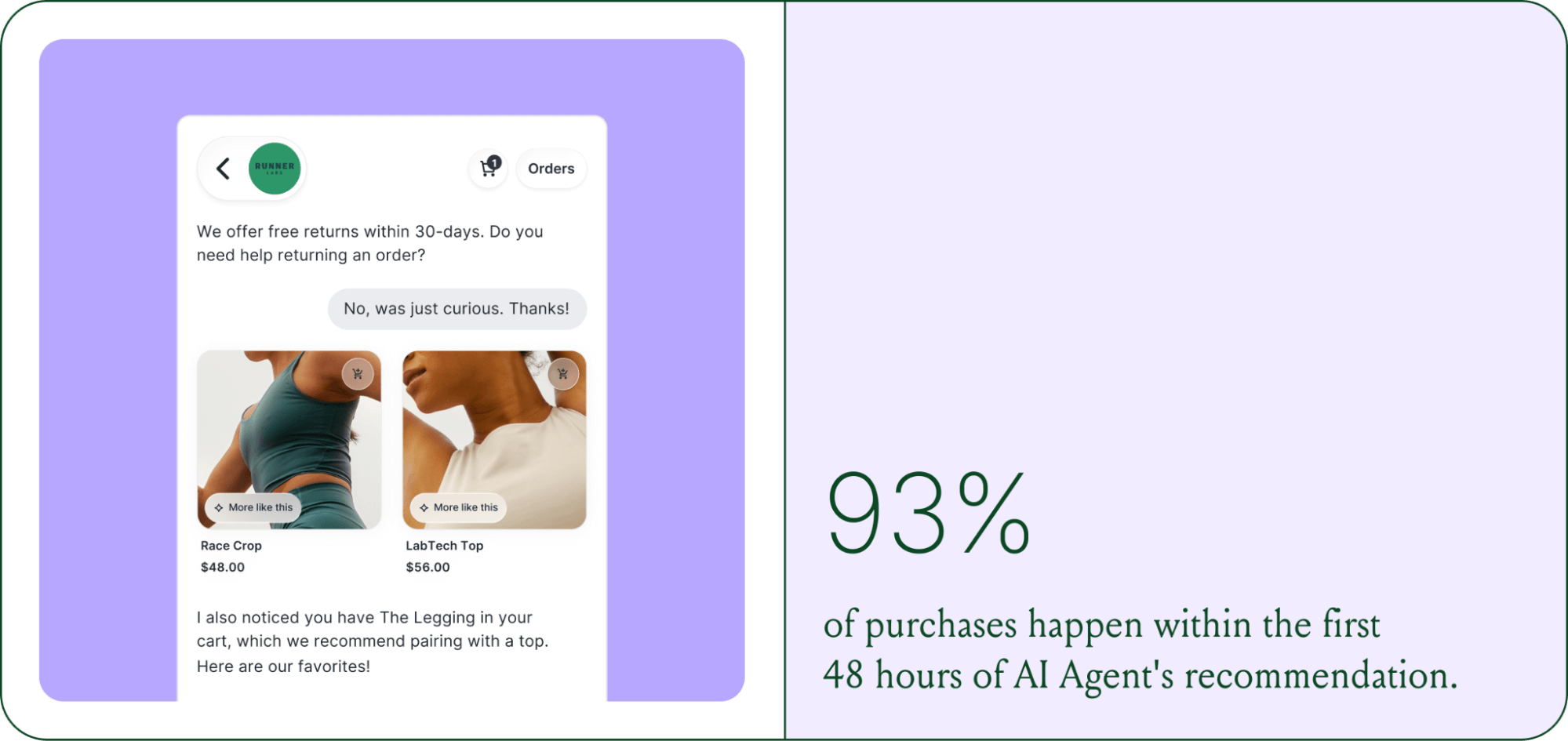
- AI is shortening the buying cycle. 93% of AI-influenced purchases happen within the first 48 hours of the conversation.
- CX teams are changing, not shrinking. Ecommerce brands are actively hiring for more technical roles to implement, coach, and maintain AI.
- The winning model is hybrid. AI handles volume and speed, while humans handle complexity and judgment.
The way shoppers buy online has shifted and customers are at the center.
They no longer want to scroll through product pages, dig through FAQs, or wait 24 hours for an email reply. They open a conversation, ask a specific question, and expect a useful answer in seconds. Brands that can’t deliver these experiences at scale are seeing customer hesitation turn into abandoned carts and lost revenue.
This shift has a name: conversational commerce. It's the practice of using real-time, two-way conversations as your primary sales channel, through chat, AI agents, messaging apps, and voice.
What started as an experiment for early adopters has become a key growth lever, with 84% of ecommerce brands treating conversational commerce as a strategic pillar this year vs. last year.
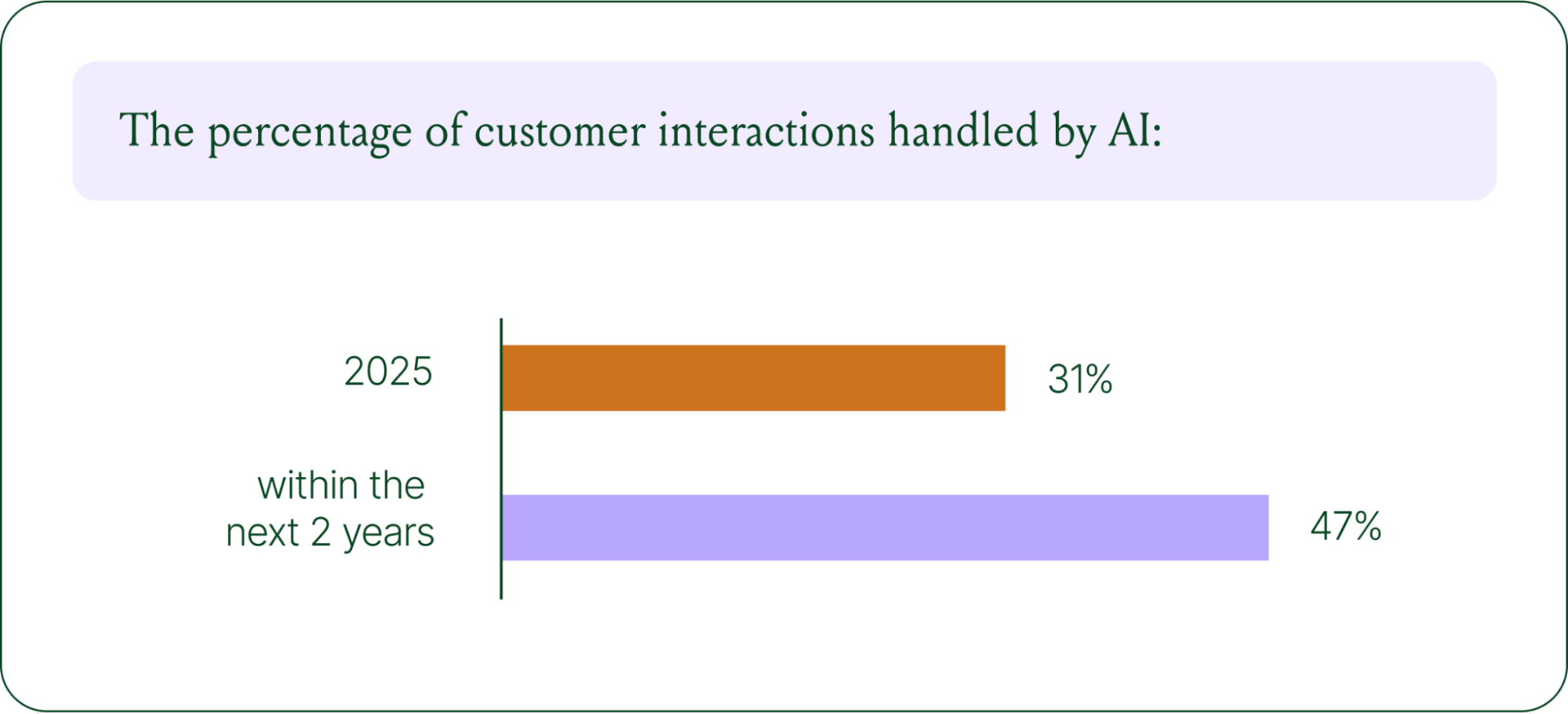
We surveyed 400 ecommerce decision-makers across North America, the U.K., and Europe to understand how conversational commerce and AI are reshaping the ecommerce landscape. These findings are complemented by aggregated and anonymized internal Gorgias platform data from 16,000+ ecommerce brands.
The State of Conversational Commerce in 2026 trends report breaks down all of the findings, including five key trends shaping the ecommerce landscape.
{{lead-magnet-1}}
Trend 1: AI is table stakes for ecommerce and it’s no longer just about efficiency
A few years ago, adding an AI chatbot to your site that could provide tracking links and Help Center article recommendations was a differentiator. Today, it's table stakes. McKinsey found that 71% of shoppers expect personalized experiences, and 76% get frustrated when they don't get them.
Right now, most ecommerce professionals use AI, with 93% having used it for at least 1 year. Enthusiasm is accelerating quickly, with only 30% of ecommerce professionals rating their excitement for AI at 10/10 in April 2025. Similarly, while AI adoption rose steadily year over year, it reached a clear peak in 2026.
The use cases driving this adoption are practical and high-volume:
- Order tracking and status updates
- Returns, exchanges, and refund requests
- Shipping FAQs and delivery estimates
These are the tickets that flood brands’ inboxes every day. AI agents resolve them instantly, without pulling teams away from conversations that actually require human judgment.
Explore AI adoption and use case data in more depth in the full report.
Trend 2: Conversations are the new path to checkout
The traditional ecommerce funnel, visit site, browse products, add to cart, check out, is losing ground. Shoppers now discover products on Instagram, ask questions via direct message, and complete purchases without ever visiting a website.
Conversational AI is actively increasing revenue, with 79% of brands reporting that AI-driven interactions have increased sales and conversion in their business.

The practical implication is that every channel is becoming a storefront. Creating personalized touchpoints with customers earlier in the journey, through proactive engagement, is impacting the bottom line.
Read the full report to explore how AI conversions have increased QoQ by industry.
Trend 3: AI is accelerating the purchase cycle
Pre-purchase hesitation is one of the biggest conversion killers in ecommerce. A shopper lands on your product page, has a question about sizing or compatibility, can't find the answer quickly, and leaves. That's a lost sale that had nothing to do with your product.
Conversational AI changes that dynamic. When a shopper can ask a question and get an accurate, personalized answer in real time, the friction disappears.
Brands using Gorgias saw this play out at scale in 2025. When AI Agent recommended a product, 80% of the resulting purchases happened the same day, and 13% happened the next day.
Brands are further accelerating the buying cycle through proactive engagement. On-site features such as suggested product questions, recommendations triggered by search results, and “Ask Anything” input bars drove 50% of conversation-driven purchases during BFCM 2025.
Explore how AI is collapsing the purchase cycle in Trend 3 of the report.
Trend 4: AI is making CX teams more technical
There's a persistent narrative that AI is making CX teams redundant. The data tells a different story. 62% of ecommerce brands are planning to grow their teams, not cut them. But the scope of those teams is changing.

New roles are emerging around AI configuration and quality assurance. Teams are investing in technical members to write AI Guidance instructions, develop tone-of-voice instructions, and continuously QA results.
CX teams are also bridging the gap between support goals and revenue goals, as the two functions increasingly overlap.
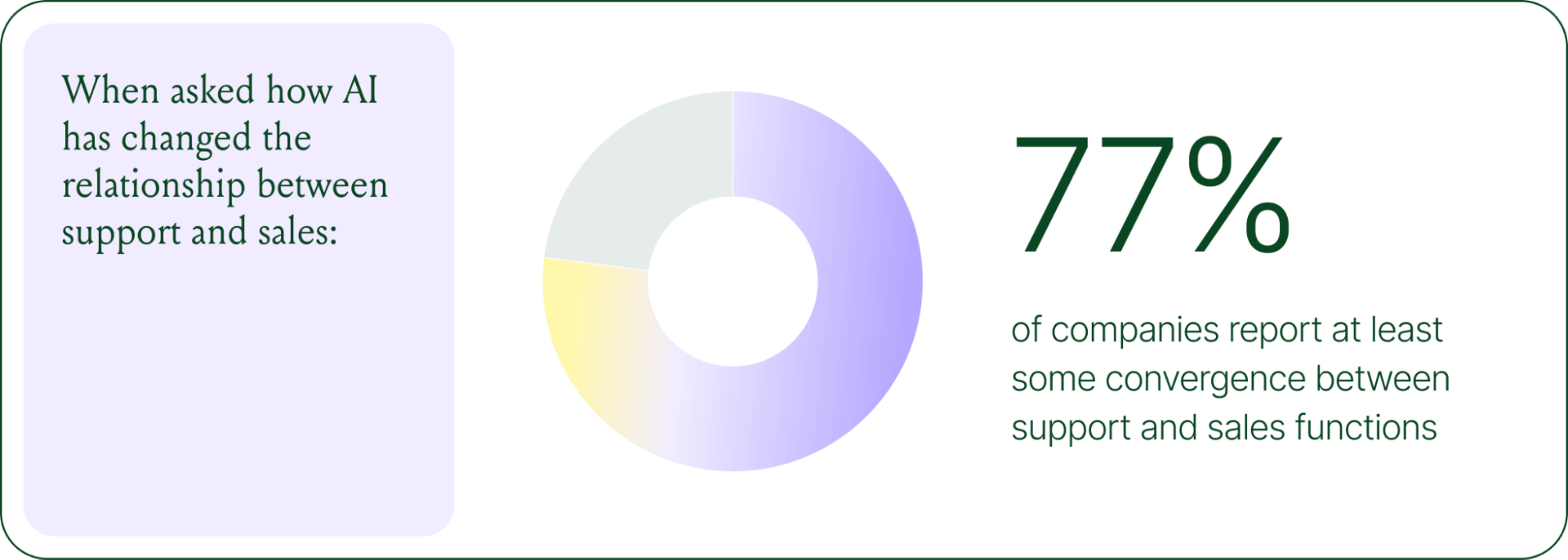
The result is CX teams that are more technical than they were before. Agents who once spent their days answering repetitive tickets are now spending that time on higher-value work: complex escalations, VIP customer relationships, and improving the AI systems and knowledge bases that handle the volume.
Learn more about the evolution of CX roles in Trend #4.
Trend 5: The future is hybrid: AI-first, humans when it counts
Despite increasing AI adoption, data shows that ecommerce brands shouldn’t strive for 100% automation. Winning brands are building systems in which AI handles repetitive tier-1 tickets, and humans handle complex, sensitive cases.

AI handles speed and scale. It resolves order-tracking requests at 2 a.m., processes return-eligibility checks in seconds, and answers the same shipping question for the thousandth time without compromising quality.
Human agents handle conversations that require context, empathy, or decisions that fall outside the standard playbook. There are several topics where shoppers still prefer human support.
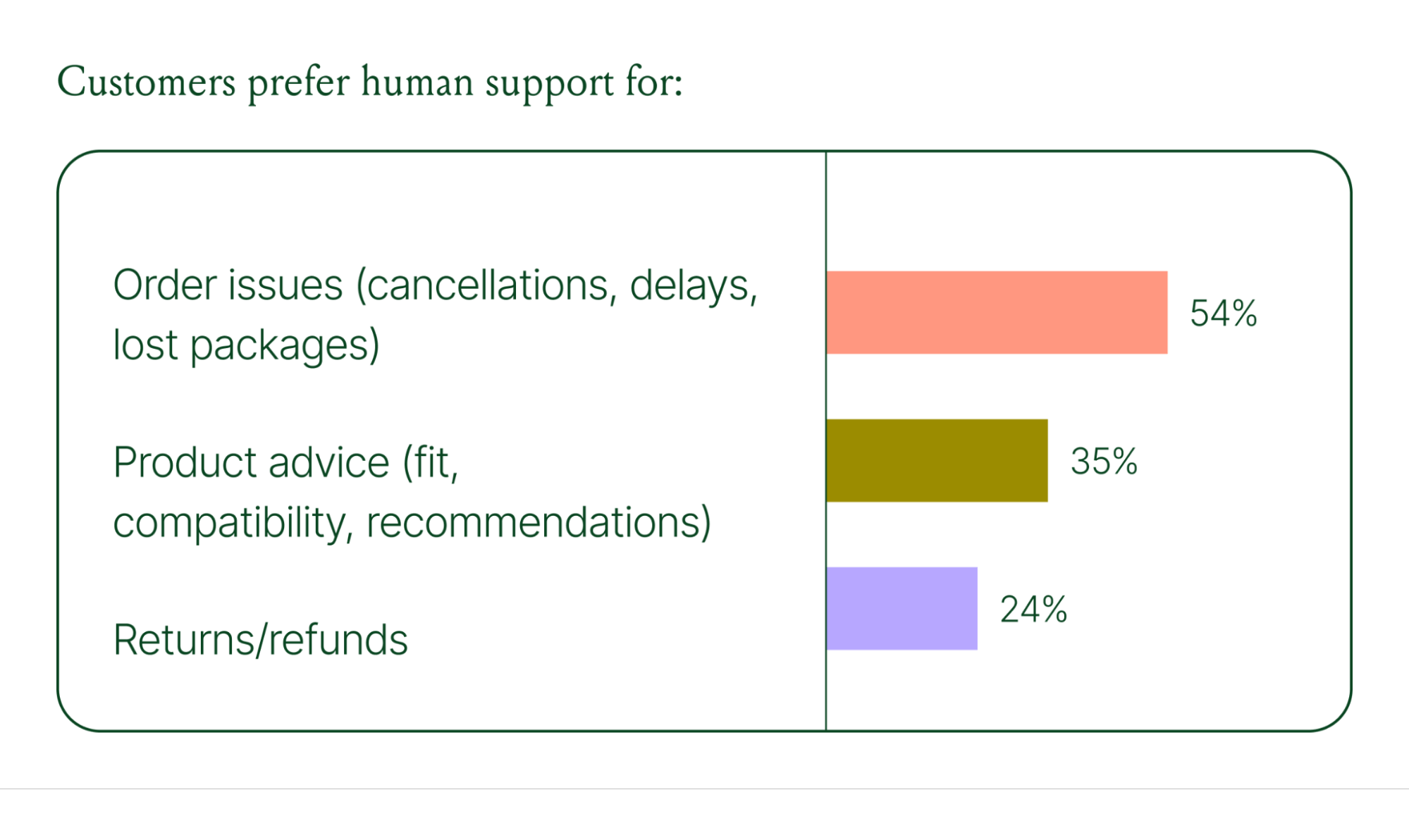
Successful hybrid systems require continuous iteration, meaning reviewing handover topics, Guidance, and reviewing AI tickets on a weekly basis.
Discover how leading brands are balancing human and AI systems in Trend #5.
Where conversational commerce is heading by 2030
The 2026 trends are about expansion and standardization. The 2030 predictions are about what comes next.
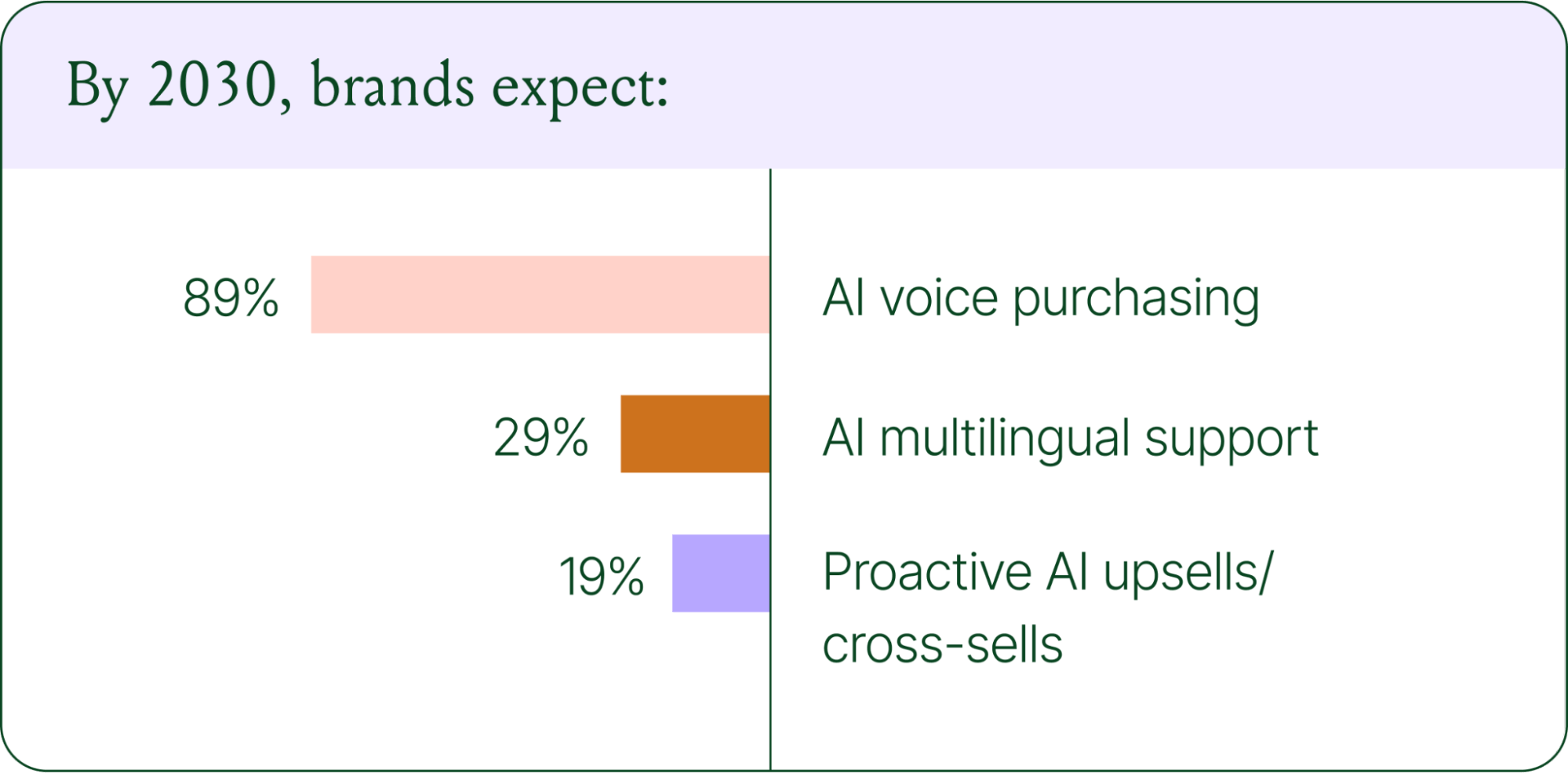
Voice-based purchasing is the biggest bet on the horizon. Only 7% of brands currently use voice assistants for commerce, but 89% expect it to be standard by 2030. The vision is a customer who can reorder a product, check their subscription status, or manage a return entirely over the phone.
Proactive AI is the other major shift. Rather than waiting for a customer to reach out, AI will anticipate needs based on browsing behavior, purchase history, and where someone is in their relationship with your brand. Think of it as the digital equivalent of a sales associate who remembers what you bought last time and knows what you're likely to need next.
Explore where ecommerce brands are allocating their AI budgets in the full report.
Start building your conversational commerce strategy today
The brands winning in 2026 are creating smart, scalable systems where AIhandles volume and humans handle nuance. They’re treating every conversational channel as an opportunity to serve and sell.
The data is clear: AI adoption is accelerating, customer expectations are rising, and the revenue impact of getting this right is measurable.
{{lead-magnet-1}}
Newsletter Signup
The best in CX and ecommerce, right to your inbox
Featured articles

Conversations Are Becoming a Revenue Channel: The Data Proves It
TL;DR:
- Customer journeys are collapsing to a single conversation. The traditional browse-and-buy journey is giving way to AI-guided shopping that moves from discovery to purchase in a single exchange.
- 79% of brands say AI-driven conversational commerce has increased their sales and purchase rates.
- AI-only influenced orders grew 63% in a single year, from 2.7 million in Q1 to 4.4 million in Q4.
- Brands treating conversation as a revenue channel. They’re not just a support function, generating higher AOV, shorter buying cycles, and stronger retention.
The page-based shopping experience dominated for decades. Customers would search, browse, compare, abandon, get retargeted, return, and eventually buy (sometimes).
That journey is no longer the only option.
Shoppers are turning to chat, messaging, and AI-powered tools to find what they need. Instead of clicking through product pages or reading static FAQs, they ask questions, have back-and-forth conversations, and get answers that move them closer to a purchase in real time. The path to checkout has changed, and the brands that recognize this are pulling ahead.
Read our 2026 State of Conversational Commerce Report to learn more about conversation commerce trends from 400 ecommerce decision-makers and 16,000+ ecommerce brands using Gorgias.
{{lead-magnet-1}}
The shopping journey has collapsed into a single thread
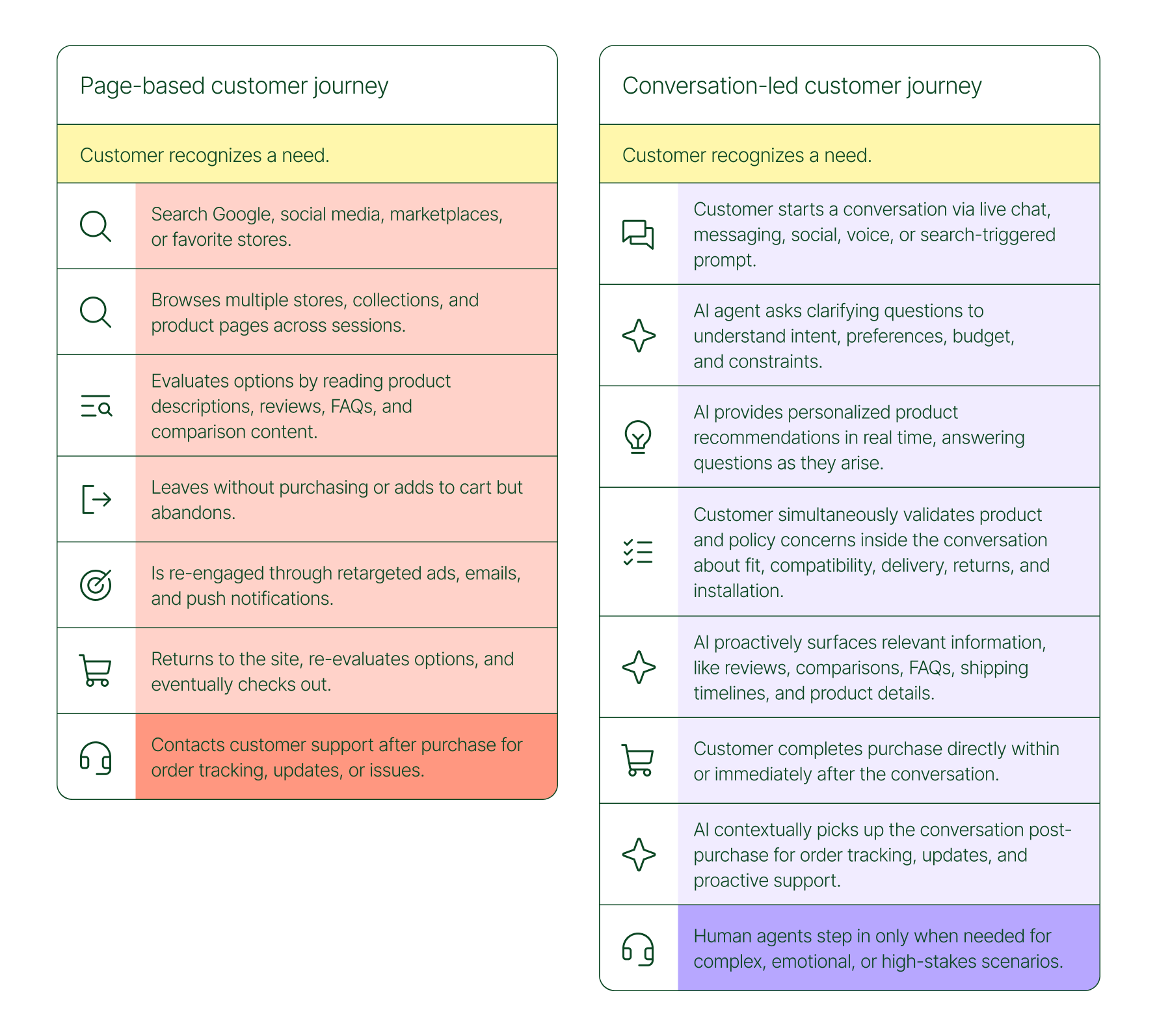
The traditional shopping journey was a solo experience. A shopper had a need, searched for options, browsed across sessions, and eventually made a decision — often days later, after being retargeted multiple times. Support only entered the picture after the purchase.
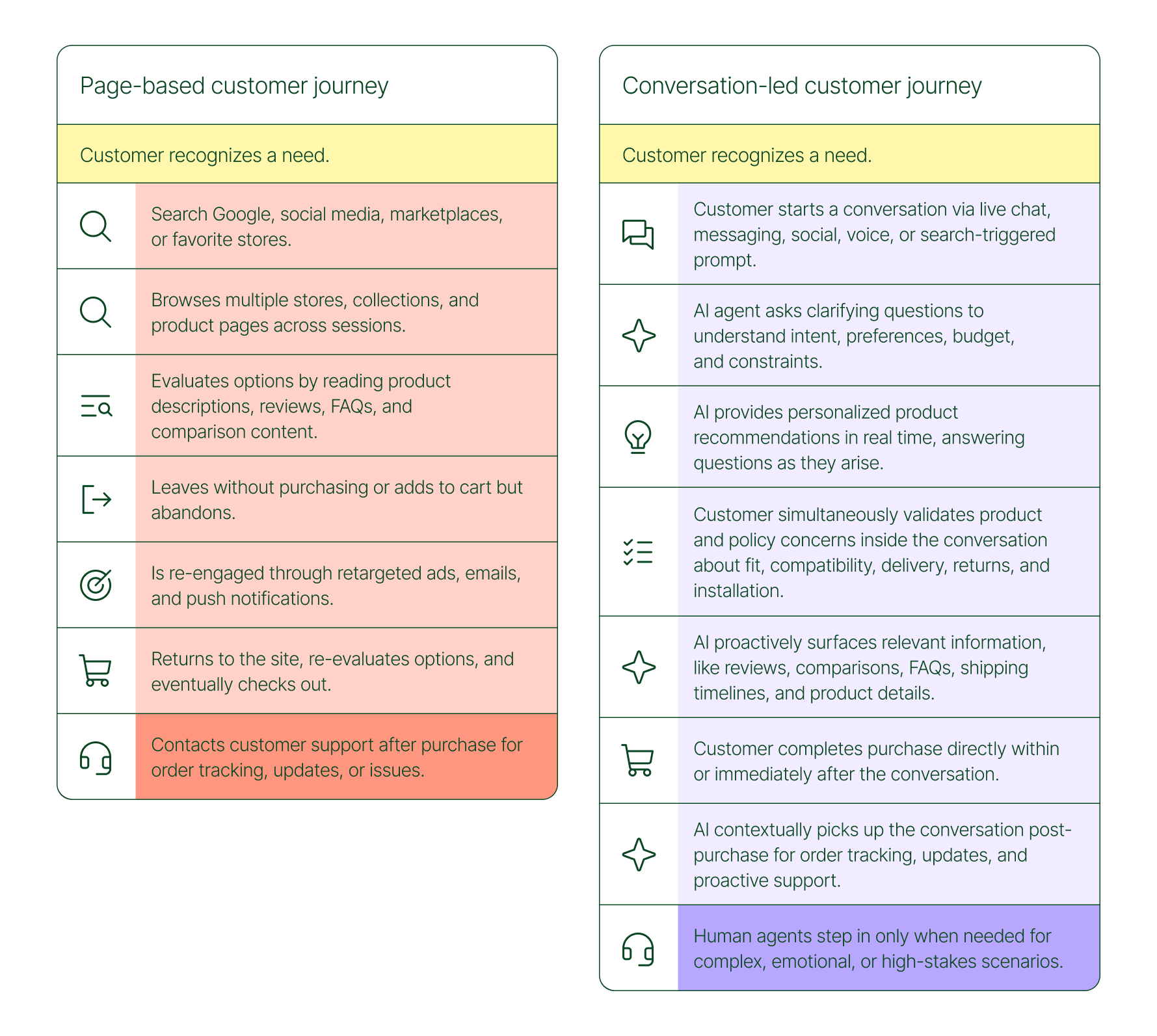
The conversation-led journey collapses that timeline:
- A shopper recognizes a need and starts a conversation via chat, messaging, or a search-triggered prompt
- An AI agent asks clarifying questions about preferences, budget, and constraints
- The AI provides personalized product recommendations in real time
- The shopper validates concerns about fit, compatibility, delivery, and returns, all inside the conversation
- The shopper completes the purchase directly within or immediately after that exchange
- The AI picks up the conversation post-purchase for order tracking and proactive support
- A human agent steps in only when the situation calls for it
What used to take days now takes minutes. Discovery, evaluation, and purchase happen in a single thread.
Conversation is a revenue strategy, not a support upgrade
79% of brands agree that AI-driven conversational commerce has increased sales and purchase rates in their business. When brands were asked to rank the highest-return areas:
- 38% cited improved customer support efficiency
- 23% pointed to higher customer retention and loyalty
- 20% saw improved purchase rates
Those numbers reflect something important: the value of conversation compounds. Faster support reduces friction. Better retention raises lifetime value. More confident shoppers buy more often and spend more per order.
The brands seeing the biggest returns aren't just using AI to deflect tickets. They're using it to create one-to-one shopping experiences at scale.
What the data shows about AI-influenced orders
Looking at AI-only influenced orders across key verticals like Apparel and Accessories, Food and Beverages, Health and Beauty, Home and Garden, and Sporting Goods, the growth across a single year was significant.
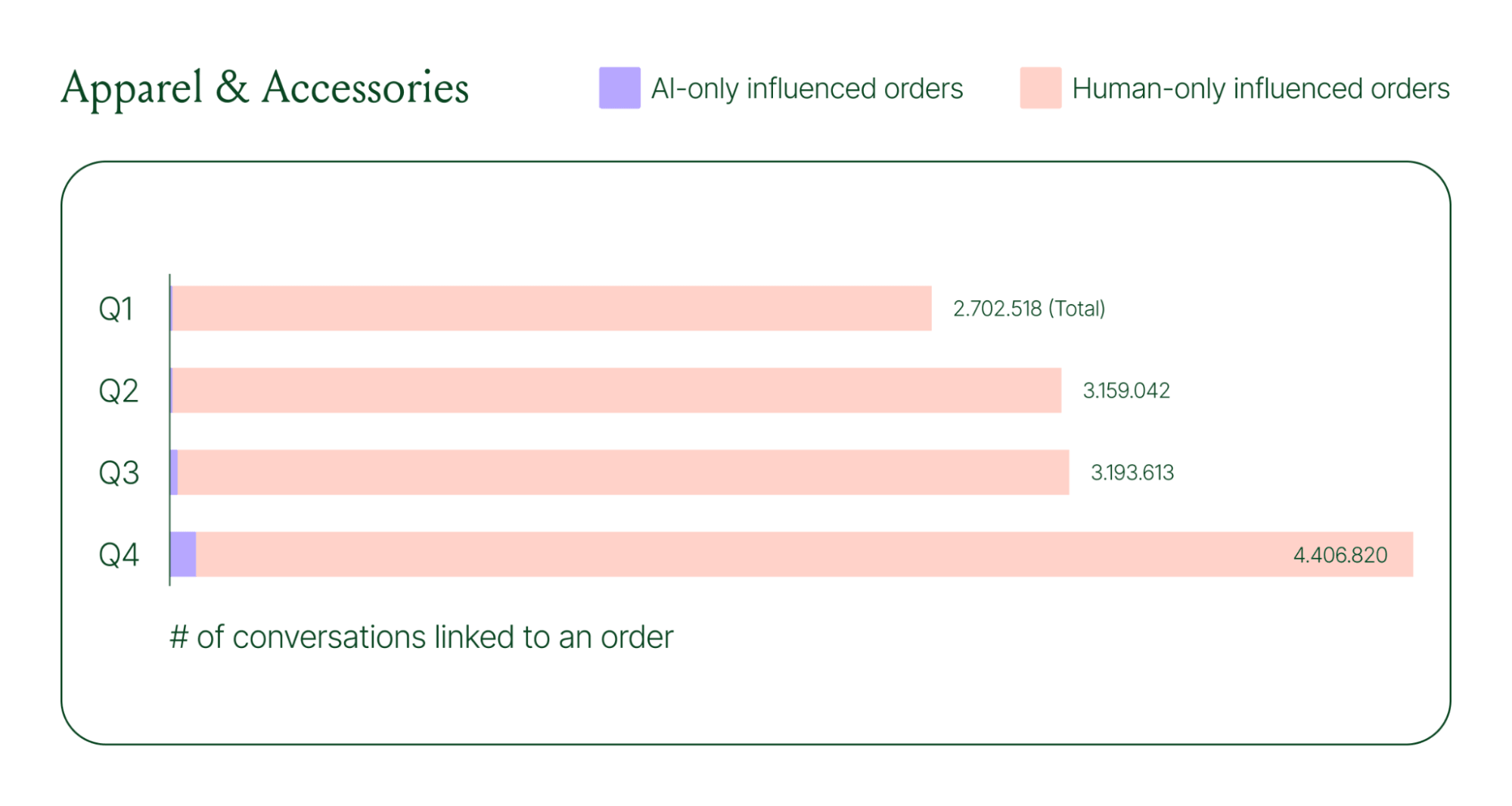
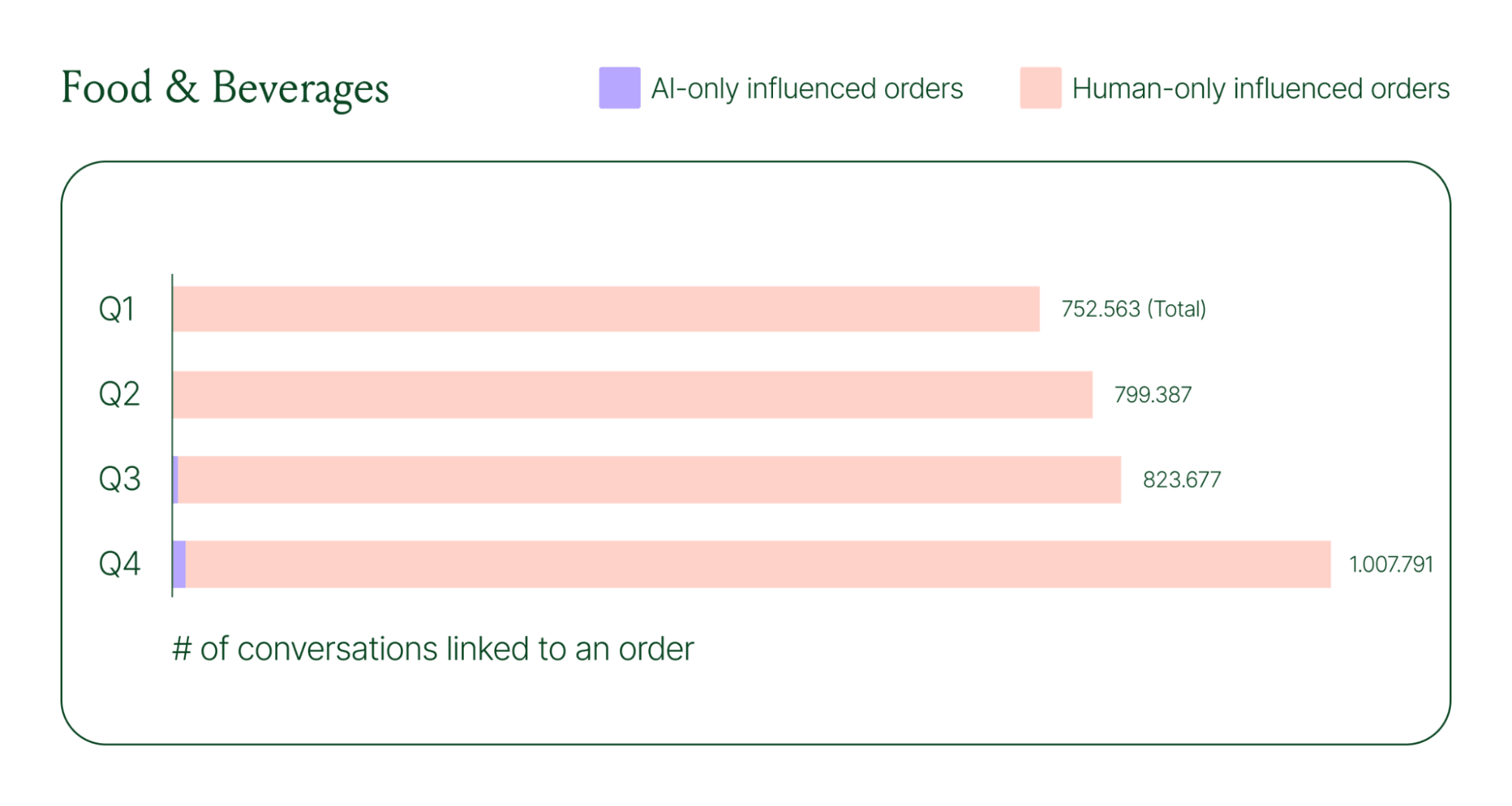
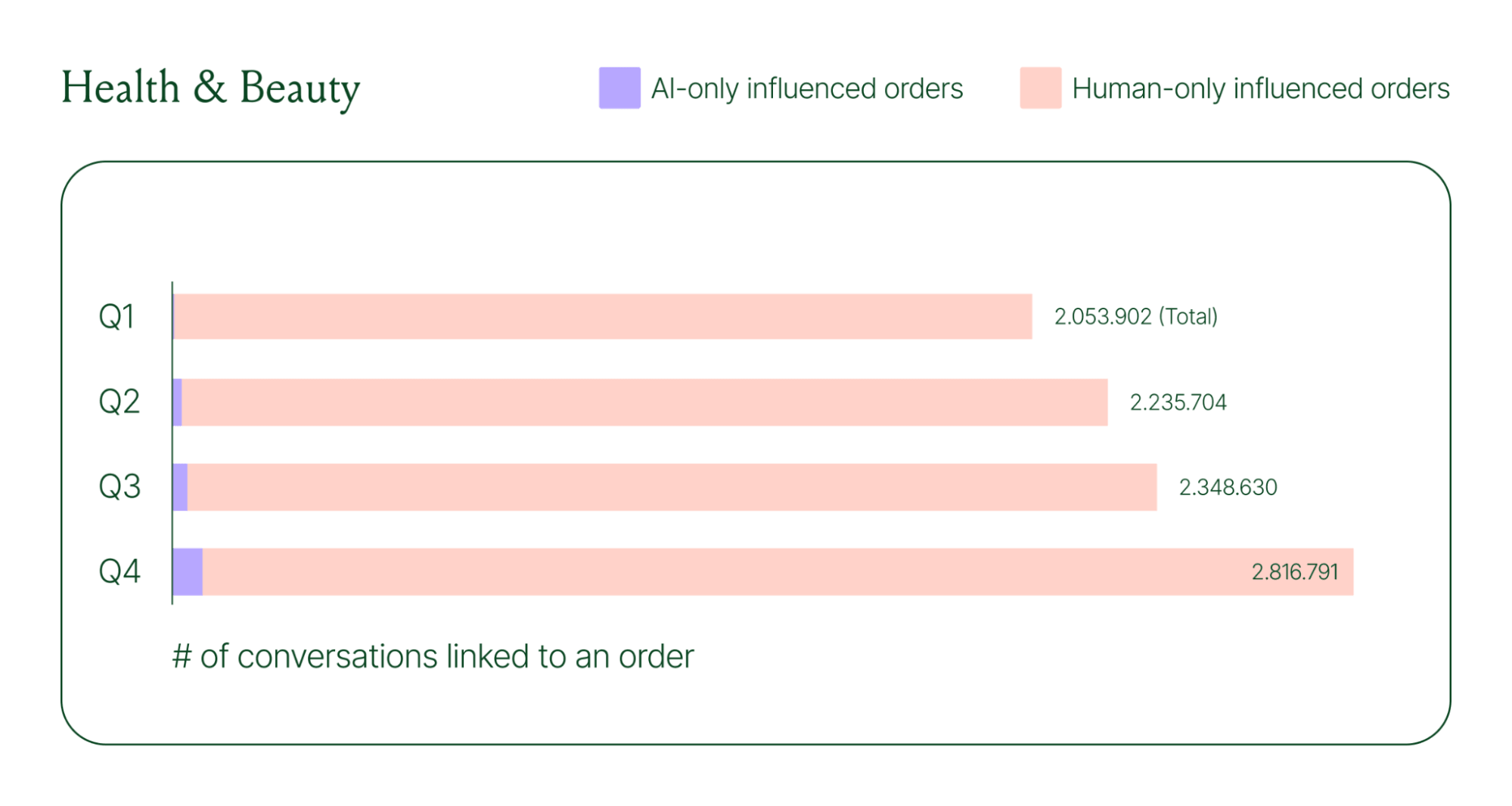
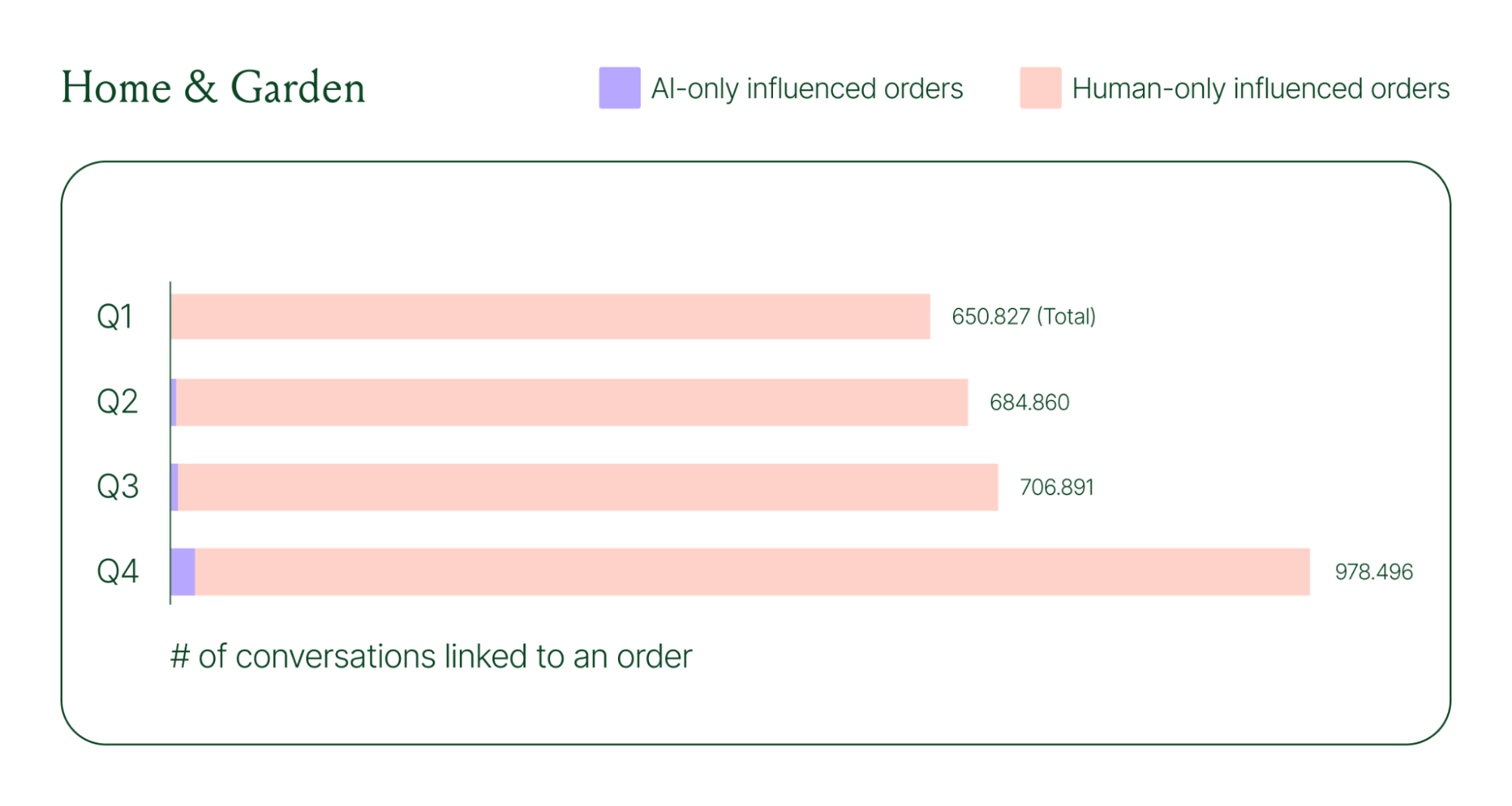
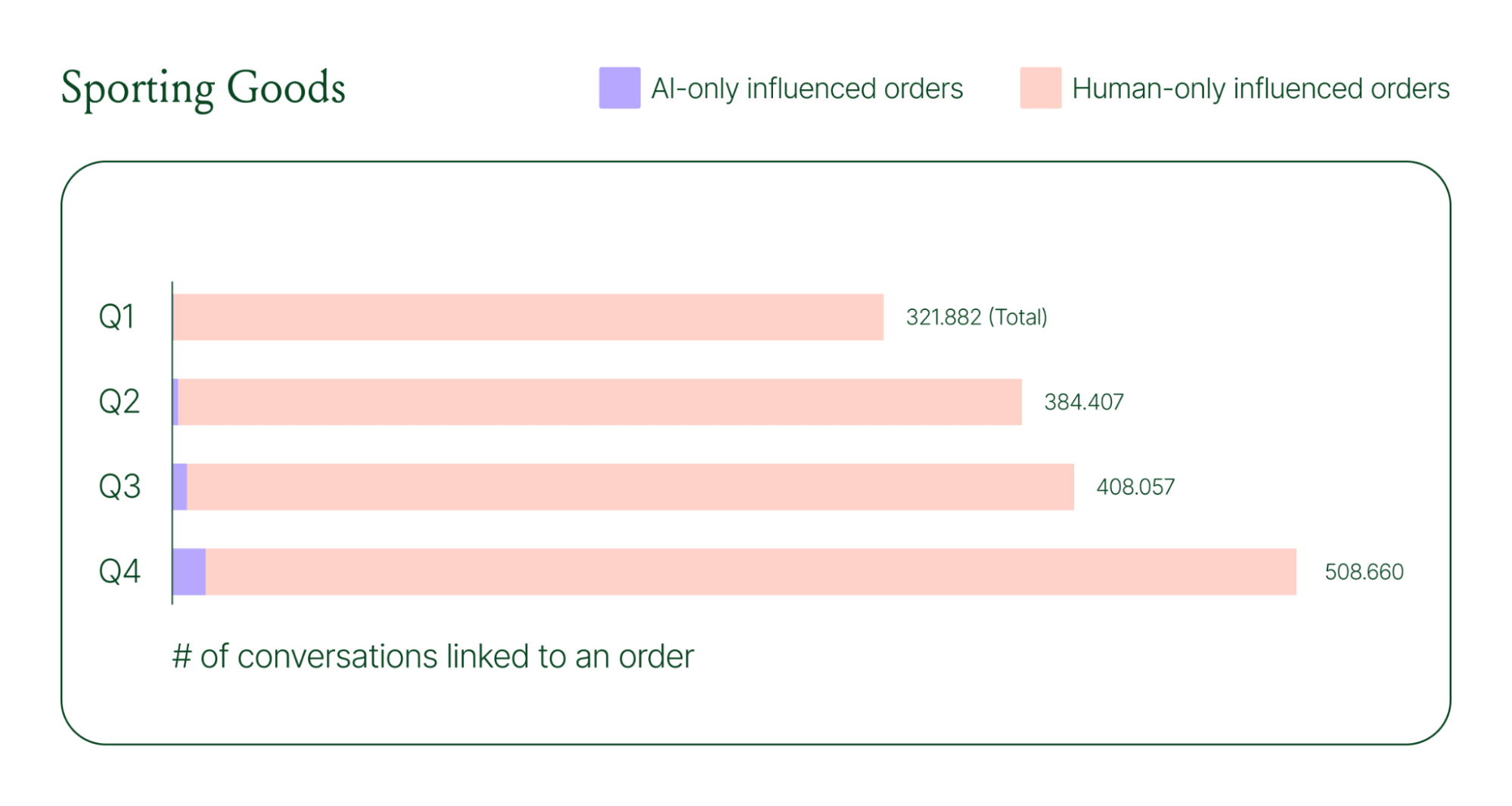
Across industries, ecommerce brands saw AI step into conversations, reduce shopper hesitation, and drive higher QoQ conversion rates.
Learn more about AI-powered revenue generation in the full 2026 Conversational Commerce Report.
Why brands are making this a strategic priority
84% of brands say the strategic importance of conversational commerce is higher than it was a year ago. 82% agree it will be mainstream in their sector within two years.
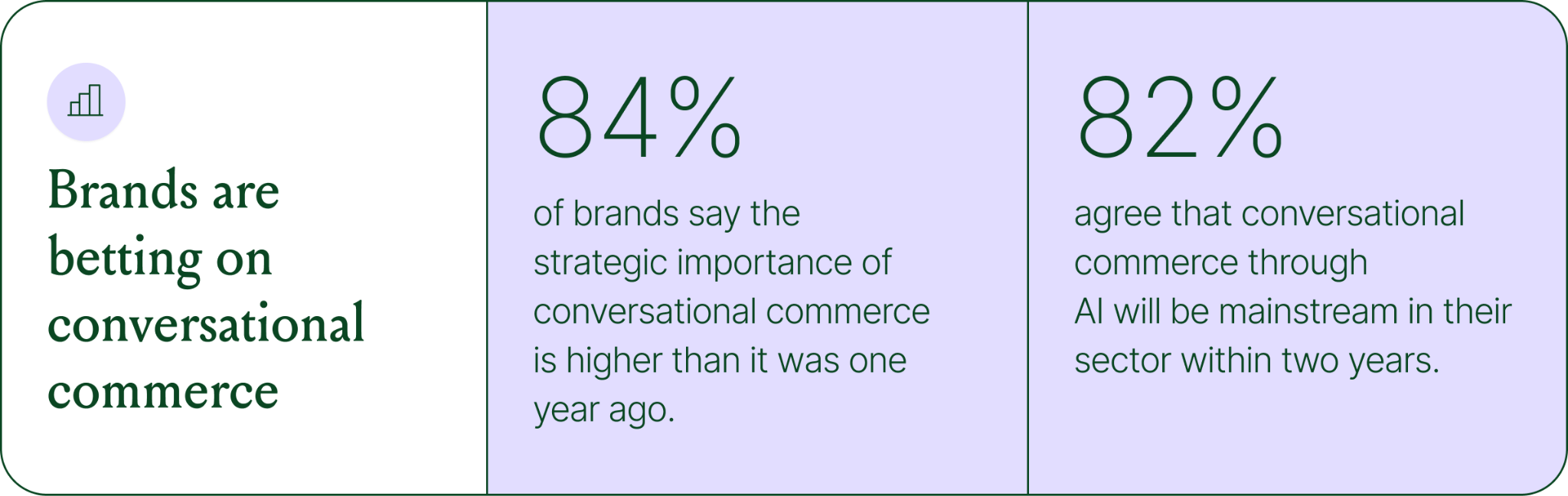
That shift is registering at the leadership level because of what conversational commerce does to the buying experience. Creating one-to-one touchpoints earlier in the journey drives higher AOV, shorter buying cycles, and stronger purchase rates. Shoppers who get real-time answers to their questions are more confident.
What this looks like in practice: TUSHY
TUSHY, known for eco-friendly bidets and bathroom essentials, is a useful example of what happens when you take conversational commerce seriously.
Bidets aren't an impulse purchase. Shoppers have real questions about fit, compatibility, and installation. Those questions used to go unanswered until the CX team could respond, often after the customer had abandoned the cart.
TUSHY used Gorgias's AI Agent and shopping assistant capabilities to automate pre-sales support. AI Agent engaged shoppers in real-time conversations, addressed their concerns directly, and built confidence at the moment of highest intent.
This resulted in a 190% increase in chat-based purchases, a 13x return on investment, and twice the purchase rate of human agents.
How to apply this to your strategy
You don't need to overhaul your entire operation to start seeing results. The most effective approach is to start where the impact is clearest and expand from there.
A few places to begin:
- Pre-sales chat. Identify your most common pre-purchase questions (sizing, compatibility, shipping timelines) and ensure your AI can answer them confidently and promptly.
- Product page engagement. Use proactive chat prompts triggered by page behavior to start conversations before shoppers leave.
- Post-purchase follow-up. Let AI pick up the conversation after checkout with order updates and proactive support, reducing inbound volume and building trust.
- Human escalation. Define clearly which situations require a human agent – complex issues, emotional exchanges, high-stakes decisions.
Want to see the full picture of where conversational commerce is headed in 2026? Read the full report to explore the data, trends, and strategies shaping the next era of ecommerce.
{{lead-magnet-1}}
AI Is Table Stakes for Ecommerce: What the Data Tells Us About 2026
TL;DR:
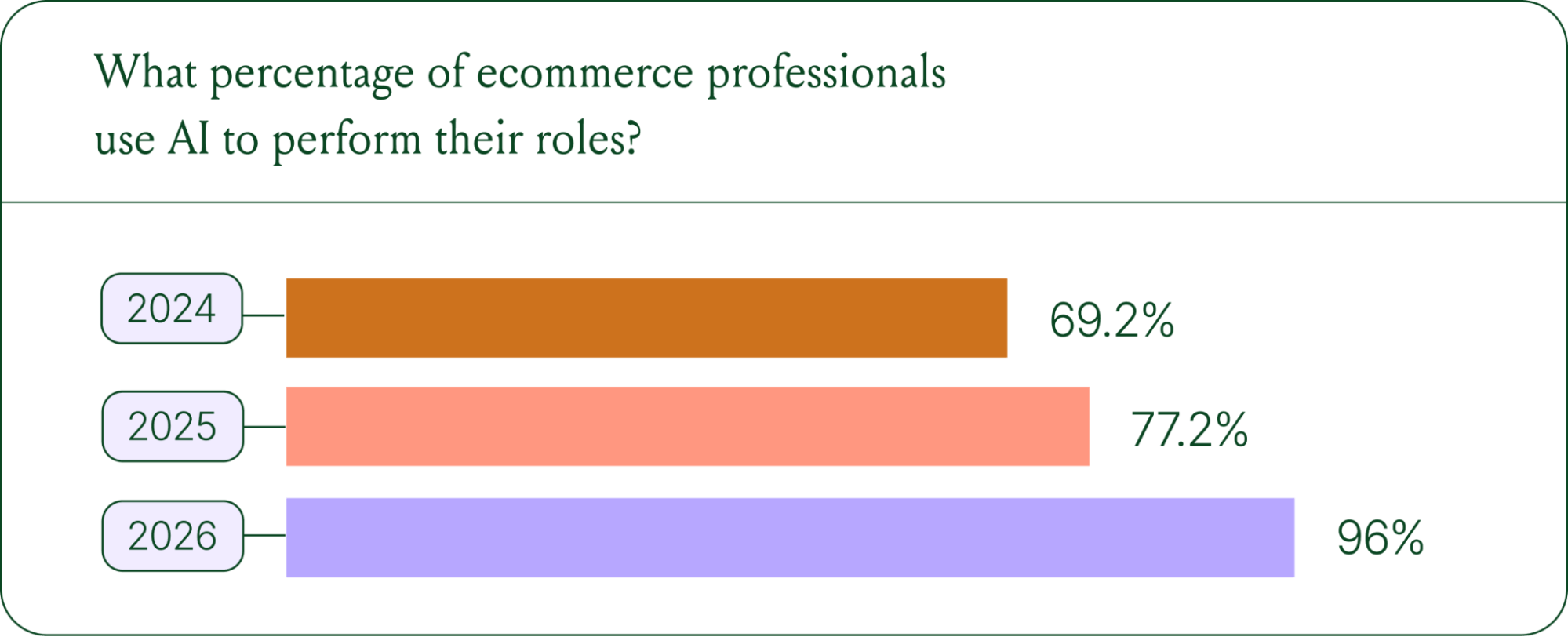
- AI adoption is rapidly accelerating. 96% of ecommerce professionals now use AI in their roles, up from 69% in 2024.
- AI has moved beyond support automation. Use cases have evolved into revenue generation, personalization, and logistics.
- Brands are tying AI success to profit-and-loss outcomes. 60% of brands consider AOV a top indicator of AI effectiveness.
A year ago, ecommerce brands were still debating whether AI was worth the investment. That debate is over. Today, nearly every ecommerce professional uses AI to do their job.
The shift isn't just about adoption. It's about what AI is used for and how brands measure its impact. Support automation was the entry point. Now, AI is embedded across the full operation, from product recommendations to inventory control to real-time shopping conversations.
In our 2026 State of Conversational Commerce Report, we break down trends on AI usage among 400 ecommerce decision-makers and 16,000+ ecommerce brands using Gorgias.
{{lead-magnet-1}}
AI adoption has reached a tipping point
If we rewind 12 months ago, the industry was still split on AI. Some ecommerce professionals were excited, but most were still hesitant. In 2024, 69% of ecommerce professionals used AI in their roles. By 2025, that number reached 77%. In 2026, it hit 96%.
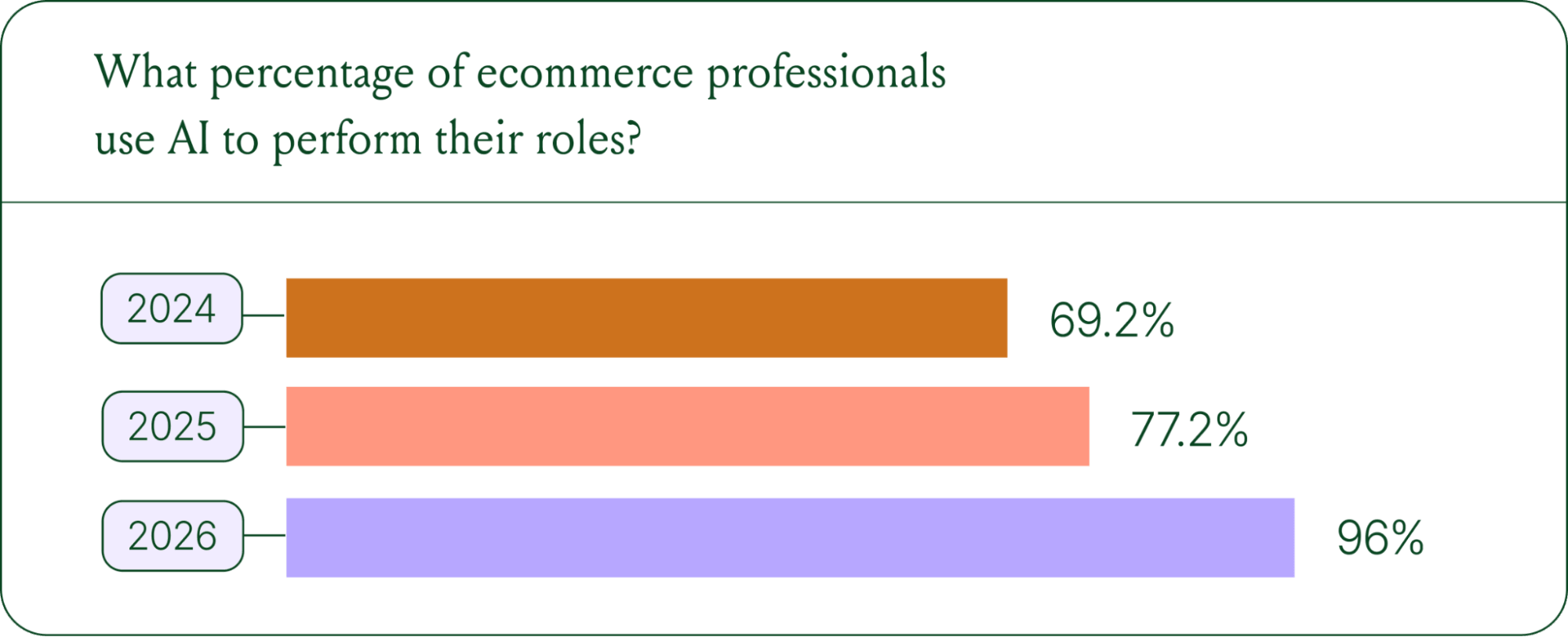
The confidence numbers back it up. 71% of brands say they are confident using AI for ecommerce, and 73% are satisfied with its business impact.
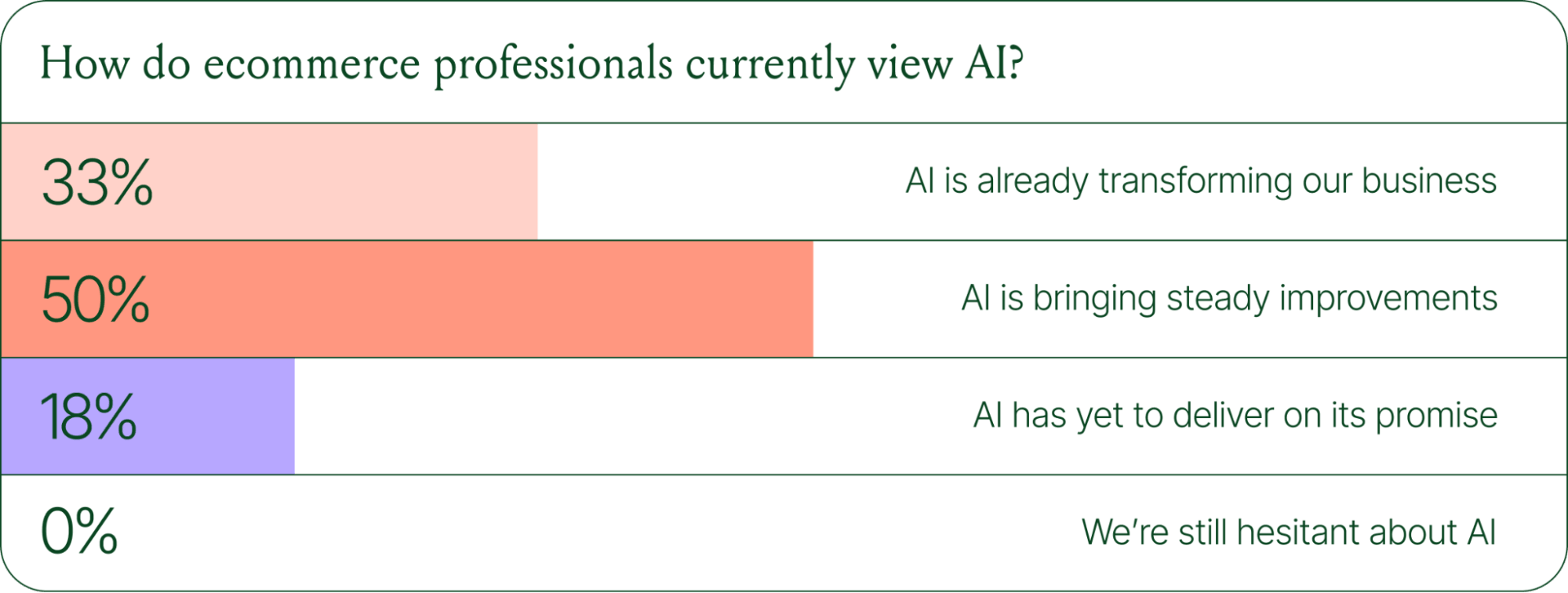
In early 2025, only 30% of ecommerce professionals rated their excitement for AI at 10/10. Today, zero percent of respondents describe themselves as hesitant about AI.
AI use cases now span the full ecommerce stack
Using AI in ecommerce is not new. In fact, it dates back to the 1980s with the invention of algorithms and expert systems. And if you’ve ever leveraged similar product recommendations or chatbots, you’ve already integrated AI into your ecommerce stack.
Modern AI is far more sophisticated.
With the rise of agentic commerce and conversational AI, brands began leveraging AI agents to automate the processing of repetitive support tickets. That’s still happening today, but the scope has expanded beyond the support queue.
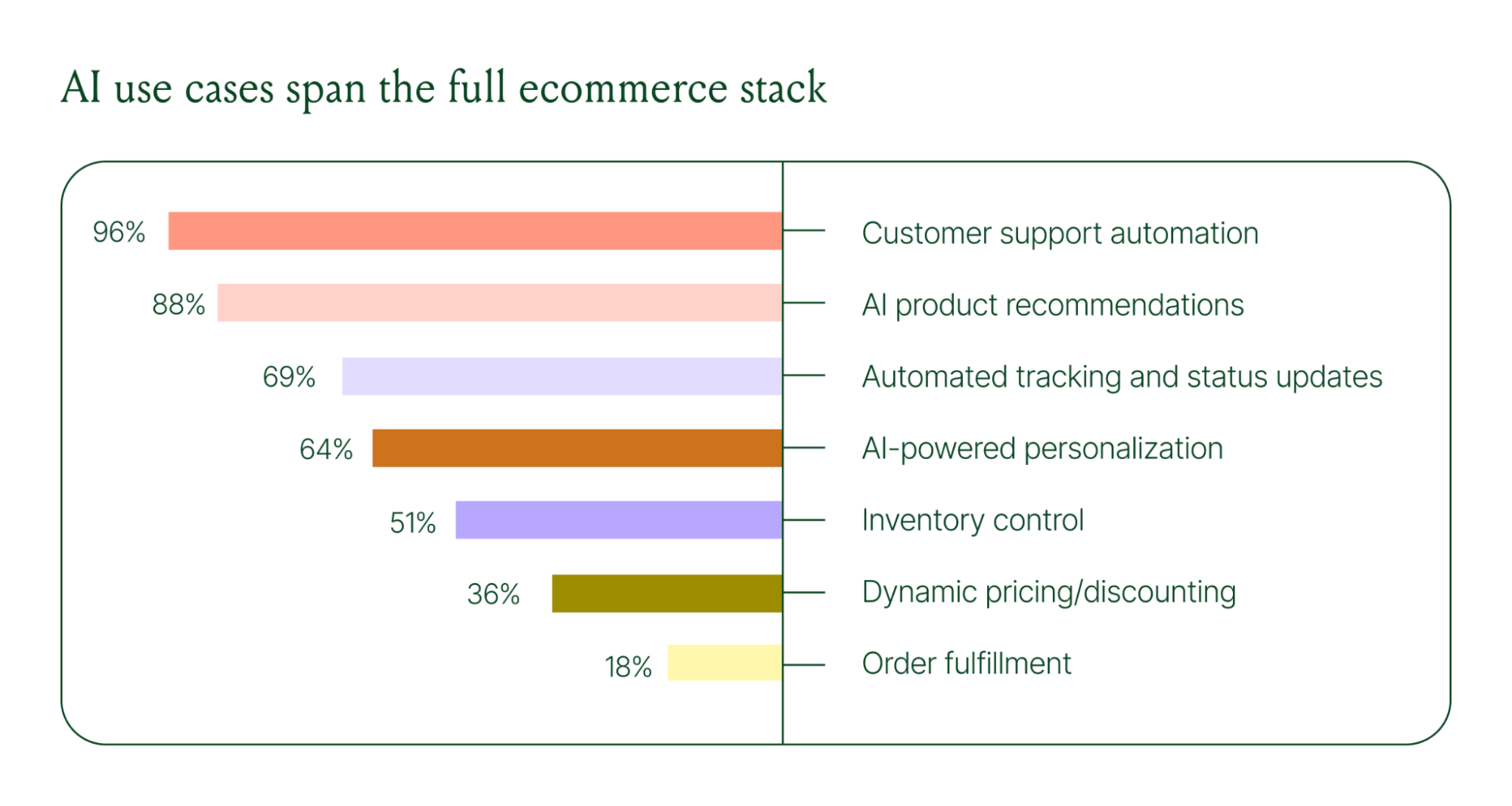
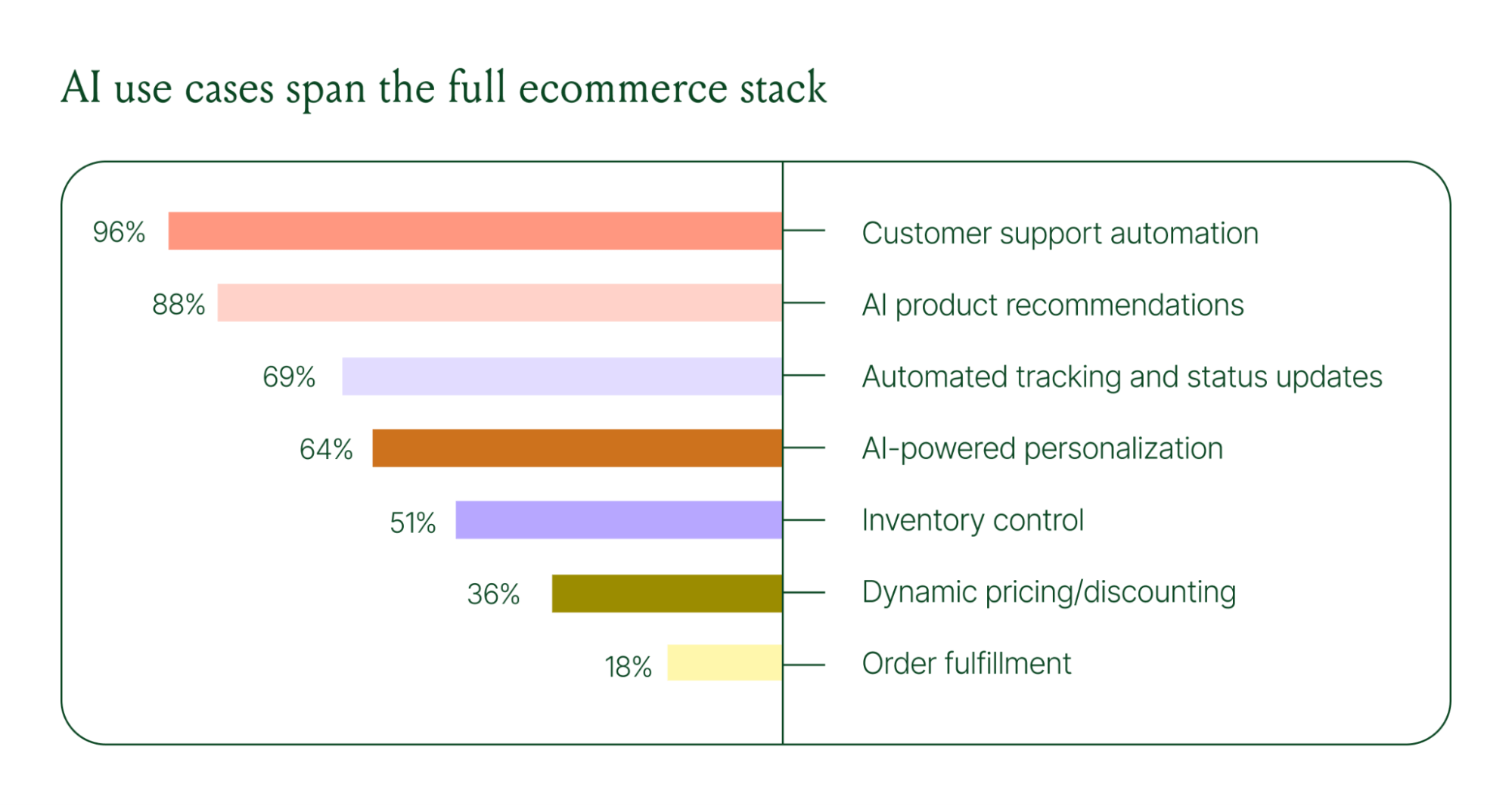
Ecommerce brands are deploying AI across every layer of their operation:
- Customer support automation: 96%
- Product recommendations: 88%
- Automated tracking and status updates: 69%
- Personalization: 64%
- Inventory control: 51%
- Dynamic pricing and discounting: 36%
- Order fulfillment: 18%
When brands were asked which channels contribute most to their AI success, conversational channels dominated. Social media messaging led at 78%, followed by SMS at 70%, and website live chat at 51%. Shoppers want fast, personal conversations, and AI is the best way to deliver that at scale.
Learn more about AI adoption, perception, and use case trends in the full 2026 Conversational Commerce Report.
How AI is changing CX success metrics
For decades, customer support success meant fast response times and high satisfaction scores. Those are still important indicators of success, but leading brands are adding revenue-focused metrics to their dashboards.
91% of brands still track CSAT as a measure of AI's impact. But 60% now include AOV as a top indicator, and higher-revenue brands earning $20M+ are focusing on metrics like total operating expenses, cost per resolution, incremental revenue, and one-touch ticket rate.
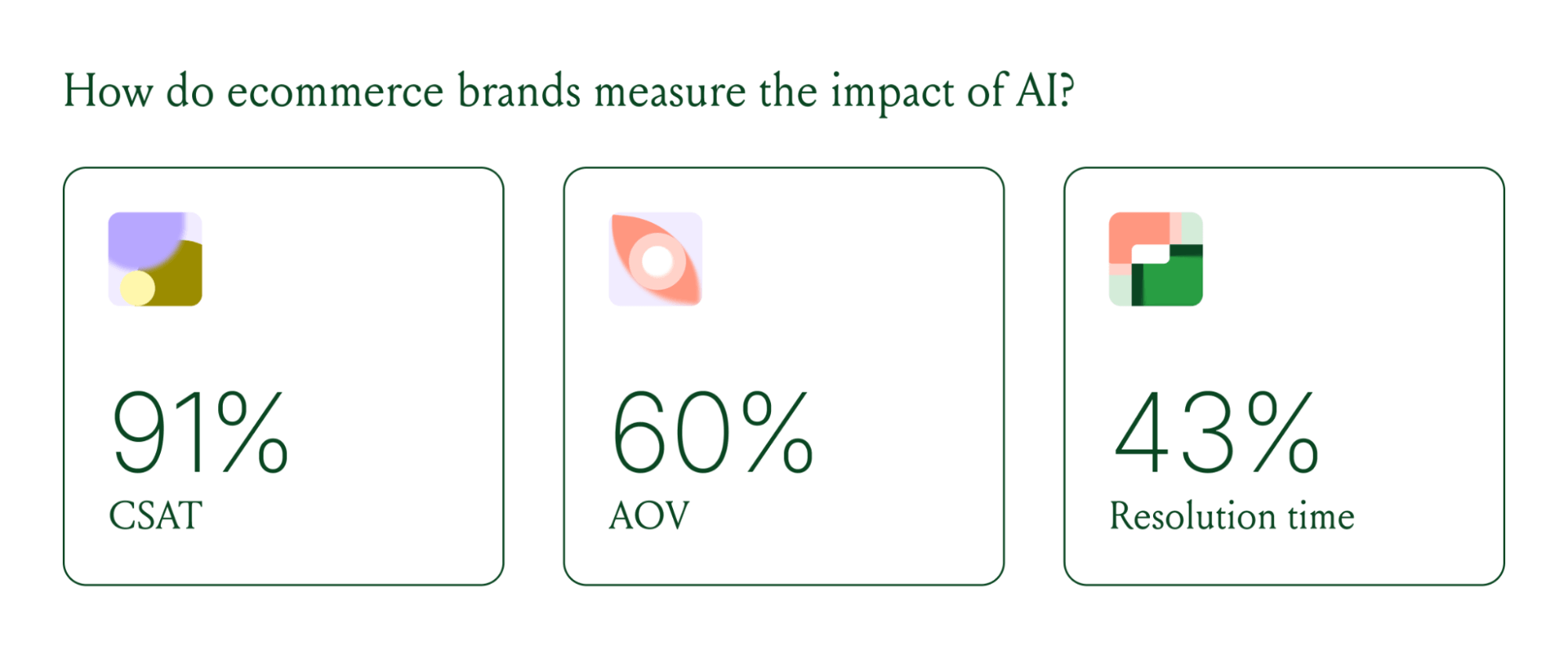
AI can now start a conversation, ease customer doubts, sell, upsell, and recover abandoned carts in a single conversation. When you’re only measuring CSAT, you’re ignoring the real ROI of conversational AI investment.
AI makes every conversational channel a storefront
Virtual shopping assistants now proactively engage shoppers, adapt to their needs in real time, and offer contextual product recommendations and upsells. When the moment calls for it, they can close the deal with a targeted discount.
Gorgias brands using AI Agent's shopping assistant capabilities nearly doubled their purchase rates and converted 20–50% better than those using AI Agent for support only.
Orthofeet, the largest provider of orthopedic footwear in the US, is a concrete example of this in practice. Using Gorgias, they achieved:
- 56% of support tickets automated in 2 months
- Email response times down from 24 hours to 35 seconds
- Double-digit revenue growth without adding headcount.
What this means for your AI strategy
The data tells a clear story: AI has evolved beyond a tool for handling tier 1 support tickets. It’s a core part of your revenue generation strategy.
57% of brands are already using AI for 26–50% of all customer interactions, and 37% expect that share to rise to 51–75% within the next two years. The brands building toward that range now are the ones who will have the operational advantage when it matters most.
The practical question isn't whether to invest in AI. It's where to focus first. Based on where brands are seeing the most impact, three priorities stand out:
- Start with high-volume, low-complexity tickets. WISMO (where is my order) inquiries, return policy questions, and order status updates are where AI delivers the fastest return. Automate these first.
- Expand into conversational channels. Social messaging and SMS are where AI is driving the most success right now.
- Connect AI performance to revenue metrics. If you're only measuring CSAT and response time, you're missing half the story. Add AOV, conversion rate, and incremental revenue to your reporting.
Want to go deeper on the full 2026 conversational commerce trends? Read the complete report for data across every major AI use case in ecommerce.
{{lead-magnet-1}}




Further reading

10 Must-Know AI Agent Use Cases for Instant Resolutions
TL;DR:
- Gorgias AI Agent handles a variety of customer inquiries. These include order tracking, returns, cancellations, discounts, account management, feedback, collaboration requests, and complex topics.
- Use Guidance to train AI Agent to handle each type of inquiry. Guidance acts like a built-in training manual, helping AI Agent follow your brand’s guidelines in every interaction.
- Test and refine Guidance to keep responses accurate. Use Test Mode to ensure AI Agent follows instructions, reflects your brand’s tone, and escalates when needed.
- AI Agent can provide 24/7 support. Even when your agents are offline, AI Agent can respond to customers, reducing response times and keeping customers satisfied.
For support teams, sending the right answer at the right time, every time, is the ultimate goal. But with limited resources and operating hours, how can you be there for your customers 24/7? We’ve got an answer.
Designed specifically for ecommerce brands, AI Agent is conversational AI that steps in where human agents are stretched thin: handling repetitive tickets. AI Agent is trained on your brand’s policies, voice, and instructions, helping you resolve customer inquiries like your agents — but faster.
We’ll cover 10 types of inquiries AI Agent can resolve instantly, complete with template instructions (Guidance) and real-life examples. Plus, keep in mind five best practices to get the most out of your new AI teammate.
{{lead-magnet-1}}
10 AI Agent use cases, templates, and examples
Each use case comes with a template for Guidance instructions that acts like a built-in training manual for AI Agent. Then, see how AI Agent uses those templates to respond to real customer tickets.
Note: Guidance are special instructions that tell Gorgias’s AI Agent exactly how to handle customer questions, including when to hand them off to your human agents. This gives you control over AI Agent, so every AI interaction is always aligned with your brand’s protocols.
1. Where is my order? (WISMO) inquiries
90% of shoppers want to be able to track their orders, according to DispatchTrack. Easily fulfill those neverending WISMO requests with one comprehensive Guidance that detects a customer’s current order status to give them the best answer.
Include these key elements in your where is my order? Guidance instructions:
- Detect if a tracking number is available: If the order has a tracking number, provide the link to the tracking page.
- Provide delivery time: Automatically calculate and share the expected delivery date based on the shipping method.
- Check order status: Inform the customer whether the order is processing, shipped, or delivered.
- Handle delivery delays: If the system detects a delay, apologize and offer an updated delivery estimate.
- Escalate complex issues: If the order is missing or has incorrect tracking info, escalate the ticket to a human agent for further review.
Here’s an example of a where is my order? Guidance setup, available as a template in Gorgias:

Here’s how AI Agent uses that Guidance to assist a customer with their order inquiry:

💡 Pro Tip: Can’t find AI Agent? Double-check that you have an active AI Agent subscription and connect Shopify to Gorgias. To do this, go to Settings > My Apps > Shopify > Update app permissions. You must be an Admin to complete this task.
2. Product-related questions
Shoppers ask product questions to get the clarity they need before buying. These pre-sales questions can make or break their decision to buy your product. Close the gap from browsing to checkout by using AI Agent to deliver quick, accurate answers that help them make confident decisions.
Here’s an example of a product-focused Guidance setup:

Here’s how AI Agent uses that Guidance to assist a customer with their product inquiry:

💡 Pro Tip: AI Agent can also learn information from your web pages. Go to AI Agent > Knowledge > Public URL sources to sync key web pages like sizing guides, blog posts, and more.
3. Returns
Answering ecommerce return requests can be time-consuming. Requests can range from a simple what is your return policy? question to customers wanting to go through the return process. Regardless, return inquiries can easily be handled by AI and handed off to a human agent if necessary.
Include these key elements in your returns Guidance instructions:
- Determine return eligibility: Check if the order is within the return window based on your policy.
- Identify non-returnable items: Inform customers if their item is non-returnable due to your specific policies.
- Guide through the return process: Provide instructions on how to initiate a return, including steps like entering an order number or using a return portal link.
- Inform about processing times: Share estimated times for processing returns and refunds.
- Escalate complex cases: If the return involves exceptions, like damaged goods or international returns, escalate the ticket to a human agent.
Here’s an example of a returns inquiry Guidance setup, available as a template in Gorgias:

Now, look at how AI Agent uses this Guidance to assist a customer with their return request:

💡 Pro Tip: If you’re using Loop Returns, set up AI Agent to automatically send a returns portal link to customers. This Action fully resolves returns inquiries by directing shoppers straight to their orders.
4. Order issues
Order issue tickets often require back-and-forth. The customer states their problem, you ask for photo verification and check if the customer has tried all the different solutions — the list goes on. Let AI Agent cover the bases for you every time, and if needed, escalate the ticket to your team.
Include these key elements in your order issues Guidance instructions:
- Express empathy for any inconvenience caused: Show that your customer’s happiness and experience are priorities.
- Handle damaged products: Provide instructions for customers to submit photos of damaged goods, then process a replacement or refund based on your policy.
- Correct incorrect shipments: If the wrong item was sent, guide the customer through returning the incorrect item and arrange for the correct product to be shipped.
- Escalate the issue: Route the ticket to a human agent for further handling.
Here’s an example of a Guidance setup for handling order issues, available as a template in Gorgias:

Here’s how AI Agent follows this Guidance to resolve a customer’s order issue:

5. Cancellations
Canceling orders is pretty much a race against order fulfillment and your third-party logistics. The key is to catch these inquiries as soon they hit your inbox. The problem? Tickets can come late at night or outside of your business hours. However, when you let AI Agent handle them, customers can rest assured that their request will be dealt with.
Include these key elements in your cancellation Guidance instructions:
- Check order status: Determine if the order is eligible for cancellation based on its shipping status.
- Process cancellation: If eligible, guide the customer through the cancellation process and confirm the order has been canceled.
- Handle shipped orders: If the order has already shipped, instruct the customer on how to return the item once received, or escalate the case to a human agent.
- Escalate exceptions: For complex or time-sensitive cancellations, escalate the ticket to a human agent.
Here’s an example of a cancellation Guidance setup, available as a template in Gorgias:

Here’s how AI Agent follows this Guidance to handle a customer’s cancellation request:

💡 Did you know? You can let AI Agent cancel an order when the customer and order meet certain conditions. For example, the Action will only be performed if the fulfillment status is still empty. Go to AI Agent > Support Actions > Create from Template > Cancel order.
6. Discounts (including BFCM)
Come holiday season, including Black Friday, you’ll be swamped with loads of discount inquiries. Whether it’s customers asking about discount codes not working or if you have any codes available, these repetitive inquiries are best resolved by AI.
Include these key elements in your discount Guidance instructions:
- Provide active discount codes: Provide customers with a list of current discount codes and their eligibility criteria.
- Assist with missed discount codes: Help customers who forgot to add a discount code by offering guidance on how to apply it retroactively or escalate to an agent.
- Troubleshoot code issues: Guide customers through common reasons why a discount code might not be working, like expiry dates, minimum purchase requirements, or product exclusions.
- Upsell by offering alternatives to discounts: If no active code is provided, offer alternative available promotions or direct them to sign up for the latest offers.
Here’s an example of a discount inquiry Guidance setup, available as a template in Gorgias:

Here’s how AI Agent follows this Guidance to handle a customer asking for coupons:

7. Customer feedback
Acknowledging feedback, good and bad, can make customers more willing to keep doing business with you. Maintain an honest rapport with customers by letting them know you’re always listening.
Include these key elements in your feedback Guidance instructions:
- Acknowledge positive feedback: Respond with a thoughtful, genuine thank-you message, reinforcing customer appreciation.
- Request a public-facing review: Encourage customers who leave positive feedback to share their experience further, such as writing a product review or sharing their thoughts on social media.
- Escalate negative feedback: For negative feedback, escalate the ticket to a human agent.
Here’s an example of a customer feedback Guidance setup:

Here’s how AI Agent uses this Guidance to respond to positive feedback:

💡 Pro Tip: Let AI Agent automatically tag feedback tickets for you by going to AI Agent > Settings > AI ticket tagging. This way, your agents can find all customer feedback organized in one place.
8. Account management
Account management tasks like updating details or managing subscriptions are tedious, time-consuming, and often things customers can do themselves. Let AI Agent handle these tasks to speed up resolutions.
Include these key elements in your account management Guidance instructions:
- Provide instructions: Provide clear instructions for updating account details like email, shipping address, or payment methods.
- Verify identity for security: Include steps to verify customer identity before making sensitive changes, like account or subscription modifications.
- Escalate complex issues: For issues like account access problems or billing disputes, escalate to a human agent.
Here’s an example of a Guidance setup for account management, available as a template in Gorgias:

Take a look at how AI Agent uses this Guidance to help a customer with managing their rewards:
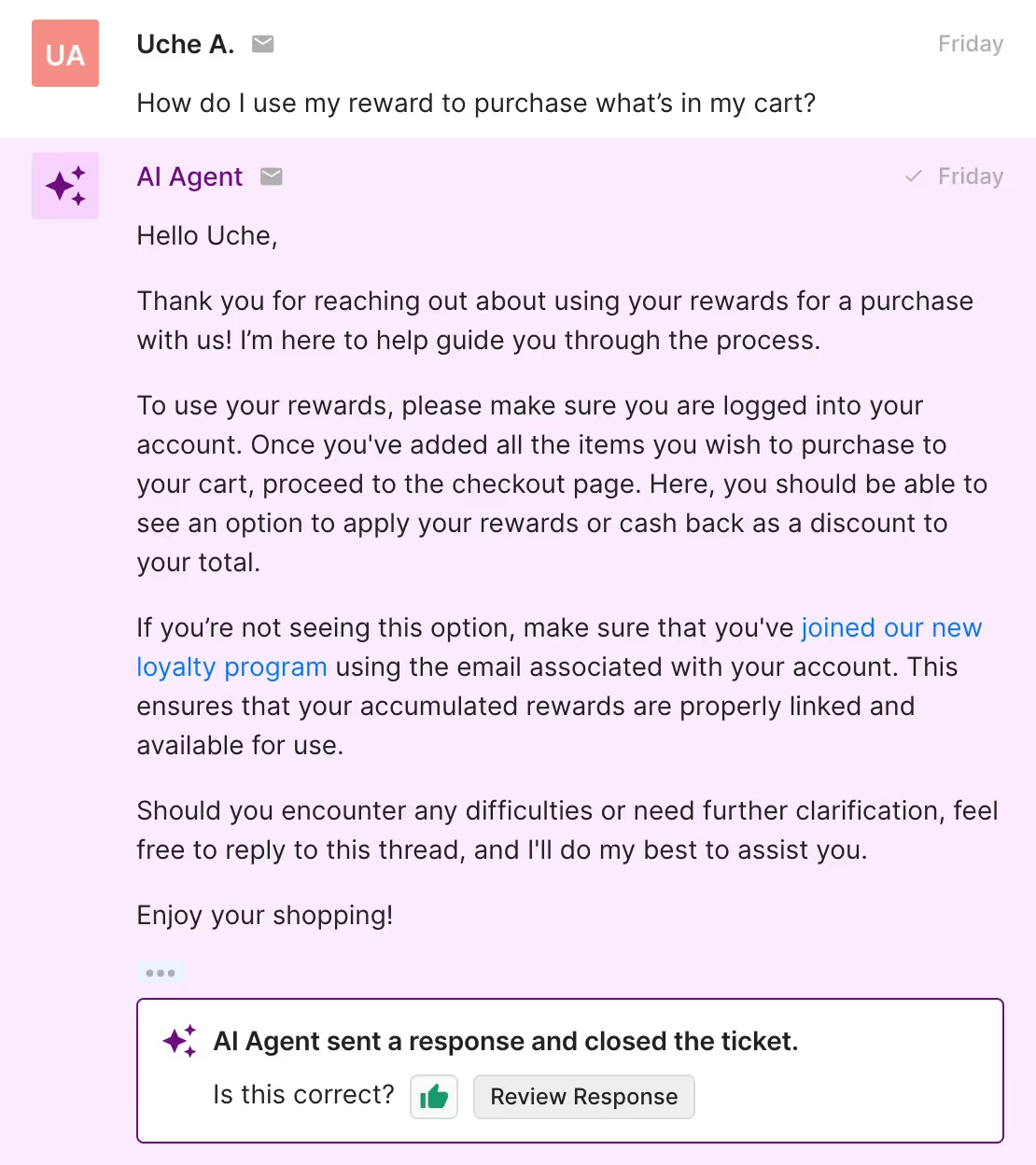
💡 Pro Tip: Use Recharge Actions to automate subscription cancellations or skip shipments with AI Agent. Go to AI Agent > Support Actions > Create from Template > Cancel subscription or Skip next subscription shipment.
9. Collaboration requests
Influencer marketing is on the rise as customers look to social proof when deciding what products to buy. With the right Guidance, your AI Agent can easily manage collaboration and marketing partnership inquiries.
Include these key elements in your collaboration requests Guidance instructions:
- Gather social media profiles: Prompt customers to share their social media profiles and relevant platforms for review if they haven’t.
- Request collaboration details: Ask for specifics about the type of collaboration or partnership they’re interested in (e.g., influencer campaigns, sponsorships).
- Provide next steps: Let the customer know their request will be reviewed and what they can expect in terms of timing.
- Escalate complex or high-value inquiries: For more significant partnerships, escalate the request to your marketing or partnerships team.
Here’s an example of a collaboration request Guidance setup:

See how AI Agent uses this Guidance to respond to a collaboration request from a content creator:

10. Complex and sensitive topics
AI Agent isn’t designed to handle all tickets. For highly complex and sensitive topics, instruct AI Agent to reroute them to your human agents who are equipped to handle certain subjects with more caution and context than AI.
For example, a makeup brand would disable AI Agent from taking on tickets about allergic reactions or health concerns so customers receive safe advice.
Here are other messages you should prevent AI Agent from answering:
- Messages that mention legal actions
- Messages that mention allergic reactions or health issues
- Messages where customers report negative reactions to products
- Messages that mention unsubscribing, stop messages, stop emails or stop texts
Take a look at how AI Agent escalates a ticket about a damaged product:

Note: AI Agent automatically escalates messages with angry language and sentiment to your support team — no Guidance needed.
Keep these 5 Guidance best practices in mind
While AI Agent answers most customer inquiries, you’ll still need to be there to provide it with the barriers to keep its answers on-brand and accurate.
Here are five best practices to keep in mind when creating Guidance instructions.
1. Include Guidance for your top 5 most FAQs
Prime AI Agent with essential brand information by creating Guidance for the top five most common customer questions:
- Order status and tracking
- Returns, exchanges, and refunds
- Order cancellations and edits
- Discounts and promos
- Subscription/account management
You can automate a significant portion of customer support and save time for your team just by letting AI Agent answer these tickets.
2. Use a descriptive Guidance name
Always use clear and descriptive names for your Guidance. AI Agent relies on this information to identify whether the Guidance is relevant to the customer’s question.
For example, instead of naming it “Shipping,” use something like “Shipping policy – domestic & international” to help AI Agent choose the right response.
3. Include examples in your instructions
It’s important to include detailed examples to help AI Agent detect the intent behind your incoming tickets. Clear examples let AI Agent match customer inquiries with the correct response more reliably.
For instance, instead of just saying, “Answer shipping questions,” give it an example: “For domestic orders, say: ‘Shipping takes 5-7 days. For international orders, it takes 10-15 days.’” This helps AI Agent detect when a question is about shipping timelines and respond appropriately.
4. Review and update your Guidance
Customer needs and products change over time, so it’s important to check back on your Guidance to make sure it’s relevant. AI Agent’s responses should reflect any changes to your policies, products, or processes to provide customers with up-to-date information.
5. Test new and updated Guidance in Test Mode
Before going live with new or updated Guidance, use Test Mode to make sure AI Agent is responding as expected.
Here are key things to check in Test Mode:
- Help Center articles: Verify that AI Agent is pulling from the correct Help Center resources.
- Guidance instructions: Test your updated Guidance to make sure AI Agent follows the protocols you have laid out.
- Excluded topics: Ask AI Agent questions about excluded topics to make sure it escalates the inquiry as needed.
- Tone of voice: Check that AI Agent’s responses are in your brand’s tone.
Lead conversations to faster resolutions with AI Agent
Right out of the box, Gorgias includes Guidance templates to help AI Agent manage your FAQs, like returns inquiries, shipping questions, and more.
Equip your AI Agent with Guidance and watch your support team thrive with more time to nurture your customer relationships and handle complex tasks.
See how AI Agent can transform your support team within minutes by booking a demo today.
{{lead-magnet-2}}


Guide To Creating and Managing A Customer Knowledge Base
Let’s be clear: a customer knowledge base is not a landing page full of frequently asked questions.
Sure, FAQs can live in your knowledge base, but they can do so much more than simple Q&A.
A well-crafted Help Center is a strategic asset, propelling your conversion goals by easily guiding customers through the sales funnel.
We’ll walk you through what a knowledge base is, how it can support your bottom line, and everything you need to know to create yours successfully.
What is a customer knowledge base?
Customers love having the power to solve problems independently and on their schedule. That's precisely what a knowledge base delivers.
Your knowledge base isn’t just a static library of articles — it's an interactive portal connecting your customers to sales and customer service. That means making it easy for them to find answers before purchasing and helping them troubleshoot any possible issues afterward.
{{lead-magnet-1}}
How a knowledge base can transform your customer service (and customer experience)
Now that we've introduced the concept of a knowledge base, let's dive deeper into how these helpful landing pages can drive revenue by leveling up your customer service game.
Zero-touch resolutions
90% of consumers worldwide consider issue resolution as their top priority for customer service. And with a knowledge base, you can make their dreams come true with 24/7 self-service support.
Think of a customer knowledge base as your company's information powerhouse that includes helpful articles, FAQs, contact methods, and more ––– all readily available 24/7 for your customers to tap into whenever they need help.
And the magic word that describes why a knowledge base is so powerful? Self-service.
Nail this experience, and your knowledge base will serve as a revenue-driving machine for acquisition- and retention-based goals.
No more waiting in line, playing phone tag, or being told the customer support team is “offline until tomorrow.” As long as customers can easily locate the information they’re after (more on this later), they get an immediate response to their questions.
Reduce support burden (and response time as a result)
Your support team deals with a mountain of questions every day:
- "Where's my order?"
- "What's your refund policy?"
- "How long does shipping take?"
…These are the classics.
Imagine dramatically cutting down the number of repetitive inquiries your team handles or eliminating them entirely. Your knowledge base can make this happen. By leveraging data to pinpoint the most frequently asked questions, you can create help articles that address these issues and showcase them at the top of your knowledge base.
But how do you identify the most common questions? Two straightforward solutions are already at your fingertips in the Gorgias Helpdesk.
1. Monitor commonly used tags: Tags are labels for categorizing tickets by topic or customer intent. Regularly reviewing tags helps identify common customer inquiries. Generally, the more a tag is used, the greater the need for clarity on that topic.
On Gorgias, navigate to Statistics > Ticket Insights > Tags to see the frequency of tag usage. This view gives you an overview of popular tags. You can adjust the view by filtering by app integration, channel, and date range.

2. Review your intent statistics: Intent Statistics provide valuable insights into why customers contact support. You can understand the primary reasons behind customer queries by analyzing these statistics.
On Gorgias, go to Statistics > Ticket Insights > Intents to review the usage frequency of different customer intents.
This feature provides a clear bar graph view of customer concerns frequently mentioned in messages. You can also change the view using channel and date range filters.

The result: Customers don’t have to search through your articles, and your support team frees up time to focus on providing better customer experiences.
Questions answered, problems solved.
Final tip: To streamline the creation of your Help Center, we created 50+ ready-to-use article templates on key topics like shipping, tracking, account setup, and product details. See the templates here.
Turn inquiries into sales
Customers browsing your store often need help deciding between options or understanding how your product works. Don’t let them leave with uncertainty.
A knowledge base isn't just for answering questions about shipping or order tracking — it can also function as a personal shopper, guiding customers toward the perfect fit or style.
With Gorgias Convert, you can engage customers at key moments with personalized, persuasive messaging. Offer exactly what they need while they’re viewing a product, such as a helpful guide from your knowledge base that:
- Clarifies product details
- Increases brand awareness
- Encourages them to explore more of your catalog
Take TUSHY, which highlights an article on their toilet compatibility page when customers show a 30-second delay on their bidet product page.

As another example, if a customer asks, "I have wide feet. Will your shoes fit me?" don’t just respond with a simple "yes." Take it further by sharing helpful links to articles about your shoe size and fit. This approach answers their question and boosts their confidence in purchasing.
Reinforce your brand
Delivering information in a consistent tone across all customer interactions builds trust and leaves a lasting impression. You can easily do this in your knowledge base by staying in line with your brand's tone and style and communicating your company’s values.
Let’s run through an example: Let's say you sell organic skincare products, and you want to use your knowledge base to establish your expertise and the brand values you share with like-minded people.
Health-conscious consumers often have specific concerns about product safety, ingredients, and potential side effects. Your knowledge base is the ideal platform to address these concerns transparently. How?
Explain the benefits of organic ingredients, the absence of harmful chemicals, and how your products contribute to healthier skin.
Proactively addressing these concerns promotes a lifestyle choice centered around happy skin and well-being. Doing so will set you up to be seen as a trustworthy source of information about safe beauty.
Everything you need to know about creating & managing a customer knowledge base
Next, we’ll walk you through creating and managing your customer-facing knowledge base.
How to set up a knowledge base
These initial steps are the foundation of a successful knowledge base, ensuring long-term success.
1) Identify your customer’s frequently asked questions
To lay the groundwork for your knowledge base, you need to know your customers like the back of your hand. A few ways you can kick off this research:
Review key questions and phrases from your previous conversations with customers: Dive into your customer support history, whether it’s through email, live chat, or social media.
Look for recurring questions, common issues, or patterns. For example, those should be high-priority topics if you're constantly fielding inquiries about sizing or return policies.
You can learn these by looking into the reasons for contact with Gorgias. This AI-powered feature identifies a ticket's contact reason from its message content. Reasons could range from cancellations and refunds to shipment issues and feedback. The Contact Reason is conveniently located at the top of each ticket, as shown in the image below.

Use customer satisfaction surveys to discover what burning questions are on your shoppers’ minds: To view satisfaction scores on Gorgias, navigate to Statistics > Support Performance > Satisfaction.
This section provides details on surveys sent, response rates, average ratings, and response distribution over three months. Filter for scores of 3 stars or below. Analyzing lower ratings and their accompanying comments will help you pinpoint the topics your Help Center articles should address.

Any customer data you have available becomes your roadmap to creating valuable knowledge base content.
The research step is crucial, and here’s why: In 2022, Deloitte Digital conducted research with Twilio about the business value of trust. The results showed that when companies make it easy to do business with them, 96% of consumers trust the brand more.
When asked how companies can make it easier to do business with them, customers said the following factors are the most important:
- Making sure issues are resolved quickly
- Being able to easily get in touch with a real person for help (and not getting bounced around from person to person when trying to solve a problem)
- Being able to simply find answers and get information as needed on their own.
Your knowledge base can help with all three factors. As a result, Deloitte’s research found that customers are more likely to reward that trust by making more frequent and higher-value purchases.
2) Use templates to streamline page creation
Starting a Help Center can be daunting, especially when you're strapped for time already.
Creating a Help Center involves research, brand consistency, copywriting, and page structure. Luckily, platforms like Gorgias provide templates that eliminate the guesswork and lighten the load.
These ready-to-use templates are crafted from successful Help Centers across various industries, giving you a proven framework to structure your own content confidently.
3) Customize the look of your knowledge base
Your knowledge base isn't just a sidekick. It's a key part of your brand's identity. No matter if a new customer lands on your knowledge base through your main site or via a Google search, it should feel like they're interacting with the same business as they jump between the knowledge base and your main site pages.
That’s why you need to ensure your knowledge base’s branding seamlessly matches your website, creating a cohesive experience for your customers.
A few elements to consider:
- Add your logo to the header
- Match the header design to your main website
- Edit fonts and use your preferred typeface
- Use similar iconography and images as you would on your other website pages
Princess Polly’s customer knowledge base ties in all of these elements well. Even though the knowledge base is on a separate subdomain, it doesn’t feel any different from the brand’s main domain from a user’s perspective.

Princess Polly's knowledge base design matches its main homepage, keeping the user experience cohesive.
Platforms like Gorgias allow you to edit fonts, logos, and headers for your Help Center without any coding required. If you're craving more customization, you can dip into HTML and CSS to tailor specific elements.
4) Make your pages categorizable and searchable
Remember, the goal here is to make things effortless for your customers. If your knowledge base is a maze of articles without clear categorization, it's not user-friendly — it's a Q&A jungle that nobody wants to venture through.
Organize all your articles with crystal-clear categorization — think "Shipping," "Returns," "Loyalty Program," and "Sizing." Don't forget to add a smart search bar that understands keywords and common phrases to recommend relevant articles.
"We have a great Help Center that attracts tens of thousands of monthly visitors who are then redirected back to the main site and in this circular motion where we don't want those customers to drop off. Two critical aspects drive this success: ensuring accessibility so customers can easily find the answers they need, and providing direct contact options for our team. We don't want you to have to go searching for your answer to the point where you're frustrated and you stop that purchasing experience." —Colin Waters, Leading at The Feed & former Associate Director of Customer Experience at BrüMate
Turn your knowledge base into an interactive Help Center
Once you’ve gone through the foundational steps, you can work on taking your knowledge base to the next level. This will enhance customer satisfaction and engagement.
5) Create automated and interactive FAQs
In a world where 65% of customers expect companies to adapt to their changing needs and preferences, proactive customer service is essential. One way you can satisfy this expectation is to use automated and interactive FAQs via chatbot that adjust to customer needs.
For example, with Gorgias Automate, you can use Article Recommendations in Chat to help customers out without live agent help. When they type in the Chat, they'll automatically receive a relevant Help Center article suggestion.
The goal is to answer the customer’s question without having to pull in a support agent.
What if automation doesn’t answer a customers’ question? Glad you asked! At the end of the flow, if the customer still requires help then a ticket is then created for an agent to follow up.
6) Offer self-serve order tracking
Order tracking is a hot topic for customers, so don't be shy about it. Add more than one CTA that customers can click to track their order without having to get in touch with your team.
Feature an order tracking CTA prominently in your knowledge base's header, via chat, and as a main option on the Help Center page.
See the screenshot from Parade below, for example: This may seem overkill, but we promise it’s not. The data to prove it: merchants who use Gorgias’s automation tools reduce support tickets in their helpdesk by 60%.
7) Go multimedia

When it comes to crafting a comprehensive knowledge base solution, text alone might not always suffice. Customers often prefer visual cues, and research has shown that visual content can significantly improve understanding and retention of information.
Think about any time you’ve built a piece of furniture that you bought online. Those manuals are confusing enough as is — even with the images added to every step. Imagine how much head-scratching you’d be doing if you didn’t have the images to accompany you.
That’s why images, videos, and other iconography are useful to include in your knowledge base, so you can eliminate confusion and boost user confidence.
Check out how Loop uses videos along with written instructions for tutorials:

8) Make contact forms easily accessible
Yes, one of the key objectives of a knowledge base is to empower customers to find answers and solutions independently. However, there will always be situations where customers require personalized support — like when an order arrives damaged, for example.
Integrating contact forms directly into your knowledge base provides a straightforward channel for customers to reach out for assistance. But these inquiries can be difficult to keep up with when you have multiple forms living on various parts of your site.
💡 Tip: Add a “contact us” CTA in your knowledge base. If a customer clicks it, they’re redirected to the main contact page on your website. You can also create a knowledge base form that’s separate to track traffic from the Help Center page alone.
Here’s an example from BrüMate, which features its “contact us” form directly on the Knowledge Base domain:

9) Add flexible communication options
It’d be nice if you could promptly answer every customer’s question, but sometimes, a self-service knowledge base isn't enough. Unique situations will arise, and that's where the human touch comes in.
A staggering 83% of customers agree that they feel more loyal to brands that respond to and resolve their complaints. So, be prepared to chat live when the need arises.
Concerned about managing live chat support? A few ways to make it easier for strapped CX teams:
- Only implement live chat on specific web pages, so it’s not featured on all pages on your site.
- Set realistic SLAs for when your customer support team is online, so if it’s outside working hours the customer shouldn’t expect an answer until the following day.
- Highlight your most prominent FAQ articles as soon as someone opens the live chat window, so they can find certain answers without contacting your team.
Here’s another knowledge base example from Princess Polly, which features a live chat widget on its knowledge base page and highlights key FAQs.

⚡ Key Takeaway: Every customer has a different preference for how they want to be communicated with. It’s important that you offer various methods to satisfy those preferences.
Keep your knowledge base updated
Your knowledge base is an ongoing initiative. As you expand your product line and discover new information, you’re going to want to adapt your knowledge base to continue meeting the needs of your buyers.
So lastly, let’s talk about maintaining and evolving your knowledge base to ensure you continue providing a high-quality and effective experience.
10) Track knowledge base analytics
Your knowledge base is an evolving entity. Using analytics to your advantage will help you continue to improve it over time.
Here are a few questions to consider:
- Are some queries or questions more popular than others? Use this to improve your content hierarchy by placing the most relevant information upfront.
- Is one method of communication preferred? Customers naturally scan left to right and top to bottom. Line up your most popular contact options with that in mind. For example, if you’re placing email, live chat, and phone number options left to right, feature email first if you know that’s the most popular contact option.
- What time of day do you see an uptick in engagement on your knowledge base? Trigger a customer service email workflow that shares FAQ pages to send during these times.
- What common questions can you place on other areas of your website? If customers are asking how your products are sustainable, it might be worth just adding that information directly to your homepage, product description pages, or on social media. Plus, you can pass this feedback to other teams like marketing, which can delve deeper to solve these problems at the root.
Gorgias's cloud-based integration with Google Analytics makes tracking engagement a cinch, helping you uncover the most-viewed questions, peak activity times, and top-clicked links.
11) Get feedback from customers
Metrics from your analytics tools is helpful but becomes even stronger when you combine it with qualitative data. This type of information has to be collected directly from customers, which you can do via feedback forms.
After each support interaction, simply ask customers how you can improve. Some questions you can ask are:
- Did they know your Help Center existed?
- Was it easy to find?
- Did they have trouble finding the answer they needed?
12) Optimize your knowledge base for search
Did you know your knowledge base can be used as an acquisition tool by driving organic traffic to your website? Optimize it for search engines by framing questions as main headings.
For example, article titles can be formatted like, "What is your return policy?" This way, when potential customers search Google for answers, your article will appear.
When building your knowledge base in Gorgias, you can even customize your meta title and description for an extra SEO boost. Check out ALOHAS’ knowledge base as an example. For customers who search “What is Alohas’ return policy?” in Google, this article will show:

The ALOHAS Help Center is the highlighted result on Google thanks to search engine optimization.
13) Regularly audit articles
We all know things won’t stay the same forever. Products change, ingredients shift, and branding gets a makeover.
When information changes, It's essential to shift the information in your knowledge base too.
What if you decide to change your shipping policy, so it’s only free after a customer spends $50 versus $25? The last thing you want is an irate customer pointing to an old article that mentions the $25 rule.
This is why you must regularly audit and quality check your articles to ensure they're as recent as possible. Failing to do so can impact customer loyalty.
Examples of a full-fledged interactive knowledge base
Now that you have the full scoop on building a successful customer knowledge base, looking at specific examples may help.
Here are a few businesses that have integrated automation, clear categorization, and user-friendly interfaces to empower customers to find answers and solutions efficiently.
BrüMate
BrüMate's Help Center stands out for its customer-centric approach. Here's what makes it effective:
Directly addresses key questions
Right at the top of the page, BrüMate addresses two of the most common customer queries: the returns policy and compatibility with their products. This ensures that customers can find answers without scrolling.

Directing customers to the right product
BrüMate goes a step further by offering a personalized product finder quiz. This interactive element helps customers discover the perfect BrüMate product that suits their needs without the hassle of extensive research.

“We’ve started pushing people towards resources that are in our Help Center. We're trying to help our customers self-solve.”
—Colin Waters, leading at The Feed & former Associate Director of Customer Experience at BrüMate
Accessible support
The Help Center features easily accessible header links, including options to track packages and return to the main site. The chat bubble is readily available, and if the customer service team is offline, customers can access helpful articles.
ALOHAS
ALOHAS’s Help Center excels in providing quick and convenient access to information. Here's what sets it apart:
Top questions featured
Just like BrüMate, ALOHAS prioritizes customer needs by featuring top questions prominently at the top of the page. This means customers don't have to scroll to find answers.

ALOHAS puts its most frequently asked questions about refunds and shipping at the top of its knowledge base.
Effective use of iconography
ALOHAS uses icons effectively for Call to Action (CTA) buttons related to orders, including tracking, returns, cancellations, and reporting issues.

ALOHAS makes it easier to navigate their knowledge base with icons and emojis.
User friendly categorization
The Help Center is well-organized with clear categorization of articles, making it easy for users to navigate and find relevant information.
Powerful search function
ALOHAS' search function is highly effective, pulling relevant information based on key phrases, further enhancing the user experience.

ALOHAS includes a search bar to allow customers to find their specific questions quickly.
LUNO
LUNO takes a minimalist approach that proves simplicity can be highly effective:
Simplicity
LUNO demonstrates that sometimes less is more. The Help Center is clean and uncluttered, ensuring customers can find what they need without distractions.

LUNO's knowledge base is simple without extra decorative elements like images or icons.
Dedicated product information
Many articles are dedicated to specific product questions, such as compatibility, user manuals, and repair guides. It serves as a virtual manual for customers.
Turn your customer service knowledge base into a conversion machine
88% of customers already search your website for some kind of knowledge base or FAQ. It's your chance to transform those searches into conversions.
All of the knowledge base tools mentioned today are available with Gorgias, which you can try for free for 7 days.
{{lead-magnet-2}}

How AI Agent Works & Gathers Data
TL;DR:
- No data is stored. AI Agent follows a zero data retention policy and complies with regulations like GDPR and CPRA.
- Learns from your store’s data to provide personalized support. AI Agent pulls from sources like Shopify, your Help Center, and internal documents to respond with relevant, on-brand answers. The use of internal knowledge rather than public databases helps to avoid generic answers.
- Constructs sentences using a mix of different large language models (LLMs). AI Agent uses OpenAI, Anthropic, and other models to form natural-sounding responses.
- Feedback helps improve AI Agent’s performance. Support teams can review AI Agent’s responses, while Gorgias also monitors feedback from thousands of brands to optimize back-end prompts.
AI Agent is a conversational AI support assistant designed specifically for ecommerce brands. Trained on your store’s Shopify data, policies, and brand guidelines, AI Agent responds to customer interactions with personalized, high-quality answers.
But is it the good type of AI?
As AI emerges more and more as a necessity for CX teams, there are a few common concerns among leaders. Worries that it will steal customer data, use data to enhance OpenAI’s LLM, or leverage shopper data for things outside of its scope are just a few.
To quell those concerns, we’ll go into the specifics of how AI Agent actually collects and uses data.
{{lead-magnet-1}}
Jump to an answer:
- How does AI Agent collect data?
- Does AI Agent store data?
- Is AI Agent trustworthy?
- How accurate are the support responses?
- Do you have to legally disclose that you’re using AI?
How does AI Agent collect data?
Gorgias’s AI Agent uses merchants’ unique data, including orders, ticket information, product catalogs, and store content, and then uses a blend of state-of-the-art LLMs, including OpenAI and Anthropic, to help it construct natural, human-like responses.
AI Agent uses the following as data sources:
- Custom Guidance
- Shopify order data
- Your Help Center
- Public webpages
- Macros
- Handover instructions and excluded topics

How AI Agent handles Shopify order data
The information AI Agent has access to is approximately the same data as the one presented in the Shopify widget in the Gorgias helpdesk. We push this same information to AI Agent to compute the next step for the customer.
Some of the data permissions that AI Agent has when integrated with Shopify include access to all orders, all draft orders, order edits, fulfilments, products, customers, themes, discounts, scripts, and content.
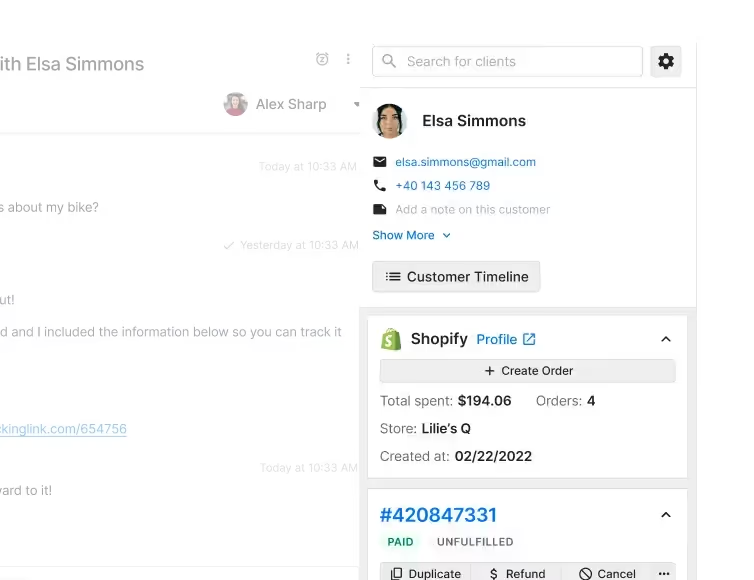
The Customer Sidebar displays Shopify data.
How AI Agent chooses data between different data sources
AI Agent processes the information from the ticket to understand where to pull the relevant data from, such as correlating information from the account associated with the interaction as well as the intent of the message. Here’s how it works.
🎟️ Ticket analysis
AI Agent first analyzes the content of the ticket to identify the key information and intent behind the customer's inquiry.
📊 Data correlation
It correlates this information with the available data sources, such as Guidance your team sets up (which takes precedence over other knowledge sources), Help Center articles, Macros, and any other integrated knowledge bases.
🤔 Context understanding
AI Agent understands the context of the message and retrieves relevant data. If there are multiple sources of information, it determines which source is most pertinent to the query.

💬 Clarifying questions
If the ticket has vague or insufficient information, AI Agent will ask clarifying questions to ensure it pulls the correct information.
✅ Internal QA process
Before sending the response, AI Agent undergoes an internal QA process where it verifies the information and creates an internal note for the merchant. This note includes information on what knowledge and Shopify data was used, and shows "reasoning" for the event if the QA failed.

🗣️ Feedback loop
Merchants or admins can provide feedback on whether the resolution was good or bad, and AI Agent uses this feedback to improve future responses.
Does AI Agent store data?
Gorgias and AI Agent do not store shopper or customer data.
AI Agent operates under a zero data retention (ZDR) policy, meaning that once the request is processed, the data is not stored.
📚 Further reading: Our Master Service Agreement (MSA) and Data Processing Agreement (DPA) govern the use of all Gorgias services, including AI Agent. If you’d like to learn more, these terms detail the data we collect and how we use Artificial Intelligence.
AI Agent prioritizes data security
Data privacy and security are top priorities for us, and our systems are designed to handle data in a secure manner without retaining personal or sensitive information.
AI Agent uses language models developed by OpenAI. OpenAI does not use customer data to train their models, and there is a zero data retention policy. Any data sent through the API is not stored beyond the duration needed to serve the request pulled.
Gorgias is SOC 2 Type II compliant and adheres to strict regulations and standards to ensure the privacy, security, and proper handling of sensitive data.
AI Agent does not use shopper data to enhance its LLM
AI Agent and Gorgias comply with stringent data privacy regulations, such as the General Data Protection Regulation (GDPR) and California Privacy Rights Act (CPRA), ensuring that shopper data is handled securely and responsibly without being used for model enhancement.
This approach ensures that shopper data remains private and is not utilized beyond the scope of providing immediate customer support.
“We were initially nervous about using AI, but it has quickly proven its worth. Our community members have even mistaken the AI Agent for a real person, which speaks volumes about how well it aligns with our brand voice.”
—Zoe Cranney, Community Experience Expert, LSKD
Is AI Agent trustworthy?
Yes! AI Agent was built not only to provide instant and accurate responses, but also with transparency in mind. For every interaction that AI Agent has, it provides you with an internal note that covers:
- The Guidance/Articles/Macros it used
- The source of the account information it pulled
- A prompt for your feedback to improve future responses

How accurate are the support responses?
While no AI tool is capable of perfect accuracy 100% of the time, we put several safeguards in place to keep AI Agent from sending inaccurate information.
Trained on your knowledge — not generic information
When AI Agent responds to a customer, it pulls from your team’s specific documents. Aside from the Guidance you set, which it prioritizes, AI Agent uses your Shopify order data, Macros, your brand’s webpages, as well as your Help Center.
Using AI Agent is unlike only relying on ChatGPT for answers, which uses broad information. AI Agent draws from your data only, making its responses highly accurate and personalized to your brand.
We use multiple LLMs for natural language processing
LLMs like OpenAI and Anthropic’s main role in AI Agent is to recognize and form natural-flowing responses. It can speak in different languages and tones to align with your brand voice. This, combined with your own internal knowledge sources, helps add that human touch that sets it apart from automated emails and bots.
Topics can be excluded or handed over
As another layer of control, we let you define topics that AI Agent should completely ignore and hand over to your team.
For example, some topics — such as medical questions or legal threats — are too sensitive to handle with AI. You can add these to your Exclusion or Handover topics to ensure AI Agent does not respond to them.
Teams can provide feedback on resolutions
You can improve AI Agent’s responses by providing feedback on how it handled tickets. You can either approve of its behavior or suggest adjustments to improve future interactions.
For example, when an influencer reached out to hip toddler carrier brand Wildride and said, “I really love you guys,” AI Agent replied, “Love you too ❤️❤️”.
Amber van den Berg, Head of Customer Experience, found this really funny, as it was exactly the type of response the team would have given. But if that response wasn’t quite right, or wasn’t on brand, they could have given AI Agent that feedback.
Do you have to legally disclose that you’re using AI?
You have the choice of whether or not to disclose your use of AI in response generated by AI Agent.
However, for maximum legal protection, we recommend using your email signature to indicate that the message your customers receive has been created with AI.
- In email: Use the Email Signature setting to disclose your use of AI.
- In chat: Use the Privacy Policy feature to disclose your use of AI.
Note: Some laws, such as the California Bolstering Online Transparency Act, prohibit misleading consumers about the use of automated artificial identities.
Give better support to your CX team & your customers
"I saw how well AI Agent was replying to customers and really started to think about how we could optimize it to work for us even more,” said Amber van den Berg, Head of Customer Experience at Wildride.
“Within one month, AI Agent was answering 33% of emails, which is quite impressive." This was essential for Wildride’s CX team after viral social media content bumped 1000 tickets per month to 1000 tickets per week.
Now, the team is freed up to focus on more complex issues, and AI Agent can fill in the rest.
Book a demo to see how AI Agent can work for you.
{{lead-magnet-2}}

Reduce Customer Effort with AI: A Smarter Approach Than Surprise and Delight
TL;DR:
- Loyalty comes from ease, not delight. Simplifying customer support drives more loyalty than going above and beyond to surprise customers.
- High-effort interactions hurt loyalty. Long, complicated support experiences can push even satisfied customers to competitors.
- AI reduces customer effort. AI can automate simple tasks like FAQs, personalizing support, and order modifications, so your team can handle more complex tasks.
- AI enhances human support. AI works best when it complements your team by handling repetitive tasks.
For years, businesses have chased the idea that delighting customers is how to earn loyalty. The belief is simple: go above and beyond, exceed expectations, and customers will come back.
However, research from The Effortless Experience, a best-selling customer service book by Matthew Dixon, shows that this approach might be wrong. Focusing on customer delight often makes the experience more complicated and less efficient.
Most businesses aim to wow customers, but trying too hard leads to longer customer support interactions and higher costs. The real key to customer loyalty is making things easy.
Below, find out how AI is another string to your customer support bow, allowing you to increase speed and reduce effort while maintaining your brand's empathetic voice.
{{lead-magnet-1}}
Why doesn’t customer delight drive loyalty?
When customers reach out with a problem they want a prompt solution––90% of customers say an “immediate” response is important.
Delight is a problem when it adds additional steps and doesn’t solve the problem upfront.
Customers don’t want a solution with all the bells and whistles. They simply want to solve the problem ASAP.
There’s a disconnect between satisfaction and loyalty
It’s a common misconception that satisfied customers are loyal customers. But the numbers tell a different story. Research shows that satisfaction doesn’t always lead to loyalty.
In fact, 20% of customers who say they’re satisfied with a service still plan to switch to a competitor. Satisfaction alone isn’t enough to keep customers from exploring other options.
High-effort experiences put customers off
High-effort experiences are a major driver of customer disloyalty. Studies show that 96% of customers who encounter high effort interactions become disloyal.
When customers feel like they have to jump through hoops to get help, they’re more likely to take their business elsewhere.

Read more: Why you need to monitor customer effort score (& how to do it)
It’s easier to trigger disloyalty than loyalty
Negative experiences are much more likely to leave a lasting impression. Even when customers feel satisfied with the products, high-effort experiences can negatively impact loyalty.
For example, a customer may contact customer service due to a minor issue, such as a shipping delay. However, they may have to wait a long time to get a response or repeat their issue to multiple agents. Even if the issue is eventually resolved, they will leave frustrated and less likely to return.
If you need to put in extra effort, even positive interactions will fall short.
Bonus track: High-effort experiences are expensive
Trying to delight customers might sound like a winning strategy, but it often comes with a hefty price tag. Offering freebies, bending rules, and making special exceptions can increase your operational costs significantly. When these additional costs don’t contribute to customer satisfaction or loyalty, it’s important to evaluate if they’re worthwhile.
Read more: The hidden power and ROI of automated customer support
Simplify, don’t surprise: How can AI help reduce customer effort?
Several common issues make customer support a hassle. Some of the biggest culprits are multiple contacts to resolve a single issue, having to repeat information, and being transferred from one agent to another.
You can solve these common customer complaints with AI.
But won’t AI make my brand sound robotic and devoid of human touch?
Our hot take is that AI actually frees up your team to focus on more valuable tasks.
For example, RiG’d Supply, a brand specializing in off-road vehicle accessories, is letting AI handle some of the repetitive work so they can do better customer service. As a small team, even the CEO occasionally jumps in to keep up with the repetitive daily requests.
“This isn’t a matter of eliminating jobs, but giving our employees their primary jobs back. We get more bandwidth back to be able to take phone calls and hear how we can help you have the best possible experience on your next ramble,” says Luke Wronski, CEO of RiG’d Supply. “Our hope is to have AI give us the time back to have a conversation with you about the stuff that keeps us stoked to do what we do.”

Read more: Our AI approach: Onboard, automate, observe, and coach
5 AI strategies to minimize customer effort
Don’t get us wrong, AI can’t handle every moving piece of your customer support. So don’t assume you can replace your whole support team with AI. You still need high-quality human support for more complex tasks.
But if you have a solid support team that provides top-quality customer experience, you already have the right foundation to benefit from AI.
1. Automate frequently asked questions
AI tools are excellent at resolving simple customer queries, such as “Where is my order?” or “How much is delivery?” on the first contact.
Quick, accurate responses lead to a smooth experience and less effort from both sides. Customers no longer need to follow up multiple times for the same issue. Plus, you’ll save time that your support team can use for more complex issues.
Consider using an automated customer experience platform with an AI assistant. For example, Gorgias AI Agent automatically responds to FAQs like “How much is shipping?” or “When will my order arrive?” in your brand’s voice. For more technical requests, it assigns them to the right agents.
Read more: What's the secret to reducing WISMO requests?
2. Personalize support
AI can analyze customer data to deliver personalized suggestions. For example, if a customer frequently orders the same product, AI might recommend a subscription service to save them time and effort. Or if a customer has ordered several cooking utensils from the same product line, AI might suggest matching pans to complete their set.
💡Pro Tip: Find a CX platform with AI that offers custom, human-like responses. You can program your AI Agent to respond in different tones — friendly, professional, playful, or empathetic — so it feels more like your brand and less like a robot.

3. Provide guidance for next issue-avoidance
Imagine solving your customers' problems before they even know they have them — that’s next-issue avoidance. With AI, you can recall past interactions and customer habits to anticipate their needs.
If a customer has had issues with a product before, AI could suggest a protection plan upfront, saving them from future headaches. Your AI solution should help you stay one step ahead so customer support remains smooth and customers are happy.
Some AI assistants can even learn specific instructions or “Guidance” for handling certain topics. For example, you could create a Guidance instructing the AI to request photos if a customer reports a damaged product. If the AI detects that photos are already included, it automatically escalates the ticket to a human agent.
4. Automate order edits
AI’s capabilities shouldn’t end at answering FAQs. AI can also handle routine tasks like address changes or order modifications so your team can focus on issues that need more technical problem-solving.
Speedy resolutions keep customers happy, and as long as the issue is resolved efficiently, they care more about the result than who handled it.
For example, brands using Shopify can use Gorgias AI Agent to cancel orders and update shipping addresses without manual intervention from agents — so agents can dive into more complex requests that need their expertise, like upselling or resolving negative customer feedback.

5. Answer customer concerns with AI recommendations
Let’s face it—nobody wants to jump through hoops to get help. AI-powered helpdesks dig into customer interactions to find out where things get sticky and offer smart suggestions to improve the process.
For instance, AI might notice that customers are often confused about how to download and print the shipping label to return items. With this insight, you could make it easier and faster for customers to find and print the correct label.
Gorgias AI Agent goes a step further by detecting your customers' top concerns and allowing you to create knowledge base articles about them automatically. Brands can use this data to update their Help Center and FAQs, make key webpages more visible, and enhance product pages, ensuring customers find the answers they need quickly and easily.

Embrace effortless customer experience with AI
Customer loyalty isn’t won with flashy gestures. Instead, brands earn it by making things easy. AI is your best friend here, helping you streamline interactions, solve issues before they even arise, and keep customers in the loop without them having to chase down information. Remember, AI is there to enhance an already solid customer experience foundation and to help your team.
It’s time to rethink how you approach customer support. With AI, you can craft a seamless, low-effort experience that satisfies customers and turns them into loyal fans.
Book a demo to see how Gorgias can eliminate customer effort.
{{lead-magnet-2}}

Why Campaign Timing Matters: 4 Ways to Get it Right
TL;DR:
- Launch onsite campaigns at the right time to meet customer needs. For example, start a campaign when customers look at a sizing guide.
- Avoid using chat campaigns without a goal. Invite dialogue while addressing specific customer concerns.
- Educational campaigns help customers make better choices. When done at the right time, they can increase sales by 31%.
- Offering premium options on entry-level product pages can help engage customers and drive upgrades.
Without strategic planning, campaigns become nothing more than annoying pop-ups. But done right, onsite campaigns can energize customers to checkout and click the ‘order’ button.
At CX Connect 2024, TUSHY’s Senior Director of Customer Experience, Ren Fuller-Wasserman, and Connor O'Malley from Gorgias shared how vital timing was in creating successful Gorgias Convert campaigns.
You can also watch the full Why Education Matters for Conversions panel discussion below:
How campaign timing impacts customer engagement
Launching a message too early or too late can end in two ways: engaging a potential customer or losing them entirely. Timed perfectly to align with your target audience, you have a better chance of converting them.
Essentially, you want to be in the right place at the right time.
Connor O’Malley, a Gorgias customer success manager who helps brands optimize their Convert campaigns, said that it’s effective to solve a pre-sales friction point at the right time. “If we're going to have a campaign on the website and we want people to actually read it and feel compelled to engage with it, timing is everything.”
So, how do you resolve presale friction points with campaigns, all while getting the timing right? There are a few ways:
- Engage new customers with educational campaigns.
- Address customer concerns by initiating chat campaigns.
- Upsell to the appropriate customers based on customer behavior.
- Analyze your ticket history and metrics.
Now, let’s look at how you can launch these campaigns effectively:
1. Capture new customers with educational campaigns on product pages
Customers navigating your store might need help determining which option to choose or how your product works.
Don’t let them leave with unanswered questions.
Instead, offer them exactly what they need while they view a product, like a video tutorial, compatibility guide, or even an invitation to chat with one of your agents.
It’s about giving them the clarity they need to:
- Learn about your product
- Increase brand awareness
- Motivate them to explore the rest of your offerings

“The engagement rate on our education campaigns was much higher than any other campaigns we've seen, even upsell or exit intent campaigns,” Ren said. More impressively, their educational campaigns led to a conversion rate of 31%.
2. Answer customer concerns with chat campaigns
Brands miss the mark when they only use onsite campaigns as a bridge to their live chat channel.
You might even be one of them with one of these conversational campaigns on your website right now:
- “Let us know if you have any questions!”
- “Need help? Talk to an agent now!”
While there’s nothing wrong with using campaigns to get one-on-one time with shoppers, it casts too wide a net to truly capture customers’ attention.
“We were just asking, "Let us know if you have any questions. Here's the chat," and that’s not really compelling people to ask their questions, even if they did have some,” Connor said.
The fix? Use customer concerns to guide your chat campaigns and bake them right into your campaign messaging.
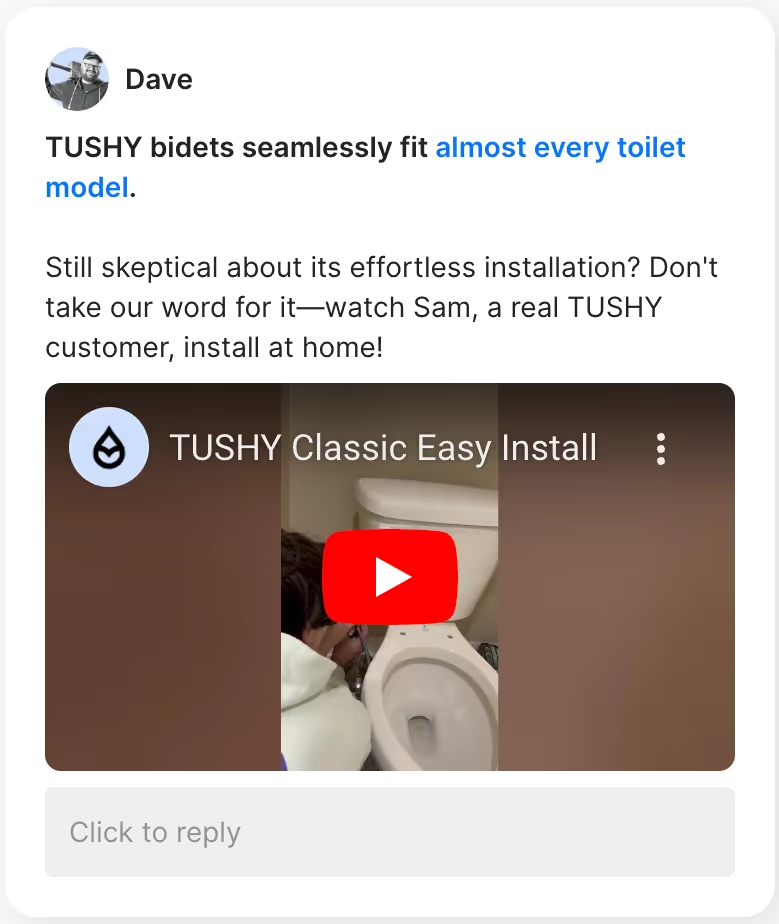
Here are pages that could benefit from chat campaigns:
- Compatibility/quiz page: Accelerate decision-making and alleviate concerns by activating a campaign on pages where customers are exploring product compatibility, taking a quiz, or checking sizing guides.
- Product comparison page: Trigger a chat campaign when customers are comparing similar products to help them understand differences and guide them toward the best choice.
- Checkout page hesitation: Engage customers who linger at checkout with a chat offering to clarify any last-minute concerns, such as shipping details or return policies, to help push them over the finish line.
💡 Pro Tip: Offer real-time support during peak traffic hours to catch customers when they’re most available.
“People fall in love with TUSHY through these real-time conversations. We talk to everyone like our best friend, and that is what drives people to consider making this life switch.”
—Ren Fuller-Wasserman, Senior Director of Customer Experience at TUSHY
3. Upsell items on entry-level product pages
Upselling to new customers can be effortless if you present your higher-ticket items as better options, as Ren does.
TUSHY has multiple bidet models, ranging from a basic model called Classic to one with a temperature-controlled seat. Ren uses their entry-level bidet product page to launch an upsell campaign aiming to educate and upsell simultaneously.
“We want customers to have the insertion at the right moment. They’re on our Classic page. Great, did you know you could get hot water? We pop the campaign up for our Spa 3.0.”

4. Find the perfect timing by analyzing your metrics
We’ve given you general recommendations on when to deploy your onsite campaigns, but your campaigns should go beyond these general campaigns.
The best information for finding your perfect timing? Your tickets.
Tickets are a record of customer sentiment — your cheat sheet to find out what customers want to know and their exact concerns.
“If you can look at your analytics, you can target what the average site traffic spend is on a particular page. That’s the sweet spot you want to shoot for,” Connor said.
On Convert, you can tailor campaigns to display only when customers meet certain conditions. Some conditions you can customize are current URL, time spent on a page, products in cart, number of visits, total spent, and more.

💡 Pro Tip: Analyze traffic for each of your webpages and think about the reasons behind the metrics. Why are website visitors spending more time on one product page than another? Why do visitors drop off after viewing certain pages? Understanding these patterns allows you to alter your campaigns to address specific concerns.
Get your timing right with Gorgias Convert
Effective campaigns depend on delivering the right message at the right time. Focusing on presale friction points, carefully timing your outreach, engaging in valuable conversations, and providing educational and upselling content when it’s most relevant can help you reach your conversion goals.
Ready to see how Gorgias Convert optimizes your campaign timing? Book a demo today and flip customer interactions into brand advocacy.
{{lead-magnet-1}}
A Complete Guide to Black Friday Ecommerce in 2025
TL;DR:
- Start BFCM prep now to capture more revenue and loyal customers. Early planning helps you launch high-converting campaigns and get your support team ready before the rush.
- Update your returns, shipping, and lost package policies. Make these policies visible and self-serviceable to boost trust and reduce support tickets during peak traffic.
- Automate support to protect your team’s time. Use AI tools like Gorgias to deflect FAQs and focus human agents on high-impact tickets.
- Build BFCM campaigns with social media, influencers, and SMS. Create content that highlights your deals, promote top posts, and offer early access to subscribers.
- Recover carts and re-engage new customers post-BFCM. Set up chat widgets, SMS/email automations, and follow-up campaigns to turn browsers into repeat buyers.
One month ahead of Black Friday and Cyber Monday, and shoppers have already managed to spend $88.6 billion online, according to Adobe.
But it takes a coordinated effort by customer support, sales, and marketing to encourage a shopper to click “checkout.” Without a solid ecommerce strategy in place, many online retailers will miss out on the Black Friday and Cyber Monday rush.
Whether you’re looking to optimize your existing strategy or starting from scratch, we’ve got you covered. This guide will help you make the most out of your BFCM ecommerce strategy with a clear list of steps (in chronological order) to help you prepare.
{{lead-magnet-1}}
What is Black Friday, Cyber Monday?
Black Friday, Cyber Monday — also referred to as BFCM — are two back-to-back sales days that bring in a ton of revenue for both in-store and ecommerce retailers in the US. The Black Friday - Cyber Monday shopping window also kick-starts holiday shopping from Thanksgiving day through the new year.
Why you need to prepare for BFCM now
BFCM isn’t just about one big day of generating revenue. It’s a crucial period for online retailers to capture new customers and convince them to keep shopping through the end of the year and beyond.
In-person BFCM experiences are out and ecommerce is in
Shopper sentiment is shifting away from physical experiences. Online transactions are up by 8.2% year-over-year. So, you probably won’t see consumers camping out in front of physical stores on Black Friday, but those same shoppers still want to find a great ecommerce deal.
Consumers are eager to spend, despite concerns about inflation
According to research from Nielsen, the desire for a good deal caused 41% of shoppers to spend more in 2023 than they had the year prior.
Brand loyalty is out — unless given a reason to commit
Shoppers, Gen Z in particular, are willing to buy “dupes” from alternative brands for a cheaper price. That's why building brand awareness well before BFCM is crucial — you need shoppers to know and trust you before the sales frenzy begins.
Get proactive rather than reactive
When you make a plan early, you give your business more time to craft a great marketing campaign. Plus, you give your team time to figure out how to manage customer service on Black Friday for these high-traffic days.
Considering Black Friday, Cyber Monday is the busiest ecommerce sales event of the year, prepare as early as possible to get a leg-up and stay on top of Black Friday trends.
Related reading: Why proactive customer service is essential for growing your business
Pre-Black Friday preparation: What to do before the holidays
Preparing for Black Friday — and building a strong ecommerce strategy — goes well beyond ironing out a limited-time deal.
Tactics like updating key policies, building out customer self-service options, and marketing early will help you be successful.
1. Update key policies on your website before BFCM
Displaying clear-cut and easy-to-find policies on your website makes a huge difference to a customer’s user experience. It sets the customer up for success and cultivates a positive sentiment with your brand.
To prepare for the best Black Friday-Cyber Monday possible, we recommend updating these key policies (and your FAQ page) with BFCM-related information:
- Returns & exchanges: Expect more gift returns and exchanges. Use return apps like Loop Returns to create a self-service portal and connect it with Gorgias so AI Agent can automatically send customers their return link or status update.
- Shipping & fulfillment: Be upfront about processing times, estimated delivery dates, and tracking options. Shoppers buying gifts expect fast and reliable delivery. Transparency here prevents frustration and ticket spikes.
- Lost packages: More shipments mean more chances for loss or delays. Make sure your policy explains whether you cover damages, refunds, or credits. Include this in your FAQ so customers (and your support team) know exactly what to expect.
Related reading: FAQ Page template & tips (+ free Shopify FAQ generator)
2. Reduce strain on your customer service team
Turns out, a lot of the customer support inquiries your team receives are repetitive.
“If you force agents to respond to every question manually — no matter how small — you're only limiting the time they can spend on tickets that actually need human attention,” says Gorgias Senior Director of Customer Success, Bri Christiano.
That’s the reason we built AI Agent at Gorgias: It deflects your most repetitive tickets — up to 60% of your overall ticket volume — so you can focus on the tickets that grow your business.
Orthopedic shoe retailer Orthofeet leaned into Gorgias’s AI to support customer service interactions. Not only did the brand gain a streamlined way to manage customer feedback, they also saw response time shrink from 24 hours to 35 seconds on email.
3. Build a marketing campaign to tap into social commerce
Social commerce is on the rise among consumers worldwide.
Sprout Social reports that one-third of shoppers in the UK make spontaneous purchases based on social media a few times per year. And that number is expected to rise as shoppers complete their holiday shopping during BFCM.
You don’t necessarily have to sell directly through Instagram, but you can leverage your social channels to generate brand awareness.
The need for social-focused customer support is exactly why online retailer MNML turned to Gorgias. The company found that their shoppers turned more and more to social media for answers to their shopping-related questions.
Ultimately, the company leveled up their customer support on social media to connect with potential buyers.

Blanking on BFCM campaigns? Here are some effective marketing campaign ideas:
- Partner with micro-influencers to generate brand awareness. Don’t partner with influencers for the sake of it. Think about it like building a relationship with someone who fits your brand ideals who can cross-sell your products to their audience. Look for a creator with less than 100,000 followers who have audiences that match your target audience.
- Create content around your Black Friday deals. Highlight your deals using creative content. Collect photos, videos, or illustrations of your products. Then, draft copy for captions, think through the best hashtags, and hand over creative briefs to your design team to build any assets you might need.
- Put a little money behind your most successful organic social media posts. The weeks or months leading up to BFCM are prime time to talk about your brand’s Black Friday promotions. Use social media analytics to see which published posts across your channels are performing the best. Even with a small budget, you can use social ads to grab even more eyeballs — and potentially bring more people to your website.
- Prompt customers to sign up for SMS alerts on mobile. Through these notifications, you can give early sale access to subscribers and incentivize new shoppers to build a deeper relationship with your brand.
How to maximize BFCM revenue in 2 steps
Imagine Black Friday, Cyber Monday is here. Even better, imagine you’ve got a ton of website traffic full of eager browsers. You need a plan to keep those browsers engaged.
One major step you can take to boost your conversion rate and potential revenue is to increase communication touch points and focus on recovering abandoned carts.
1. Increase customer touchpoints to keep shoppers engaged
Throughout any customer’s journey, there are many opportunities to interact with your brand. One moment might be finding out about your BFCM sale on social media, signing up for emails to get early access, or browsing the best deals before heading to checkout.
The more you interact with customers along the way, the more you can keep them engaged — and personalized interactions increase your chances of converting a first-time shopper into a repeat customer.
One way to do that is with Gorgias Shopping Assistant, an upselling tool that uses conversational AI to personalize the customer's buying journey. It offers several ways to boost overall engagement:
- Customer-specific product recommendations
- Upselling products during high-intent moments
- Offering discounts to ease customer hesitation

2. Reduce abandoned carts
Cart abandonment is a major source of lost retail sales for any ecommerce business, considering about 70% of online carts are abandoned.
You can easily target customers who have opted into an email list or receive SMS messages from your brand. Design emails or text messages designed to trigger if a cart is abandoned.
Include copy that builds a sense of urgency to drive customers back to their shopping carts to “buy now” before the deal is over.
There’s even a chance to use re-engagement to increase your average order value by upselling once that customer returns to your site.
How to retain new customers you get during BFCM
Repeat customers are valuable — like, really valuable.
According to Gorgias research, returning customers make up about 21% of a brand’s customer base but generate 44% of that same brand’s revenue.
Your brand should re-engage with anyone who shops on your website during the BFCM rush. Those same people could become returning customers who give your shop a revenue boost during the rest of the holiday season.
1. Offer a discount for next time
The perfect moment to re-engage a customer starts at checkout. When someone makes a purchase through your online store, offer them an immediate discount that goes toward their next purchase.
At CX Connect LA 2024, Ron Shah, CEO of Obvi, shared his brand’s strategy for offering discounts to generate revenue. Ron knew implementing AI to support Obvi’s two-person customer support team was necessary to help the brand grow without eliminating the need for his human agents.
“The time saved by AI handled a lot of the redundant work our agents were doing, which meant we could turn them into part-time sales agents. We also gave them a code to help them prevent a refund from happening or upsell somebody. It created a completely new shift in their mindset. They realized, ‘Oh wow, you're not just taking something away from me (with AI) — you're actually elevating my opportunity.’”
Tip: You can increase the touchpoints to re-engage with an existing customer by building a reminder email that triggers one week after their initial transaction. That way, you not only stay at the top of their inbox, you also stay top of mind.
2. Invite customers to join a loyalty program
Loyalty programs are a tried-and-true method to build engaged, returning customers.
In a recent survey, Yotpo found that over half of surveyed consumers agreed a loyalty program would encourage them to purchase more from a brand.
If you already offer a loyalty program, make sure new customers know about how to get the VIP experience with your store. Build awareness touchpoints into your loyalty program marketing strategy. You can also prompt buyers to become loyal customers after they make their first purchase.
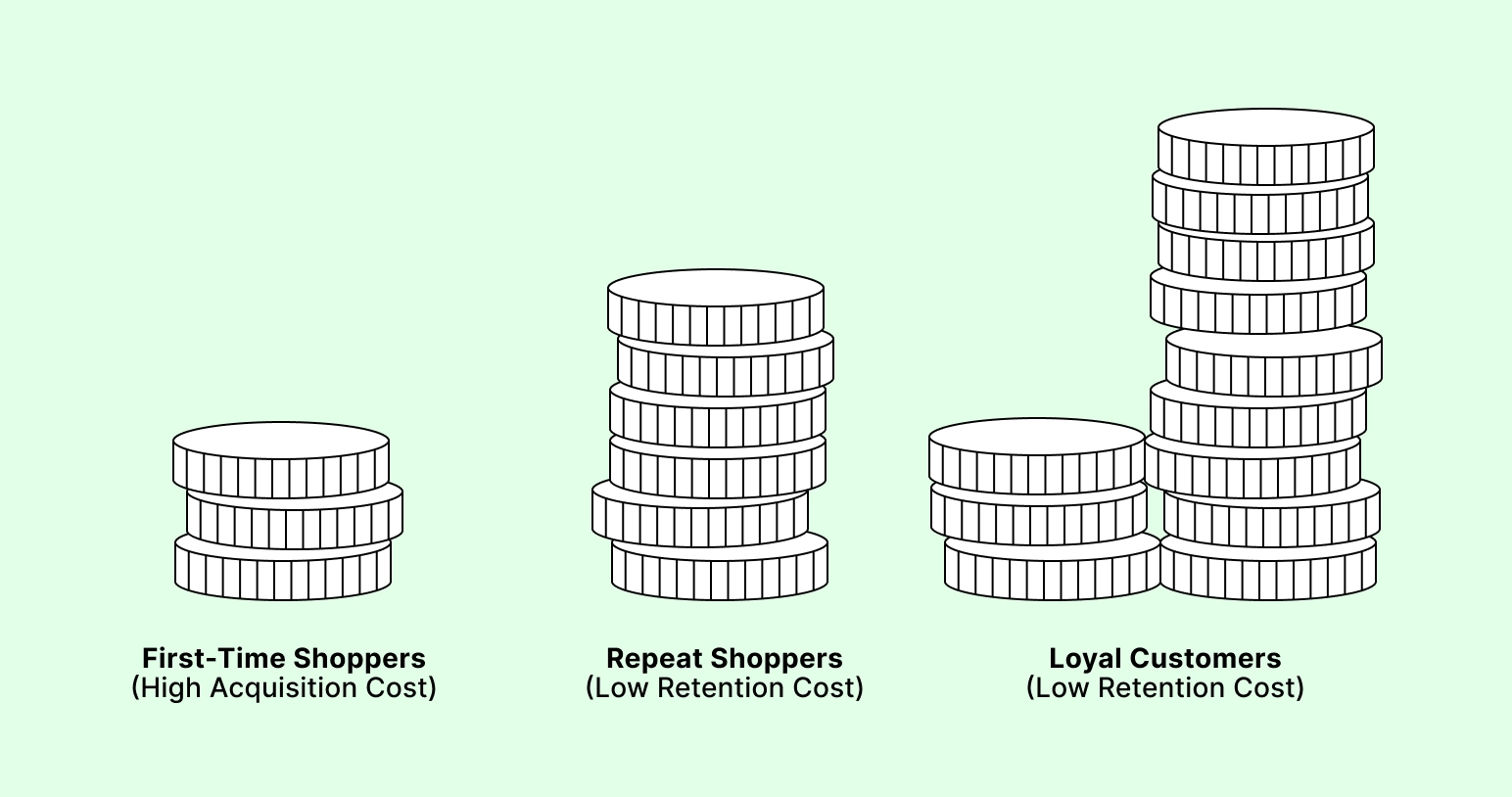
3. Continue to improve your customer experience strategy
A successful, positive, and repeatable customer experience doesn’t end after midnight on Cyber Monday. It’s a road rather than a destination.
Consumer habits are always changing, and your support teams must be prepared to handle customer requests.
One way to anticipate your customer’s pain points is to look at customer feedback.
Reviews and social media activity is a great place to start. You might also consider putting a more formal customer sentiment strategy in place, with a CSAT survey to collect direct feedback from customers.
This feedback helps your team prioritize what needs to improve so you’re not left reaching in the dark.
Give your ecommerce strategy a boost this holiday shopping season
The name of the game this Black Friday - Cyber Monday isn’t just to get a ton of online sales; it’s to set up your ecommerce site for a successful holiday shopping season.
Success could look like:
- A reduction in BFCM returns or exchanges
- Having the perfect amount of inventory
- Seeing higher-than-average sustained engagement on your social channels
If you want to move the meter, focus on a strong Black Friday marketing strategy that starts now.
Gorgias is designed with ecommerce merchants in mind. Find out how Gorgias’s time-saving automations and convenient platform can help you create successful customer experiences.
Claim your demo today, or sign up to try Gorgias.
{{lead-magnet-2}}

How to Automate Half of your CX Tasks
TL;DR:
- Automating CX tasks improved Shinesty’s support performance. They cut resolution time by 50% and raised satisfaction scores.
- They focused on high-impact, repetitive inquiries first. WISMO, subscriptions, and account questions were easy wins.
- Automation didn’t kill their brand voice. Smart help articles and custom AI responses kept things on-brand.
- Their small team got more specialized. Freed from repetitive work, agents now handle complex, high-value conversations.
Customer expectations continue to rise — around 82% of service pros say customers expect their requests to be resolved in less than three hours. Given the pressure to meet these climbing demands, more brands are turning to automation and AI.
It’s not only about providing a fast, helpful, and efficient customer experience. Brands must also stay ahead of the competition and adopt the latest tech for long-term success.
Luckily, brands like Shinesty are adopting tech like AI and automation to meet consumer demands. It’s worth it — since adopting automated CX in 2023, Shinesty’s resolution time has decreased by 50%, and their overall satisfaction rate is up.
In a recent workshop, Molly Wallace Kerrigan, the Marketing and CX Director at Shinesty, shared her team’s strategies for setting up automation, maintaining brand voice, and optimizing customer experience (CX).
You can also hear Molly share these insights herself by watching the workshop here:
How Shinesty automates more than half of their CX tasks
Before using AI Agent, Shinesty hired about 20 seasonal employees, including CX agents, to help with the peak holiday season. In 2023, they only hired two, bringing their total to five agents. It was clear that AI Agent saved them money.
“When AI Agent came along, it changed everything... We only hired two agents, raising our team from three to five. That was our biggest game changer with Gorgias.”
Molly shared their impressive journey to automating 54% of their CX tasks — a feat transforming their customer service operations, especially during high-demand periods like the holiday season. Most importantly, they achieved this without losing their brand’s personality.
Here’s how they did it:
Focus on key areas
First, Shinesty identified the most common customer inquiries that could be automated. They prioritized high-volume tasks such as WISMO (where is my order?), subscription cancellations, and account management. Automating these repetitive inquiries reduced the pressure on their human support agents.

Shinesty uses Flows in their Chat to answer frequently asked questions like “Do you have discounts?”
Rebuild and clean up
Before rolling out automation, Shinesty cleaned up its helpdesk. The team re-evaluated existing workflows, removed outdated processes, and ensured their helpdesk was ready for automation. Laying the groundwork helped the team transition to automation more efficiently.
Optimize self-service
A key part of Shinesty’s strategy was empowering customers to find answers on their own. Molly emphasized the importance of creating simple, humorous help articles that resonate with their brand. Regular audits of these resources meant customers could self-serve more easily, reducing the need for human intervention.

Shinesty’s Help Center provides customers with a quick way to self-serve.
Lean into AI recommendations
AI-powered Article Recommendations help Shinesty identify ways to improve their use of automation. For example, AI suggested updating some existing help articles based on common customer questions, helping Shinesty address gaps proactively.

With AI Agent, you can train AI to recommend the most relevant articles depending on a customer’s message.
Gradual scale-up
Instead of overhauling everything at once, Shinesty rolled out automation gradually. The team focused on key areas and then expanded. Eventually, they automated 54% of their CX tasks without overwhelming their team or compromising service quality.
Reinvest time into human agents
Automation doesn’t mean eliminating human agents. Instead of getting bogged down in repetitive tasks, their small team of agents now has the chance to focus on more valuable tasks and specialize.
“With a smaller team, we could develop our agents more, giving them opportunities to specialize in different areas. Our satisfaction rate has increased, and our resolution time has decreased by 50%.”
{{lead-magnet-1}}
Why you should embrace AI and stay ahead of the competition
Molly strongly encourages businesses not to hesitate when it comes to adopting AI tools. “Don't be afraid. Just do it. AI is here to stay, and it's not going anywhere,” she emphasized.
Integrating AI into your CX strategy allows you to keep up with customer demands and position your brand ahead of the competition.
📚 Related reading: The hidden power and ROI of automated customer support
Take the leap with AI for a competitive edge
Molly’s advice is clear: AI is a game-changer for businesses looking to stay ahead. The tools are intuitive, easy to implement, and designed to enhance your team’s capabilities rather than replace them.
Gorgias AI Agent comes with pre-built templates that make it even easier to get started. These templates provide a solid foundation, allowing you to quickly set up automated responses and workflows that align with your brand’s tone and style. Molly pointed out, “The templates were a great starting point, and the guidance part was simple.”
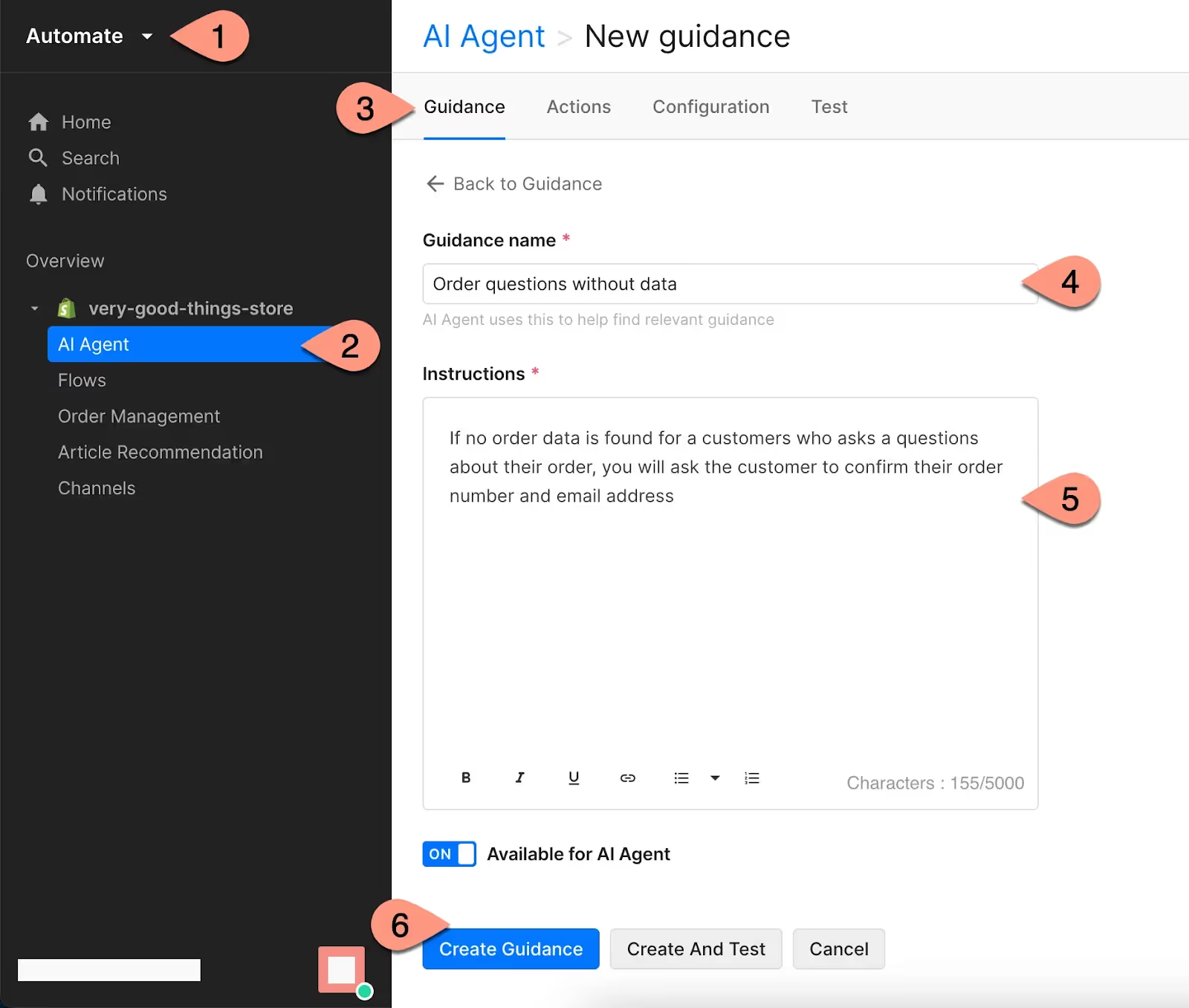
Control how Gorgias’s AI Agent responds to customers with custom instructions based on your best practices and internal policies.
By adopting AI, you can automate routine tasks and ensure consistent and empathetic customer interactions. Your team will also have more time to focus on more complex and valuable activities.
As Molly noted, AI allows your team “to develop beyond mindless tasks” and offers “empathetic responses without turning on the customer,” which can significantly improve customer satisfaction and loyalty.
Read more: How Shinesty automates 50%+ of tickets to offer great CX with a team of 5
The future is here with more AI Agent features
Looking to level up your CX automation? AI Agent has more exciting features, including the ability to perform actions like canceling orders or changing addresses automatically — tasks that currently require human intervention.
Another essential feature for CX teams is Auto QA, which enhances the quality assurance process by removing subjectivity and ensuring more consistent results.
Want to see how many routine tasks you can automate? Book a demo to see Gorgias AI Agent in action today.
{{lead-magnet-2}}
Building delightful customer interactions starts in your inbox
