

72% of Gorgias Uses AI for Decisions: How We Did It
Four months ago, our analysts were dealing with a barrage of questions. "What's our ARR by segment?" "Build me a dashboard for this quarter's pipeline." Quick asks piled up behind complex deep dives. Stakeholders waited for answers that should have taken seconds, and analysts spent their time fielding requests instead of doing the strategic work that creates the most value.
Today, anyone at Gorgias can ask a question in plain language and get an accurate, contextualized response in seconds. Not from a colleague or dashboard, nor from a generic answer from the internet. But a response built on our business context. We call it Cortex, our flagship internal AI agent.
In two months, Cortex went from an idea to fielding thousands of questions every week, recommending actions across the business, and deprecating the need for manual dashboard creation. While most companies right now are treating AI as an initiative — at Gorgias, AI is already part of how we work. 72% of Gorgias employees use Cortex each week, and that number is only growing.
We didn’t achieve this by simply plugging a large language model into our stack. LLMs are a critical part of the equation, but they aren't the driving force — it’s everything else under the hood: the infrastructure, context, platform architecture, and the team that brings it all together.
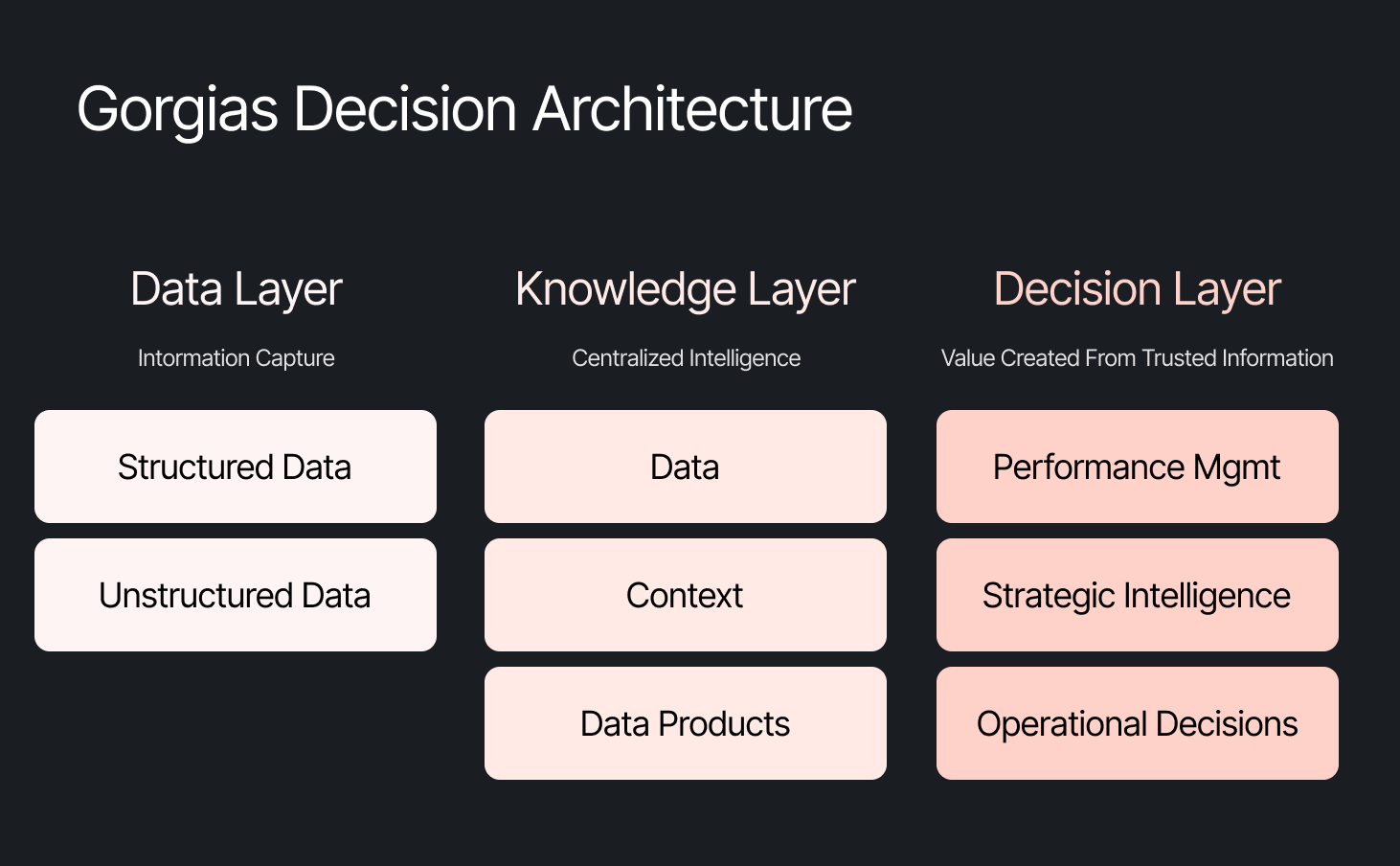
The framing problem most companies get wrong
The instinct across many companies today is to start with the model, pick a provider to solve a specific challenge, or invest heavily in getting the data right. All reasonable starting points, but most of them solve for one use case. Underneath that approach is a framing problem: seeing AI as an initiative — something you assign and measure. Seeing AI as another tool your company uses versus how your company operates.
We started somewhere different. Every company is built on four pillars: customers, people, product, and decisions. AI investments tend to place heavy emphasis on the first three. We started with the fourth. Our bet was that if we built everything around the need to make effective decisions first, asking what Gorgias needed to know to operate well, then our AI would become dramatically more powerful.
Cortex is that philosophy in practice
Cortex is our flagship internal AI agent, and the product where we established the tenets that now run through everything else we build: composable and modular infrastructure, governed context, and accessible from wherever decisions happen. Cortex lives in Slack, as well as across LLM vendors, in its own browser extension, and even on its own dedicated internal site.
Cortex doesn’t stop at answering questions. It can read and write to Notion, file Linear tasks, create HTML apps, automate signal delivery, and more. It operates across every layer of our stack, from dashboards to data pipelines, because we designed it as one integrated system. It is this connection that adds remarkable depth to what people can ask, and what they get in return.
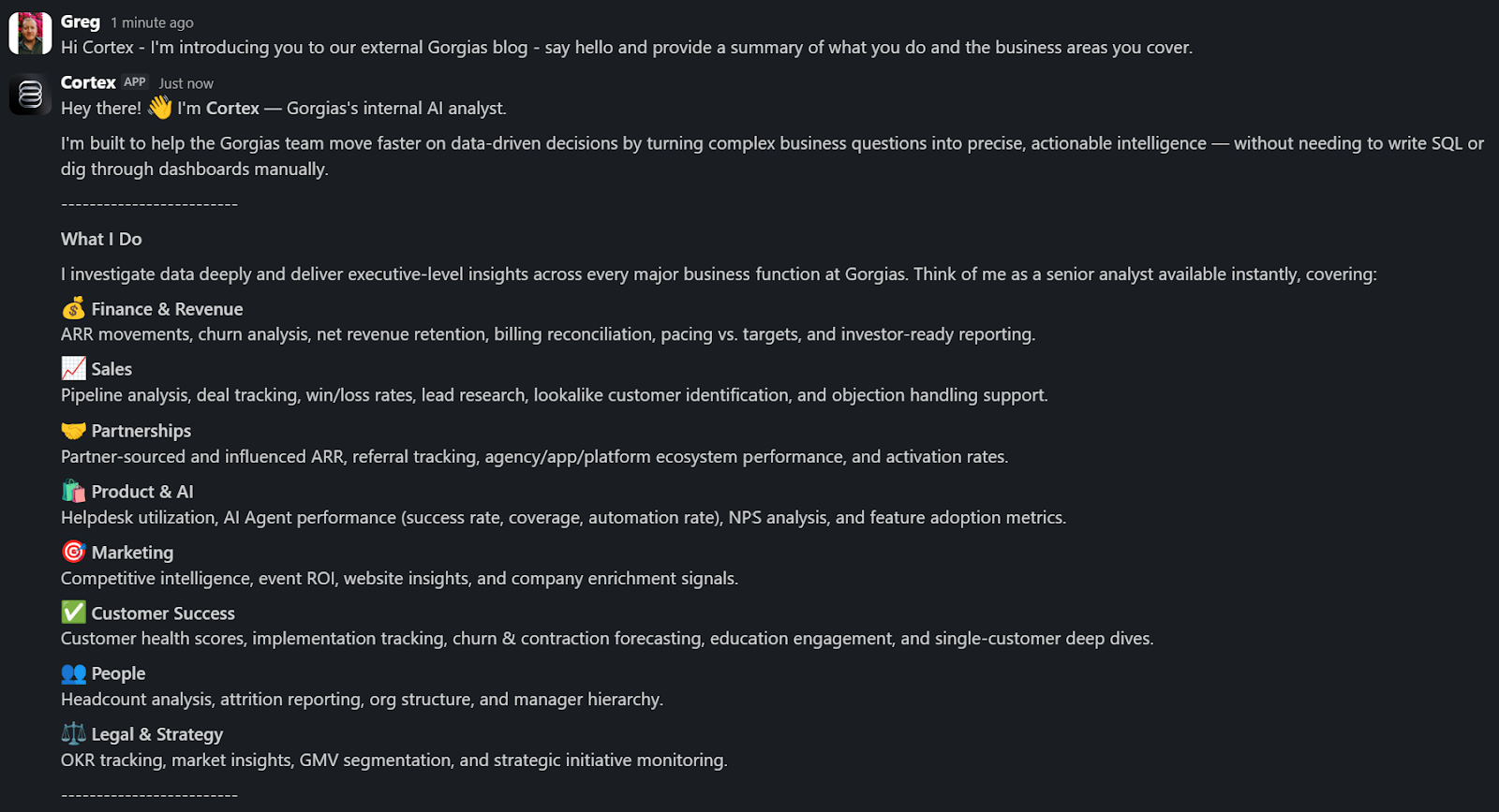
A Sales Lead is pitching and asks Cortex for the full picture of the merchant. In a customized PDF, Cortex lists coverage gaps, pre-sale intent signals, and product fit options. Everything the sales lead needs to walk in with confidence.
A Senior Product leader asks, "How are we performing against OKR #1, and what can my team do to help accelerate it?" Cortex returns a full ARR breakdown, projected end-of-month attainment, segment-level findings, and connects it all back to company-level strategies. A suite of recommendations customized to the leader, the performance, and the signals that bridge how they can support our goals. The kind of answer that used to take someone a week to put together.
These aren't simple lookup queries. They require deep business context spanning multiple areas. Cortex handles these because its Decision Engine gives it the information to reason against governed data, metric definitions, and business context, turning a generic answer into a credible one.
Overnight, teams have built Cortex into how they work. They’re spending less time searching and more time finding answers, not because they were told to, but because Cortex reduced the distance between question and decision.
Flexibility as the foundation
Cortex’s modular infrastructure allows us to experiment and add new capabilities freely. We’ve already built two more internal AI agents made for entirely different use cases, but using the same Decision Engine as Cortex.
GAIA, our internal experimentation AI Agent, helps our customers identify opportunities in their AI Agent Guidance design. It takes institutional knowledge across our teams and turns it into a scalable system that drives automation and value to our customers. Our CEO, Romain Lapeyre, has been its most vocal advocate since day one.
When we needed a platform for investor readiness and board preparation, we built Oracle. Our board decks and talk tracks are informed and built with the same AI, and our numbers are validated every step of the way.
We’re continuing to expand new AI agents internally, exploring how they can create value for customers and our own teams.
AI has transformed how data teams create value, and we’ve already shifted to account for it
When AI handles thousands of analytical questions each week, the highest-value work for a data team shifts permanently. Late 2025, we repositioned from a Data Analytics function into a Decision Intelligence function — a structural change in what we own and how we operate.
Today, our analysts focus on the most sensitive, complex, and forward-looking decisions and analyses. They partner more deeply with stakeholders by driving next steps from signals. They're even building entirely new capabilities that didn't exist in their role descriptions months ago. Things like AI skills for Cortex, context curation, and insight and recommendation delivery. The role of the analyst hasn't diminished. It's expanded to encompass the most meaningful work an analyst can do: driving outcomes and ensuring those decisions can achieve them.
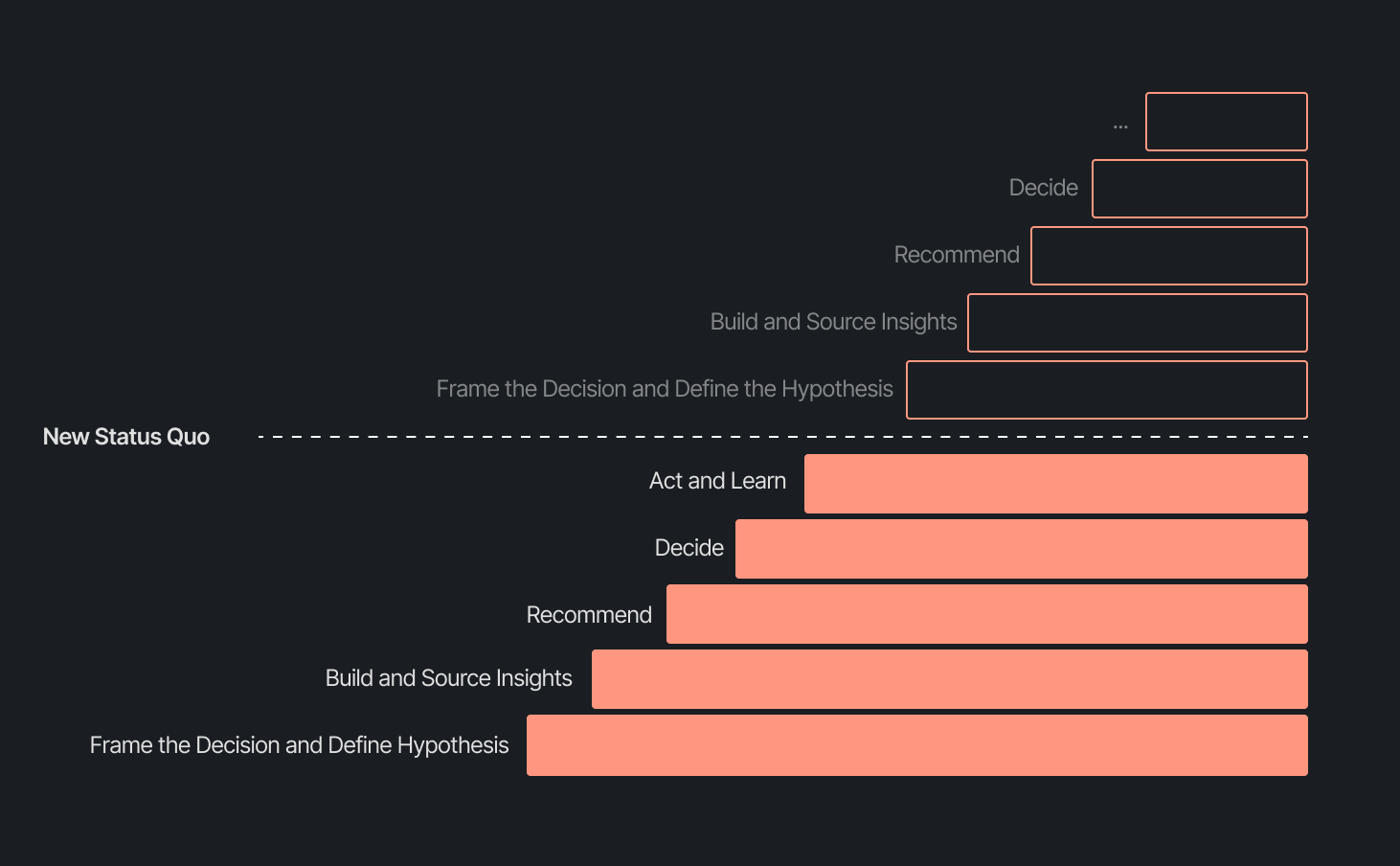
Our business support model has changed, too. Instead of embedding analysts and dedicated engineers within functional teams, we align capacity to the highest-impact company objectives and move fluidly across them. This model works even better because Decision Intelligence brings together both analytics and engineering teams under one roof.
Elliot Trabac leads our Data, Context and AI Engineering teams. The Decision Engine, Cortex, GAIA, and the platforms I've described exist because of the infrastructure his team innovated and built from the ground up. Noemie Happi Nono leads our Decision Strategy and Operations team, driving decision outcomes with stakeholders, advancing the development of Cortex skills and capabilities, and pushing into new areas of analysis every day.
Together, they're shaping what a modern data function looks like when AI becomes a standard building block for how a company operates.
What’s next for the Decision Intelligence team
The question of ROI is long gone. AI has opened the floodgates to more trusted and meaningful signals than ever. The natural next evolution is Proactive Intelligence, signals surfaced toward what you need to know, before you ask. And we're already building this because our architecture is designed to support it.
In the coming weeks, members of the Decision Intelligence team will go deeper into themes I've touched on here. Yochan Khoi, a Senior Analytics Engineer on our team, recently published a technical walkthrough of our context layer and will go further into building context strategies that scale. Others will cover infrastructure, analytical partnerships, evolving data assets into decision assets, and the cost and efficiency gains that make sustained AI investment viable.
AI hasn't changed the most important element of data and analytics functions — delivering outcomes — but it has raised the bar for what it looks like and how far we can take it. We’re just getting started.
TL;DR:
- AI is resolving tickets, not just replying. AI now handles 31% of customer interactions for ecommerce brands, and that number is expected to nearly double within two years.
- Every channel is becoming a storefront. Conversations are replacing the traditional browse-and-buy journey, with 79% of brands reporting sales from AI-driven interactions.
- AI is shortening the buying cycle. 93% of AI-influenced purchases happen within the first 48 hours of the conversation.
- CX teams are changing, not shrinking. Ecommerce brands are actively hiring for more technical roles to implement, coach, and maintain AI.
- The winning model is hybrid. AI handles volume and speed, while humans handle complexity and judgment.
The way shoppers buy online has shifted and customers are at the center.
They no longer want to scroll through product pages, dig through FAQs, or wait 24 hours for an email reply. They open a conversation, ask a specific question, and expect a useful answer in seconds. Brands that can’t deliver these experiences at scale are seeing customer hesitation turn into abandoned carts and lost revenue.
This shift has a name: conversational commerce. It's the practice of using real-time, two-way conversations as your primary sales channel, through chat, AI agents, messaging apps, and voice.
What started as an experiment for early adopters has become a key growth lever, with 84% of ecommerce brands treating conversational commerce as a strategic pillar this year vs. last year.
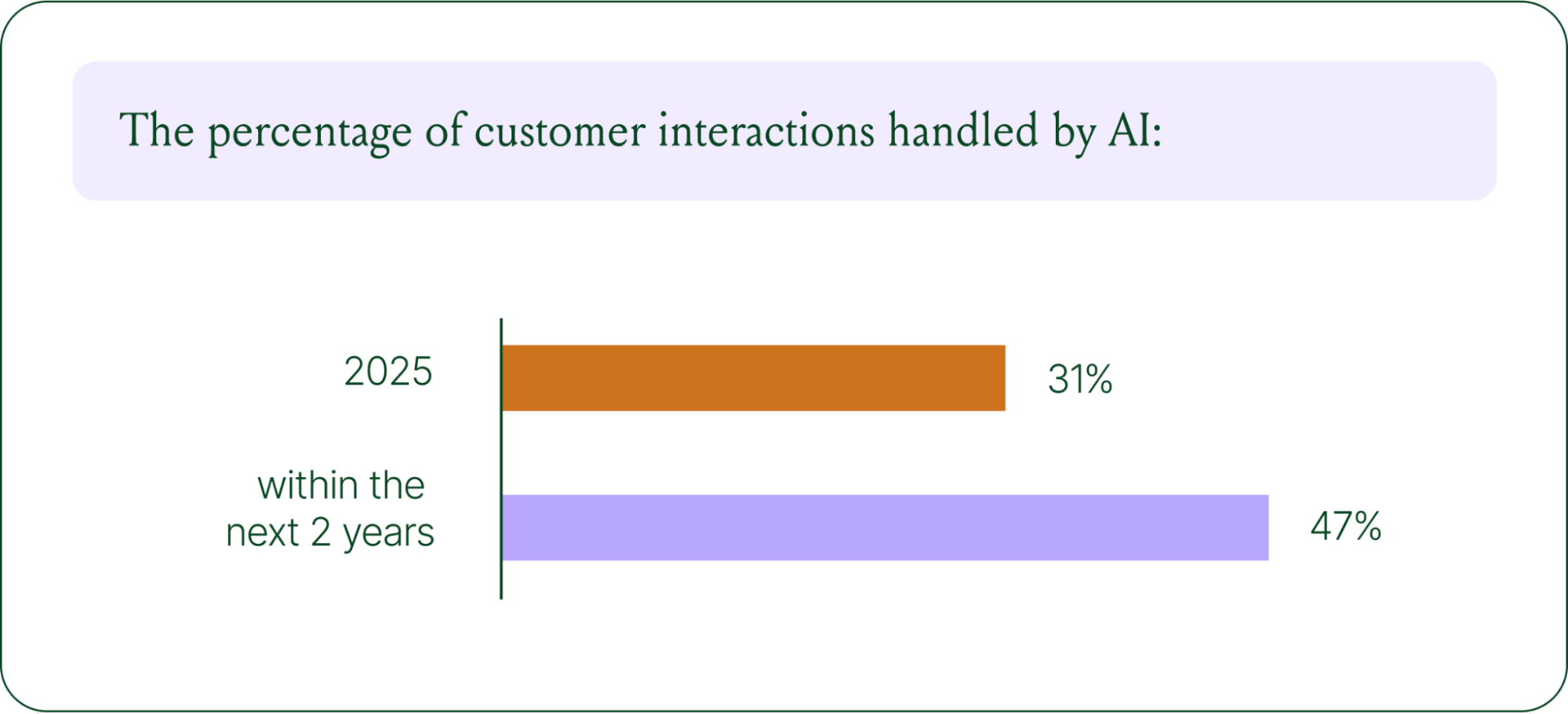
We surveyed 400 ecommerce decision-makers across North America, the U.K., and Europe to understand how conversational commerce and AI are reshaping the ecommerce landscape. These findings are complemented by aggregated and anonymized internal Gorgias platform data from 16,000+ ecommerce brands.
The State of Conversational Commerce in 2026 trends report breaks down all of the findings, including five key trends shaping the ecommerce landscape.
{{lead-magnet-1}}
Trend 1: AI is table stakes for ecommerce and it’s no longer just about efficiency
A few years ago, adding an AI chatbot to your site that could provide tracking links and Help Center article recommendations was a differentiator. Today, it's table stakes. McKinsey found that 71% of shoppers expect personalized experiences, and 76% get frustrated when they don't get them.
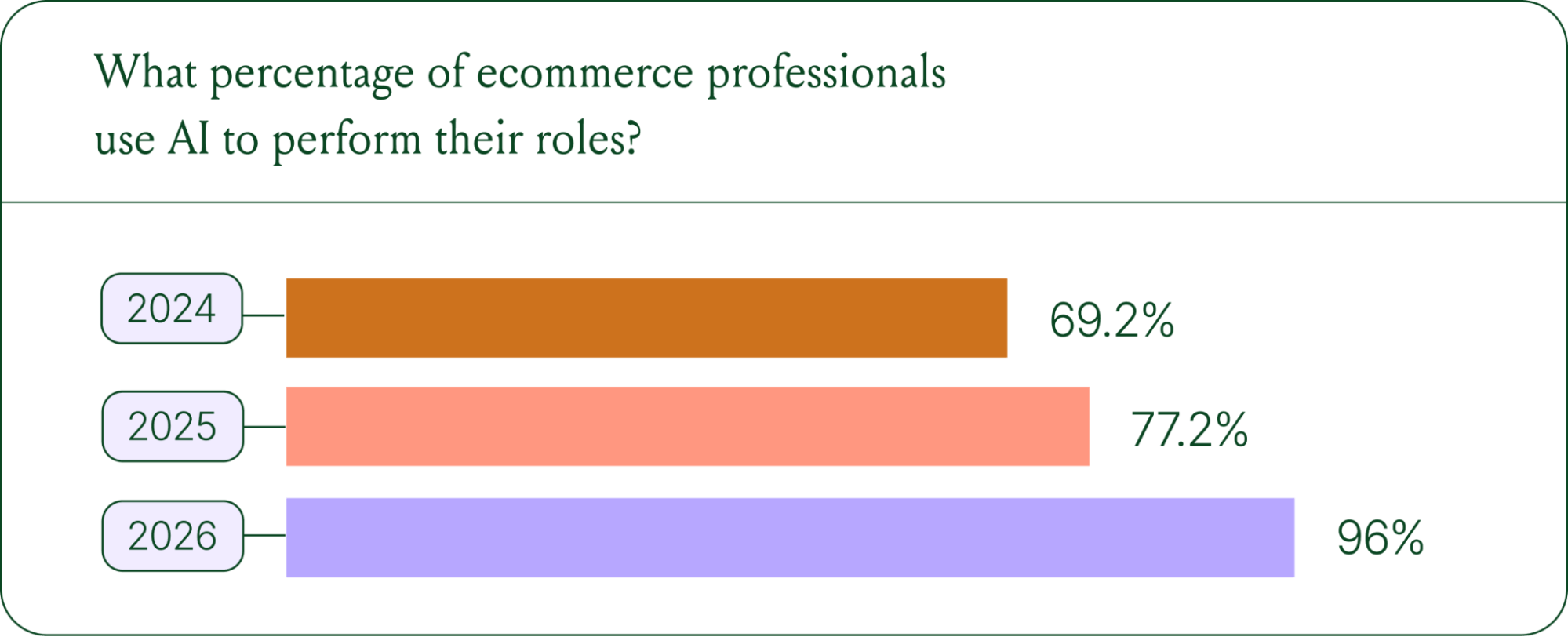
Right now, most ecommerce professionals use AI, with 93% having used it for at least 1 year. Enthusiasm is accelerating quickly, with only 30% of ecommerce professionals rating their excitement for AI at 10/10 in April 2025. Similarly, while AI adoption rose steadily year over year, it reached a clear peak in 2026.
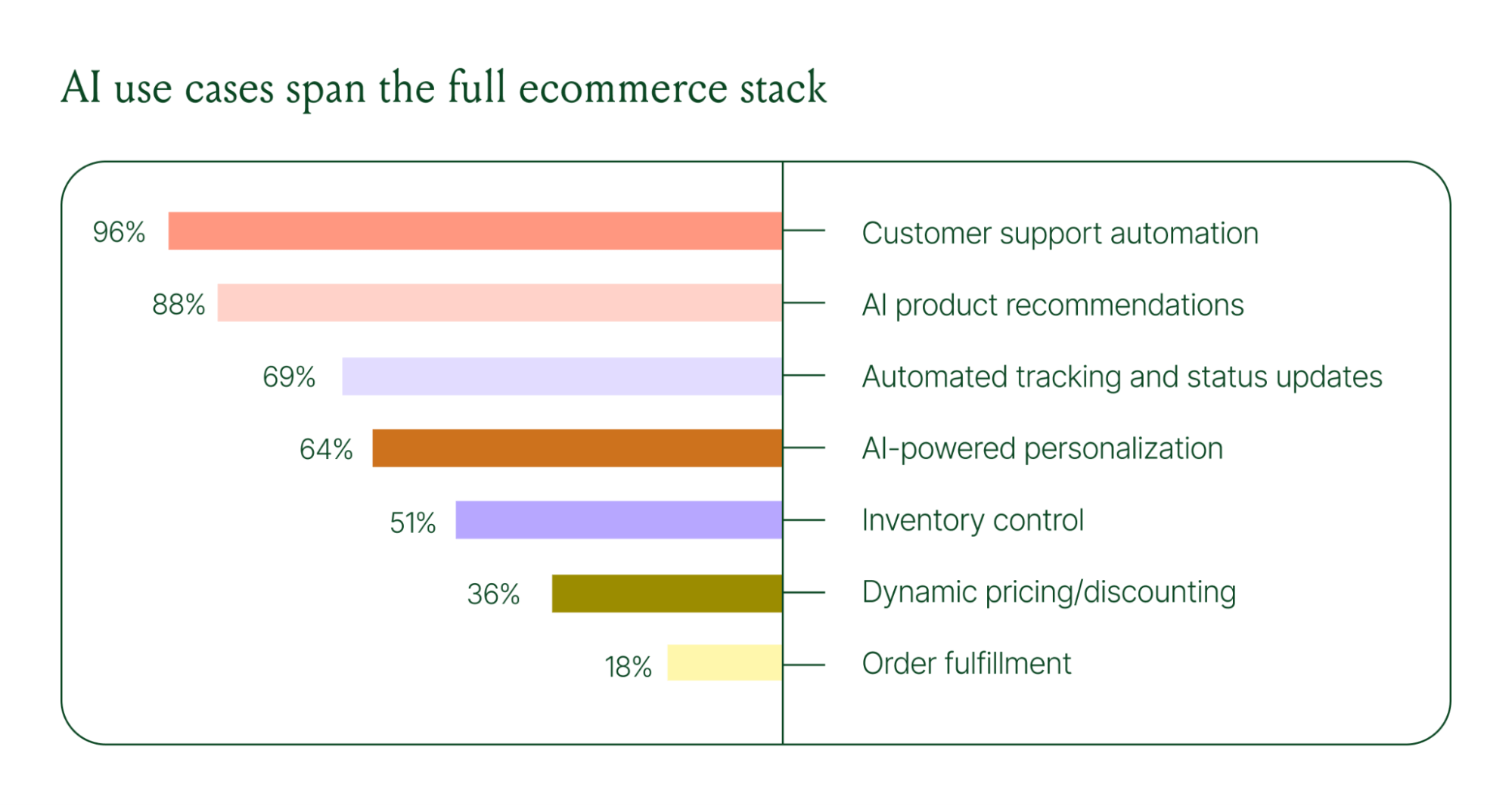
The use cases driving this adoption are practical and high-volume:
- Order tracking and status updates
- Returns, exchanges, and refund requests
- Shipping FAQs and delivery estimates
These are the tickets that flood brands’ inboxes every day. AI agents resolve them instantly, without pulling teams away from conversations that actually require human judgment.
Explore AI adoption and use case data in more depth in the full report.
Trend 2: Conversations are the new path to checkout
The traditional ecommerce funnel, visit site, browse products, add to cart, check out, is losing ground. Shoppers now discover products on Instagram, ask questions via direct message, and complete purchases without ever visiting a website.
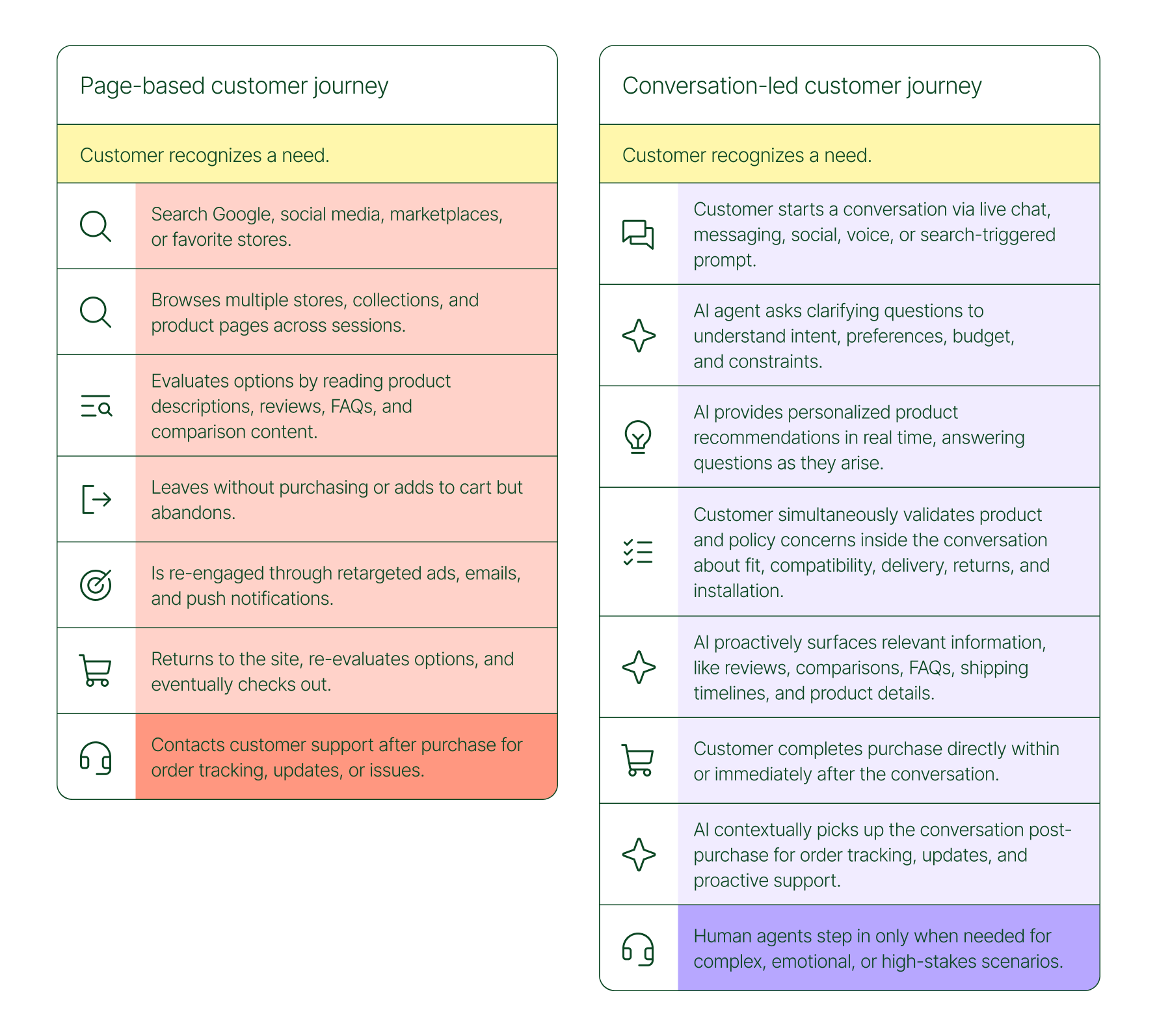
Conversational AI is actively increasing revenue, with 79% of brands reporting that AI-driven interactions have increased sales and conversion in their business.

The practical implication is that every channel is becoming a storefront. Creating personalized touchpoints with customers earlier in the journey, through proactive engagement, is impacting the bottom line.
Read the full report to explore how AI conversions have increased QoQ by industry.
Trend 3: AI is accelerating the purchase cycle
Pre-purchase hesitation is one of the biggest conversion killers in ecommerce. A shopper lands on your product page, has a question about sizing or compatibility, can't find the answer quickly, and leaves. That's a lost sale that had nothing to do with your product.
Conversational AI changes that dynamic. When a shopper can ask a question and get an accurate, personalized answer in real time, the friction disappears.
Brands using Gorgias saw this play out at scale in 2025. When AI Agent recommended a product, 80% of the resulting purchases happened the same day, and 13% happened the next day.
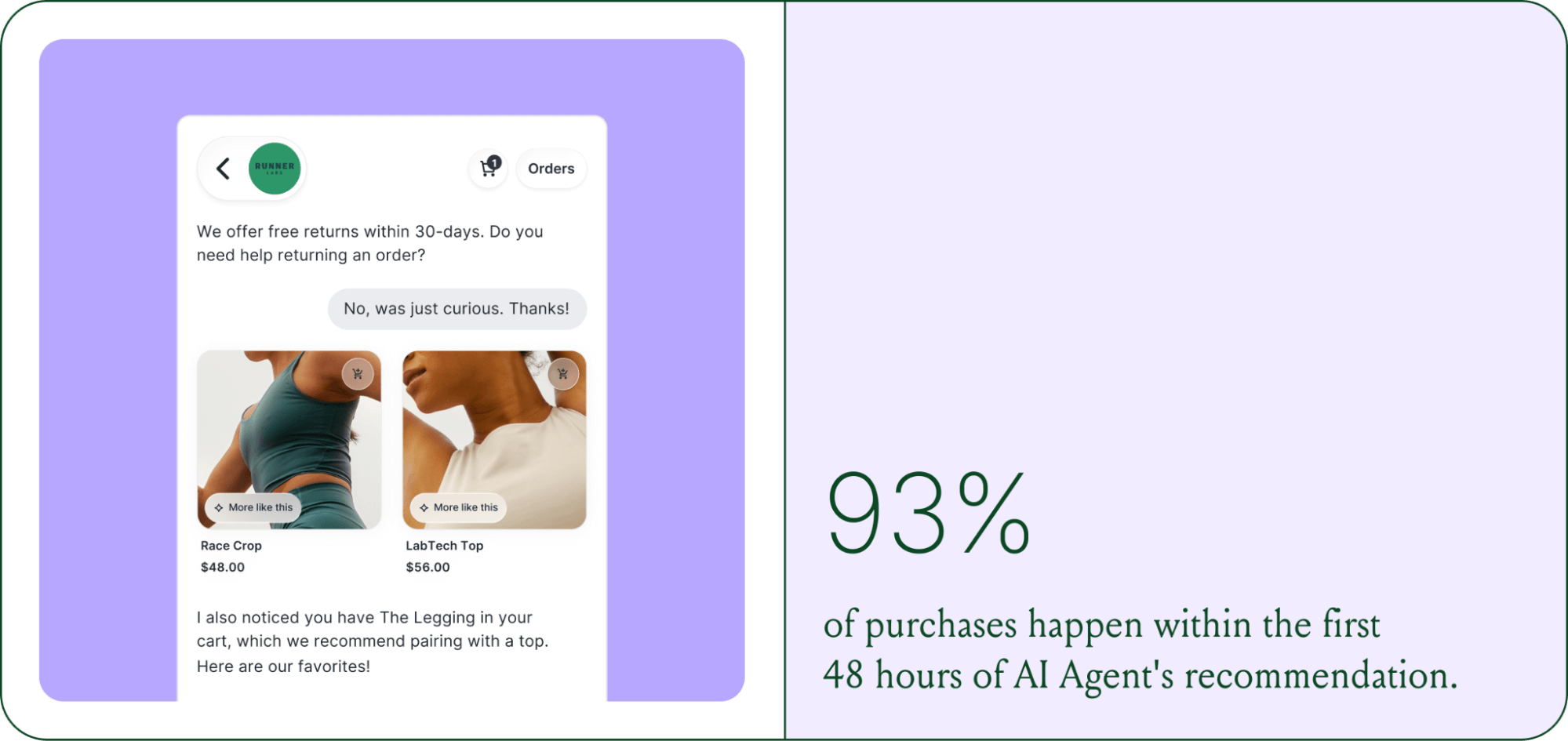
Brands are further accelerating the buying cycle through proactive engagement. On-site features such as suggested product questions, recommendations triggered by search results, and “Ask Anything” input bars drove 50% of conversation-driven purchases during BFCM 2025.
Explore how AI is collapsing the purchase cycle in Trend 3 of the report.
Trend 4: AI is making CX teams more technical
There's a persistent narrative that AI is making CX teams redundant. The data tells a different story. 62% of ecommerce brands are planning to grow their teams, not cut them. But the scope of those teams is changing.

New roles are emerging around AI configuration and quality assurance. Teams are investing in technical members to write AI Guidance instructions, develop tone-of-voice instructions, and continuously QA results.
CX teams are also bridging the gap between support goals and revenue goals, as the two functions increasingly overlap.
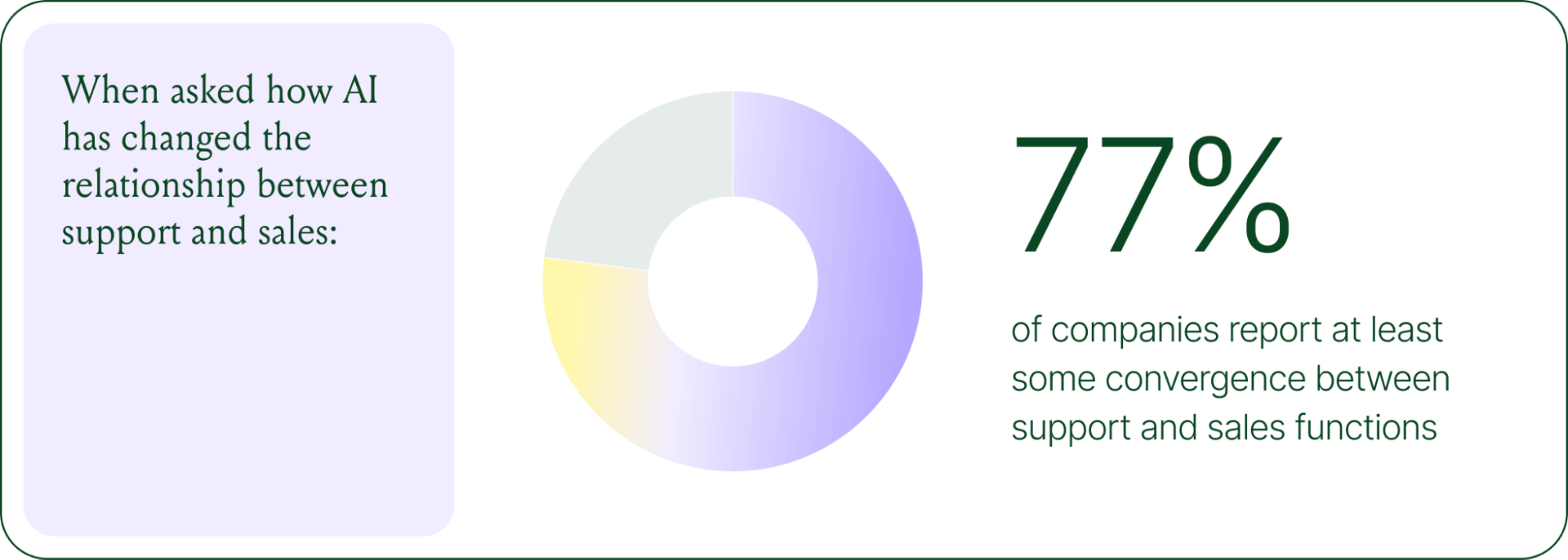
The result is CX teams that are more technical than they were before. Agents who once spent their days answering repetitive tickets are now spending that time on higher-value work: complex escalations, VIP customer relationships, and improving the AI systems and knowledge bases that handle the volume.
Learn more about the evolution of CX roles in Trend #4.
Trend 5: The future is hybrid: AI-first, humans when it counts
Despite increasing AI adoption, data shows that ecommerce brands shouldn’t strive for 100% automation. Winning brands are building systems in which AI handles repetitive tier-1 tickets, and humans handle complex, sensitive cases.

AI handles speed and scale. It resolves order-tracking requests at 2 a.m., processes return-eligibility checks in seconds, and answers the same shipping question for the thousandth time without compromising quality.
Human agents handle conversations that require context, empathy, or decisions that fall outside the standard playbook. There are several topics where shoppers still prefer human support.
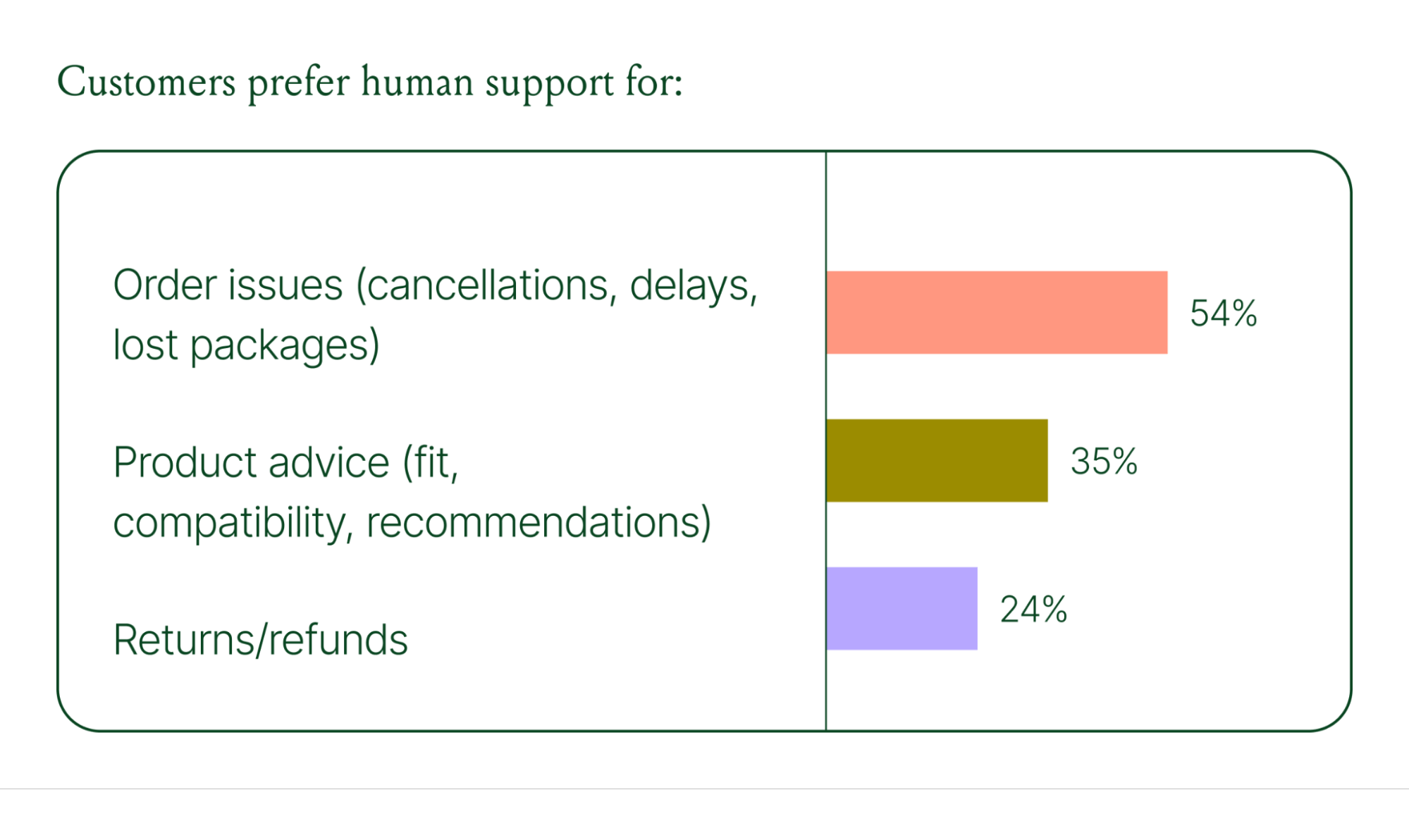
Successful hybrid systems require continuous iteration, meaning reviewing handover topics, Guidance, and reviewing AI tickets on a weekly basis.
Discover how leading brands are balancing human and AI systems in Trend #5.
Where conversational commerce is heading by 2030
The 2026 trends are about expansion and standardization. The 2030 predictions are about what comes next.
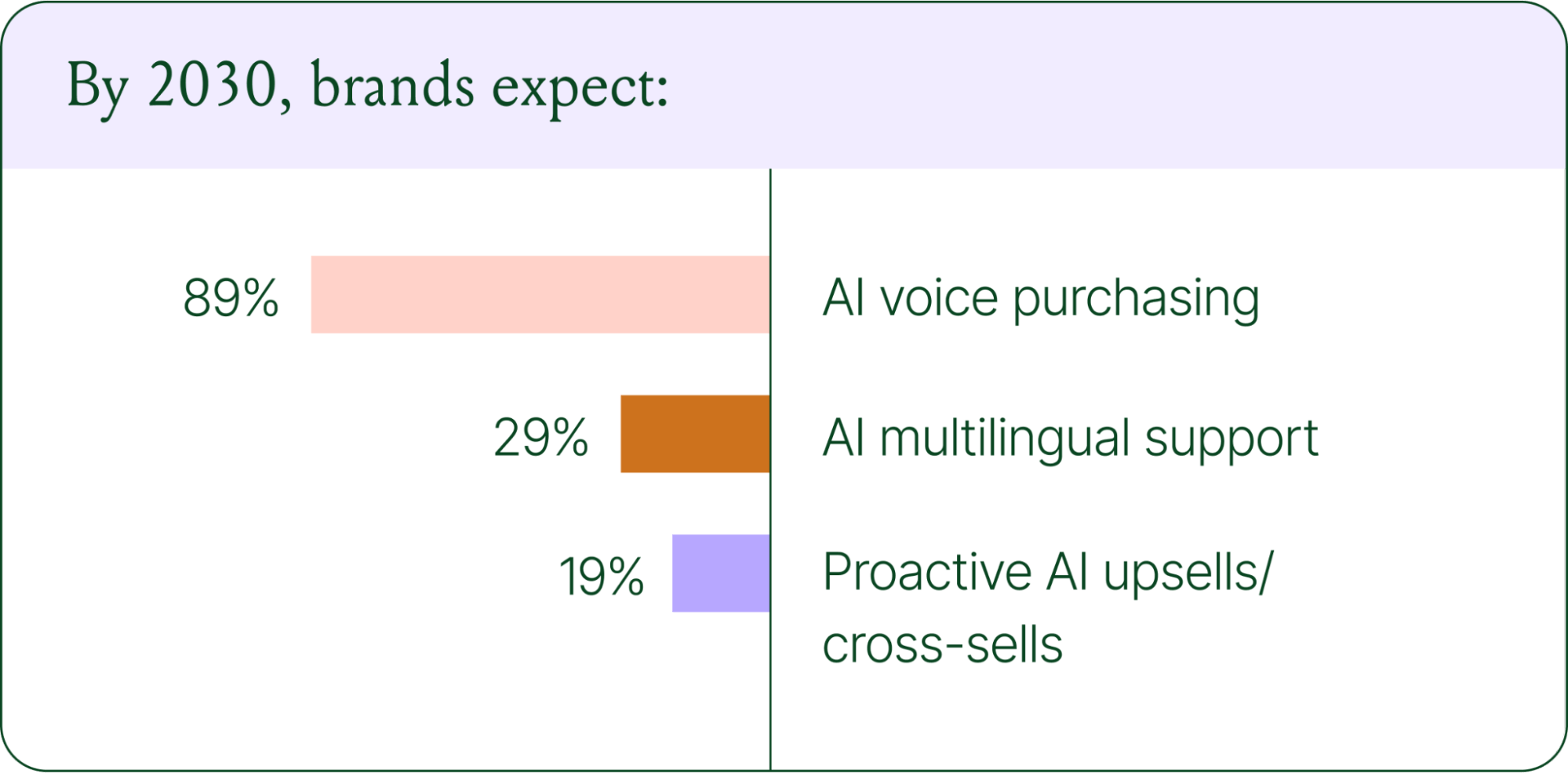
Voice-based purchasing is the biggest bet on the horizon. Only 7% of brands currently use voice assistants for commerce, but 89% expect it to be standard by 2030. The vision is a customer who can reorder a product, check their subscription status, or manage a return entirely over the phone.
Proactive AI is the other major shift. Rather than waiting for a customer to reach out, AI will anticipate needs based on browsing behavior, purchase history, and where someone is in their relationship with your brand. Think of it as the digital equivalent of a sales associate who remembers what you bought last time and knows what you're likely to need next.
Explore where ecommerce brands are allocating their AI budgets in the full report.
Start building your conversational commerce strategy today
The brands winning in 2026 are creating smart, scalable systems where AIhandles volume and humans handle nuance. They’re treating every conversational channel as an opportunity to serve and sell.
The data is clear: AI adoption is accelerating, customer expectations are rising, and the revenue impact of getting this right is measurable.
{{lead-magnet-1}}
Newsletter Signup
The best in CX and ecommerce, right to your inbox
Featured articles

Conversations Are Becoming a Revenue Channel: The Data Proves It
TL;DR:
- Customer journeys are collapsing to a single conversation. The traditional browse-and-buy journey is giving way to AI-guided shopping that moves from discovery to purchase in a single exchange.
- 79% of brands say AI-driven conversational commerce has increased their sales and purchase rates.
- AI-only influenced orders grew 63% in a single year, from 2.7 million in Q1 to 4.4 million in Q4.
- Brands treating conversation as a revenue channel. They’re not just a support function, generating higher AOV, shorter buying cycles, and stronger retention.
The page-based shopping experience dominated for decades. Customers would search, browse, compare, abandon, get retargeted, return, and eventually buy (sometimes).
That journey is no longer the only option.
Shoppers are turning to chat, messaging, and AI-powered tools to find what they need. Instead of clicking through product pages or reading static FAQs, they ask questions, have back-and-forth conversations, and get answers that move them closer to a purchase in real time. The path to checkout has changed, and the brands that recognize this are pulling ahead.
Read our 2026 State of Conversational Commerce Report to learn more about conversation commerce trends from 400 ecommerce decision-makers and 16,000+ ecommerce brands using Gorgias.
{{lead-magnet-1}}
The shopping journey has collapsed into a single thread
The traditional shopping journey was a solo experience. A shopper had a need, searched for options, browsed across sessions, and eventually made a decision — often days later, after being retargeted multiple times. Support only entered the picture after the purchase.
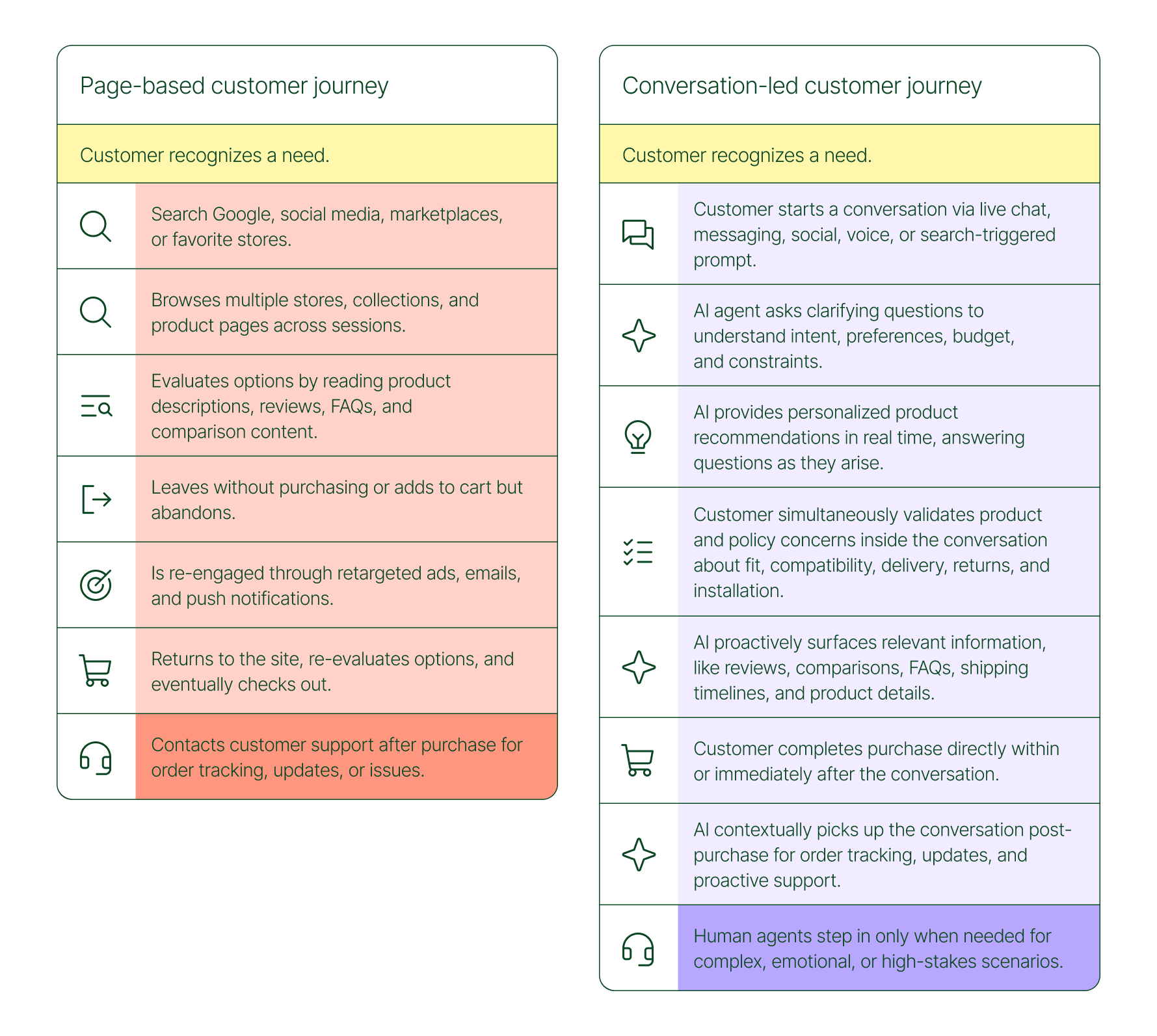
The conversation-led journey collapses that timeline:
- A shopper recognizes a need and starts a conversation via chat, messaging, or a search-triggered prompt
- An AI agent asks clarifying questions about preferences, budget, and constraints
- The AI provides personalized product recommendations in real time
- The shopper validates concerns about fit, compatibility, delivery, and returns, all inside the conversation
- The shopper completes the purchase directly within or immediately after that exchange
- The AI picks up the conversation post-purchase for order tracking and proactive support
- A human agent steps in only when the situation calls for it
What used to take days now takes minutes. Discovery, evaluation, and purchase happen in a single thread.
Conversation is a revenue strategy, not a support upgrade
79% of brands agree that AI-driven conversational commerce has increased sales and purchase rates in their business. When brands were asked to rank the highest-return areas:
- 38% cited improved customer support efficiency
- 23% pointed to higher customer retention and loyalty
- 20% saw improved purchase rates
Those numbers reflect something important: the value of conversation compounds. Faster support reduces friction. Better retention raises lifetime value. More confident shoppers buy more often and spend more per order.
The brands seeing the biggest returns aren't just using AI to deflect tickets. They're using it to create one-to-one shopping experiences at scale.
What the data shows about AI-influenced orders
Looking at AI-only influenced orders across key verticals like Apparel and Accessories, Food and Beverages, Health and Beauty, Home and Garden, and Sporting Goods, the growth across a single year was significant.
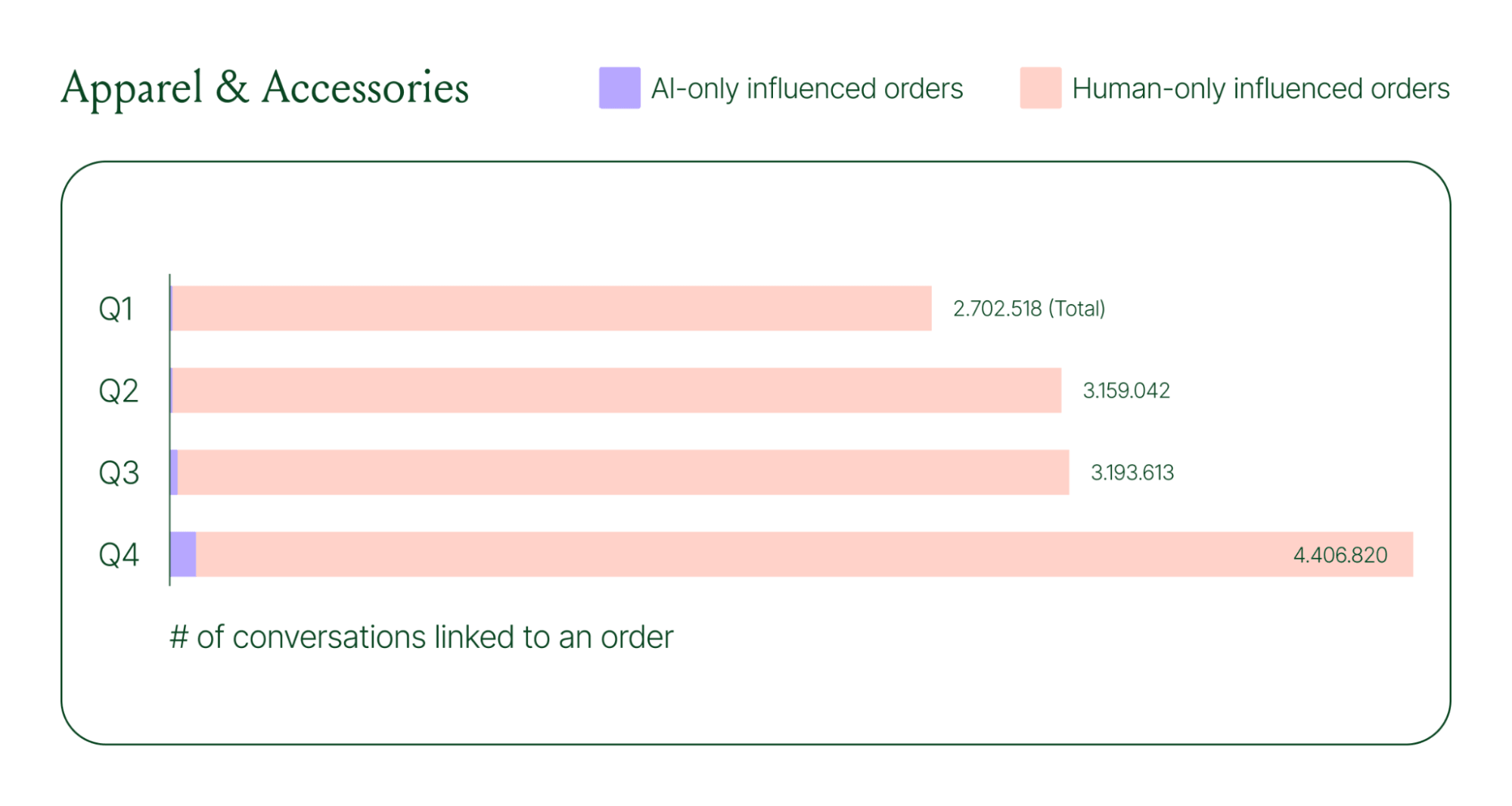
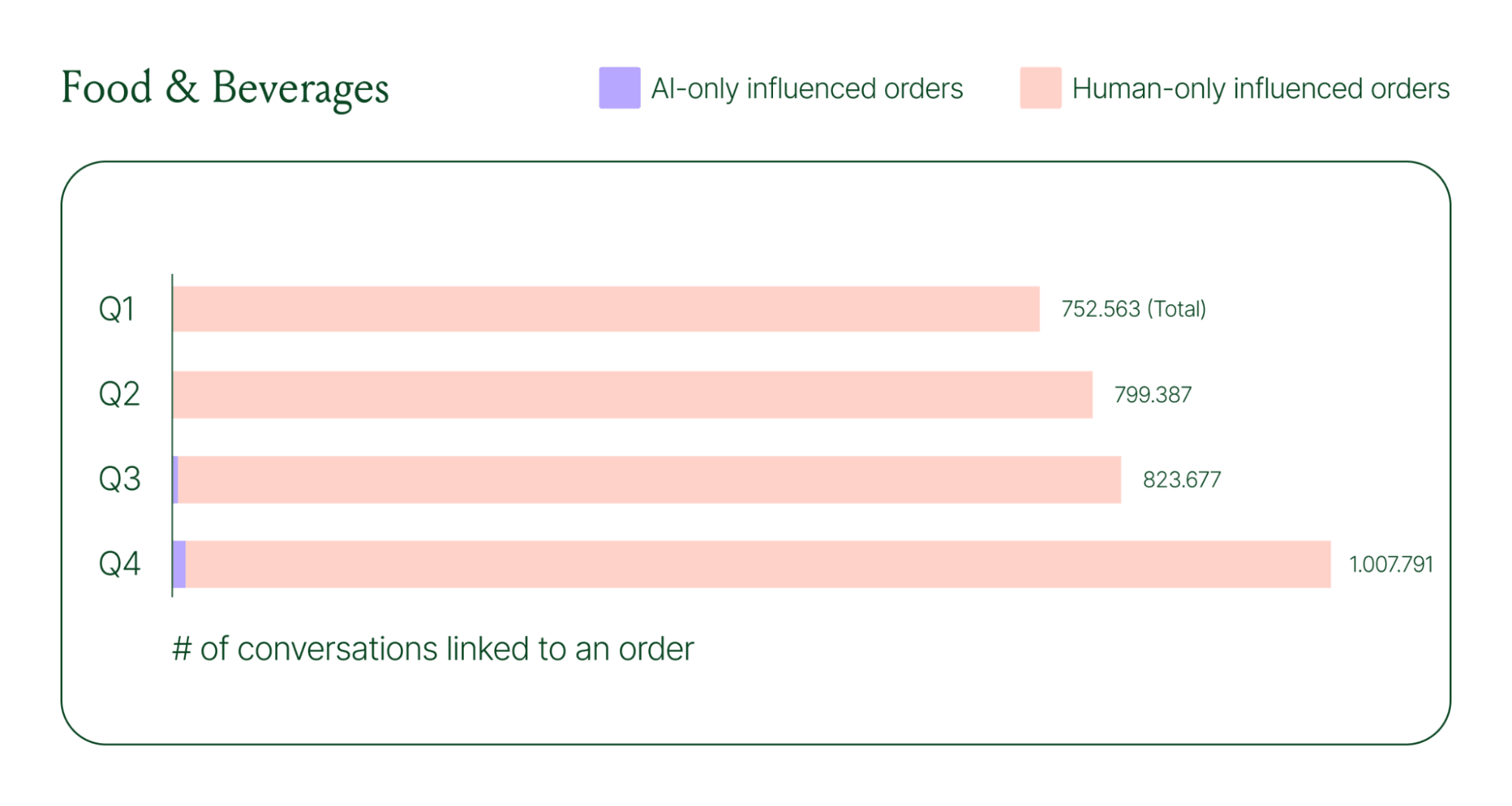
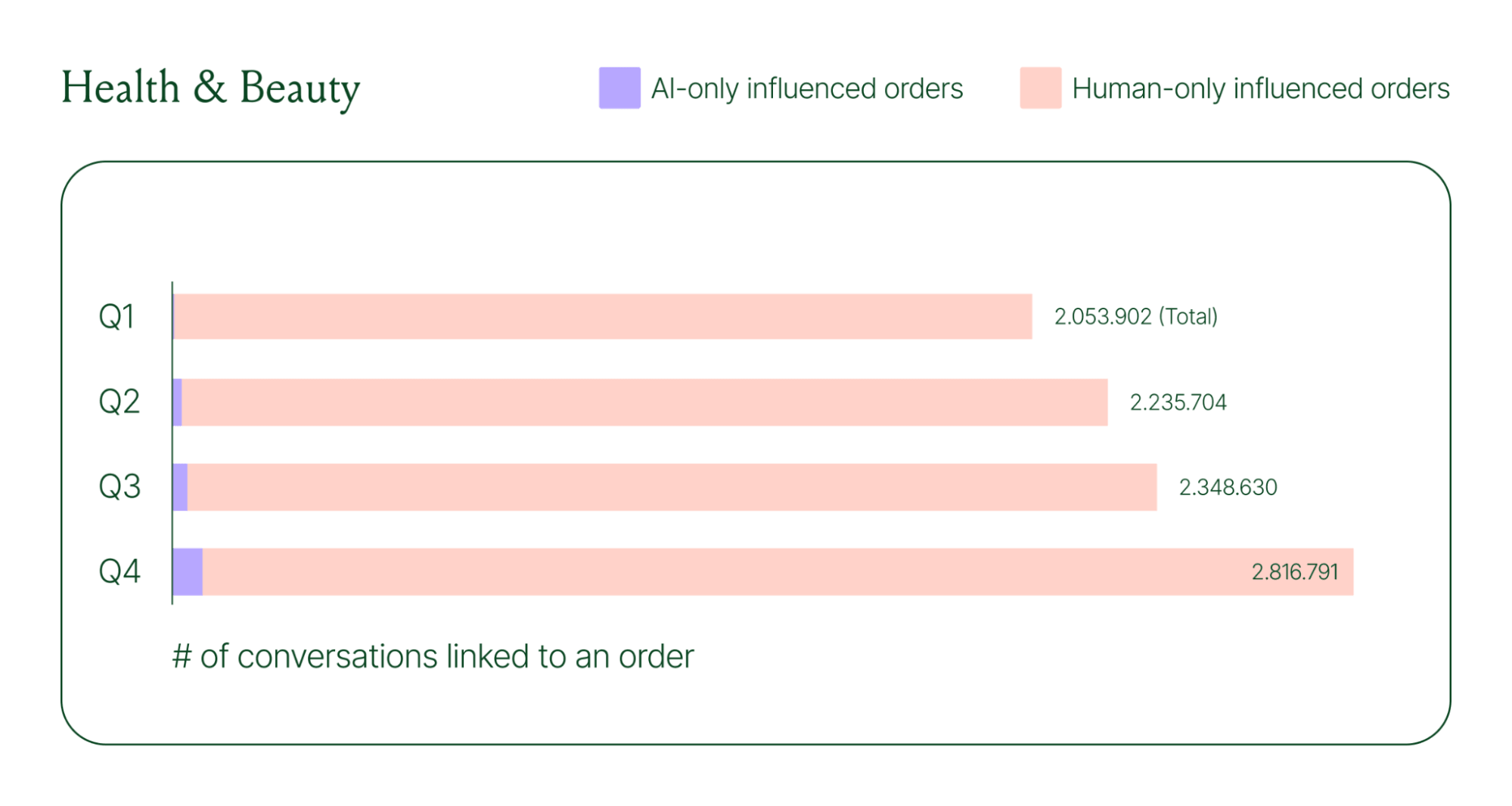
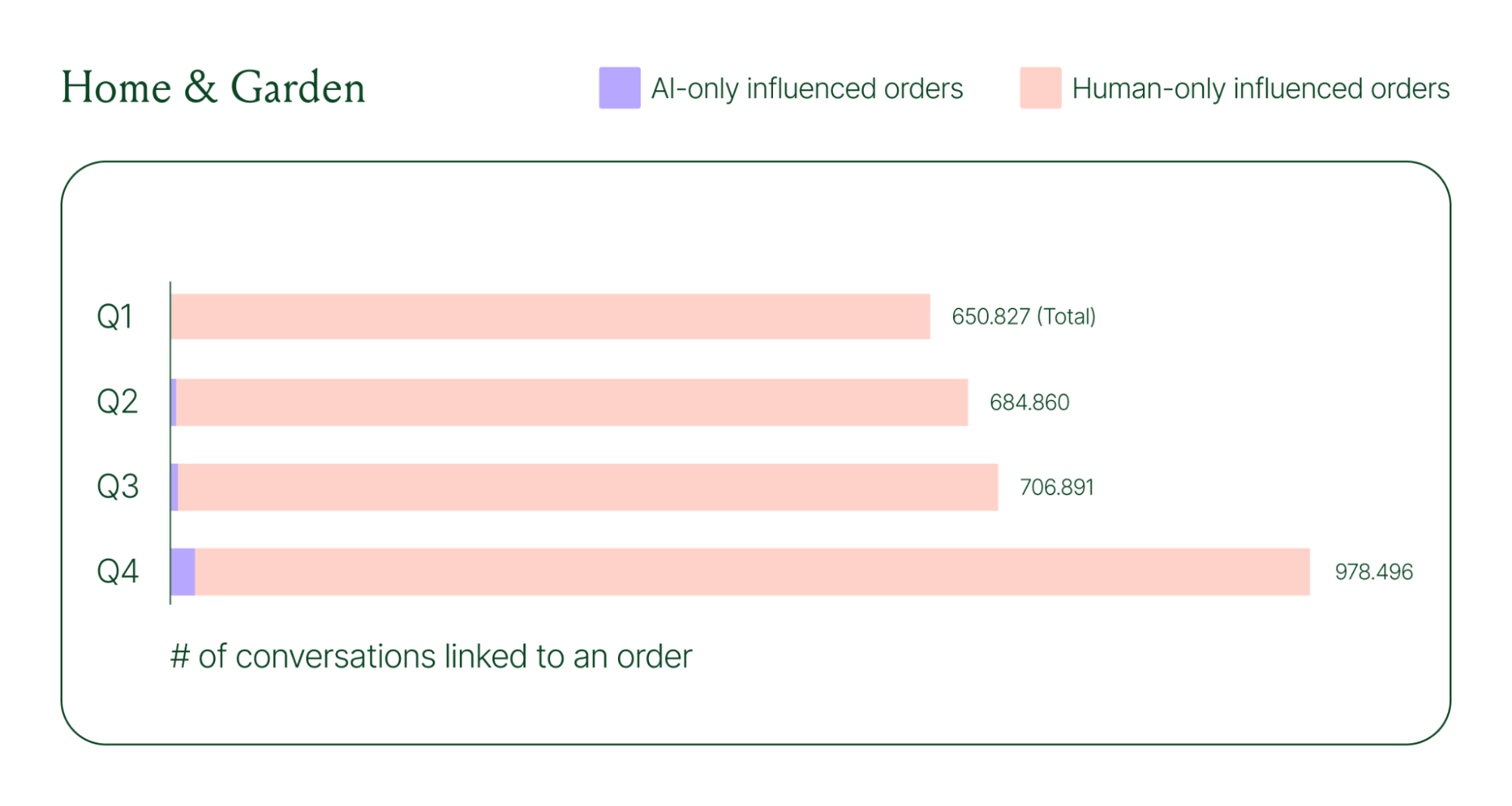
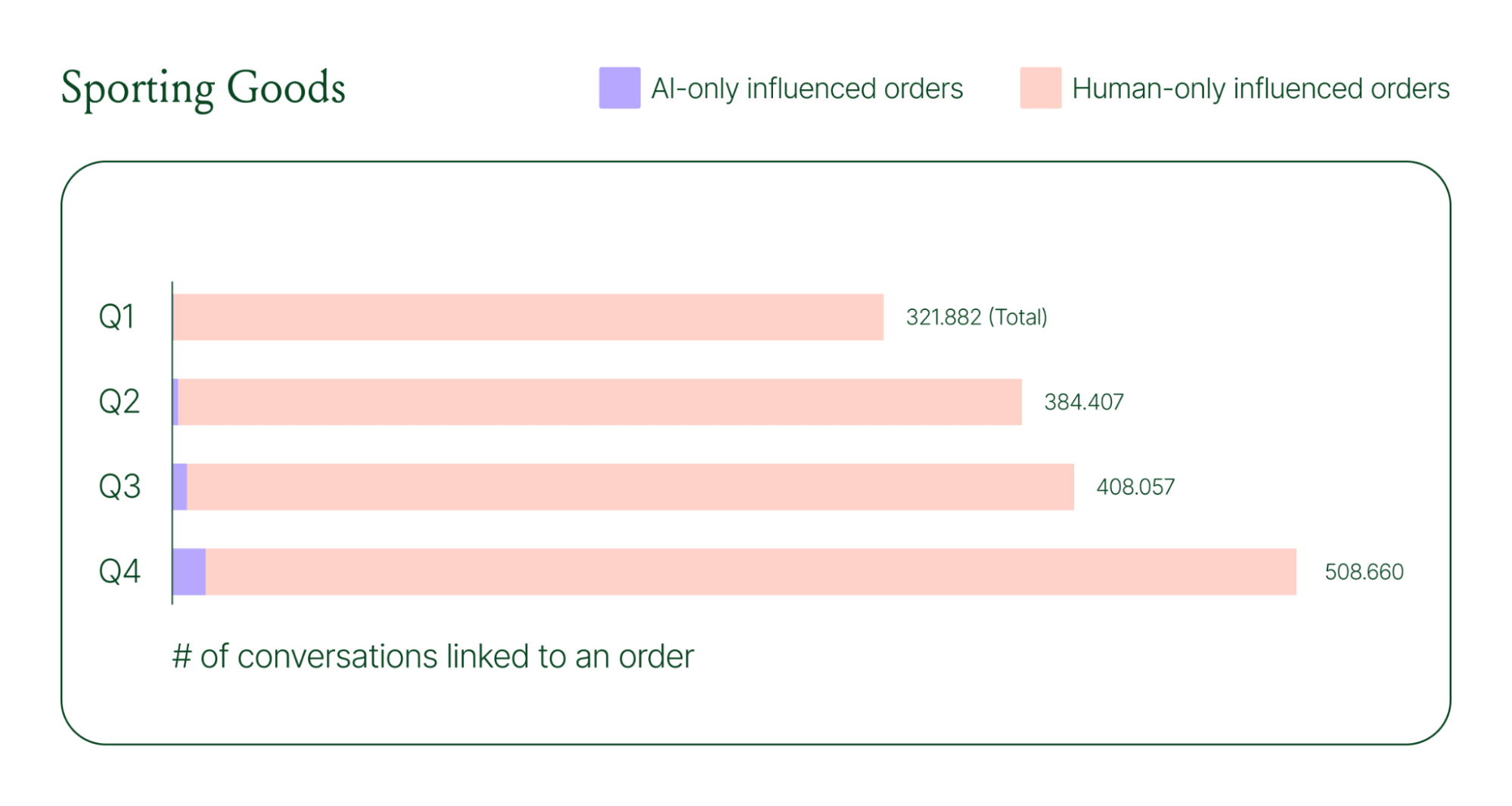
Across industries, ecommerce brands saw AI step into conversations, reduce shopper hesitation, and drive higher QoQ conversion rates.
Learn more about AI-powered revenue generation in the full 2026 Conversational Commerce Report.
Why brands are making this a strategic priority
84% of brands say the strategic importance of conversational commerce is higher than it was a year ago. 82% agree it will be mainstream in their sector within two years.
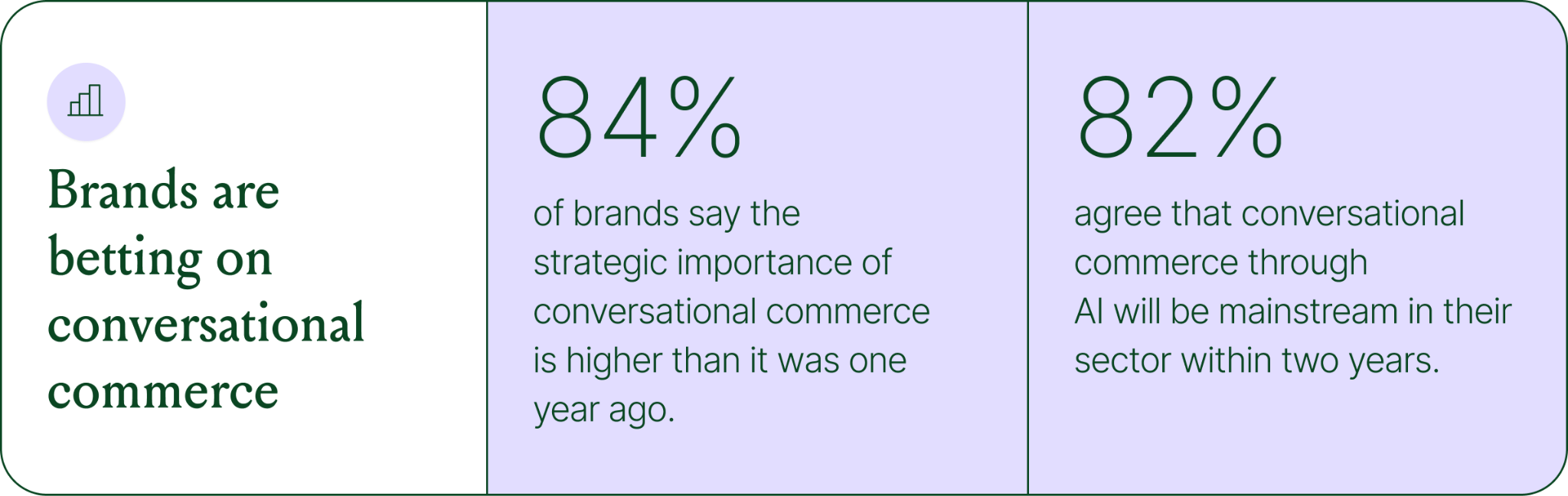
That shift is registering at the leadership level because of what conversational commerce does to the buying experience. Creating one-to-one touchpoints earlier in the journey drives higher AOV, shorter buying cycles, and stronger purchase rates. Shoppers who get real-time answers to their questions are more confident.
What this looks like in practice: TUSHY
TUSHY, known for eco-friendly bidets and bathroom essentials, is a useful example of what happens when you take conversational commerce seriously.
Bidets aren't an impulse purchase. Shoppers have real questions about fit, compatibility, and installation. Those questions used to go unanswered until the CX team could respond, often after the customer had abandoned the cart.
TUSHY used Gorgias's AI Agent and shopping assistant capabilities to automate pre-sales support. AI Agent engaged shoppers in real-time conversations, addressed their concerns directly, and built confidence at the moment of highest intent.
This resulted in a 190% increase in chat-based purchases, a 13x return on investment, and twice the purchase rate of human agents.
How to apply this to your strategy
You don't need to overhaul your entire operation to start seeing results. The most effective approach is to start where the impact is clearest and expand from there.
A few places to begin:
- Pre-sales chat. Identify your most common pre-purchase questions (sizing, compatibility, shipping timelines) and ensure your AI can answer them confidently and promptly.
- Product page engagement. Use proactive chat prompts triggered by page behavior to start conversations before shoppers leave.
- Post-purchase follow-up. Let AI pick up the conversation after checkout with order updates and proactive support, reducing inbound volume and building trust.
- Human escalation. Define clearly which situations require a human agent – complex issues, emotional exchanges, high-stakes decisions.
Want to see the full picture of where conversational commerce is headed in 2026? Read the full report to explore the data, trends, and strategies shaping the next era of ecommerce.
{{lead-magnet-1}}

AI Is Table Stakes for Ecommerce: What the Data Tells Us About 2026
TL;DR:
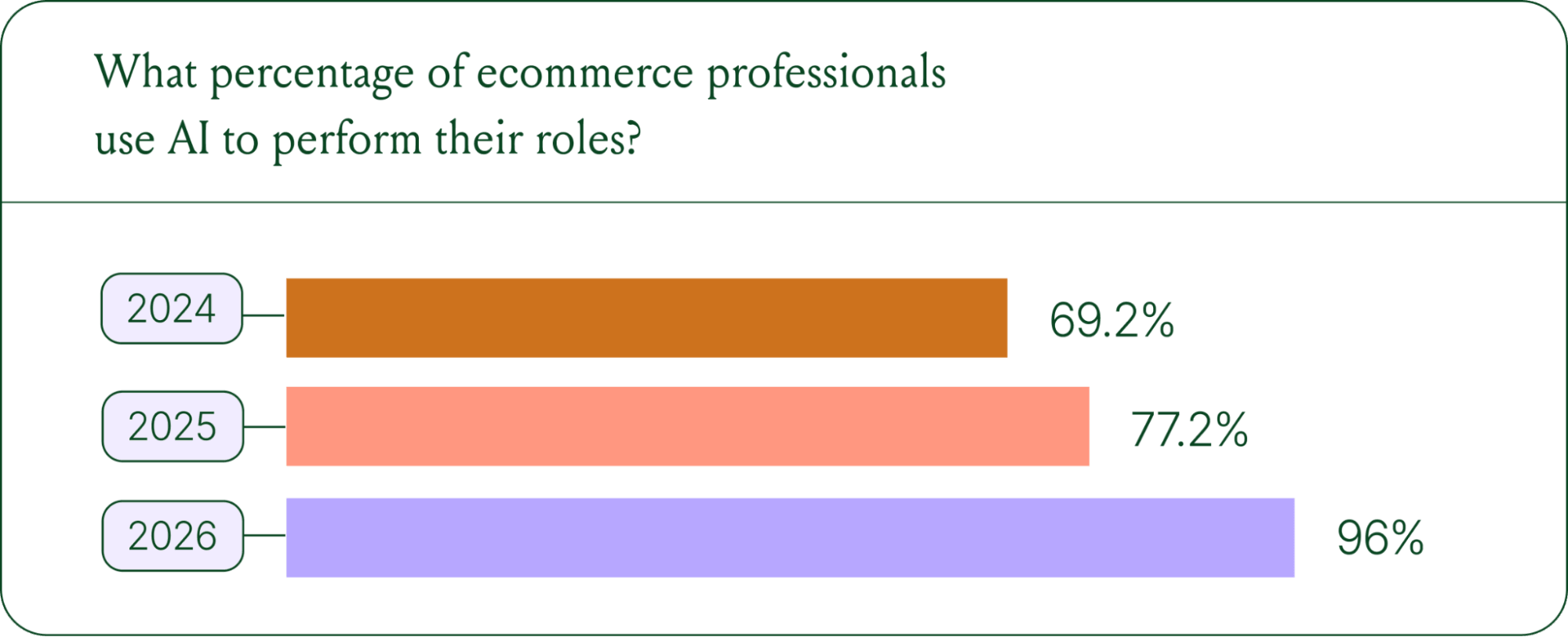
- AI adoption is rapidly accelerating. 96% of ecommerce professionals now use AI in their roles, up from 69% in 2024.
- AI has moved beyond support automation. Use cases have evolved into revenue generation, personalization, and logistics.
- Brands are tying AI success to profit-and-loss outcomes. 60% of brands consider AOV a top indicator of AI effectiveness.
A year ago, ecommerce brands were still debating whether AI was worth the investment. That debate is over. Today, nearly every ecommerce professional uses AI to do their job.
The shift isn't just about adoption. It's about what AI is used for and how brands measure its impact. Support automation was the entry point. Now, AI is embedded across the full operation, from product recommendations to inventory control to real-time shopping conversations.
In our 2026 State of Conversational Commerce Report, we break down trends on AI usage among 400 ecommerce decision-makers and 16,000+ ecommerce brands using Gorgias.
{{lead-magnet-1}}
AI adoption has reached a tipping point
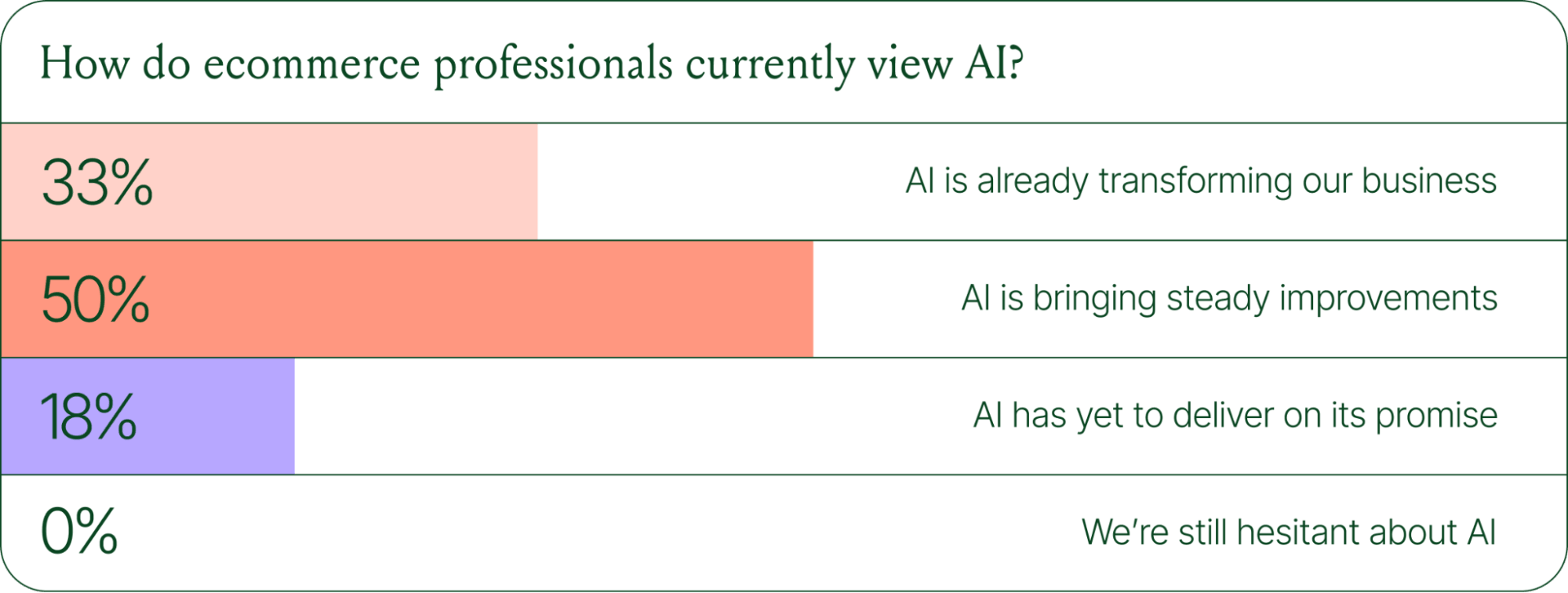
If we rewind 12 months ago, the industry was still split on AI. Some ecommerce professionals were excited, but most were still hesitant. In 2024, 69% of ecommerce professionals used AI in their roles. By 2025, that number reached 77%. In 2026, it hit 96%.
The confidence numbers back it up. 71% of brands say they are confident using AI for ecommerce, and 73% are satisfied with its business impact.
In early 2025, only 30% of ecommerce professionals rated their excitement for AI at 10/10. Today, zero percent of respondents describe themselves as hesitant about AI.
AI use cases now span the full ecommerce stack
Using AI in ecommerce is not new. In fact, it dates back to the 1980s with the invention of algorithms and expert systems. And if you’ve ever leveraged similar product recommendations or chatbots, you’ve already integrated AI into your ecommerce stack.
Modern AI is far more sophisticated.
With the rise of agentic commerce and conversational AI, brands began leveraging AI agents to automate the processing of repetitive support tickets. That’s still happening today, but the scope has expanded beyond the support queue.
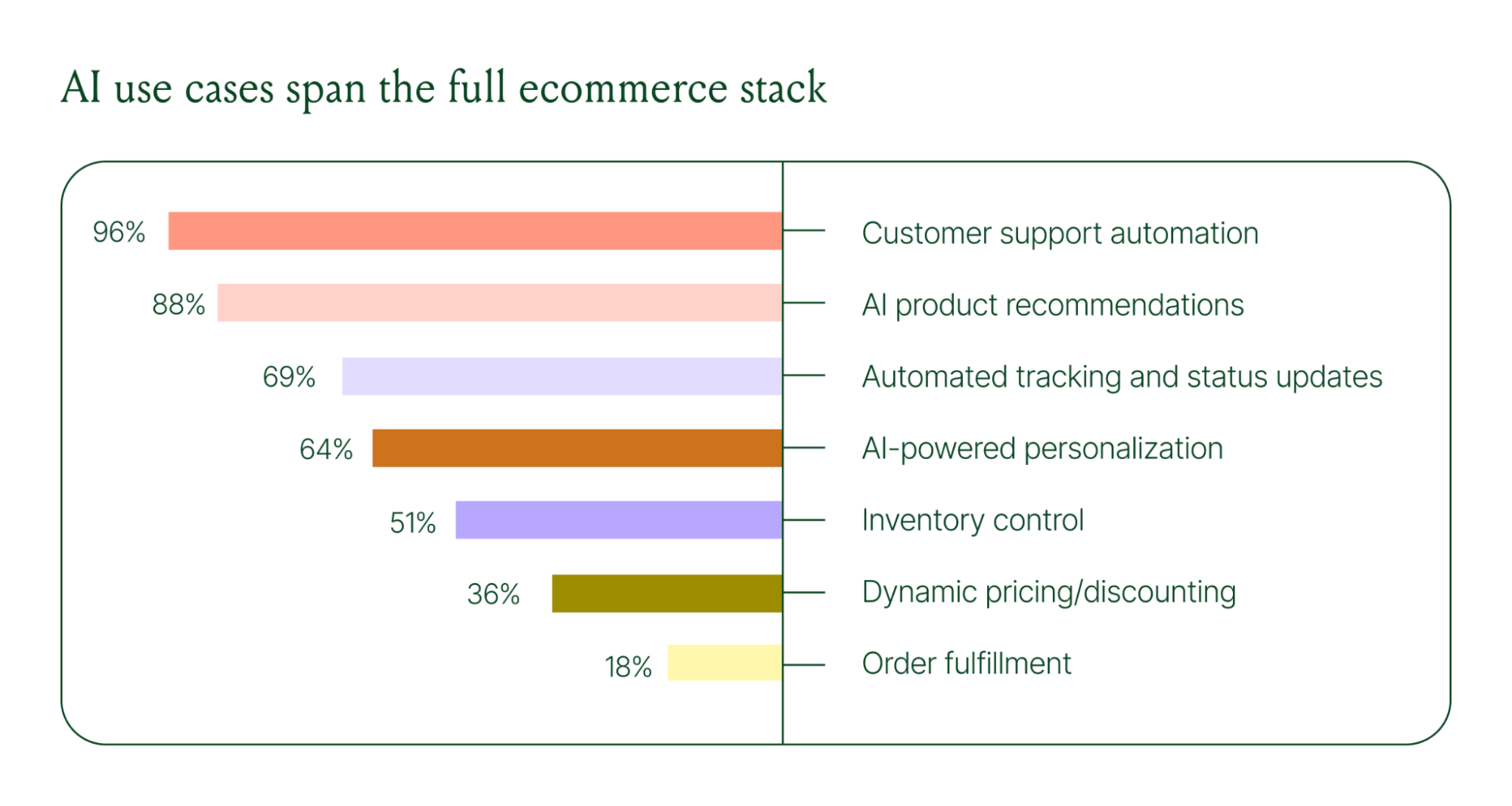
Ecommerce brands are deploying AI across every layer of their operation:
- Customer support automation: 96%
- Product recommendations: 88%
- Automated tracking and status updates: 69%
- Personalization: 64%
- Inventory control: 51%
- Dynamic pricing and discounting: 36%
- Order fulfillment: 18%
When brands were asked which channels contribute most to their AI success, conversational channels dominated. Social media messaging led at 78%, followed by SMS at 70%, and website live chat at 51%. Shoppers want fast, personal conversations, and AI is the best way to deliver that at scale.
Learn more about AI adoption, perception, and use case trends in the full 2026 Conversational Commerce Report.
How AI is changing CX success metrics
For decades, customer support success meant fast response times and high satisfaction scores. Those are still important indicators of success, but leading brands are adding revenue-focused metrics to their dashboards.
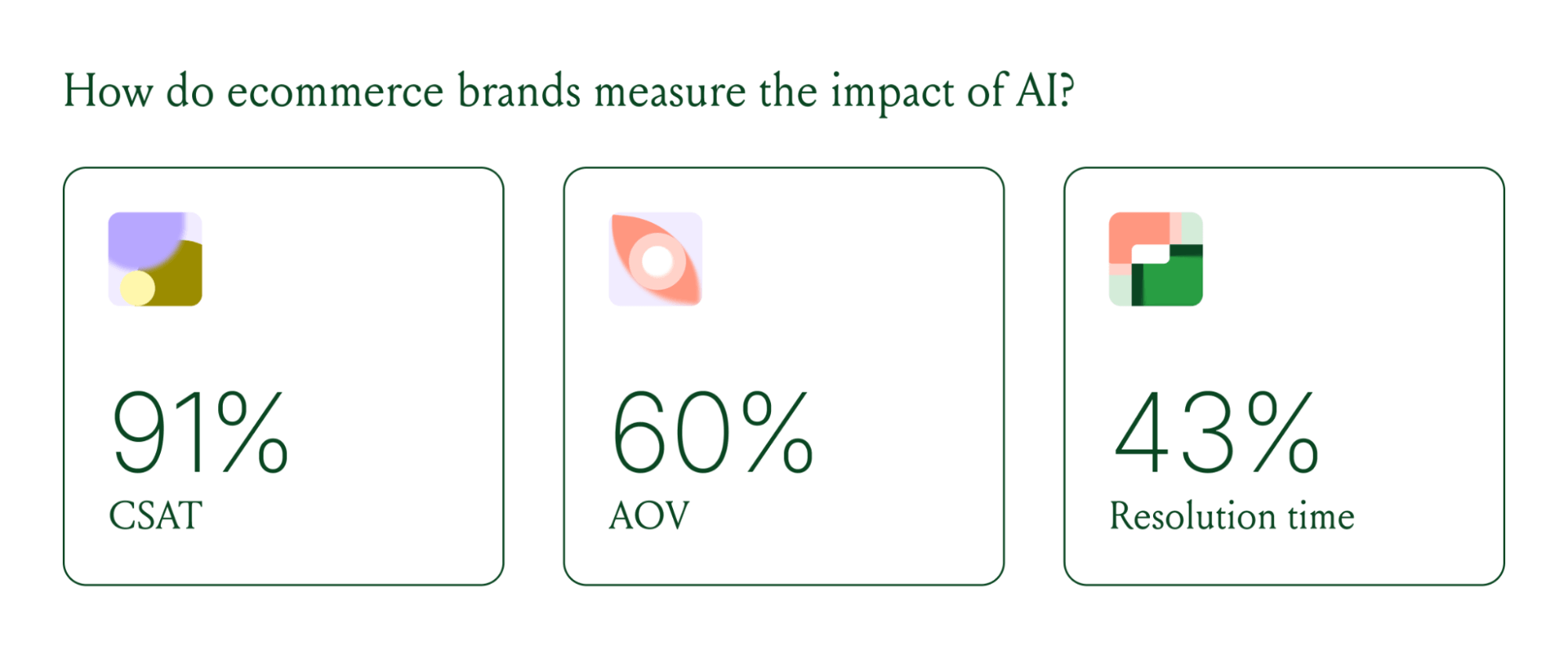
91% of brands still track CSAT as a measure of AI's impact. But 60% now include AOV as a top indicator, and higher-revenue brands earning $20M+ are focusing on metrics like total operating expenses, cost per resolution, incremental revenue, and one-touch ticket rate.
AI can now start a conversation, ease customer doubts, sell, upsell, and recover abandoned carts in a single conversation. When you’re only measuring CSAT, you’re ignoring the real ROI of conversational AI investment.
AI makes every conversational channel a storefront
Virtual shopping assistants now proactively engage shoppers, adapt to their needs in real time, and offer contextual product recommendations and upsells. When the moment calls for it, they can close the deal with a targeted discount.
Gorgias brands using AI Agent's shopping assistant capabilities nearly doubled their purchase rates and converted 20–50% better than those using AI Agent for support only.
Orthofeet, the largest provider of orthopedic footwear in the US, is a concrete example of this in practice. Using Gorgias, they achieved:
- 56% of support tickets automated in 2 months
- Email response times down from 24 hours to 35 seconds
- Double-digit revenue growth without adding headcount.
What this means for your AI strategy
The data tells a clear story: AI has evolved beyond a tool for handling tier 1 support tickets. It’s a core part of your revenue generation strategy.
57% of brands are already using AI for 26–50% of all customer interactions, and 37% expect that share to rise to 51–75% within the next two years. The brands building toward that range now are the ones who will have the operational advantage when it matters most.
The practical question isn't whether to invest in AI. It's where to focus first. Based on where brands are seeing the most impact, three priorities stand out:
- Start with high-volume, low-complexity tickets. WISMO (where is my order) inquiries, return policy questions, and order status updates are where AI delivers the fastest return. Automate these first.
- Expand into conversational channels. Social messaging and SMS are where AI is driving the most success right now.
- Connect AI performance to revenue metrics. If you're only measuring CSAT and response time, you're missing half the story. Add AOV, conversion rate, and incremental revenue to your reporting.
Want to go deeper on the full 2026 conversational commerce trends? Read the complete report for data across every major AI use case in ecommerce.
{{lead-magnet-1}}




Further reading

5 CX Metrics To Track in 2025: A Guide for Managers
There are tons of CX metrics you could be tracking. But where you spend your time is crucial as a customer experience leader.
According to recent data, these are the top five CX metrics for you to prioritize and improve on in 2025.
{{lead-magnet-1}}
Why CX metrics are essential for success
Not tracking CX metrics is like putting a loaf of bread in the oven but leaving baking time to chance. Without a set timer, you could end up with an underbaked bowl of dough or a burnt mess. Unless you have a sixth sense, it’s going to be really challenging to end up with something good.
In the same vein, metrics provide clear parameters for success. Meet or exceed them and your team is doing well; fall short and you’ll be better equipped to identify pain points and solve them.
Here are a few additional reasons why setting customer support metrics is key to success.
- Measure success and ROI. By tracking KPIs like resolution time, first response time, and CSAT, you can gauge the health of your customer support program and potentially justify investments in CX initiatives in the future.
- Identify customer and team pain points. Metrics help uncover areas where customers or your team is struggling. For example, high resolution times or low CSAT scores signal friction in the experience that you can address.
- Create accountability within your team. When everyone on your team understands what success looks like, it aligns efforts and keeps everyone focused on shared goals.
- Prioritize resources. Metrics guide CX leaders on where to allocate resources—for example, leveraging AI and automation to tackle repetitive tickets when ticket volume adds up or resolution times are getting high.
- Get proactive. Metrics reveal trends in customer behavior which can help you predict customer needs and make proactive adjustments in your CX strategy. By monitoring customer sentiment and acting on feedback, CX leaders can create more personalized and positive experiences.
Tip : AI and automation can be valuable sidekicks as you look to optimize and improve on metrics. That’s especially true for busy periods: in 2024, 70% of CX leaders relied on AI and automation during peak seasons.

Resolution time should be your main focus for 2025
Customers are done with being patient. One study found that two thirds of respondents valued speed to reply just as much as product price.
A recent survey we ran found the same thing.
In our 2024 customer expectations survey, we asked CX leads and agents which metric they used to track success. Here’s what they said:
- Resolution Time (71%)
- First Response Time (59%)
- CSAT (53%)
- Revenue or Sales Impact (41%)
- Ticket Volume (41%)
Resolution time is going to be a key differentiator for your team this year. It should be your primary focus when it comes to optimizing different facets of your customer service strategy.

Top 5 CX metrics for 2025 & how to improve them with AI
1) Resolution time
Resolution time is the average time it takes to resolve a customer request from start to finish.
How do you calculate resolution time?
To calculate resolution time, you’ll take the total resolution time within a set period and divide it by the total number of customer interactions your team tackled within that same time frame.
Average resolution time = Total resolution time in a defined period / Total number of customer interactions resolved in that period
How to use AI & automation to improve it
According to a 2023 study from Statista, 70% of support leaders noted that the customer support metrics that AI had the greatest positive effect on was resolution time.
You can use automation features to send Macros to answer common questions, or leverage AI to interact as an agent via email or chat. The instant nature of these tools means that customers won’t have to wait in a queue for your team to get to them.
For example, Wildride implemented Gorgias AI Agent to manage an influx of 1,000 tickets per week. After AI Agent took over 33% of email inquiries, the team saw a 24% decrease in resolution time. That allowed the team to focus on more complex issues, streamline their support process, and make their customers happier.
2) First Response Time (FRT)
First response time is the length of time it takes for a customer service team to send the initial reply to a customer inquiry.
How do you calculate first response time?
To calculate average first response time, take the total amount of time it took for your team to respond to initial customer requests and divide by the total number of tickets within a set time frame.
How to use AI & automation to improve it
Your team is busy––when they’re not tackling repetitive questions, they’re helping customers with complicated or high-effort requests. All of that work is going to bog down your FRT, especially during more buzzy periods like sales, new releases, or over the holidays.
By using AI to jump in to handle those more routine requests, you can significantly reduce your FRT and give your team time back to tackle more heavy-lift needs.
For example, AI Agent helped Glamnetic achieve a 91% improvement in first response time during Black Friday Cyber Monday (BFCM) 2024. They got FRT down from their pre-AI Agent time of eight minutes to 40 seconds.
Here’s what that looked like in practice:

3) Customer Satisfaction Score (CSAT)
CSAT scores show how satisfied customers are with a product, service, or interaction, typically gathered through surveys.
How is CSAT calculated?
CSAT is calculated via a five-point rating scale survey sent to customers after a support interaction, where one is the worst experience and five is the best. While it can be calculated in different ways, at Gorgias the average of all survey responses is your CSAT score.
How to use AI & automation to improve it
When customers reach out for support, they’re expecting a fast response––regardless if they have an issue or are contemplating their next purchase.
That’s why using automation or AI tools to provide that lightning quick response, even if it directs shoppers to a self-service resource, can be extremely effective in raising CSAT scores. These responses could be sent by an AI agent that responds like a human agent would or an automated Macro built to fire off pre-crafted templates to common questions.
In luxury golf brand VESSEL’s case, customers felt that the AI responses were helpful and seemed on-par with the level of support they’d expect from a human agent.
“Our customers expect almost immediate responses, and so being able to automate that, even if it's not necessarily the exact answer that they're looking for, but being able to send over information to give them the reassurance that we're looking into it or trying to find an answer, whatever it may be, that's been a huge help to our team,” says Lauren Reams, the Customer Experience Manager at VESSEL.
4) Revenue or sales impact
The direct or indirect effect of customer service or business activities on generating sales or revenue.
How do you calculate it?
There are different ways to calculate revenue generated and the sales impact of customer support, and quantifying the indirect impact can be difficult. But generally, the formula looks like this:
ROI = [ (Money earned - Money spent) / Money spent ] x 100
Resource: How to measure & improve customer service ROI
How to use AI & automation to improve it
Leveraging AI and automation can provide significant cost savings because it acts as an additional agent who can tackle repetitive questions, translating to money saved on the time it would take for human agents to manually answer those questions.
The results are tangible: by automating 48% of inquiries, Dr. Bronner's saved $5,248 in the first month, and $100K in the first year.
Jonas Paul Eyewear saw revenue influenced by AI Agent as well: the team tracked $600 of sales revenue directly to the tool after it effectively answered pre-sales support questions from shoppers.

5) Ticket volume
Ticket volume is the total number of customer service inquiries that a team receives over a specific period of time.
How do you calculate it?
The customer support tool you use will be able to calculate ticket volume for you, as it’s the total number of tickets that have come in within a set amount of time. If you don’t use a CX platform yet and are still using something like Gmail or Excel, you’ll perform this count manually.
How to use AI & automation to improve it
Set rules to trigger automated responses to common questions, or ask an AI agent to completely take them off your team’s plate.
Arcade Belts, for example, saw a 50% reduction in ticket volume by using Gorgias AI Agent.
How to get buy in to improve your CX program
Tracking CX metrics is valuable for more than just gauging your program's effectiveness. The more you improve upon your CX metrics, the more you can leverage them to prove your support function’s value within your company.
- Tie CX to revenue. Show how improvements in customer satisfaction or repeat purchase rates directly impact revenue growth.
- Show industry benchmarks. Compare your team’s stats to competitors or industry averages to demonstrate how well your support strategy is working.
- Demonstrate your team’s impact on sales and retention. Use the metrics you’ve collected to show support’s impact on converting customers asking pre-sales questions and getting repeat customers.
- Ask to expand your team’s budget. Pitch acquiring additional buy in and resources by presenting revenue generated, costs saved through tools like AI and automation, and happy customers created.
How to use metrics to evaluate AI performanceIf you want to transform customer experience for the long term, the AI tools you use should never be “set it and forget it” solutions. Just as you do with your human agents, you can use metrics to evaluate your AI agent to make sure it’s performing well. If you use Gorgias, you’ll find these metrics under the AI Agent dashboard.
To review AI Agent’s performance:


It’s also easy to retrain your AI's performance by adjusting settings like Guidance, refining the internal documents it draws from, setting up brand voice, or creating a Handover topic list to escalate certain types of tickets to human agents.
Start tracking top CX metrics
Whether you’re new to being a CX leader or you’re a seasoned pro, tracking and improving on your CX metrics will help your team stand out among the rest. A key way to improve them is to leverage AI and Automation tools, and Gorgias is here to help you do it.
{{lead-magnet-2}}

Say Hello to AI Agent on Chat: 24/7 Support for Online Stores
TL;DR:
- AI Agent on Chat automates up to 50% of chat conversations. It ensures customers get fast, context-aware answers, product recommendations, and seamless handovers to human agents when needed.
- AI Agent goes beyond automated features like Flows and article recommendations. On top of basic automation features, AI Agent can handle complex inquiries like modifying orders and providing personalized product recommendations.
- Setting up AI Agent on Chat is quick. Brands can activate AI Agent with a few clicks, improving efficiency during peak seasons and reducing the need for follow-ups.
- Updating AI Agent’s knowledge and behavior ensures the best customer experience. Businesses should refine their Help Center, set Guidance instructions, personalize AI Agent’s tone, and test responses before going live.
It’s clear that shoppers want answers fast—chat accounts for 20% of all customer support tickets.
The appeal is obvious: Chat is an easy-to-access customer service channel for quick questions and a convenient and subtle way to cross-sell complementary products.
But without the right chat tool, brands risk losing these valuable opportunities.
Introducing AI Agent on Chat, a conversational AI assistant that can automate up to 50% of chat conversations. This new feature upgrades chat by combining agent knowledge with superhuman efficiency and response times.
Now, customers can guarantee personalized interactions at any point of the shopping journey—whether they’re looking for a quick answer or a tailored recommendation.
With AI powering every interaction, one-to-one conversations become a seamless part of every customer experience.
Why Chat is better with AI Agent
Before AI Agent, customers reaching out through chat outside business hours had two options: following pre-set Flows (automated FAQ conversations) or browsing through suggested Help Center articles.
These features are great for quick answers to basic questions, but AI Agent takes support to the next level by handling more complex needs like modifying orders or offering personalized product recommendations.
With AI Agent in Chat, customers enjoy dynamic, real-time conversations available on multiple channels. AI Agent generates personalized responses that match exactly what customers ask for, automating 50% of chat interactions so agents get time back to upsell, create stronger relationships, and craft better experiences.
Related: How to optimize your Help Center for AI Agent
The key features of AI Agent on Chat
Upgrade your chat support from a basic Q&A tool into an intelligent assistant that handles customer inquiries 24/7. Here's how AI Agent makes that possible:
Real-time conversations
AI Agent responds within 15 seconds or less, offering fast responses that result in frictionless conversations. Unlike traditional chatbots, AI Agent also adapts to your brand’s unique tone of voice to enhance the customer experience and assure shoppers their questions will be taken care of.

24/7 availability
Today’s shoppers expect instant responses regardless of time zone or business hours. AI Agent on Chat means customers get the help they need, when they need it. This availability leads to higher customer satisfaction and fewer abandoned carts.
Instant product recommendations
AI Agent understands context and customer intent. Whether a shopper needs help finding the right product size or changes their mind and wants to compare features, AI Agent customizes its recommendations for each person.
Intelligent handovers
Some conversations, like technical issues or complaints, need a human touch. AI Agent recognizes these situations and smoothly transfers them to the right agent.
Using Handover topics, you can choose which types of inquiries should go straight to human agents. Then, if AI Agent lacks the confidence to provide an answer or can’t locate relevant knowledge in its database, it automatically escalates the conversation.
Read more: Handover rules
Why enable AI Agent in Chat now?
Based on Hiver’s 2024 study, 62% of customers prefer live chat to other support channels. With AI Agent in Chat, agents can cut down average response times while customers get the answers they need in one conversation with zero wait times or follow-ups.
Easy setup
AI Agent on Chat is ready to use in a few clicks. Simply connect your Shopify store and Chat widget to AI Agent, and you’re ready to resolve questions asked by visitors and loyal customers faster than you ever have.
Capture the growing demand for live support
Chat is often a customer’s first touchpoint with your brand, whether they’ve just discovered your brand or are on their third order. Meet customer expectations by being available with AI Agent on Chat. The faster you can ease their concerns, the faster they can head to checkout.
Maximize team efficiency
AI Agent makes scaling support effortless, especially during peak seasons like Black Friday. While it handles repetitive support tickets like order status and shipping questions, your team can focus on high-priority tasks like requests from VIP customers.

Eliminate the need for follow-ups
Drawing from knowledge sources like your Help Center and policy pages means AI Agent can often resolve inquiries within one conversation. No more unnecessary back-and-forths. Quick resolutions = happier and more loyal customers.
How to activate AI Agent on Chat
Ready to get started? Here’s how to activate AI Agent on Chat:
- Click Automate in the top left menu.
- Select your store from the sidebar, then click on AI Agent.
- In the Settings tab, under Chat Settings, select one or more Chat from the dropdown menu.
- Toggle Enable AI Agent on Chat on.
- Select Save Changes at the bottom of the page.
Already use AI Agent for email? No need to set up Guidance and Handover topics all over again—AI Agent will behave the same way in Chat.
Best practices for setting up AI Agent on Chat
Get the most out of AI Agent on Chat by following these best practices.
1. Prepare and optimize your knowledge base
The Help Center is AI Agent’s brain. This customer knowledge database is the key to AI Agent’s accurate and on-brand responses. To ensure your AI Agent is as trained as your human agents, include important topics in your Help Center like shipping, returns, cancellations, and account management.
No articles yet? No problem! Gorgias has 20+ article templates for you to use and modify. Or, even better, check out the AI Library for AI-generated articles based on your customer tickets.

2. Set restrictions with Guidance
AI tools perform best when you set limitations. A Guidance is the main way to control AI Agent’s behavior. It is a set of written instructions that outline how AI Agent should interact with customers, handle certain requests, and more.
We recommend publishing a Guidance on the top five questions you receive from customers.
Tip: AI Agent prioritizes Guidance above Help Center articles. Unlike Help Center articles, the content in your Guidance will not be customer-facing.

3. Personalize AI Agent's voice
The beauty of AI Agent is its ability to speak like one of your agents. Select from Friendly, Professional, or Sophisticated presets—or create a custom tone that aligns with your brand.

Need help finding your brand voice? Here are seven brand voice examples.
4. Test AI Agent’s responses before going live
Use test scenarios to see how AI Agent responds to common customer questions, such as order status, shipping questions, and return policies. To cover all your bases, test AI Agent as both a new and returning customer to make sure it delivers accurate responses no matter the customer's need.

5. Improve AI Agent’s behavior
AI Agent becomes smarter as it learns from you. Like a human agent, give your AI Agent feedback on its responses, from how it speaks, which topics it escalates, and what actions it takes in certain scenarios.
There are multiple ways to give AI Agent feedback on a ticket:
- Mark AI Agent’s message or any of the resources it used as correct or incorrect.
- Suggest that AI Agent use a different resource if a better or more correct piece of knowledge exists.
- Report an issue to the Gorgias Product team.

Try AI Agent Actions on Chat
AI Agent can also perform actions like accessing Shopify order details and executing third-party app actions, such as updating shipping addresses and order cancellations, directly in Chat.
Excited to deliver an elevated chat experience? Book a demo now to experience the power of AI Agent on Chat.
{{lead-magnet-1}}

The Gorgias & Shopify Integration: 8 Features Your Support Team Will Love
TL;DR:
Managing customer support as a Shopify store owner can feel like juggling too many tools at once.
Constantly switching tabs to look up orders, update customer information, or track returns wastes valuable time. Plus, it prevents your team from focusing on what really matters––delivering quick, personalized customer service.
Gorgias’s Shopify integration solves this. It keeps all your Shopify data in one place, so your team spends less time toggling tabs and more time helping customers. The result? Faster responses, better service, and more revenue.
Below, we break down the eight key capabilities of this integration, each paired with practical use cases to showcase its real-world value.
{{lead-magnet-1}}
1. View Shopify data in tickets
What it does: Shopify order data is displayed directly within support tickets, allowing agents to view essential details like order status, customer information, and transaction history without leaving the helpdesk.
Use case: An agent handling a “Where’s my order?” request can instantly check tracking information and update the customer.
The fashion retailer Princess Polly improved their customer experience team’s efficiency by using Gorgias's deep integration with Shopify. Agents can view and update customer and order data directly within Gorgias, eliminating the need to switch between multiple tabs.
Taking a streamlined approach led to a 40% increase in efficiency, an 80% decrease in resolution time, and a 95% decrease in first response time.

2. Perform Shopify Actions
What it does: Agents can update Shopify order and customer data with Shopify Actions right in Gorgias.
Key features:
- Create a new order: Add existing products or custom items, apply discounts, modify quantities, add notes and tags, and choose to charge taxes. Then set the order as Paid or Pending and email the invoice to the customer.
- Duplicate an order: Replicate an existing order and make adjustments as needed.
- Cancel/refund an order: Cancel or refund orders by setting quantities to refund, specifying shipping amounts to refund, providing reasons for cancellation, restocking items, and notifying the customer.
- Edit shipping address: Update the shipping address for an order.
- Insert product links: Add product links or product cards from tickets so customers can add the product to their cart quickly.
- Display the customer’s cart: View the exact items the customer has in their cart at the moment they reach out via Chat.
Use case: Agents can perform Shopify actions directly from Gorgias, such as adding products, applying discounts, updating quantities, or issuing refunds.

3. Embed customer-specific Shopify data in Macros
What it does: Create templated responses called Macros with dynamic Shopify variables to automatically incorporate customer-specific information.
Key features:
- Dynamic variables: Macros can include variables that pull real-time data from Shopify, such as order status, tracking numbers, and customer details.
- Automated actions: Beyond inserting dynamic content, Macros can perform actions like tagging tickets, setting statuses, or assigning conversations to specific agents. The automation streamlines workflows and ensures consistent handling of similar inquiries.
Use case: A customer inquires about their order. With one click, the agent uses a Macro that pulls in the order status and expected delivery date, creating a faster and more personalized response.
Take Try The World, a gourmet subscription service, needed a robust Shopify integration to handle an increasing volume of customer inquiries. By switching to Gorgias, they gained the ability to unify conversations and embed Shopify data directly into Macros. Now, agents can quickly generate personalized responses that includes order details, tracking links, and customer-specific information.
Try the World’s support team’s efficiency skyrocketed, enabling them to handle 120 tickets per day, up from 80, and reduce response times to just one business day.

4. Provide product information with Macros
What it does: Macros with embedded Shopify data let agents quickly and accurately share pre-sale information like product links, stock availability, and discount codes, helping to convert prospective customers into buyers.
Key features:
- Dynamic Shopify variables in Macros: Agents can use dynamic variables to pull real-time product information.
- Pre-built responses for common questions: Macros can include templated responses tailored for pre-sale inquiries, such as providing direct links to products or applying discount codes.
Use case: A customer asks if a specific product is available in their size and color. The agent can apply a Macro that automatically pulls the product's inventory details and includes a discount code, sending a response like this:
“Hi [customer name Macro],
Great news! The product [Shopify product information Macro] is currently in stock in the size and color you’re looking for. You can check it out here: [Product Link]. Use the code WELCOME10 at checkout for 10% off your first order! Let me know if you have any other questions!”
How it helps:
- Eliminates manual search and typing for agents.
- Ensures accurate, real-time product information for customers.
- Improves the likelihood of converting inquiries into sales.
5. Enable self-serve order management in Chat
What it does: Using Gorgias Chat, customers can track orders or manage their purchases on their own with no agent assistance needed.
Key feature:
- Order management automation: Customers can access real-time order information, including status updates and tracking details, through the chat interface. This automation reduces the volume of live chat inquiries by up to 30%.
Use case: A customer wants to check the status of their recent purchase. By accessing Chat on your website, they can enter their email and order number and receive instant updates on their order's progress, including shipping and delivery information, without waiting for an agent's response.
How it helps:
- Automates routine inquiries and frees up your support team to handle more complex issues.
- Enhances customer satisfaction thanks to immediate responses.
- Reduces the need for multiple communication channels, consolidating support interactions in one place.
6. Use Shopify variables in Rules
What it does: Rules paired with Shopify variables can automate various support tasks, such as identifying specific customer segments or tagging tickets, to boost efficiency and consistency.
Key features:
- Automated tagging: Rules can automatically tag tickets based on specific Shopify data. For instance, you can set up a Rule to tag tickets from customers with high order counts or significant total spending as "VIP."
- Prioritization of tickets: Rules can prioritize tickets that meet certain criteria, such as high-value orders or repeat customers.
Use case: A customer with a history of substantial purchases contacts support. A rule detects that the customer's total spending exceeds a predefined threshold and automatically tags the ticket as "VIP."
This tag can then trigger other workflows, such as assigning the ticket to a senior support agent or escalating its priority.
How it helps:
- Improves customer experience by prioritizing high-value customers.
- Maintains consistent service quality.

7. Track revenue with reporting
What it does: Gorgias offers comprehensive reporting that allows you to measure how your support interactions influence sales.
Key features:
- Tickets converted: Tracks the number of support tickets that led to a sale within five days of the ticket's creation.
- Conversion rate: Calculates the percentage of created tickets that resulted in sales, helping you assess the effectiveness of your support team's interactions.
- Total sales from support: Sums the revenue generated from orders associated with converted tickets, accounting for refunds and order adjustments to provide accurate figures.
These metrics are accessible under Statistics → Support Performance → Revenue in your Gorgias dashboard. You can filter the data by integration, ticket channel, tags, or specific time periods to gain detailed insights.
Use case: By analyzing Revenue Statistics, you can identify which support channels or agents are most effective in driving sales. For example, if live chat interactions have a higher conversion rate, you might allocate more resources to that channel.
Additionally, recognizing top-performing agents can inform training programs to elevate overall team performance.
For example, One Block Down, a Milan-based streetwear brand, struggled to manage a growing volume of customer inquiries across multiple platforms. By integrating Gorgias with Shopify, they centralized all customer interactions into a single platform, giving agents instant access to crucial information like order history and returns directly within tickets.
The setup allowed the team to measure the direct impact of their support efforts on revenue.
The result? An impressive 1,000% increase in support-generated revenue and a 1-hour average first response time. By connecting the dots between customer service and sales performance, One Block Down demonstrated how proactive, data-driven support can directly influence the bottom line.
How it helps:
- Quantifies the revenue generated from support interactions.
- Faster team optimization with data-driven insights.
- Understanding the correlation between support interactions and sales can help refine customer service strategies.

8. AI Agent integration
What it does: AI Agent automates Shopify actions like canceling orders, editing order details, and reshipping items.
Key features:
- Cancel Shopify order: AI Agent can automatically cancel unfulfilled orders upon customer request, restocking the items and issuing a full refund. A confirmation email is sent to the customer once the cancellation is complete.
- Edit order shipping address: When a customer needs to update their shipping address, AI Agent verifies if the order is unfulfilled, confirms the new address with the customer, and updates it in Shopify accordingly.
- Replace order item: AI Agent facilitates item replacements in orders by confirming the item to be removed and the new item to be added, checking stock availability, adjusting payments if necessary, and sending an updated order confirmation to the customer.
- Reship order for free: In cases where an order is lost in transit or arrives damaged, AI Agent can duplicate and resend the order at no additional charge.
- Remove order item: If a customer decides to remove an item from their order, AI Agent can handle the removal, restock the item in Shopify, process the refund for the removed item, and notify the customer of the updated order details.
Use case: A customer realizes they've entered an incorrect shipping address shortly after placing an order. They contact support, and AI Agent promptly verifies that the order is unfulfilled, confirms the correct address with the customer, updates the shipping information in Shopify, and sends a confirmation email—all without human intervention.
How it helps:
- Automating routine order management tasks reduces the workload on human agents.
- Quick and accurate responses to order modification requests lead to a better customer experience.
- Automated processes ensure consistency and accuracy in handling order changes, reducing the likelihood of human error.

{{lead-magnet-2}}

The Problem with Full-Screen Pop-Ups for Driving Conversions
TL;DR:
- Full-screen pop-ups disrupt the shopping experience. They frustrate visitors by interrupting their browsing and increase bounce rates, driving 72% of customers away.
- Gorgias Convert offers a non-intrusive alternative. With a chat-based widget, it engages customers naturally without interrupting their journey.
- Convert tailors messages to shopper behavior. Personalized campaigns detect browsing habits, cart details, and exit intent to deliver relevant offers at the right moment.
- Shopify brands see measurable results with Convert. Users report conversion boosts of 6-10%, improved customer satisfaction, and revenue growth, proving its effectiveness over traditional pop-ups.
Looking to grow an email list to capture leads or offer welcome incentives? These days, the default solution is to plaster a full-screen pop-up on your homepage.
It seems effective on the surface, collecting emails right off the bat, but dig deeper, and these pop-ups disrupt the shopping experience and skyrocket bounce rates—with 72% of customers exiting a website.
But how else do you get your message across?
That’s where Gorgias Convert comes in—a smarter, more customer-centric tool to drive conversions without pushing your visitors away.
Below, we’ll explore why it’s time to move on from full-screen pop-ups and how Gorgias Convert offers a better alternative for Shopify brands looking to boost engagement and revenue.
What’s wrong with full-screen pop-ups?
Pop-ups can be an effective marketing tool, but their full-screen counterpart often creates more problems than they solve. These intrusive overlays pose several challenges that can harm both user experience and your bottom line.
Disruptive experience
Full-screen pop-ups demand attention, often at the worst possible moment—like when a customer is browsing products or is just about to check out. This experience can frustrate visitors and lead them to abandon your site entirely.
High bounce rates
The BBC says every extra second a page takes to load can cost you 10% of your users—and pushy pop-ups don’t help. If your pop-ups are poorly timed or overly intrusive, visitors feel unwelcome, causing them to leave before exploring your offerings.
Lack of personalization
Traditional pop-ups are static and one-size-fits-all. They can’t adjust messaging based on where the customer is in their shopping journey or their behavior on your site.
Can be blocked
Many users employ ad blockers that filter out pop-ups altogether, meaning your message never even reaches a portion of your audience.
Why Gorgias Convert is the better alternative: 7 benefits
Gorgias Convert flips the script by offering a subtle, customer-friendly way to capture leads and drive sales without the drawbacks of full-screen pop-ups. Here’s why your Shopify brand should make the switch:
1. Non-intrusive
Gorgias Convert integrates seamlessly into your store, using a chat-based widget that feels like a natural part of the browsing experience. Using chat to double as a supporting and converting tool is less disruptive, allowing customers to explore your store at their own pace.

2. Caters to user behavior
Convert makes it easy to bring any type of campaign to life. Catch the attention of the exact shoppers you want by detecting their browsing behavior, customer profile, cart attributes, and more.
For example, the exit intent campaign is the top-performing Convert campaign—it detects when a user is about to leave and displays a discount code. It’s fully customizable, allowing you to tailor offers based on how much time they’ve spent on a page, the number of items in their cart, or if they’ve visited more than three times without making a purchase.

3. Customizable messaging
Unlike one-size-fits-all pop-ups, Convert lets you tailor your messaging based on customer behavior, order history, and engagement. For example, if a customer is browsing a specific product, Convert can offer a relevant discount or incentive tied directly to that item.
4. Encourages conversations
With Convert, you’re not just collecting an email address—you’re starting a conversation. The tool allows you to engage with customers in real-time through pre-set flows that guide them toward taking action, whether it’s signing up for your newsletter, redeeming an offer, or completing a purchase.

Related: 6 types of conversational customer service + how to implement them
5. Mobile-friendly
In 2024, smartphones were responsible for generating 68 percent of online shopping orders. To meet shoppers where they are, Convert’s chat-style interactions are optimized for mobile users. Unlike traditional pop-ups that don’t display correctly on smaller screens, Convert maintains a seamless experience for shoppers who prefer to shop on the go.

6. Integrated with Shopify and Gorgias
Using Convert means you can combine immediate assistance with smart marketing through its native integration with Gorgias and Shopify. For example, if a customer hesitates to make a purchase, you can intervene with a live chat offer or product recommendation in real-time.
The Shopify integration also allows you to generate unique discount codes that expire within 48 hours—preventing them from being shared on unauthorized coupon sites. These codes are automatically created with customizable thresholds, such as discounts for specific collections or individual users, without manual setup.

7. A/B testing made easy
Convert allows you to test different messages and incentives, giving valuable insights into what resonates most with your audience. This data-driven approach ensures your lead capture strategy evolves with shoppers over time.
Read more: How campaign messaging can increase conversions
Rave reviews from real Shopify brands
Shopify brands using Gorgias Convert have led to a conversion rate boost of 6-10% more across their website, up to a 24% click-through rate and 43% click-to-order rate, and improved customer satisfaction. By prioritizing a frictionless shopping experience, these brands are turning casual visitors into loyal customers.
Here’s what some happy brands have to say about Convert:
Haircare brand, Kreyol Essence, influenced 13% of revenue with Convert campaigns: “With Convert, we’ve not only improved our conversion rates but also created a seamless, personalized shopping experience that our customers love. It’s like having a personal assistant for each shopper. Thanks to Convert, we can interact with our customers and surface key information at the right time, turning clicks into connections."
Brands using customer service management agency, TalentPop, love how easy it is to generate revenue with Convert: “Clients are constantly surprised and delighted by how effective Gorgias Convert is for revenue generation. They especially appreciate that Convert can be used to target a diverse range of customers across the entire purchasing journey.”
In five months, yoga brand Manduka, increased revenue by 284.15% after using Convert: “Gorgias Convert has helped us make the shopping experience more intuitive. We can give a nice prompt to remind people of promotions we’re running, highlight specific product features, or just remind them we're here to help and answer questions. The chat campaigns make it easy for customers because they lead them to us, as opposed to them having to search for how to contact us for assistance.”
Goodbye full-screen pop-ups, hello Gorgias Convert
Shoppers want personalized experiences that respect their time and preferences. Full-screen pop-ups belong to an era of intrusive marketing that shoppers would rather leave in the past.
Gorgias Convert for your Shopify brand means delivering impactful interactions, more conversions, and an easy path to long-term customer loyalty.
Ready to make the switch? Start your effortless shopping journey today with Gorgias Convert. Chat with our team!

Introducing Conversational AI: The Smartest Way to Handle Chat, Actions, QA, and Insights
Today, we’re announcing our deeper investment in conversational AI for ecommerce.
"Since day one, Gorgias has been dedicated to helping ecommerce brands deliver exceptional customer experiences. We started with a helpdesk to centralize support, then introduced AI Agent to instantly resolve support questions,” says Romain Lapeyre, CEO of Gorgias.
“Now, we're taking the next leap forward with an AI Agent that powers the entire customer journey—anticipating buyer needs, boosting sales, and automating high-quality support. Today, I'm happy to announce Gorgias as the Conversational AI platform for ecommerce.”
Gorgias’s Conversational AI platform will let teams provide fast, scalable, and cost-effective support while helping them drive revenue growth. From automatic order changes and refunds to product recommendations and cross-sells, brands will be able to flawlessly combine their support and sales efforts.
The end result is an AI-powered customer journey where every customer interaction feels complete, personal, and connected, both before and after purchase.
Questions in Chat, resolved in seconds
Last year, we introduced AI Agent for email.
Some brands call their AI Agent Lisa, some call it Wally, and most treat it like a real member of the team. But this reliable support sidekick was only available to answer customers on email—until now.
Get ready for instant responses that tackle support inquiries of all sizes. Now, your customers can enjoy fast responses that keep their shopping experience as smooth as possible.
On top of improving first response times, AI Agent can play an even more critical role in unblocking sales, suggesting products, and driving upsells and cross-sells.
With responses sent in 15 seconds or less, brands can delight customers with near-instant resolutions.

Let your AI Agent take action
Actions let AI Agent perform customer requests on behalf of your support team. This includes changing shipping addresses, fetching fulfillment status, canceling orders, adding discounts, and more.
You can use a library of pre-configured Actions for popular apps like Shopify, Rebuy, Loop, and more. And you don’t need any technical skills to set them up.
With almost half of queries requiring some kind of update, Actions is your go-to for complete resolutions so you can get more accomplished.

Quality built into every support ticket
Quality checks have traditionally been manual, time-consuming, and inconsistent. Our brand new Auto QA feature changes that by automatically scoring 100% of conversations on resolution completeness and communication quality—whether from a human or AI agent.
With Auto QA, team leads can:
- Scale quality consistently and easily. Both human and AI agents follow the same quality standards, allowing for consistent, high-quality customer experiences.
- Coach smarter. Use real-time QA ratings in tickets to give agents targeted feedback.
- Track team performance. The dashboard highlights metrics by agent, showing what’s working and where to improve.

Gain clarity on your AI Agent’s impact
Support teams should be in complete control of their AI. That’s why the AI Agent Report and AI Agent Insights were created—to help you know exactly how your AI Agent is performing and contributing to your customer service operations.
The AI Agent Report provides full visibility into AI Agent’s performance, covering metrics like first response Time, CSAT, and one-touch ticket resolutions. Fully integrated into your Support Performance Statistics dashboard, the report includes:
- The percentage of tickets automated by AI Agent
- The number of tickets closed by AI Agent
- Success rates for one-touch resolutions
- How satisfied customers are with AI Agent’s responses

AI Agent Insights takes it a step further. It analyzes AI Agent’s performance data and provides you with a dashboard of recommendations, including potential automation opportunities, popular ticket intents to optimize, and knowledge base improvements.

Meet your new AI sales assistant
Soon, we’ll be expanding AI Agent's skills with the launch of Shopping Assistant, a tool designed to assist customers on their shopping journey.
Shopping Assistanthelps brands boost their sales capabilities through smart product recommendations, on-page checkout assistance, and personalized conversations. Now it's easier to reduce cart abandonment, suggest complementary products to boost average order value, and overcome pre-sale objections.
This new tool will bridge the gap between marketing and CX, ensuring brands can scale personalized interactions 24/7 without increasing headcount.
Looking ahead with conversational AI
As we continue to innovate with conversational AI, our focus remains on helping you succeed.
By combining smarter tools with valuable insights, we’re creating opportunities for you to put your customers first and build deeper connections at every touchpoint.
Join us as we pave a new way for the future of ecommerce.
{{lead-magnet-1}}

12 Ways to Upgrade Your Data and Trend Analysis With Ticket Fields
TL;DR:
- Ticket Fields make it easy to organize ticket data. They let agents collect the right information by filling out specific fields before closing a ticket.
- Conditional Ticket Fields are smart fields that adapt based on the ticket type. These fields show up only when they’re needed, helping agents capture just the right details.
- Use Ticket Fields to spot trends and improve your CX. Track things like return reasons, product feedback, or refund patterns to make smarter decisions and keep customers happy.
- Get your team up to speed with quick, practical tools. Share a best practices deck, give them a handy cheat sheet, and run a quick demo to make Ticket Fields easy to understand and use.
Your customer service conversations contain a goldmine of insight about your shoppers—like why they reached out, trends in shopper behavior, and how your products or services perform.
But how do you turn thousands of unstructured support tickets into accurate, digestible, and actionable takeaways?
Ticket Fields are the answer. They give support teams extra layers of data by labeling tickets in a much smarter way than traditional tags. With the right setup, Ticket Fields can help you uncover patterns, make smarter decisions, and highlight the value customer experience (CX) brings to your entire organization.
{{lead-magnet-1}}
What are Ticket Fields?
Ticket Fields are customizable properties that allow CX teams to collect and organize information about tickets. Agents fill in ticket fields before closing the ticket, making it much easier to scale data collection.
Ticket Fields can be mandatory, requiring an agent to populate a field before closing the ticket. They can also be conditional, only appearing when relevant to the ticket.
There are four types of Ticket Fields: Dropdown, Number, Text, and Yes/No. Here are some ways to use each:
- Return Reason (Dropdown): Track why customers are returning items, such as incorrect sizing, damaged goods, or dissatisfaction. This can help you spot product deficiencies or fulfillment errors.
- Product Feedback (Text): Collect feedback about products directly from customers. Share this data with your product team and make it easier for them to make improvements that customers ask for.
- Refund Amount (Number): Use this to identify trends, like high refund rates for a specific product, and modify your refund policies to minimize losses.
- First-Time Buyer (Yes/No): Flag whether a customer is making their first purchase. Use this to address pain points among new customers.

Why Ticket Fields are more powerful than Tags
Unlike Tags, which are single-reason and non-conditional, Ticket Fields ensure key information, such as fulfillment details or cancellation reasons, is built into a ticket.
Think of Tags as stickers added to a ticket, while Ticket Fields are part of the ticket’s DNA itself, giving you much more control and insight.
Let’s take a closer look at why Ticket Fields are far superior at collecting data than Tags:
Mandatory fields for comprehensiveness
Agents manually apply Tags, which means it’s easy to forget to tag a ticket.
Ticket Fields, however, enforce structure by allowing CX managers to decide which fields are mandatory and which are optional. This flexibility ensures that all tickets contain the same basic details.
Conditional fields for a streamlined experience and in-depth data
Ticket Fields can be conditional, meaning certain types of tickets automatically include fields that must be filled in.
How does it work? Take a look at this example:
If the Contact Reason field is Cancellation, conditional ticket fields like Cancel Reason, Did We Cancel Subscription, and Order Number must also be filled out.
Here’s how it looks in the Field Conditions settings:

No more missing context, gaps in the data, or typing N/A in a field. Support teams can capture the data they need from each ticket every time.
Ease of migration
For CX teams transitioning from other helpdesks, being able to import historical ticket data with the field information intact is significant. This preserves workflows and existing data, helping teams get set up in no time without losing crucial information.
Tags, on the other hand, should be used to:
- Sort tickets in different Views. Tags are helpful for organizing your tickets into different views to aid your workflow. For example, you can focus on all urgent tickets by creating a view that only displays tickets tagged as “Urgent.”
- Used as temporary categories for exceptions. Tags can be used to add extra detail to an existing category. For instance, if you have a field named “Subscription Type” with “Premium Plan” selected as value in the ticket, you can add a “Gift Subscription” Tag temporarily.
12 Ticket Fields every CX team should consider for better reporting
Ticket Fields are incredibly adaptable, allowing you to capture the exact data your team needs to meet your goals—whether it’s tracking product trends, choosing a shipping carrier, or increasing customer satisfaction.
Here are 12 examples of custom Ticket Fields to level up your data analysis.
1. Contact reason
Type of ticket field: Dropdown
What to do with the data: Identify common reasons customers contact you and take proactive steps to address them.
The Contact Reason ticket field is an easy way to figure out why customers reach out to your support team in the first place.
You can quickly identify trends, such as a sudden spike in return requests, and investigate whether it's a website, fulfillment, product, or service issue.
Some common contact reasons:
- Status inquiry
- Discount
- Refund
- Product question
- Feedback
Note: Gorgias AI automatically suggests contact reasons, pre-filling the field with a prediction based on message content. Agents can accept or adjust the suggestion, helping the system become smarter over time as it learns from these interactions.

2. Resolution
Type of ticket field: Dropdown
What to do with the data: Assess the effectiveness of resolutions and refine your service level agreement.
The Resolution ticket field tracks the action taken to resolve a ticket. Analyzing how your team handles tickets and identifying opportunities to improve resolutions is essential.
For example, you could analyze how often issues are resolved with replacements versus discounts. If you find replacements are overused for minor issues, you might implement a policy to provide discounts instead, helping to reduce costs without harming customer satisfaction.
Here are some values to add to the Resolution ticket field:
- Sent more information
- Replacement sent
- Discount given
- Refund
- Sent tracking order information
- No action taken

3. Feedback
Type of ticket field: Dropdown
What to do with the data: Use both positive and negative feedback to update your policies, escalation process, customer-facing resources, product, and more.
The Feedback ticket field can capture general feedback about your brand or feedback specific to your products.
This field is an excellent way to carry out product research. For example, if you’re a food brand, you can create a dropdown that categorizes feedback by sentiment, such as “Too Sweet,” “Too Salty,” “General Dislike,” and “Artificial Taste.” Once you’ve received a decent amount of feedback, you can return to the test kitchen and perfect your recipe.

4. Product
Type of ticket field: Dropdown
What to do with the data: Track product trends and prioritize improvements.
The Product field is valuable for tracking which items generate the most inquiries. If you have a large inventory, incorporating a Product ticket field can help flag which products are causing the most issues or trouble for shoppers.
If a product is the most used value, this could indicate frequent issues with the product, such as quality issues, defects, or missing information on its product page.
If a product is the least used value, it may not be generating much attention. If this is due to low sales, consider enhancing its visibility through marketing to attract more shoppers. However, being the least used value can also be good news, meaning your product performs well, and shoppers have no complaints.
Pro Tip: To understand which specific products are getting returned, add a conditional “Product” ticket field.

5. Defect
Type of ticket field: Dropdown + conditional field
What to do with the data: Identify recurring quality issues and fix root causes.
Track the most prominent defects reported by customers with a Defect ticket field. This can help you monitor product quality and adjust production, manufacturer, or supplier processes.
For deeper insights, add a conditional “Product” field to pinpoint which products experience specific defects. For example, if you’re a bag brand, you might find that a certain backpack is usually tied to a “Zipper” defect. This can be a valuable insight to pass on to your product team to alter the design or adjust your manufacturing process.
Here’s a look at the dropdown values for the Defect ticket field:

6. Cancellation reason
Type of ticket field: Dropdown
What to do with the data: Lower churn by addressing cancellation triggers.
If you’re a subscription-based business with a climbing cancellation rate, adding a Cancellation Reason ticket field can help you stop the churn. This field tracks why customers cancel orders or subscriptions. It’s a powerful way to identify patterns, such as price sensitivity or delivery delays, and to take steps to retain customers.
Cancellation reason examples:
- Too expensive
- Bad product-customer fit
- Don’t need it
- Moving to a competitor
- Poor customer service
7. Shipping carrier
Type of ticket field: Dropdown + conditional field
What to do with the data: Evaluate shipping carrier performance and improve logistics.
For any ecommerce brand, your shipping carrier is a big contributor to customer satisfaction. The faster a customer’s order gets to them, the better.
Use a Shipping Carrier ticket field to track the shipping carrier for tickets related to delivery issues. This will provide insights into which carriers perform poorly, enabling you to modify your logistics and order fulfillment processes.
Pair the Shipping Carrier field with a conditional “Shipping Issue” field to identify potential correlations. For example, if “Delayed” is a top shipping issue for a certain carrier, it may be time to change your logistics process.

8. Purchase origin
Type of ticket field: Dropdown
What to do with the data: Learn how customers find your brand and see what types of customers and issues are tied to the purchase source.
The Purchase Origin field helps you see where customers are coming from. Are they buying directly from your website? Or from social media platforms like Instagram or TikTok?
Dig deeper, and you may also spot connections between purchase origin and common issues.
For your marketing team, this data will help improve strategies at all levels, from advertising and messaging to targeting the right platforms.

9. Customer escalation
Type of ticket field: Yes/No
What to do with the data: Reduce escalations by revising escalation processes and retraining agents.
The Customer Escalation field tracks whether a ticket was escalated to a manager. It helps teams identify training needs and improve processes to reduce escalations.
As the use of AI agents increases in ecommerce customer service, having a clear view of which tickets are escalated can help pinpoint gaps in AI performance and identify scenarios that require human intervention.
Analyzing this data over time can guide updates to AI workflows and agent training, reducing the need for escalations altogether.
10. Discount percentage
Type of ticket field: Number
What to do with the data: Understand how discounts impact customer satisfaction.
The Discount Percentage ticket field tracks the percentage of a discount applied to a customer's order, offering insights into how promotions affect customer behavior.
For example, if customers using a 20% discount frequently contact support about order confusion or dissatisfaction, it might indicate unclear promotion terms or product descriptions. This data helps brands refine promotional messaging and determine whether higher discounts lead to increased ticket volumes, customer satisfaction, or sales.

11. First-time buyer
Type of ticket field: Yes/No + conditional field
What to do with the data: Improve the customer experience for brand new customers.
The First-Time Buyer field flags whether a customer is making their first purchase, making it easier to spot and support new shoppers. When a customer is marked as a first-time buyer, a conditional “Customer Sentiment” field can appear to capture how they feel about their experience.
First-time buyers often have questions about products or need recommendations to feel confident about their purchase. Pairing this ticket field with sentiment data helps to identify common pain points, preferences, and patterns among new customers so your team can finetune the customer experience and leave a lasting first impression.

12. Months in use
Type of ticket field: Number
What to do with the data: Analyze product performance over time.
The Months in Use field tracks how long customers have been using a product. It’s perfect for spotting when items start breaking down, spoiling, or losing effectiveness.
This data helps brands figure out where durability, shelf life, or packaging could be improved to keep customers happy and products performing as expected.
Who benefits from Ticket Fields?
Ticket Fields provide value across the entire CX ecosystem, from agents to decision-makers.
- Support teams: Gain a deeper understanding of shopper behavior and where issues arise from.
- Operations teams: Identify and resolve operational inefficiencies in your support, fulfillment, and feedback workflows.
- Data and tech teams: Analyze Ticket Fields reports from the support team that provide detailed customer service and product data that can inform other departments like product.
- Executives: Get visibility into CX operations, including shipping, damaged items, cancellations, and team performance, to make data-backed decisions.
How to make Ticket Fields a core part of your support process
Ticket Fields are only as powerful as the processes that support them. Follow these five steps to help your team turn support tickets into valuable data for better reporting.
1. Define your data and reporting goals
Decide what insights your team needs to improve workflows, product quality, or customer satisfaction. For example, if you want to track cancellations, set up fields like "Cancellation Reason" and "Refund Amount." Keep your Ticket Fields focused on data your team can use.
2. Set up Ticket Fields
Use Gorgias to configure Ticket Fields in a structured and easy-to-use format. Keep dropdown options concise and specific to avoid confusion. Then, run a test ticket or two to confirm the setup works smoothly for agents.
Read more: Create and edit Ticket Fields
3. Train and onboard your team
Create a presentation deck that clearly explains the purpose of every Ticket Field, the options agents can select for each field, and how the fields tie into the team’s data goals. For added visuals, include flowcharts to show when and how to use each field.

Pro Tip: Give agents a quick reference tool they can easily consult by providing a cheat sheet summarizing Ticket Field best practices.
4. Implement changes based on insights
Whether the data points to gaps in your workflows, product details, or customer education, acting on these patterns is how you drive meaningful change.
Here are some fixes, from low to high effort, that your team can implement:
- Update FAQs in your Chat Flows
- Edit automated responses
- Retrain your AI agent with new information
- Add relevant answers to your Help Center
- Optimize product pages with more details like usage instructions, ingredients, or sizing charts
- Modify product categorization on your website
- Adjust internal workflows
- Renegotiate contracts with underperforming shipping carriers
- Redesign or reformulate products
5. Review Ticket Field data in monthly meetings
Schedule a monthly meeting to review your Ticket Fields Statistics and evaluate their impact on your support workflows and customer satisfaction.
During the meeting, discuss:
- What trends do the reports reveal?
- Are agents consistently filling out each field?
- Which fields are consistently filled out and provide actionable insights?
- Have our priorities changed, making some fields less useful?
Lastly, remember to document the insights and update your team regularly to keep everyone aligned.

Drive smarter decisions with Ticket Fields
Gorgias’s Ticket Fields turn ticket data into insights you can actually use. Spot trends, improve workflows, and make faster, smarter decisions.
Are you ready to see it in action? Book a demo, and let us show you how Ticket Fields can elevate your support.
{{lead-magnet-2}}

How to Reduce CX Stress in 2025 with AI and Automation
TL;DR:
- Automate repetitive questions to give agents time back. Use tools like Help Centers, Flows, and AI agents to handle common queries so agents can take care of more complex issues.
- Lower response times with automation. Set up automated email responses, use Flows, and leverage AI Agents to reply to customers faster.
- Maintain a consistent tone of voice with AI. Automate QA processes and provide custom tone instructions to ensure every response aligns with your brand's voice.
- Self-serve returns and use chat campaigns to upsell. Use tools like Loop Returns for self-serve returns and Gorgias Convert to boost revenue with personalized upselling campaigns.
According to Salesforce research, 77% of support staff have dealt with increased and complex workflows compared to the year prior. In addition, 56% of agents have experienced burnout due to support work.
As teams transition into the next era of CX—one where almost every customer expects efficiency, convenience, and friendly and knowledgeable service –– they’ll need the support of more than just a stellar lead to avoid the stress that comes with the job.
AI and automation are valuable and impactful tools that can aid teams in providing these top-notch experiences while helping agents lower their own stress.
Here are seven ways to leverage AI and automation to increase agent productivity, meet customer expectations, and decrease burnout on CX teams.
{{lead-magnet-1}}
How to reduce stress with AI and automation
While there will always be reasons for human intervention, here are seven support challenges that AI and automation can solve for CX teams long term.
- Tackle repetitive questions
- Lower response times
- Keep a consistent tone of voice
- QA responses at scale
- Upsell customer conversations
- Let customers self-serve returns
- Address common points of confusion
1) Tackle repetitive questions
Every CX team receives repetitive questions like “where is my order” (WISMO), “can I change my shipping address,” or “what is your return policy” every single day. These questions add up over time, creating frustration and burnout for agents and longer response times for customers.
Instead, teams can leverage AI and automation to answer these questions and take time back for other essential tasks.
How to use AI and automation to reduce repetitive questions
If you use Gorgias, there are a couple of ways to put automation to work.
- Lowest effort: Create a Help Center. Help Centers are beneficial for a couple of reasons. First, they give customers an avenue for self-service. Second, they're the primary knowledge source that Gorgias AI Agent draws from. To make setup a breeze, browse 50 help center templates with included answers, all customizable to your brand’s policies.
- Medium effort: Set up Flows. Flows guide simple automated interactions that get customers the answers they need. Flows might help customers understand sizing, learn how long delivery will take, or find warranty information.
- Highest effort: Activate AI Agent. AI Agent is conversational AI that can handle repetitive tickets for teams by learning your brand’s policies, tone of voice, and specific instructions.

"Gorgias's AI Agent has been a game-changer for us, allowing us to automate nearly half of our customer service inquiries. This efficiency means we don’t need to hire additional staff to manage routine tasks, which has saved us the equivalent of two full-time positions.
—Noémie Rousseau, Customer Service Manager at Pajar
Resource: How to automate half of your CX tasks
2) Lower response times
Many customers get frustrated due to delayed support responses, especially if (they believe) they’re asking a simple question. Not only can AI and automation support by offering responses to these questions, they allow human agents to respond faster to customers who have more complex questions.
How to use AI and automation to lower response times
- Lowest effort: Use automated acknowledgment responses to reassure customers that you’ve heard them, and provide a time frame for when they can expect to hear back. This can be as simple as setting up an email to trigger each time a customer sends in a support request.
- Medium effort: Set up Flows in Chat to give customers quick, automated answers to common questions.
- Highest effort: Use AI Agent to answer customers 10x faster than your human agents.

AI Agent has been an effective tool for the team at luxe golf accessory shop VESSEL. “Now we’re able to get back to people so much faster than before,” says Lauren Reams, their Customer Experience Manager.
“We can quickly collect information – avoiding the back and forth questions like what is your name, email or shipping address. Using AI to eliminate the back and forth has been great, and getting back to customers much faster than before has been the biggest win for our team.”
3) Keep a consistent tone of voice
If customers see an inconsistent tone of voice across responses, it’ll affect your brand credibility. It also causes confusion and may create issues maintaining repeat and loyal customers.
How to use AI and automation to keep tone of voice consistent
- Lowest effort: Set up AI Agent’s tone of voice with custom instructions. While AI Agent comes with three pre-set options (Friendly, Professional, and Sophisticated), you can also provide custom Guidance for how you’d like it to sound.
- Medium effort: Use Macros or templated responses to always keep agents on brand.
- Highest effort: Conduct agent training via an automated QA system. Auto QA can provide instant feedback on agent responses to ensure they’re on brand and use the right tone of voice.

4) QA responses at scale
Manual quality assurance checks are time-consuming and often inconsistent. But they’re key to providing great support at scale while maintaining a high standard across thousands of interactions. Aside from catching any errors, a regular QA process also builds trust with customers, increases personalization, and helps agents improve over time.
How to use AI and automation for QA
Automated quality assurance can provide up to 90% accuracy, according to research by McKinsey. To ensure 100% of your customer conversations are checked, used Auto QA. This AI-powered QA tool evaluates your team's responses—AI or human—based on Resolution Completeness, Communication, and Language Proficiency.

5) Upsell customer conversations
When CX teams are bogged down with an overwhelming amount of tickets, there’s going to be a lack of time and opportunity to upsell in customer conversations. This is especially true when dealing with angry or upset customers, and during high-impact periods like BFCM.
How to use AI and automation for upselling
Activate onsite marketing campaigns with Gorgias Convert to provide product recommendations and promote current discounts, sales, or campaigns.
For example, you can use AI to promote relevant items to shoppers to increase their cart value. You might highlight items that are frequently bought together, or show a bundle that would make a great gift for someone. Research shows that these types of personalized recommendations can increase average order value (AOV) by 15%.

Resource: 5 Holiday Onsite Campaigns to Maximize Year-End Sales
6) Let customers self-serve returns
The National Retail Federation (NRF) projects that retail returns will total $890 billion in 2024. With so many brands losing money from returns, it’s essential that you find ways to mitigate them.
How to use AI and automation for returns
By switching to Gorgias, Audien Hearing saw nearly a 5% drop in return rates. And Rumpl saw $8,000 in recouped return fees by integrating Loop Returns with Gorgias.
Loop lets customers self-serve returns through a returns portal that encourages exchanges instead. It makes the entire process a breeze, and eliminates back and forth between customers and busy support teams.

7) Address common points of confusion
Many times, issues that were completely avoidable are escalated, leaving support teams with more tickets and already frustrated customers. These issues are likely common points of confusion that you can easily solve before they ever reach your customers.
How to use AI and automation to ease confusion
If you use Gorgias, here’s how you can leverage automation:
- Lowest effort: Update your Help Center to address FAQs or policies customers have found confusing in the past.
- Medium effort: Create Flows to address frequently asked questions.
- Highest effort: Set up AI Agent’s handover rules to only escalate certain topics to your human team.

“I’ve been in this role for four years and this was probably our best back to school season yet. In past years, you knew you were going to come in and be bogged down – but this year was way more seamless and much less stressful and that’s thanks to AI Agent.”
—Danae Kaminski, Customer Care Team Lead at Jonas Paul Eyewear
Get time back to do what really matters
At Gorgias, our goal is to create solutions to the real problems CX professionals face every day. Tools like AI Agent make it possible for teams to provide better customer experiences, reduce agent stress, and create more cohesive and positive working environments overall.
”Thanks to the time we've saved by automating many of our routine tasks, our team has had the chance to bond more,” says Noémie.
“We even had time for a team picnic and painted a picnic table outside! It’s been great to step away and spend time as a team occasionally, knowing that our customers are still being taken care of by the AI Agent. It’s really improved team morale.”
{{lead-magnet-2}}

How to Refresh Your Help Center for 2025: A Step-by-Step Guide
TL;DR:
- Audit your help center. Review analytics, gather feedback, and test usability to identify gaps and outdated content.
- Update and optimize content. Add trending FAQs, visuals, and clear formatting to improve readability and usability.
- Boost accessibility and SEO. Place links across your site, optimize with keywords, and integrate with proactive support tools.
- Leverage AI for better support. Use your help center to train AI tools and regularly update content for accuracy.
The start of a new year is the perfect time to give your help center the refresh it deserves. For many ecommerce brands, the help center is one of the most underused support tools—yet it's also one of the most powerful. 88% of customers already search your website for some kind of knowledge base or FAQ.
Customers expect fast answers, and a well-designed, updated help center can meet their needs while taking some weight off your support team. We’ll walk you through why refreshing matters and how to do it.
{{lead-magnet-1}}
Why refresh your help center?
90% of consumers worldwide consider issue resolution their top priority for customer service. A robust help center gives you the tools to meet this expectation, delivering fast and reliable solutions that simplify your customers’ lives.
A well-designed help center benefits both your customers and your team. For customers, it lets them solve problems quickly and independently. Instead of waiting for an email response or queuing for live chat, a help center empowers them to find answers on their own terms 24/7.
For your team, a refreshed help center is transformative, too. Here’s what a help center update can achieve:
- Deflect repetitive pre-sale questions: Save your agents from answering the same FAQs over and over by addressing common queries proactively in your help center.
- Support your team: Equip agents with easy access to up-to-date product, service, and policy information. You’ll reduce response times, and your team will deliver consistent answers.
- Train AI tools: Turn your help center into a powerful data source for AI tools. Comprehensive, structured content helps AI provide accurate and consistent responses, giving customers fast solutions and further reducing ticket volume.
In short, refreshing your help center will improve customer experience and boost efficiency across your entire customer service strategy. It’s a win-win for everyone.
How to refresh your help center: 4 steps to follow
Refreshing your help center doesn’t have to be overwhelming. By breaking the process into clear, actionable steps, you can transform your help center into a powerful self-service tool that delights customers and supports your team.
Here are four key steps to guide your refresh.
Step 1: Audit your existing help center
Before making any major changes, you need to understand where your help center currently stands. A thorough audit will help you identify areas for improvement and ensure you make targeted updates.
Here's how to start:
Review analytics
Dive into your help center metrics to spot underperforming content. Look at article views, time-on-page, and bounce rates. Low engagement might mean the content is unclear, irrelevant, or hard to find.
With a customer experience platform like Gorgias, you can view the performance of each article:

Survey your customers
Customer feedback is invaluable. Use surveys or follow-up emails to ask customers what information they had trouble finding. Their responses can highlight blind spots in your help center.
Add CSAT questions
At the end of each help center article, include a simple question like, "Was this content helpful?" Use the feedback to pinpoint which articles are effective and which may need improvement.

Test usability
Put yourself in your customers’ shoes. Try searching for answers to common questions. Is the layout intuitive? Are the search results helpful? A smooth user experience is key to a successful help center.
Evaluate content freshness
Check if your articles are outdated or missing important updates, like new product features or policy changes.
Read more: How to create and optimize a customer knowledge base
Step 2: Update and optimize your help center content
Fresh, well-organized content is the backbone of a great help center. Customers rely on clear and accurate information, so investing in your content can transform your help center into a powerful self-service tool.
Here’s how to refresh your content and make it shine:
Add trending FAQs
Regularly analyze support tickets to identify common and emerging questions. Integrate these into your knowledge base to address customer needs proactively and reduce incoming tickets.
Create multimedia content
Text alone isn’t always enough. Use images, GIFs, and videos to break down complex topics and make instructions easier to follow. For example, a quick explainer video can save customers time and eliminate confusion.
Princess Polly’s customer help center exemplifies what a great help center should look like. Its visually appealing design ensures that customers can quickly navigate to the information they need. Whether they’re looking for help with shipping, payments, returns, or any other issue, the intuitive layout makes the process simple and stress-free.

Gorgias lets you customize fonts, logos, and headers for your Help Center without any coding. If you want more customization, you can dip into HTML and CSS to tailor specific elements.
Standardize your tone
Ensure your content reflects your brand voice while staying approachable and customer-friendly. Consistency builds trust and reinforces your brand identity.
Need help finding your brand voice? Read AI Tone of Voice: Tips for On-Brand Customer Communication for guidance.
Update outdated articles
Review older content for inaccuracies or missing information, such as policy changes or new product details.
Structure for readability
Use bullet points, short paragraphs, and clear headings to make articles easy to scan. Most customers skim for quick answers—design your content to match their behavior.
Step 3: Make your help center easy to find
Even the most well-crafted help center is ineffective if customers can’t locate it. Ensuring visibility across all customer touchpoints is key to driving engagement and making self-service the first stop for support. Here’s how to do it:
Link it everywhere
Make your help center easily accessible by placing links in strategic locations, such as your website’s header, footer, and main navigation menu. Include links in transactional emails, like order confirmations, tracking updates, or shipping updates, where customers often have questions.
Improve SEO
Optimize your help center articles with keywords your customers are likely to search for. Use clear, concise titles, meta descriptions, and headings to boost search engine visibility and help customers find answers directly from Google.
Integrate with support tools
Use tools like automated chat and automated email responses to proactively surface relevant help center articles. For instance, when customers type a question in a chatbox, suggest related articles before escalating to a support agent.
Read more: Offer more self-serve options with Flows: 10 use cases & best practices
Promote it proactively
Don’t wait for customers to stumble upon your help center—promote it! Highlight it in onboarding emails, social media posts, and banners on your site.

Jonas Paul Eyewear ensures their help center is easy to access by prominently linking it in the website’s footer under the “Quick Links” section. The thoughtful placement ensures customers can quickly navigate to the help center from any page, making it a convenient resource for addressing their questions or concerns.
Read more: Boost your Help Center's visibility: Proven strategies to increase article views
Step 4: Use your help center to power AI tools
Your help center isn’t just for customers—it will also level up your AI-driven support strategy. By structuring your knowledge base effectively, you enable AI tools to deliver accurate, reliable, and consistent answers to customer queries.
Here’s how to make it work:
Create comprehensive content
Ensure your help center articles cover a wide range of customer questions in detail. This makes it easier for AI tools to pull relevant information and respond accurately.
Structure for machine readability
Organize your content with clear headings, bullet points, and simple language. Well-structured articles are easier for AI to parse and interpret.
Focus on consistency
Use uniform terminology across articles to prevent confusion and ensure AI tools can quickly identify relevant data.
Update regularly
Keep your knowledge base fresh by adding new FAQs, updating outdated content, and incorporating customer feedback. Up-to-date information ensures AI tools provide answers that align with your latest products, policies, and services.
Test AI performance
Periodically review how well your AI tools are using your help center content to address customer needs. Identify gaps in information and fine-tune articles as needed.
Dr. Bronner’s built their help center to power AI Agent, a conversational support assistant that answers both transactional and personalized customer inquiries in the same style as a human agent. Making this change helps the brand save $100,000 a year and decrease their resolution time by 74%.

💡Pro Tip: Transform your help center into an AI training powerhouse with Gorgias’s help center AI optimization guide. This guide offers actionable tips for making your knowledge base AI-ready.

By using your help center to power AI tools, you’ll improve customer self-service options and lighten the load on your support team. AI-enhanced support delivers faster resolutions, higher customer satisfaction, and a scalable approach to customer service.
Elevate your support strategy with a help center refresh
Refreshing your help center isn’t just about improving customer experience—it’s a game-changer for your entire support strategy. With tools like Gorgias’s Help Center, you can empower customers to self-serve while equipping your team with the resources they need to excel.
In 2025, make your help center the cornerstone of your support operations—and watch the results speak for themselves.
{{lead-magnet-2}}
Building delightful customer interactions starts in your inbox
