

72% of Gorgias Uses AI for Decisions: How We Did It
Four months ago, our analysts were dealing with a barrage of questions. "What's our ARR by segment?" "Build me a dashboard for this quarter's pipeline." Quick asks piled up behind complex deep dives. Stakeholders waited for answers that should have taken seconds, and analysts spent their time fielding requests instead of doing the strategic work that creates the most value.
Today, anyone at Gorgias can ask a question in plain language and get an accurate, contextualized response in seconds. Not from a colleague or dashboard, nor from a generic answer from the internet. But a response built on our business context. We call it Cortex, our flagship internal AI agent.
In two months, Cortex went from an idea to fielding thousands of questions every week, recommending actions across the business, and deprecating the need for manual dashboard creation. While most companies right now are treating AI as an initiative — at Gorgias, AI is already part of how we work. 72% of Gorgias employees use Cortex each week, and that number is only growing.
We didn’t achieve this by simply plugging a large language model into our stack. LLMs are a critical part of the equation, but they aren't the driving force — it’s everything else under the hood: the infrastructure, context, platform architecture, and the team that brings it all together.
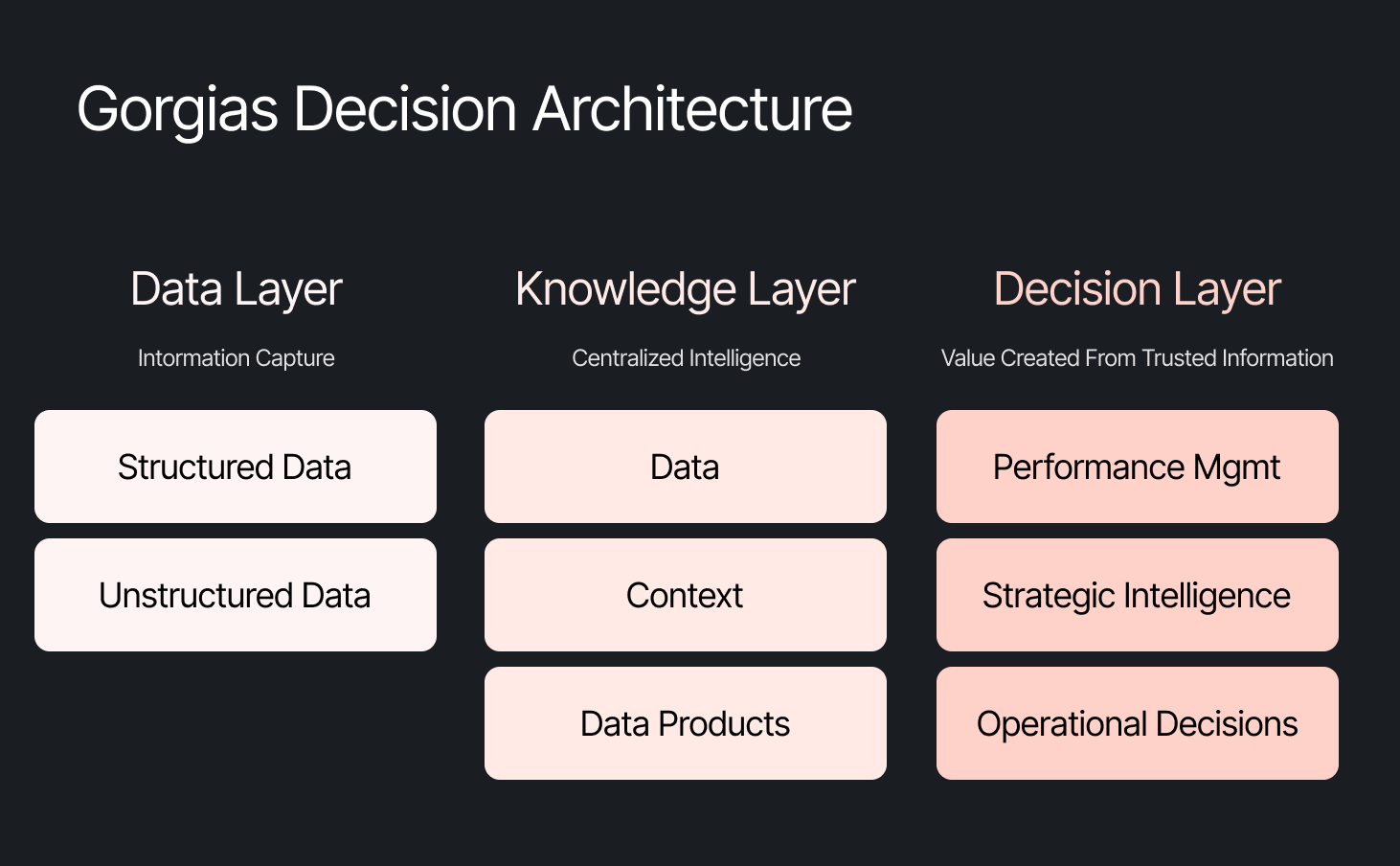
The framing problem most companies get wrong
The instinct across many companies today is to start with the model, pick a provider to solve a specific challenge, or invest heavily in getting the data right. All reasonable starting points, but most of them solve for one use case. Underneath that approach is a framing problem: seeing AI as an initiative — something you assign and measure. Seeing AI as another tool your company uses versus how your company operates.
We started somewhere different. Every company is built on four pillars: customers, people, product, and decisions. AI investments tend to place heavy emphasis on the first three. We started with the fourth. Our bet was that if we built everything around the need to make effective decisions first, asking what Gorgias needed to know to operate well, then our AI would become dramatically more powerful.
Cortex is that philosophy in practice
Cortex is our flagship internal AI agent, and the product where we established the tenets that now run through everything else we build: composable and modular infrastructure, governed context, and accessible from wherever decisions happen. Cortex lives in Slack, as well as across LLM vendors, in its own browser extension, and even on its own dedicated internal site.
Cortex doesn’t stop at answering questions. It can read and write to Notion, file Linear tasks, create HTML apps, automate signal delivery, and more. It operates across every layer of our stack, from dashboards to data pipelines, because we designed it as one integrated system. It is this connection that adds remarkable depth to what people can ask, and what they get in return.
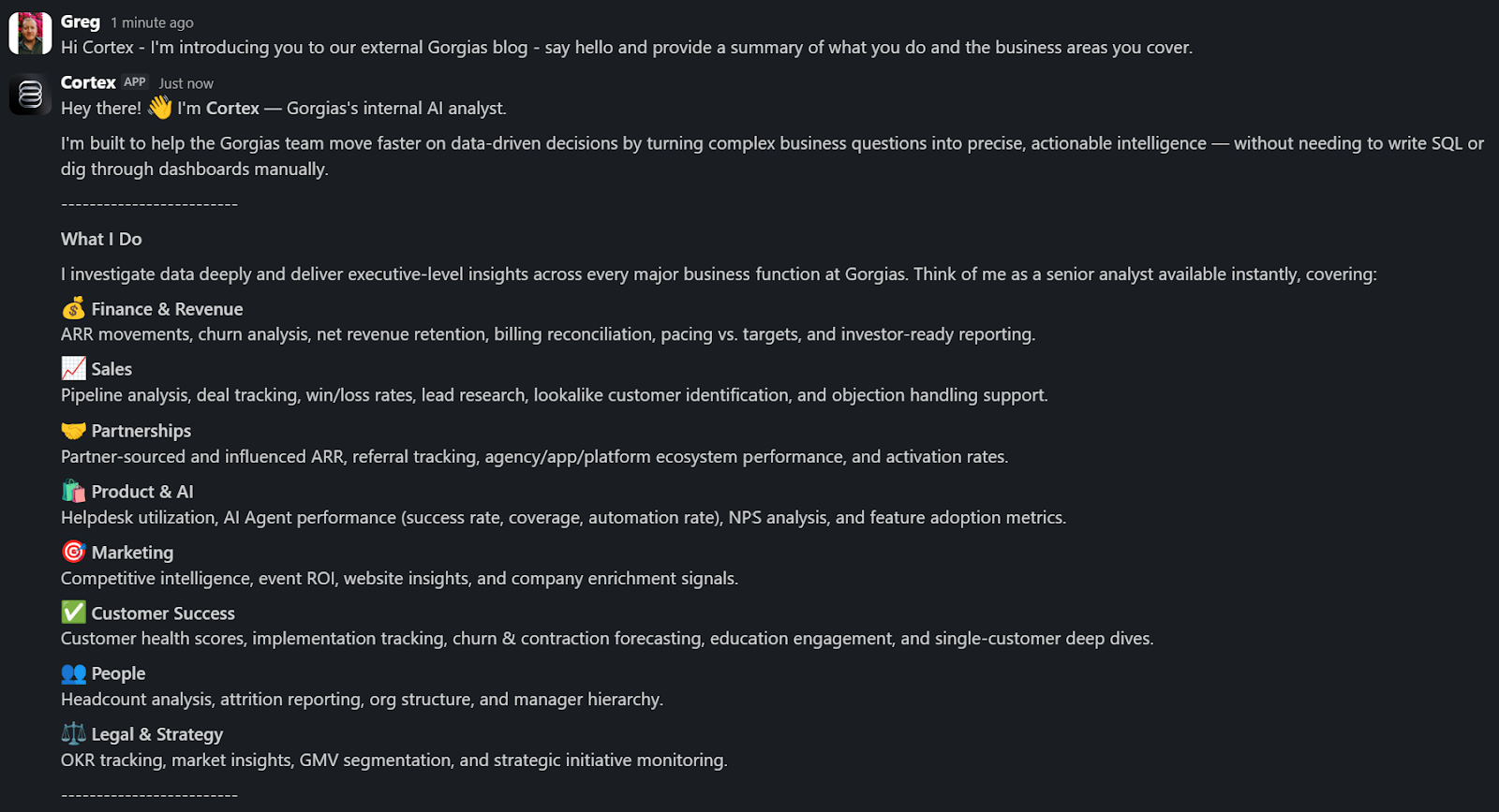
A Sales Lead is pitching and asks Cortex for the full picture of the merchant. In a customized PDF, Cortex lists coverage gaps, pre-sale intent signals, and product fit options. Everything the sales lead needs to walk in with confidence.
A Senior Product leader asks, "How are we performing against OKR #1, and what can my team do to help accelerate it?" Cortex returns a full ARR breakdown, projected end-of-month attainment, segment-level findings, and connects it all back to company-level strategies. A suite of recommendations customized to the leader, the performance, and the signals that bridge how they can support our goals. The kind of answer that used to take someone a week to put together.
These aren't simple lookup queries. They require deep business context spanning multiple areas. Cortex handles these because its Decision Engine gives it the information to reason against governed data, metric definitions, and business context, turning a generic answer into a credible one.
Overnight, teams have built Cortex into how they work. They’re spending less time searching and more time finding answers, not because they were told to, but because Cortex reduced the distance between question and decision.
Flexibility as the foundation
Cortex’s modular infrastructure allows us to experiment and add new capabilities freely. We’ve already built two more internal AI agents made for entirely different use cases, but using the same Decision Engine as Cortex.
GAIA, our internal experimentation AI Agent, helps our customers identify opportunities in their AI Agent Guidance design. It takes institutional knowledge across our teams and turns it into a scalable system that drives automation and value to our customers. Our CEO, Romain Lapeyre, has been its most vocal advocate since day one.
When we needed a platform for investor readiness and board preparation, we built Oracle. Our board decks and talk tracks are informed and built with the same AI, and our numbers are validated every step of the way.
We’re continuing to expand new AI agents internally, exploring how they can create value for customers and our own teams.
AI has transformed how data teams create value, and we’ve already shifted to account for it
When AI handles thousands of analytical questions each week, the highest-value work for a data team shifts permanently. Late 2025, we repositioned from a Data Analytics function into a Decision Intelligence function — a structural change in what we own and how we operate.
Today, our analysts focus on the most sensitive, complex, and forward-looking decisions and analyses. They partner more deeply with stakeholders by driving next steps from signals. They're even building entirely new capabilities that didn't exist in their role descriptions months ago. Things like AI skills for Cortex, context curation, and insight and recommendation delivery. The role of the analyst hasn't diminished. It's expanded to encompass the most meaningful work an analyst can do: driving outcomes and ensuring those decisions can achieve them.
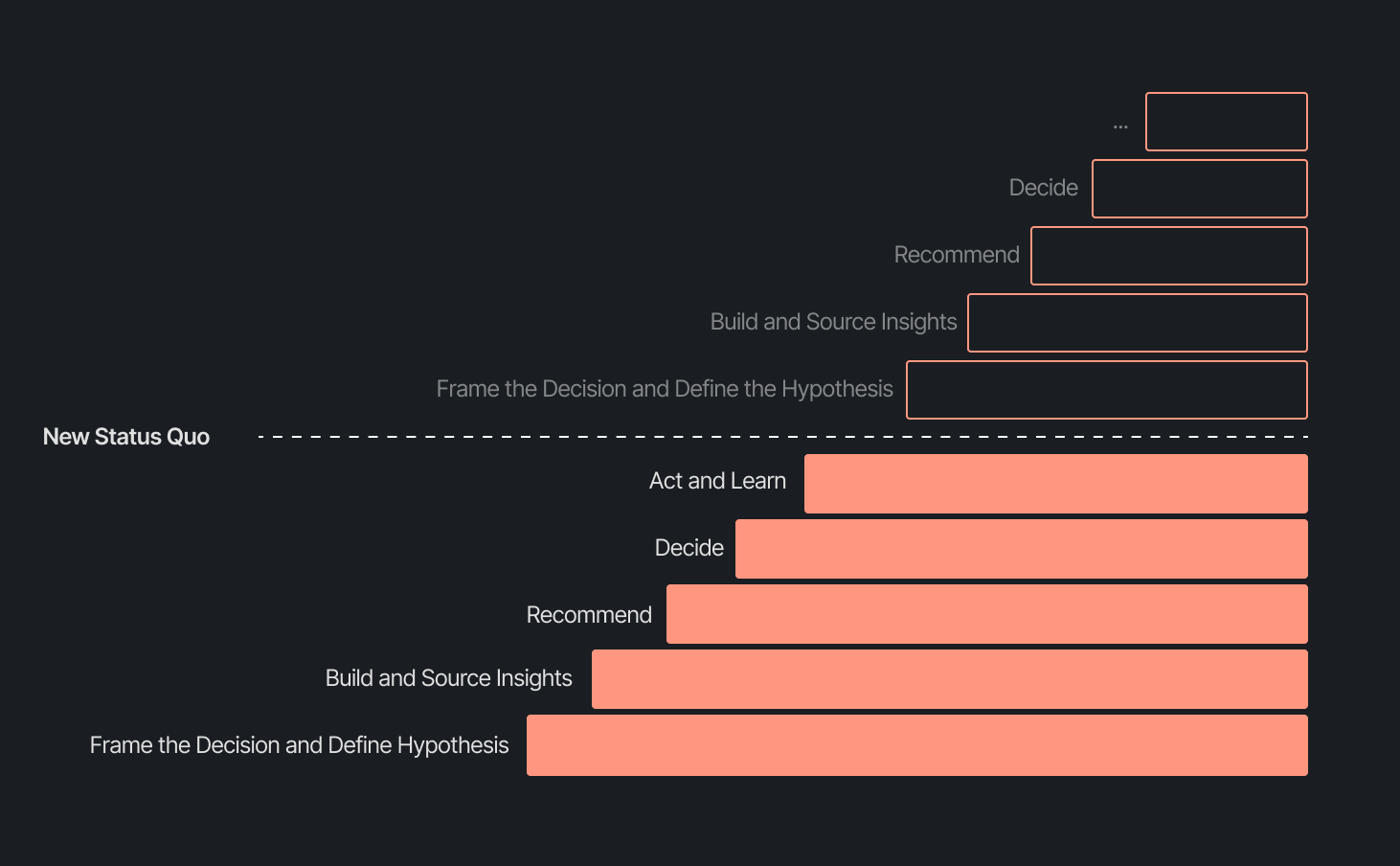
Our business support model has changed, too. Instead of embedding analysts and dedicated engineers within functional teams, we align capacity to the highest-impact company objectives and move fluidly across them. This model works even better because Decision Intelligence brings together both analytics and engineering teams under one roof.
Elliot Trabac leads our Data, Context and AI Engineering teams. The Decision Engine, Cortex, GAIA, and the platforms I've described exist because of the infrastructure his team innovated and built from the ground up. Noemie Happi Nono leads our Decision Strategy and Operations team, driving decision outcomes with stakeholders, advancing the development of Cortex skills and capabilities, and pushing into new areas of analysis every day.
Together, they're shaping what a modern data function looks like when AI becomes a standard building block for how a company operates.
What’s next for the Decision Intelligence team
The question of ROI is long gone. AI has opened the floodgates to more trusted and meaningful signals than ever. The natural next evolution is Proactive Intelligence, signals surfaced toward what you need to know, before you ask. And we're already building this because our architecture is designed to support it.
In the coming weeks, members of the Decision Intelligence team will go deeper into themes I've touched on here. Yochan Khoi, a Senior Analytics Engineer on our team, recently published a technical walkthrough of our context layer and will go further into building context strategies that scale. Others will cover infrastructure, analytical partnerships, evolving data assets into decision assets, and the cost and efficiency gains that make sustained AI investment viable.
AI hasn't changed the most important element of data and analytics functions — delivering outcomes — but it has raised the bar for what it looks like and how far we can take it. We’re just getting started.
TL;DR:
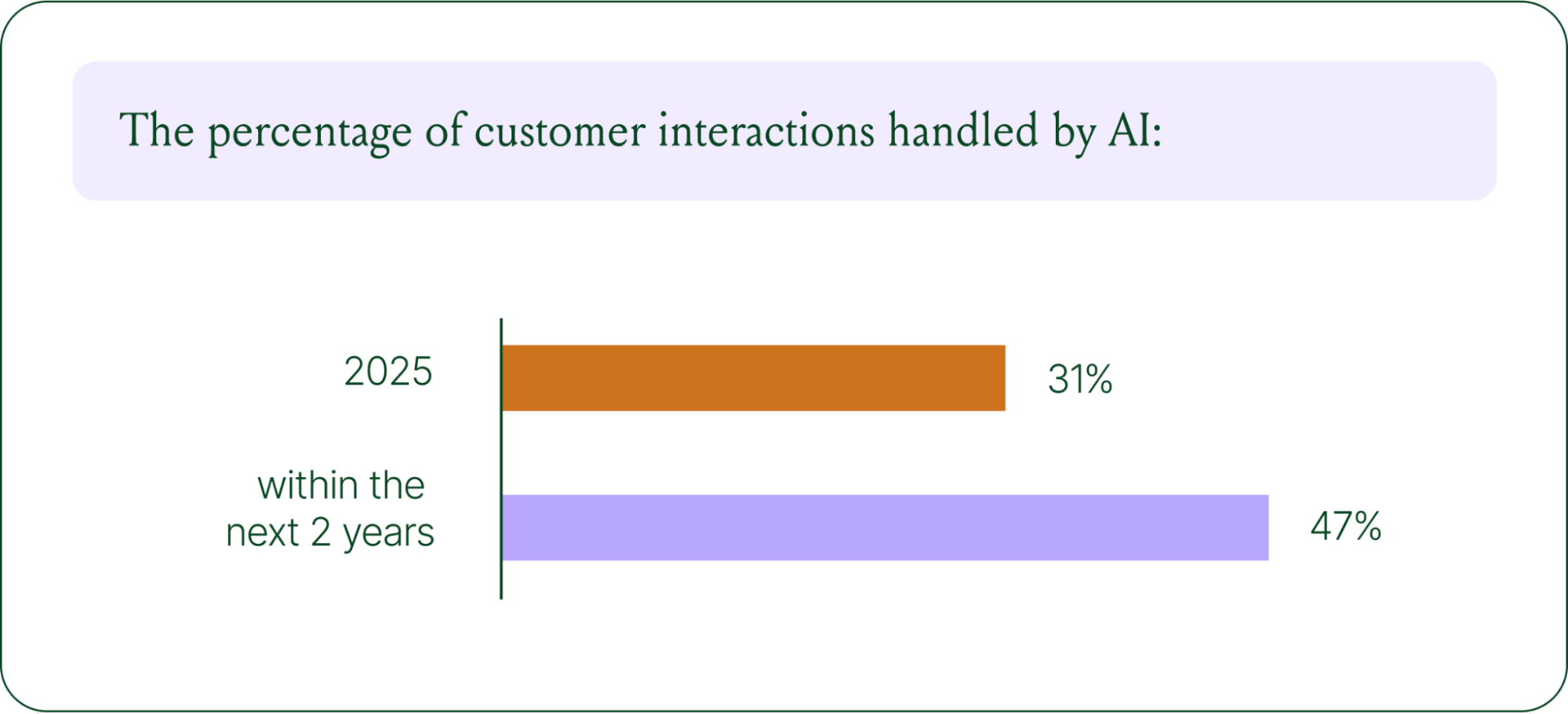
- AI is resolving tickets, not just replying. AI now handles 31% of customer interactions for ecommerce brands, and that number is expected to nearly double within two years.
- Every channel is becoming a storefront. Conversations are replacing the traditional browse-and-buy journey, with 79% of brands reporting sales from AI-driven interactions.
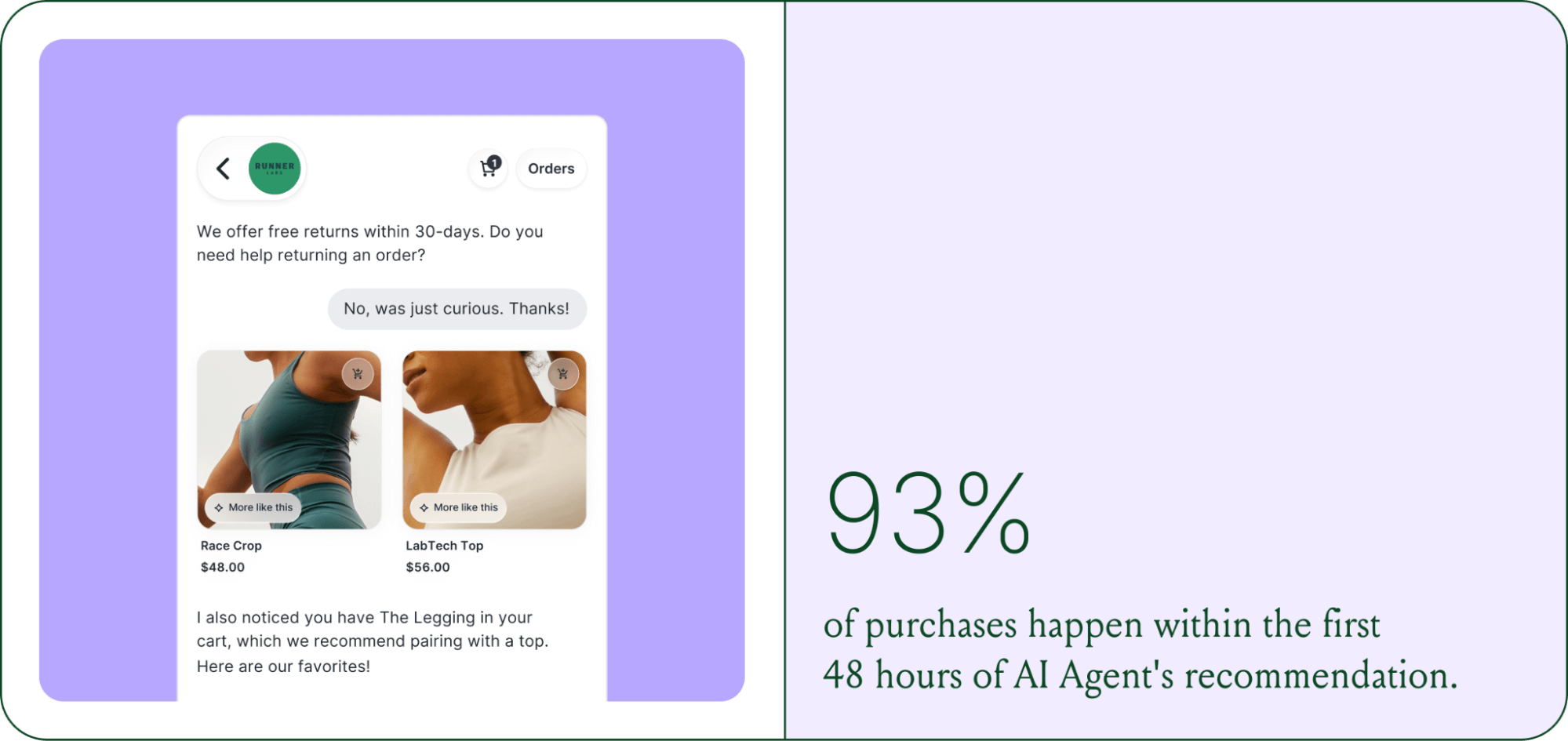
- AI is shortening the buying cycle. 93% of AI-influenced purchases happen within the first 48 hours of the conversation.
- CX teams are changing, not shrinking. Ecommerce brands are actively hiring for more technical roles to implement, coach, and maintain AI.
- The winning model is hybrid. AI handles volume and speed, while humans handle complexity and judgment.
The way shoppers buy online has shifted and customers are at the center.
They no longer want to scroll through product pages, dig through FAQs, or wait 24 hours for an email reply. They open a conversation, ask a specific question, and expect a useful answer in seconds. Brands that can’t deliver these experiences at scale are seeing customer hesitation turn into abandoned carts and lost revenue.
This shift has a name: conversational commerce. It's the practice of using real-time, two-way conversations as your primary sales channel, through chat, AI agents, messaging apps, and voice.
What started as an experiment for early adopters has become a key growth lever, with 84% of ecommerce brands treating conversational commerce as a strategic pillar this year vs. last year.
We surveyed 400 ecommerce decision-makers across North America, the U.K., and Europe to understand how conversational commerce and AI are reshaping the ecommerce landscape. These findings are complemented by aggregated and anonymized internal Gorgias platform data from 16,000+ ecommerce brands.
The State of Conversational Commerce in 2026 trends report breaks down all of the findings, including five key trends shaping the ecommerce landscape.
{{lead-magnet-1}}
Trend 1: AI is table stakes for ecommerce and it’s no longer just about efficiency
A few years ago, adding an AI chatbot to your site that could provide tracking links and Help Center article recommendations was a differentiator. Today, it's table stakes. McKinsey found that 71% of shoppers expect personalized experiences, and 76% get frustrated when they don't get them.
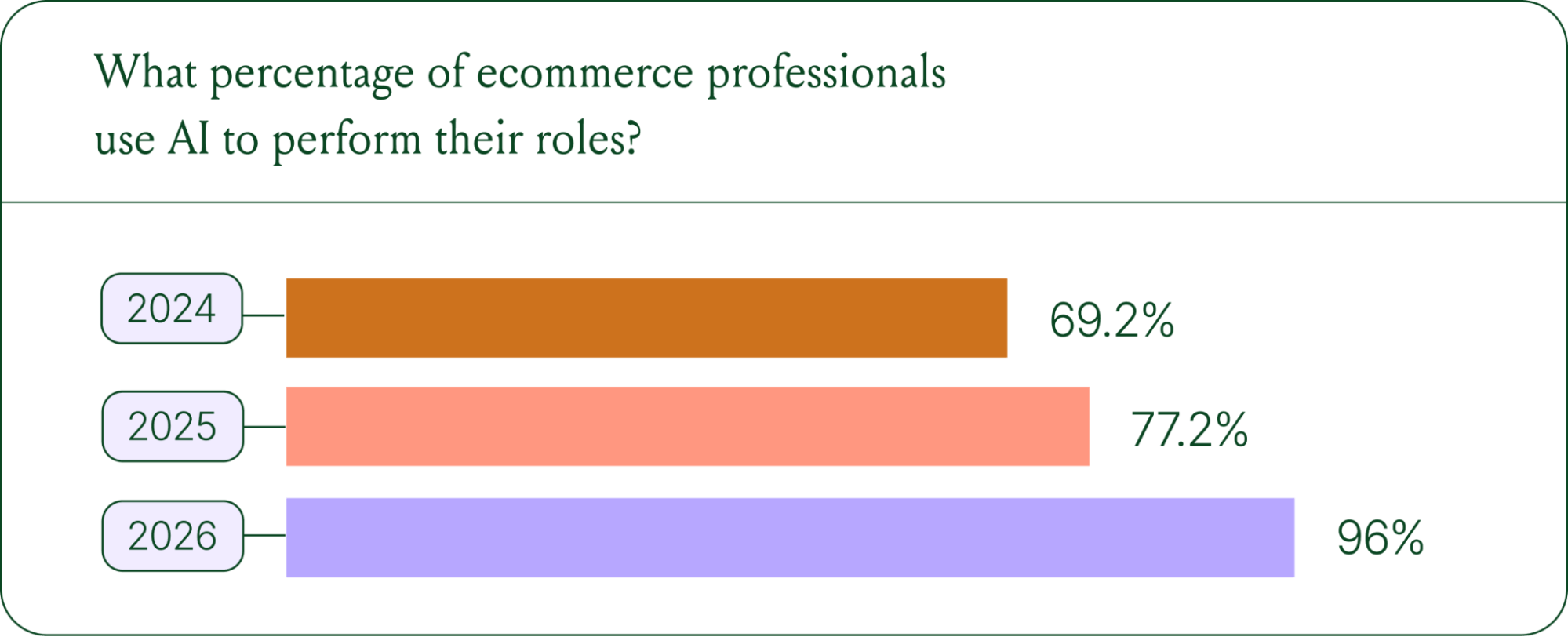
Right now, most ecommerce professionals use AI, with 93% having used it for at least 1 year. Enthusiasm is accelerating quickly, with only 30% of ecommerce professionals rating their excitement for AI at 10/10 in April 2025. Similarly, while AI adoption rose steadily year over year, it reached a clear peak in 2026.
The use cases driving this adoption are practical and high-volume:
- Order tracking and status updates
- Returns, exchanges, and refund requests
- Shipping FAQs and delivery estimates
These are the tickets that flood brands’ inboxes every day. AI agents resolve them instantly, without pulling teams away from conversations that actually require human judgment.
Explore AI adoption and use case data in more depth in the full report.
Trend 2: Conversations are the new path to checkout
The traditional ecommerce funnel, visit site, browse products, add to cart, check out, is losing ground. Shoppers now discover products on Instagram, ask questions via direct message, and complete purchases without ever visiting a website.
Conversational AI is actively increasing revenue, with 79% of brands reporting that AI-driven interactions have increased sales and conversion in their business.

The practical implication is that every channel is becoming a storefront. Creating personalized touchpoints with customers earlier in the journey, through proactive engagement, is impacting the bottom line.
Read the full report to explore how AI conversions have increased QoQ by industry.
Trend 3: AI is accelerating the purchase cycle
Pre-purchase hesitation is one of the biggest conversion killers in ecommerce. A shopper lands on your product page, has a question about sizing or compatibility, can't find the answer quickly, and leaves. That's a lost sale that had nothing to do with your product.
Conversational AI changes that dynamic. When a shopper can ask a question and get an accurate, personalized answer in real time, the friction disappears.
Brands using Gorgias saw this play out at scale in 2025. When AI Agent recommended a product, 80% of the resulting purchases happened the same day, and 13% happened the next day.
Brands are further accelerating the buying cycle through proactive engagement. On-site features such as suggested product questions, recommendations triggered by search results, and “Ask Anything” input bars drove 50% of conversation-driven purchases during BFCM 2025.
Explore how AI is collapsing the purchase cycle in Trend 3 of the report.
Trend 4: AI is making CX teams more technical
There's a persistent narrative that AI is making CX teams redundant. The data tells a different story. 62% of ecommerce brands are planning to grow their teams, not cut them. But the scope of those teams is changing.

New roles are emerging around AI configuration and quality assurance. Teams are investing in technical members to write AI Guidance instructions, develop tone-of-voice instructions, and continuously QA results.
CX teams are also bridging the gap between support goals and revenue goals, as the two functions increasingly overlap.
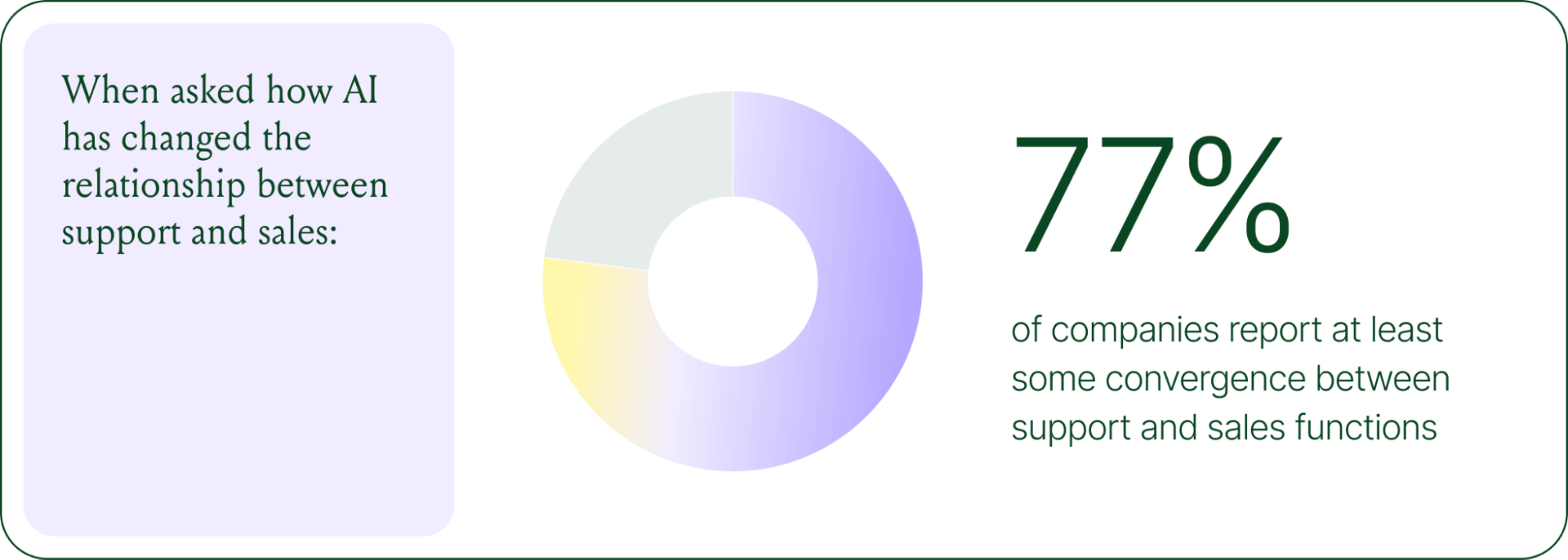
The result is CX teams that are more technical than they were before. Agents who once spent their days answering repetitive tickets are now spending that time on higher-value work: complex escalations, VIP customer relationships, and improving the AI systems and knowledge bases that handle the volume.
Learn more about the evolution of CX roles in Trend #4.
Trend 5: The future is hybrid: AI-first, humans when it counts
Despite increasing AI adoption, data shows that ecommerce brands shouldn’t strive for 100% automation. Winning brands are building systems in which AI handles repetitive tier-1 tickets, and humans handle complex, sensitive cases.

AI handles speed and scale. It resolves order-tracking requests at 2 a.m., processes return-eligibility checks in seconds, and answers the same shipping question for the thousandth time without compromising quality.
Human agents handle conversations that require context, empathy, or decisions that fall outside the standard playbook. There are several topics where shoppers still prefer human support.
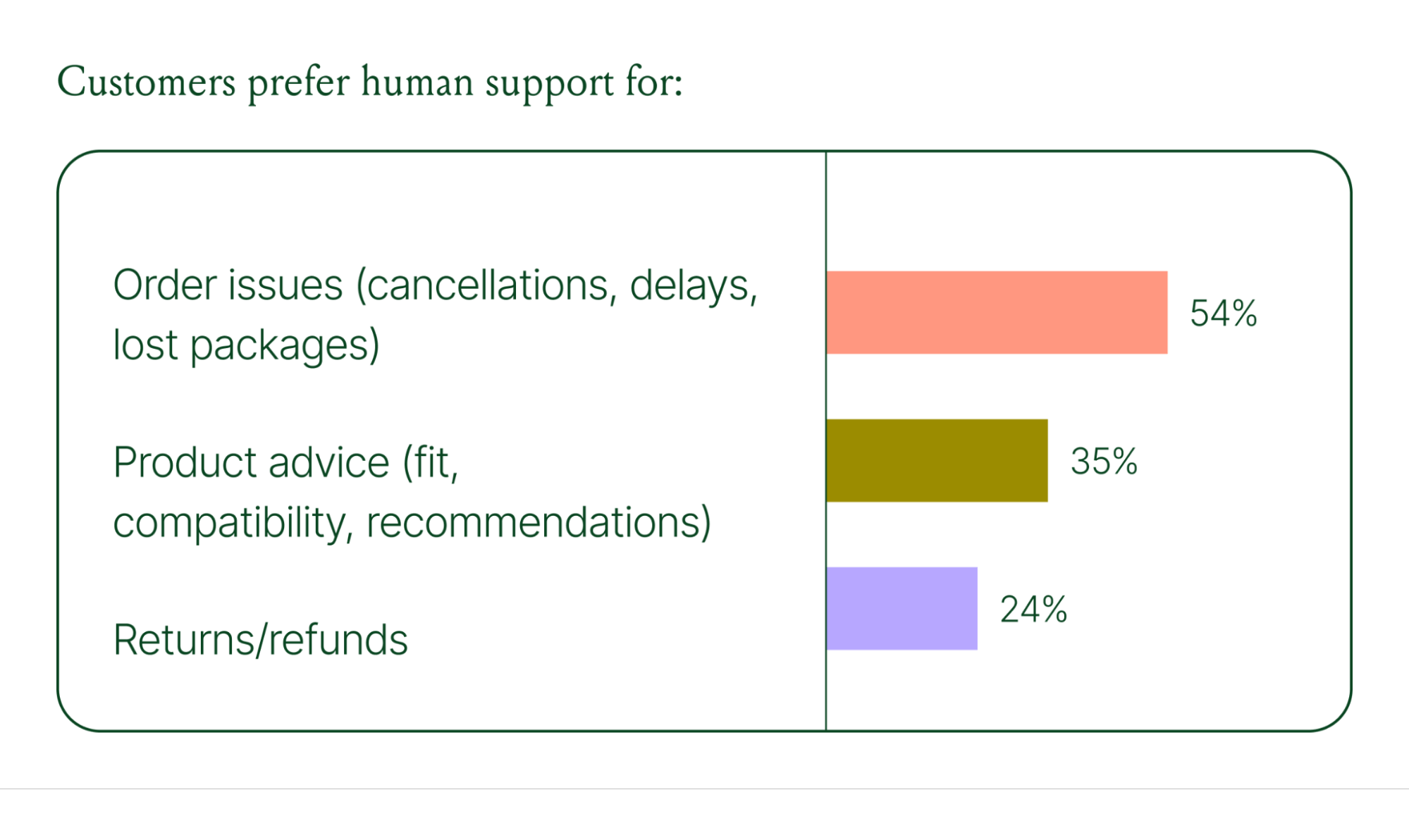
Successful hybrid systems require continuous iteration, meaning reviewing handover topics, Guidance, and reviewing AI tickets on a weekly basis.
Discover how leading brands are balancing human and AI systems in Trend #5.
Where conversational commerce is heading by 2030
The 2026 trends are about expansion and standardization. The 2030 predictions are about what comes next.
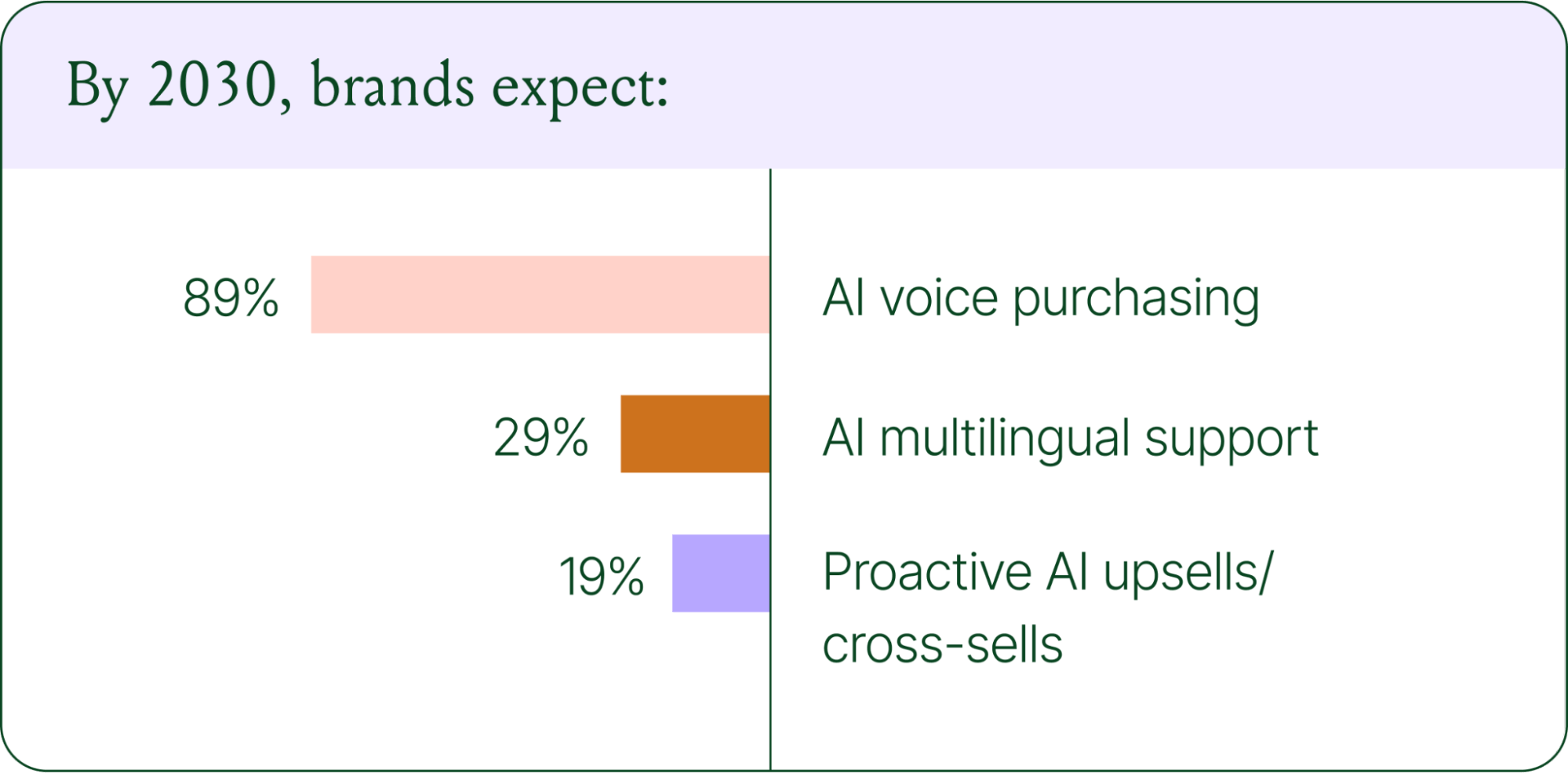
Voice-based purchasing is the biggest bet on the horizon. Only 7% of brands currently use voice assistants for commerce, but 89% expect it to be standard by 2030. The vision is a customer who can reorder a product, check their subscription status, or manage a return entirely over the phone.
Proactive AI is the other major shift. Rather than waiting for a customer to reach out, AI will anticipate needs based on browsing behavior, purchase history, and where someone is in their relationship with your brand. Think of it as the digital equivalent of a sales associate who remembers what you bought last time and knows what you're likely to need next.
Explore where ecommerce brands are allocating their AI budgets in the full report.
Start building your conversational commerce strategy today
The brands winning in 2026 are creating smart, scalable systems where AIhandles volume and humans handle nuance. They’re treating every conversational channel as an opportunity to serve and sell.
The data is clear: AI adoption is accelerating, customer expectations are rising, and the revenue impact of getting this right is measurable.
{{lead-magnet-1}}
Newsletter Signup
The best in CX and ecommerce, right to your inbox
Featured articles

Conversations Are Becoming a Revenue Channel: The Data Proves It
TL;DR:
- Customer journeys are collapsing to a single conversation. The traditional browse-and-buy journey is giving way to AI-guided shopping that moves from discovery to purchase in a single exchange.
- 79% of brands say AI-driven conversational commerce has increased their sales and purchase rates.
- AI-only influenced orders grew 63% in a single year, from 2.7 million in Q1 to 4.4 million in Q4.
- Brands treating conversation as a revenue channel. They’re not just a support function, generating higher AOV, shorter buying cycles, and stronger retention.
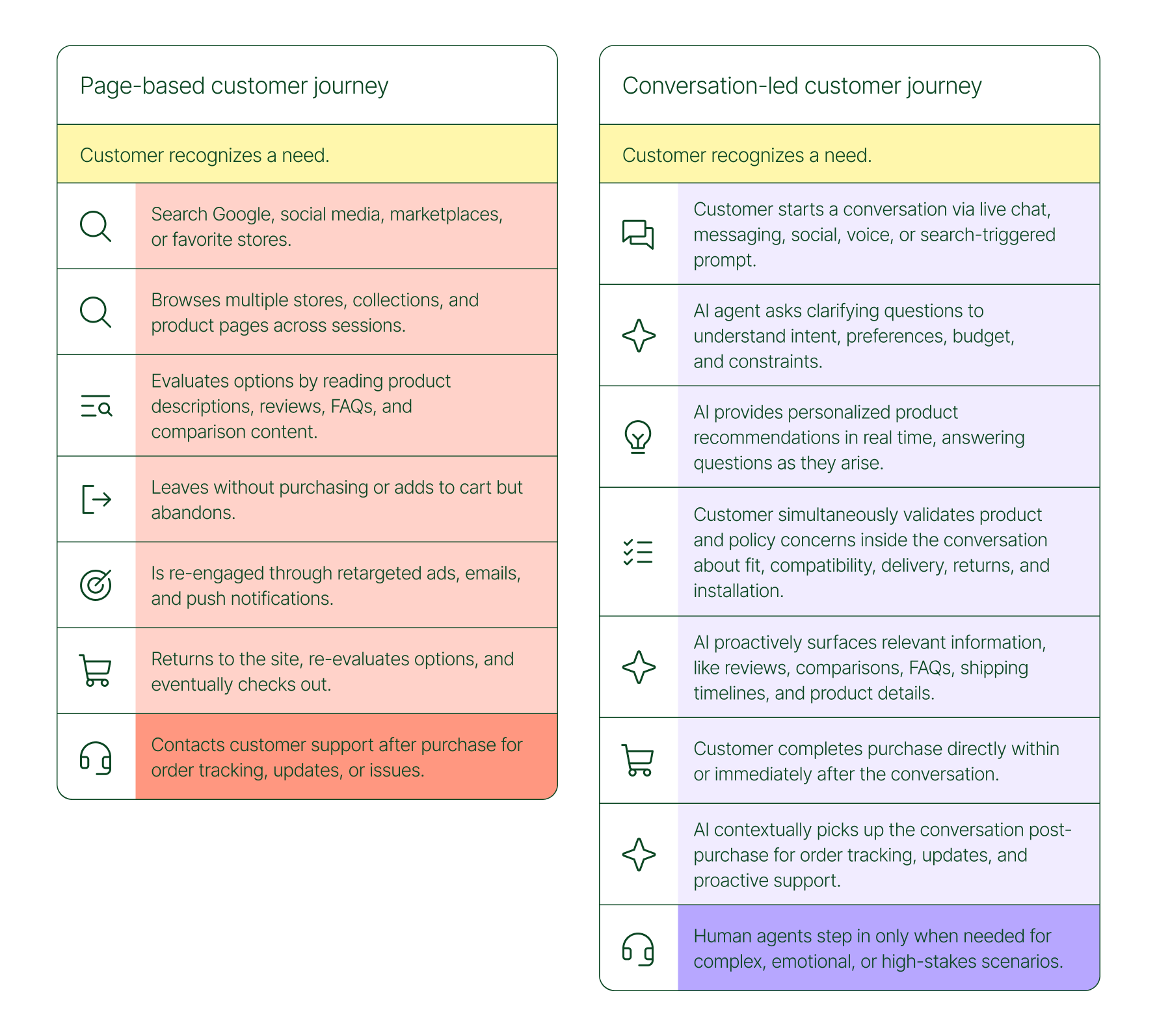
The page-based shopping experience dominated for decades. Customers would search, browse, compare, abandon, get retargeted, return, and eventually buy (sometimes).
That journey is no longer the only option.
Shoppers are turning to chat, messaging, and AI-powered tools to find what they need. Instead of clicking through product pages or reading static FAQs, they ask questions, have back-and-forth conversations, and get answers that move them closer to a purchase in real time. The path to checkout has changed, and the brands that recognize this are pulling ahead.
Read our 2026 State of Conversational Commerce Report to learn more about conversation commerce trends from 400 ecommerce decision-makers and 16,000+ ecommerce brands using Gorgias.
{{lead-magnet-1}}
The shopping journey has collapsed into a single thread
The traditional shopping journey was a solo experience. A shopper had a need, searched for options, browsed across sessions, and eventually made a decision — often days later, after being retargeted multiple times. Support only entered the picture after the purchase.
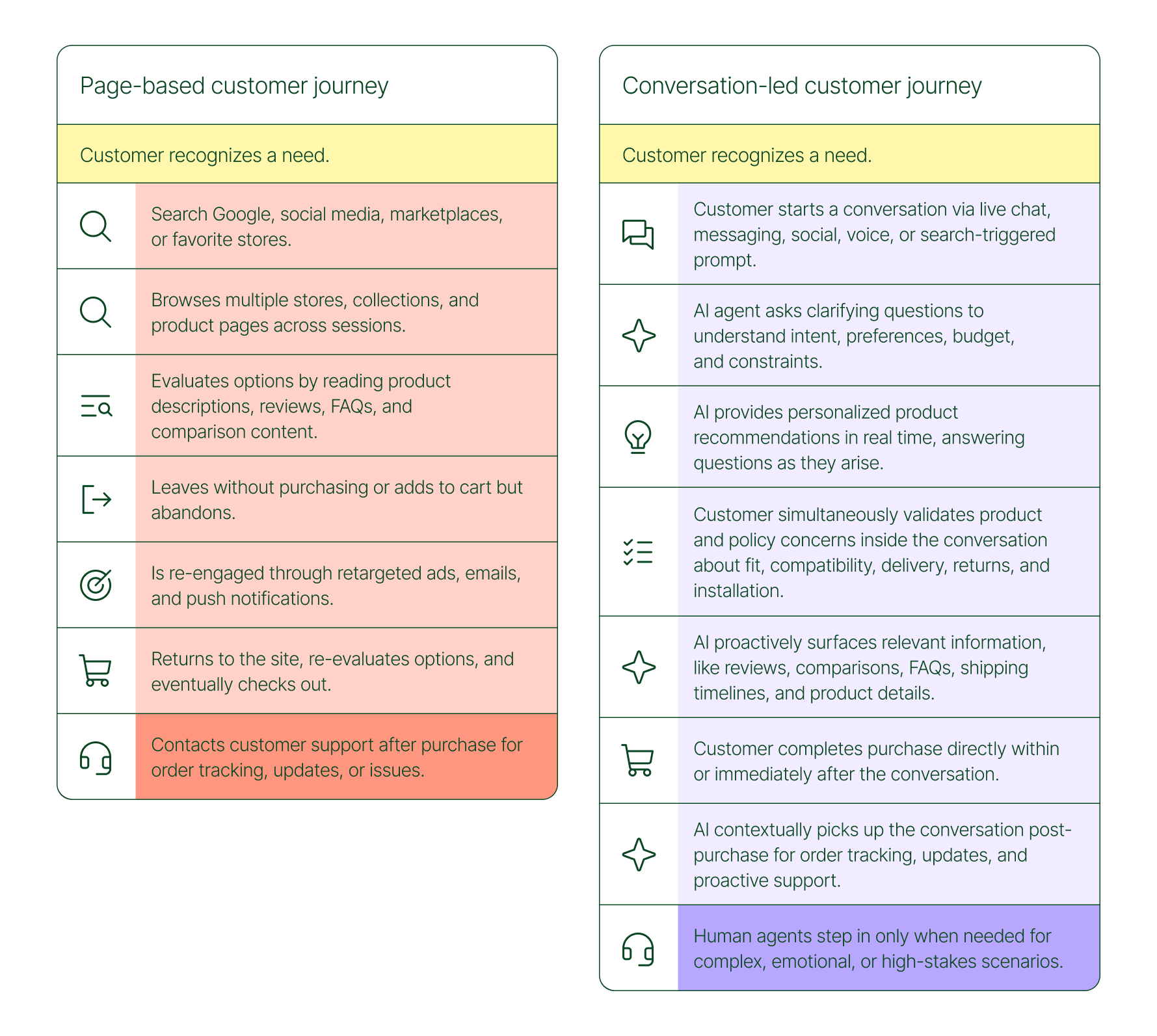
The conversation-led journey collapses that timeline:
- A shopper recognizes a need and starts a conversation via chat, messaging, or a search-triggered prompt
- An AI agent asks clarifying questions about preferences, budget, and constraints
- The AI provides personalized product recommendations in real time
- The shopper validates concerns about fit, compatibility, delivery, and returns, all inside the conversation
- The shopper completes the purchase directly within or immediately after that exchange
- The AI picks up the conversation post-purchase for order tracking and proactive support
- A human agent steps in only when the situation calls for it
What used to take days now takes minutes. Discovery, evaluation, and purchase happen in a single thread.
Conversation is a revenue strategy, not a support upgrade
79% of brands agree that AI-driven conversational commerce has increased sales and purchase rates in their business. When brands were asked to rank the highest-return areas:
- 38% cited improved customer support efficiency
- 23% pointed to higher customer retention and loyalty
- 20% saw improved purchase rates
Those numbers reflect something important: the value of conversation compounds. Faster support reduces friction. Better retention raises lifetime value. More confident shoppers buy more often and spend more per order.
The brands seeing the biggest returns aren't just using AI to deflect tickets. They're using it to create one-to-one shopping experiences at scale.
What the data shows about AI-influenced orders
Looking at AI-only influenced orders across key verticals like Apparel and Accessories, Food and Beverages, Health and Beauty, Home and Garden, and Sporting Goods, the growth across a single year was significant.
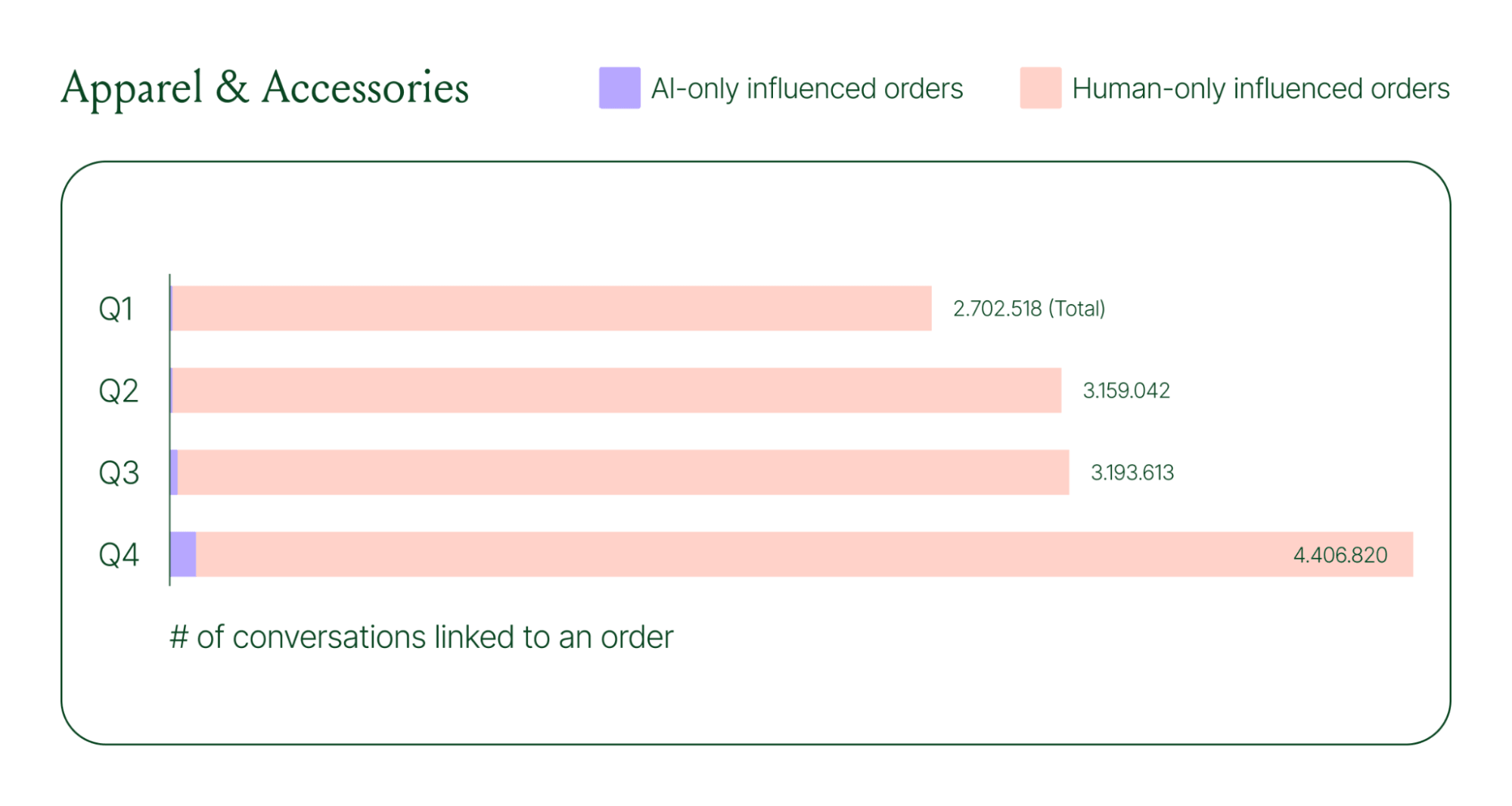
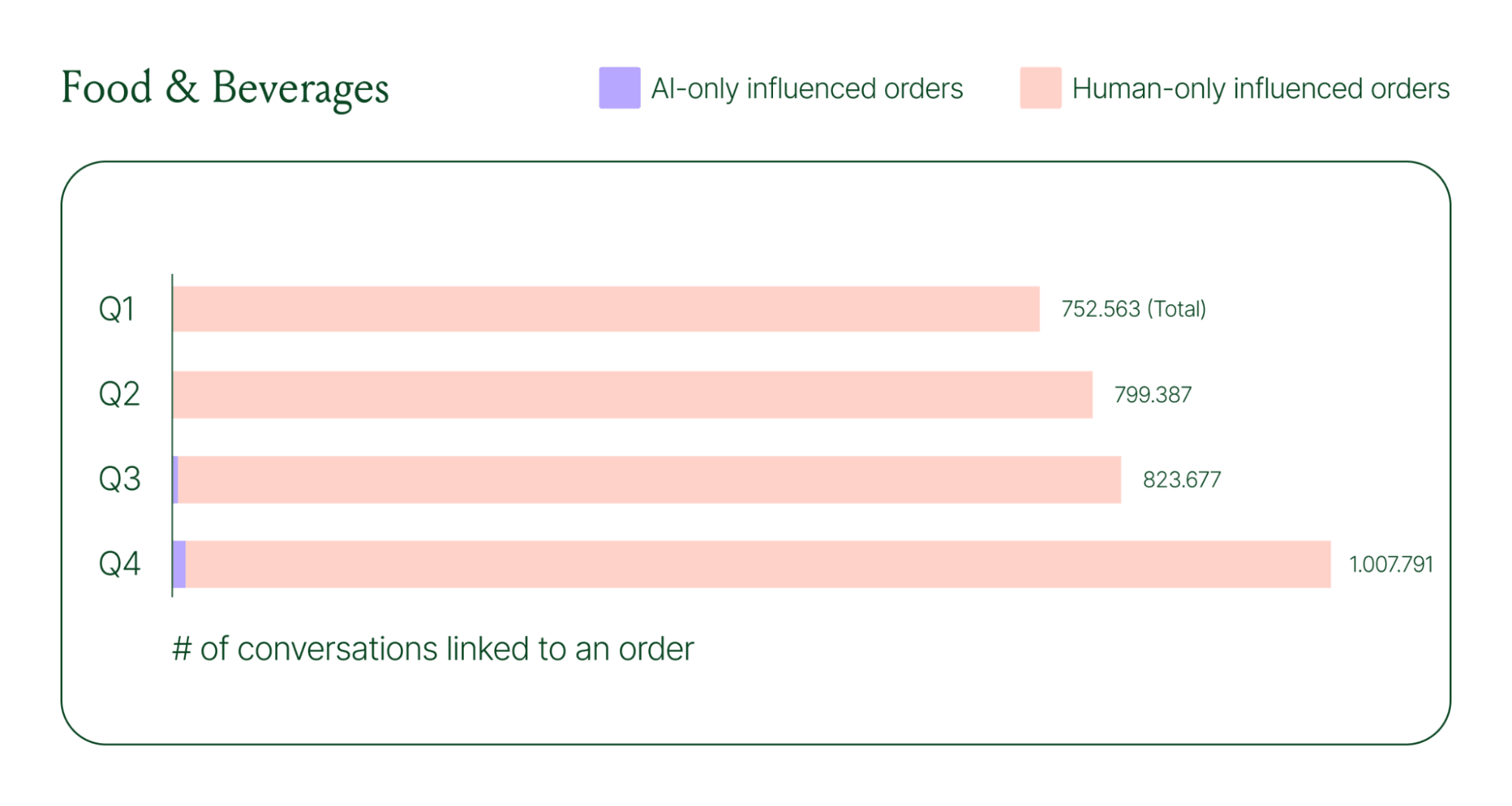
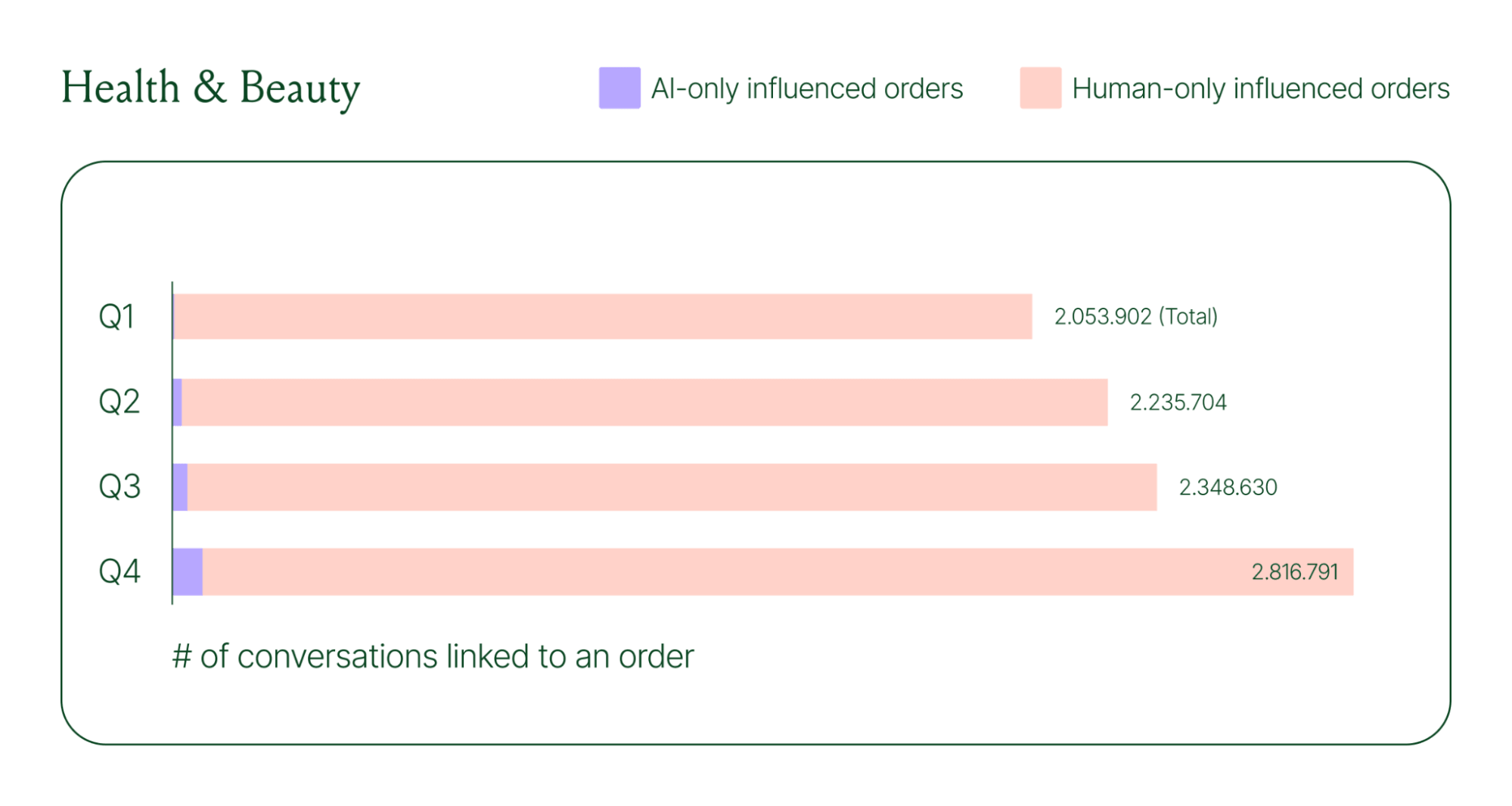
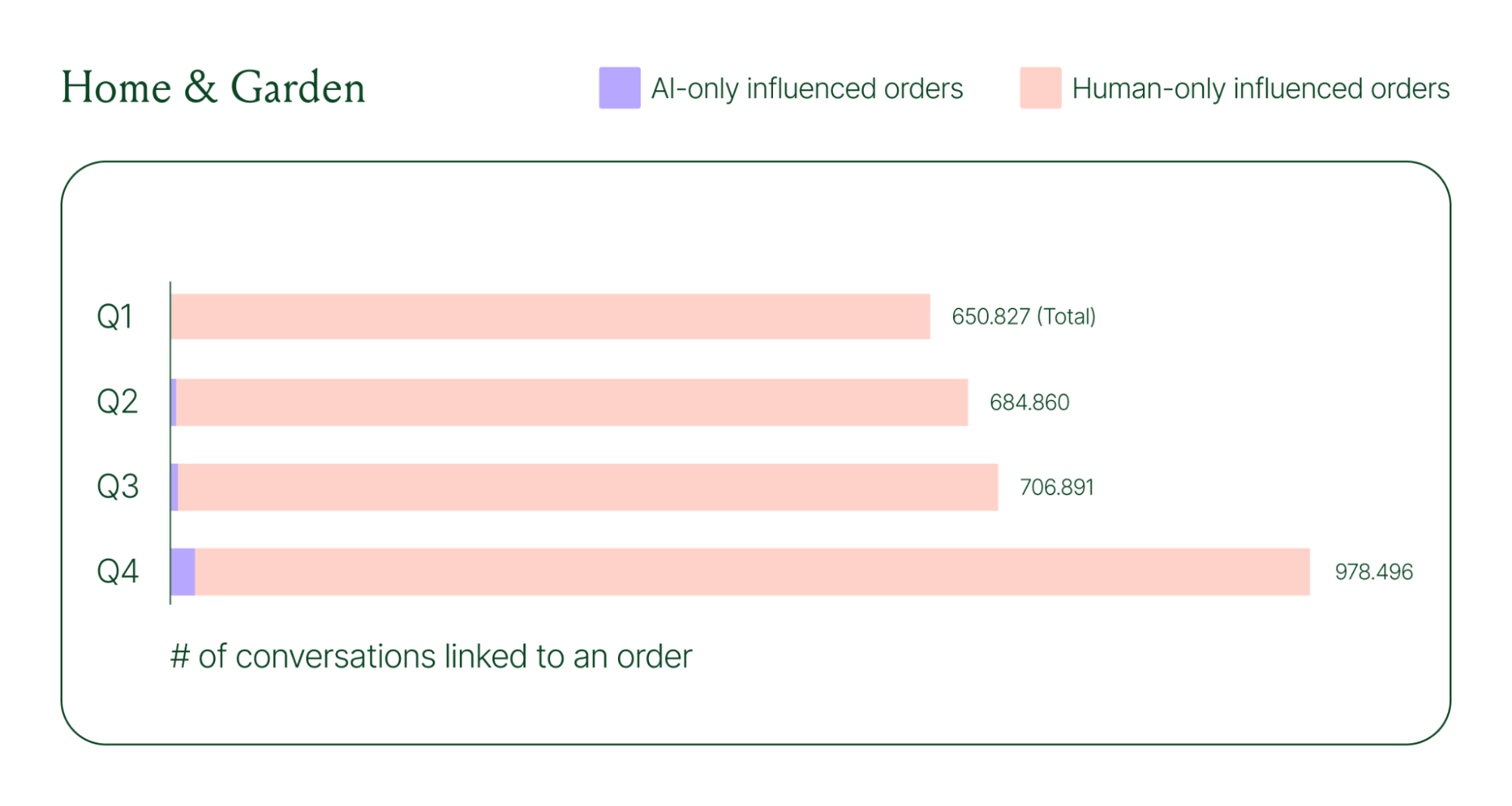
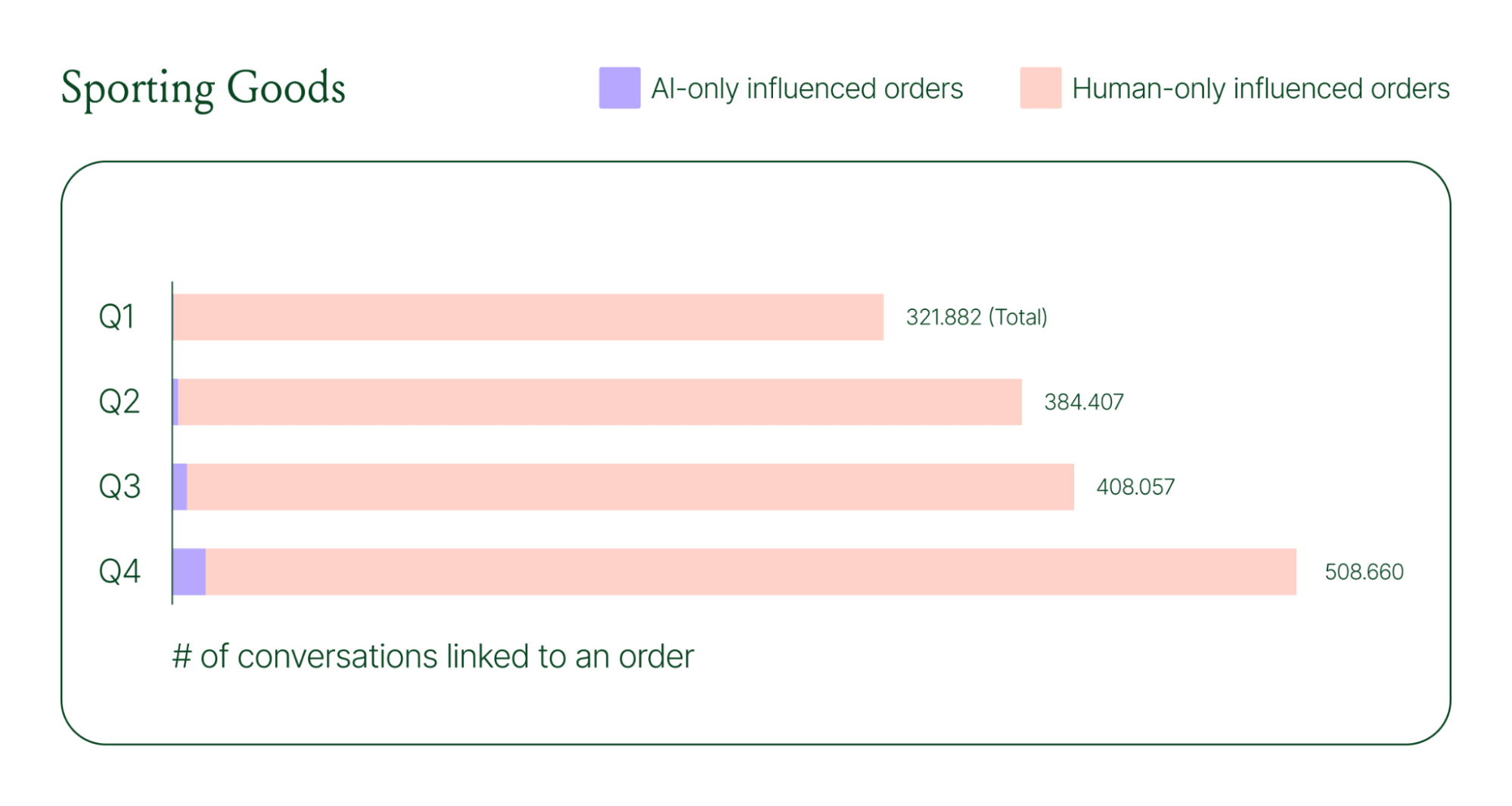
Across industries, ecommerce brands saw AI step into conversations, reduce shopper hesitation, and drive higher QoQ conversion rates.
Learn more about AI-powered revenue generation in the full 2026 Conversational Commerce Report.
Why brands are making this a strategic priority
84% of brands say the strategic importance of conversational commerce is higher than it was a year ago. 82% agree it will be mainstream in their sector within two years.
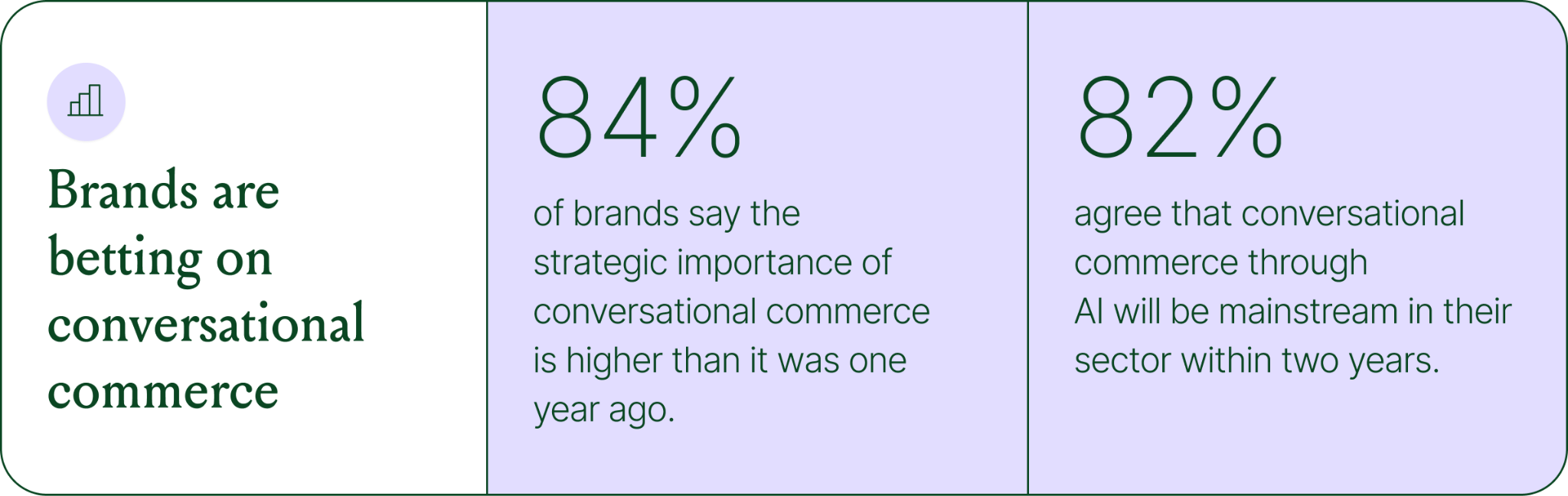
That shift is registering at the leadership level because of what conversational commerce does to the buying experience. Creating one-to-one touchpoints earlier in the journey drives higher AOV, shorter buying cycles, and stronger purchase rates. Shoppers who get real-time answers to their questions are more confident.
What this looks like in practice: TUSHY
TUSHY, known for eco-friendly bidets and bathroom essentials, is a useful example of what happens when you take conversational commerce seriously.
Bidets aren't an impulse purchase. Shoppers have real questions about fit, compatibility, and installation. Those questions used to go unanswered until the CX team could respond, often after the customer had abandoned the cart.
TUSHY used Gorgias's AI Agent and shopping assistant capabilities to automate pre-sales support. AI Agent engaged shoppers in real-time conversations, addressed their concerns directly, and built confidence at the moment of highest intent.
This resulted in a 190% increase in chat-based purchases, a 13x return on investment, and twice the purchase rate of human agents.
How to apply this to your strategy
You don't need to overhaul your entire operation to start seeing results. The most effective approach is to start where the impact is clearest and expand from there.
A few places to begin:
- Pre-sales chat. Identify your most common pre-purchase questions (sizing, compatibility, shipping timelines) and ensure your AI can answer them confidently and promptly.
- Product page engagement. Use proactive chat prompts triggered by page behavior to start conversations before shoppers leave.
- Post-purchase follow-up. Let AI pick up the conversation after checkout with order updates and proactive support, reducing inbound volume and building trust.
- Human escalation. Define clearly which situations require a human agent – complex issues, emotional exchanges, high-stakes decisions.
Want to see the full picture of where conversational commerce is headed in 2026? Read the full report to explore the data, trends, and strategies shaping the next era of ecommerce.
{{lead-magnet-1}}
AI Is Table Stakes for Ecommerce: What the Data Tells Us About 2026
TL;DR:
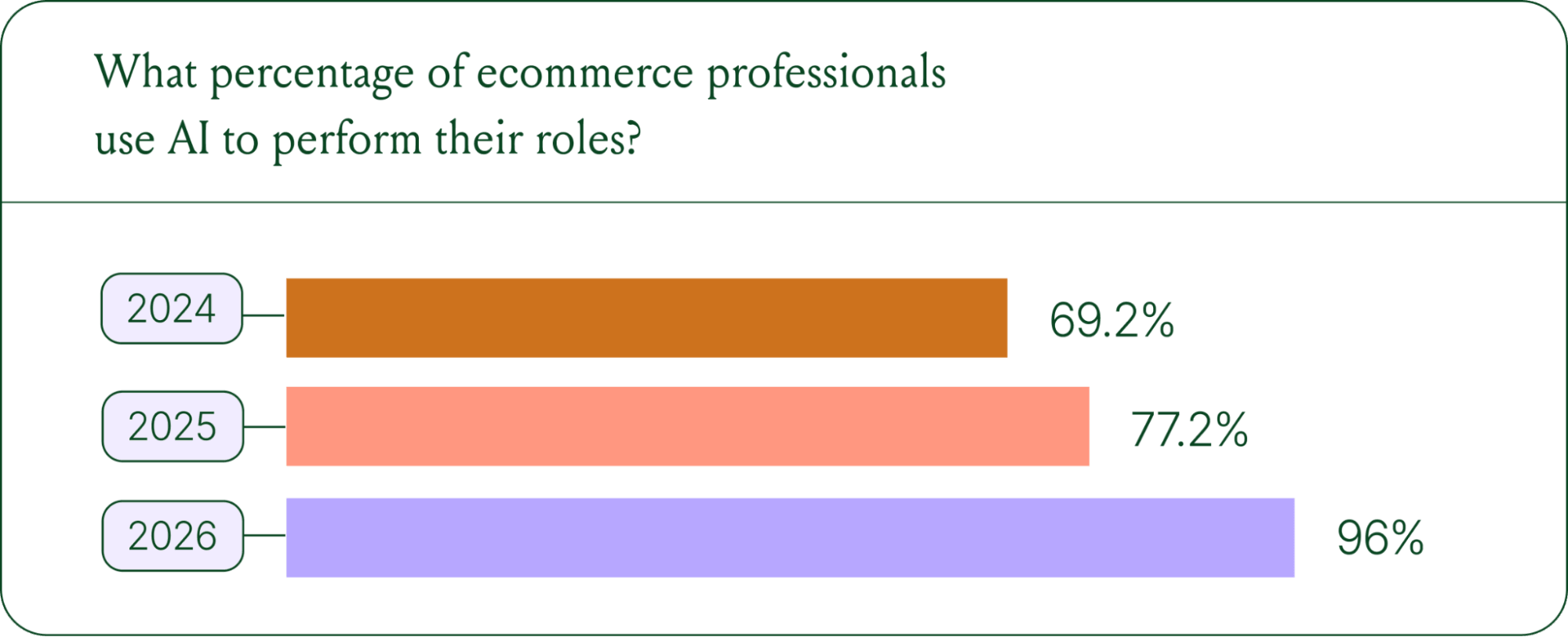
- AI adoption is rapidly accelerating. 96% of ecommerce professionals now use AI in their roles, up from 69% in 2024.
- AI has moved beyond support automation. Use cases have evolved into revenue generation, personalization, and logistics.
- Brands are tying AI success to profit-and-loss outcomes. 60% of brands consider AOV a top indicator of AI effectiveness.
A year ago, ecommerce brands were still debating whether AI was worth the investment. That debate is over. Today, nearly every ecommerce professional uses AI to do their job.
The shift isn't just about adoption. It's about what AI is used for and how brands measure its impact. Support automation was the entry point. Now, AI is embedded across the full operation, from product recommendations to inventory control to real-time shopping conversations.
In our 2026 State of Conversational Commerce Report, we break down trends on AI usage among 400 ecommerce decision-makers and 16,000+ ecommerce brands using Gorgias.
{{lead-magnet-1}}
AI adoption has reached a tipping point
If we rewind 12 months ago, the industry was still split on AI. Some ecommerce professionals were excited, but most were still hesitant. In 2024, 69% of ecommerce professionals used AI in their roles. By 2025, that number reached 77%. In 2026, it hit 96%.
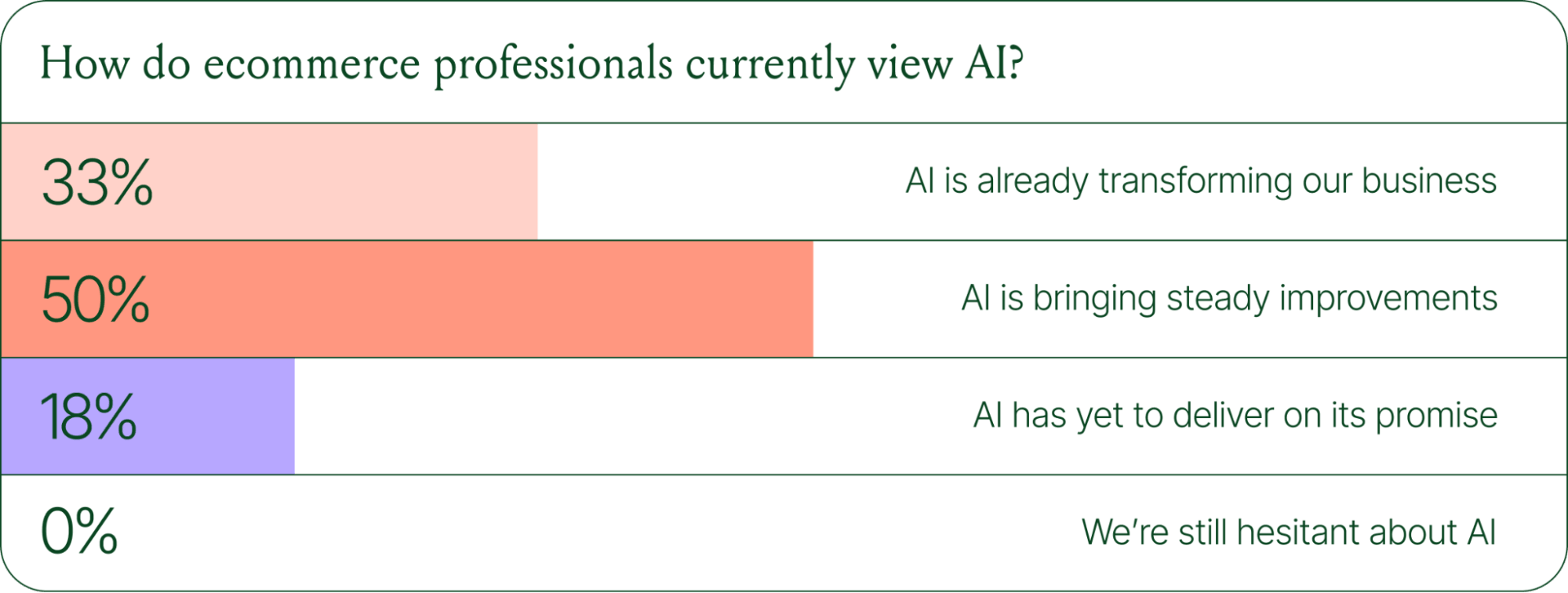
The confidence numbers back it up. 71% of brands say they are confident using AI for ecommerce, and 73% are satisfied with its business impact.
In early 2025, only 30% of ecommerce professionals rated their excitement for AI at 10/10. Today, zero percent of respondents describe themselves as hesitant about AI.
AI use cases now span the full ecommerce stack
Using AI in ecommerce is not new. In fact, it dates back to the 1980s with the invention of algorithms and expert systems. And if you’ve ever leveraged similar product recommendations or chatbots, you’ve already integrated AI into your ecommerce stack.
Modern AI is far more sophisticated.
With the rise of agentic commerce and conversational AI, brands began leveraging AI agents to automate the processing of repetitive support tickets. That’s still happening today, but the scope has expanded beyond the support queue.
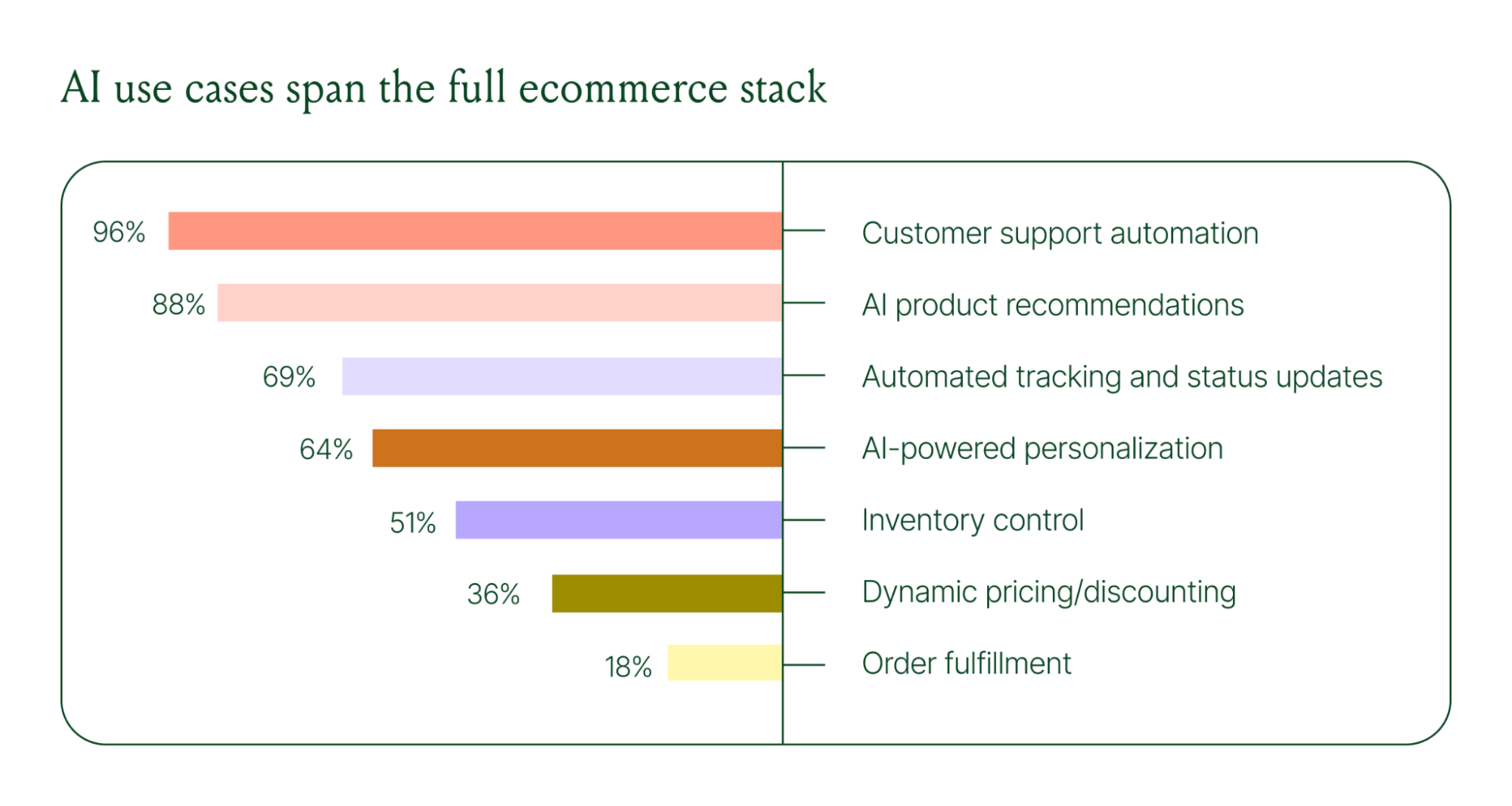
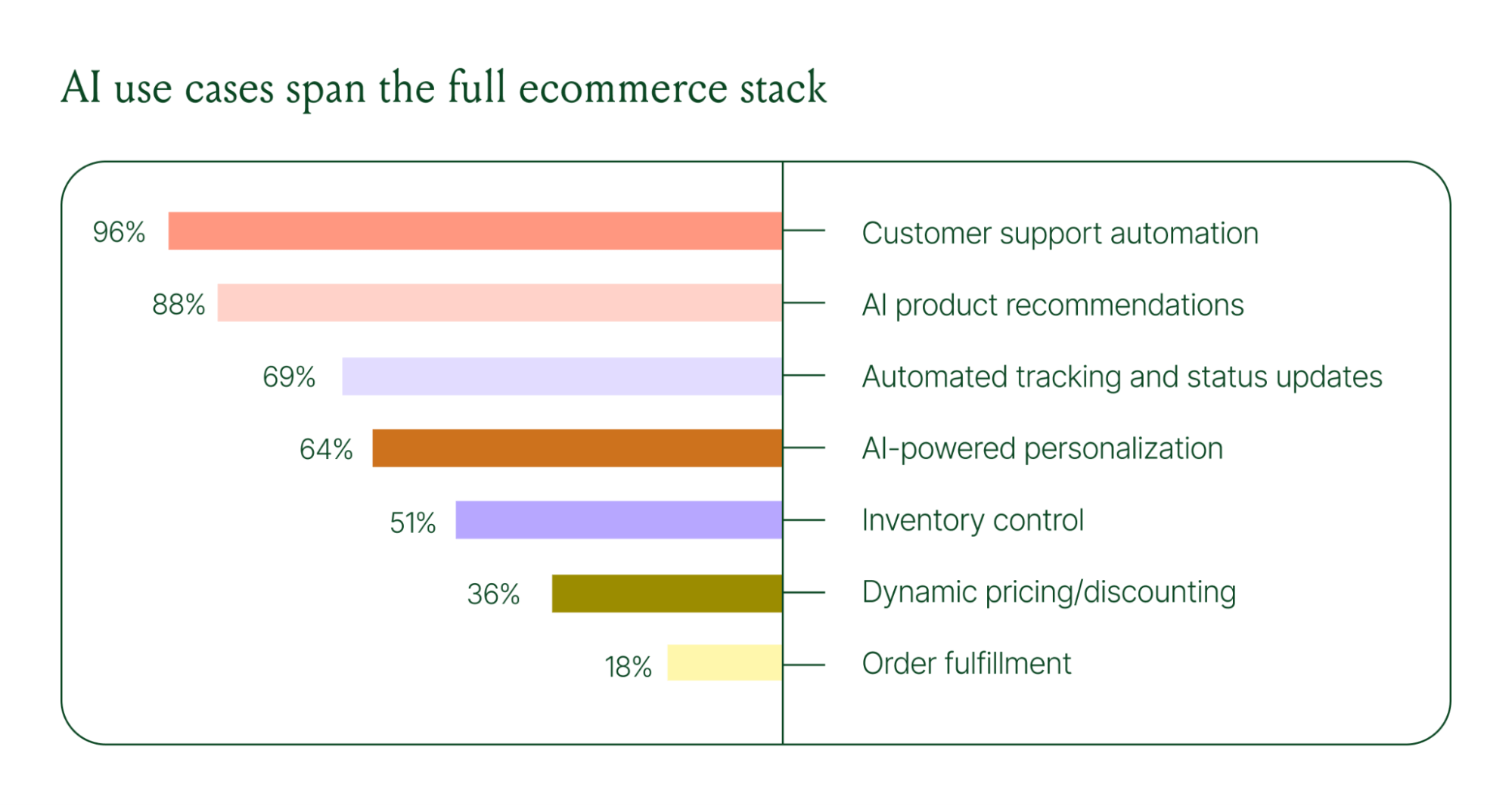
Ecommerce brands are deploying AI across every layer of their operation:
- Customer support automation: 96%
- Product recommendations: 88%
- Automated tracking and status updates: 69%
- Personalization: 64%
- Inventory control: 51%
- Dynamic pricing and discounting: 36%
- Order fulfillment: 18%
When brands were asked which channels contribute most to their AI success, conversational channels dominated. Social media messaging led at 78%, followed by SMS at 70%, and website live chat at 51%. Shoppers want fast, personal conversations, and AI is the best way to deliver that at scale.
Learn more about AI adoption, perception, and use case trends in the full 2026 Conversational Commerce Report.
How AI is changing CX success metrics
For decades, customer support success meant fast response times and high satisfaction scores. Those are still important indicators of success, but leading brands are adding revenue-focused metrics to their dashboards.
91% of brands still track CSAT as a measure of AI's impact. But 60% now include AOV as a top indicator, and higher-revenue brands earning $20M+ are focusing on metrics like total operating expenses, cost per resolution, incremental revenue, and one-touch ticket rate.
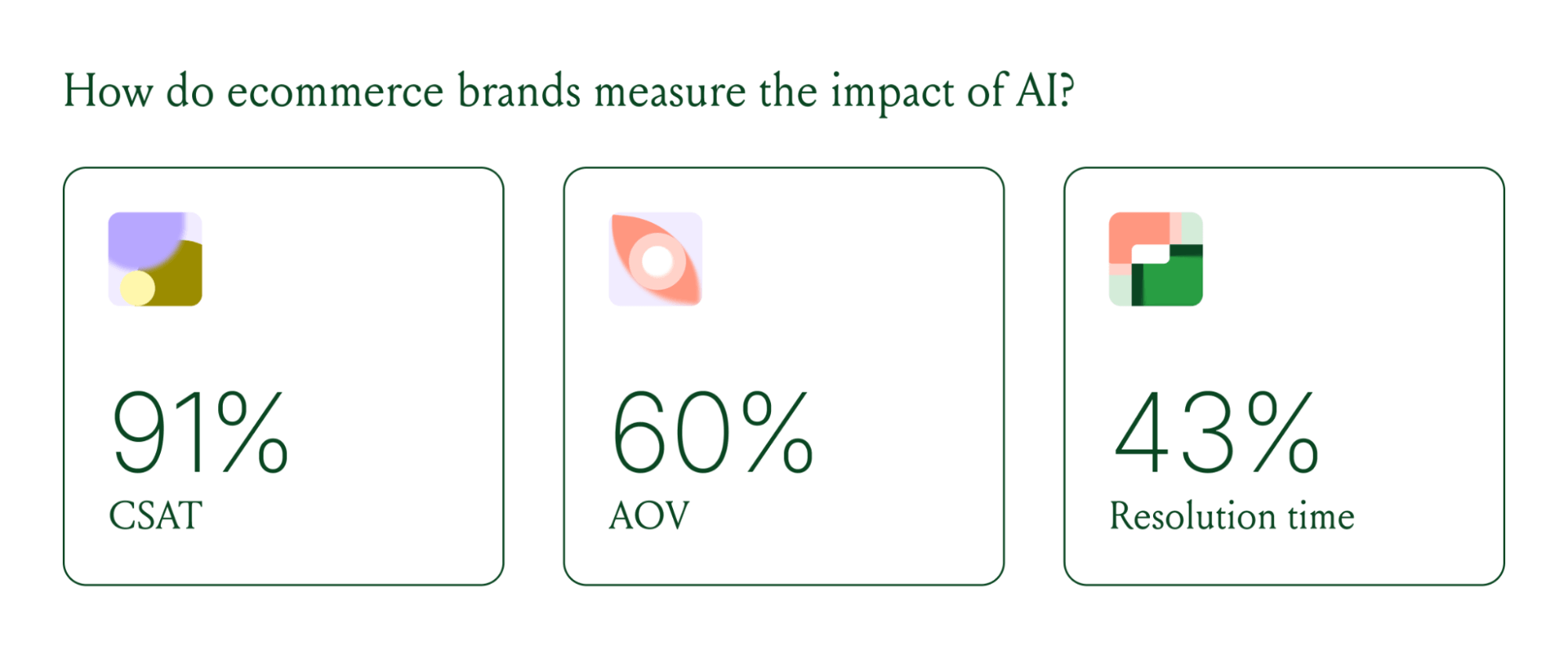
AI can now start a conversation, ease customer doubts, sell, upsell, and recover abandoned carts in a single conversation. When you’re only measuring CSAT, you’re ignoring the real ROI of conversational AI investment.
AI makes every conversational channel a storefront
Virtual shopping assistants now proactively engage shoppers, adapt to their needs in real time, and offer contextual product recommendations and upsells. When the moment calls for it, they can close the deal with a targeted discount.
Gorgias brands using AI Agent's shopping assistant capabilities nearly doubled their purchase rates and converted 20–50% better than those using AI Agent for support only.
Orthofeet, the largest provider of orthopedic footwear in the US, is a concrete example of this in practice. Using Gorgias, they achieved:
- 56% of support tickets automated in 2 months
- Email response times down from 24 hours to 35 seconds
- Double-digit revenue growth without adding headcount.
What this means for your AI strategy
The data tells a clear story: AI has evolved beyond a tool for handling tier 1 support tickets. It’s a core part of your revenue generation strategy.
57% of brands are already using AI for 26–50% of all customer interactions, and 37% expect that share to rise to 51–75% within the next two years. The brands building toward that range now are the ones who will have the operational advantage when it matters most.
The practical question isn't whether to invest in AI. It's where to focus first. Based on where brands are seeing the most impact, three priorities stand out:
- Start with high-volume, low-complexity tickets. WISMO (where is my order) inquiries, return policy questions, and order status updates are where AI delivers the fastest return. Automate these first.
- Expand into conversational channels. Social messaging and SMS are where AI is driving the most success right now.
- Connect AI performance to revenue metrics. If you're only measuring CSAT and response time, you're missing half the story. Add AOV, conversion rate, and incremental revenue to your reporting.
Want to go deeper on the full 2026 conversational commerce trends? Read the complete report for data across every major AI use case in ecommerce.
{{lead-magnet-1}}




Further reading

30 Live Chat Customer Service Templates, Responses, and Scripts for Any Situation
TL;DR:
- Live chat has a positive impact on customer loyalty, sales, and revenue.
- Predefined responses save time and ensure consistent quality.
- Templates for greetings, handling angry customers, managing returns, boosting sales, and ending chats positively.
- Leveraging automation through chatbots can enhance efficiency.
- Balance personalization and efficiency when using live chat templates and scripts.
79% of companies say that live chat has had a positive impact on customer loyalty, sales, and revenue. However, delivering consistently high-quality live chat experiences can be a challenge, especially when live chat agents repeatedly encounter the same questions and inquiries.
By using a set of predefined responses, you’ll enable your customer service team to save time, ensure consistent quality, and offer a smoother customer experience.
Whether you’re just starting to build out your live chat support strategy or looking to streamline your existing processes, here are some live chat response examples for the most common scenarios your support team will encounter.
{{lead-magnet-1}}
Live chat templates that greet customers
Getting the initial interaction right sets a positive tone and builds rapport with customers. First impressions count! Here are some templates to help your agents start the conversation on the right foot.
Template 1) “Hi there! Thanks for reaching out to [business name]. My name is [agent name] and I’m here to help. What can I support you with?”
Template 2) “Hey and welcome to [business name]! I’m [agent name]. What brings you here?”
Template 3) “Hello! This is [agent name] from [business name]. Thank you for reaching out. How can I help?”
Template 4) “Hi! Thanks for reaching out to us. I'm [agent name]. If you have any questions about [business name] and our [products/services], let me know!"
Personalized, templated greetings like these help live chat agents balance a consistent brand tone with efficiency.
Live chat scripts to address angry customers with care
Dealing with angry customers can be challenging, but having the right scripts on hand can make a big difference by speeding up resolution times and improving customer satisfaction. Here are samples of canned responses for de-escalating tense situations:
Template 5) “I really appreciate you reaching out to us to let us know this happened, [customer name] – I’m going to help resolve this for you right away. In order to get this sorted out, can you please share [photo, more information, etc] with me?”
Template 6) “I am so sorry for the inconvenience that you’ve experienced. That’s not the customer experience we strive for at [company name]. Let me look into this further and see what I can do to make this right. If necessary I can talk with my team to see what else we can do.”
Template 7) “[Customer name], I so apologize for the error on our end. I’m going to look into this for you right away. It should only take a couple of minutes. Thanks for your patience!”
Template 8) “I’m sorry to hear that you’ve experienced this issue and I apologize for the trouble. Let’s work together to find a solution that you're happy with.”
By acknowledging the customer’s frustrations and demonstrating a genuine desire to help, your live chat agents can turn a potentially negative situation into a positive one. That's something that Ren Fuller-Wasserman, Director of Customer Experience at bidet brand TUSHY, feels strongly about:
“We’re fervent believers that even the worst customer experiences are actually opportunities ripe for the Poo-Rus to convert into meaningful customer interactions, experiences where we can show a customer that we’re truly listening and have heard their concerns.
We can’t always solve every problem, but our customers knowing that they have a real live pooping human supporting them through their woes has been invaluable in building lifelong product and brand relationships.”
📚 Recommended reading: How TUSHY Approaches Customer Service vs. Customer Experience
Templates to streamline returns, cancellations, or exchanges
Handling returns, cancellations, exchanges, and other routine customer requests can be tricky, but having the right scripts can help ensure a smooth process. The following live chat examples can guide your agents through the necessary steps while providing a consistent high-quality experience for your customers.
💡 Tip: Gorgias's integration with Shopify means all customer context, like their contact information, past orders, order numbers, and shipping status are available for each agent, right in the customer sidebar. No switching tabs or asking customers for simple details again!
Template 9) “I can definitely assist you in returning or exchanging that item. In order to get the process started, can you send over your [order number, email, etc.]?”
Template 10) “I understand you’d like to cancel your order. Let me review the status and see what I can do. Can you provide me with [cancellation reason, order number, etc]?”
Template 11) “[Customer name], Confirming that I've canceled your order [number of last order] and issued a refund. As a reminder, the refund can take [# of days] to process. We refunded the original amount to the same credit card you used to make the purchase.”
Template 12) “No problem, we can certainly process an exchange for you. Could you let me know the item you’d like to exchange and the new item you’d prefer? ... Ok, I’ve swapped out [item name] for the [item name] you originally selected. Can you please confirm that the following [billing information, address, etc] on file is correct? … Is there anything else I can help with?”
Gorgias has empowered clients like Marine Layer, a clothing retailer known for its fun, vibey brand and high-quality clothes, with numerous retail locations and a strong online presence to excel by using templates.
Emphasizing customer-centric experiences, Marine Layer has harnessed chat scripts to streamline and harmonize communication and reduce first response time, resulting in a 68% decrease in resolution times. This approach, featuring clear, brand-aligned messaging, has significantly boosted online successes, enhancing customer support efficiency, customer satisfaction, and increasing online orders.
 |
 |
Discount coupon templates
Who doesn't love a good discount code? Letting shoppers know that you're running a promotion can help take them from browse to checkout.
💡 Tip: Gorgias Convert can automatically trigger coupon codes based on different behaviors. For example, yoga brand Manduka shares a discount code in chat when a shopper looks like they're about to exit the website.
Template 13) “Hey there [customer name]! Good news: [company name] is offering a discount on [promotional item or discount amount]. Questions? Let me know!”
Template 14) “I noticed you’ve been browsing our [product department name/category] collection. I wanted to let you know that we have a special bundle deal that includes [detail the deal]. Let me know if you want to learn more!”
Template 15) “I have some great news - we’re currently offering [discount percentage] off your entire order. Would you like me to apply that discount to your cart? “
Template 16) “Just to say thanks for being awesome, I’d like to offer you an exclusive [discount percentage] off coupon code to use on your next purchase.”
By adapting their approach, agents can elevate a simple sales pitch into a valuable, personalized experience. Through chat scripts, agents are equipped to inform website visitors about general information and perks such as qualifying for free shipping or securing a discount, serving as effective conversation starters that incentivize visitors to make a purchase before leaving a website.
Templates for managing out-of-stock items
Handling out-of-stock situations in response to customer requests can be a delicate balancing act. On one hand, you have disappointed customers who were eager to make a purchase, on the other, you have the realities of inventory management. With the right chat scripts, agents can maintain a positive experience. Try:
Template 17) “Oh shucks! [product name] isn't available right now. But, it will be back soon. Would you like me to put you on a waitlist so you’re the first to know when it’s back in stock?”
Template 18) “I apologize, but it looks like the [product name] you’re interested in is currently out of stock. We’re expecting a new shipment in the next [number range] business days. Why don’t you provide me with your email address or phone number and I can notify you by email or text as soon as it’s back in stock?”
Template 19) “Unfortunately, the [product name] is sold out at the moment. However, I’d be happy to suggest some similar items that are available if you’d like?”
Live chat templates to help boost sales
When customers are actively browsing your site and adding items to their cart, using proactive customer service messages in your chat scripts can provide valuable guidance and encouragement to help seal the deal.
📚 Recommended reading: How to Leverage the Power of Live Chat for Sales
Here are some scripts that team members can use:
Template 20) “The [product name] is one of our best sellers! Other shoppers love it for its [key feature] and [key feature].”
Template 21) “I noticed you’ve been looking at the [product name]. What questions about it can I help answer?”
Template 22) “Based on the items you’ve been exploring, I think you might really like our [product/service] line. It has [key features/benefits] that are designed for [features]. Does this sound like it could be a good fit?.”
The key is to strike the right balance between guiding the customer and empowering informed decisions. As Shinesty – a rapidly growing, innovative apparel brand known for its distinctive, themed underwear and custom-branded collections – gets it right. “We got a lot of praise from our customers, and they talk highly of our CX team after 1:1 interactions.” – Molly Kerrigan, Senior Director of Retention at Shinesty.
 |
 |
 |
By leveraging these sales-boosting live chat scripts, your customer service team can provide the high-touch service customers appreciate in real time and drive more conversions.
Tactful cross-selling and upselling chat scripts
Offering upgraded products can be a great way to increase your agents’ average order value. These templates can help your live agents navigate the cross-sell and upsell process with finesse.
Template 23) “Since you’re interested in the [product name], I wanted to let you know that we also offer a [upgraded product name] with [additional feature] and [additional feature]. Want to learn more?”
Template 24) “I noticed you had [product name] in your cart. [Product name] is the perfect compliment. Together, they [benefit] and [benefit].”
Template 25) “Great choice on the [product name]! While you’re here, I wanted to mention our [bundled product name] – it includes the [original product name] plus [additional item] and [additional item] for a discounted price. Let me know if you have any questions!”
By focusing on the customer’s needs and offering genuine value, live chat agents can turn these interactions into a win-win for both shoppers and your business.
Templates for ending chats on a positive note
Just as important as starting the conversation on the right foot, wrapping up the live chat conversation with a positive tone can leave a lasting impression. Here are some live chat templates to help agents gracefully conclude the conversation:
Template 26) “Is there anything else I can assist you with today? I’m happy to help. … If there is nothing else, feel free to reach out at any time with any more questions. Have a great day!”
Template 27) “I’m so glad we could resolve your issue today! If you need anything else, just send us a message any time. We're online during [hours] if you need a speedy response. Take care!”
Template 28) “Thanks for reaching out! Don't hesitate to shoot us a note if you have any other questions in the future. ”
Template 29) “Thanks for reaching out and letting us know about your experience with us! Have a wonderful rest of your day.”
Template 30) “Thanks so much for your order! I hope you love your new purchase!”
By leaving customers feeling valued and supported, agents are setting the stage for future positive interactions. The idea is to ensure the customer is happy. In fact, 91% of customers say good service is essential and makes them more likely to purchase from the company again.
Leverage automation for efficiency
While live chat templates and chat support scripts can significantly improve the quality and consistency of your customer support, automation takes things to the next level.
Gorgias Automate can handle routine, high-volume inquiries, provide a seamless customer experience, improve efficiency, resolution times and save you money. By combining the power of live chat templates and the efficiency of Automate, you can empower your live chat agents and support team to focus on more complex issues that require a human touch, enhancing the customer experience.
{{lead-magnet-2}}

How to Optimize Your Help Center for AI Agent
TL;DR:
- AI Agent, Gorgias’s conversational AI tool, uses your Help Center as its primary knowledge source to autonomously handle over 30% of customer email inquiries.
- Ensure your Help Center articles address all relevant topics such as shipping, orders, product information, and account management.
- An updated Help Center boosts AI Agent's ability to deliver accurate and relevant responses.
- Ready your Help Center for the upcoming AI Agent beta in May 2024 by using our 50+ article templates.
Your Help Center is a great resource for sharing information with customers. And as AI technology transforms customer support, the Help Center now also serves as a data source that provides AI with the knowledge to answer questions.
Gorgias’s AI features function by drawing on information from knowledge sources. For example, Gorgias’s AI can draw upon your past support tickets to generate Help Center content. Likewise, our upcoming AI Agent uses your Help Center to write and send answers to customer questions.
Our AI Agent is coming July 1st (with a Beta starting in May). Below, we'll explain why an up-to-date Help Center that covers all your policies is the best way to prepare for AI Agent, gain admission to the Beta, and resolve 30%+ of your email support interactions.
{{lead-magnet-1}}
Help Center: The foundation of AI Agent’s knowledge
AI Agent is a conversational AI tool that answers customer support emails by learning your brand’s policies and processes from your Help Center. It can understand a wide array of questions and generate unique responses that are helpful, personalized, and accurate.
Unlike AI tools like ChatGPT or Gemini, which are trained on public information, AI Agent specifically works with your data. Its first layer of support is your Help Center, a database of articles about your products and policies. From there, you can complement its knowledge with data from Macros and connected ecommerce tools like Shopify.
With AI Agent as your level 1 support, your team can focus on escalated or VIP tickets and other projects you may not currently have time for.
The crucial step to fully prepare AI Agent is to make sure your Help Center articles are accurate and up-to-date. You don’t need to have your Help Center published or linked on your website — however, articles must be published and not saved as drafts.
How to tell if your Help Center is ready for AI Agent
To hit the ground running with AI Agent, your Help Center must meet a few criteria. Here’s a checklist to prepare your Help Center:
✔️ Answers all relevant topics
Ideally, customers should find answers with just one click. You can achieve this by publishing articles that answer your customers’ top concerns.
We’ve compiled the most important Help Center articles to have, with the starred questions being essential to include. You can skip to the bottom of this post to find templates for these topics:
Shipping & Tracking
- ⭐️ Where is my order? (WISMO)
- ⭐️ How do I track my order?
- ⭐️ How do I get my tracking number?
- ⭐️ How much does shipping cost?
- ⭐️ Do you offer free shipping?
- ⭐️ International shipping / do you ship worldwide?
- ⭐️ Do you offer expedited shipping?
- ⭐️ How long does delivery take?
- Why can’t I track my order?
Orders & Payment
- ⭐️ Can I edit or add anything to my order?
- ⭐️ How do I apply promo/discount codes?
- What methods of payment do you accept?
- Where do I get promo codes/discounts?
- My promo code isn’t working
- Forgot to add a promo code (but already purchased)
- How do Shop Pay installments work?
- How do I update the billing information on my order?
- How do I purchase a gift card?
- How do I use a gift card for my purchase?
- Do you price match for sales?
Order Issues
- ⭐️ What is your return/exchange policy?
- ⭐️ What is your cancellation policy?
- ⭐️ How do I initiate a return?
- ⭐️ How do I initiate an exchange?
- ⭐️ How do I cancel my order?
- ⭐️ How do I get a refund?
- ⭐️ Order is marked delivered but not here
- ⭐️ What do I do if I receive the wrong item in my order?
- Right product was delivered but wrong size/style/color/etc.
- Item is missing from my order
- Does not fit/not true to size
- I’m having a reaction to the product
- Order damaged
Product Information
- Sizing
- Styles
- Materials/Ingredients
- Product recommendations
- How to use this product
- How long does this last?
- How to store this product (if it’s perishable)?
- Product care / washing / cleaning
- Differences between similar products
Accounts/Subscriptions
- ⭐️ How do I use these benefits/rewards points?
- ⭐️ I’m having trouble logging in
- ⭐️ How do I cancel my membership/subscription?
- ⭐️ How do I skip a subscription shipment?
- ⭐️ How do I update my subscription items?
- How do I set up an account?
- How do I become a member/subscriber/loyalty program?
- What are the member benefits? Why should I sign up?
- I forgot my password / Reset my password
- How do I change my default address?
✔️ Up-to-date and accurate articles
As an online business, your information constantly changes, including policies, product updates, and brand revamps. Review older articles, particularly those over a year old, to ensure the information is still accurate.
Here are the most important elements to update:
- Policies, e.g. international shipping, order processing times, return windows, your contact details
- Product names and availability
- Links (to key pages on your website or self-service portals)
✔️ Includes important links
If your articles point to other web pages, you’ll want to make sure the right texts are hyperlinked, and the links do not lead to 404 pages.
Some important links to include:
- Order tracking portal
- Returns & exchanges portal
- Loyalty program portal
💡 Pro Tip: Avoid including statements in your articles like, “To resolve this issue, contact us at [email]” as this confuses the AI Agent.
✔️ Articles are published
Ensure your articles are published so AI Agent can learn from them. Whether the article is Unlisted or Public, you must take them out of Draft mode. An article left in Draft mode remains invisible to AI Agent. To confirm that your article is published, check the top right corner of the editor to ensure the article is “Published” and not “Unsaved.”
 |
That said, if you’re not ready to share your Help Center with customers, you don’t need to publish the Help Center itself.
 |
Related: How to boost your Help Center’s visibility
How to build a Help Center as quickly as possible
If you don’t currently have a Help Center, you can set one up and start filling it with articles within a couple of hours. Below are three strategies that will let you create the most comprehensive Help Center, fast.
1) Use AI to create articles
When you create a Help Center on Gorgias, you can access the AI Library. The AI-generated articles are based on your past conversations with customers and their concerns. You can edit them to suit your brand voice and policies.
 |
As of now, only accounts with a single Shopify store connected have access to the AI Library. We expect multi-store accounts to gain access to this feature by mid-May 2024.
Related: Our AI Library Help Doc
2) Use article templates
Accelerate the setup of your Help Center by using pre-written article templates. These templates cover common customer inquiries and ensure consistency in response quality and format.
Gorgias offers six ready-to-use Help Center article templates that cover essential topics. These templates enable you to quickly establish a strong database without wasting agents’ time.
 |
3) Leverage existing content
Take stock of your existing content, such as FAQs, product guides, and blog posts. Convert this content into Help Center articles and properly categorize them based on the topic for seamless user navigation.
💡 Pro Tip: Each article should only ask one question. This helps AI Agent to easily decipher the purpose of each article.
 |
50+ Help Center Article Templates with Answers
To speed up Help Center creation, we’ve provided article templates covering topics from shipping and tracking and account creation to product information. Simply edit the details and add the necessary links based on your policies.
Shipping & Tracking
⭐️ Where is my order? (WISMO)
To check the status of your order, please visit our Order Tracking Portal and enter your email address and order number. We update our tracking information as soon as it is available.
⭐️ How do I track my order?
Once your order has shipped, we'll send you a confirmation email with a tracking link. Click on the link to view the latest updates on your order and its estimated delivery date.
⭐️ How do I get my tracking number?
Your tracking number will be emailed to you when your order ships. If you haven't received it, please check your spam folder. If it's not there, please contact our customer support team.
⭐️ How much does shipping cost?
Shipping costs vary depending on the weight of your order and the destination. To view shipping costs, simply add items to your cart, proceed to checkout, and enter your shipping address. The applicable shipping fees will be displayed before you finalize your order.
⭐️ Do you offer free shipping?
Yes, we offer free standard shipping on orders over [$#]. A standard shipping fee will be applied to orders under [$#].
⭐️ Do you ship worldwide?
We ship to [#] countries worldwide. Shipping costs and times vary depending on the destination. For detailed information and to see if we ship to your country, please visit our international shipping page.
⭐️ Do you offer expedited shipping?
Yes, we offer expedited shipping options for most locations. You can select your preferred shipping method at checkout. Additional charges will apply for expedited shipping.
⭐️ How long does delivery take?
Delivery times vary depending on the destination and the shipping method selected. For standard shipping in [country], expect your order to arrive within 5-7 business days. International orders may take 10-20 business days.
Why can’t I track my order?
If you can’t track your order, it may be for several reasons: the tracking information is not yet available, the tracking number is incorrect, or there may be a delay in the tracking system updates.
Please allow up to 24 hours for your tracking information to become available after receiving your shipping confirmation email. If you still face issues, contact our customer support team for further assistance.
Order & Payment
⭐️ Can I edit or add anything to my order?
Once an order is placed, we are unable to make changes to the order. However, if you need to update your shipping address or contact information, please contact our customer service team immediately after placing your order.
⭐️ How do I apply promo/discount codes?
To apply a promo or discount code, proceed to checkout and enter your code in the 'Discount Code' field. Click 'Apply' to see your new total before finalizing your order. Only one code can be used per order.
What methods of payment do you accept?
We accept various payment methods including Visa, MasterCard, American Express, and PayPal.
Please note that we do not accept personal checks or money orders.
Where do I get promo codes/discounts?
To get promo and discount codes, make sure to subscribe to our newsletter, check our homepage, and follow us on social media to get the latest deals.
My promo code isn’t working.
The promo code you entered may not work due to an incorrect input (check that you have entered the right letters and numbers), specific conditions (like minimum spend), or an expiry date. If you continue to experience issues, please contact our support team for assistance.
I forgot to add a promo code but already made a purchase.
If you forgot to apply a promo code at checkout, please contact our customer service team as soon as possible. Depending on the status of your order, our team may be able to apply the promo code for you.
How do Shop Pay installments work?
Shop Pay Installments allow you to split your purchase into multiple payments, interest-free. At checkout, choose Shop Pay, select 'Installments', and follow the prompts to set up your payment plan.
How do I update the billing information on my order?
To update your billing information, you may log in to your account and change your information from the Account Settings page. If you do not have an account, please contact our customer service immediately.
How do I purchase a gift card?
Gift cards can be purchased directly from our website. Visit our gift card section, choose the amount, and complete the purchase. The gift card will be directly emailed to you or to the specified recipient.
How do I use a gift card for my purchase?
To use a gift card, enter the code in the 'Gift Card or Discount Code' box at checkout. The value of the gift card will be deducted from your order total.
Do you price match for sales?
We offer price matching for sales within [specific timeframe] of purchase. If an item you’ve bought goes on sale within this period, please contact our customer service to adjust the price difference. Note that certain conditions may apply.
Order Issues
⭐️ What is your return/exchange policy?
We accept returns and exchanges within [30] days of purchase. Items must be in their original condition and packaging. Some items may not be eligible for return. Please see our detailed return policy for more information.
⭐️ What is your cancellation policy?
Orders can be canceled within 24 hours. After this period, we may not be able to cancel your order as it might already be in processing or shipment.
⭐️ How do I initiate a return?
To initiate a return, please visit our Returns & Exchanges Portal and enter your order number and email address.
⭐️ How do I initiate an exchange?
To exchange an item, please visit our Returns & Exchanges Portal.
⭐️ How do I cancel my order?
If you need to cancel your order, please contact us immediately. If your order has not yet been processed, we will cancel it and issue a full refund. If the order is already processed, please refer to our Returns & Exchanges policy.
⭐️ How do I get a refund?
Refunds are processed upon receipt and inspection of the returned item. Please allow up to 10 business days for your refund to be credited back to your original form of payment.
⭐️ Order is marked delivered but not here.
If your order is marked as delivered but you haven't received it, please check around your delivery location and with neighbors. If you still can't locate it, contact our customer support for assistance.
⭐️ What do I do if I receive the wrong item in my order?
If you receive the wrong item, please contact our customer service immediately. We will arrange for the correct item to be sent to you and provide instructions for returning the incorrect item.
I received the right product but in the wrong size/style/color.
We apologize for any inconvenience caused. Please contact our customer service team within [#] days of receiving your order to initiate an exchange for the correct size/style/color. Visit our Returns & Exchanges policy for more information.
What should I do if an item is missing from my order?
We're sorry to hear that you're experiencing issues with your order. Please check your confirmation emails to ensure all items were included in your shipment. If an item is missing, please contact our customer service team immediately so we can resolve the issue.
What can I do if my item doesn't fit or isn't true to size?
If the item you purchased does not fit, you can return it for a refund or exchange it for a different size. Please refer to our Returns & Exchanges policy for details on how to initiate a return or exchange.
What should I do if I'm having a reaction to the product?
Your safety is our priority. Please stop using the product immediately and consult a healthcare professional as needed. To report a reaction and request a return or exchange, contact our customer support team. We also recommend checking the ingredients list to identify any potential allergens.
What should I do if my order arrived damaged?
We apologize for the inconvenience. Please take a photo of the damaged item and email it to our customer service department within [#] days of delivery. We will assist you with a return or exchange as quickly as possible.
Product Information
Where can I find sizing information?
Our sizing runs true to size unless stated otherwise.
For detailed sizing information, please visit our Sizing Guide page. The guide includes size charts and tips on measuring yourself to ensure the best fit.
Which style is best suited for my needs?
Our various styles cater to different preferences and requirements. For a breakdown of our styles and their best uses, please check out our detailed Style Guide.
What are the materials or ingredients used in this product?
We use high-quality materials/ingredients to ensure the best experience with our products. For a full list of the materials or ingredients in this product, visit the product page.
What product do you recommend for [trait/preference/condition]?
For [trait/preference/condition], we recommend our [Product Name], designed to provide a [benefit here].
How do I use this product?
For optimal results, follow these steps:
- Step 1
- Step 2
- Step 3
- Step 4
How long does this product last and how should it be stored?
This product typically lasts [X amount of time] when used as directed. Store in a cool, dry place away from direct sunlight. For perishable products, refrigeration may be required.
What's the best way to care for this product?
To maintain the quality of your product, we recommend [specific care instructions, e.g., machine wash cold, hand wash only]. For more detailed care instructions, please visit our Care Guide.
What's the difference between Product A and Product B?
Product A is designed for [specific use], while Product B is better suited for [different use].
Accounts/Subscriptions
⭐️ How do I use these rewards points?
You can redeem your rewards points at checkout. Enter the amount of points you wish to apply in the 'Rewards' field, and the discount will be applied to your total.
⭐️ I’m having trouble logging in.
If you're having trouble logging into your account, please try resetting your password using the 'Forgot Password' link on the login page. If you still experience issues, contact our customer support team for help.
⭐️ How do I cancel my membership/subscription?
To cancel your membership or subscription, please log into your account and navigate to the 'Subscriptions' section. You can choose to cancel your subscription from there. If you need assistance, our customer service team is here to help.
⭐️ How do I skip a subscription shipment?
You can skip a subscription shipment by logging into your account, going to the 'Subscriptions' section, and selecting the shipment you wish to skip. Please do this before the billing date for the next shipment.
⭐️ How do I update my subscription items?
To update the items in your subscription, log into your account and visit the 'Subscriptions' tab. You can add or remove products or change the quantities for your next shipment.
How do I set up an account?
Create an account [here] by using the same email address you ordered with.
Please note that if you haven’t created a password, you do not have an account. Additionally, signing up for our emails or ordering doesn't mean you have created an account.
How do I become a member/subscriber/loyalty program?
Become a member by visiting our Membership page.
What are the membership benefits?
You’ll earn many perks as a [company name here] member! Upon joining, you’ll receive a 10% off discount on any purchase.
Plus, more benefits:
- Points for every dollar spent
- [$] off anytime you refer a friend
- A special birthday gift
- An anniversary gift
I forgot my password.
To reset your password, please click [here].
How do I change my default address?
You can change your default address from your Account settings.
If you need to change your shipping address for a current order, please [contact us].
{{lead-magnet-2}}

The Gems of Learning with TJ Balo
TJ’s Top Advice:
- As a leader, foster openness and creativity by encouraging team members to regularly share their ideas.
- Tell your customers when you update a product. Including them in the conversation can build trust and bring about valuable feedback.
- Treat your customers as your stakeholders. They are the driving force behind your brand and deserve to have their voices heard.
- Leadership entails continuous learning from your team, customers, and the industry at large.
Everybody wants to skip to the answers, but for TJ Balo, there is more joy to be found in the learning. Since 2014, TJ has been the Head of Customer Relations and Marketing at Andrea Iyamah, a fashion line founded in 2011 by Nigerian designer Andrea Dumebi Iyamah. From Toronto, TJ leads a group of customer service reps from around the world, including New York and Nigeria, teaching them the ins and outs of customer service operations, logistics, and lingo.
Encouraging out-of-the-box ideas
Brainstorming is one of the most exciting parts of the job for TJ, who’s always finding ways to improve the customer experience. When his team gets together, there is no wrong answer. TJ encourages his staff to think outside the box. Whether it’s a bold social media marketing play or a never-before-done collection, he wants to hear it all.
“I always want them to bring new concepts and ideas to the table. I think that for success, it's not about the implementation. It's about what you’re thinking,” he says.
The vulnerability to share out-of-the-box ideas allows his team to create a playground where creativity is the only goal. It’s where every idea has a chance to shine when the time is right, whether it’s in a month or in the next year. All TJ asks is for every person to be fearless and confident: “Let your presence be known. The minute I can identify you, that's when I know that you're doing something right and I'm doing something right.”

Including customers in the conversation
Online businesses, especially fashion brands, are no strangers to the challenge of meeting customer expectations. Sometimes colors don’t appear the same way on a screen as they do in person. Other times, sizes may run a smidge too loose or snug. Regardless of the issue, “it’s about consistent communication first,” TJ says.
How can you show up for the customer and show them they matter? For TJ’s team, customer satisfaction is their guiding light. They always remember to throw in an incentive for customers, whether it’s a refund, discount, or replacement.
TJ pays the same heed to internal feedback. His team’s opinion takes precedence before a product is released. They answer questions like, “What’s missing?” “Does it translate well to different body types?” People naturally gravitate towards good products, and TJ wants to hit that mark as closely as possible the first time around.
When mishaps occur, broadcasting the solution to their customer base is imperative. “I think that that's one step a lot of fashion and retail brands miss. They take the feedback in, and they come out with a new or better product, but the customer doesn't know because they don't communicate that message to them to say, ‘We took this in from you, we have this new version out, come and try it again,” he says.
Treating customers as stakeholders

Peruse Andrea Iyamah’s Pinterest and their inspirations draw from a cornucopia of African cultures, stories, and experiences. Traditional details can be found in every piece, from a modern sleeveless dress in the recognizable silhouette of a Kaftan to jumpsuits adorned with sculptural pleats similar to those found on a Gele. The room to innovate is boundless, especially with their Treasures.
Treasures, the term of endearment for their customers, are the backbone of Andrea Iyamah. Without the support and feedback of their Treasures, the brand would not have crossed international borders, dressing icons like Michelle Obama, Gabrielle Union, Ciara, and Kate Hudson.
“We treat our customers as our stakeholders. We believe they’re the driving force of the brand and its vision, hence our goal to make them feel valued and appreciated,” TJ emphasizes.
On Instagram, they spotlight their Treasures’ voices with Instagram carousels of rave reviews on Twitter. One Treasure confidently states, “Andrea Iyamah never misses… I swear.”
“You have to take in every single detail. That is where the brand meets the stakeholder. That's where they both come together. I never give credit to just either or. They both come together to create and to curate this amazing masterpiece.” —TJ Balo on handling custom orders
Continuous learning is vital to leadership
For a business that’s been operating for over a decade, you could say Andrea Iyamah has accomplished everything. But for TJ, the learning never stops. “Research and ensuring that you're actually taking in that research is the genesis of staying on the cutting edge.”
He recognizes that they aren’t the first to do it in their industry, that there are countless other companies making great strides. Nonetheless, he wants to be the best to do it. “As we grow, as a business, as a brand, as a company, even just as a team generally, I want to be a reflection of what I would like from my team. You can never know it all. Continuous learning is also leadership.”
{{lead-magnet-1}}

There’s More to Chat Than You Think: Debunking 5 Chat Myths
Customers who use chat support are 2.8 times more likely to convert than those who don’t. Despite its proven impact, misconceptions around chat’s limited scope — reducing it to only live interactions — persist, creating a missed opportunity for the online stores that could benefit from it the most.
The reality is chat is a versatile tool that can adjust to company needs, whether it’s a self-service tool that runs on its own, a channel for providing live support, or both.
For ecommerce businesses on the fence about incorporating chat into their customer service operations, we're here to clear up five of the most common myths about chat’s functions, costs, and benefits. After that, we’ll lay out a five-step guide to efficiently set up chat so you can start delighting customers now.
{{lead-magnet-1}}
What’s the difference between Live Chat and Chat?
Live chat is real-time communication that allows customers to interact with a customer service representative instantly. It's the digital equivalent of walking into a store and speaking directly with an employee.
On the other hand, chat is more than just live interactions; it includes automated responses that ensure customers receive support, even without agents. This hybrid approach allows businesses to deliver 24/7 customer support.
Chat solutions, like Gorgias Chat, blend live chat's on-demand nature with automation and AI. Chat allows businesses to provide support regardless of time zone and staff availability.
Five chat myths debunked
Confusion about what chat can do often discourages businesses from leveraging the powerful customer service tool. Below, we’ll be myth-busting five common misconceptions about chat to reveal its true potential.
Myth 1: Chat is expensive
Contrary to popular belief, chat can be a cost-effective solution to operate customer service. Brands can earn 10x more revenue by implementing chat and, in turn, operate a smaller support team. Support agents can be costly, so using chat to deflect tickets can be a quick way to optimize both time and budget.
 |
Myth 2: Chat is only for big companies
Chat's usefulness transcends business size and breaks down silos in customer service by allowing customers to get answers on their own time. As a customer service tool, any business engaging with customers can benefit greatly from it to tackle pre-sales questions and resolve issues efficiently.
Myth 3: Chat requires staff to operate
As previously mentioned, chat can handle both live and automated interactions, which means no agents are required to manage it. Online stores can set up chat on their websites, allowing it to run 24/7. Businesses can decide whether to enable live chat or keep it fully automated.
 |
Related: Customer service outsourcing: why, when, and how
Myth 4: Chat increases your tickets
Due to automation-based conversations in chat, ticket volume does not necessarily increase when customers use chat. A ticket is only created when a customer converses with a live agent. Unlike using social media as a support channel, chat empowers customers to self-serve and resolve issues on their own.
 |
Myth 5: Chat decreases customer satisfaction
Contrary to popular belief, chat has a positive impact on customer satisfaction. Based on Gorgias data, brands experienced a 1% increase in CSAT when using automation, including chat. The improved satisfaction can be attributed to the efficiency of automated answers and the absence of wait times.
 |
Myth 6: Email is just as good as chat
While email remains a staple, chat offers immediate engagement in the shopping flow that can create opportunities for upselling. For example, an on-site campaign toolkit like Gorgias Convert becomes a seamless extension of your sales and support strategy with the ability to recommend products within chat.
Since chat simplifies the process of reaching out, it is also easier for companies to build trust with their customers. The fewer hurdles customers have to jump over to get an answer, the more readily they will trust your brand.
 |
Read more: You’re doing it wrong: better ways to use email as a customer service channel
The best Chat setup in 4 easy steps
Now that you know chat isn’t expensive and can give you a great return on investment, you can start making the most of it. Here’s the optimal way to set up chat in four, simple steps.
1. Customize your chatbot avatar
A study from the University of Göttingen found that customers value clarity on whether they're conversing with a bot or a human agent. Their satisfaction did not dwindle when issues went unresolved, knowing they were interacting with a chatbot.
You can add “Bot” to your chat name on Gorgias whenever automated messages are sent. Enabling this improves the customer experience by letting them know exactly who they are talking to.
In addition, customizing your chatbot avatar to your company logo instead of leaving it as the default robot avatar adds a personal touch. If live chat is enabled, uploading individual profile photos for your agents will help customers feel more comfortable since they’re able to associate a face with the agent they’re talking to.
2. Set up Quick Responses to answer frequently asked questions
Frequently asked questions can quickly dominate your inbox, but with Quick Responses, you can offer fully automated answers. This allows you to provide customer service on an international scale without worrying about increasing agent workload.
Gorgias Automate upgrades your customer experience with an entire automation toolkit that includes Quick Responses in Chat. You can display up to six Quick Responses at a time, providing customers with immediate answers to their questions.
 |
3. Set live chat hours
While many assume live chat needs to be available for extended hours, the truth is that live chat hours can be tailored to what suits your brand best, even if that's just one hour a day. The key is to clearly communicate when an agent will respond to customers outside of these hours.
Customers prefer live chat because of the lack of wait times, so if you’re offering live chat, be sure your agents meet customer expectations by answering chat conversations in 30 seconds. Strengthening customer relationships is crucial to building trust and, therefore, increasing your ecommerce retention rate. On Gorgias, setting your business hours will directly update how Chat appears to customers.
 |
4. Build a Help Center to provide Article Recommendations in Chat
A help center is a database of articles that range from frequently asked questions and guides to video tutorials and policies. On Gorgias, Chat can use your Help Center articles to enrich automated answers with detailed information. For instance, fashion and apparel stores can create a sizing guide article, which Chat can then reference, guiding customers directly to the information they need.
 |
Accomplish the work of 3 agents with Gorgias Automate
Gorgias Automate enabled luxury luggage company July to handle the equivalent workload of three extra agents. With tools like Chat, July went from handling repetitive queries to focusing on more significant customer issues. This significant change enhanced their support efficiency and customer satisfaction.
Want to become a success story? Discover how Gorgias Automate can streamline your support workflow and elevate customer experience. Book a demo today.

New Data Shows 4 Ways Automation Impacts Customer Service
Since ChatGPT was introduced in November 2022, customer service automation has stormed its way into almost every industry, including ecommerce. This leap in technology has paved the way for companies to increase their support efficiency dramatically, as demonstrated by the buy-now-pay-later service Klarna, which recently resolved two-thirds of customer service chats with AI.
The business gains arising from automation are evident. Faster and smarter tools mean less time handling mundane tasks and more time improving the customer journey with meaningful conversations, personalized experiences, and seamless upselling opportunities.
At Gorgias, our mission is to elevate customer experiences with automated solutions. To determine the impact, we analyzed data from over 14,000 merchants who use automation compared to those who do not.
Our data revealed a 36% increase in repeat purchases, a 37% reduction in first response time, a 52% reduction in resolution time, a 27% decrease in the ticket-to-order ratio, and a 1% increase in CSAT when automation is used.
These compelling results assert our belief in automation as the next, inevitable step for scaling support teams.
“AI is going to help us transform ourselves into deeper thinkers by taking over simple, standardized functions” —Ron Shah, CEO and Co-founder at Obvi
The shift in customer service: doing more with less
Before automation, customer service teams scrambled to hire more agents as their customer bases grew. When Black Friday and other peak seasons arrived, hiring more agents was the Band-Aid fix. Today, companies are opting for leaner support teams as automation allows them to do more with less. The benefit? Teams can scale and improve the quality of service without temporarily bringing on new staff.
Automation works like a junior support agent but at a higher efficiency. It can handle frequently asked questions like where is my order? and customize responses according to brand voice. So, as repetitive tasks are handled in the background, agents can focus on more complex tickets, such as product-specific questions or technical issues that require troubleshooting.
“Before, agents had to handle it all. Now, they rarely take a ticket about frequently asked questions. They’re only handling escalations, special product-related questions, and things like that.” —Caela Castillo, Director of Customer Experience, Jaxxon
Automation is redefining customer experiences
The flexibility of automation makes it the ideal tool for personalized customer service. Aside from being a keyboard shortcut or macro, automation can be a hands-off assistant that can engage customers and influence as much as 25% of revenue.
At Gorgias, automation is at the core of our products, powering almost every feature in Helpdesk, Automate, and Convert. It allows merchants to deliver delightful and personalized customer interactions across various channels and touchpoints in the customer journey.
While automation is only one of many factors, we’ve found it to positively impact support performance metrics. Based on our data, merchants who used automation saw clear improvements in repeat purchase rates, response times, resolution times, tickets per order, and CSAT scores.
Automation led to 36% more repeat purchases
Retaining customer loyalty is challenging even when brands launch loyalty programs, as customers are discouraged by the effort required to receive rewards. However, Gorgias data shows that simply using automation can increase repeat purchase rates. Within 28 days, merchants who automated up to 20% of tickets increased their repeat purchase rate by 8 points.
 |
Yoga apparel brand Manduka used Gorgias Convert's on-site campaigns to influence customers to purchase multiple products. The campaign convinced shoppers to hit a $100 order total for free shipping by recommending small additional items they may be interested in. Their campaign brought in nearly $12,000, proving that automation can directly affect revenue.
“We want to be able to target our repeat customers who have purchased a lot, and say, ‘Welcome back! Here's a new product that would go wonderfully with the item you bought last time.’ It would be a wonderful translation of the in-person retail experience where staff know what you like, so they can assist you better.” —Jessica Botello, Customer Service Manager at Manduka
Automation accelerated first response time by 37%
 |
Automated responses resolve tickets in zero seconds and result in faster first response times. On average, merchants using automation respond 37% faster than ones who don’t automate customer service.
Responding to customers as quickly as possible is especially important during busy seasons like Black Friday and Cyber Monday so that revenue-generating questions don’t get pushed to the backlog. The customer experience team at health supplement brand Obvi was able to drive 3x more purchases from support conversations compared to previous years.
Faster response times also mean agents are able to make stronger connections with customers. For Obvi’s CX team, it translated to more time to engage with their vibrant Facebook community:
“Instantly, our CX team had time to prioritize important matters, like being active in our community of 75,000 women instead of sitting answering emails.” —Ron Shah, CEO and Co-founder at Obvi
Customer issues are resolved 52% faster with automation
When customer tickets are automated, resolution times improve dramatically. Merchants using automation resolved tickets 52% faster than those without.
Automation is especially helpful in answering pre-sales questions. High-end luggage retailer July deflected 450 tickets a month immediately after activating Quick Responses, one-click FAQs that live in Chat. Their Head of Operations and CX, Alex Naoumidis, notes that setup was “so easy, with a huge payoff.”
This significant efficiency gain ensures customers are well-educated about their products, leaving agents time to personalize the rest of the customer journey.
Automation decreased ticket-to-order ratio by 27%
As automated responses provide quick solutions to customer issues, customers need to contact support less. Based on our data, brands that automate 10% or more of their tickets see a decrease in billable tickets per order. Brands with little to no automation do not see a significant improvement in the ticket-to-order ratio.
For apparel brand Shinesty, automating more than 10% of tickets greatly decreased the number of tickets per order by 27%. Self-serve tools like interactive conversations called Flows and Article Recommendations enabled customers to solve issues relating to discounts, subscription policies, and returns on their own.
 |
“Automate would be useful for any ecommerce company that needs to lower their ticket counts, or wants to provide a more consistent experience.” —Molly Kerrigan, Senior Director of Retention at Shinesty
30 days of automation allow brands to scale faster
 |
Thirty days after setting up automation in Gorgias, brands enjoyed a 1% increase in CSAT score, a 4.51 score compared to 4.46 for non-automating brands. Even though satisfaction only nudged an inch, the positive effects reached support teams, improving agent morale and team alignment.
Molly Kerrigan, Senior Director of Retention at Shinesty, emphasizes the importance of preserving quality customer interactions during growth, "We get a lot of praise from our customers, and they talk highly of our CX team after 1:1 interactions. We can’t lose that as we scale."
Since Gorgias provides in-depth conversation analytics, CX teams are finally able to see their impact.
“Tracking customer satisfaction scores in Gorgias is a really big help to us. Before, we didn't know if we were doing well or not, but now we can see people like the service we provide. We use the KPI tracking data for internal monthly meetings to review performance and see where we can improve,” says Deja Jefferson, Customer Experience Manager at Topicals.
Clearly, balancing automation with personalization significantly improves the customer journey. Given that customers with positive customer experiences are 2.7 times more likely to do repeat business, the value of automation is unmistakable.
In the future, agents will be AI coaches
AI progress has advanced in a short amount of time. But to remind you, this is only the beginning of what automation and AI can do in customer service. We envision AI as a constant work in progress, meant to intake information until it is capable enough to handle more complex tasks. This means agents will spend more time building strong customer connections and finding ways the business can grow.
Gorgias is at the forefront of this evolution, developing automation and AI-driven solutions like an AI-generated Help Center, an AI Agent, a generative AI assistant that autonomously answers customer questions, and an Interaction Quality Score to measure and report on AI-customer interactions. Gorgias aims to transform how support teams and customers interact with AI, paving the way for more impactful customer experiences on a human scale.
{{lead-magnet-1}}

Boost Your Help Center's Visibility: Proven Strategies to Increase Article Views
TL;DR:
- A Help Center is an article database for customers to get the answers they need without contacting a support team
- Create relevant Help Center articles by monitoring statistics like customer contact reasons, ticket intents, and CSAT scores
- Leverage SEO by including relevant keywords and internal links in articles
- Gorgias Automate can help promote your Help Center articles via on-site article recommendations
The Help Center is more than a database to make the lives of your agents and customers easier. It's also an ingenious way of creating brand awareness. By enhancing your Help Center's visibility, you carve new pathways for shoppers to discover your brand while solidifying your brand's reliability with loyal followers.
This guide delves into practical methods for increasing your article views and turning your Help Center into a dynamic hub with Gorgias. We’ll look at the basics of a Help Center, how to structure it based on statistics and SEO, and how to share it across multiple channels.
What is a Help Center?
A Help Center is a knowledge database of articles addressing common questions about your products, services, and brand. It empowers customers to find solutions on their own without needing to contact your customer service team.
A Help Center can include how-to articles, policies, answers to frequently asked questions, and more. Each article can also be supplemented with images, GIFs, and videos to better guide customers toward solutions.

Two strategies to make your Help Center stand out
Boosting your Help Center's visibility involves two key elements: understanding customer concerns to create relevant content and using SEO to increase article views.
Focusing on your customers' specific needs and questions allows you to provide articles that directly address their concerns.
Let’s delve into the two strategies you can use with Gorgias.
Strategy 1: Understand customer concerns to create relevant articles
The first step to creating Help Center articles is understanding your customers’ problems. Identifying their concerns ensures your content aligns with what questions need clarification.
Here are five ways to uncover customer concerns with Gorgias Statistics:
1) Monitor Ticket Tags
Tags are labels for categorizing tickets by topic or customer intent. Regularly reviewing tags helps identify common customer inquiries. Generally, the more a tag is used, the greater the need for clarity on that topic.
On Gorgias, navigate to Statistics -> Ticket Insights -> Tags to see tag usage frequency. This view gives you an overview of popular tags. You can also adjust the view by filtering by app integration, channel, and date range.
💡 Pro Tip: The most frequently used tags can help inform what articles you should include in your Help Center. Based on the screenshot below, it would be smart to create articles about FAQs and a Price Match policy.

2) View Intent Statistics
Intent Statistics provide valuable insights into why customers contact support. By analyzing these statistics, you can understand the primary reasons behind customer queries.
On Gorgias, go to Statistics -> Ticket Insights -> Intents to review the usage frequency of different customer intents.
This feature provides a clear bar graph view of customer concerns that are frequently mentioned in messages. You can also change the view using filters such as channel and date range.

3) Look into Contact Reasons
Another way to learn about your customers’ concerns is by looking at contact reasons. On Gorgias, Contact Reason is an AI-powered feature that identifies a ticket's contact reason from its message content. Reasons could range from cancellations and refunds to shipment issues and feedback.
The Contact Reason is conveniently located at the top of each ticket, as shown in the image below.

4) Analyze low satisfaction scores and read negative feedback
While positive CSAT scores are gratifying, it's the negative feedback that truly helps improve your customer support.
To view Satisfaction scores on Gorgias, navigate to Statistics -> Support Performance -> Satisfaction. This section provides details on surveys sent, response rates, average ratings, and response distribution over three months.
💡 Pro Tip: For deeper insights into CSAT scores, filter for scores of 3 stars or below. Analyzing lower ratings and their accompanying comments will help you pinpoint the exact topics your Help Center articles should address.

5) Create related articles from top-performing articles

Checking the performance of your articles can be the key to adding relevant articles to your Help Center while avoiding unnecessary topics.
On Gorgias, you can find individual article performance by going to Statistics -> Help Center -> Performance by articles. Articles are sorted from most viewed to least.
Here’s how to use article performance data to write relevant articles:
- 📈 Most viewed articles: These articles indicate the topics customers are most concerned about. Consider creating related articles that branch out from these top articles in order to increase information about a certain topic.
- 📉 Least viewed articles: These articles may be irrelevant to your general customer base, which means you can hold off on writing similar articles. On the other hand, these articles may also not be highly visible on your Help Center. Ensure customers can easily find them.
{{lead-magnet-1}}
Strategy 2: Utilize SEO to increase article views
SEO (Search Engine Optimization) isn't solely for your primary webpages. It's equally crucial for Help Center articles. Using SEO tactics in Help Center articles boosts their online visibility, but most importantly, they allow you to turn visitors into customers.
Here are some effective SEO strategies to apply:
1) Incorporate relevant keywords into articles
Using relevant and related keywords in an article can boost search visibility. Customers won’t always use the same search query, so anticipating their word usage will help capture all types of customers looking for your content.
On Gorgias, you can find out what keywords customers are searching for under Statistics -> Help Center -> Help Center searches.

Here’s how to leverage search result data:
- Search terms with results: Use the most popular search terms as a guide for which keywords to include in existing articles.
- Articles clicked: Sometimes search terms will have zero articles clicked. This may mean users weren’t able to find exactly what they were looking for. Pinpoint the search terms with zero clicks and create articles accordingly.
- No search results: This is a list of keywords customers search for but don't find relevant articles for. Make sure to use these keywords in existing articles or create new articles for them.
💡 Pro Tip: Don’t forget to incorporate relevant keywords into your article titles, subheadings, and excerpts. There are two benefits to this: they make it easier for customers to quickly scan your content and enhance your brand's discoverability in search engines.

2) Update articles based on article performance
Again, data plays a crucial role in making your support and Help Center the ultimate resources. On Gorgias, the "Performance by articles" section allows you to track how well each article performs. Articles are sorted by view count, ratings, and the dates they were last updated.

Here’s how you can leverage the following types of articles:
- 📈 Most viewed articles: Feature your top-performing articles front and center in your Help Center to make them visible to customers looking for answers.
- 👎 Unhelpful articles: Update these articles thumbed down by customers as they may lack detailed and up-to-date information, internal links, and SEO.
- ⌛️ Old articles: There may be a relation between poorly performing and outdated articles. Refresh your old articles accordingly.
3) Use internal links
Internal links are hyperlinks that point to other articles in your Help Center, creating a network of related content. This tactic helps to proactively address questions customers might not have considered, effectively reducing the load on your support team.
Spread the word: share your Help Center articles across multiple platforms
To effectively increase the visibility of your Help Center articles, consider leveraging a variety of communication channels:
- Customer communications. Embed article links in customer interactions, such as order confirmations or support responses, to provide extra assistance.
- Email newsletters. Feature links to key articles in your marketing emails and newsletters to notify existing customers about your additional resources.
- Social media. Share your articles on social media to reach a broader audience and showcase your brand's expertise. You can also share them on forums and online groups to engage with potential customers.
Enhance Help Center performance with Gorgias Automate
Remember, a well-optimized Help Center is a powerful tool in building brand awareness and customer loyalty.
Do more with an AI-powered Help Center with the power of Gorgias Automate. Discover how our advanced tools can streamline your support processes and improve customer satisfaction. Book a demo today.
{{lead-magnet-2}}


How To Leverage Automation For More Personalized Customer Interactions
TL;DR:
- Automation can be customized to fit the language, tone, and voice of your brand.
- Combine automation with ecommerce app integrations to personalize messages at scale.
- Use a customer helpdesk trained on AI to automate personalized customer service.
- Disclose when automated messages are used to maintain customer trust.
While there’s a common concern that automation might alienate customers with responses that miss the mark, it turns out that 73% of customers have higher expectations for personalized experiences when advanced tech is involved.
Not only do customers expect automation and AI in customer service, but they also believe that brands should make the most out of them.
Luckily, helpdesk tools like Gorgias have found the right balance between automation, personalization, and human touch. The only thing left for CX agents to do is to use automation strategically.
{{lead-magnet-1}}
Automation is not AI & other automation myths debunked
Automation and AI are distinct, just like live chat versus chatbots. AI, such as ChatGPT, evolves in real-time from interacting with and learning from input data, while automation follows set rules for routine tasks without understanding natural language.
Automation is highly customizable — it won’t spew out an inappropriate sentence unless you tell it to. If you’re still hesitant about automating your support, here are four automation myths debunked below.
Myth 1: Automation produces robotic language
The tone and style of your automated messages are entirely within your control, thanks to the customizable nature of automation. This flexibility ensures that your brand's unique voice shines through, allowing for a tailored approach that aligns with your ecommerce strategy.
If we’re talking about AI, we’ve also come a long way from generic chatbot responses. In fact, a 2019 Stanford University report found that AI computational power doubled every 3.4 months. The result? Humans are only correct 60% of the time when guessing if they’re talking to AI or a real person.
Myth 2: Automation can’t be personalized
In reality, automation is highly adaptable and can incorporate customer data, brand voice, and plenty of dynamic variables to create powerful communications for personalized customer service.
Learn more: How Manduka used personalized, on-site campaigns and earned $70k
Myth 3: Automation can replace human agents
While automation enhances efficiency, it works best in tandem with human insight rather than as a complete replacement for human agents. Customer service thrives when there is a route back to human support.
Myth 4: Customers prefer human agents
Yes, customers appreciate the ease of connecting to a fellow human, but they also value speed — something automation excels at compared to humans.
Learn more: How Luksusbaby boosted 66% first response time with 45% automation
The balancing act of using automation effectively without sacrificing personalization
A customer-centric helpdesk trained on AI is the most effective way to have rapid and authentic customer interactions. A tool like Gorgias enables you to scale your customer service operations by connecting your ecommerce store. Gorgias learns customer conversations and data and automates simple processes like responding to repetitive tickets and refunding orders.
How to use automation the right way to support your customers
To effectively implement customer service automation, always remember to add a human touch to make customers feel comfortable. More importantly, not all customer interactions are suitable for automated responses so automate strategically.
Here are five ways to implement personalized automation with Gorgias, from automating responses to using website chat and creating a help center.
1) Create auto-responses to answer FAQs
Skip the mental work of reading a frequently asked question and thinking of a response. Auto-responses will do both for you in the background while you complete other high-priority tasks.
How to implement:
- Set up a rule to auto-respond to where is my order? (WISMO) tickets
Note: Manually follow up on complaints or technical issues. Using auto-responses on these sensitive issues may escalate them and cause more customer frustration.

2) Route customers to live chat agents or help center articles
AI is excellent at answering simple inquiries, but sometimes customers will ask questions that need a human’s problem-solving skills. Include a route to a live agent to address this. Allowing AI and agents to work in tandem is an effective way to improve customer satisfaction.
How to implement:
- Enable live chat support alongside automated, offline chat
- Include disclaimers and instructions in your automated responses about how customers can speak to a live agent
- Include an option to talk to an agent in your interactive voice response (IVR) system
Note: Don’t trick customers into thinking they’re speaking to an agent when they’re speaking to AI. Customers are more likely to trust you when you set clear expectations from the start.

3) Use enriched customer data to deliver personalized messages
Make personalization a part of the customer journey to create friendly experiences on a large scale. Without tailored communications, you’ll likely frustrate 76% of your customers due to irrelevant recommendations and marketing campaigns.
How to implement:
- Include customers’ names in emails, SMS, chat, social media direct messages, and other notifications with a Shopify integration
- Mention past purchases when providing customers with new recommendations
- Adjust language in automated emails and email marketing based on customer demographic

4) Prioritize VIP customers with automated rules
According to a survey of 3,000 consumers, 56% would repurchase from a retailer that provides personalization. For this reason, create an automated action, also known as a rule, that labels tickets from VIP customers. Prioritizing VIP needs will allow your team to strengthen loyalty and drive repeat purchases.
How to implement:
- Identify VIP customers by setting a minimum purchase total or total # of orders
- Create a rule that identifies tickets from VIP customers based on their customer profile

5) Build a help center to provide article recommendations
The responsiveness of AI depends on the knowledge you feed it. To accelerate automation’s efficiency, provide it with resources from your knowledge base or help center. In 2020, organizations reported a reduction of up to 70% in call, chat, and email inquiries after implementing a chatbot or virtual customer assistant.
How to implement:
- Compile a list of customers’ most frequently asked questions using an AI tool or help center statistics
- Create articles answering each question and upload them into a help center

Read more: 9 types of customer self-service
Balance automation and the human touch with Gorgias Automate
Setting up automation without the right tools can detract from personalization efforts. Gorgias Automate remedies this by equipping CX teams with features like Autoresponders, self-service Order Management, Quick Responses in Chat, and Article Recommendations. Elevate customer experiences and grow your customer relationships by booking a demo with Gorgias today.
{{lead-magnet-2}}
Building delightful customer interactions starts in your inbox
